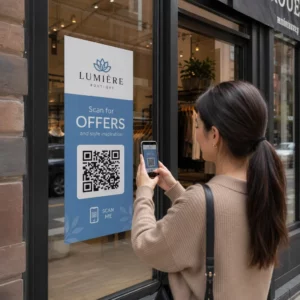
Figyelmen kívül hagyják az e-mail feliratkozóid a szöveges linkeket, amikor asztali számítógépen olvasnak üzeneteket? Amikor a címzettek számítógépen nyitják meg az e-maileket, a mobilalkalmazások manuális keresésére vagy hosszú webcímek begépelésére kényszerítés szükségtelen súrlódást okoz. A beolvasható kódok beépítése az e-mail marketingbe közvetlen hidat képez az asztali számítógépen történő megtekintés és a mobilos végrehajtás között.
Hogyan hidalják át a QR-kódok az asztali számítógépek és a mobilok közötti szakadékot?
A legtöbb e-mail kampány eszközfüggetlenségi akadállyal szembesül: a feliratkozók gyakran asztali számítógépen vagy laptopon olvassák a promóciós e-maileket, de a kívánt művelet – például egy mobilalkalmazás telepítése, egy névjegykártya mentése vagy egy eseményjegy hozzáadása – okostelefonon történik.
Egy beolvasható grafika e-mailbe helyezése lehetővé teszi a címzettek számára, hogy megnyissák okostelefonjuk kameráját, a számítógép képernyőjére irányítsák, és azonnal elindítsanak egy műveletet a mobileszközükön. Ez az eszközök közötti interakció csökkenti a mobil részvételt igénylő munkafolyamatok lemorzsolódási arányát. A marketingszakemberek ezt a csatornák közötti stratégiát arra is használhatják, hogy összekapcsolni a közösségi médiát és az e-mail marketinget, közvetlenül az aktív közösségi profilokhoz irányítva az asztali hírlevél olvasóit.
Gyakorlati felhasználási esetek e-mail marketing kampányokhoz
Egy e-mailben található beolvasható elemnek mindig egyértelmű funkcionális célt kell szolgálnia. Íme néhány főbb forgatókönyv, ahol egy beolvasható kód hozzáadása jobban teljesít, mint a hagyományos szöveges linkek önmagukban:
- Vezetési alkalmazás letöltések: Az asztali számítógépes olvasókat közvetlenül az iOS App Store-ba vagy a Google Play Áruházba irányítsa át a telefonjuk operációs rendszere alapján.
- Wallet hűségkártyák hozzáadása: Vigye át rendezvényjegyeit, jegyeit vagy digitális kuponjait asztali kijelzőiről közvetlenül az Apple Walletbe vagy a Google Walletbe.
- Elérhetőségek frissítése: Lehetővé teszi az üzleti partnerek számára, hogy vCardok segítségével közvetlenül a telefonjuk címjegyzékébe mentsék az értékesítési képviselő adatait.
- Előre kitöltött üzenetek aktiválása: Nyissa meg a mobil e-mail klienseket vagy üzenetküldő alkalmazásokat, amelyek előre ki vannak töltve a címzett adataival és a kérdés szövegével.
- Az űrlapbeküldések egyszerűsítése: Irányítsd az olvasókat mobilra optimalizált felmérésekre vagy feliratkozás-kezelő oldalakra. Ha hírlevélkampányokat futtatsz, zökkenőmentesen összekapcsolhatod a beolvasható elemeket a Mailchimp e-mail munkafolyamatok az előfizetői regisztrációk egyszerűsítése érdekében.
Rugalmas e-mail kampánykódok létrehozása Frissítenie kell a promóciós linkjét egy e-mail elküldése után? Használja a Dinamikus QR-kód generátor a céllinkek bármikor módosítására és a vizsgálat teljesítményének valós idejű figyelésére.
Kritikus bevált gyakorlatok az e-mailek olvashatóságához és akadálymentesítéséhez
Amikor beolvasható grafikákat helyezünk el az e-mail sablonokban, a technikai kivitelezés határozza meg, hogy a feliratkozók sikeresen tudnak-e interakcióba lépni a tartalommal. A megállapított vizuális és akadálymentesítési szabványok betartása biztosítja, hogy minden feliratkozó technikai akadályok nélkül részt vehessen.
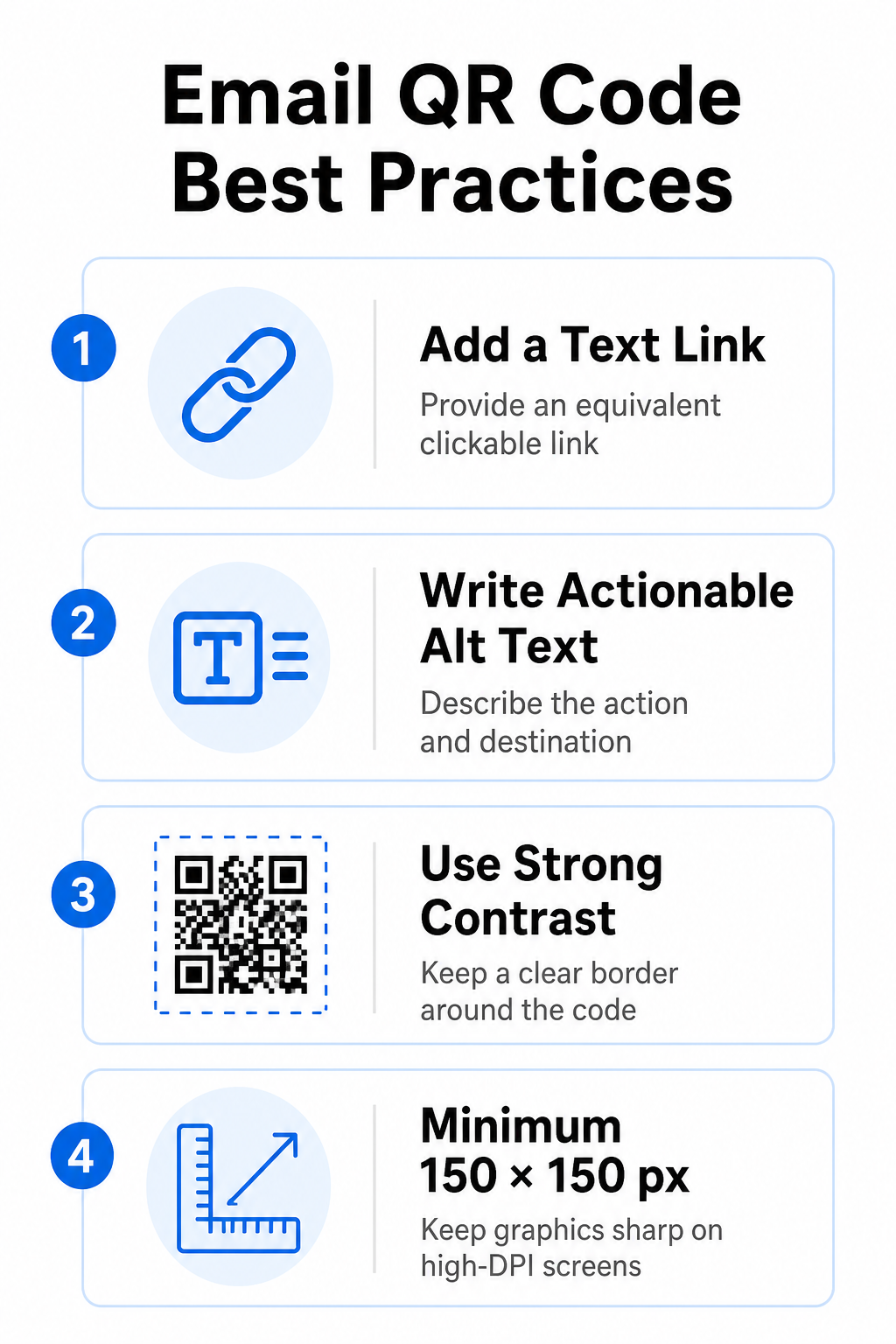
Mindig adjon meg egyenértékű szöveges linket
Egy beolvasható grafika soha nem lehet az e-mailben található információk elérésének kizárólagos módja. Az akadálymentesítési szabványok előírják, hogy a grafika mellett vagy közvetlenül alatta egy szabványos, kattintható hiperhivatkozást kell elhelyezni. Ez biztosítja, hogy az e-mailt mobileszközön olvasó feliratkozók – ahol a saját képernyőjük beolvasása nem lehetséges – vagy a képernyőolvasókat használók könnyen elérhessék a célhivatkozást.
Műveletet elősegítő alternatív szöveg beillesztése
Az e-mail kliensek gyakran alapértelmezés szerint blokkolják a képeket. Ha a grafika nem töltődik be azonnal, a képernyőolvasók és a feliratkozók alternatív szövegre támaszkodnak a tartalom megértéséhez. Használjon leíró alt szöveget, amely elmagyarázza a konkrét műveletet és a célt, például `alt="QR-kód beolvasása a 20% kedvezménykupon igényléséhez"`, a grafika vizuális leírása helyett.
Biztosítsa a magas színkontrasztot és a csendes zónákat
A szkennerek nagy kontrasztot igényelnek a sötét előtér minták és a világos háttérterületek között. A világos háttérre helyezett sötét kódok maximalizálják a fényelnyelést és biztosítják a gyors kamerafelismerést. Kerülje a világos színű kódok használatát világos háttéren, illetve a sötét minták használatát sötét e-mail sablonrészeken. Ezenkívül tartson fenn egy akadálytalan szegélyt – úgynevezett csendes zónát – a kód kerülete mentén, hogy megakadályozza a környező e-mail tervezési elemek zavarását a szkennerek felismerésében. Tekintse át ezeket a szerkezeti paramétereket útmutatónkban a témában. a QR-kód olvashatóságára vonatkozó legjobb gyakorlatokat mielőtt elkészítenéd a sablonjaidat.
Nagy DPI-felbontású kijelzőkhöz tartozó grafikák mérete
Annak érdekében, hogy a grafika nagy felbontású képernyőkön is tisztán, elmosódás és pixelesedés nélkül jelenjen meg, a képet legalább 150 x 150 pixel (2 cm x 2 cm) méretben jelenítse meg. A képek exportálása nagy felbontású vektoros formátumban megbízható link QR-kód generátor kezelhetővé teszi az adatsűrűséget és éles vonalakat az asztali kijelzőkön.
| Tervezési paraméter | Ajánlás | Technikai ok |
|---|---|---|
| Minimális méretek | 150 x 150 pixel (2 x 2 cm) | Megakadályozza a kamera fókuszhibáját és a pixelesedést a nagy DPI-felbontású asztali képernyőkön. |
| Előtér színe | Sötét (pl. fekete, sötétkék) | Maximalizálja a fényelnyelést a gyors kameraérzékelés érdekében. |
| Háttérszín | Világos (pl. fehér, világosszürke) | Szükséges kontrasztot biztosít az előtérben lévő adatmodulokkal szemben. |
| Alt szövegtartalom | “QR-kód beolvasása a következőhöz: [művelet]” | Világos hivatkozási kontextust biztosít, ha az e-mail kliensek letiltják a képeket. |
Egyedi márkájú QR-kódok létrehozása Készen állsz arra, hogy beolvasható kódokat integrálj az e-mail hírleveleid dizájnjába? Generálj nagy felbontású, személyre szabott kódokat ingyenesen a fő szolgáltatásunk segítségével. QR Kód Generátor még ma.
Statikus vs. dinamikus QR-kódok az e-mail kampányokban
A szkennelhető grafikák megfelelő technikai formátumának kiválasztása mind a kampány rugalmasságát, mind a jelentéskészítés pontosságát befolyásolja.
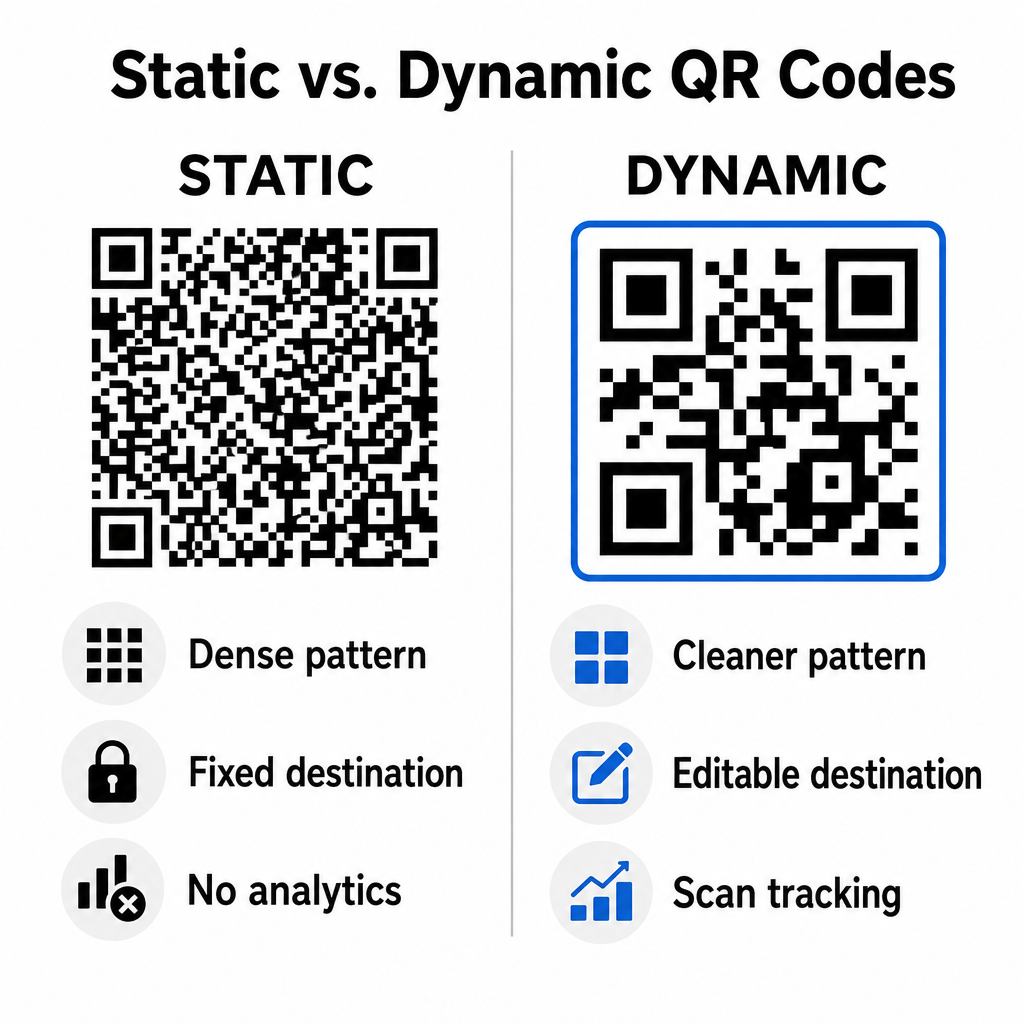
A statikus kódok közvetlenül a vizuális mátrixban tárolják a cél URL-t. Mivel a hosszú webcímek több adatmodult igényelnek, a statikus kódok sűrű, összetett mintákat jelenítenek meg, amelyeket az okostelefonok kamerái nehezebben tudnak dekódolni a számítógép kijelzőjén kívül. Továbbá a statikus kódok nem kínálnak követési mutatókat, és nem szerkeszthetők, miután egy e-mail hírlevelet kiküldtek.
A dinamikus kódok egy rövid átirányítási URL-t ágyaznak be a teljes céloldal címe helyett. Ez a szerkezeti különbség egy letisztultabb, alacsonyabb sűrűségű vizuális mintázatot hoz létre, amely azonnal beolvassa a rendszert még kisebb méretekben is. A dinamikus kódok lehetővé teszik a kampánymenedzserek számára, hogy frissítsék a céllinkeket a telepítés után, és átfogó elemzéseket rögzítsenek. A különbségek megértése a következők között: statikus vs dinamikus QR-kódok segít kiválasztani a megfelelő formátumot az ismétlődő hírlevél-sorozatokhoz. Dinamikus átirányítási URL-ek használatával hozzáférést kapsz a legfontosabb információkhoz QR-kód követési mutatók beleértve a teljes szkennelések számát, az eszközök operációs rendszereit, a szkennelés időbélyegeit és a földrajzi eloszlást.
Gyakori hibák, amelyeket el kell kerülni az e-mail kampányokban
Az előre látható tervezési és felhasználói élménybeli hibák elkerülése védi a kampányok elköteleződési arányát és megőrzi a feliratkozók bizalmát:
- Világos szkennelési utasítások kihagyásaA címke nélküli kód megjelenítése a jutalom vagy a következő lépés magyarázata nélkül csökkenti az elköteleződést.
- Felhasználók átirányítása nem reszponzív oldalakraA mobilszkennerek csak asztali számítógépeknek szánt landing oldalakra küldése súrlódást okoz és növeli a visszafordulási arányt.
- Vizuális elemek túlzott testreszabásaA nehéz logók vagy alacsony kontrasztú háttérátmenetek adatmátrixra helyezése rontja a kamera szkennelhetőségét.
- Kliensek közötti renderelési tesztek kihagyásaA kód megjelenésének tesztelésének elmulasztása a Gmailben, az Outlookban és az Apple Mailben világos és sötét módban is hibás elrendezésekhez vezet.
E-mail QR-kód stratégiájának elindítása
A szöveges hiperhivatkozások és a dinamikus, átolvasható grafikák kombinálása hatékony utat biztosít az asztali e-mailek olvasásától a mobilos műveletekig. Az erős színkontraszt fenntartása, a leíró alt szövegek megadása és a céloldalak mobilképernyőkre optimalizálásának ellenőrzése zökkenőmentes, több eszközön keresztüli felhasználói élményt biztosít a közönség számára. A következő sorozatban valósítsa meg ezeket a szabványokat a következő használatával: Dinamikus QR-kód generátor hogy beolvasható linkeket építs, testreszabj és nyomon kövess az összes e-mail marketing kampányodban.
Gyakori kérdések
A mobilolvasók nem tudják könnyen beolvasni a saját eszközük képernyőjén megjelenő kódot. Mindig párosítsa a beolvasható grafikákat egy mellette lévő, kattintható szöveges linkkel, hogy a mobilfelhasználók egyszerűen koppintással elérhessék a célhelyet.
A képet legalább 150 x 150 pixel (vagy 2 cm x 2 cm) méretben jelenítse meg. Ez biztosítja, hogy az okostelefonok kamerái dekódolni tudják a mátrixot egy laptop vagy asztali számítógép képernyőjének szkennelésekor.
Igen, feltéve, hogy dinamikus QR-kód generátort használ. A dinamikus kódok rögzítik a szkennelési mutatókat, beleértve a szkennelési időket, az eszköz operációs rendszerét és a földrajzi helyet, összetett URL-paraméterek nélkül.