ホーム > ブログ > Guidelines for Using QR Codes in Email Marketing
Scanning an email QR code

Guidelines for Using QR Codes in Email Marketing

Learn how to use QR codes in email marketing to bridge the desktop-to-mobile gap. Discover best practices for design, tracking, and accessibility.
Updated on 7月 27, 2026
目次

Are your email subscribers ignoring text links when reading messages on desktop screens? When recipients open emails on a computer, forcing them to manually search for mobile apps or type long web addresses creates unnecessary friction. Incorporating scannable codes into your email marketing provides a direct bridge between desktop viewing and mobile execution.

How QR Codes Bridge the Desktop-to-Mobile Gap

Most email campaigns face a cross-device hurdle: subscribers frequently read promotional emails on a desktop or laptop computer, but the intended action – such as installing a mobile app, saving a contact card, or adding an event pass – belongs on a smartphone.

Placing a scannable graphic inside an email allows recipients to open their smartphone camera, point it at their computer screen, and immediately trigger an action on their mobile device. This cross-device interaction reduces drop-off rates for workflows that require mobile participation. Marketers can also use this cross-channel strategy to ソーシャルメディアとEメールマーケティングを連携させる, guiding desktop newsletter readers straight to active social profiles.

Practical Use Cases for Email Marketing Campaigns

Including a scannable element in an email should always serve a clear functional purpose. Here are key scenarios where adding a scannable code outperforms standard text links alone:

  • Driving App Downloads: Route desktop readers directly to the iOS App Store or Google Play Store based on their phone’s operating system.
  • Adding Wallet Loyalty Cards: Transfer event passes, tickets, or digital coupons from desktop displays straight into Apple Wallet or Google Wallet.
  • Updating Contact Details: Allow business contacts to save sales representative details directly into their phone address book via vCards.
  • Triggering Pre-Filled Messages: Open mobile email clients or messaging apps pre-populated with recipient information and inquiry text.
  • Simplifying Form Submissions: Direct readers to mobile-optimized surveys or subscription management pages. If you run newsletter campaigns, you can seamlessly connect scannable elements with Mailchimp email workflows to streamline subscriber sign-ups.

Create Flexible Email Campaign Codes Need to update your promotional link after sending an email? Use the ダイナミックQRコードジェネレーター to modify destination links anytime and monitor scan performance in real time.

Critical Best Practices for Email Scannability and Accessibility

When placing scannable graphics into email templates, technical execution determines whether subscribers can successfully interact with your content. Following established visual and accessibility standards ensures every subscriber can participate without technical barriers.

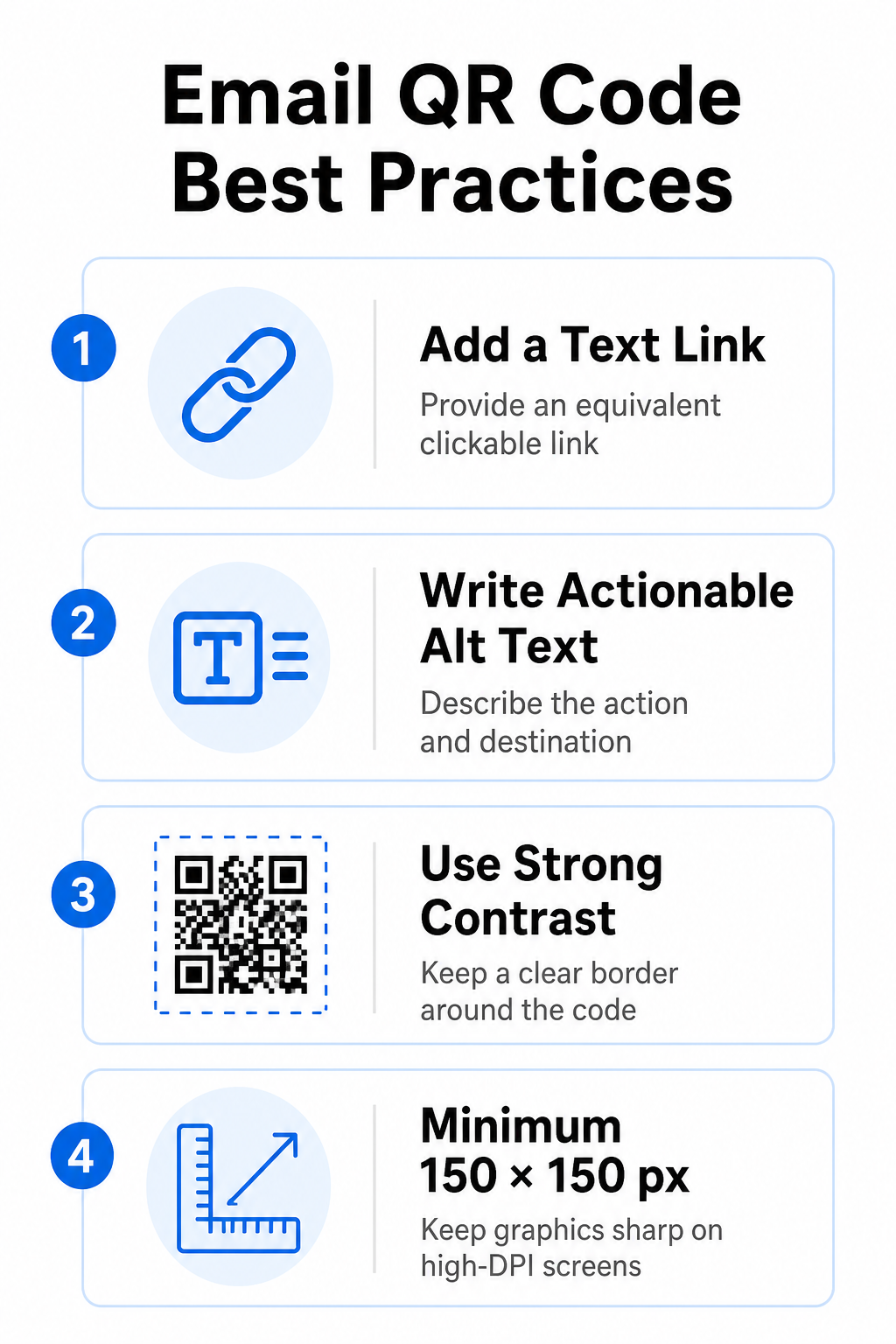
Email QR code best practices

Always Provide an Equivalent Text Link

A scannable graphic must never be the exclusive method for accessing information in an email message. Accessibility standards require a standard, clickable hyperlink placed adjacent to or directly beneath the graphic. This ensures that subscribers reading the email on a mobile device – where scanning their own screen is impossible – or those using screen readers can easily access the destination link.

Include Actionable Alt Text

Email clients frequently block images by default. If your graphic fails to load immediately, screen readers and subscribers rely on alternative text to understand the content. Use descriptive alt text that explains the specific action and destination, such as `alt=”Scan QR code to claim your 20% discount coupon”`, rather than describing the graphic visually.

Ensure High Color Contrast and Quiet Zones

Scanners require high contrast between dark foreground patterns and light background spaces. Dark codes placed on light backgrounds maximize light absorption and ensure rapid camera detection. Avoid using light-colored codes on light backgrounds or dark patterns against dark email template sections. Additionally, maintain an unobstructed border – known as a quiet zone – around the perimeter of the code to prevent surrounding email design elements from interfering with scanner recognition. Review these structural parameters in our guide on QRコードの読みやすさに関するベストプラクティス before building your templates.

Size Graphics for High-DPI Displays

To ensure the graphic renders clearly on high-resolution screens without blurriness or pixelation, display the image at a minimum size of 150 x 150 pixels (2 cm x 2 cm). Exporting your images in high-resolution vector formats using a reliable リンクQRコードジェネレーター keeps data density manageable and lines sharp across desktop displays.

Design Parameter 推奨事項 Technical Reason
最小寸法 150 x 150 pixels (2 x 2 cm) Prevents camera focus failure and pixelation on high-DPI desktop screens.
Foreground Color Dark (e.g., Black, Navy) Maximizes light absorption for rapid camera detection.
Background Color Light (e.g., White, Light Gray) Provides necessary contrast against foreground data modules.
Alt Text Content “Scan QR code to [action]” Delivers clear link context when images are disabled by email clients.

Build Custom Branded QR Codes Ready to integrate scannable codes into your email newsletter designs? Generate high-resolution, customized codes for free using our main QRコードジェネレーター で今すぐ利用可能なツールをご覧ください。.

Static vs. Dynamic QR Codes in Email Campaigns

Choosing the correct technical format for your scannable graphics affects both campaign flexibility and reporting accuracy.

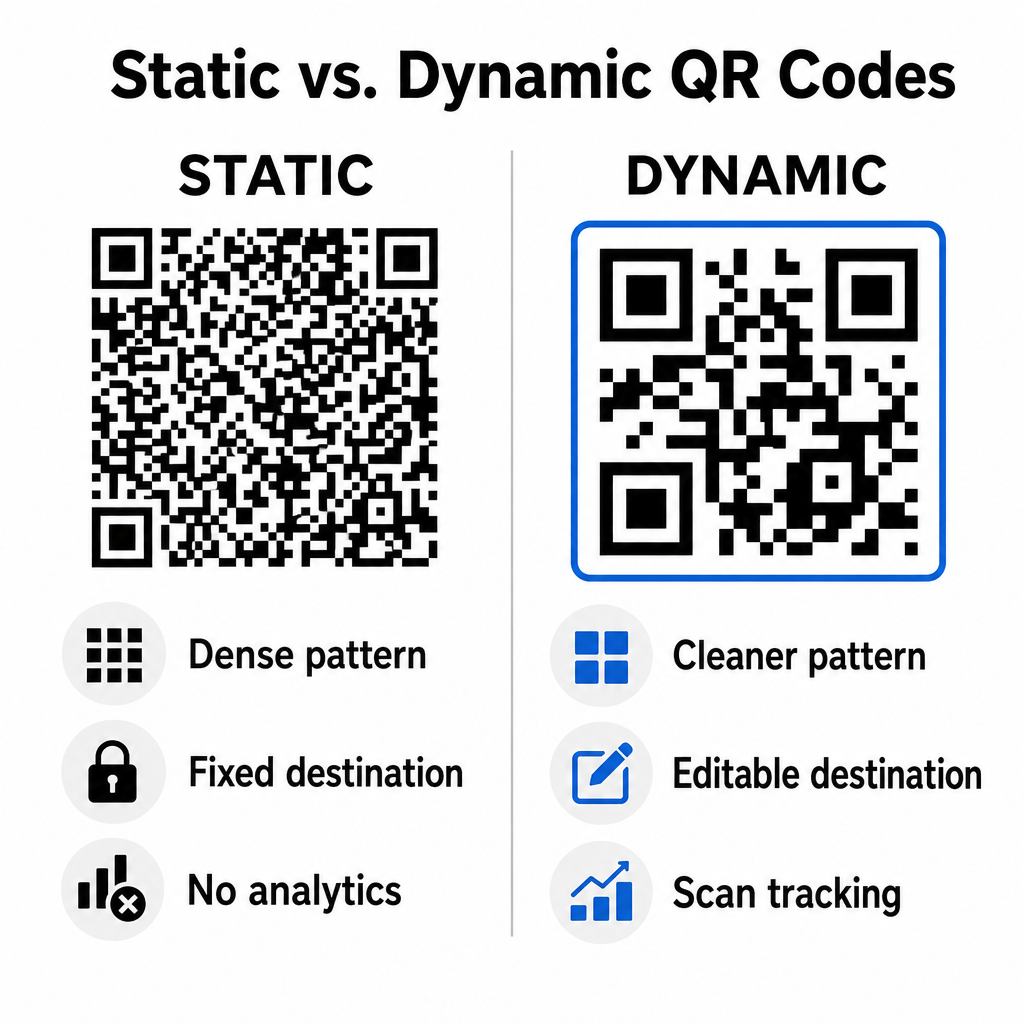
Static codes store your destination URL directly inside the visual matrix. Because long web addresses require more data modules, static codes display dense, complex patterns that become harder for smartphone cameras to decode off computer displays. Furthermore, static codes offer no tracking metrics and cannot be edited once an email newsletter is sent out.

Dynamic codes embed a short redirect URL instead of the full landing page address. This structural difference creates a cleaner, lower-density visual pattern that scans instantly even at smaller sizes. Dynamic codes allow campaign managers to update destination links after deployment and capture comprehensive analytics. Understanding the differences between 静的QRコードと動的QRコードの選択が helps you select the right format for recurring newsletter sequences. By utilizing dynamic redirect URLs, you gain access to essential QR code tracking metrics including total scan counts, device operating systems, scan timestamps, and geographic distribution.

Static versus dynamic QR codes

Common Mistakes to Avoid in Email Campaigns

Avoiding predictable design and user experience errors protects your campaign engagement rates and preserves subscriber trust:

  • Omitting clear scanning instructions: Displaying an unlabelled code without explaining the reward or next step reduces engagement.
  • Directing users to non-responsive pages: Sending mobile scanners to desktop-only landing pages creates friction and drives bounce rates higher.
  • Over-customizing visual elements: Placing heavy logos or low-contrast background gradients over the data matrix compromises camera scannability.
  • Skipping cross-client rendering tests: Failing to test code appearances across Gmail, Outlook, and Apple Mail in both light and dark modes leads to broken layouts.

Launching Your Email QR Code Strategy

Combining text hyperlinks with dynamic scannable graphics establishes an efficient path from desktop email reading to mobile action. Maintaining strong color contrast, providing descriptive alt text, and verifying that destination landing pages are optimized for mobile screens ensures a smooth cross-device journey for your audience. Implement these standards in your next sequence by using the ダイナミックQRコードジェネレーター to build, customize, and track scannable links across all your email marketing campaigns.

よくある質問

Should I put a QR code in an email meant for mobile readers?

Mobile readers cannot easily scan a code displayed on their own device screen. Always pair scannable graphics with an adjacent, clickable text link so mobile users can simply tap to reach the destination.

What is the minimum size for a QR code inside an email template?

Display the image at a minimum size of 150 x 150 pixels (or 2 cm x 2 cm). This ensures smartphone cameras can decode the matrix when scanning a laptop or desktop screen.

Can I track how many subscribers scan the QR code in my email?

Yes, provided you use a dynamic QR code generator. Dynamic codes record scan metrics including scan times, device operating systems, and geographic location without requiring complex URL parameters.

著者について

Siim KostabiはPagelootのコンテンツリードです。Pagelootの革新的なQRコード生成サービスについて執筆しています。5年以上にわたるQRコードに関する深い専門知識を持つSiimは、この分野の専門家です。QRテクノロジーを活用してデジタルインタラクションを簡素化・拡張する上で、大きな進歩を遂げています。.

カテゴリー
について詳しくはこちら
有権者がキャンペーンQRをスキャンする
のQRコード 大統領選挙キャンペーン
プレイヤーがQRコードをスキャン
QRコードをスキャンして ポケモン
✅ QRコードの#1ソリューション

オンラインでQRコードを作成する必要がある場合は QRコードを作る ここで無料で
ページルートは #1のGo-Toソリューション でQRコードを作成してスキャンすることができます。

BL-0318

ブログジェネ

売上、レビュー、フォロワーを増やすために 20,000 を超えるブランドから信頼されています。

クライアントのロゴ
トップブランドから信頼される
5 のうち 4.8 と評価しました

4.86 / 5つ星評価

ユーゴ・ローラン
ユーゴ・ローラン
レストランオーナー
最も簡単で信頼性の高いQRコードジェネレータです。PDFファイルを即座にアップロードできます。レストランのメニューがデジタル化されました。
ルーカス・ジャンセン
ルーカス・ジャンセン
不動産開発業者
これは優れたツールで、QRコードでちょうど欲しいところに連れて行ってくれます。私たちは位置情報のQRコードしか使っていませんが、とても便利な機能がたくさんあります。
エマ・モレッティ
エマ・モレッティ
小売製品
使いやすいし、早い。素晴らしい機能で、完璧な画像を作成してくれるので、社員は私のvCardをダウンロードすることができます。
ユーゴ・ローラン
ユーゴ・ローラン
レストランオーナー
最も簡単で信頼性の高いQRコードジェネレータです。PDFファイルを即座にアップロードできます。レストランのメニューがデジタル化されました。
ルーカス・ジャンセン
ルーカス・ジャンセン
不動産開発業者
これは優れたツールで、QRコードでちょうど欲しいところに連れて行ってくれます。私たちは位置情報のQRコードしか使っていませんが、とても便利な機能がたくさんあります。
エマ・モレッティ
エマ・モレッティ
小売製品
使いやすいし、早い。素晴らしい機能で、完璧な画像を作成してくれるので、社員は私のvCardをダウンロードすることができます。
QRコードをもっと見る
ゲストがホテルのQRをスキャン
のQRコード ホテル&リゾート
あらゆるものをデジタル体験に変えよう 3分以内に。

14日間の無料トライアル。

クレジットカードは必要ありません。

初回購入で30%オフ

次のコードを使用してください:

MP3ファイルを共有

PDF QRコードを作成するにはサインアップしてください

必要なものをすべてアップロードして表示する。

  • オーディオファイル
  • ポッドキャスト
  • 音楽

サインアップで14日間無料トライアル。.
トライアル終了後、QRコードは期限切れになります。.

オーディオmp3 QRコードを作成するにはサインアップしてください

フレームでより多くのスキャンを獲得

QRコードにフレームを追加するにはサインアップしてください

コールトゥアクションフレームは、お客様が簡単にQRコードと対話できるようにします。ぜひお試しください。

サインアップで14日間無料トライアル。.
トライアル終了後、QRコードは期限切れになります。.

QRコードにフレームを追加するにはサインアップしてください

シェイプでスタイルを追加

より多くの図形を作成するにはサインアップしてください

QRコードは四角いものである必要はありません。あなたのブランドのイメージに合わせて変えてみてください。

サインアップで14日間無料トライアル。.
トライアル終了後、QRコードは期限切れになります。.

より多くの図形を作成するにはサインアップしてください

QRコードにロゴを追加

QRコードにロゴを追加するにはサインアップしてください

QRコードにロゴやブランドを入れることで、目立たせることができます。

サインアップで14日間無料トライアル。.
トライアル終了後、QRコードは期限切れになります。.

QRコードにロゴを追加するにはサインアップしてください

スマートなApp Storeリダイレクト

アプリストアのQRコードを作成するにはサインアップしてください

スマートなApp StoreのQRコードに、あなたのアプリのリンクを追加します。ユーザーは、デバイスに応じてリダイレクトされます。

サインアップで14日間無料トライアル。.
トライアル終了後、QRコードは期限切れになります。.

アプリストアのQRコードを作成するにはサインアップしてください

QRコードに画像をアップロード

画像QRコードを作成するにはサインアップしてください

画像を簡単に共有できます。どんな画像も、数秒でダイナミックに変化します。

サインアップで14日間無料トライアル。.
トライアル終了後、QRコードは期限切れになります。.

画像QRコードを作成するにはサインアップしてください

PDFファイルを共有

PDF QRコードを作成するにはサインアップしてください

必要なものをすべてアップロードして表示する。

  • メニュー&プライスリスト
  • 指示
  • 任意の書類

サインアップで14日間無料トライアル。.
トライアル終了後、QRコードは期限切れになります。.

PDF QRコードを作成するにはサインアップしてください

印刷せずに後で編集

再度印刷せずにQRコードを編集するにはサインアップしてください

ダイナミックQRコードは、新たにQRコードを印刷することなく、QRコードの内容を変更することができます。

サインアップで14日間無料トライアル。.
トライアル終了後、QRコードは期限切れになります。.

再度印刷せずにQRコードを編集するにはサインアップしてください

いつ?どこで?QRコードのスキャンを追跡

QRコードを追跡するにはサインアップしてください

どのQRコードが最も多くスキャンされ、何が最も顧客を喜ばせているのかを知ることができます。

サインアップで14日間無料トライアル。.
トライアル終了後、QRコードは期限切れになります。.

QRコードを追跡するにはサインアップしてください

印刷可能なファイルが利用可能

PDFやSVGのようなベクターQRコードを作成するにはサインアップしてください

.eps、.pdf、.svg

QRコードをHD解像度でダウンロードしたいですか?すぐに印刷できるベクターまたはピクセル形式を入手しましょう。

サインアップで14日間無料トライアル。.
トライアル終了後、QRコードは期限切れになります。.

PDFやSVGのようなベクターQRコードを作成するにはサインアップしてください

しばらくお待ちください。あなたのQRコードは ロード... ロード...

あなただけのものに

サインアップしてQRコードを後で保存してください

異なる色、ロゴ、コールトゥアクションフレームで素晴らしいQRコードを作成することで、より多くのスキャンを得ることができます。

サインアップで14日間無料トライアル。.
トライアル終了後、QRコードは期限切れになります。.

サインアップしてQRコードを後で保存してください