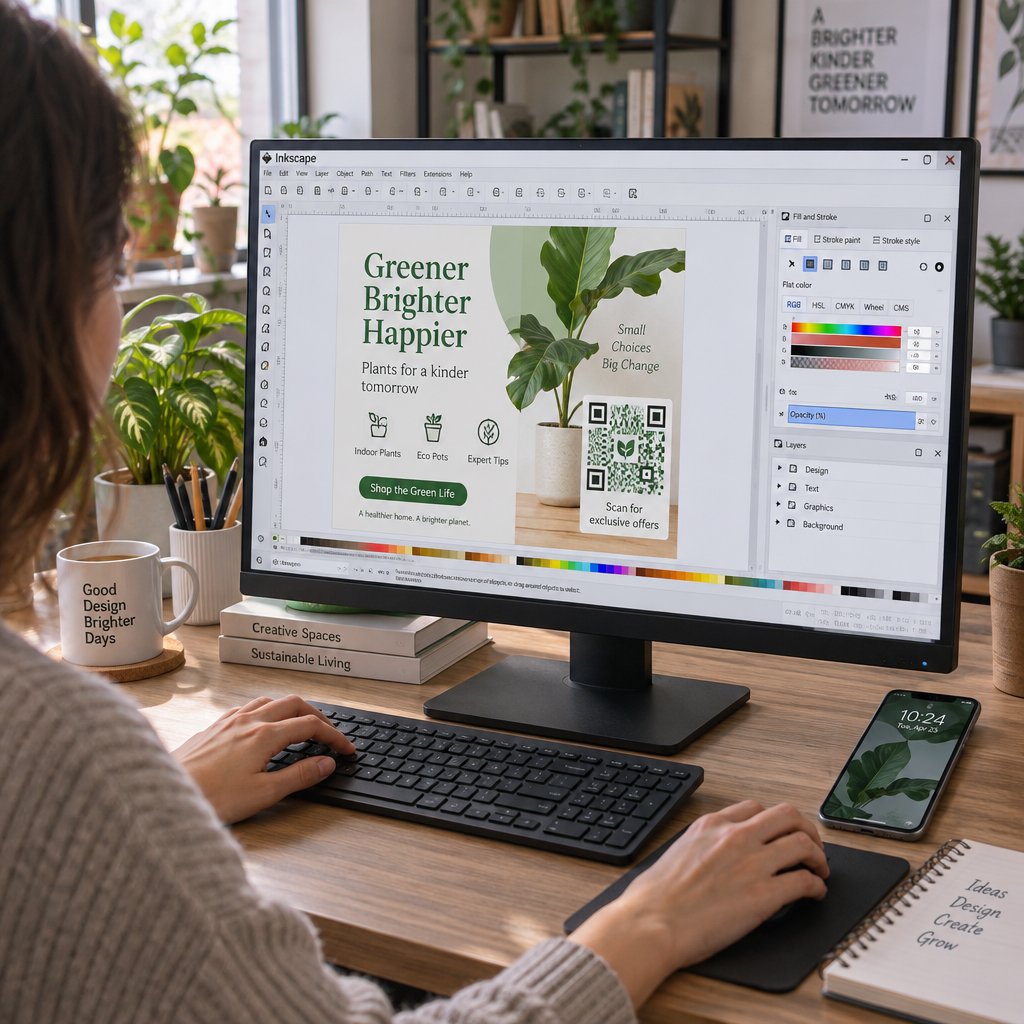
Liệu những người đăng ký nhận email của bạn có đang bỏ qua các liên kết văn bản khi đọc tin nhắn trên màn hình máy tính? Khi người nhận mở email trên máy tính, việc buộc họ phải tự tìm kiếm ứng dụng di động hoặc gõ các địa chỉ web dài sẽ tạo ra sự bất tiện không cần thiết. Việc tích hợp mã quét vào chiến dịch tiếp thị email của bạn sẽ tạo ra cầu nối trực tiếp giữa việc xem trên máy tính để bàn và thực thi trên thiết bị di động.
Mã QR thu hẹp khoảng cách giữa máy tính để bàn và thiết bị di động như thế nào?
Hầu hết các chiến dịch email đều gặp phải trở ngại về khả năng tương thích đa thiết bị: người đăng ký thường đọc email quảng cáo trên máy tính để bàn hoặc máy tính xách tay, nhưng hành động mà người dùng dự định thực hiện – chẳng hạn như cài đặt ứng dụng di động, lưu danh bạ hoặc thêm thẻ tham dự sự kiện – lại cần được thực hiện trên điện thoại thông minh.
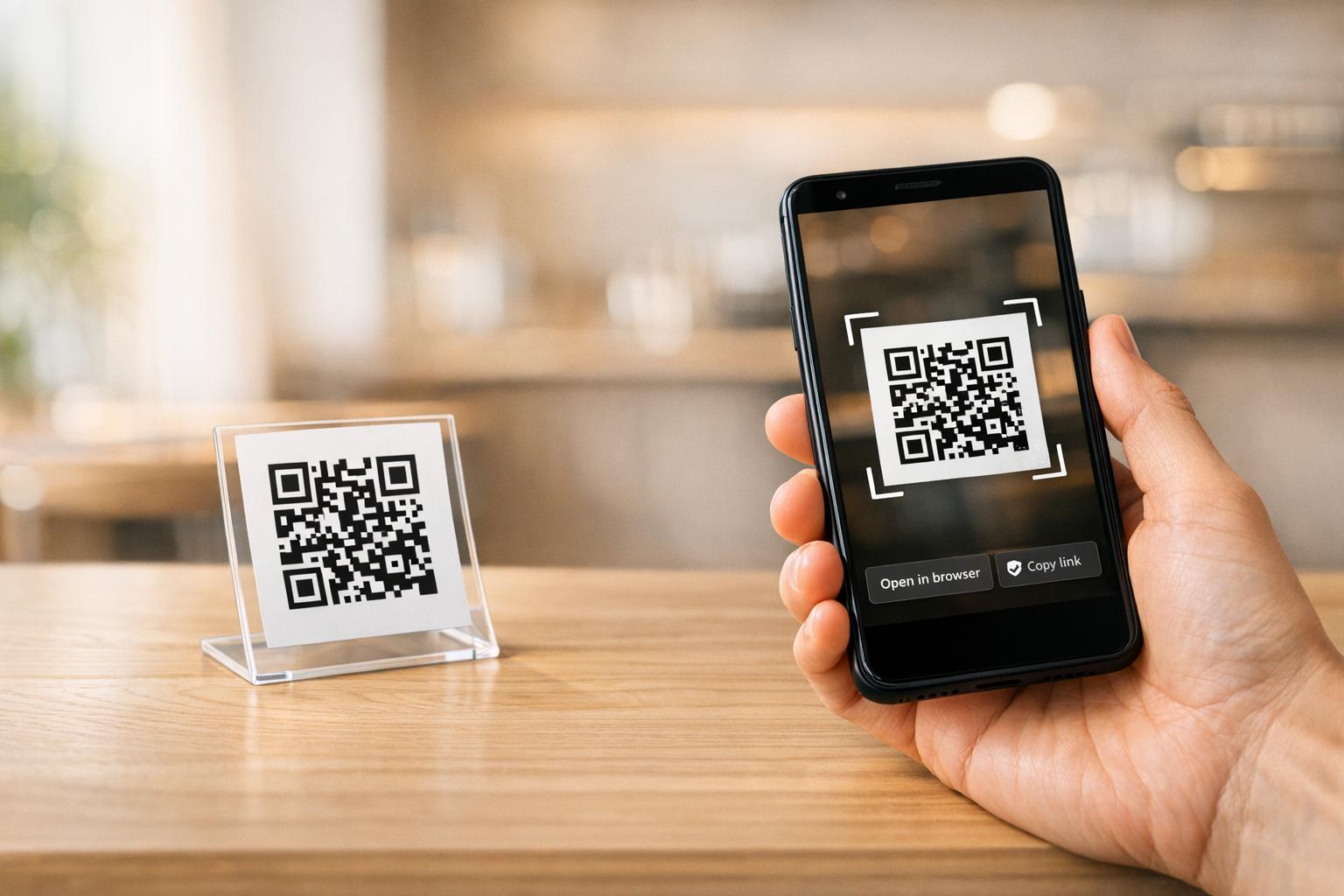
Việc đặt một hình ảnh có thể quét được bên trong email cho phép người nhận mở camera điện thoại thông minh, hướng vào màn hình máy tính và ngay lập tức thực hiện một hành động trên thiết bị di động của họ. Tương tác đa thiết bị này giúp giảm tỷ lệ bỏ ngang đối với các quy trình làm việc yêu cầu sự tham gia của thiết bị di động. Các nhà tiếp thị cũng có thể sử dụng chiến lược đa kênh này để kết nối mạng xã hội và tiếp thị qua email, hướng người đọc bản tin trên máy tính để bàn trực tiếp đến các hồ sơ mạng xã hội đang hoạt động.
Các trường hợp sử dụng thực tiễn của chiến dịch tiếp thị qua email
Việc chèn mã có thể quét vào email luôn phải phục vụ một mục đích chức năng rõ ràng. Dưới đây là những trường hợp quan trọng mà việc thêm mã có thể quét mang lại hiệu quả tốt hơn so với chỉ sử dụng liên kết văn bản thông thường:
- Tải xuống ứng dụng lái xe: Chuyển hướng người dùng máy tính để bàn trực tiếp đến App Store dành cho iOS hoặc Google Play Store dựa trên hệ điều hành của điện thoại.
- Thêm thẻ tích điểm ví: Chuyển thẻ tham dự sự kiện, vé hoặc phiếu giảm giá điện tử từ màn hình máy tính trực tiếp vào Apple Wallet hoặc Google Wallet.
- Cập nhật thông tin liên hệCho phép các liên hệ kinh doanh lưu thông tin chi tiết của đại diện bán hàng trực tiếp vào danh bạ điện thoại của họ thông qua vCard.
- Kích hoạt tin nhắn được điền sẵnMở các ứng dụng email hoặc nhắn tin trên điện thoại di động đã được điền sẵn thông tin người nhận và nội dung yêu cầu.
- Đơn giản hóa việc gửi biểu mẫu: Hướng người đọc đến các khảo sát được tối ưu hóa cho thiết bị di động hoặc các trang quản lý đăng ký. Nếu bạn đang thực hiện các chiến dịch bản tin, bạn có thể kết nối liền mạch các yếu tố có thể quét được với Quy trình email của Mailchimp để đơn giản hóa quy trình đăng ký thuê bao.
Tạo mã chiến dịch email linh hoạt Bạn cần cập nhật liên kết khuyến mãi sau khi đã gửi email? Hãy sử dụng... Tạo mã QR động Chỉnh sửa liên kết đích bất cứ lúc nào và theo dõi hiệu suất quét trong thời gian thực.
Các nguyên tắc thực hành tốt nhất quan trọng để đảm bảo khả năng quét và truy cập email
Khi chèn hình ảnh có thể quét vào mẫu email, việc thực hiện kỹ thuật sẽ quyết định liệu người nhận có thể tương tác thành công với nội dung của bạn hay không. Tuân thủ các tiêu chuẩn về hình ảnh và khả năng truy cập đã được thiết lập sẽ đảm bảo mọi người nhận đều có thể tham gia mà không gặp rào cản kỹ thuật.
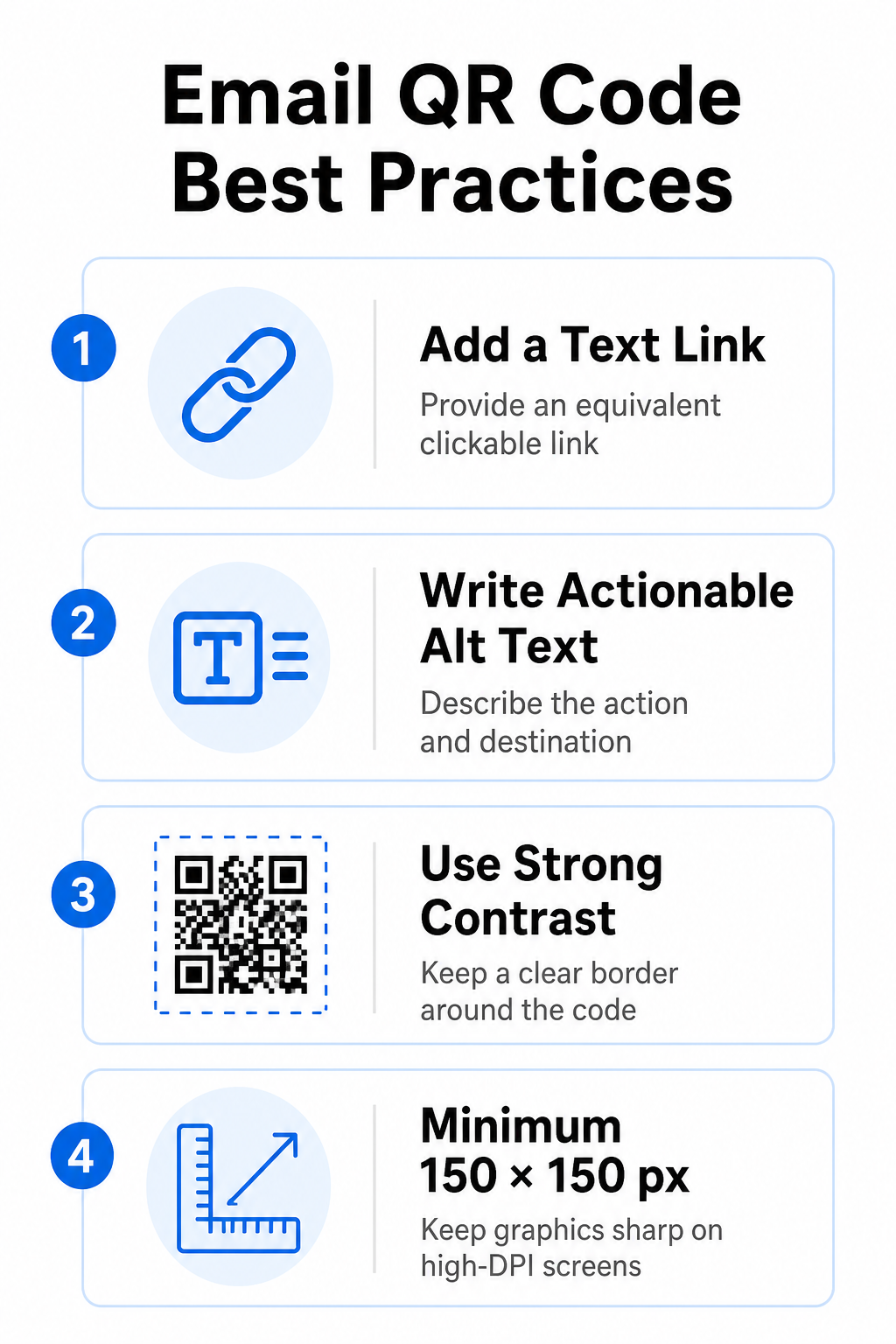
Luôn cung cấp liên kết văn bản tương đương
Hình ảnh có thể quét được không bao giờ được sử dụng làm phương pháp duy nhất để truy cập thông tin trong email. Các tiêu chuẩn về khả năng truy cập yêu cầu một liên kết siêu văn bản chuẩn, có thể nhấp chuột, được đặt cạnh hoặc ngay bên dưới hình ảnh. Điều này đảm bảo rằng người nhận email trên thiết bị di động – nơi không thể quét màn hình của chính họ – hoặc những người sử dụng trình đọc màn hình có thể dễ dàng truy cập vào liên kết đích.
Bao gồm văn bản thay thế có thể thao tác
Các trình duyệt email thường chặn hình ảnh theo mặc định. Nếu hình ảnh của bạn không tải ngay lập tức, trình đọc màn hình và người đăng ký sẽ dựa vào văn bản thay thế để hiểu nội dung. Hãy sử dụng văn bản thay thế mô tả rõ ràng hành động và đích đến, ví dụ như `alt=”Quét mã QR để nhận phiếu giảm giá 20%”`, thay vì mô tả hình ảnh trực quan.
Đảm bảo độ tương phản màu cao và các khu vực yên tĩnh.
Máy quét yêu cầu độ tương phản cao giữa các họa tiết nền tối và các khoảng trống nền sáng. Mã tối màu đặt trên nền sáng sẽ tối đa hóa khả năng hấp thụ ánh sáng và đảm bảo máy quét nhận diện nhanh chóng. Tránh sử dụng mã sáng màu trên nền sáng hoặc các họa tiết tối màu trên các phần mẫu email tối màu. Ngoài ra, hãy duy trì một đường viền không bị cản trở – được gọi là vùng yên tĩnh – xung quanh chu vi của mã để ngăn các yếu tố thiết kế email xung quanh gây nhiễu quá trình nhận diện của máy quét. Xem lại các thông số cấu trúc này trong hướng dẫn của chúng tôi về... các phương pháp hay nhất để đọc mã QR trước khi xây dựng các mẫu của bạn.
Điều chỉnh kích thước đồ họa cho màn hình độ phân giải cao (High-DPI Displays)
Để đảm bảo hình ảnh hiển thị rõ nét trên màn hình độ phân giải cao mà không bị mờ hoặc vỡ hạt, hãy hiển thị hình ảnh ở kích thước tối thiểu 150 x 150 pixel (2 cm x 2 cm). Xuất hình ảnh của bạn ở định dạng vector độ phân giải cao bằng một phần mềm đáng tin cậy. trình tạo mã QR liên kết Giúp duy trì mật độ dữ liệu ở mức hợp lý và các đường kẻ sắc nét trên màn hình máy tính.
| Tham số Thiết kế | Khuyến nghị | Lý do kỹ thuật |
|---|---|---|
| Kích thước tối thiểu | 150 x 150 pixel (2 x 2 cm) | Ngăn ngừa hiện tượng lỗi lấy nét và nhiễu ảnh trên màn hình máy tính để bàn có độ phân giải cao. |
| Màu nền trước | Màu tối (ví dụ: Đen, Xanh hải quân) | Tối ưu hóa khả năng hấp thụ ánh sáng để phát hiện mục tiêu nhanh chóng bằng camera. |
| Màu nền | Sáng (ví dụ: Trắng, Xám nhạt) | Tạo độ tương phản cần thiết so với các mô-đun dữ liệu ở phía trước. |
| Nội dung văn bản thay thế | “Quét mã QR để [thực hiện hành động]” | Cung cấp ngữ cảnh liên kết rõ ràng khi hình ảnh bị vô hiệu hóa bởi các trình duyệt email. |
Tạo mã QR mang thương hiệu riêng Bạn đã sẵn sàng tích hợp mã quét vào thiết kế bản tin email của mình chưa? Tạo mã tùy chỉnh độ phân giải cao miễn phí bằng công cụ chính của chúng tôi. Trình tạo mã QR của chúng tôi ngay hôm nay.
Mã QR tĩnh so với mã QR động trong các chiến dịch email
Việc lựa chọn định dạng kỹ thuật phù hợp cho các hình ảnh có thể quét được sẽ ảnh hưởng đến cả tính linh hoạt của chiến dịch và độ chính xác của báo cáo.
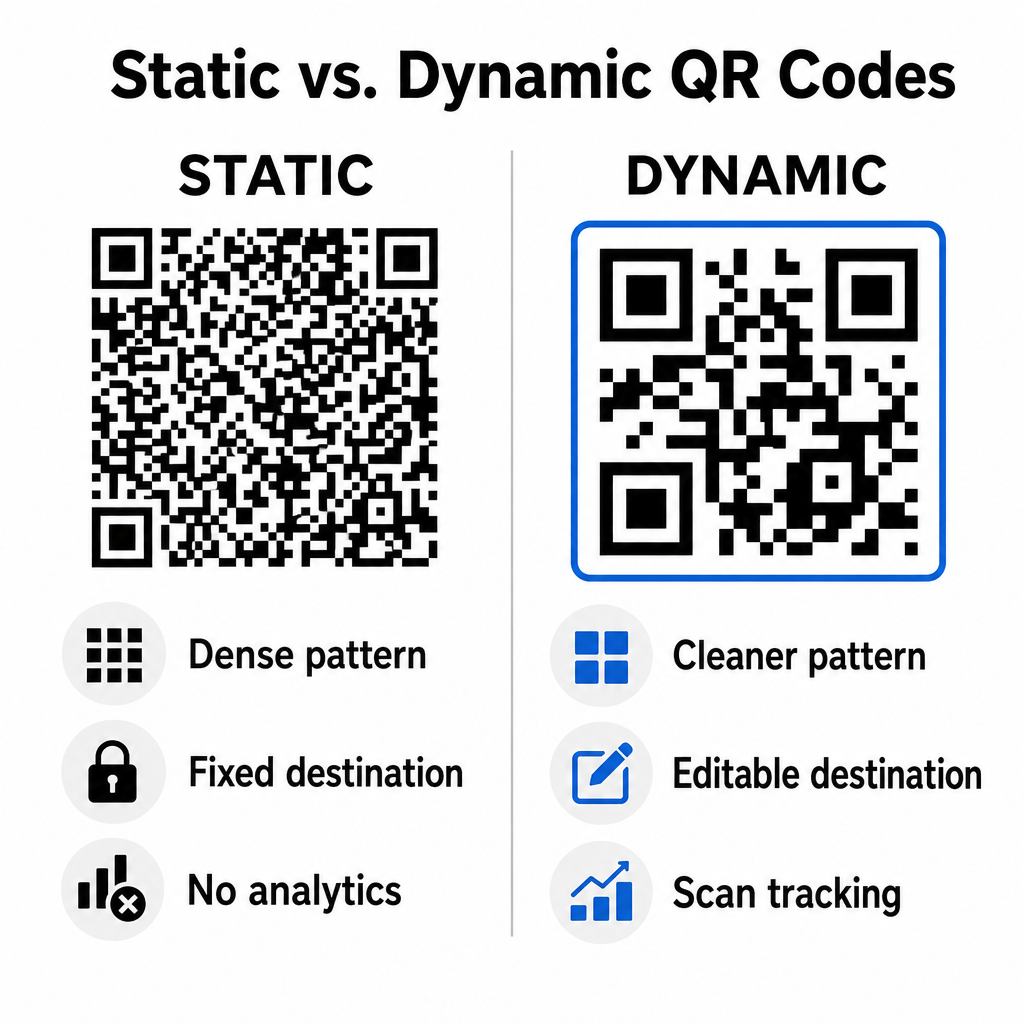
Mã tĩnh lưu trữ URL đích của bạn trực tiếp bên trong ma trận trực quan. Vì địa chỉ web dài yêu cầu nhiều mô-đun dữ liệu hơn, mã tĩnh hiển thị các mẫu dày đặc, phức tạp, khiến camera điện thoại thông minh khó giải mã hơn khi hiển thị trên màn hình máy tính. Hơn nữa, mã tĩnh không cung cấp số liệu theo dõi và không thể chỉnh sửa sau khi bản tin email đã được gửi đi.
Mã động nhúng một URL chuyển hướng ngắn thay vì địa chỉ trang đích đầy đủ. Sự khác biệt về cấu trúc này tạo ra một mẫu trực quan gọn gàng hơn, có mật độ thấp hơn, giúp người dùng dễ dàng quét ngay cả ở kích thước nhỏ. Mã động cho phép người quản lý chiến dịch cập nhật liên kết đích sau khi triển khai và thu thập dữ liệu phân tích toàn diện. Hiểu rõ sự khác biệt giữa các mã này sẽ giúp bạn hiểu rõ hơn về sự khác biệt giữa chúng. mã QR tĩnh và động Giúp bạn chọn định dạng phù hợp cho chuỗi bản tin định kỳ. Bằng cách sử dụng URL chuyển hướng động, bạn có quyền truy cập vào các thông tin cần thiết. Số liệu theo dõi mã QR bao gồm tổng số lần quét, hệ điều hành thiết bị, dấu thời gian quét và phân bố địa lý.
Những lỗi thường gặp cần tránh trong các chiến dịch email
Việc tránh các lỗi thiết kế và trải nghiệm người dùng dễ đoán trước sẽ giúp bảo vệ tỷ lệ tương tác của chiến dịch và duy trì lòng tin của người đăng ký:
- Thiếu hướng dẫn quét rõ ràngViệc hiển thị một mã không có nhãn mà không giải thích phần thưởng hoặc bước tiếp theo sẽ làm giảm sự tương tác.
- Chuyển hướng người dùng đến các trang không tương thích với thiết bị di động.Việc dẫn người dùng quét mã QR trên thiết bị di động đến các trang đích chỉ dành cho máy tính để bàn sẽ tạo ra sự bất tiện và làm tăng tỷ lệ thoát trang.
- Tùy chỉnh quá mức các yếu tố hình ảnhViệc đặt các logo lớn hoặc các hiệu ứng chuyển màu nền có độ tương phản thấp lên trên ma trận dữ liệu sẽ làm giảm khả năng quét của camera.
- Bỏ qua các bài kiểm tra hiển thị trên nhiều máy kháchViệc không kiểm tra hiển thị mã trên Gmail, Outlook và Apple Mail ở cả chế độ sáng và tối dẫn đến bố cục bị lỗi.
Khởi động chiến lược mã QR email của bạn
Việc kết hợp các liên kết văn bản với đồ họa động dễ quét sẽ tạo ra một lộ trình hiệu quả từ việc đọc email trên máy tính để bàn đến hành động trên thiết bị di động. Duy trì độ tương phản màu sắc mạnh mẽ, cung cấp văn bản thay thế mô tả và xác minh rằng các trang đích được tối ưu hóa cho màn hình di động sẽ đảm bảo trải nghiệm mượt mà trên nhiều thiết bị cho người dùng của bạn. Hãy áp dụng các tiêu chuẩn này vào chuỗi email tiếp theo của bạn bằng cách sử dụng... Tạo mã QR động Xây dựng, tùy chỉnh và theo dõi các liên kết có thể quét được trên tất cả các chiến dịch tiếp thị email của bạn.
Câu hỏi thường gặp
Người dùng thiết bị di động không thể dễ dàng quét mã hiển thị trên màn hình thiết bị của họ. Luôn kết hợp hình ảnh có thể quét được với liên kết văn bản có thể nhấp chuột liền kề để người dùng di động chỉ cần chạm vào để truy cập vào đích đến.
Hiển thị hình ảnh ở kích thước tối thiểu 150 x 150 pixel (hoặc 2 cm x 2 cm). Điều này đảm bảo camera điện thoại thông minh có thể giải mã ma trận khi quét màn hình máy tính xách tay hoặc máy tính để bàn.
Có, với điều kiện bạn sử dụng trình tạo mã QR động. Mã động ghi lại các số liệu quét bao gồm thời gian quét, hệ điều hành thiết bị và vị trí địa lý mà không cần các tham số URL phức tạp.