E-posta aboneleriniz masaüstü ekranlarda mesajları okurken metin bağlantılarını görmezden mi geliyor? Alıcılar e-postaları bilgisayarda açtığında, mobil uygulamaları manuel olarak aramak veya uzun web adreslerini yazmak zorunda kalmaları gereksiz bir zorluk yaratır. E-posta pazarlamanıza taranabilir kodlar eklemek, masaüstü görüntüleme ile mobil uygulama arasında doğrudan bir köprü sağlar.
QR Kodları Masaüstü ve Mobile Arasındaki Bağlantıyı Nasıl Kuruyor?
Çoğu e-posta kampanyası, cihazlar arası uyumluluk sorunuyla karşı karşıyadır: Aboneler genellikle tanıtım e-postalarını masaüstü veya dizüstü bilgisayarda okurlar, ancak amaçlanan eylem (örneğin mobil uygulama yüklemek, iletişim kartı kaydetmek veya etkinlik bileti eklemek) akıllı telefonda gerçekleştirilmelidir.
E-postanın içine taranabilir bir grafik yerleştirmek, alıcıların akıllı telefon kameralarını açıp bilgisayar ekranlarına doğrultmalarına ve mobil cihazlarında anında bir işlem başlatmalarına olanak tanır. Bu cihazlar arası etkileşim, mobil katılım gerektiren iş akışlarında terk oranlarını azaltır. Pazarlamacılar bu çok kanallı stratejiyi ayrıca şu amaçlarla da kullanabilirler: sosyal medyayı ve e-posta pazarlamasını bağlamak, Masaüstü haber bülteni okuyucularını doğrudan aktif sosyal medya profillerine yönlendiriyor.
E-posta Pazarlama Kampanyaları için Pratik Kullanım Örnekleri
E-postalara taranabilir bir öğe eklemek her zaman açık ve işlevsel bir amaca hizmet etmelidir. İşte taranabilir bir kod eklemenin standart metin bağlantılarından daha iyi performans gösterdiği temel senaryolar:
- Sürüş Uygulaması İndirmeleriMasaüstü okuyucuları, telefonlarının işletim sistemine bağlı olarak doğrudan iOS App Store veya Google Play Store'a yönlendirin.
- Cüzdana Sadakat Kartları EklemeEtkinlik geçiş kartlarını, biletleri veya dijital kuponları masaüstü ekranlardan doğrudan Apple Wallet veya Google Wallet'a aktarın.
- İletişim Bilgilerinin Güncellenmesiİş bağlantılarınızın satış temsilcisi bilgilerini vCards aracılığıyla doğrudan telefon rehberlerine kaydetmelerine olanak tanıyın.
- Önceden Doldurulmuş Mesajları TetiklemeAlıcı bilgileri ve sorgu metni önceden doldurulmuş olarak mobil e-posta istemcilerini veya mesajlaşma uygulamalarını açın.
- Form Gönderimlerini BasitleştirmeOkuyucuları mobil cihazlar için optimize edilmiş anketlere veya abonelik yönetim sayfalarına yönlendirin. Eğer bülten kampanyaları yürütüyorsanız, taranabilir öğeleri sorunsuz bir şekilde entegre edebilirsiniz. Mailchimp e-posta iş akışları Abone kayıt işlemlerini kolaylaştırmak için.
Esnek E-posta Kampanya Kodları Oluşturun E-posta gönderdikten sonra tanıtım bağlantınızı güncellemeniz mi gerekiyor? Şunu kullanın: Dinamik QR Kod Oluşturucu Hedef bağlantıları istediğiniz zaman değiştirebilir ve tarama performansını gerçek zamanlı olarak izleyebilirsiniz.
E-posta Taranabilirliği ve Erişilebilirliği için Kritik En İyi Uygulamalar
E-posta şablonlarına taranabilir grafikler yerleştirirken, abonelerin içeriğinizle başarılı bir şekilde etkileşim kurup kuramayacağı teknik uygulama açısından büyük önem taşır. Belirlenmiş görsel ve erişilebilirlik standartlarına uymak, her abonenin teknik engeller olmadan katılımını sağlar.
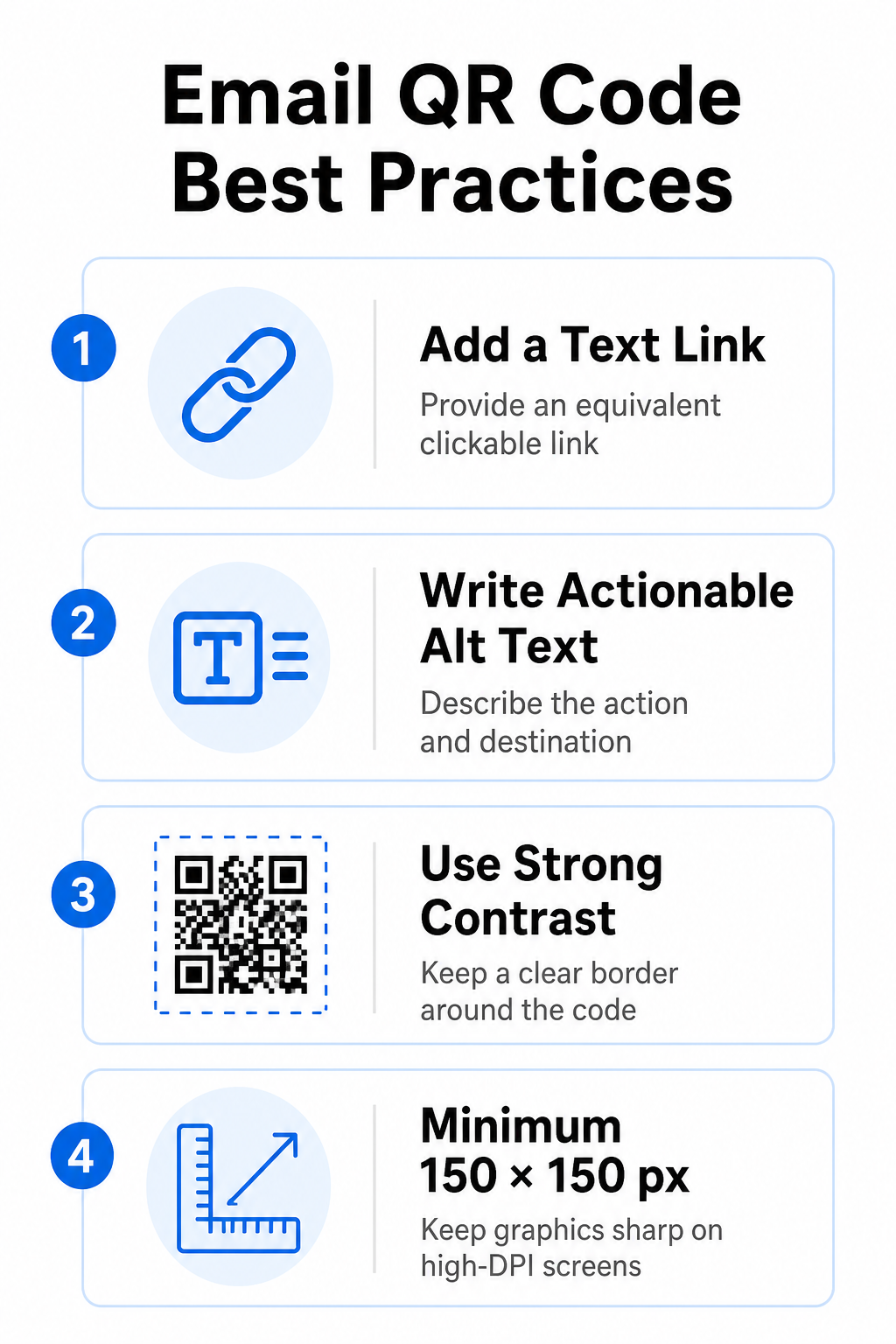
Her zaman eşdeğer bir metin bağlantısı sağlayın.
E-posta mesajlarındaki bilgilere erişim için taranabilir bir grafik asla tek yöntem olmamalıdır. Erişilebilirlik standartları, grafiğin yanına veya doğrudan altına yerleştirilmiş standart, tıklanabilir bir köprü bağlantısı gerektirir. Bu, e-postayı mobil cihazda okuyan (kendi ekranlarını taramaları mümkün olmayan) veya ekran okuyucu kullanan abonelerin hedef bağlantıya kolayca erişebilmelerini sağlar.
Eyleme Geçirilebilir Alternatif Metin Ekle
E-posta istemcileri genellikle varsayılan olarak görselleri engeller. Grafiğiniz hemen yüklenmezse, ekran okuyucular ve aboneler içeriği anlamak için alternatif metne güvenir. Grafiği görsel olarak tanımlamak yerine, `alt="20% indirim kuponunuzu almak için QR kodunu tarayın"` gibi belirli eylemi ve hedefi açıklayan açıklayıcı alternatif metin kullanın.
Yüksek renk kontrastı ve sessiz bölgeler sağlayın.
Tarayıcılar, koyu ön plan desenleri ile açık arka plan alanları arasında yüksek kontrast gerektirir. Açık arka planlara yerleştirilen koyu kodlar, ışık emilimini en üst düzeye çıkarır ve hızlı kamera algılamasını sağlar. Açık renkli kodları açık arka planlarda veya koyu desenleri koyu e-posta şablonu bölümlerinde kullanmaktan kaçının. Ayrıca, tarayıcı tanımayı engelleyen e-posta tasarım öğelerini önlemek için kodun çevresinde engellenmemiş bir kenarlık (sessiz bölge olarak bilinir) bulundurun. Bu yapısal parametreleri kılavuzumuzda inceleyin. QR kodu okunabilirliği için en iyi uygulamaları Şablonlarınızı oluşturmadan önce.
Yüksek Çözünürlüklü Ekranlar için Grafik Boyutlandırma
Grafiğin yüksek çözünürlüklü ekranlarda bulanıklık veya pikselleşme olmadan net bir şekilde görüntülenmesini sağlamak için, görüntüyü en az 150 x 150 piksel (2 cm x 2 cm) boyutunda görüntüleyin. Görüntülerinizi güvenilir bir yöntem kullanarak yüksek çözünürlüklü vektör formatlarında dışa aktarın. bağlantı QR kod oluşturucunuzun Veri yoğunluğunu yönetilebilir seviyede tutar ve masaüstü ekranlarda çizgilerin netliğini korur.
| Tasarım Parametresi | Öneri | Teknik Sebep |
|---|---|---|
| Minimum Boyutlar | 150 x 150 piksel (2 x 2 cm) | Yüksek çözünürlüklü masaüstü ekranlarda kamera odaklama hatasını ve pikselleşmeyi önler. |
| Ön Plan Rengi | Koyu (örneğin, Siyah, Lacivert) | Hızlı kamera tespiti için ışık emilimini en üst düzeye çıkarır. |
| Arka Plan Rengi | Açık (örneğin, Beyaz, Açık Gri) | Ön plandaki veri modüllerine karşı gerekli kontrastı sağlar. |
| Alternatif Metin İçeriği | “[İşlem] için QR kodunu tarayın” | E-posta istemcileri tarafından görseller devre dışı bırakıldığında net bağlantı bağlamı sağlar. |
Özel Markalı QR Kodları Oluşturun E-posta bülten tasarımlarınıza taranabilir kodlar entegre etmeye hazır mısınız? Ana aracımızı kullanarak ücretsiz olarak yüksek çözünürlüklü, özelleştirilmiş kodlar oluşturun. QR Kod Oluşturucu bugün.
E-posta Kampanyalarında Statik ve Dinamik QR Kodları
Taranabilir grafikleriniz için doğru teknik formatı seçmek, hem kampanya esnekliğini hem de raporlama doğruluğunu etkiler.
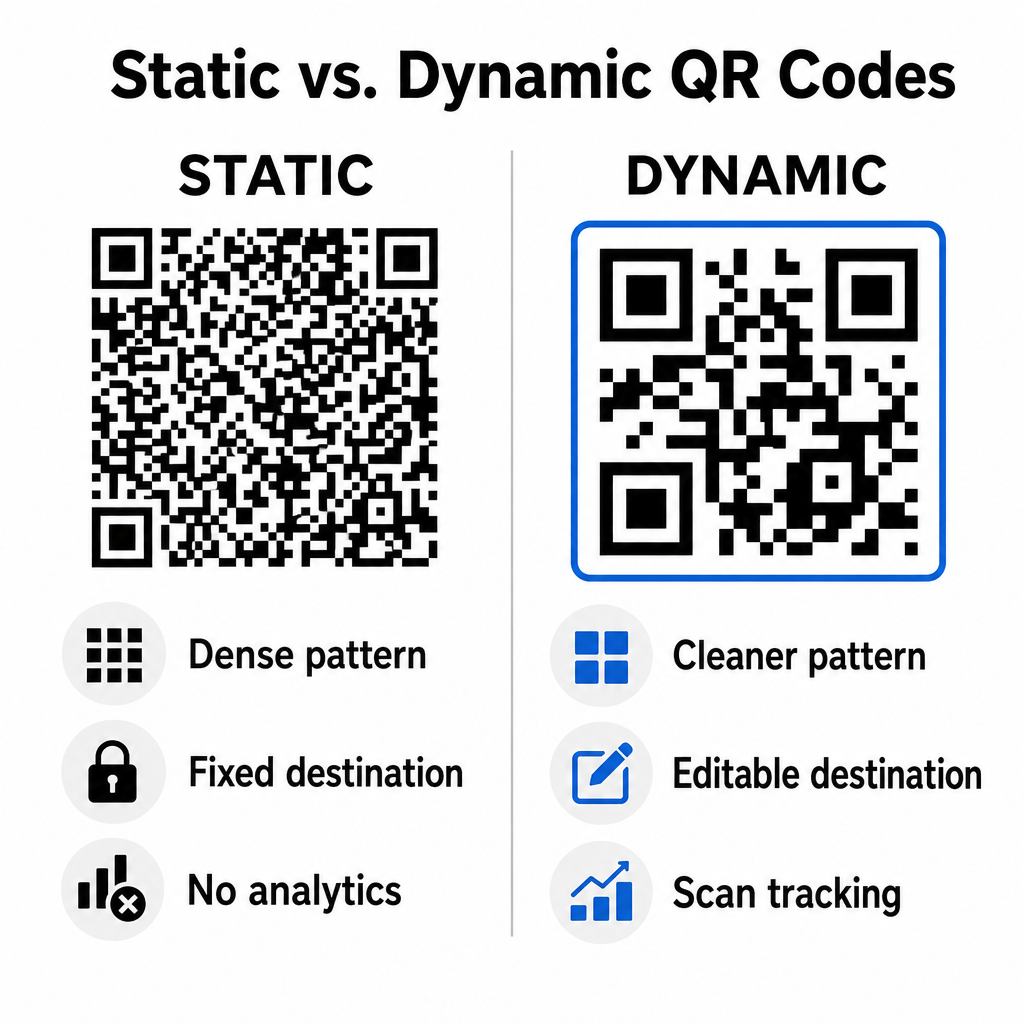
Statik kodlar, hedef URL'nizi doğrudan görsel matrisin içine kaydeder. Uzun web adresleri daha fazla veri modülü gerektirdiğinden, statik kodlar yoğun ve karmaşık desenler görüntüler; bu da akıllı telefon kameralarının bilgisayar ekranlarından bu desenleri çözmesini zorlaştırır. Ayrıca, statik kodlar herhangi bir izleme ölçütü sunmaz ve e-posta bülteni gönderildikten sonra düzenlenemez.
Dinamik kodlar, tam açılış sayfası adresi yerine kısa bir yönlendirme URL'si yerleştirir. Bu yapısal farklılık, daha küçük boyutlarda bile anında taranabilen daha temiz, daha düşük yoğunluklu bir görsel desen oluşturur. Dinamik kodlar, kampanya yöneticilerinin dağıtım sonrasında hedef bağlantıları güncellemesine ve kapsamlı analizler yakalamasına olanak tanır. İki kod türü arasındaki farkları anlamak önemlidir. statik ve dinamik QR kodları Tekrarlayan bülten dizileri için doğru formatı seçmenize yardımcı olur. Dinamik yönlendirme URL'lerini kullanarak, önemli bilgilere erişim sağlarsınız. QR kod izleme metrikleri Toplam tarama sayıları, cihaz işletim sistemleri, tarama zaman damgaları ve coğrafi dağılım dahil olmak üzere.
E-posta Kampanyalarında Kaçınılması Gereken Yaygın Hatalar
Öngörülebilir tasarım ve kullanıcı deneyimi hatalarından kaçınmak, kampanya etkileşim oranlarınızı korur ve abone güvenini muhafaza eder:
- Açık tarama talimatlarının atlanmasıEtiketlenmemiş bir kodu, ödülü veya sonraki adımı açıklamadan göstermek etkileşimi azaltır.
- Kullanıcıları duyarlı olmayan sayfalara yönlendirmekMobil tarayıcıları yalnızca masaüstü bilgisayarlarda kullanılabilen açılış sayfalarına yönlendirmek, sürtünmeye neden olur ve hemen çıkma oranlarını yükseltir.
- Görsel öğelerin aşırı özelleştirilmesiVeri matrisinin üzerine büyük logolar veya düşük kontrastlı arka plan gradyanları yerleştirmek, kameranın tarama yeteneğini olumsuz etkiler.
- İstemciler arası oluşturma testleri atlanıyor.Gmail, Outlook ve Apple Mail'de hem açık hem de koyu modlarda kod görünümlerinin test edilmemesi, bozuk düzenlere yol açar.
E-posta QR Kod Stratejinizi Başlatmak
Metin bağlantılarını dinamik, taranabilir grafiklerle birleştirmek, masaüstü e-posta okumasından mobil cihaza geçişte verimli bir yol oluşturur. Güçlü renk kontrastını korumak, açıklayıcı alternatif metin sağlamak ve hedef açılış sayfalarının mobil ekranlar için optimize edildiğini doğrulamak, hedef kitleniz için sorunsuz bir cihazlar arası yolculuk sağlar. Bu standartları bir sonraki sıralamanızda aşağıdaki yöntemleri kullanarak uygulayın: Dinamik QR Kod Oluşturucu Tüm e-posta pazarlama kampanyalarınızda taranabilir bağlantılar oluşturmak, özelleştirmek ve izlemek için.
Sıkça sorulan sorular
Mobil okuyucular kendi cihaz ekranlarında görüntülenen bir kodu kolayca tarayamazlar. Taranabilir grafikleri her zaman bitişik, tıklanabilir bir metin bağlantısıyla eşleştirin, böylece mobil kullanıcılar hedefe ulaşmak için sadece dokunabilirler.
Görüntüyü en az 150 x 150 piksel (veya 2 cm x 2 cm) boyutunda gösterin. Bu, akıllı telefon kameralarının dizüstü veya masaüstü bilgisayar ekranını tararken matrisi çözebilmesini sağlar.
Evet, dinamik bir QR kod oluşturucu kullanmanız şartıyla. Dinamik kodlar, karmaşık URL parametrelerine ihtiyaç duymadan tarama süreleri, cihaz işletim sistemleri ve coğrafi konum gibi tarama ölçümlerini kaydeder.