¿Le cuesta demostrar qué campañas impresas o expositores en tiendas realmente generan ventas? Invertir presupuesto en canales offline sin una atribución clara hace que sea imposible justificar los costes u optimizar su estrategia. Al combinar códigos QR rastreables con parámetros UTM y análisis web, puede conectar los puntos de contacto físicos directamente con las conversiones digitales y medir su retorno de la inversión exacto.
Por qué las campañas offline requieren atribución dinámica
El material impreso, el correo directo y la señalización física son herramientas de marketing esenciales, pero medir su rendimiento financiero históricamente ha presentado un desafío. Cuando alguien ve un expositor en una tienda o recibe una postal y luego visita su sitio web, los análisis web estándar clasifican a ese visitante como tráfico directo o búsqueda orgánica. Como resultado, el punto de contacto físico no recibe ningún crédito por la venta resultante.
Los códigos QR rastreables cierran esta brecha al convertir los puntos de contacto físicos en puntos de entrada digitales medibles. Cuando un cliente escanea un código en material impreso, su plataforma de análisis registra el evento de escaneo y rastrea el recorrido de ese usuario a través de formularios de clientes potenciales, registros o compras de comercio electrónico.
Para capturar datos de atribución precisos, debe comprender las diferencias operativas clave entre los códigos estáticos y dinámicos:
- Códigos QR estáticos codifican una URL de destino fija directamente en el patrón de píxeles. No ofrecen capacidades de seguimiento y no se pueden actualizar después de la impresión.
- Códigos QR dinámicos dirigen al escáner a través de un enlace corto flexible a su página de destino final. Registran datos de escaneo en tiempo real, incluyendo la hora de escaneo, la ubicación y el tipo de dispositivo, y le permiten actualizar los enlaces de destino en cualquier momento sin necesidad de reimprimir. Confiar en los códigos QR dinámicos para marketing proporciona la base necesaria para una medición completa de la campaña.
Creación de parámetros UTM personalizados para puntos de contacto físicos
Los parámetros UTM (Urchin Tracking Module) son etiquetas de texto estandarizadas que se añaden al final de una URL de destino. Cuando la cámara de un smartphone escanea un código que contiene estas etiquetas, las herramientas de analítica web como Google Analytics 4 (GA4) leen los parámetros y atribuyen la sesión del usuario a la fuente offline específica. Sin las etiquetas UTM, las plataformas de analítica agrupan el tráfico de códigos QR bajo tráfico directo genérico, dejando a los gestores de campañas sin visibilidad sobre qué folleto, póster o anuncio impreso impulsó la visita.
Estructurando Sus Enlaces de Seguimiento
Un enlace de seguimiento offline robusto se basa en campos de parámetros específicos:
| Parámetro | Propósito | Formato Offline Recomendado | Valor de ejemplo |
|---|---|---|---|
| “utm_source” | Identifica el canal físico o la ubicación | Elemento impreso específico o lugar de exhibición | “directmailpostcard” |
| “utm_medium” | Identifica el medio de marketing general | Etiqueta de canal estandarizada como “qr” u “offline” | “qr” |
| “utm_campaign” | Identifica la promoción u oferta específica | Nombre de la promoción y año | “springsale2025” |
| “utm_content” | Distingue variaciones de diseño o ubicación | Detalle de ubicación o variante creativa | “frontpáginaqr” |
| “utm_term” | Rastrea segmentos de audiencia objetivo | Segmento demográfico o código de lista de correo | “existing_customers” |
Estandarizando las Convenciones de Nomenclatura
Para mantener limpios sus análisis web y evitar informes fragmentados, siga las reglas de formato estándar:
- Use letras minúsculas de manera consistente: Las herramientas de análisis tratan las etiquetas en mayúsculas y minúsculas por separado, creando entradas de canal duplicadas para “QR” y “qr”.
- Separe las palabras con guiones bajos: Avoid spaces, which create percent-encoding symbols (“%20”) that clutter tracking URLs.
- Mantenga etiquetas de medio uniformes: Aplique un único valor de medio en todos los materiales impresos para que todo el tráfico de escaneo se consolide bajo un solo grupo de canal en las vistas de informes.
Para obtener más orientación sobre cómo estructurar las URL de seguimiento para plataformas de análisis web, revise estos consejos detallados sobre el uso de parámetros UTM para códigos QR.
Convirtiendo URL de Seguimiento en Códigos QR Dinámicos
Una vez que construya una URL etiquetada, conviértala en un código escaneable. Usando un generador de códigos QR de enlaces o un completo Generador de códigos QR dinámicos, introduzca su URL etiquetada completa (por ejemplo, “https://yourwebsite.com/promo?utmsource=springflyer&utmmedium=qr&utmcampaign=retail_expansion”).
Mejores Prácticas para la Implementación en Impresión
Para mantener una alta capacidad de escaneo y asegurar una captura de datos fiable en medios físicos:
- Asigne códigos únicos por ubicación física: Genere códigos QR dinámicos distintos con valores únicos de “utmsource” o “utmcontent” para cada ubicación física. El uso de códigos separados para los carteles de escaparate y los folletos de caja le permite comparar directamente el rendimiento de la ubicación.
- Mantenga un fuerte contraste visual: Coloque los módulos oscuros del código QR sobre un fondo claro y liso. El alto contraste permite que las cámaras de los teléfonos identifiquen y decodifiquen patrones de píxeles al instante.
- Aplique las pautas de tamaño de impresión adecuadas: Los materiales impresos escaneados a distancia de un brazo, como los promocionales Folletos o de correo directo postales, requieren un tamaño mínimo de 0.8 × 0.8 pulgadas (2 × 2 cm). Para señalización más grande, mantenga una relación de 10:1 entre la distancia de escaneo y el ancho del código.
- Exporte diseños en formatos de archivo vectorial: Descargue siempre los gráficos finales del código QR en formatos vectoriales (.SVG o .PDF) en lugar de imágenes rasterizadas como JPEGs para evitar la pixelación durante la impresión profesional.
Comience a Rastrear Sus Campañas Impresas Deje de adivinar qué canales offline convierten. Use el Generador de códigos QR dinámicos de Pageloot para crear códigos QR rastreables que ofrezcan análisis de escaneo instantáneos e informes de ROI sin problemas.
Monitoreo de Escaneos y Análisis de Datos de Conversión
Medir el ROI requiere conectar las interacciones físicas de la parte superior del embudo con las conversiones digitales de la parte inferior del embudo. Recopilará datos de la campaña en dos entornos integrados: su panel de control de gestión de QR y su software de análisis web.
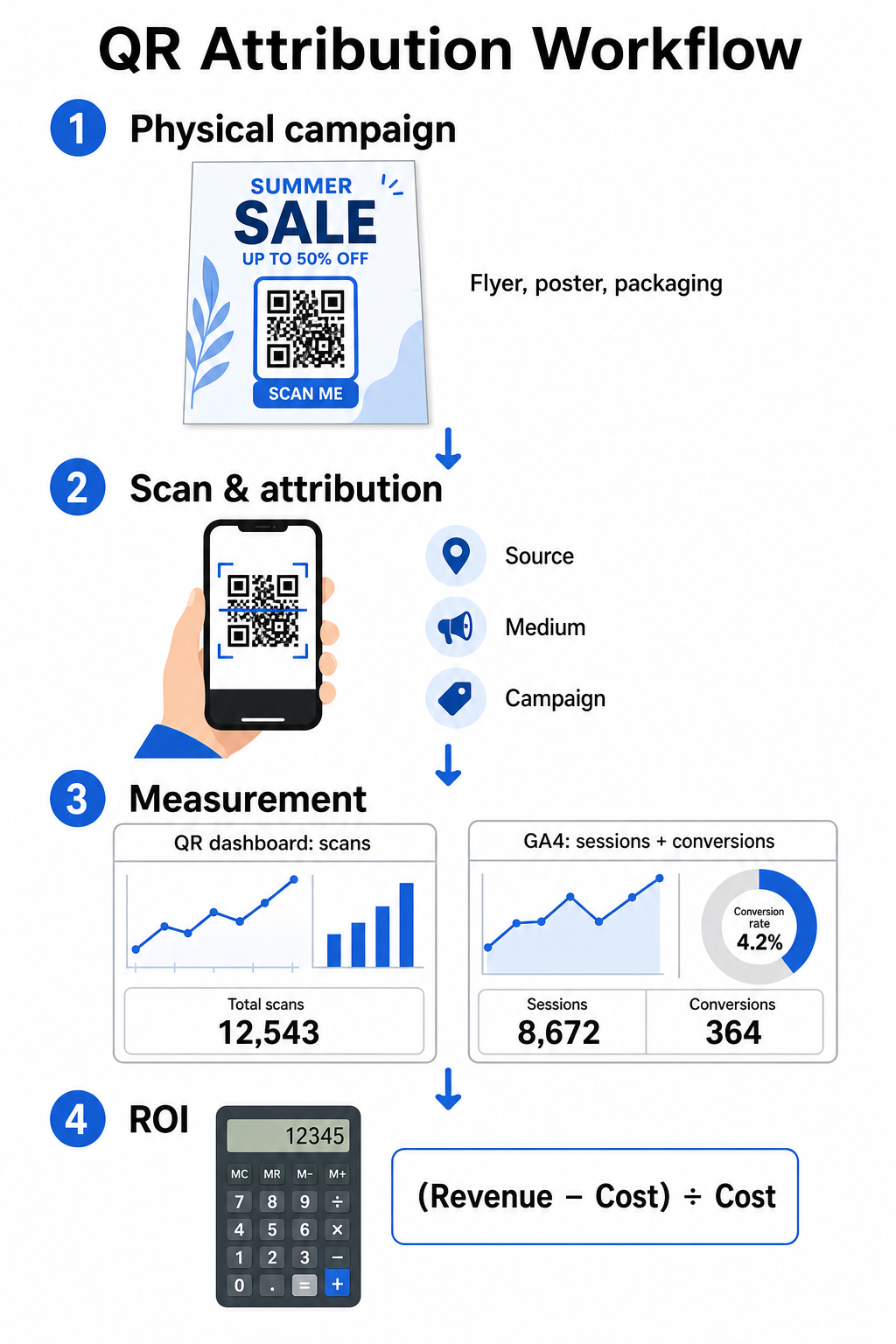
Captura de datos de la parte superior del embudo en su panel de control
Su plataforma de gestión de QR registra los datos de interacción de escaneo físico de inmediato. Cuando usted rastrear escaneos de códigos QR en tiempo real, su panel de control muestra métricas de participación críticas:
- Escaneos totales vs. únicos: Los escaneos totales registran cada instancia de escaneo, mientras que los escaneos únicos aíslan las interacciones individuales de los dispositivos.
- Distribución geográfica de escaneos: Los mapas señalan las ciudades y regiones postales de mayor rendimiento.
- Tendencias de tiempo de participación: Las distribuciones de escaneos por hora y día revelan los períodos de máxima actividad para las audiencias objetivo.
- Sistemas operativos de dispositivos: Las métricas del sistema operativo aseguran que las páginas de destino funcionen sin problemas en dispositivos iOS y Android.
El uso de un central panel de análisis de códigos QR brinda a los gerentes de campaña retroalimentación inmediata sobre el rendimiento sin tener que esperar los retrasos en el procesamiento de los análisis web.
Evaluación de conversiones en Google Analytics 4
Mientras su panel de escaneo mide las interacciones físicas, GA4 rastrea el comportamiento del usuario después de que los visitantes llegan a su sitio web.
Para evaluar el tráfico de la campaña en GA4:
- Navegue a Informes > Adquisición > Adquisición de tráfico.
- Cambie la dimensión de informe principal a Fuente / medio de la sesión o Campaña de la sesión.
- Busque su etiqueta de medio personalizada (como “qr”).
- Analice los indicadores clave de rendimiento, incluyendo Sesiones con interacción, Tasa de interaccióny Eventos clave (conversiones).
Cuando las acciones en línea, como compras de comercio electrónico, envíos de formularios o suscripciones a boletines, se designan como eventos clave en GA4, la plataforma atribuye esas conversiones directamente a los parámetros de origen de su campaña impresa.
Cálculo del ROI de la campaña y las métricas de rendimiento
Una vez que se registra el gasto de la campaña y se rastrean los ingresos atribuidos en el análisis web, puede calcular el Retorno de la Inversión (ROI) exacto utilizando fórmulas financieras estándar.
La fórmula de cálculo del ROI
Calcule el ROI de la campaña utilizando la ecuación estándar:
ROI (%) = [(Ingresos Atribuidos − Costo Total de la Campaña) ÷ Costo Total de la Campaña] × 100
Ejemplo Práctico de Cálculo de ROI
Consideremos una campaña de folletos por correo directo creada para generar reservas de servicios en línea:
- Costo Total de la Campaña: $2,500 (cubriendo diseño gráfico, impresión y franqueo).
- Escaneos QR Totales: 800 escaneos totales (650 escaneos únicos).
- Conversiones Web Atribuidas: 50 reservas completadas originadas por “utmsource=directmail_flyer”.
- Ingresos Totales Atribuidos: $6,000 en ingresos por ventas directas.
Aplicando la fórmula de cálculo:
ROI = [($6,000 − $2,500) ÷ $2,500] × 100 = ($3,500 ÷ $2,500) × 100 = 140%
La campaña generó un 140% de retorno de inversión neto.
Métricas de Eficiencia Secundarias
Para comparar la eficiencia entre diferentes materiales físicos y ubicaciones, monitorice estos indicadores de rendimiento de apoyo:
- Costo por Escaneo (CPS): Divida el costo total de la campaña por el total de escaneos ($2,500 ÷ 800 = $3.12 por escaneo).
- Tasa de Escaneo a Conversión: Divida las conversiones atribuidas por los escaneos únicos y multiplique por 100 ((50 ÷ 650) × 100 = 7.69%).
- Costo por Adquisición (CPA): Divida el costo total de la campaña por las conversiones atribuidas ($2,500 ÷ 50 = $50.00 por conversión).
- Ingresos por Escaneo (RPS): Divida los ingresos totales atribuidos por el total de escaneos ($6,000 ÷ 800 = $7.50 por escaneo).
Comparación de Rendimiento entre Medios Físicos
Evaluar el rendimiento en diferentes ubicaciones físicas ayuda a asignar futuros presupuestos de impresión hacia tipos de material con alto rendimiento.
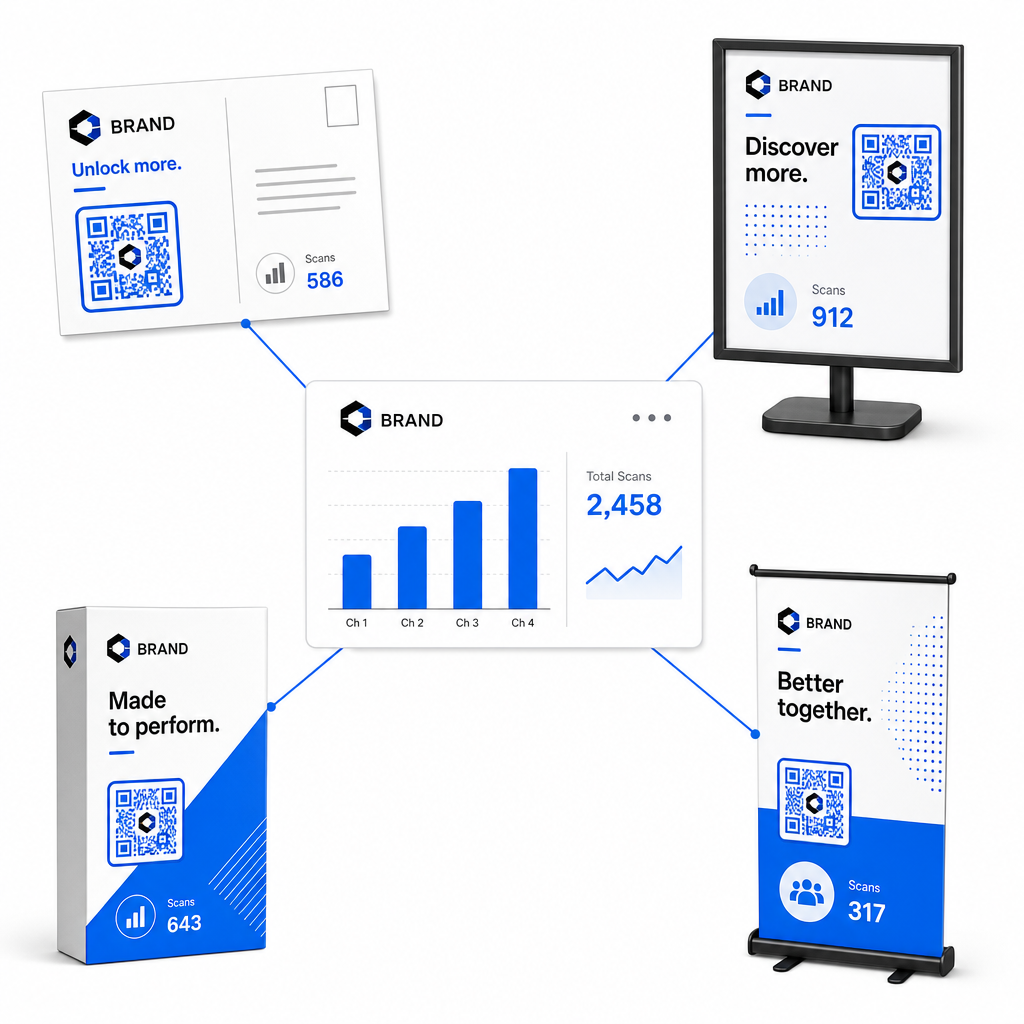
| Material de Marketing | KPI Objetivo | Estrategia de Optimización |
|---|---|---|
| Correo Directo & Postales | Tasa de Conversión & CPA | Coloque un incentivo claro u oferta de descuento directamente adyacente al código. |
| Pósteres y Exposiciones en Tienda | Volumen de Escaneos & Velocidad de Escaneo | Ajuste la altura de la exhibición y mueva los códigos hacia puntos focales a la altura de los ojos en zonas de alto tráfico. |
| Embalaje del producto | Escaneos Repetidos & Tasa de Interacción | Dirija a los usuarios a manuales de instrucciones digitales, formularios de activación de garantía o descuentos por nuevo pedido. |
| Cartelería y Pancartas de Eventos | Tasa de Captura de Leads | Ofrezca recursos descargables o obsequios promocionales a cambio de información de contacto. |
Para explorar estrategias adicionales para implementar códigos en medios impresos tradicionales, revise esta guía sobre rastreando los códigos QR.
Directrices para Maximizar Escaneos de Campañas Offline
Para maximizar las tasas de conversión y mantener datos de campaña precisos, siga estos estándares operativos clave:
- Incluya texto claro orientado a la acción: Evite imprimir códigos independientes sin contexto. Coloque llamadas a la acción explícitas junto al marco del código, como “Escanee para desbloquear un 15% de descuento en su compra” o “Escanee para ver el menú completo”.
- Optimice las páginas de destino móviles: El escaneo ocurre exclusivamente en dispositivos móviles. Asegúrese de que las páginas de destino carguen en menos de dos segundos y presenten diseños de maquetación amigables para el pulgar.
- Pruebe las URL de seguimiento antes de la distribución masiva: Realice pruebas de escaneo en vivo en múltiples dispositivos con sistema operativo móvil para confirmar que todas las etiquetas UTM se transmiten correctamente a la página de destino y se registran en análisis en tiempo real.
- Actualizar la gestión dinámica de enlaces de destino: Si los enlaces de la página de destino cambian o las promociones se actualizan, use su panel administrativo para cambiar las URL de destino sin reimprimir el material. Obtenga más información sobre la ejecución efectiva en este recurso sobre cómo usar los códigos QR.
Combinar las características de gestión dinámica con enlaces UTM estructurados transforma los medios impresos en un canal de crecimiento predecible y medible. Cree códigos dinámicos personalizados con el Generador de códigos QR de Pageloot para obtener una medición completa de su inversión en marketing impreso.
Preguntas frecuentes
Sí, las plataformas de gestión de códigos QR dinámicos rastrean automáticamente el volumen de escaneos, los sistemas operativos de los dispositivos, las marcas de tiempo de los escaneos y las ubicaciones geográficas. Sin embargo, añadir parámetros UTM a los enlaces de destino permite que las plataformas de análisis web y CRM atribuyan las sesiones posteriores del sitio web, las compras y los envíos de formularios de clientes potenciales a su campaña física específica.
Si generó códigos QR dinámicos, puede actualizar la URL de destino y los parámetros UTM en cualquier momento a través de su panel de gestión sin reimprimir su material gráfico físico. Los códigos QR estáticos codifican la dirección web de destino de forma permanente en el diseño de impresión y no pueden modificarse una vez impresos.
Asigne un código QR dinámico único con parámetros UTM distintos (como “utmcontent=windowposter” vs “utmcontent=checkoutflyer”) a cada ubicación física o tipo de material. Esta configuración le permite aislar los volúmenes de escaneo, las tasas de conversión y los ingresos atribuidos en ubicaciones individuales en sus informes de análisis.