Qual tecnologia de check-in é a certa para o seu evento – e o que acontece quando você escolhe a errada? Gargalos na entrada, compartilhamento de credenciais e lacunas no rastreamento em tempo real custam tempo aos organizadores e a confiança dos participantes. Este guia detalha como os códigos QR, RFID e NFC se comparam para o check-in de eventos e como implementar a abordagem que melhor se adapta à sua configuração.
Como os Códigos QR, RFID e NFC Funcionam de Forma Diferente
Antes de escolher um sistema de check-in, é útil entender o que cada tecnologia realmente faz – e onde cada uma falha.
Códigos QR são códigos visuais baseados em câmera. Um scanner ou câmera de smartphone lê o padrão, decodifica as informações e procura o registro do participante. Eles exigem linha de visão e funcionam melhor quando o código está limpo, bem iluminado e sem danos. O check-in por código QR é a opção de menor custo para implementar: os participantes recebem um código por e-mail ou SMS, e a equipe o escaneia com qualquer dispositivo equipado com câmera.
RFID (Identificação por Radiofrequência) usa ondas de rádio entre uma etiqueta incorporada em um crachá ou pulseira e um dispositivo leitor. Os participantes não precisam fazer nada – eles apenas se aproximam de um leitor e o sistema registra sua entrada. O RFID é totalmente passivo do lado do participante, o que o torna extremamente rápido em grandes volumes. Os leitores podem detectar etiquetas a alguns metros de distância, o que significa que a entrada pode ser completamente desacompanhada no portão.
NFC (Comunicação por Campo Próximo) é um subconjunto de curto alcance da tecnologia RFID, exigindo que o crachá ou pulseira esteja a cerca de 1–4 centímetros do leitor – essencialmente um toque. O curto alcance é intencional: o NFC oferece comunicação bidirecional criptografada que é difícil de clonar, tornando-o a escolha mais forte para controle de acesso seguro, pagamentos sem dinheiro e gerenciamento de zonas VIP.
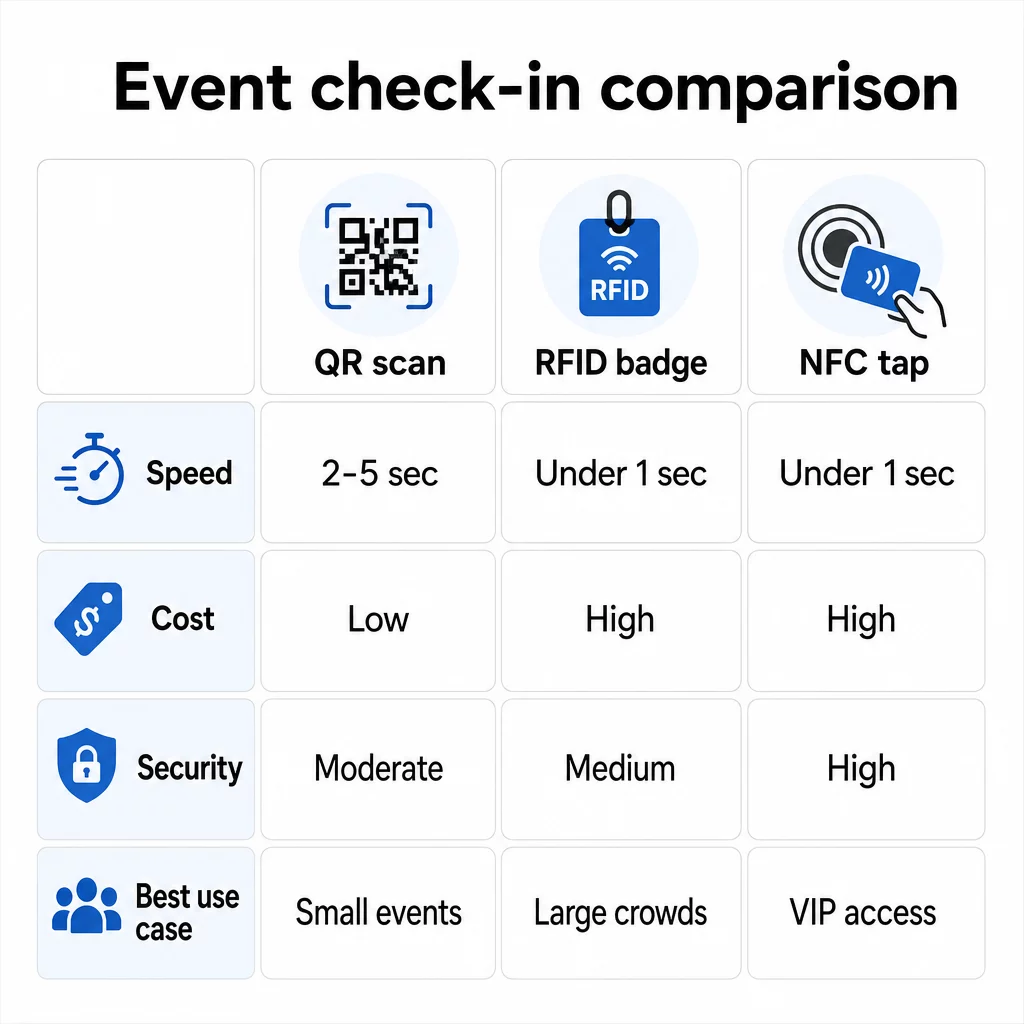
Comparando as Três Tecnologias Lado a Lado
| RECURSO | Leitor de | RFID | NFC |
|---|---|---|---|
| COMO FUNCIONA | Câmera escaneia código visual | Ondas de rádio, sem linha de visão | Toque de curto alcance (1–4 cm) |
| Velocidade por entrada | 2–5 segundos | Menos de 1 segundo, mãos-livres | Menos de 1 segundo |
| Custo de infraestrutura | Baixo (qualquer dispositivo de câmera) | Alto (leitores + crachás codificados) | Alto (leitores + crachás codificados) |
| Segurança | Moderado (facilmente compartilhado via captura de tela) | Variável | Alto (criptografado, difícil de clonar) |
| Capacidade offline | Depende da plataforma | Geralmente sim | Geralmente sim |
| Reutilização | Uso único ou impressão única | Reutilizável em vários dias ou eventos | Reutilizável em vários dias ou eventos |
| Rastreamento de movimento em tempo real | Apenas em pontos de leitura | Em todo o local do evento | Em zonas definidas |
| Melhor para | Eventos de pequeno a médio porte, baixo orçamento | Eventos de grande volume, festivais | Acesso seguro, zonas VIP, pagamentos |
Os códigos QR são rápidos mas frágeis. Funcionam bem em condições ideais, mas tornam-se gargalos quando as baterias dos participantes acabam, os ecrãs estão rachados ou a conectividade de rede cai. O RFID lida com grandes multidões com atrito mínimo. O NFC oferece o perfil de segurança mais forte, mas requer a proximidade física mais próxima.
Quando Usar Códigos QR para Check-In
Os códigos QR são a escolha certa para a maioria dos eventos de pequeno a médio porte, conferências de um dia e qualquer situação em que o orçamento ou o tempo de configuração sejam limitados. Pode implementar um sistema completo de check-in QR sem hardware especializado – apenas uma plataforma de código QR fiável e um dispositivo equipado com câmara em cada ponto de entrada.
As vantagens práticas dos códigos QR incluem:
- Nenhum hardware do participante necessário – os códigos ficam num ecrã de telemóvel ou bilhete impresso
- Distribuição fácil – enviar por email, SMS ou aplicações de mensagens antes do evento
- Atualização dinâmica – se o seu local mudar ou o seu fluxo de check-in for alterado, pode atualizar para onde um código QR dinâmico aponta sem reimprimir nada
- Análise de leitura – acompanhar os horários de check-in, tipos de dispositivo e volume de entrada em tempo real
As principais fraquezas a serem consideradas: os códigos QR não verificam inerentemente a identidade, apenas a posse de um código. Eles são fáceis de capturar e compartilhar. E eles não rastreiam passivamente para onde os participantes vão entre os pontos de leitura.
Para fechar algumas dessas lacunas, atribua a cada inscrito um código QR único, de uso único, que é marcado como usado na primeira leitura. Isso evita duplicatas e compartilhamento de credenciais sem adicionar custos de hardware. Você pode aprender como isso funciona na prática em guia definitivo de códigos QR para check-ins de eventos.
Configurar Códigos de Check-In de Evento Rastreáveis Crie códigos QR personalizados e dinâmicos para cada participante e monitore dados de leitura em tempo real a partir de um único painel. Comece com o Gerador de Código QR para Eventos Pageloot.
Quando Usar RFID ou NFC em Vez Disso
Para grandes festivais, conferências de vários dias ou qualquer evento com mais de 1.000 participantes passando por múltiplas zonas de acesso, RFID e NFC oferecem uma taxa de transferência e profundidade de rastreamento significativamente melhores.
RFID faz sentido quando:
- Você precisa de portões de entrada totalmente automatizados e sem equipe
- Os participantes estão se movendo por múltiplas sessões ou áreas e você precisa de rastreamento passivo do local
- O compartilhamento de credenciais é um risco material de fraude
- Você está emitindo pulseiras ou crachás físicos de qualquer forma
NFC faz sentido quando:
- Você precisa de controle de acesso baseado em zona com credenciais criptografadas (VIP, bastidores, imprensa)
- Você está executando pagamentos sem dinheiro juntamente com o gerenciamento de entrada
- Você deseja troca de dados bidirecional entre crachás e leitores
- A resistência máxima à clonagem é um requisito de segurança
A desvantagem é a infraestrutura. RFID e NFC exigem investimento inicial em leitores, crachás ou pulseiras codificadas e integração de software com sua plataforma de gerenciamento de eventos. Você também precisa emitir credenciais com antecedência, o que adiciona uma etapa de logística pré-evento que os sistemas de código QR ignoram completamente.
Configurando o Check-In com Código QR: Uma Abordagem Passo a Passo
Se você decidiu que os códigos QR são a escolha certa, veja como implementá-los corretamente.
Escolha Códigos Dinâmicos em Vez de Estáticos
Os códigos QR estáticos fixam um destino no momento da criação. Se o URL do seu formulário de check-in mudar, ou se sua plataforma de eventos cair e você precisar redirecionar os participantes, você terá que reimprimir. Os códigos QR dinâmicos permitem que você atualize o destino a qualquer momento – mesmo durante o evento – sem emitir novos códigos.
Para eventos onde qualquer detalhe pode mudar, os códigos dinâmicos são o padrão prático. Plataformas como a da Pageloot gerador de código QR permitem criar códigos editáveis e rastrear cada leitura em tempo real.
Atribua Códigos Individuais a Cada Participante
Um código por participante evita o compartilhamento, cria um registro de check-in auditável e permite que seu sistema marque cada código como usado na primeira leitura. Distribua os códigos por e-mail (incorporados como imagem com um backup em PDF para download) e por SMS para participantes que podem não verificar o e-mail de forma confiável. Envie mensagens de lembrete 48 e 24 horas antes do evento para reduzir o número de pessoas que chegam sem seu código.
Se você está construindo uma configuração mais integrada – onde os códigos QR preenchem automaticamente os dados dos participantes em um CRM ou formulário na leitura – o guia sobre construção de códigos QR dinâmicos para check-ins de CRM detalha a implementação técnica.
Configure Seu Formulário de Rastreamento de Presença
Uma abordagem simples e eficaz: crie um formulário de check-in no Google Forms ou ferramenta similar, então gere um código QR que linka diretamente para ele. Quando os participantes escaneiam, eles enviam suas informações, e os dados alimentam seu painel de rastreamento. O código QR de rastreamento de presença a configuração no Pageloot suporta exatamente este fluxo de trabalho – os organizadores podem visualizar todos os dados enviados no gerador depois que os participantes digitalizam e enviam.
Para eventos que usam códigos QR em bilhetes, vincule o código a um endpoint de validação seguro para que a equipe possa confirmar a identidade do participante em tempo real, em vez de depender de um envio de formulário passivo.
Planeje a Colocação Cuidadosamente
Onde você coloca os códigos QR importa tanto quanto como você os cria. Princípios chave de colocação:
- Posicione as estações de digitalização a cerca de 1,2 metros de altura para acomodar todos os usuários confortavelmente
- Configure múltiplos pontos de check-in para eventos com mais de 200 participantes para evitar gargalos nas filas
- Garanta iluminação forte e uniforme em cada estação – especialmente para eventos noturnos ou internos
- Coloque códigos QR nos pontos de saída vinculados a um formulário de feedback para que os convidados possam compartilhar suas opiniões ao sair
- Para eventos baseados em sessões, coloque códigos QR individuais em cada entrada de sessão para rastrear a participação
Percorra o local antes do evento como se fosse um participante. Verifique se os códigos digitalizam de forma limpa de múltiplos ângulos e sob as condições de iluminação reais do espaço.
Projete Códigos Que Digitalizam Confiávelmente
O design visual de um código QR afeta diretamente se ele digitaliza consistentemente em diferentes dispositivos e ambientes.
- Tamanho mínimo: 0,8 × 0,8 polegadas (2 × 2 cm) para digitalização de perto; maior para telas ou sinalização
- Contraste: módulos escuros em um fundo claro, com uma taxa de contraste de pelo menos 4:1
- Correção de erros: use o nível H ao adicionar um logotipo ao centro do código, pois permite que até 30% do código seja obscurecido, mantendo-se legível
- Para bilhetes impressos que podem dobrar ou amassar, use impressão fosca em vez de acabamentos brilhantes para reduzir o brilho
- Adicione uma breve chamada para ação abaixo do código: “Digitalize para fazer o check-in” remove a ambiguidade para os participantes
Você pode adicionar cores da marca e o logotipo do seu evento, mantendo a capacidade de digitalização – ferramentas como o gerador da Pageloot aplicam correção de erros automaticamente quando os logotipos são incorporados. Teste cada código em vários modelos de telefone e condições de iluminação antes de distribuir.
Para uma análise mais aprofundada sobre como tornar os códigos acessíveis a todos os participantes, incluindo aqueles com deficiência visual ou sem smartphones, o guia de códigos QR de RSVP aborda as melhores práticas de acessibilidade em detalhes.
Monitoramento de Check-Ins em Tempo Real
Uma das vantagens práticas que os sistemas baseados em QR têm sobre muitas implementações de RFID é a análise acessível e em tempo real, sem software especializado.
Métricas que valem a pena acompanhar durante o evento:
- Total de check-ins a qualquer momento
- Tempo médio de processamento de digitalização por participante
- Comprimento da fila e janelas de pico de chegada
- Contagens de digitalização específicas da sessão (se estiver usando códigos QR de sessão)
Com Rastreamento de código QR em uma plataforma como a Pageloot, cada digitalização registra o carimbo de data/hora, o tipo de dispositivo e a localização, dando-lhe uma imagem ao vivo de onde as multidões estão se formando. Se uma faixa de entrada estiver congestionada, você pode redirecionar a equipe imediatamente. Se um código QR de sessão mostrar uma participação inesperadamente alta, você pode ajustar a capacidade da sala antes que se torne um problema.
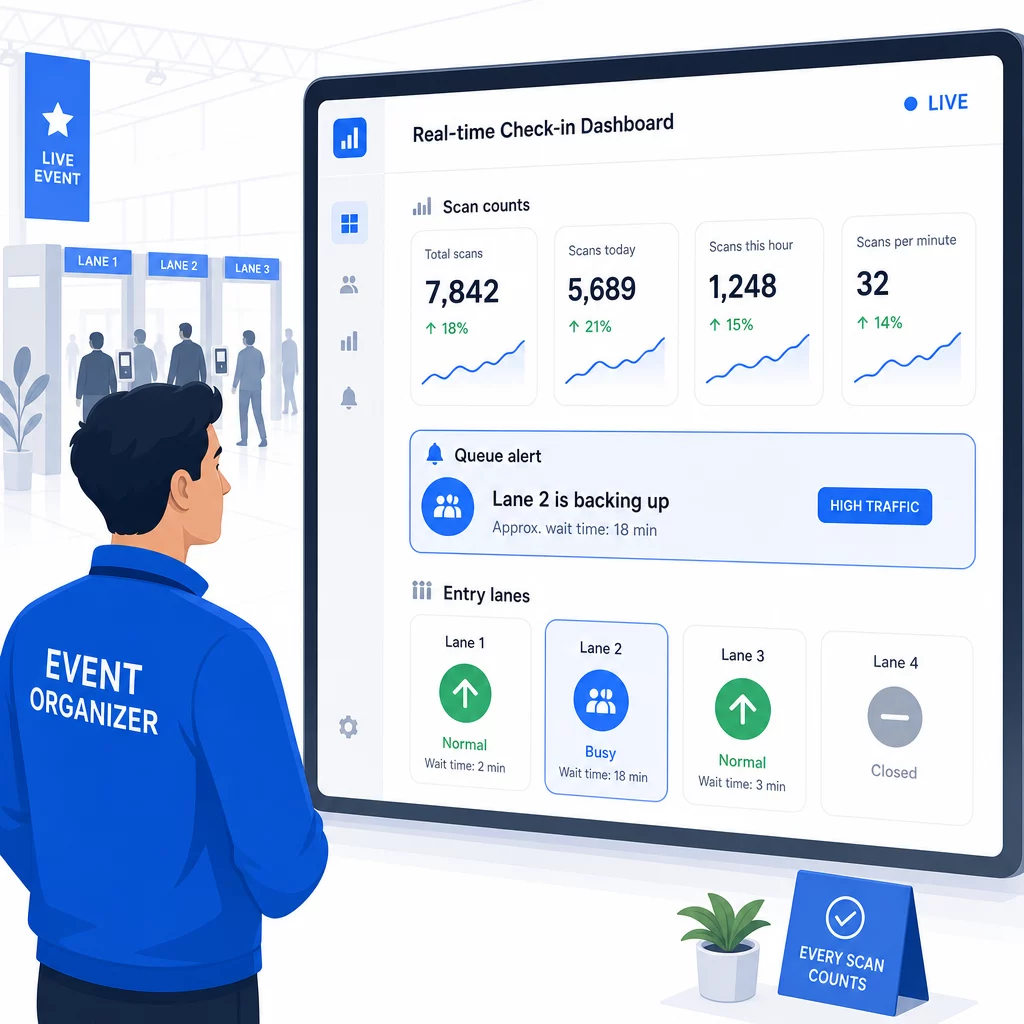
Após o evento, esses dados informam as decisões para a próxima vez: quando abrir as portas, quantas faixas de entrada você precisa e quais sessões geraram mais engajamento. Ferramentas para Rastreamento de eventos por código QR oferecer exportações de relatórios pós-evento que alimentam diretamente os fluxos de trabalho de planejamento.
Segurança e Privacidade de Dados
Sistemas de check-in lidam com dados pessoais, o que cria obrigações legais e de reputação.
Para sistemas de código QR especificamente:
- Use códigos de uso único que desativam após a primeira leitura para evitar o compartilhamento de credenciais
- Criptografe todos os dados em trânsito e em repouso – confirme se sua plataforma QR suporta isso antes de se comprometer
- Colete apenas o que você precisa: nome, tipo de ingresso e carimbo de data/hora do check-in geralmente são suficientes; endereços residenciais e números de telefone raramente são
- Aplique controles de acesso para que apenas a equipe que precisa dos dados dos participantes possa vê-los
- Inclua um aviso de privacidade claro em seu formulário de registro explicando o que você coleta, por que e por quanto tempo você o retém
Para eventos com participantes da Califórnia, a conformidade com a CCPA é exigida independentemente de onde seu evento é realizado. Os participantes têm o direito de saber quais dados você coletou e de solicitar sua exclusão. Para orientação sobre como incorporar essas proteções em seu fluxo de trabalho de emissão de ingressos desde o início, o guia de ingressos de evento com código QR seguro aborda criptografia, tokenização e validação de uso único em detalhes.
Ao avaliar plataformas de código QR, procure conformidade com SOC 2, dados armazenados em servidores dos EUA se seu evento for doméstico, logs de auditoria para acesso a dados e uma política clara que declare que você retém a propriedade total dos dados de seus participantes.
Planos de Backup para Quando a Tecnologia Falha
Mesmo sistemas bem testados encontram problemas no dia do evento. Construa seu plano de contingência antes de precisar dele.
Problemas comuns de digitalização e soluções rápidas:
- Iluminação deficiente: adicione iluminação de tarefa LED em cada estação
- Códigos danificados ou ilegíveis: mantenha um tablet em cada estação para que a equipe possa acessar uma versão digital do registro do participante
- Incompatibilidade de dispositivo: peça aos participantes para segurarem o telefone a 6–8 polegadas do scanner; se o aplicativo de câmera nativo falhar, um aplicativo de scanner de QR dedicado geralmente resolve o problema
Para falhas de rede:
- Use uma plataforma que armazene os dados de check-in localmente e sincronize quando a conectividade retornar
- Mantenha dois dispositivos de digitalização de backup em cada ponto de entrada
Se todos os sistemas digitais falharem:
- Tenha uma lista impressa de participantes em ordem alfabética em cada ponto de entrada
- Instrua a equipe sobre como pesquisar por nome, lidar com códigos perdidos e emitir crachás temporários
- Use carimbos ou adesivos codificados por cores para marcar check-ins manuais e evitar entradas duplicadas
Para eventos com níveis VIP ou zonas restritas, pré-imprima crachás temporários codificados por cores antes do evento para que a equipe possa gerenciar os níveis de acesso sem depender do sistema digital. Comunique quaisquer atrasos claramente: “Estamos usando nosso sistema de backup para que você entre o mais rápido possível” é suficiente para preservar uma experiência positiva do participante durante dificuldades técnicas.
Automatizando o Acompanhamento Após o Check-In
Os dados de check-in que você coleta tornam-se mais valiosos após o término do evento. Ao conectar seu sistema de digitalização de QR ao seu e-mail ou plataforma de marketing, você pode enviar acompanhamentos segmentados com base no que cada participante realmente fez.
Automação prática pós-evento:
- Envie e-mails de agradecimento dentro de 2 horas após o término do evento, incluindo links para slides ou recursos
- Para eventos com várias sessões, use dados de leitura de QR específicos da sessão para enviar apenas o conteúdo relevante para o que cada participante compareceu
- Compartilhe pesquisas de feedback 24–48 horas após o evento – mantenha-as com cinco perguntas ou menos e ofereça um pequeno incentivo pela conclusão
- Para eventos de networking, compile um e-mail de resumo de conexões a partir dos dados de leitura para que os participantes tenham um registro de quem eles conheceram
Acompanhe as taxas de abertura e as taxas de cliques nas mensagens de acompanhamento para calibrar o tempo e o conteúdo para eventos futuros.
Perguntas frequentes
Depende do tamanho do seu evento, orçamento e requisitos de segurança. Os códigos QR são a opção de menor custo e funcionam bem para eventos de pequeno a médio porte onde os participantes trazem seus próprios dispositivos. RFID é adequado para eventos de alto volume onde você precisa de entrada passiva e sem contato para milhares de participantes. NFC é a escolha mais forte quando você precisa de controle de acesso baseado em zona criptografado, pagamentos sem dinheiro ou reutilização de credenciais por vários dias. A maioria dos eventos com menos de 500 participantes pode realizar um check-in tranquilo inteiramente com códigos QR e uma plataforma confiável.
Atribua um código QR único a cada participante e configure seu sistema para marcar cada código como usado imediatamente após a primeira leitura. Uma vez lido, o código não pode ser usado novamente. Códigos QR dinâmicos emparelhados com um backend de validação em tempo real detectam tentativas de leitura duplicadas instantaneamente. Para eventos onde a verificação de identidade é importante, treine a equipe para verificar um documento de identificação com foto em relação ao nome de registro quando o código for lido.
Tenha uma lista impressa e alfabetizada de participantes em cada ponto de entrada e treine a equipe para fazer o check-in dos participantes manualmente usando nome e número do bilhete. Mantenha pelo menos dois dispositivos de digitalização de backup por faixa com baterias carregadas ou power banks portáteis. Use uma plataforma que armazene os check-ins localmente e sincronize quando a conectividade com a internet retornar para que nenhum dado seja perdido. Instrua sua equipe sobre o processo manual antes do início do evento para que a transição seja perfeita, se necessário.