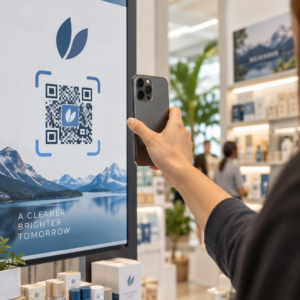
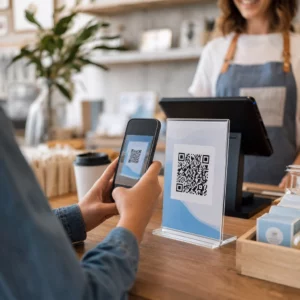
Kuri registracijos technologija tinka jūsų renginiui – ir kas nutinka, kai pasirenkate netinkamą? Įėjimo spūstys, prisijungimo duomenų dalijimasis ir realaus laiko stebėjimo spragos kainuoja organizatoriams laiko ir dalyvių pasitikėjimo. Šis vadovas paaiškina, kaip QR kodai, RFID ir NFC palyginami renginių registracijai ir kaip įdiegti bet kurį metodą, atitinkantį jūsų nustatymus.
Kaip QR kodai, RFID ir NFC veikia skirtingai
Prieš pasirenkant registracijos sistemą, naudinga suprasti, ką kiekviena technologija iš tikrųjų daro – ir kur kiekviena iš jų sugenda.
QR kodai yra vizualiniai, kameromis nuskaitomi kodai. Skaitytuvas arba išmaniojo telefono kamera nuskaito raštą, iššifruoja informaciją ir suranda dalyvio įrašą. Jiems reikalingas tiesioginis matomumas ir jie geriausiai veikia, kai kodas yra švarus, gerai apšviestas ir nepažeistas. QR kodo registracija yra pigiausias įgyvendinimo variantas: dalyviai gauna kodą el. paštu arba SMS žinute, o personalas jį nuskaito bet kokiu įrenginiu su kamera.
RFID (radijo dažnio identifikavimas) naudoja radijo bangas tarp žymos, įmontuotos į ženklelį ar apyrankę, ir skaitytuvo įrenginio. Dalyviams nereikia nieko daryti – jie tiesiog praeina pro skaitytuvą, o sistema užregistruoja jų įėjimą. RFID yra visiškai pasyvus dalyvio pusėje, todėl jis yra itin greitas esant dideliems srautams. Skaitytuvai gali aptikti žymas per kelias pėdas, o tai reiškia, kad įėjimas gali būti visiškai be priežiūros prie vartų.
NFC (artimojo lauko ryšys) yra trumpojo nuotolio RFID technologijos pogrupis, reikalaujantis, kad ženklelis ar apyrankė būtų maždaug 1–4 centimetrų atstumu nuo skaitytuvo – iš esmės prisilietimas. Trumpas nuotolis yra tyčinis: NFC siūlo šifruotą, dvipusį ryšį, kurį sunku klonuoti, todėl tai yra stipriausias pasirinkimas saugiai prieigos kontrolei, atsiskaitymams be grynųjų pinigų ir VIP zonų valdymui.
Trijų technologijų palyginimas vienas šalia kito
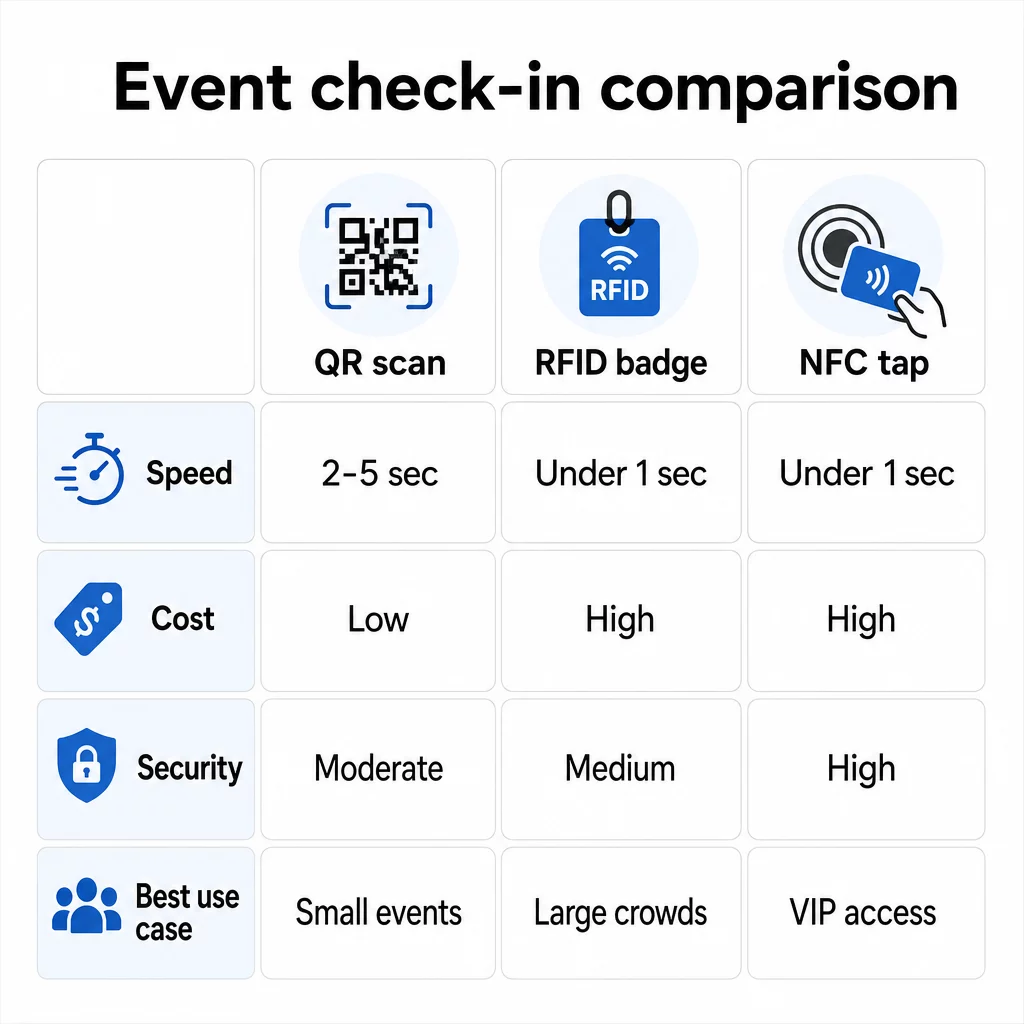
| FUNKCIJA | QR kodas | RFID | NFC |
|---|---|---|---|
| KAIP TAI VEIKIA | Kamera nuskaito vizualinį kodą | Radijo bangos, nereikia tiesioginio matomumo | Trumpo nuotolio prisilietimas (1–4 cm) |
| Greitis vienam įėjimui | 2–5 sekundės | Mažiau nei 1 sekundė, laisvų rankų | Mažiau nei 1 sekundė |
| Infrastruktūros kaina | Žema (bet koks kameros įrenginys) | Aukšta (skaitytuvai + koduoti ženkleliai) | Aukšta (skaitytuvai + koduoti ženkleliai) |
| Saugumas | Vidutinė (lengvai dalinama per ekrano nuotrauką) | Kintama | Aukšta (šifruota, sunku klonuoti) |
| Galimybė veikti neprisijungus | Priklauso nuo platformos | Paprastai taip | Paprastai taip |
| Pakartotinis naudojimas | Vienkartinis arba vienkartinis spausdinimas | Pakartotinai naudojamas dienomis ar renginiuose | Pakartotinai naudojamas dienomis ar renginiuose |
| Judėjimo stebėjimas realiuoju laiku | Tik nuskaitymo taškuose | Visoje renginio vietoje | Apibrėžtose zonose |
| Geriausiai tinka | Maži ir vidutiniai renginiai, mažas biudžetas | Didelio masto renginiai, festivaliai | Saugus patekimas, VIP zonos, mokėjimai |
QR kodai yra greiti, bet trapūs. Jie puikiai veikia idealiomis sąlygomis, tačiau tampa kliūtimis, kai lankytojų baterijos išsenka, ekranai įskyla arba nutrūksta tinklo ryšys. RFID valdo dideles minias su minimalia trintimi. NFC siūlo stipriausią saugumo profilį, tačiau reikalauja artimiausio fizinio artumo.
Kada naudoti QR kodus registracijai
QR kodai yra tinkamas pasirinkimas daugumai mažų ir vidutinių renginių, vienos dienos konferencijų ir bet kokiai situacijai, kai biudžetas ar įrengimo laikas yra ribotas. Galite įdiegti visą QR registracijos sistemą be jokios specializuotos aparatinės įrangos – tiesiog patikima QR kodo platforma ir įrenginys su kamera kiekviename įėjimo taške.
Praktiniai QR kodų privalumai apima:
- Nereikia jokios lankytojo aparatinės įrangos – kodai yra telefono ekrane arba atspausdintame biliete
- Lengvas platinimas – siųsti el. paštu, SMS žinutėmis ar susirašinėjimo programėlėmis prieš renginį
- Dinaminis atnaujinimas – jei pasikeičia renginio vieta arba registracijos eiga, galite atnaujinti, kur nukreipia dinaminis QR kodas, nieko neperspausdinant
- Nuskaitymų analizė – stebėti registracijos laikus, įrenginių tipus ir įėjimo srautą realiuoju laiku
Pagrindiniai trūkumai, kuriuos reikia numatyti: QR kodai savaime nepatvirtina tapatybės, tik kodo turėjimą. Juos lengva nufotografuoti ir bendrinti. Ir jie pasyviai nestebi, kur lankytojai eina tarp nuskaitymo taškų.
Norėdami užpildyti kai kurias iš šių spragų, kiekvienam registruotam asmeniui priskirkite unikalų, vienkartinį QR kodą, kuris pažymimas kaip panaudotas po pirmo nuskaitymo. Tai apsaugo nuo dublikatų ir kredencialų dalijimosi, nepridedant papildomų techninės įrangos išlaidų. Kaip tai veikia praktikoje, galite sužinoti išsamiame QR kodų vadove renginių registracijai.
Nustatykite stebimus renginio registracijos kodus Sukurkite personalizuotus, dinaminius QR kodus kiekvienam lankytojui ir stebėkite nuskaitymo duomenis realiuoju laiku iš vienos prietaisų skydelio. Pradėkite nuo Pageloot renginių QR kodo generatorius.
Kada vietoj to naudoti RFID arba NFC
Dideliems festivaliams, kelių dienų konferencijoms ar bet kokiam renginiui, kuriame dalyvauja daugiau nei 1 000 lankytojų, judančių per kelias prieigos zonas, RFID ir NFC siūlo žymiai geresnį pralaidumą ir stebėjimo gylį.
RFID yra prasminga, kai:
- Jums reikia visiškai automatizuotų, be priežiūros įėjimo vartų
- Lankytojai juda per kelias sesijas ar zonas ir jums reikia pasyvaus vietos stebėjimo
- Kredencialų dalijimasis yra didelė sukčiavimo rizika
- Jūs vis tiek išduodate fizines apyrankes ar ženklelius
NFC yra prasminga, kai:
- Jums reikia zonos pagrindu veikiančios prieigos kontrolės su šifruotais kredencialais (VIP, užkulisių, spaudos)
- Jūs vykdote atsiskaitymus be grynųjų pinigų kartu su įėjimo valdymu
- Norite dvipusio duomenų mainų tarp ženklelių ir skaitytuvų
- Maksimalus atsparumas klonavimui yra saugumo reikalavimas
Kompromisas yra infrastruktūra. Tiek RFID, tiek NFC reikalauja išankstinių investicijų į skaitytuvus, užkoduotus ženklelius ar apyrankes ir programinės įrangos integravimą su jūsų renginių valdymo platforma. Taip pat reikia išduoti leidimus iš anksto, o tai prideda išankstinį renginio logistikos žingsnį, kurį QR kodų sistemos visiškai praleidžia.
QR kodų registracijos nustatymas: žingsnis po žingsnio metodas
Jei nusprendėte, kad QR kodai tinka, štai kaip juos tinkamai įdiegti.
Pasirinkite dinaminius, o ne statinius kodus
Statiniai QR kodai užfiksuoja fiksuotą paskirties vietą kūrimo metu. Jei jūsų registracijos formos URL pasikeičia arba jūsų renginio platforma sugenda ir jums reikia nukreipti dalyvius, turite perspausdinti. Dinaminiai QR kodai leidžia atnaujinti paskirties vietą bet kuriuo metu – net ir renginio metu – neišduodant naujų kodų.
Renginiams, kuriuose bet kokia detalė gali pasikeisti, dinaminiai kodai yra praktiškas numatytasis pasirinkimas. Platformos, tokios kaip Pageloot, QR kodo generatorių leidžia jums kurti redaguojamus kodus ir stebėti kiekvieną nuskaitymą realiuoju laiku.
Priskirkite individualius kodus kiekvienam dalyviui
Vienas kodas vienam dalyviui apsaugo nuo dalijimosi, sukuria audituojamą registracijos įrašą ir leidžia jūsų sistemai pažymėti kiekvieną kodą kaip panaudotą po pirmo nuskaitymo. Platinkite kodus el. paštu (įterptus kaip paveikslėlį su atsisiunčiama PDF atsargine kopija) ir SMS žinutėmis dalyviams, kurie gali nepatikimai tikrinti el. paštą. Siųskite priminimo žinutes 48 ir 24 valandas prieš renginį, kad sumažintumėte žmonių, atvykstančių be savo kodo, skaičių.
Jei kuriate labiau integruotą sąranką – kur QR kodai iš anksto užpildo dalyvių duomenis į CRM arba formą nuskaitymo metu – vadovas apie dinaminių QR kodų kūrimą CRM registracijoms išsamiai aprašo techninį įgyvendinimą.
Nustatykite savo lankomumo stebėjimo formą
Paprastas ir efektyvus metodas: sukurkite registracijos formą „Google Forms“ ar panašioje priemonėje, tada sugeneruokite QR kodą, kuris tiesiogiai į ją nukreipia. Kai dalyviai nuskaito, jie pateikia savo informaciją, o duomenys patenka į jūsų stebėjimo prietaisų skydelį. Šis lankomumo stebėjimo QR kodas Pageloot nustatymas palaiko būtent šį darbo eigą – organizatoriai gali peržiūrėti visus pateiktus duomenis generatoriuje po to, kai dalyviai nuskenuoja ir pateikia.
Renginiams, naudojantiems QR kodus ant bilietų, susiekite kodą su saugiu patvirtinimo galiniu tašku, kad darbuotojai galėtų patvirtinti dalyvio tapatybę realiuoju laiku, o ne pasikliauti pasyviu formos pateikimu.
Kruopščiai planuokite išdėstymą
Kur dedate QR kodus, yra taip pat svarbu, kaip ir tai, kaip juos sukuriate. Pagrindiniai išdėstymo principai:
- Nustatykite skenavimo stotis maždaug 1,2 metro aukštyje, kad visi vartotojai jaustųsi patogiai
- Įrenkite kelis registracijos punktus renginiams, kuriuose dalyvauja daugiau nei 200 žmonių, kad išvengtumėte eilių susidarymo
- Užtikrinkite stiprų, tolygų apšvietimą kiekvienoje stotyje – ypač vakariniams ar vidaus renginiams
- Prie išėjimo taškų padėkite QR kodus, susietus su atsiliepimų forma, kad svečiai galėtų pasidalinti mintimis išeidami
- Sesijiniams renginiams, prie kiekvieno sesijos įėjimo padėkite individualius QR kodus, kad būtų galima stebėti dalyvavimą
Prieš renginį apeikite vietą taip, tarsi būtumėte dalyvis. Patikrinkite, ar kodai skenuojami aiškiai iš įvairių kampų ir esant realioms erdvės apšvietimo sąlygoms.
Kurkite patikimai skenuojamus kodus
QR kodo vizualinis dizainas tiesiogiai veikia tai, ar jis nuosekliai skenuojamas įvairiuose įrenginiuose ir aplinkose.
- Minimalus dydis: 0,8 × 0,8 colio (2 × 2 cm) artimam skenavimui; didesnis ekranams ar iškaboms
- Kontrastas: tamsūs moduliai šviesiame fone, su bent 4:1 kontrasto santykiu
- Klaidų taisymas: naudokite H lygį, kai pridedate logotipą į kodo centrą, nes tai leidžia uždengti iki 30 % kodo, išlaikant jį nuskaitomą
- Spausdintiems bilietams, kurie gali sulinkti ar susiglamžyti, naudokite matinį spausdinimą, o ne blizgius paviršius, kad sumažintumėte atspindžius
- Po kodu pridėkite trumpą raginimą veikti: “Nuskaitykite, kad užsiregistruotumėte” pašalina dviprasmybes dalyviams
Galite pridėti prekės ženklo spalvas ir savo renginio logotipą, išlaikydami nuskaitomumą – tokios priemonės kaip „Pageloot“ generatorius automatiškai taiko klaidų taisymą, kai įterpiami logotipai. Prieš platindami patikrinkite kiekvieną kodą su keliais telefonų modeliais ir skirtingomis apšvietimo sąlygomis.
Norėdami išsamiau sužinoti, kaip kodus padaryti prieinamus visiems dalyviams, įskaitant tuos, kurie turi regos sutrikimų ar neturi išmaniųjų telefonų, RSVP QR kodų vadovas išsamiai aprašo prieinamumo geriausią praktiką.
Registracijų stebėjimas realiuoju laiku
Vienas iš praktinių QR pagrindu veikiančių sistemų pranašumų, palyginti su daugeliu RFID diegimų, yra prieinama, realaus laiko analizė be specializuotos programinės įrangos.
Renginio metu verta stebėti šiuos rodiklius:
- Bendras registracijų skaičius bet kuriuo metu
- Vidutinis nuskaitymo apdorojimo laikas vienam dalyviui
- Eilės ilgis ir piko atvykimo laikas
- Konkrečios sesijos nuskaitymų skaičius (jei naudojami sesijos QR kodai)
Su QR kodo sekimas tokioje platformoje kaip „Pageloot“ kiekvienas nuskaitymas registruoja laiko žymę, įrenginio tipą ir vietą, suteikdamas jums gyvą vaizdą, kur renkasi minios. Jei viena įėjimo juosta užsikimšusi, galite nedelsiant nukreipti darbuotojus. Jei sesijos QR kodas rodo netikėtai didelį lankomumą, galite pakoreguoti kambario talpą, kol tai netaps problema.
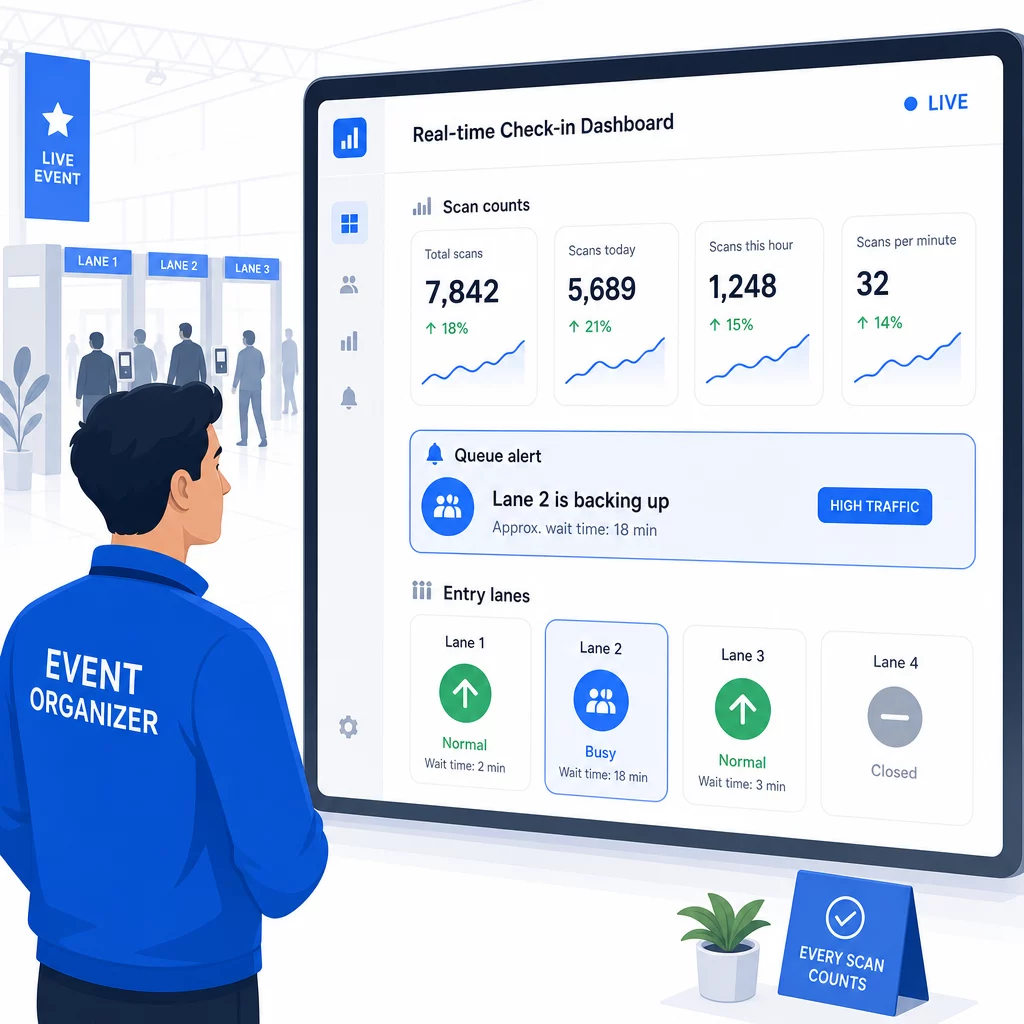
Po renginio šie duomenys padeda priimti sprendimus kitam kartui: kada atidaryti duris, kiek įėjimo juostų reikia ir kurios sesijos sulaukė didžiausio susidomėjimo. Priemonės, skirtos QR kodo renginių sekimas siūlyti ataskaitų eksportą po renginio, kuris tiesiogiai integruojasi į planavimo darbo eigas.
Saugumas ir duomenų privatumas
Registracijos sistemos tvarko asmens duomenis, o tai sukuria tiek teisines, tiek reputacines prievoles.
Konkrečiai QR kodo sistemoms:
- Naudokite vienkartinius kodus, kurie deaktyvuojasi po pirmo nuskaitymo, kad būtų išvengta prisijungimo duomenų dalijimosi
- Šifruokite visus duomenis perdavimo metu ir ramybės būsenoje – prieš įsipareigodami patvirtinkite, kad jūsų QR platforma tai palaiko
- Rinkite tik tai, ko jums reikia: vardo, bilieto tipo ir registracijos laiko žymos paprastai pakanka; namų adresai ir telefono numeriai retai yra reikalingi
- Taikykite prieigos kontrolę, kad tik darbuotojai, kuriems reikia dalyvių duomenų, galėtų juos matyti
- Įtraukite aiškų privatumo pranešimą į savo registracijos formą, paaiškinantį, ką renkate, kodėl ir kiek laiko saugote
Renginiams, kuriuose dalyvauja Kalifornijos gyventojai, reikalingas CCPA atitikimas, nepriklausomai nuo to, kur vyksta jūsų renginys. Dalyviai turi teisę žinoti, kokius duomenis surinkote, ir prašyti juos ištrinti. Norėdami gauti patarimų, kaip nuo pat pradžių įdiegti šias apsaugos priemones į savo bilietų pardavimo darbo eigą, žr. saugus QR kodo renginių bilietų vadovas išsamiai aprašo šifravimą, tokenizaciją ir vienkartinio naudojimo patvirtinimą.
Vertindami QR kodo platformas, ieškokite SOC 2 atitikties, duomenų, saugomų JAV serveriuose, jei jūsų renginys yra vietinis, duomenų prieigos audito žurnalų ir aiškios politikos, teigiančios, kad išlaikote visą savo dalyvių duomenų nuosavybę.
Atsarginiai planai, kai technologija sugenda
Net ir gerai išbandytos sistemos susiduria su problemomis renginio dieną. Sukurkite atsarginį planą, kol jo neprireikė.
Dažnos nuskaitymo problemos ir greiti sprendimai:
- Prastas apšvietimas: prie kiekvienos stotelės pridėkite LED darbinį apšvietimą
- Pažeisti arba neįskaitomi kodai: prie kiekvienos stotelės laikykite planšetinį kompiuterį, kad darbuotojai galėtų iškviesti skaitmeninę versiją iš dalyvio įrašo
- Įrenginio nesuderinamumas: paprašykite dalyvių laikyti telefoną 6–8 colius nuo skaitytuvo; jei nepavyksta naudoti vietinės kameros programėlės, tam skirta QR skaitytuvo programėlė paprastai išsprendžia problemą
Tinklo gedimams:
- Naudokite platformą, kuri saugo registracijos duomenis vietoje ir sinchronizuoja, kai grįžta ryšys
- Kiekviename įėjimo taške laikykite du atsarginius nuskaitymo įrenginius
Jei visos skaitmeninės sistemos sugenda:
- Kiekviename įėjimo taške turėkite abėcėlės tvarka sudarytą atspausdintą dalyvių sąrašą
- Instruktuokite darbuotojus, kaip ieškoti pagal vardą, tvarkyti pamestus kodus ir išduoti laikinus ženklelius
- Naudokite spalvotais kodais pažymėtus antspaudus arba lipdukus, kad pažymėtumėte rankines registracijas ir išvengtumėte pasikartojančių įrašų
Renginiams su VIP lygiais arba ribotomis zonomis, iš anksto atspausdinkite spalvotais kodais pažymėtus laikinus ženklelius prieš renginį, kad darbuotojai galėtų valdyti prieigos lygius nepasikliaudami skaitmenine sistema. Aiškiai praneškite apie bet kokius vėlavimus: “Naudojame atsarginę sistemą, kad kuo greičiau jus įleistume” pakanka, kad išlaikytumėte teigiamą dalyvių patirtį techninių sunkumų metu.
Automatinis tolesnis veiksmas po registracijos
Registracijos duomenys, kuriuos renkate, tampa vertingesni pasibaigus renginiui. Prijungę savo QR nuskaitymo sistemą prie el. pašto ar rinkodaros platformos, galite siųsti segmentuotus tolesnius pranešimus, atsižvelgdami į tai, ką kiekvienas dalyvis iš tikrųjų padarė.
Praktinė automatizacija po renginio:
- Siųskite padėkos el. laiškus per 2 valandas po renginio pabaigos, įskaitant nuorodas į skaidres ar išteklius
- Daugiasesijiniams renginiams naudokite sesijai būdingus QR nuskaitymo duomenis, kad siųstumėte tik turinį, susijusį su tuo, ką kiekvienas dalyvis lankė.
- Pasidalinkite atsiliepimų apklausomis 24–48 valandas po renginio – laikykitės penkių ar mažiau klausimų ir pasiūlykite nedidelę paskatą už užpildymą.
- Tinklaveikos renginiams sudarykite ryšių santraukos el. laišką iš nuskaitymo duomenų, kad dalyviai turėtų įrašą apie tai, su kuo susitiko.
Stebėkite atidarymo ir paspaudimų rodiklius tolesniuose pranešimuose, kad sureguliuotumėte laiką ir turinį būsimiems renginiams.
Dažniausiai užduodami klausimai
Tai priklauso nuo jūsų renginio dydžio, biudžeto ir saugumo reikalavimų. QR kodai yra pigiausias variantas ir puikiai tinka mažiems bei vidutinio dydžio renginiams, kuriuose dalyviai atsineša savo įrenginius. RFID tinka didelio masto renginiams, kuriuose reikalingas pasyvus, laisvų rankų įėjimas tūkstančiams dalyvių. NFC yra geriausias pasirinkimas, kai jums reikia šifruotos zonos pagrindu veikiančios prieigos kontrolės, atsiskaitymų be grynųjų pinigų arba kelių dienų prisijungimo duomenų pakartotinio naudojimo. Dauguma renginių, kuriuose dalyvauja mažiau nei 500 žmonių, gali sklandžiai registruotis vien tik su QR kodais ir patikima platforma.
Priskirkite unikalų QR kodą kiekvienam registruotam asmeniui ir sukonfigūruokite savo sistemą, kad kiekvienas kodas būtų pažymėtas kaip panaudotas iš karto po pirmo nuskaitymo. Nuskaičius, kodas negali būti naudojamas dar kartą. Dinaminiai QR kodai, susieti su realaus laiko patvirtinimo posistemiu, akimirksniu fiksuoja pasikartojančius nuskaitymo bandymus. Renginiams, kuriuose svarbus tapatybės patvirtinimas, apmokykite personalą patikrinti asmens tapatybės dokumentą su nuotrauka pagal registracijos vardą, kai kodas nuskaitomas.
Turėkite atspausdintą, abėcėlės tvarka sudarytą dalyvių sąrašą prie kiekvieno įėjimo ir apmokykite personalą registruoti dalyvius rankiniu būdu, naudojant vardą ir bilieto numerį. Kiekvienai juostai turėkite bent du atsarginius nuskaitymo įrenginius su įkrautomis baterijomis arba nešiojamaisiais maitinimo blokais. Naudokite platformą, kuri saugo registracijas vietoje ir sinchronizuoja duomenis, kai grįžta interneto ryšys, kad nebūtų prarasta jokių duomenų. Prieš renginio pradžią supažindinkite savo komandą su rankiniu procesu, kad prireikus perėjimas būtų sklandus.