Milline registreerimistehnoloogia sobib teie üritusele – ja mis juhtub, kui valite vale? Sissepääsu kitsaskohad, mandaatide jagamine ja reaalajas jälgimise lüngad maksavad korraldajatele aega ja osalejate usaldust. See juhend selgitab, kuidas QR-koodid, RFID ja NFC ürituste registreerimisel võrreldavad on ning kuidas rakendada seda lähenemist, mis teie seadistusega sobib.
Kuidas QR-koodid, RFID ja NFC erinevalt töötavad
Enne registreerimissüsteemi valimist on kasulik mõista, mida iga tehnoloogia tegelikult teeb – ja kus igaüks neist ebaõnnestub.
QR-koodid on visuaalsed, kaameraga loetavad koodid. Skanner või nutitelefoni kaamera loeb mustri, dekodeerib teabe ja otsib üles osaleja kirje. Need nõuavad otsenähtavust ja töötavad kõige paremini, kui kood on puhas, hästi valgustatud ja kahjustamata. QR-koodiga registreerimine on kõige odavam rakendamise võimalus: osalejad saavad koodi e-posti või SMS-i teel ja personal skannib seda mis tahes kaameraga varustatud seadmega.
RFID (raadiosagedustuvastus) kasutab raadiolaineid märgi või käepaela sisse paigaldatud sildi ja lugejaseadme vahel. Osalejad ei pea midagi tegema – nad lihtsalt kõnnivad lugeja lähedale ja süsteem logib nende sissepääsu. RFID on osaleja poolel täiesti passiivne, mis muudab selle suure mahu korral äärmiselt kiireks. Lugejad suudavad tuvastada silte mõne jala kauguselt, mis tähendab, et sissepääs võib olla väravas täiesti mehitamata.
NFC (lähiväljaside) on RFID-tehnoloogia lühimaa alamhulk, mis nõuab märgi või käepaela asetamist lugejast umbes 1–4 sentimeetri kaugusele – sisuliselt puudutust. Lühike ulatus on tahtlik: NFC pakub krüpteeritud kahesuunalist sidet, mida on raske kloonida, muutes selle tugevaimaks valikuks turvalise juurdepääsukontrolli, sularahata maksete ja VIP-tsoonide haldamiseks.
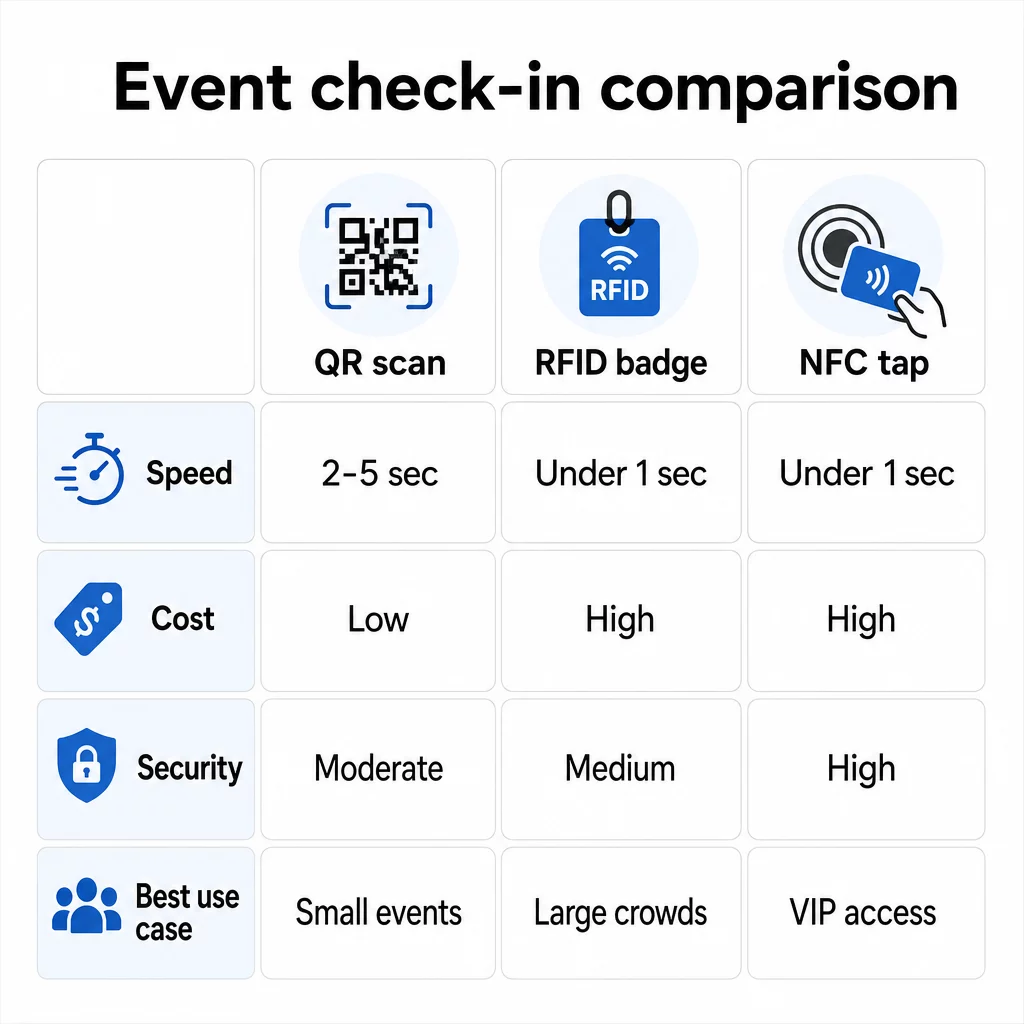
Kolme tehnoloogia võrdlus kõrvuti
| FUNKTSIOON | QR koodi | RFID | NFC |
|---|---|---|---|
| KUIDAS SEE TÖÖTAB | Kaamera skannib visuaalset koodi | Raadiolained, otsenähtavus puudub | Lühimaa puudutus (1–4 cm) |
| Kiirus sissepääsu kohta | 2–5 sekundit | Alla 1 sekundi, käed-vabad | Alla 1 sekundi |
| Infrastruktuuri maksumus | Madal (mis tahes kaameraseade) | Kõrge (lugejad + kodeeritud märgid) | Kõrge (lugejad + kodeeritud märgid) |
| Turvalisus | Mõõdukas (lihtsalt jagatav ekraanipildi kaudu) | Muutuv | Kõrge (krüpteeritud, raske kloonida) |
| Võrguühenduseta võimekus | Sõltub platvormist | Üldiselt jah | Üldiselt jah |
| Taaskasutatavus | Ühekordne või ühekordne printimine | Taaskasutatav päevade või sündmuste lõikes | Taaskasutatav päevade või sündmuste lõikes |
| Reaalajas liikumise jälgimine | Ainult skaneerimispunktides | Kogu toimumiskohas | Määratletud tsoonides |
| Parim | Väikesed kuni keskmise suurusega üritused, madal eelarve | Suuremahulised üritused, festivalid | Turvaline ligipääs, VIP-tsoonid, maksed |
QR-koodid on kiired, kuid haprad. Need töötavad hästi ideaalsetes tingimustes, kuid muutuvad kitsaskohaks, kui osalejate akud tühjenevad, ekraanid on katki või võrguühendus katkeb. RFID haldab suuri rahvahulki minimaalse hõõrdumisega. NFC pakub tugevaimat turvaprofiili, kuid nõuab kõige lähemal füüsilist lähedust.
Millal kasutada QR-koode sisseregistreerimiseks
QR-koodid on õige valik enamiku väikeste ja keskmise suurusega ürituste, ühepäevaste konverentside ja mis tahes olukordade puhul, kus eelarve või seadistamisaeg on piiratud. Saate rakendada täieliku QR-koodi sisseregistreerimissüsteemi ilma spetsiaalse riistvarata – lihtsalt usaldusväärne QR-koodi platvorm ja kaameraga varustatud seade igas sisenemispunktis.
QR-koodide praktilised eelised hõlmavad järgmist:
- Osalejate riistvara pole vaja – koodid asuvad telefoni ekraanil või prinditud piletil
- Lihtne levitamine – saatke e-posti, SMS-i või sõnumirakenduste kaudu enne üritust
- Dünaamiline uuendamine – kui teie toimumiskoht muutub või teie sisseregistreerimise voog nihkub, saate dünaamilise QR-koodi suunamise kohta värskendada ilma midagi uuesti printimata
- Skaneerimise analüütika – jälgida sisseregistreerimise aegu, seadmetüüpe ja sisenemismahtu reaalajas
Peamised nõrkused, millega arvestada: QR-koodid ei kinnita isikut, vaid ainult koodi omamist. Neid on lihtne ekraanipildistada ja jagada. Ja nad ei jälgi passiivselt, kuhu osalejad skaneerimispunktide vahel liiguvad.
Nende lünkade sulgemiseks määrake igale registreerijale unikaalne, ühekordselt kasutatav QR-kood, mis märgitakse esimesel skaneerimisel kasutatuks. See hoiab ära duplikaadid ja mandaatide jagamise ilma riistvara lisakuludeta. Saate teada, kuidas see praktikas töötab ülima juhendiga QR-koodide kohta ürituste registreerimiseks.
Seadistage jälgitavad sündmuse sisseregistreerimise koodid Looge igale osalejale isikupärastatud, dünaamilised QR-koodid ja jälgige reaalajas skaneerimisandmeid ühest juhtpaneelist. Alustage Pagelooti ürituse QR-koodi generaator.
Millal kasutada RFID-d või NFC-d hoopis
Suurte festivalide, mitmepäevaste konverentside või mis tahes sündmuse puhul, kus 1000+ osalejat liigub läbi mitme juurdepääsutsooni, pakuvad RFID ja NFC oluliselt paremat läbilaskevõimet ja jälgimissügavust.
RFID on mõistlik, kui:
- Vajate täielikult automatiseeritud, mehitamata sissepääsuväravaid
- Osalejad liiguvad läbi mitme seansi või ala ja vajate passiivset toimumiskoha jälgimist
- Mandaatide jagamine on oluline pettuse risk
- Väljastate niikuinii füüsilisi käepaelu või märke
NFC on mõistlik, kui:
- Vajate tsoonipõhist juurdepääsukontrolli krüpteeritud mandaatidega (VIP, lava taga, press)
- Kasutate sularahata makseid koos sissepääsu haldamisega
- Soovite kahesuunalist andmevahetust märkide ja lugejate vahel
- Maksimaalne kloonimiskindlus on turvanõue
Kompromiss on infrastruktuur. Nii RFID kui ka NFC nõuavad esialgset investeeringut lugejatesse, kodeeritud märkidesse või käepaeladesse ning tarkvara integreerimist teie ürituste haldamise platvormiga. Samuti peate volitused eelnevalt väljastama, mis lisab ürituse-eelse logistika sammu, mille QR-koodisüsteemid täielikult vahele jätavad.
QR-koodiga sisseregistreerimise seadistamine: samm-sammult lähenemine
Kui olete otsustanud, et QR-koodid sobivad, siis siin on, kuidas neid õigesti rakendada.
Valige dünaamilised koodid staatiliste asemel
Staatilised QR-koodid lukustavad loomise hetkel fikseeritud sihtkoha. Kui teie sisseregistreerimisvormi URL muutub või teie ürituste platvorm läheb alla ja peate osalejad ümber suunama, peate uuesti printima. Dünaamilised QR-koodid võimaldavad teil sihtkohta igal ajal – isegi ürituse ajal – värskendada, ilma uusi koode väljastamata.
Ürituste puhul, kus iga detail võib muutuda, on dünaamilised koodid praktiline vaikeseade. Platvormid nagu Pageloot'i QR-koodi generaator võimaldavad teil luua muudetavaid koode ja jälgida iga skaneeringut reaalajas.
Määrake igale osalejale individuaalsed koodid
Üks kood osaleja kohta takistab jagamist, loob auditeeritava sisseregistreerimise kirje ja võimaldab teie süsteemil märkida iga koodi esimesel skaneerimisel kasutatuks. Jagage koode e-posti teel (manustatuna pildina koos allalaaditava PDF-varukoopiaga) ja SMS-i teel osalejatele, kes ei pruugi e-posti usaldusväärselt kontrollida. Saatke meeldetuletussõnumid 48 ja 24 tundi enne üritust, et vähendada inimeste arvu, kes saabuvad ilma oma koodita.
Kui ehitate integreeritumat süsteemi – kus QR-koodid täidavad osalejate andmed CRM-i või vormi skaneerimisel – siis juhend dünaamiliste QR-koodide loomine CRM-i sisseregistreerimiseks selgitab tehnilist rakendamist.
Seadistage oma osavõtu jälgimise vorm
Lihtne ja tõhus lähenemine: looge sisseregistreerimisvorm Google Forms'is või sarnases tööriistas, seejärel genereerige QR-kood, mis lingib otse sellele. Kui osalejad skaneerivad, esitavad nad oma teabe ja andmed sisestatakse teie jälgimispaneelile. osavõtu jälgimise QR-kood Pagelooti seadistus toetab täpselt seda töövoogu – korraldajad saavad vaadata kõiki esitatud andmeid generaatoris pärast seda, kui osalejad on skanninud ja esitanud.
Ürituste puhul, mis kasutavad QR-koode piletitel, linkige kood turvalise valideerimispunktiga, et personal saaks kinnitada osaleja identiteeti reaalajas, selmet tugineda passiivsele vormi esitamisele.
Planeerige paigutus hoolikalt
See, kuhu te QR-koodid paigutate, on sama oluline kui see, kuidas te neid loote. Peamised paigutusprintsiibid:
- Paigutage skaneerimisjaamad umbes 4 jala kõrgusele, et kõik kasutajad saaksid mugavalt kasutada
- Seadistage mitu sisseregistreerimispunkti üle 200 osalejaga ürituste jaoks, et vältida järjekordade ummikuid
- Tagage tugev ja ühtlane valgustus igas jaamas – eriti õhtuste või siseürituste puhul
- Paigutage väljapääsupunktidesse QR-koodid, mis on lingitud tagasisidevormiga, et külalised saaksid lahkudes oma mõtteid jagada
- Sessioonipõhiste ürituste puhul paigutage individuaalsed QR-koodid iga sessiooni sissepääsu juurde osaluse jälgimiseks
Käige ürituse toimumiskohas enne üritust läbi nagu oleksite osaleja. Veenduge, et koodid skaneeruvad puhtalt mitme nurga alt ja ruumi tegelikes valgustingimustes.
Kujundage koodid, mis skaneeruvad usaldusväärselt
QR-koodi visuaalne disain mõjutab otseselt seda, kas see skaneerub järjepidevalt erinevates seadmetes ja keskkondades.
- Minimaalne suurus: 0,8 × 0,8 tolli (2 × 2 cm) lähiskaneerimiseks; suurem ekraanide või siltide jaoks
- Kontrast: tumedad moodulid heledal taustal, vähemalt 4:1 kontrastsussuhtega
- Vigade parandus: kasutage taseme H parandust, kui lisate logo koodi keskele, kuna see võimaldab kuni 30% koodist varjata, jäädes samal ajal loetavaks
- Trükitud piletite puhul, mis võivad painduda või kortsu minna, kasutage läikivate viimistluste asemel matttrükki, et vähendada peegeldust
- Lisage koodi alla lühike üleskutse: “Skaneeri sisseregistreerimiseks” eemaldab osalejate jaoks ebaselguse
Saate lisada brändivärve ja oma ürituse logo, säilitades samal ajal skaneeritavuse – tööriistad nagu Pagelooti generaator rakendavad logode manustamisel automaatselt veaparandust. Testige iga koodi mitme telefonimudeli ja valgustingimuse korral enne levitamist.
Sügavama ülevaate saamiseks koodide kättesaadavaks tegemisest kõigile osalejatele, sealhulgas nägemispuudega inimestele või nutitelefonita inimestele, on RSVP QR-koodide juhend hõlmab üksikasjalikult ligipääsetavuse parimaid tavasid.
Sisseregistreerimiste jälgimine reaalajas
Üks QR-põhiste süsteemide praktilisi eeliseid paljude RFID-rakenduste ees on ligipääsetav reaalajas analüüs ilma spetsiaalse tarkvarata.
Ürituse ajal jälgimist väärt mõõdikud:
- Sisseregistreerimiste koguarv igal ajahetkel
- Keskmine skaneerimise töötlemisaeg osaleja kohta
- Järjekorra pikkus ja tipp saabumisajad
- Seansipõhised skaneerimiste arvud (kui kasutatakse seansi QR-koode)
Koos QR-koodi jälgimine platvormil nagu Pageloot logib iga skaneering ajatempli, seadme tüübi ja asukoha, andes teile reaalajas pildi sellest, kus rahvahulgad kogunevad. Kui üks sissepääsurada ummistub, saate personali kohe ümber suunata. Kui seansi QR-kood näitab ootamatult suurt osavõttu, saate ruumi mahutavust kohandada enne, kui see probleemiks muutub.
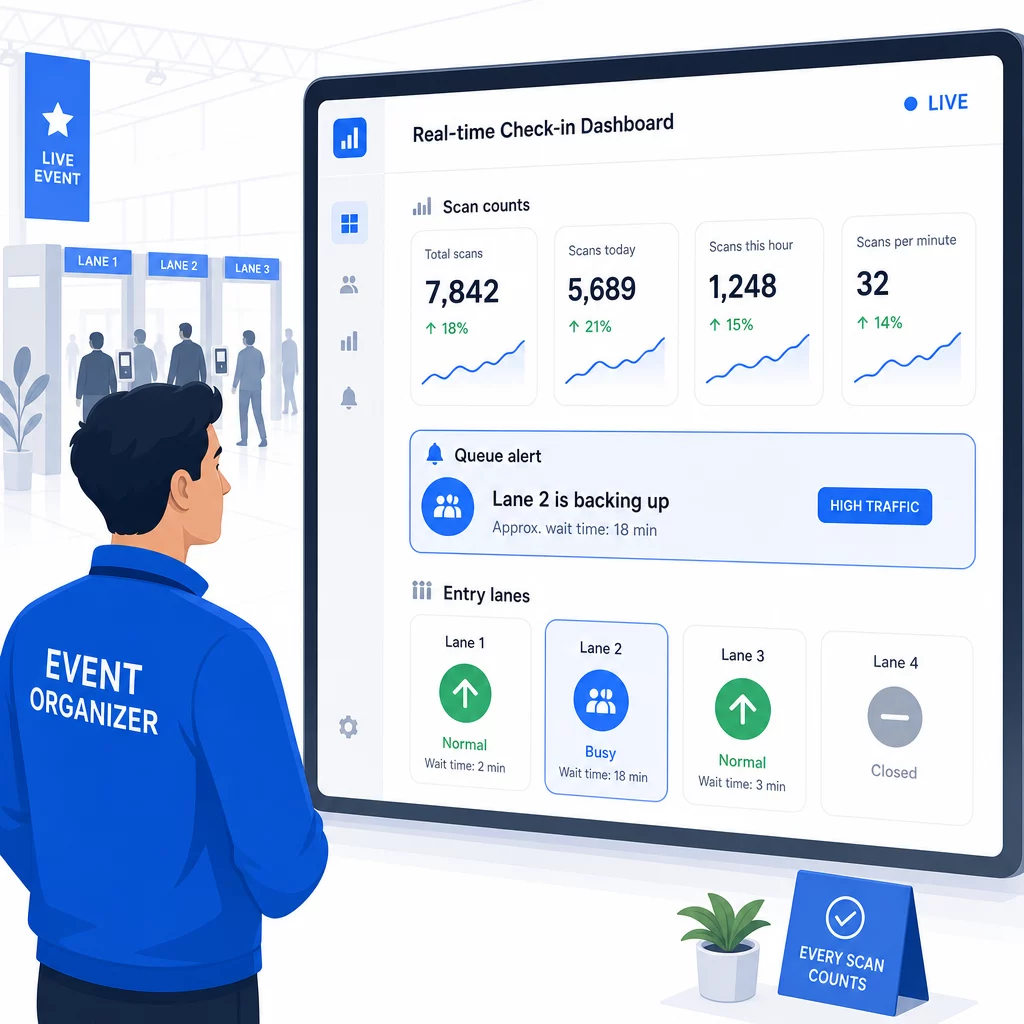
Pärast üritust annavad need andmed teavet järgmise korra otsuste tegemiseks: millal uksed avada, kui palju sissepääsuradasid vajate ja millised seansid pälvisid kõige rohkem tähelepanu. Tööriistad QR-koodi sündmuse jälgimine pakkuda sündmusejärgseid aruannete eksporte, mis sisestuvad otse planeerimise töövoogudesse.
Turvalisus ja andmekaitse
Sisseregistreerimissüsteemid käsitlevad isikuandmeid, mis loob nii juriidilisi kui ka mainelisi kohustusi.
Eelkõige QR-koodisüsteemide puhul:
- Kasutage ühekordseid koode, mis deaktiveeruvad pärast esimest skaneerimist, et vältida mandaatide jagamist
- Krüpteerige kõik andmed edastamisel ja puhkeolekus – veenduge, et teie QR-platvorm seda toetab, enne kui kohustute
- Koguge ainult seda, mida vajate: nimi, piletitüüp ja sisseregistreerimise ajatempel on tavaliselt piisavad; koduaadressid ja telefoninumbrid harva
- Rakendage juurdepääsukontrolle, et ainult töötajad, kes vajavad osalejate andmeid, saaksid neid näha
- Lisage oma registreerimisvormile selge privaatsusteatis, mis selgitab, mida te kogute, miks ja kui kaua te seda säilitate
California osalejatega ürituste puhul on CCPA-le vastavus nõutav olenemata sellest, kus teie üritus toimub. Osalejatel on õigus teada, milliseid andmeid olete kogunud, ja taotleda nende kustutamist. Juhiste saamiseks nende kaitsemeetmete integreerimiseks oma piletite müügi töövoogu algusest peale, vaadake turvaliste QR-koodiga sündmusepiletite juhend käsitleb üksikasjalikult krüpteerimist, tokeniseerimist ja ühekordse kasutuse valideerimist.
QR-koodi platvorme hinnates otsige SOC 2 vastavust, andmete salvestamist USA serverites, kui teie üritus on kodumaine, andmetele juurdepääsu auditilogisid ja selget poliitikat, mis sätestab, et te säilitate oma osalejate andmete täieliku omandiõiguse.
Varuplaanid tehnoloogia rikete korral
Isegi hästi testitud süsteemid kohtavad sündmuse päeval probleeme. Ehitage oma varuplaan enne, kui seda vajate.
Levinud skannimisprobleemid ja kiired lahendused:
- Kehv valgustus: lisage igasse jaama LED-töövalgustus
- Kahjustatud või loetamatud koodid: hoidke igas jaamas tahvelarvutit, et töötajad saaksid osaleja andmetest digitaalse versiooni üles otsida
- Seadme sobimatus: paluge osalejatel hoida oma telefoni skannerist 6–8 tolli kaugusel; kui natiivne kaamerarakendus ebaõnnestub, lahendab selle tavaliselt spetsiaalne QR-skanneri rakendus
Võrguühenduse rikete korral:
- Kasutage platvormi, mis salvestab sisseregistreerimise andmed kohapeal ja sünkroonib need ühenduse taastumisel
- Hoidke igas sisenemispunktis kahte varuskannimisseadet
Kui kõik digitaalsed süsteemid ebaõnnestuvad:
- Hoidke igas sisenemispunktis tähestikulises järjekorras prinditud osalejate nimekirja
- Juhendage töötajaid, kuidas nime järgi otsida, kadunud koode käsitleda ja ajutisi pääsmeid väljastada
- Kasutage värvikoodiga templeid või kleebiseid käsitsi sisseregistreerimiste märkimiseks ja topeltkirjete vältimiseks
VIP-tasemete või piiratud tsoonidega ürituste puhul printige värvikoodiga ajutised pääsmed enne üritust ette, et töötajad saaksid juurdepääsutasemeid hallata ilma digitaalsele süsteemile tuginemata. Edastage kõik viivitused selgelt: “Kasutame oma varusüsteemi, et teid võimalikult kiiresti sisse lasta” on piisav, et säilitada positiivne osalejakogemus tehniliste raskuste korral.
Järeltegevuse automatiseerimine pärast sisseregistreerimist
Sisseregistreerimise andmed, mida kogute, muutuvad väärtuslikumaks pärast ürituse lõppu. Ühendades oma QR-skannimissüsteemi oma e-posti või turundusplatvormiga, saate saata segmenteeritud järeltegevusi vastavalt sellele, mida iga osaleja tegelikult tegi.
Praktiline üritusejärgne automatiseerimine:
- Saatke tänukirjad 2 tunni jooksul pärast ürituse lõppu, lisades lingid slaididele või ressurssidele
- Mitme sessiooniga ürituste puhul kasutage sessioonipõhiseid QR-skannimise andmeid, et saata ainult sisu, mis on asjakohane sellele, millisel sessioonil iga osaleja osales.
- Jagage tagasisideküsitlusi 24–48 tundi pärast üritust – piirake need viie küsimusega või vähemaga ja pakkuge täitmise eest väikest stiimulit.
- Võrgustikuürituste puhul koostage skannimisandmete põhjal ühenduste kokkuvõtte e-kiri, et osalejatel oleks ülevaade, kellega nad kohtusid.
Jälgige järelteadete avamismäärasid ja klikkimismäärasid, et kalibreerida tulevaste ürituste ajastust ja sisu.
Korduma kippuvad küsimused
See sõltub teie ürituse suurusest, eelarvest ja turvanõuetest. QR-koodid on kõige soodsam variant ja sobivad hästi väikestele ja keskmise suurusega üritustele, kus osalejad kasutavad oma seadmeid. RFID sobib suuremahulistele üritustele, kus on vaja passiivset, käed-vabad sissepääsu tuhandetele osalejatele. NFC on parim valik, kui vajate krüpteeritud tsoonipõhist juurdepääsukontrolli, sularahata makseid või mitmepäevast mandaatide taaskasutamist. Enamik alla 500 osalejaga üritusi saab sujuva sisseregistreerimise korraldada täielikult QR-koodide ja usaldusväärse platvormi abil.
Määrake igale registreerujale unikaalne QR-kood ja konfigureerige oma süsteem nii, et see märgistaks iga koodi kasutatuks kohe pärast esimest skaneerimist. Pärast skaneerimist ei saa koodi enam uuesti kasutada. Dünaamilised QR-koodid koos reaalajas valideerimise taustasüsteemiga tuvastavad dubleeritud skaneerimiskatsed koheselt. Ürituste puhul, kus isikutuvastus on oluline, koolitage personali kontrollima fotoga isikut tõendavat dokumenti registreerimisnimega, kui kood skaneeritakse.
Omage igas sissepääsupunktis prinditud, tähestikulises järjekorras osalejate nimekirja ja koolitage personali osalejaid käsitsi sisse registreerima, kasutades nime ja piletinumbrit. Hoidke igas rajas vähemalt kahte varuskannerit laetud akude või kaasaskantavate akupankadega. Kasutage platvormi, mis salvestab sisseregistreerimised kohapeal ja sünkroonib, kui internetiühendus taastub, et andmeid ei läheks kaduma. Tutvustage oma meeskonnale käsitsi protsessi enne ürituse algust, et üleminek oleks vajadusel sujuv.