ホーム > ブログ > Proximity Technologies for Event Check-In: QR Codes, RFID, and NFC Compared
Event check-in scan

Proximity Technologies for Event Check-In: QR Codes, RFID, and NFC Compared

Compare proximity QR codes, RFID, and NFC for event check-in. Find the best fit for your budget and attendance with our setup and real-time tracking guide.
Updated on 6月 10, 2026
目次

Which check-in technology is right for your event – and what happens when you pick the wrong one? Entry bottlenecks, credential sharing, and real-time tracking gaps cost organizers time and attendee trust. This guide breaks down how QR codes, RFID, and NFC compare for event check-in, and how to implement whichever approach fits your setup.

How QR Codes, RFID, and NFC Work Differently

Before choosing a check-in system, it helps to understand what each technology actually does – and where each one breaks down.

QRコード are visual, camera-based codes. A scanner or smartphone camera reads the pattern, decodes the information, and looks up the attendee record. They require line-of-sight and work best when the code is clean, well-lit, and undamaged. QR code check-in is the lowest-cost option to implement: attendees receive a code by email or SMS, and staff scan it with any camera-equipped device.

RFID (Radio Frequency Identification) uses radio waves between a tag embedded in a badge or wristband and a reader device. Attendees don’t need to do anything – they just walk near a reader and the system logs their entry. RFID is fully passive on the attendee’s side, which makes it extremely fast at high volumes. Readers can detect tags across a few feet, meaning entry can be completely unmanned at the gate.

NFC (Near Field Communication) is a short-range subset of RFID technology, requiring the badge or wristband to be within about 1–4 centimeters of the reader – essentially a tap. The short range is intentional: NFC offers encrypted, two-way communication that’s hard to clone, making it the strongest choice for secure access control, cashless payments, and VIP zone management.

Comparing the Three Technologies Side by Side

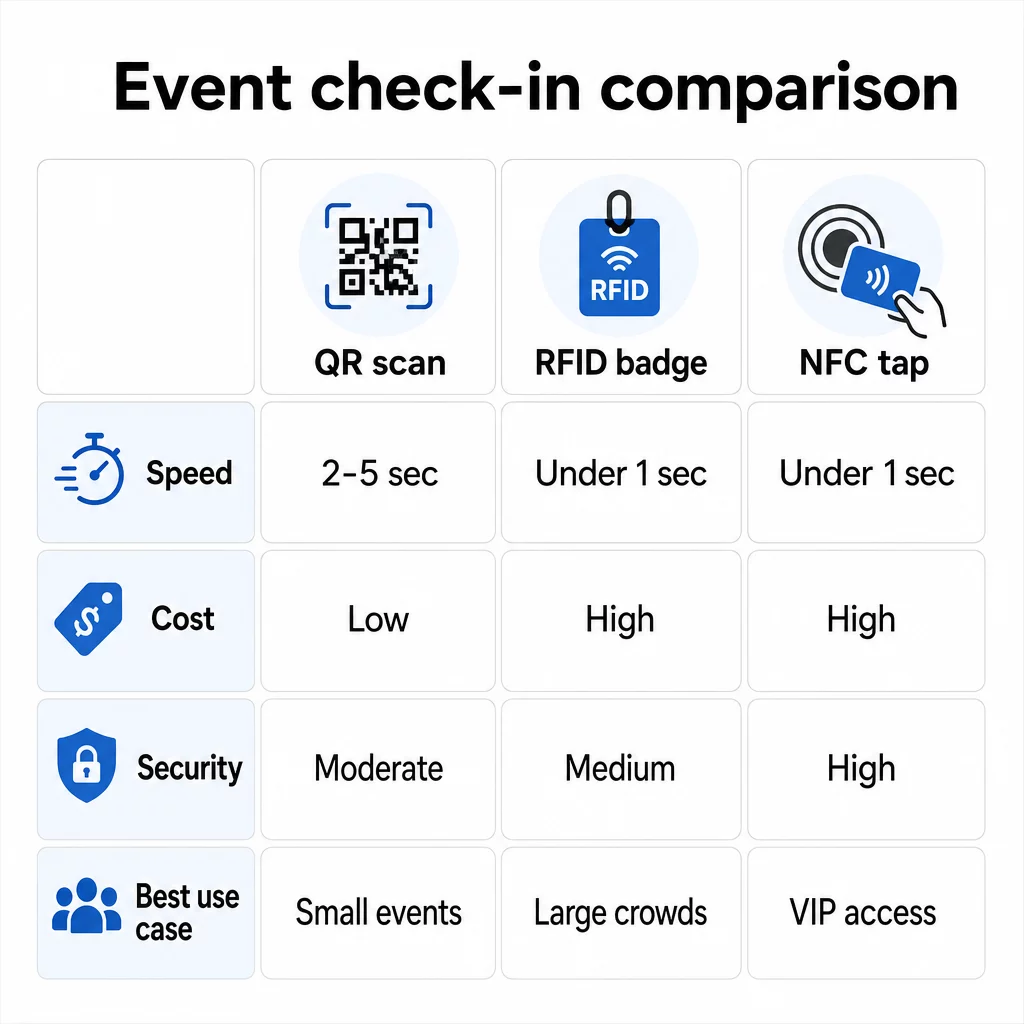
機能 QRコード RFID NFC
How it works Camera scans visual code Radio waves, no line-of-sight Short-range tap (1–4 cm)
Speed per entry 2–5 seconds Under 1 second, hands-free Under 1 second
Infrastructure cost Low (any camera device) High (readers + encoded badges) High (readers + encoded badges)
セキュリティ Moderate (easily shared via screenshot) Variable High (encrypted, hard to clone)
Offline capability Depends on platform Generally yes Generally yes
Reusability Single-use or single-print Reusable across days or events Reusable across days or events
Real-time movement tracking Only at scan points Across the full venue Across defined zones
最適 Small to mid-size events, low budget High-volume events, festivals Secure access, VIP zones, payments

QR codes are fast but fragile. They work well under ideal conditions but become bottlenecks when attendee batteries die, screens are cracked, or network connectivity drops. RFID handles large crowds with minimal friction. NFC offers the strongest security profile but requires the closest physical proximity.

Check-in technology comparison

When to Use QR Codes for Check-In

QR codes are the right choice for most small to mid-size events, one-day conferences, and any situation where budget or setup time is limited. You can implement a full QR check-in system with no specialist hardware – just a reliable QR code platform and a camera-equipped device at each entry point.

The practical advantages of QR codes include:

  • No attendee hardware required – codes live on a phone screen or printed ticket
  • Easy distribution – send via email, SMS, or messaging apps before the event
  • Dynamic updating – if your venue changes or your check-in flow shifts, you can update where a dynamic QR code points without reprinting anything
  • スキャン分析 – track check-in times, device types, and entry volume in real time

The main weaknesses to plan around: QR codes don’t inherently verify identity, only possession of a code. They’re easy to screenshot and share. And they don’t passively track where attendees go between scan points.

To close some of these gaps, assign each registrant a unique, single-use QR code that’s marked as used on first scan. This prevents duplicates and credential sharing without adding hardware overhead. You can learn how this works in practice in the イベントチェックインのためのQRコード究極ガイド.

Set Up Trackable Event Check-In Codes Create personalized, dynamic QR codes for every attendee and monitor real-time scan data from a single dashboard. Start with the PagelootイベントQRコードジェネレーター.

When to Use RFID or NFC Instead

For large festivals, multi-day conferences, or any event with 1,000+ attendees moving through multiple access zones, RFID and NFC offer meaningfully better throughput and tracking depth.

RFID makes sense when:

  • You need fully automated, unmanned entry gates
  • Attendees are moving through multiple sessions or areas and you need passive venue tracking
  • Credential sharing is a material fraud risk
  • You’re issuing physical wristbands or badges anyway

NFC makes sense when:

  • You need zone-based access control with encrypted credentials (VIP, backstage, press)
  • You’re running cashless payments alongside entry management
  • You want two-way data exchange between badges and readers
  • Maximum clone-resistance is a security requirement

The tradeoff is infrastructure. RFID and NFC both require upfront investment in readers, encoded badges or wristbands, and software integration with your event management platform. You also need to issue credentials in advance, which adds a pre-event logistics step that QR code systems skip entirely.

Setting Up QR Code Check-In: A Step-by-Step Approach

If you’ve decided QR codes are the right fit, here’s how to implement them properly.

Choose Dynamic Over Static Codes

Static QR codes lock in a fixed destination at the time of creation. If your check-in form URL changes, or your event platform goes down and you need to redirect attendees, you have to reprint. Dynamic QR codes let you update the destination at any point – even during the event – without issuing new codes.

For events where any detail might shift, dynamic codes are the practical default. Platforms like Pageloot’s QRコードジェネレーター let you create editable codes and track every scan in real time.

Assign Individual Codes to Each Attendee

One code per attendee prevents sharing, creates an auditable check-in record, and lets your system mark each code as used on first scan. Distribute codes by email (embedded as an image with a downloadable PDF backup) and by SMS for attendees who may not check email reliably. Send reminder messages 48 and 24 hours before the event to reduce the number of people who arrive without their code.

If you’re building a more integrated setup – where QR codes pre-populate attendee data into a CRM or form on scan – the guide on building dynamic QR codes for CRM check-ins walks through the technical implementation.

Set Up Your Attendance Tracking Form

A simple and effective approach: create a check-in form on Google Forms or a similar tool, then generate a QR code that links directly to it. When attendees scan, they submit their information, and the data feeds into your tracking dashboard. The attendance tracking QR code setup on Pageloot supports exactly this workflow – organizers can view all submitted data in the generator after attendees scan and submit.

For events using QR codes on tickets, link the code to a secure validation endpoint so staff can confirm attendee identity in real time rather than relying on a passive form submission.

Plan Placement Carefully

Where you put QR codes matters as much as how you create them. Key placement principles:

  • Position scanning stations at about 4 feet high to accommodate all users comfortably
  • Set up multiple check-in points for events over 200 attendees to prevent lane bottlenecks
  • Ensure strong, even lighting at every station – especially for evening or indoor events
  • Place exit-point QR codes linked to a feedback form so guests can share thoughts as they leave
  • For session-based events, place individual QR codes at each session entrance to track participation

Walk the venue before the event as if you’re an attendee. Verify that codes scan cleanly from multiple angles and under the actual lighting conditions of the space.

Design Codes That Scan Reliably

A QR code’s visual design directly affects whether it scans consistently across devices and environments.

  • Minimum size: 0.8 × 0.8 inches (2 × 2 cm) for close-range scanning; larger for displays or signage
  • Contrast: dark modules on a light background, with at least a 4:1 contrast ratio
  • Error correction: use level H when adding a logo to the center of the code, as it allows up to 30% of the code to be obscured while remaining readable
  • For printed tickets that may bend or crease, use flat matte printing rather than glossy finishes to reduce glare
  • Add a short call-to-action below the code: “Scan to check in” removes ambiguity for attendees

You can add brand colors and your event logo while maintaining scannability – tools like Pageloot’s generator apply error correction automatically when logos are embedded. Test every code across multiple phone models and lighting conditions before distributing.

For a deeper look at making codes accessible to all attendees, including those with visual impairments or without smartphones, the RSVP QR codes guide covers accessibility best practices in detail.

Monitoring Check-Ins in Real Time

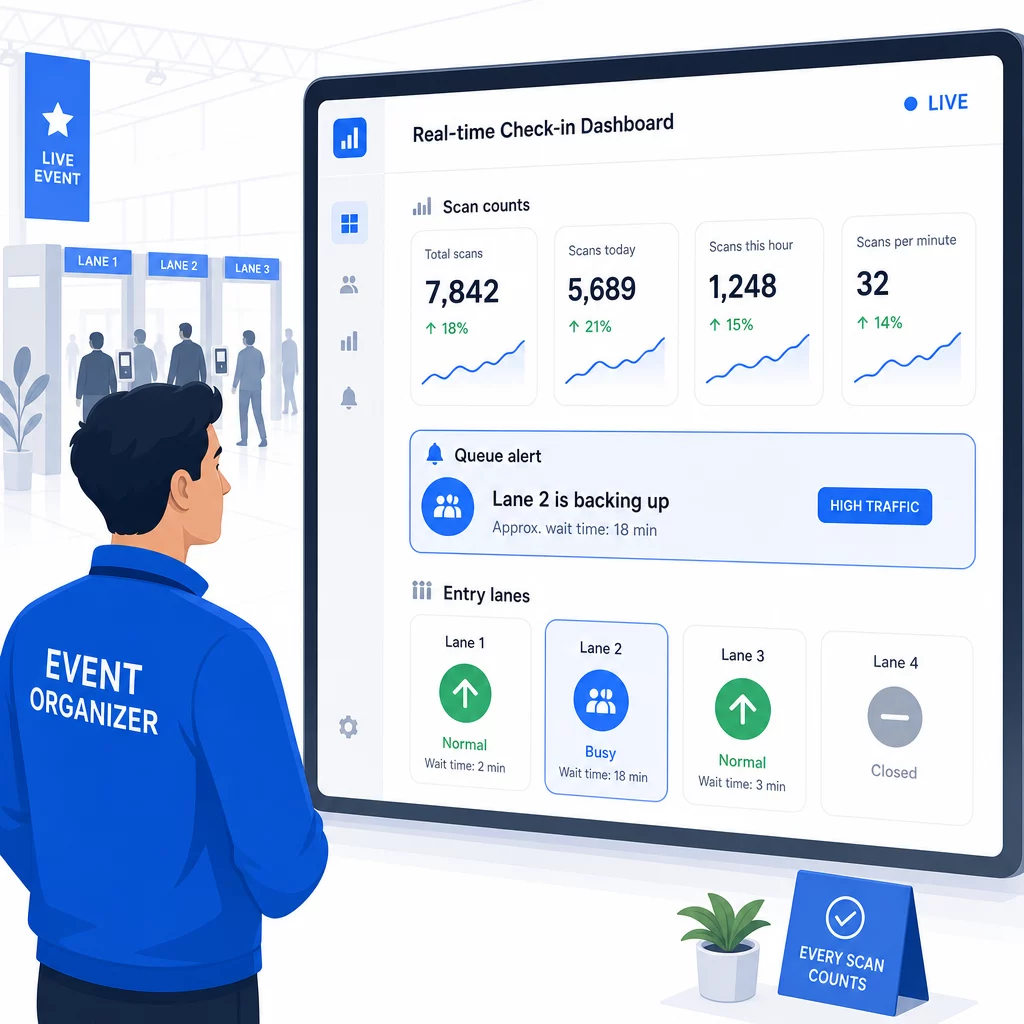
One of the practical advantages QR-based systems have over many RFID implementations is accessible, real-time analytics without specialist software.

Metrics worth tracking during the event:

  • Total check-ins at any given time
  • Average scan processing time per attendee
  • Queue length and peak arrival windows
  • Session-specific scan counts (if using session QR codes)

QRコードトラッキング on a platform like Pageloot, each scan logs the timestamp, device type, and location, giving you a live picture of where crowds are building. If one entry lane is backing up, you can redirect staff immediately. If a session QR code shows unexpectedly high attendance, you can adjust room capacity before it becomes a problem.

Real-time check-in dashboard

After the event, this data informs decisions for next time: when to open doors, how many entry lanes you need, and which sessions drew the most engagement. Tools for QR code event tracking offer post-event reporting exports that feed directly into planning workflows.

Security and Data Privacy

Check-in systems handle personal data, which creates both legal and reputational obligations.

For QR code systems specifically:

  • Use single-use codes that deactivate after first scan to prevent credential sharing
  • Encrypt all data in transit and at rest – confirm your QR platform supports this before committing
  • Collect only what you need: name, ticket type, and check-in timestamp are usually sufficient; home addresses and phone numbers rarely are
  • Apply access controls so only staff who need attendee data can see it
  • Include a clear privacy notice on your registration form explaining what you collect, why, and how long you retain it

For events with California attendees, CCPA compliance is required regardless of where your event is held. Attendees have the right to know what data you’ve collected and to request its deletion. For guidance on building these protections into your ticketing workflow from the start, the secure QR code event tickets guide covers encryption, tokenization, and one-time-use validation in detail.

When evaluating QR code platforms, look for SOC 2 compliance, data stored on U.S. servers if your event is domestic, audit logs for data access, and a clear policy stating that you retain full ownership of your attendee data.

Backup Plans for When Technology Fails

Even well-tested systems encounter problems on event day. Build your fallback before you need it.

Common scanning issues and quick fixes:

  • Poor lighting: add LED task lighting at each station
  • Damaged or unreadable codes: keep a tablet at each station so staff can pull up a digital version from the attendee record
  • Device incompatibility: ask attendees to hold their phone 6–8 inches from the scanner; if the native camera app fails, a dedicated QR scanner app usually resolves it

For network failures:

  • Use a platform that stores check-in data locally and syncs when connectivity returns
  • Keep two backup scanning devices at each entry point

If all digital systems fail:

  • Have an alphabetized printed attendee list at each entry point
  • Brief staff on how to search by name, handle lost codes, and issue temporary badges
  • Use color-coded stamps or stickers to mark manual check-ins and prevent duplicate entries

For events with VIP tiers or restricted zones, pre-print color-coded temporary badges before the event so staff can manage access levels without relying on the digital system. Communicate any delays clearly: “We’re using our backup system to get you in as quickly as possible” is enough to preserve a positive attendee experience during technical difficulties.

Automating Follow-Up After Check-In

The check-in data you collect becomes more valuable after the event ends. By connecting your QR scanning system to your email or marketing platform, you can send segmented follow-ups based on what each attendee actually did.

Practical post-event automation:

  • Send thank-you emails within 2 hours of the event’s close, including links to slides or resources
  • For multi-session events, use session-specific QR scan data to send only the content relevant to what each attendee attended
  • Share feedback surveys 24–48 hours after the event – keep them to five questions or fewer and offer a small incentive for completion
  • For networking events, compile a connection summary email from scan data so attendees have a record of who they met

Track open rates and click-through rates on follow-up messages to calibrate timing and content for future events.

よくある質問

Should I use QR codes, RFID, or NFC for my event check-in?

It depends on your event size, budget, and security requirements. QR codes are the lowest-cost option and work well for small to mid-size events where attendees bring their own devices. RFID suits high-volume events where you need passive, hands-free entry across thousands of attendees. NFC is the strongest choice when you need encrypted zone-based access control, cashless payments, or multi-day credential reuse. Most events under 500 attendees can run a smooth check-in entirely with QR codes and a reliable platform.

How do I stop attendees from sharing QR codes with people who didn’t register?

Assign a unique QR code to each registrant and configure your system to mark each code as used immediately after the first scan. Once scanned, the code cannot be used again. Dynamic QR codes paired with a real-time validation backend catch duplicate scan attempts instantly. For events where identity verification matters, train staff to cross-check a photo ID against the registration name when the code is scanned.

What should I do if my QR scanning system stops working mid-event?

Have a printed, alphabetized attendee list at every entry point and train staff to check in attendees manually using name and ticket number. Keep at least two backup scanning devices per lane with charged batteries or portable power packs. Use a platform that stores check-ins locally and syncs when internet connectivity returns so no data is lost. Brief your team on the manual process before the event starts so the transition is seamless if needed.

著者について

Siim KostabiはPagelootのコンテンツリードです。Pagelootの革新的なQRコード生成サービスについて執筆しています。5年以上にわたるQRコードに関する深い専門知識を持つSiimは、この分野の専門家です。QRテクノロジーを活用してデジタルインタラクションを簡素化・拡張する上で、大きな進歩を遂げています。.

カテゴリー
について詳しくはこちら
グループQRコードのスキャン
のQRコード フェイスブック・グループ
✅ QRコードの#1ソリューション

オンラインでQRコードを作成する必要がある場合は QRコードを作る ここで無料で
ページルートは #1のGo-Toソリューション でQRコードを作成してスキャンすることができます。

売上、レビュー、フォロワーを増やすために 20,000 を超えるブランドから信頼されています。

クライアントのロゴ
トップブランドから信頼される
5 のうち 4.8 と評価しました

4.86 / 5つ星評価

ユーゴ・ローラン
ユーゴ・ローラン
レストランオーナー
最も簡単で信頼性の高いQRコードジェネレータです。PDFファイルを即座にアップロードできます。レストランのメニューがデジタル化されました。
ルーカス・ジャンセン
ルーカス・ジャンセン
不動産開発業者
これは優れたツールで、QRコードでちょうど欲しいところに連れて行ってくれます。私たちは位置情報のQRコードしか使っていませんが、とても便利な機能がたくさんあります。
エマ・モレッティ
エマ・モレッティ
小売製品
使いやすいし、早い。素晴らしい機能で、完璧な画像を作成してくれるので、社員は私のvCardをダウンロードすることができます。
ユーゴ・ローラン
ユーゴ・ローラン
レストランオーナー
最も簡単で信頼性の高いQRコードジェネレータです。PDFファイルを即座にアップロードできます。レストランのメニューがデジタル化されました。
ルーカス・ジャンセン
ルーカス・ジャンセン
不動産開発業者
これは優れたツールで、QRコードでちょうど欲しいところに連れて行ってくれます。私たちは位置情報のQRコードしか使っていませんが、とても便利な機能がたくさんあります。
エマ・モレッティ
エマ・モレッティ
小売製品
使いやすいし、早い。素晴らしい機能で、完璧な画像を作成してくれるので、社員は私のvCardをダウンロードすることができます。
QRコードをもっと見る
Gym QR code scan
フィットネス QRコード
あらゆるものをデジタル体験に変えよう 3分以内に。

14日間の無料トライアル。

クレジットカードは必要ありません。

初回購入で30%オフ

次のコードを使用してください:

MP3ファイルを共有

PDF QRコードを作成するにはサインアップしてください

必要なものをすべてアップロードして表示する。

  • オーディオファイル
  • ポッドキャスト
  • 音楽

サインアップで14日間無料トライアル。.
トライアル終了後、QRコードは期限切れになります。.

オーディオmp3 QRコードを作成するにはサインアップしてください

フレームでより多くのスキャンを獲得

QRコードにフレームを追加するにはサインアップしてください

コールトゥアクションフレームは、お客様が簡単にQRコードと対話できるようにします。ぜひお試しください。

サインアップで14日間無料トライアル。.
トライアル終了後、QRコードは期限切れになります。.

QRコードにフレームを追加するにはサインアップしてください

シェイプでスタイルを追加

より多くの図形を作成するにはサインアップしてください

QRコードは四角いものである必要はありません。あなたのブランドのイメージに合わせて変えてみてください。

サインアップで14日間無料トライアル。.
トライアル終了後、QRコードは期限切れになります。.

より多くの図形を作成するにはサインアップしてください

QRコードにロゴを追加

QRコードにロゴを追加するにはサインアップしてください

QRコードにロゴやブランドを入れることで、目立たせることができます。

サインアップで14日間無料トライアル。.
トライアル終了後、QRコードは期限切れになります。.

QRコードにロゴを追加するにはサインアップしてください

スマートなApp Storeリダイレクト

アプリストアのQRコードを作成するにはサインアップしてください

スマートなApp StoreのQRコードに、あなたのアプリのリンクを追加します。ユーザーは、デバイスに応じてリダイレクトされます。

サインアップで14日間無料トライアル。.
トライアル終了後、QRコードは期限切れになります。.

アプリストアのQRコードを作成するにはサインアップしてください

QRコードに画像をアップロード

画像QRコードを作成するにはサインアップしてください

画像を簡単に共有できます。どんな画像も、数秒でダイナミックに変化します。

サインアップで14日間無料トライアル。.
トライアル終了後、QRコードは期限切れになります。.

画像QRコードを作成するにはサインアップしてください

PDFファイルを共有

PDF QRコードを作成するにはサインアップしてください

必要なものをすべてアップロードして表示する。

  • メニュー&プライスリスト
  • 指示
  • 任意の書類

サインアップで14日間無料トライアル。.
トライアル終了後、QRコードは期限切れになります。.

PDF QRコードを作成するにはサインアップしてください

印刷せずに後で編集

再度印刷せずにQRコードを編集するにはサインアップしてください

ダイナミックQRコードは、新たにQRコードを印刷することなく、QRコードの内容を変更することができます。

サインアップで14日間無料トライアル。.
トライアル終了後、QRコードは期限切れになります。.

再度印刷せずにQRコードを編集するにはサインアップしてください

いつ?どこで?QRコードのスキャンを追跡

QRコードを追跡するにはサインアップしてください

どのQRコードが最も多くスキャンされ、何が最も顧客を喜ばせているのかを知ることができます。

サインアップで14日間無料トライアル。.
トライアル終了後、QRコードは期限切れになります。.

QRコードを追跡するにはサインアップしてください

印刷可能なファイルが利用可能

PDFやSVGのようなベクターQRコードを作成するにはサインアップしてください

.eps、.pdf、.svg

QRコードをHD解像度でダウンロードしたいですか?すぐに印刷できるベクターまたはピクセル形式を入手しましょう。

サインアップで14日間無料トライアル。.
トライアル終了後、QRコードは期限切れになります。.

PDFやSVGのようなベクターQRコードを作成するにはサインアップしてください

しばらくお待ちください。あなたのQRコードは ロード... ロード...

あなただけのものに

サインアップしてQRコードを後で保存してください

異なる色、ロゴ、コールトゥアクションフレームで素晴らしいQRコードを作成することで、より多くのスキャンを得ることができます。

サインアップで14日間無料トライアル。.
トライアル終了後、QRコードは期限切れになります。.

サインアップしてQRコードを後で保存してください