Quelle technologie d'enregistrement convient à votre événement – et que se passe-t-il si vous choisissez la mauvaise ? Les goulots d'étranglement à l'entrée, le partage d'identifiants et les lacunes dans le suivi en temps réel coûtent du temps aux organisateurs et la confiance des participants. Ce guide explique comment les codes QR, la RFID et la NFC se comparent pour l'enregistrement d'événements, et comment mettre en œuvre l'approche qui convient le mieux à votre configuration.
Comment les codes QR, la RFID et la NFC fonctionnent différemment
Avant de choisir un système d'enregistrement, il est utile de comprendre ce que chaque technologie fait réellement – et où chacune présente des limites.
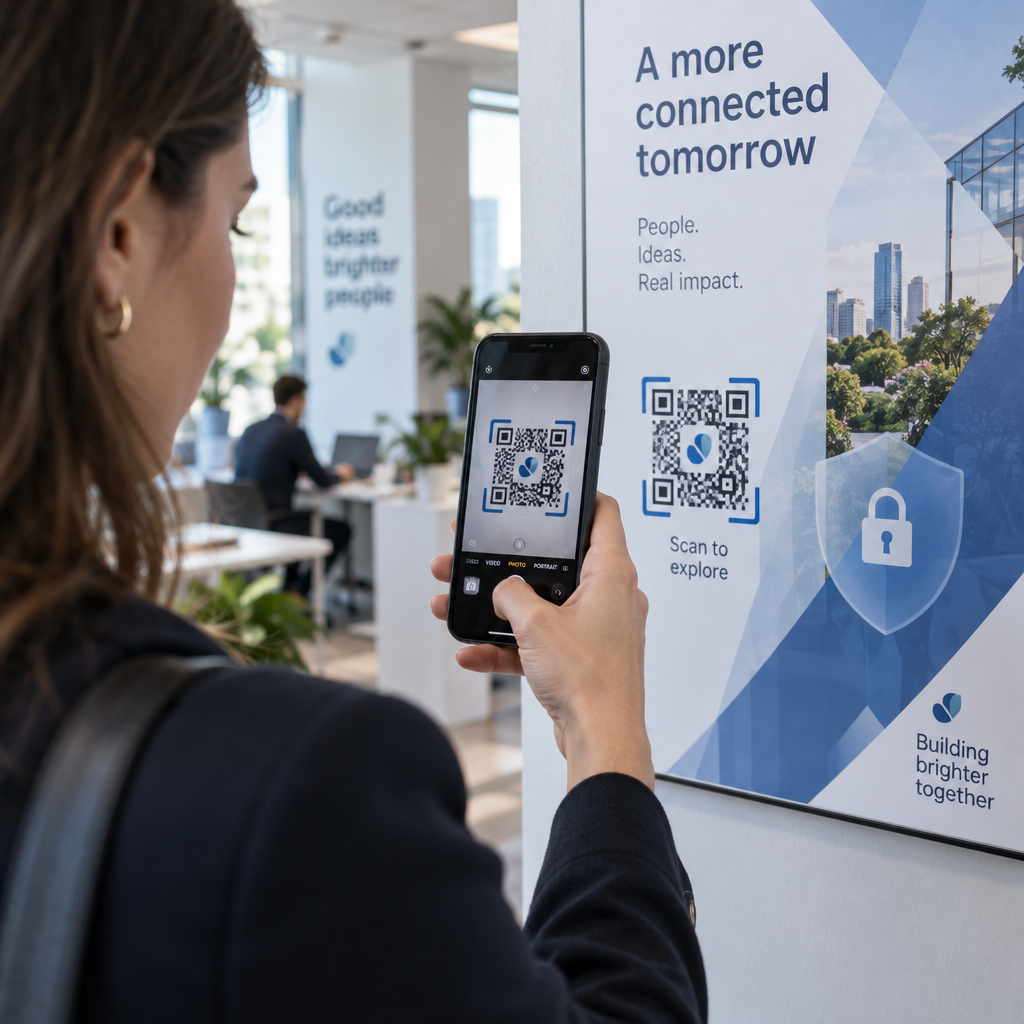
Codes QR sont des codes visuels basés sur une caméra. Un scanner ou l'appareil photo d'un smartphone lit le motif, décode l'information et recherche le dossier du participant. Ils nécessitent une ligne de visée et fonctionnent mieux lorsque le code est propre, bien éclairé et intact. L'enregistrement par code QR est l'option la moins coûteuse à mettre en œuvre : les participants reçoivent un code par e-mail ou SMS, et le personnel le scanne avec n'importe quel appareil photo.
RFID (Identification par Fréquence Radio) utilise des ondes radio entre une étiquette intégrée dans un badge ou un bracelet et un lecteur. Les participants n'ont rien à faire – ils passent simplement près d'un lecteur et le système enregistre leur entrée. La RFID est entièrement passive du côté du participant, ce qui la rend extrêmement rapide pour de grands volumes. Les lecteurs peuvent détecter les étiquettes à quelques mètres, ce qui signifie que l'entrée peut être entièrement automatisée au portail.
NFC (Communication en Champ Proche) est un sous-ensemble de la technologie RFID à courte portée, nécessitant que le badge ou le bracelet se trouve à environ 1 à 4 centimètres du lecteur – essentiellement un contact. La courte portée est intentionnelle : la NFC offre une communication bidirectionnelle cryptée difficile à cloner, ce qui en fait le meilleur choix pour le contrôle d'accès sécurisé, les paiements sans espèces et la gestion des zones VIP.
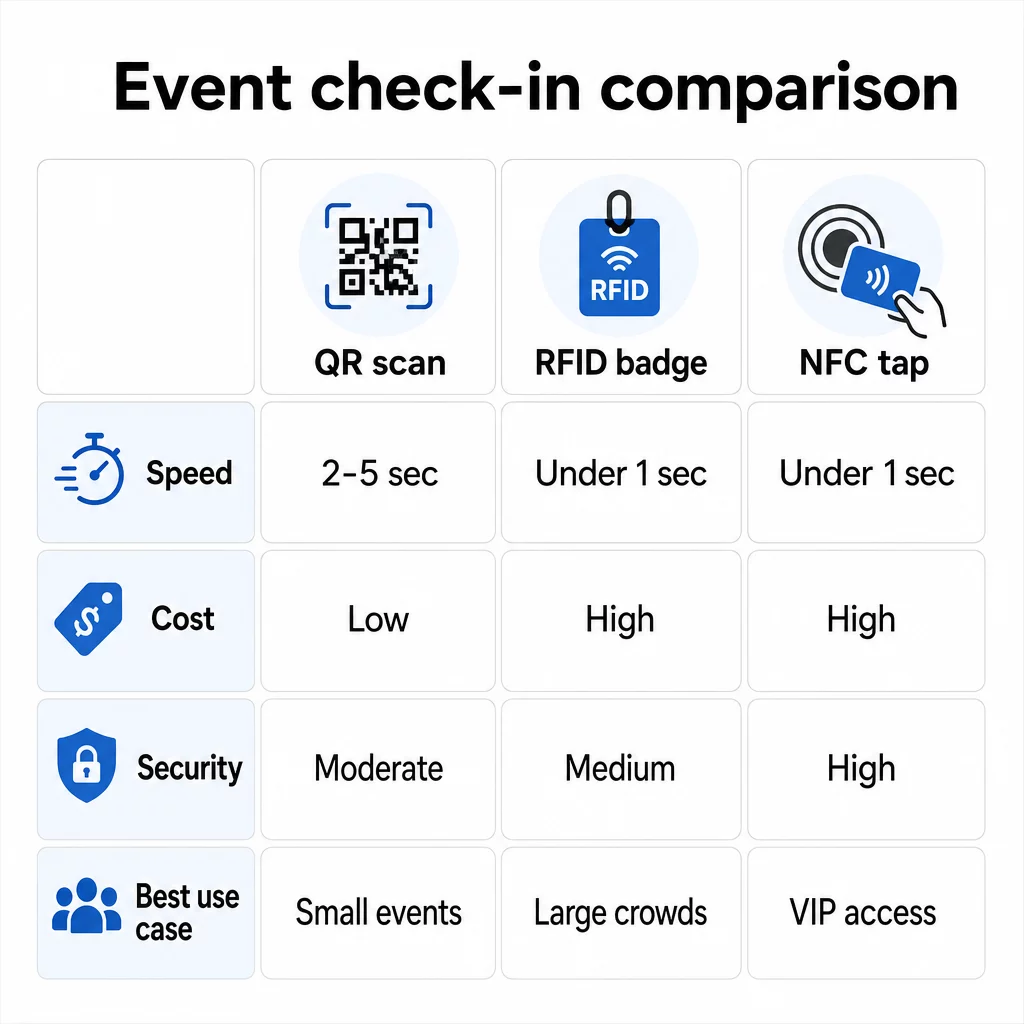
Comparaison des trois technologies côte à côte
| FONCTIONNALITÉ | Code QR | RFID | NFC |
|---|---|---|---|
| COMMENT ÇA MARCHE | La caméra scanne le code visuel | Ondes radio, pas de ligne de visée | Contact à courte portée (1–4 cm) |
| Vitesse par entrée | 2 à 5 secondes | Moins d'1 seconde, mains libres | Moins d'1 seconde |
| Coût de l'infrastructure | Faible (tout appareil photo) | Élevé (lecteurs + badges encodés) | Élevé (lecteurs + badges encodés) |
| Sécurité | Modéré (facilement partageable via capture d'écran) | Variable | Élevé (crypté, difficile à cloner) |
| Capacité hors ligne | Dépend de la plateforme | Généralement oui | Généralement oui |
| Réutilisabilité | Usage unique ou impression unique | Réutilisable sur plusieurs jours ou événements | Réutilisable sur plusieurs jours ou événements |
| Suivi des mouvements en temps réel | Uniquement aux points de scan | Sur l'ensemble du site | Dans des zones définies |
| Idéal pour | Événements de petite à moyenne taille, budget limité | Événements à fort volume, festivals | Accès sécurisé, zones VIP, paiements |
Les codes QR sont rapides mais fragiles. Ils fonctionnent bien dans des conditions idéales mais deviennent des goulots d'étranglement lorsque les batteries des participants sont déchargées, les écrans sont fissurés ou la connectivité réseau est interrompue. La RFID gère les grandes foules avec un minimum de friction. La NFC offre le profil de sécurité le plus robuste mais nécessite la plus grande proximité physique.
Quand utiliser les codes QR pour l'enregistrement
Les codes QR sont le bon choix pour la plupart des événements de petite à moyenne taille, des conférences d'une journée et toute situation où le budget ou le temps de configuration est limité. Vous pouvez mettre en œuvre un système d'enregistrement QR complet sans matériel spécialisé – juste une plateforme de codes QR fiable et un appareil équipé d'une caméra à chaque point d'entrée.
Les avantages pratiques des codes QR incluent :
- Aucun matériel participant requis – les codes sont affichés sur un écran de téléphone ou un billet imprimé
- Distribution facile – envoyer par e-mail, SMS ou applications de messagerie avant l'événement
- Mise à jour dynamique – si votre lieu change ou si votre processus d'enregistrement évolue, vous pouvez mettre à jour la destination d'un code QR dynamique sans rien réimprimer
- Analyses des scans – suivre les heures d'enregistrement, les types d'appareils et le volume d'entrée en temps réel
Les principales faiblesses à prendre en compte : les codes QR ne vérifient pas intrinsèquement l'identité, seulement la possession d'un code. Ils sont faciles à capturer et à partager. Et ils ne suivent pas passivement les déplacements des participants entre les points de scan.
Pour combler certaines de ces lacunes, attribuez à chaque inscrit un code QR unique à usage unique qui est marqué comme utilisé lors du premier scan. Cela empêche les doublons et le partage d'identifiants sans ajouter de frais matériels. Vous pouvez apprendre comment cela fonctionne en pratique dans le guide ultime des codes QR pour l'enregistrement aux événements.
Configurer des codes d'enregistrement d'événement traçables Créez des codes QR personnalisés et dynamiques pour chaque participant et surveillez les données de scan en temps réel à partir d'un tableau de bord unique. Commencez par le Générateur de codes QR d'événements Pageloot.
Quand utiliser la RFID ou la NFC à la place
Pour les grands festivals, les conférences de plusieurs jours ou tout événement avec plus de 1 000 participants se déplaçant à travers plusieurs zones d'accès, la RFID et la NFC offrent un débit et une profondeur de suivi significativement meilleurs.
La RFID est pertinente lorsque :
- Vous avez besoin de portiques d'entrée entièrement automatisés et sans personnel
- Les participants se déplacent à travers plusieurs sessions ou zones et vous avez besoin d'un suivi passif du lieu
- Le partage d'identifiants représente un risque de fraude important
- Vous émettez de toute façon des bracelets ou des badges physiques
La NFC est pertinente lorsque :
- Vous avez besoin d'un contrôle d'accès par zone avec des identifiants cryptés (VIP, coulisses, presse)
- Vous gérez des paiements sans espèces en parallèle de la gestion des entrées
- Vous souhaitez un échange de données bidirectionnel entre les badges et les lecteurs
- La résistance maximale au clonage est une exigence de sécurité
Le compromis est l'infrastructure. La RFID et la NFC nécessitent toutes deux un investissement initial dans des lecteurs, des badges ou des bracelets encodés, et une intégration logicielle avec votre plateforme de gestion d'événements. Vous devez également émettre des identifiants à l'avance, ce qui ajoute une étape logistique pré-événement que les systèmes de codes QR ignorent entièrement.
Mise en place de l'enregistrement par code QR : une approche étape par étape
Si vous avez décidé que les codes QR sont la bonne solution, voici comment les mettre en œuvre correctement.
Choisissez les codes dynamiques plutôt que statiques
Les codes QR statiques verrouillent une destination fixe au moment de leur création. Si l'URL de votre formulaire d'enregistrement change, ou si votre plateforme événementielle tombe en panne et que vous devez rediriger les participants, vous devez réimprimer. Les codes QR dynamiques vous permettent de mettre à jour la destination à tout moment – même pendant l'événement – sans émettre de nouveaux codes.
Pour les événements où le moindre détail peut changer, les codes dynamiques sont la solution par défaut pratique. Les plateformes comme celle de Pageloot Générateur de code QR vous permettent de créer des codes modifiables et de suivre chaque scan en temps réel.
Attribuez des codes individuels à chaque participant
Un code par participant empêche le partage, crée un enregistrement d'enregistrement vérifiable et permet à votre système de marquer chaque code comme utilisé lors du premier scan. Distribuez les codes par e-mail (intégrés sous forme d'image avec une sauvegarde PDF téléchargeable) et par SMS pour les participants qui ne consultent pas toujours leurs e-mails de manière fiable. Envoyez des messages de rappel 48 et 24 heures avant l'événement pour réduire le nombre de personnes qui arrivent sans leur code.
Si vous mettez en place une configuration plus intégrée – où les codes QR pré-remplissent les données des participants dans un CRM ou un formulaire lors du scan – le guide sur la création de codes QR dynamiques pour les enregistrements CRM détaille la mise en œuvre technique.
Configurez votre formulaire de suivi des présences
Une approche simple et efficace : créez un formulaire d'enregistrement sur Google Forms ou un outil similaire, puis générez un code QR qui y renvoie directement. Lorsque les participants scannent, ils soumettent leurs informations, et les données alimentent votre tableau de bord de suivi. Le code QR de suivi des présences la configuration sur Pageloot prend en charge exactement ce flux de travail – les organisateurs peuvent consulter toutes les données soumises dans le générateur après que les participants aient scanné et soumis.
Pour les événements utilisant des codes QR sur les billets, liez le code à un point de terminaison de validation sécurisé afin que le personnel puisse confirmer l'identité du participant en temps réel plutôt que de s'appuyer sur une soumission de formulaire passive.
Planifiez l'emplacement avec soin
L'endroit où vous placez les codes QR est aussi important que la façon dont vous les créez. Principes clés de placement :
- Positionnez les stations de scan à environ 1,2 mètre de hauteur pour accueillir confortablement tous les utilisateurs
- Mettez en place plusieurs points d'enregistrement pour les événements de plus de 200 participants afin d'éviter les goulots d'étranglement
- Assurez un éclairage fort et uniforme à chaque station – surtout pour les événements en soirée ou en intérieur
- Placez des codes QR aux points de sortie liés à un formulaire de commentaires afin que les invités puissent partager leurs réflexions en partant
- Pour les événements basés sur des sessions, placez des codes QR individuels à chaque entrée de session pour suivre la participation
Parcourez le lieu avant l'événement comme si vous étiez un participant. Vérifiez que les codes scannent correctement sous plusieurs angles et dans les conditions d'éclairage réelles de l'espace.
Concevez des codes qui scannent de manière fiable
La conception visuelle d'un code QR affecte directement sa capacité à être scanné de manière cohérente sur différents appareils et environnements.
- Taille minimale : 0,8 × 0,8 pouces (2 × 2 cm) pour le scan à courte portée ; plus grand pour les écrans ou la signalisation
- Contraste : modules sombres sur un fond clair, avec un rapport de contraste d'au moins 4:1
- Correction d'erreur : utilisez le niveau H lorsque vous ajoutez un logo au centre du code, car il permet d'obscurcir jusqu'à 30 % du code tout en restant lisible
- Pour les billets imprimés qui peuvent se plier ou se froisser, utilisez une impression mate plutôt que des finitions brillantes pour réduire l'éblouissement
- Ajoutez un court appel à l'action sous le code : “ Scannez pour vous enregistrer ” élimine toute ambiguïté pour les participants
Vous pouvez ajouter les couleurs de votre marque et le logo de votre événement tout en conservant la scannabilité – des outils comme le générateur de Pageloot appliquent automatiquement la correction d'erreur lorsque des logos sont intégrés. Testez chaque code sur plusieurs modèles de téléphone et dans différentes conditions d'éclairage avant de le distribuer.
Pour un examen plus approfondi de la manière de rendre les codes accessibles à tous les participants, y compris ceux ayant une déficience visuelle ou sans smartphone, le guide des codes QR RSVP couvre en détail les meilleures pratiques d'accessibilité.
Suivi des enregistrements en temps réel
L'un des avantages pratiques des systèmes basés sur les QR codes par rapport à de nombreuses implémentations RFID est l'accès à des analyses en temps réel, sans logiciel spécialisé.
Métriques à suivre pendant l'événement :
- Nombre total d'enregistrements à tout moment
- Temps moyen de traitement du scan par participant
- Longueur de la file d'attente et fenêtres d'arrivée de pointe
- Nombre de scans spécifiques à la session (si des codes QR de session sont utilisés)
Avec Suivi du code QR sur une plateforme comme Pageloot, chaque scan enregistre l'horodatage, le type d'appareil et l'emplacement, vous donnant une image en direct de l'endroit où les foules se forment. Si une voie d'entrée est encombrée, vous pouvez rediriger le personnel immédiatement. Si un code QR de session indique une affluence inattendue, vous pouvez ajuster la capacité de la salle avant que cela ne devienne un problème.
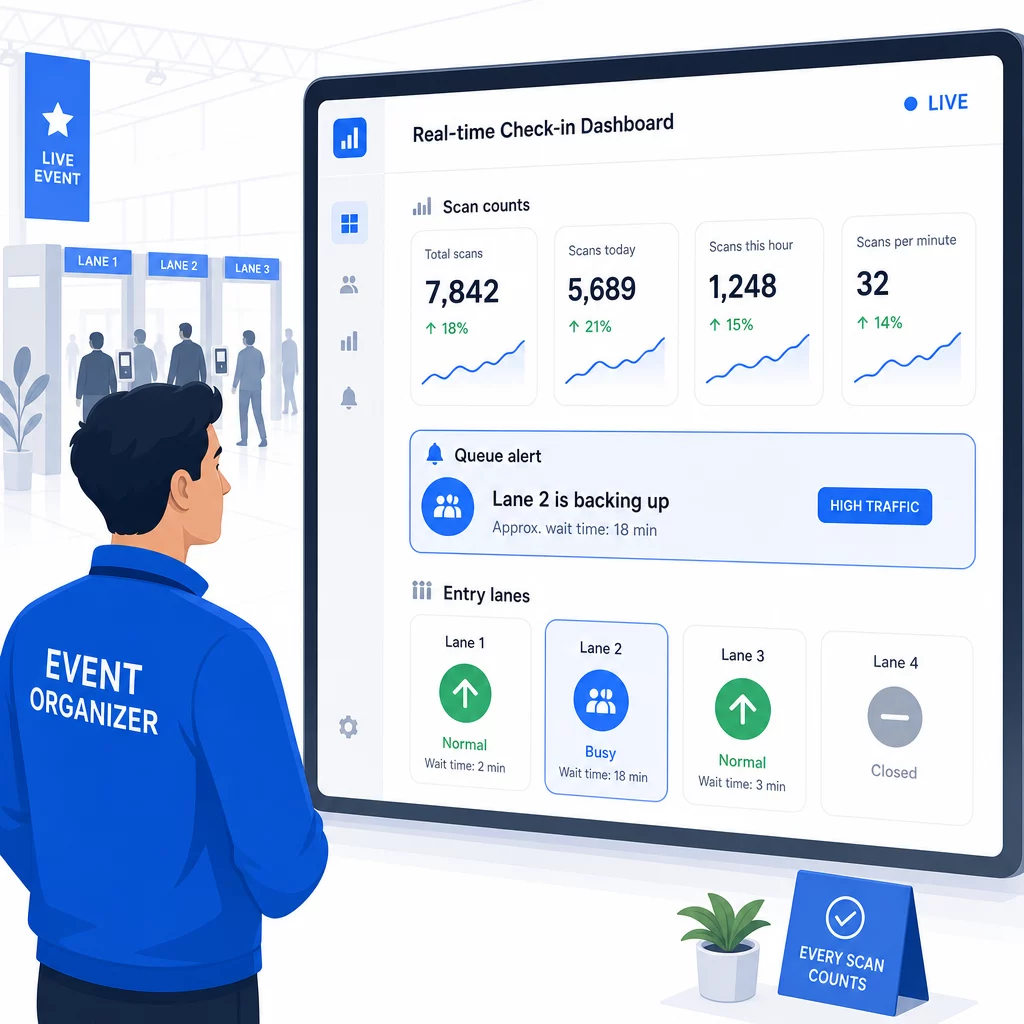
Après l'événement, ces données éclairent les décisions pour la prochaine fois : quand ouvrir les portes, combien de voies d'entrée sont nécessaires et quelles sessions ont suscité le plus d'engagement. Les outils pour Suivi d'événements par code QR proposer des exportations de rapports post-événement qui s'intègrent directement dans les flux de travail de planification.
Sécurité et confidentialité des données
Les systèmes d'enregistrement traitent des données personnelles, ce qui crée des obligations à la fois légales et de réputation.
Pour les systèmes de codes QR spécifiquement :
- Utilisez des codes à usage unique qui se désactivent après le premier scan pour éviter le partage d'identifiants
- Chiffrez toutes les données en transit et au repos – confirmez que votre plateforme QR prend en charge cela avant de vous engager
- Ne collectez que ce dont vous avez besoin : le nom, le type de billet et l'horodatage de l'enregistrement sont généralement suffisants ; les adresses personnelles et les numéros de téléphone le sont rarement
- Appliquez des contrôles d'accès afin que seul le personnel qui a besoin des données des participants puisse les voir
- Incluez un avis de confidentialité clair sur votre formulaire d'inscription expliquant ce que vous collectez, pourquoi et combien de temps vous le conservez
Pour les événements avec des participants californiens, la conformité à la CCPA est requise quel que soit le lieu de votre événement. Les participants ont le droit de savoir quelles données vous avez collectées et de demander leur suppression. Pour obtenir des conseils sur l'intégration de ces protections dans votre flux de travail de billetterie dès le début, le guide des billets d'événement sécurisés par code QR couvre en détail le chiffrement, la tokenisation et la validation à usage unique.
Lors de l'évaluation des plateformes de codes QR, recherchez la conformité SOC 2, les données stockées sur des serveurs américains si votre événement est national, les journaux d'audit pour l'accès aux données et une politique claire stipulant que vous conservez la pleine propriété de vos données de participants.
Plans de secours en cas de défaillance technologique
Même les systèmes bien testés rencontrent des problèmes le jour de l'événement. Préparez votre solution de repli avant d'en avoir besoin.
Problèmes de scan courants et solutions rapides :
- Mauvais éclairage : ajoutez un éclairage de travail LED à chaque poste
- Codes endommagés ou illisibles : gardez une tablette à chaque poste afin que le personnel puisse afficher une version numérique à partir du dossier du participant
- Incompatibilité des appareils : demandez aux participants de tenir leur téléphone à 15-20 cm du scanner ; si l'application appareil photo native échoue, une application de scan QR dédiée résout généralement le problème
Pour les pannes de réseau :
- Utilisez une plateforme qui stocke les données d'enregistrement localement et les synchronise lorsque la connectivité revient
- Gardez deux appareils de scan de secours à chaque point d'entrée
Si tous les systèmes numériques échouent :
- Ayez une liste de participants imprimée et alphabétisée à chaque point d'entrée
- Briefez le personnel sur la façon de rechercher par nom, de gérer les codes perdus et de délivrer des badges temporaires
- Utilisez des tampons ou des autocollants à code couleur pour marquer les enregistrements manuels et éviter les doublons
Pour les événements avec des niveaux VIP ou des zones restreintes, pré-imprimez des badges temporaires à code couleur avant l'événement afin que le personnel puisse gérer les niveaux d'accès sans dépendre du système numérique. Communiquez clairement tout retard : “ Nous utilisons notre système de secours pour vous faire entrer le plus rapidement possible ” est suffisant pour préserver une expérience positive pour les participants lors de difficultés techniques.
Automatisation du suivi après l'enregistrement
Les données d'enregistrement que vous collectez deviennent plus précieuses une fois l'événement terminé. En connectant votre système de scan QR à votre plateforme d'e-mail ou de marketing, vous pouvez envoyer des suivis segmentés basés sur ce que chaque participant a réellement fait.
Automatisation pratique post-événement :
- Envoyez des e-mails de remerciement dans les 2 heures suivant la fin de l'événement, y compris des liens vers des diapositives ou des ressources
- Pour les événements à sessions multiples, utilisez les données de scan QR spécifiques à la session pour envoyer uniquement le contenu pertinent à ce que chaque participant a assisté
- Partagez des enquêtes de feedback 24 à 48 heures après l'événement – limitez-les à cinq questions ou moins et offrez une petite incitation pour leur complétion
- Pour les événements de réseautage, compilez un e-mail de résumé des connexions à partir des données de scan afin que les participants aient un registre des personnes qu'ils ont rencontrées
Suivez les taux d'ouverture et les taux de clics sur les messages de suivi pour ajuster le timing et le contenu des futurs événements.
Questions fréquentes
Cela dépend de la taille de votre événement, de votre budget et de vos exigences en matière de sécurité. Les codes QR sont l'option la moins chère et fonctionnent bien pour les événements de petite à moyenne taille où les participants apportent leurs propres appareils. La RFID convient aux événements à grand volume où vous avez besoin d'une entrée passive et mains libres pour des milliers de participants. La NFC est le choix le plus solide lorsque vous avez besoin d'un contrôle d'accès crypté basé sur des zones, de paiements sans espèces ou de la réutilisation de titres d'accès sur plusieurs jours. La plupart des événements de moins de 500 participants peuvent gérer un enregistrement fluide entièrement avec des codes QR et une plateforme fiable.
Attribuez un code QR unique à chaque inscrit et configurez votre système pour marquer chaque code comme utilisé immédiatement après le premier scan. Une fois scanné, le code ne peut plus être utilisé. Les codes QR dynamiques associés à un backend de validation en temps réel détectent instantanément les tentatives de scan en double. Pour les événements où la vérification d'identité est importante, formez le personnel à vérifier une pièce d'identité avec photo par rapport au nom d'inscription lorsque le code est scanné.
Ayez une liste d'inscrits imprimée et alphabétisée à chaque point d'entrée et formez le personnel à enregistrer les participants manuellement en utilisant le nom et le numéro de billet. Gardez au moins deux dispositifs de scan de secours par voie avec des batteries chargées ou des blocs d'alimentation portables. Utilisez une plateforme qui stocke les enregistrements localement et se synchronise lorsque la connectivité internet revient afin qu'aucune donnée ne soit perdue. Briefez votre équipe sur le processus manuel avant le début de l'événement afin que la transition soit fluide si nécessaire.