Ce tehnologie de check-in este potrivită pentru evenimentul tău – și ce se întâmplă când o alegi greșit? Blocajele la intrare, partajarea acreditărilor și lacunele în urmărirea în timp real costă organizatorii timp și încrederea participanților. Acest ghid detaliază cum se compară codurile QR, RFID și NFC pentru check-in-ul la evenimente și cum să implementezi abordarea care se potrivește configurației tale.
Cum funcționează diferit codurile QR, RFID și NFC
Înainte de a alege un sistem de check-in, este util să înțelegi ce face de fapt fiecare tehnologie – și unde fiecare eșuează.
Coduri QR sunt coduri vizuale, bazate pe cameră. Un scaner sau camera unui smartphone citește modelul, decodează informația și caută înregistrarea participantului. Necesită vizibilitate directă și funcționează cel mai bine atunci când codul este curat, bine iluminat și nedeteriorat. Check-in-ul cu cod QR este opțiunea cu cel mai mic cost de implementare: participanții primesc un cod prin e-mail sau SMS, iar personalul îl scanează cu orice dispozitiv echipat cu cameră.
RFID (Identificare prin Frecvență Radio) utilizează unde radio între o etichetă încorporată într-un ecuson sau o brățară și un dispozitiv de citire. Participanții nu trebuie să facă nimic – pur și simplu se apropie de un cititor și sistemul înregistrează intrarea lor. RFID este complet pasiv din partea participantului, ceea ce îl face extrem de rapid la volume mari. Cititoarele pot detecta etichetele pe o distanță de câțiva metri, ceea ce înseamnă că intrarea poate fi complet nesupravegheată la poartă.
NFC (Comunicare în Câmp Apropiat) este o subcategorie de tehnologie RFID cu rază scurtă, necesitând ca ecusonul sau brățara să se afle la aproximativ 1–4 centimetri de cititor – practic o atingere. Raza scurtă este intenționată: NFC oferă comunicare bidirecțională criptată, greu de clonat, ceea ce o face cea mai puternică alegere pentru controlul securizat al accesului, plățile fără numerar și gestionarea zonelor VIP.
Compararea celor Trei Tehnologii Alăturate
| FUNCȚIE | Cod QR | RFID | NFC |
|---|---|---|---|
| CUM FUNCȚIONEAZĂ | Camera scanează codul vizual | Unde radio, fără vizibilitate directă | Atingere pe rază scurtă (1–4 cm) |
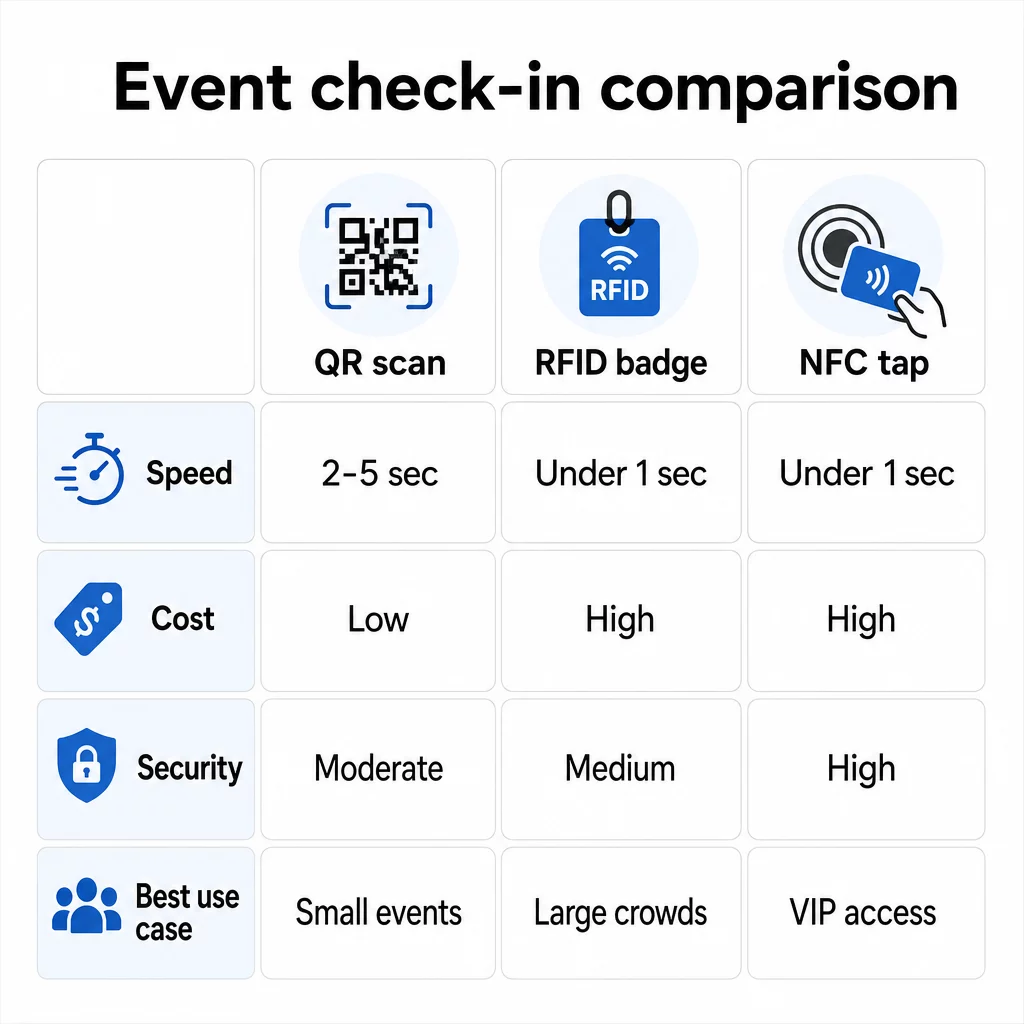
| Viteză per intrare | 2–5 secunde | Sub 1 secundă, fără mâini | Sub 1 secundă |
| Costul infrastructurii | Scăzut (orice dispozitiv cameră) | Ridicat (cititoare + ecusoane codificate) | Ridicat (cititoare + ecusoane codificate) |
| Securitate | Moderat (ușor de partajat prin captură de ecran) | Variabil | Ridicat (criptat, greu de clonat) |
| Capacitate offline | Depinde de platformă | În general da | În general da |
| Reutilizabilitate | De unică folosință sau o singură imprimare | Reutilizabil pe parcursul mai multor zile sau evenimente | Reutilizabil pe parcursul mai multor zile sau evenimente |
| Urmărirea mișcării în timp real | Doar la punctele de scanare | Pe întreaga locație | În zone definite |
| Cel mai bun pentru | Evenimente mici și medii, buget redus | Evenimente cu volum mare, festivaluri | Acces securizat, zone VIP, plăți |
Codurile QR sunt rapide, dar fragile. Funcționează bine în condiții ideale, dar devin blocaje atunci când bateriile participanților se descarcă, ecranele sunt crăpate sau conectivitatea la rețea scade. RFID gestionează mulțimi mari cu frecare minimă. NFC oferă cel mai puternic profil de securitate, dar necesită cea mai apropiată proximitate fizică.
Când să utilizați codurile QR pentru check-in
Codurile QR sunt alegerea potrivită pentru majoritatea evenimentelor mici și medii, conferințelor de o zi și oricărei situații în care bugetul sau timpul de configurare sunt limitate. Puteți implementa un sistem complet de check-in cu cod QR fără hardware specializat – doar o platformă fiabilă de coduri QR și un dispozitiv echipat cu cameră la fiecare punct de intrare.
Avantajele practice ale codurilor QR includ:
- Nu este necesar hardware pentru participanți – codurile sunt pe ecranul telefonului sau pe un bilet tipărit
- Distribuție ușoară – trimiteți prin e-mail, SMS sau aplicații de mesagerie înainte de eveniment
- Actualizare dinamică – dacă locația se schimbă sau fluxul de check-in se modifică, puteți actualiza unde indică un cod QR dinamic fără a retipări nimic
- Analize scanări – urmăriți orele de check-in, tipurile de dispozitive și volumul de intrări în timp real
Principalele slăbiciuni de luat în considerare: codurile QR nu verifică în mod inerent identitatea, ci doar posesia unui cod. Sunt ușor de capturat și partajat. Și nu urmăresc pasiv unde merg participanții între punctele de scanare.
Pentru a reduce unele dintre aceste lacune, atribuiți fiecărui înregistrat un cod QR unic, de unică folosință, care este marcat ca utilizat la prima scanare. Acest lucru previne duplicatele și partajarea acreditărilor fără a adăuga costuri suplimentare de hardware. Puteți afla cum funcționează acest lucru în practică în ghidul suprem pentru codurile QR pentru înregistrarea la evenimente.
Configurați coduri de check-in pentru evenimente urmăribile Creați coduri QR personalizate, dinamice pentru fiecare participant și monitorizați datele de scanare în timp real dintr-un singur tablou de bord. Începeți cu Generator de coduri QR pentru evenimente Pageloot.
Când să utilizați RFID sau NFC în schimb
Pentru festivaluri mari, conferințe de mai multe zile sau orice eveniment cu peste 1.000 de participanți care se deplasează prin mai multe zone de acces, RFID și NFC oferă un debit semnificativ mai bun și o adâncime de urmărire mai mare.
RFID are sens atunci când:
- Aveți nevoie de porți de intrare complet automatizate, fără personal
- Participanții se deplasează prin mai multe sesiuni sau zone și aveți nevoie de urmărire pasivă a locației
- Partajarea acreditărilor reprezintă un risc material de fraudă
- Oricum emiteți brățări sau ecusoane fizice
NFC are sens atunci când:
- Aveți nevoie de control al accesului bazat pe zone cu acreditări criptate (VIP, culise, presă)
- Rulați plăți fără numerar alături de gestionarea intrărilor
- Doriți un schimb bidirecțional de date între ecusoane și cititoare
- Rezistența maximă la clonare este o cerință de securitate
Compromisul este infrastructura. Atât RFID, cât și NFC necesită o investiție inițială în cititoare, ecusoane sau brățări codificate și integrare software cu platforma dvs. de gestionare a evenimentelor. De asemenea, trebuie să emiteți acreditări în avans, ceea ce adaugă un pas logistic pre-eveniment pe care sistemele cu coduri QR îl omit în totalitate.
Configurarea înregistrării cu cod QR: O abordare pas cu pas
Dacă ați decis că codurile QR sunt potrivite, iată cum să le implementați corect.
Alegeți coduri dinamice în locul celor statice
Codurile QR statice blochează o destinație fixă la momentul creării. Dacă URL-ul formularului dvs. de înregistrare se modifică, sau platforma evenimentului dvs. nu funcționează și trebuie să redirecționați participanții, trebuie să retipăriți. Codurile QR dinamice vă permit să actualizați destinația în orice moment – chiar și în timpul evenimentului – fără a emite coduri noi.
Pentru evenimente în care orice detaliu s-ar putea schimba, codurile dinamice sunt opțiunea implicită practică. Platforme precum Pageloot generatorul de coduri QR vă permit să creați coduri editabile și să urmăriți fiecare scanare în timp real.
Atribuiți coduri individuale fiecărui participant
Un cod per participant previne partajarea, creează o înregistrare de check-in auditabilă și permite sistemului dvs. să marcheze fiecare cod ca fiind utilizat la prima scanare. Distribuiți codurile prin e-mail (încorporate ca imagine cu o copie de rezervă PDF descărcabilă) și prin SMS pentru participanții care s-ar putea să nu verifice e-mailul în mod fiabil. Trimiteți mesaje de reamintire cu 48 și 24 de ore înainte de eveniment pentru a reduce numărul de persoane care sosesc fără codul lor.
Dacă construiți o configurație mai integrată – unde codurile QR pre-populează datele participanților într-un CRM sau formular la scanare – ghidul despre construirea de coduri QR dinamice pentru înregistrările CRM detaliază implementarea tehnică.
Configurați formularul dvs. de urmărire a prezenței
O abordare simplă și eficientă: creați un formular de înregistrare pe Google Forms sau un instrument similar, apoi generați un cod QR care se leagă direct la acesta. Când participanții scanează, își trimit informațiile, iar datele sunt introduse în tabloul de bord de urmărire. codul QR de urmărire a prezenței configurația pe Pageloot suportă exact acest flux de lucru – organizatorii pot vizualiza toate datele trimise în generator după ce participanții scanează și trimit.
Pentru evenimente care utilizează coduri QR pe bilete, legați codul de un punct final de validare securizat, astfel încât personalul să poată confirma identitatea participantului în timp real, în loc să se bazeze pe o trimitere pasivă a unui formular.
Planificați Amplasarea cu Atenție
Unde plasați codurile QR contează la fel de mult ca și cum le creați. Principii cheie de amplasare:
- Poziționați stațiile de scanare la aproximativ 1,2 metri înălțime pentru a acomoda confortabil toți utilizatorii
- Configurați mai multe puncte de înregistrare pentru evenimente cu peste 200 de participanți pentru a preveni blocajele pe benzi
- Asigurați o iluminare puternică și uniformă la fiecare stație – mai ales pentru evenimente de seară sau în interior
- Plasați coduri QR la punctele de ieșire, legate de un formular de feedback, astfel încât oaspeții să poată împărtăși gânduri la plecare
- Pentru evenimente bazate pe sesiuni, plasați coduri QR individuale la fiecare intrare de sesiune pentru a urmări participarea
Parcurgeți locația înainte de eveniment ca și cum ați fi un participant. Verificați dacă codurile scanează clar din mai multe unghiuri și în condițiile reale de iluminare ale spațiului.
Proiectați Coduri Care Scanează Fiabil
Designul vizual al unui cod QR afectează direct dacă acesta scanează consecvent pe diferite dispozitive și în diverse medii.
- Dimensiune minimă: 0,8 × 0,8 inchi (2 × 2 cm) pentru scanare de aproape; mai mare pentru afișaje sau semnalistică
- Contrast: module întunecate pe un fundal deschis, cu un raport de contrast de cel puțin 4:1
- Corecție erori: utilizați nivelul H atunci când adăugați un logo în centrul codului, deoarece permite ca până la 30% din cod să fie obturat, rămânând în același timp lizibil
- Pentru biletele tipărite care se pot îndoi sau șifona, utilizați imprimarea mată, nu finisajele lucioase, pentru a reduce reflexiile
- Adăugați un scurt apel la acțiune sub cod: “Scanați pentru a vă înregistra” elimină ambiguitatea pentru participanți
Puteți adăuga culorile brandului și logo-ul evenimentului dvs. menținând scanabilitatea – instrumente precum generatorul Pageloot aplică automat corecția erorilor atunci când logo-urile sunt încorporate. Testați fiecare cod pe mai multe modele de telefoane și în diferite condiții de iluminare înainte de a le distribui.
Pentru o privire mai aprofundată asupra modului de a face codurile accesibile tuturor participanților, inclusiv celor cu deficiențe de vedere sau fără smartphone-uri, ghidul codurilor QR RSVP acoperă în detaliu cele mai bune practici de accesibilitate.
Monitorizarea înregistrărilor în timp real
Unul dintre avantajele practice pe care sistemele bazate pe QR le au față de multe implementări RFID este analiza accesibilă, în timp real, fără software specializat.
Metrice care merită urmărite în timpul evenimentului:
- Numărul total de înregistrări la un moment dat
- Timpul mediu de procesare a scanării per participant
- Lungimea cozii și ferestrele de sosire de vârf
- Numărul de scanări specifice sesiunii (dacă se utilizează coduri QR pentru sesiuni)
Cu Urmărirea codului QR pe o platformă precum Pageloot, fiecare scanare înregistrează marcajul temporal, tipul dispozitivului și locația, oferindu-vă o imagine în direct a locurilor unde se adună mulțimile. Dacă o bandă de intrare se blochează, puteți redirecționa personalul imediat. Dacă un cod QR de sesiune arată o prezență neașteptat de mare, puteți ajusta capacitatea sălii înainte ca aceasta să devină o problemă.
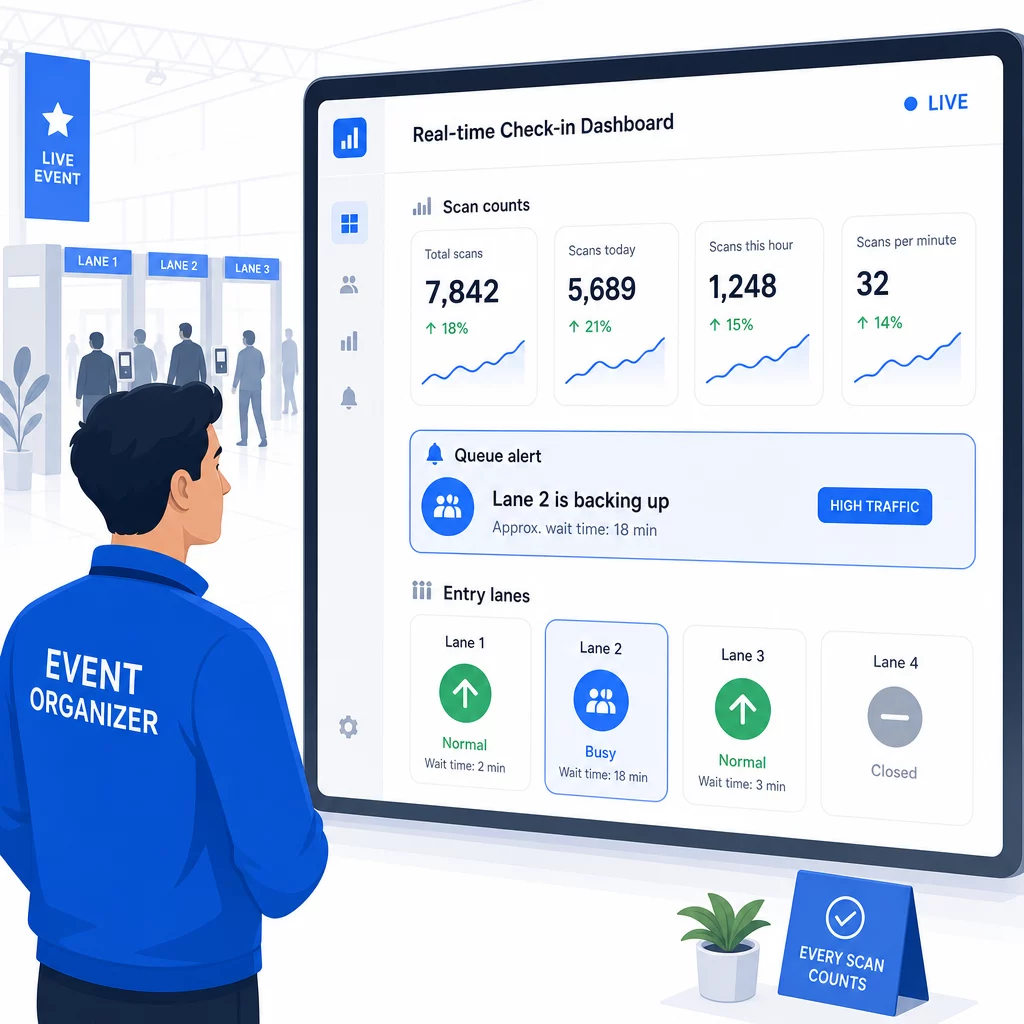
După eveniment, aceste date informează deciziile pentru data viitoare: când să deschideți ușile, câte benzi de intrare aveți nevoie și ce sesiuni au atras cel mai mult angajament. Instrumente pentru Urmărirea evenimentelor cu coduri QR oferă exporturi de rapoarte post-eveniment care se integrează direct în fluxurile de lucru de planificare.
Securitate și confidențialitatea datelor
Sistemele de check-in gestionează date personale, ceea ce creează atât obligații legale, cât și de reputație.
În special pentru sistemele cu coduri QR:
- Utilizați coduri de unică folosință care se dezactivează după prima scanare pentru a preveni partajarea acreditărilor
- Criptați toate datele în tranzit și în repaus – confirmați că platforma dvs. QR acceptă acest lucru înainte de a vă angaja
- Colectați doar ceea ce aveți nevoie: numele, tipul biletului și ora de check-in sunt de obicei suficiente; adresele de domiciliu și numerele de telefon rareori sunt
- Aplicați controale de acces astfel încât doar personalul care are nevoie de datele participanților să le poată vedea
- Includeți o notificare clară de confidențialitate pe formularul de înregistrare, explicând ce colectați, de ce și cât timp le păstrați
Pentru evenimentele cu participanți din California, conformitatea cu CCPA este obligatorie indiferent de locul în care are loc evenimentul. Participanții au dreptul să știe ce date ați colectat și să solicite ștergerea acestora. Pentru îndrumări privind integrarea acestor protecții în fluxul de lucru de ticketing de la început, ghidul de bilete sigure pentru evenimente cu cod QR acoperă în detaliu criptarea, tokenizarea și validarea de unică folosință.
Atunci când evaluați platformele de coduri QR, căutați conformitatea SOC 2, date stocate pe servere din SUA dacă evenimentul dvs. este intern, jurnale de audit pentru accesul la date și o politică clară care să stipuleze că păstrați proprietatea deplină asupra datelor participanților dvs.
Planuri de rezervă pentru când tehnologia eșuează
Chiar și sistemele bine testate întâmpină probleme în ziua evenimentului. Construiți-vă planul de rezervă înainte de a avea nevoie de el.
Probleme comune de scanare și soluții rapide:
- Iluminare slabă: adăugați iluminare LED de lucru la fiecare stație
- Coduri deteriorate sau ilizibile: păstrați o tabletă la fiecare stație, astfel încât personalul să poată accesa o versiune digitală din înregistrarea participantului
- Incompatibilitate dispozitiv: cereți participanților să țină telefonul la 6–8 inci de scaner; dacă aplicația nativă a camerei eșuează, o aplicație dedicată de scanare QR o rezolvă de obicei
Pentru defecțiuni de rețea:
- Utilizați o platformă care stochează datele de check-in local și se sincronizează când conectivitatea revine
- Păstrați două dispozitive de scanare de rezervă la fiecare punct de intrare
Dacă toate sistemele digitale eșuează:
- Aveți o listă tipărită a participanților, alfabetizată, la fiecare punct de intrare
- Instruiți personalul cum să caute după nume, să gestioneze codurile pierdute și să emită ecusoane temporare
- Utilizați ștampile sau autocolante codificate pe culori pentru a marca înregistrările manuale și a preveni intrările duplicate
Pentru evenimente cu niveluri VIP sau zone restricționate, pre-tipăriți ecusoane temporare codificate pe culori înainte de eveniment, astfel încât personalul să poată gestiona nivelurile de acces fără a se baza pe sistemul digital. Comunicați clar orice întârzieri: “Folosim sistemul nostru de rezervă pentru a vă permite accesul cât mai repede posibil” este suficient pentru a menține o experiență pozitivă a participantului în timpul dificultăților tehnice.
Automatizarea Urmăririi După Check-In
Datele de check-in pe care le colectați devin mai valoroase după încheierea evenimentului. Prin conectarea sistemului dvs. de scanare QR la platforma dvs. de e-mail sau de marketing, puteți trimite mesaje de urmărire segmentate în funcție de ceea ce a făcut efectiv fiecare participant.
Automatizare practică post-eveniment:
- Trimiteți e-mailuri de mulțumire în termen de 2 ore de la încheierea evenimentului, incluzând linkuri către prezentări sau resurse
- Pentru evenimente cu mai multe sesiuni, utilizați datele de scanare QR specifice sesiunii pentru a trimite doar conținutul relevant pentru ceea ce a participat fiecare participant
- Distribuiți sondaje de feedback la 24–48 de ore după eveniment – limitați-le la cinci întrebări sau mai puține și oferiți un mic stimulent pentru completare
- Pentru evenimente de networking, compilați un e-mail de rezumat al conexiunilor din datele de scanare, astfel încât participanții să aibă o înregistrare a persoanelor pe care le-au întâlnit
Urmăriți ratele de deschidere și ratele de clic pe mesajele de follow-up pentru a calibra momentul și conținutul pentru evenimentele viitoare.
Întrebări frecvente
Depinde de dimensiunea evenimentului, bugetul și cerințele de securitate. Codurile QR sunt opțiunea cu cel mai mic cost și funcționează bine pentru evenimente mici și medii unde participanții își aduc propriile dispozitive. RFID se potrivește evenimentelor cu volum mare unde aveți nevoie de intrare pasivă, fără contact, pentru mii de participanți. NFC este cea mai puternică alegere atunci când aveți nevoie de control acces criptat bazat pe zone, plăți fără numerar sau reutilizarea acreditărilor pe mai multe zile. Majoritatea evenimentelor cu sub 500 de participanți pot gestiona un check-in fluid în întregime cu coduri QR și o platformă fiabilă.
Atribuiți un cod QR unic fiecărui participant înregistrat și configurați-vă sistemul să marcheze fiecare cod ca fiind utilizat imediat după prima scanare. Odată scanat, codul nu mai poate fi utilizat. Codurile QR dinamice, împerecheate cu un backend de validare în timp real, detectează instantaneu încercările de scanare duplicat. Pentru evenimentele unde verificarea identității contează, instruiți personalul să confrunte un act de identitate cu fotografie cu numele de înregistrare atunci când codul este scanat.
Aveți o listă de participanți tipărită, alfabetizată, la fiecare punct de intrare și instruiți personalul să înregistreze participanții manual, folosind numele și numărul biletului. Păstrați cel puțin două dispozitive de scanare de rezervă pe bandă, cu baterii încărcate sau pachete de alimentare portabile. Utilizați o platformă care stochează înregistrările local și se sincronizează atunci când conectivitatea la internet revine, astfel încât să nu se piardă date. Informați-vă echipa despre procesul manual înainte de începerea evenimentului, astfel încât tranziția să fie fluidă, dacă este necesar.