¿Qué tecnología de registro es la adecuada para tu evento, y qué sucede cuando eliges la incorrecta? Los cuellos de botella en la entrada, el intercambio de credenciales y las lagunas en el seguimiento en tiempo real cuestan tiempo a los organizadores y la confianza de los asistentes. Esta guía desglosa cómo se comparan los códigos QR, RFID y NFC para el registro de eventos, y cómo implementar el enfoque que mejor se adapte a tu configuración.
Cómo funcionan de manera diferente los códigos QR, RFID y NFC
Antes de elegir un sistema de registro, es útil comprender qué hace realmente cada tecnología y dónde falla cada una.
Códigos QR son códigos visuales basados en cámara. Un escáner o la cámara de un smartphone lee el patrón, decodifica la información y busca el registro del asistente. Requieren línea de visión y funcionan mejor cuando el código está limpio, bien iluminado y sin daños. El registro con código QR es la opción de menor costo para implementar: los asistentes reciben un código por correo electrónico o SMS, y el personal lo escanea con cualquier dispositivo equipado con cámara.
RFID (Identificación por Radiofrecuencia) utiliza ondas de radio entre una etiqueta incrustada en una credencial o pulsera y un dispositivo lector. Los asistentes no necesitan hacer nada, simplemente caminan cerca de un lector y el sistema registra su entrada. RFID es completamente pasivo por parte del asistente, lo que lo hace extremadamente rápido en grandes volúmenes. Los lectores pueden detectar etiquetas a varios pies de distancia, lo que significa que la entrada puede ser completamente desatendida en la puerta.
NFC (Comunicación de Campo Cercano) es un subconjunto de corto alcance de la tecnología RFID, que requiere que la credencial o pulsera esté a una distancia de aproximadamente 1 a 4 centímetros del lector, esencialmente un toque. El corto alcance es intencional: NFC ofrece comunicación bidireccional cifrada que es difícil de clonar, lo que la convierte en la opción más sólida para el control de acceso seguro, pagos sin efectivo y gestión de zonas VIP.
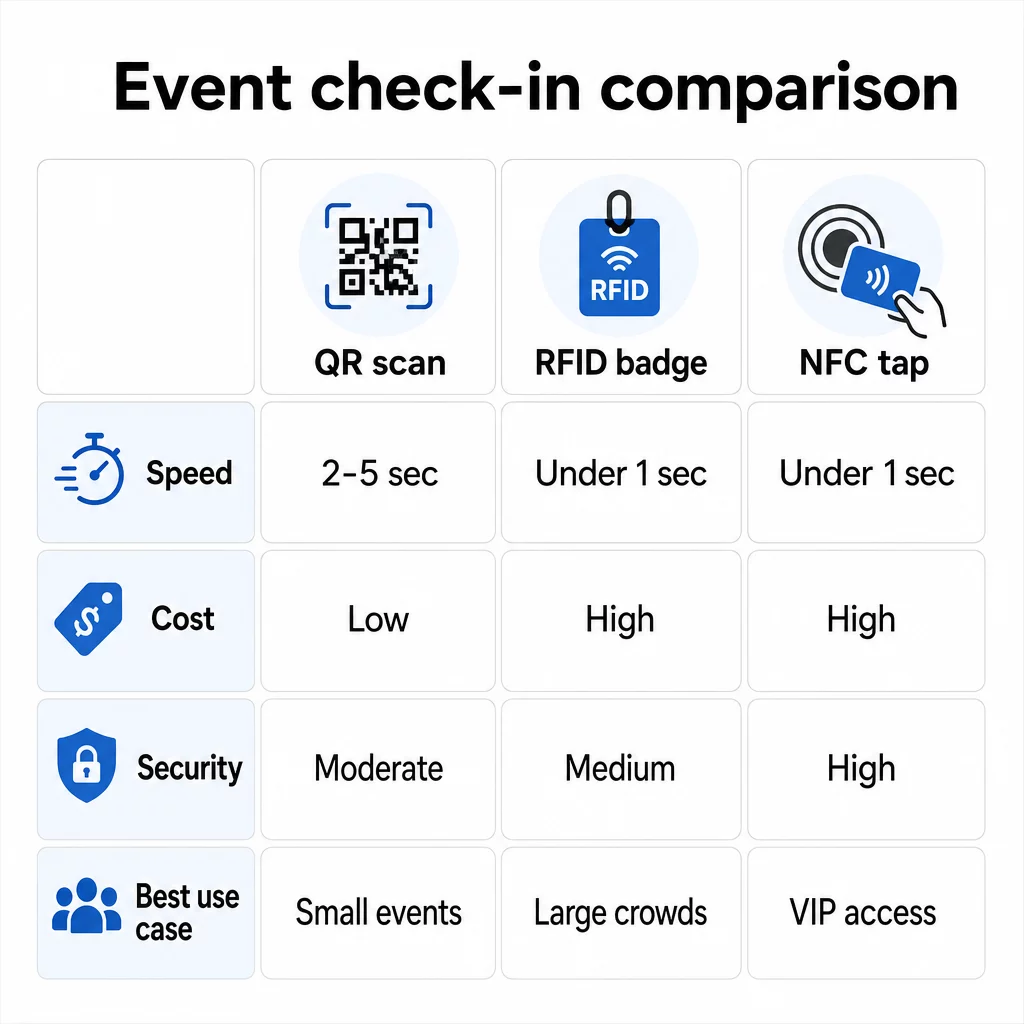
Comparando las tres tecnologías lado a lado
| FUNCIÓN | Escanear Código | RFID | NFC |
|---|---|---|---|
| CÓMO FUNCIONA | La cámara escanea el código visual | Ondas de radio, sin línea de visión | Toque de corto alcance (1–4 cm) |
| Velocidad por entrada | 2–5 segundos | Menos de 1 segundo, manos libres | Menos de 1 segundo |
| Costo de infraestructura | Bajo (cualquier dispositivo de cámara) | Alto (lectores + credenciales codificadas) | Alto (lectores + credenciales codificadas) |
| Seguridad | Moderado (fácilmente compartido mediante captura de pantalla) | Variable | Alto (encriptado, difícil de clonar) |
| Capacidad sin conexión | Depende de la plataforma | Generalmente sí | Generalmente sí |
| Reutilización | De un solo uso o de una sola impresión | Reutilizable en diferentes días o eventos | Reutilizable en diferentes días o eventos |
| Seguimiento de movimiento en tiempo real | Solo en puntos de escaneo | En todo el recinto | En zonas definidas |
| Mejor para | Eventos pequeños a medianos, bajo presupuesto | Eventos de gran volumen, festivales | Acceso seguro, zonas VIP, pagos |
Los códigos QR son rápidos pero frágiles. Funcionan bien en condiciones ideales, pero se convierten en cuellos de botella cuando las baterías de los asistentes se agotan, las pantallas se agrietan o la conectividad de red se interrumpe. RFID maneja grandes multitudes con una fricción mínima. NFC ofrece el perfil de seguridad más sólido, pero requiere la proximidad física más cercana.
Cuándo usar códigos QR para el registro
Los códigos QR son la elección correcta para la mayoría de los eventos pequeños a medianos, conferencias de un día y cualquier situación en la que el presupuesto o el tiempo de configuración sean limitados. Puedes implementar un sistema completo de registro con QR sin hardware especializado, solo una plataforma de códigos QR confiable y un dispositivo con cámara en cada punto de entrada.
Las ventajas prácticas de los códigos QR incluyen:
- No se requiere hardware para el asistente – los códigos residen en la pantalla de un teléfono o en un boleto impreso
- Fácil distribución – enviar por correo electrónico, SMS o aplicaciones de mensajería antes del evento
- Actualización dinámica – si tu lugar cambia o tu flujo de registro se modifica, puedes actualizar a dónde apunta un código QR dinámico sin reimprimir nada
- Análisis de escaneos – rastrear los tiempos de registro, los tipos de dispositivos y el volumen de entrada en tiempo real
Las principales debilidades a considerar: los códigos QR no verifican inherentemente la identidad, solo la posesión de un código. Son fáciles de capturar y compartir. Y no rastrean pasivamente a dónde van los asistentes entre los puntos de escaneo.
Para cerrar algunas de estas brechas, asigne a cada registrado un código QR único de un solo uso que se marque como usado en el primer escaneo. Esto evita duplicados y el intercambio de credenciales sin añadir gastos generales de hardware. Puede aprender cómo funciona esto en la práctica en el guía definitiva de códigos QR para el registro de eventos.
Configurar códigos de registro de eventos rastreables Cree códigos QR personalizados y dinámicos para cada asistente y supervise los datos de escaneo en tiempo real desde un único panel de control. Comience con el Generador de códigos QR para eventos de Pageloot.
Cuándo usar RFID o NFC en su lugar
Para grandes festivales, conferencias de varios días o cualquier evento con más de 1,000 asistentes que se mueven a través de múltiples zonas de acceso, RFID y NFC ofrecen un rendimiento y una profundidad de seguimiento significativamente mejores.
RFID tiene sentido cuando:
- Necesita puertas de entrada totalmente automatizadas y sin personal
- Los asistentes se mueven a través de múltiples sesiones o áreas y necesita un seguimiento pasivo del lugar
- El intercambio de credenciales es un riesgo material de fraude
- De todos modos, está emitiendo pulseras o credenciales físicas
NFC tiene sentido cuando:
- Necesita control de acceso basado en zonas con credenciales cifradas (VIP, backstage, prensa)
- Está ejecutando pagos sin efectivo junto con la gestión de entradas
- Desea un intercambio de datos bidireccional entre credenciales y lectores
- La máxima resistencia a la clonación es un requisito de seguridad
La contrapartida es la infraestructura. Tanto RFID como NFC requieren una inversión inicial en lectores, credenciales o pulseras codificadas, e integración de software con su plataforma de gestión de eventos. También necesita emitir credenciales con antelación, lo que añade un paso logístico previo al evento que los sistemas de códigos QR omiten por completo.
Configuración del registro con código QR: Un enfoque paso a paso
Si ha decidido que los códigos QR son la opción adecuada, aquí le explicamos cómo implementarlos correctamente.
Elija códigos dinámicos en lugar de estáticos
Los códigos QR estáticos fijan un destino fijo en el momento de su creación. Si la URL de su formulario de registro cambia, o su plataforma de eventos se cae y necesita redirigir a los asistentes, tendrá que reimprimir. Los códigos QR dinámicos le permiten actualizar el destino en cualquier momento – incluso durante el evento – sin emitir nuevos códigos.
Para eventos donde cualquier detalle podría cambiar, los códigos dinámicos son la opción predeterminada práctica. Plataformas como Pageloot’s generador de códigos QR le permiten crear códigos editables y rastrear cada escaneo en tiempo real.
Asigne códigos individuales a cada asistente
Un código por asistente evita el uso compartido, crea un registro de registro auditable y permite que su sistema marque cada código como usado en el primer escaneo. Distribuya los códigos por correo electrónico (incrustados como imagen con una copia de seguridad en PDF descargable) y por SMS para los asistentes que no revisen el correo electrónico de forma fiable. Envíe mensajes de recordatorio 48 y 24 horas antes del evento para reducir el número de personas que llegan sin su código.
Si está construyendo una configuración más integrada – donde los códigos QR precargan los datos de los asistentes en un CRM o formulario al escanear – la guía sobre creación de códigos QR dinámicos para registros de CRM detalla la implementación técnica.
Configure su formulario de seguimiento de asistencia
Un enfoque simple y efectivo: cree un formulario de registro en Google Forms o una herramienta similar, luego genere un código QR que enlace directamente a él. Cuando los asistentes escanean, envían su información, y los datos se alimentan a su panel de seguimiento. El código QR de seguimiento de asistencia la configuración en Pageloot soporta exactamente este flujo de trabajo – los organizadores pueden ver todos los datos enviados en el generador después de que los asistentes escaneen y envíen.
Para eventos que utilizan códigos QR en las entradas, vincule el código a un punto final de validación seguro para que el personal pueda confirmar la identidad del asistente en tiempo real en lugar de depender de un envío de formulario pasivo.
Planifique la Colocación Cuidadosamente
Dónde coloque los códigos QR importa tanto como cómo los cree. Principios clave de colocación:
- Coloque las estaciones de escaneo a aproximadamente 4 pies de altura para acomodar cómodamente a todos los usuarios
- Establezca múltiples puntos de registro para eventos con más de 200 asistentes para evitar cuellos de botella en los carriles
- Asegure una iluminación fuerte y uniforme en cada estación – especialmente para eventos nocturnos o en interiores
- Coloque códigos QR en los puntos de salida vinculados a un formulario de comentarios para que los invitados puedan compartir sus opiniones al salir
- Para eventos basados en sesiones, coloque códigos QR individuales en cada entrada de sesión para rastrear la participación
Recorra el lugar antes del evento como si fuera un asistente. Verifique que los códigos se escaneen limpiamente desde múltiples ángulos y bajo las condiciones de iluminación reales del espacio.
Diseñe Códigos Que Escaneen De Forma Fiable
El diseño visual de un código QR afecta directamente si se escanea de manera consistente en diferentes dispositivos y entornos.
- Tamaño mínimo: 0.8 × 0.8 pulgadas (2 × 2 cm) para escaneo de corto alcance; más grande para pantallas o señalización
- Contraste: módulos oscuros sobre un fondo claro, con una relación de contraste de al menos 4:1
- Corrección de errores: utiliza el nivel H al añadir un logotipo al centro del código, ya que permite que hasta el 30% del código quede oculto sin dejar de ser legible
- Para entradas impresas que puedan doblarse o arrugarse, utiliza impresión mate plana en lugar de acabados brillantes para reducir el deslumbramiento
- Añade una breve llamada a la acción debajo del código: “Escanea para registrarte” elimina la ambigüedad para los asistentes
Puedes añadir colores de marca y el logotipo de tu evento manteniendo la escaneabilidad – herramientas como el generador de Pageloot aplican la corrección de errores automáticamente cuando se incrustan logotipos. Prueba cada código en múltiples modelos de teléfono y condiciones de iluminación antes de distribuirlo.
Para una mirada más profunda sobre cómo hacer que los códigos sean accesibles para todos los asistentes, incluidos aquellos con discapacidades visuales o sin teléfonos inteligentes, la guía de códigos QR para RSVP cubre las mejores prácticas de accesibilidad en detalle.
Monitorización de Registros en Tiempo Real
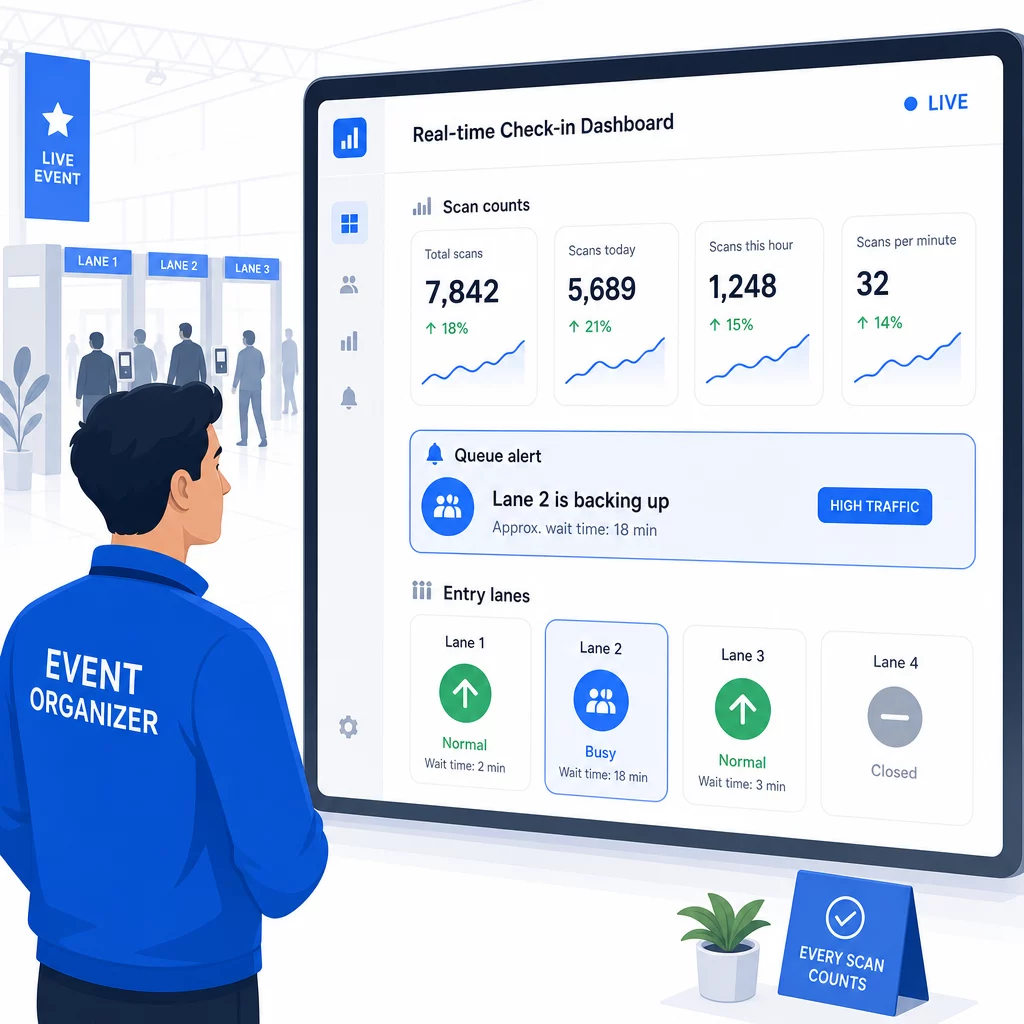
Una de las ventajas prácticas que los sistemas basados en QR tienen sobre muchas implementaciones RFID es la analítica accesible y en tiempo real sin software especializado.
Métricas que vale la pena seguir durante el evento:
- Total de registros en cualquier momento dado
- Tiempo promedio de procesamiento de escaneo por asistente
- Longitud de la cola y ventanas de llegada pico
- Recuentos de escaneos específicos de la sesión (si se utilizan códigos QR de sesión)
Con Seguimiento del código QR en una plataforma como Pageloot, cada escaneo registra la marca de tiempo, el tipo de dispositivo y la ubicación, dándote una imagen en vivo de dónde se están formando las multitudes. Si un carril de entrada se está atascando, puedes redirigir al personal inmediatamente. Si un código QR de sesión muestra una asistencia inesperadamente alta, puedes ajustar la capacidad de la sala antes de que se convierta en un problema.
Después del evento, estos datos informan las decisiones para la próxima vez: cuándo abrir las puertas, cuántos carriles de entrada necesitas y qué sesiones generaron más participación. Herramientas para Seguimiento de eventos con código QR ofrecer exportaciones de informes post-evento que se integren directamente en los flujos de trabajo de planificación.
Seguridad y Privacidad de Datos
Los sistemas de registro manejan datos personales, lo que genera obligaciones tanto legales como de reputación.
Específicamente para sistemas de código QR:
- Utilice códigos de un solo uso que se desactiven después del primer escaneo para evitar el intercambio de credenciales
- Cifre todos los datos en tránsito y en reposo – confirme que su plataforma QR lo soporta antes de comprometerse
- Recopile solo lo que necesita: nombre, tipo de entrada y marca de tiempo de registro suelen ser suficientes; las direcciones de casa y los números de teléfono rara vez lo son
- Aplique controles de acceso para que solo el personal que necesite los datos de los asistentes pueda verlos
- Incluya un aviso de privacidad claro en su formulario de registro explicando qué recopila, por qué y durante cuánto tiempo lo conserva
Para eventos con asistentes de California, se requiere el cumplimiento de la CCPA independientemente de dónde se celebre su evento. Los asistentes tienen derecho a saber qué datos ha recopilado y a solicitar su eliminación. Para obtener orientación sobre cómo integrar estas protecciones en su flujo de trabajo de emisión de entradas desde el principio, la guía de entradas seguras para eventos con código QR cubre el cifrado, la tokenización y la validación de un solo uso en detalle.
Al evaluar plataformas de código QR, busque el cumplimiento de SOC 2, datos almacenados en servidores de EE. UU. si su evento es nacional, registros de auditoría para el acceso a datos y una política clara que establezca que usted conserva la plena propiedad de los datos de sus asistentes.
Planes de Respaldo para Cuando la Tecnología Falla
Incluso los sistemas bien probados encuentran problemas el día del evento. Construya su plan de contingencia antes de necesitarlo.
Problemas comunes de escaneo y soluciones rápidas:
- Iluminación deficiente: añadir iluminación LED de trabajo en cada estación
- Códigos dañados o ilegibles: mantener una tableta en cada estación para que el personal pueda consultar una versión digital del registro del asistente
- Incompatibilidad de dispositivos: pedir a los asistentes que sostengan su teléfono a 6-8 pulgadas del escáner; si la aplicación de cámara nativa falla, una aplicación de escáner QR dedicada suele resolverlo
Para fallos de red:
- Utilizar una plataforma que almacene los datos de registro localmente y los sincronice cuando la conectividad regrese
- Mantener dos dispositivos de escaneo de respaldo en cada punto de entrada
Si todos los sistemas digitales fallan:
- Tener una lista de asistentes impresa y alfabetizada en cada punto de entrada
- Informar al personal sobre cómo buscar por nombre, gestionar códigos perdidos y emitir credenciales temporales
- Utilizar sellos o pegatinas codificados por colores para marcar los registros manuales y evitar entradas duplicadas
Para eventos con niveles VIP o zonas restringidas, imprimir previamente credenciales temporales codificadas por colores antes del evento para que el personal pueda gestionar los niveles de acceso sin depender del sistema digital. Comunicar cualquier retraso claramente: “Estamos utilizando nuestro sistema de respaldo para que pueda entrar lo más rápido posible” es suficiente para preservar una experiencia positiva para el asistente durante las dificultades técnicas.
Automatización del seguimiento después del registro
Los datos de registro que recopila se vuelven más valiosos una vez finalizado el evento. Al conectar su sistema de escaneo QR a su plataforma de correo electrónico o marketing, puede enviar seguimientos segmentados basados en lo que cada asistente realmente hizo.
Automatización práctica post-evento:
- Enviar correos electrónicos de agradecimiento dentro de las 2 horas posteriores al cierre del evento, incluyendo enlaces a diapositivas o recursos
- Para eventos de varias sesiones, utilice datos de escaneo QR específicos de la sesión para enviar solo el contenido relevante a lo que cada asistente asistió
- Comparta encuestas de retroalimentación 24–48 horas después del evento – manténgalas en cinco preguntas o menos y ofrezca un pequeño incentivo por completarlas
- Para eventos de networking, compile un correo electrónico de resumen de conexiones a partir de los datos de escaneo para que los asistentes tengan un registro de a quién conocieron
Rastree las tasas de apertura y las tasas de clics en los mensajes de seguimiento para calibrar el momento y el contenido para futuros eventos.
Preguntas frecuentes
Depende del tamaño de tu evento, presupuesto y requisitos de seguridad. Los códigos QR son la opción de menor costo y funcionan bien para eventos pequeños a medianos donde los asistentes traen sus propios dispositivos. RFID es adecuado para eventos de gran volumen donde se necesita una entrada pasiva y sin contacto para miles de asistentes. NFC es la opción más sólida cuando se necesita control de acceso cifrado basado en zonas, pagos sin efectivo o reutilización de credenciales durante varios días. La mayoría de los eventos con menos de 500 asistentes pueden realizar un registro sin problemas completamente con códigos QR y una plataforma confiable.
Asigne un código QR único a cada participante y configure su sistema para marcar cada código como usado inmediatamente después del primer escaneo. Una vez escaneado, el código no podrá ser utilizado de nuevo. Los códigos QR dinámicos emparejados con un backend de validación en tiempo real detectan los intentos de escaneo duplicados al instante. Para eventos donde la verificación de identidad es importante, capacite al personal para que coteje una identificación con foto con el nombre de registro cuando se escanee el código.
Tenga una lista de asistentes impresa y alfabetizada en cada punto de entrada y capacite al personal para registrar a los asistentes manualmente usando el nombre y el número de boleto. Mantenga al menos dos dispositivos de escaneo de respaldo por carril con baterías cargadas o paquetes de energía portátiles. Utilice una plataforma que almacene los registros localmente y se sincronice cuando la conectividad a internet regrese para que no se pierdan datos. Informe a su equipo sobre el proceso manual antes de que comience el evento para que la transición sea fluida si es necesario.