Mikä sisäänkirjautumisteknologia sopii tapahtumaasi – ja mitä tapahtuu, jos valitset väärän? Sisäänpääsyn pullonkaulat, tunnusten jakaminen ja reaaliaikaisen seurannan puutteet maksavat järjestäjille aikaa ja osallistujien luottamusta. Tämä opas selvittää, miten QR-koodit, RFID ja NFC vertautuvat tapahtuman sisäänkirjautumisessa, ja miten toteuttaa mikä tahansa lähestymistapa, joka sopii asetuksiisi.
Miten QR-koodit, RFID ja NFC toimivat eri tavoin
Ennen sisäänkirjautumisjärjestelmän valintaa on hyödyllistä ymmärtää, mitä kukin teknologia todella tekee – ja missä kukin niistä pettää.
QR-koodit ovat visuaalisia, kameraperusteisia koodeja. Skanneri tai älypuhelimen kamera lukee kuvion, purkaa tiedot ja hakee osallistujan tiedot. Ne vaativat suoran näköyhteyden ja toimivat parhaiten, kun koodi on puhdas, hyvin valaistu ja vahingoittumaton. QR-koodin sisäänkirjautuminen on edullisin vaihtoehto toteuttaa: osallistujat saavat koodin sähköpostitse tai tekstiviestillä, ja henkilökunta skannaa sen millä tahansa kameralla varustetulla laitteella.
RFID (radiotaajuustunnistus) käyttää radioaaltoja tunnisteen, joka on upotettu kulkukorttiin tai rannekkeeseen, ja lukijalaitteen välillä. Osallistujien ei tarvitse tehdä mitään – he vain kävelevät lukijan lähelle ja järjestelmä kirjaa heidän sisäänpääsynsä. RFID on täysin passiivinen osallistujan puolelta, mikä tekee siitä erittäin nopean suurilla volyymeillä. Lukijat voivat havaita tunnisteita muutaman metrin etäisyydeltä, mikä tarkoittaa, että sisäänpääsy voi olla täysin miehittämätön portilla.
NFC (lähikenttäviestintä) on RFID-teknologian lyhyen kantaman alajoukko, joka vaatii kulkukortin tai rannekkeen olevan noin 1–4 senttimetrin etäisyydellä lukijasta – pohjimmiltaan napautus. Lyhyt kantama on tarkoituksellinen: NFC tarjoaa salatun, kaksisuuntaisen viestinnän, jota on vaikea kloonata, mikä tekee siitä vahvimman valinnan turvalliseen kulunvalvontaan, käteisettömiin maksuihin ja VIP-alueiden hallintaan.
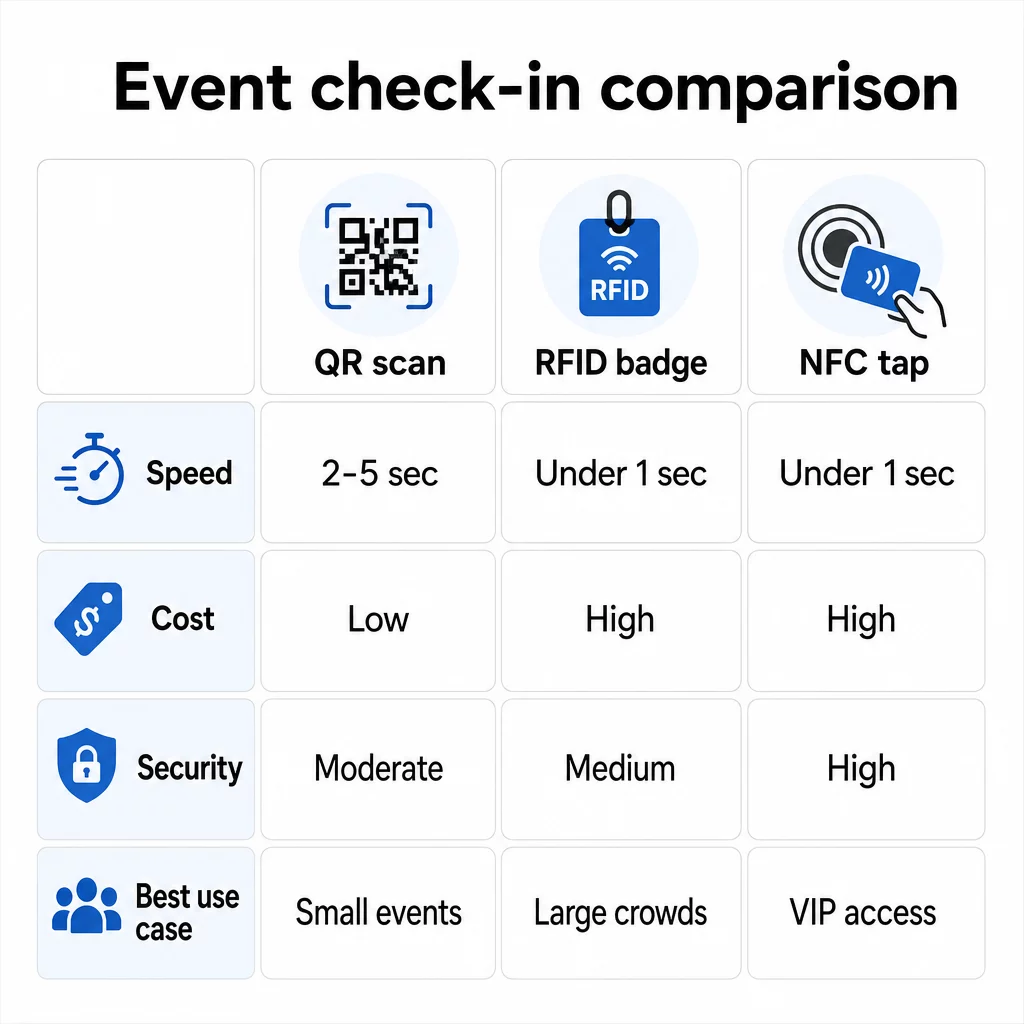
Kolmen teknologian vertailu rinnakkain
| OMINAISUUS | QR koodi | RFID | NFC |
|---|---|---|---|
| NÄIN SE TOIMII | Kamera skannaa visuaalisen koodin | Radioaallot, ei suoraa näköyhteyttä | Lyhyen kantaman napautus (1–4 cm) |
| Nopeus per sisäänpääsy | 2–5 sekuntia | Alle 1 sekunti, kädet vapaana | Alle 1 sekunti |
| Infrastruktuurikustannukset | Matala (mikä tahansa kameralaite) | Korkea (lukijat + koodatut kulkukortit) | Korkea (lukijat + koodatut kulkukortit) |
| Turvallisuus | Kohtuullinen (helposti jaettavissa kuvakaappauksen kautta) | Vaihteleva | Korkea (salattu, vaikea kloonata) |
| Offline-ominaisuus | Riippuu alustasta | Yleensä kyllä | Yleensä kyllä |
| Uudelleenkäytettävyys | Kertakäyttöinen tai kertatuloste | Uudelleenkäytettävissä päivien tai tapahtumien välillä | Uudelleenkäytettävissä päivien tai tapahtumien välillä |
| Reaaliaikainen liikkeen seuranta | Vain skannauspisteissä | Koko tapahtumapaikalla | Määritellyillä alueilla |
| Paras | Pienet ja keskisuuret tapahtumat, pieni budjetti | Suuren volyymin tapahtumat, festivaalit | Turvallinen pääsy, VIP-alueet, maksut |
QR-koodit ovat nopeita mutta hauraita. Ne toimivat hyvin ihanteellisissa olosuhteissa, mutta niistä tulee pullonkauloja, kun osallistujien akut loppuvat, näytöt halkeilevat tai verkkoyhteys katkeaa. RFID käsittelee suuria väkijoukkoja minimaalisella kitkalla. NFC tarjoaa vahvimman tietoturvaprofiilin, mutta vaatii lähimmän fyysisen läheisyyden.
Milloin käyttää QR-koodeja sisäänkirjautumiseen
QR-koodit ovat oikea valinta useimpiin pieniin ja keskisuuriin tapahtumiin, yksipäiväisiin konferensseihin ja kaikkiin tilanteisiin, joissa budjetti tai asennusaika on rajallinen. Voit toteuttaa täyden QR-sisäänkirjautumisjärjestelmän ilman erikoislaitteistoa – tarvitset vain luotettavan QR-koodialustan ja kameralla varustetun laitteen jokaisessa sisääntulopisteessä.
QR-koodien käytännön edut ovat:
- Ei vaadi osallistujan laitteistoa – koodit ovat puhelimen näytöllä tai painetussa lipussa
- Helppo jakelu – lähetä sähköpostitse, tekstiviestillä tai viestisovelluksilla ennen tapahtumaa
- Dynaaminen päivitys – jos tapahtumapaikkasi muuttuu tai sisäänkirjautumisprosessi siirtyy, voit päivittää dynaamisen QR-koodin osoittaman paikan tulostamatta mitään uudelleen
- Skannausanalytiikka – seurata sisäänkirjautumisaikoja, laitteiden tyyppejä ja sisäänpääsyjen määrää reaaliaikaisesti
Tärkeimmät heikkoudet, jotka on otettava huomioon: QR-koodit eivät itsessään varmenna henkilöllisyyttä, ainoastaan koodin hallussapidon. Ne on helppo ottaa kuvakaappauksena ja jakaa. Eivätkä ne passiivisesti seuraa, minne osallistujat menevät skannauspisteiden välillä.
Näiden puutteiden korjaamiseksi anna jokaiselle rekisteröityneelle ainutlaatuinen, kertakäyttöinen QR-koodi, joka merkitään käytetyksi ensimmäisellä skannauksella. Tämä estää kaksoiskappaleet ja tunnusten jakamisen ilman lisälaitteiston kustannuksia. Voit oppia, miten tämä toimii käytännössä perimmäinen opas QR-koodeihin tapahtumien sisäänkirjautumiseen.
Määritä seurattavat tapahtuman sisäänkirjautumiskoodit Luo henkilökohtaisia, dynaamisia QR-koodeja jokaiselle osallistujalle ja seuraa reaaliaikaista skannaustietoa yhdestä hallintapaneelista. Aloita Pageloot Event QR Code Generator.
Milloin käyttää RFID:tä tai NFC:tä sen sijaan
Suurille festivaaleille, monipäiväisille konferensseille tai mille tahansa tapahtumalle, jossa on yli 1 000 osallistujaa ja jotka liikkuvat useiden kulkualueiden läpi, RFID ja NFC tarjoavat merkittävästi paremman läpimenon ja seurannan syvyyden.
RFID on järkevää, kun:
- Tarvitset täysin automatisoituja, miehittämättömiä sisäänkäyntiportteja
- Osallistujat liikkuvat useiden istuntojen tai alueiden läpi ja tarvitset passiivista tapahtumapaikan seurantaa
- Tunnusten jakaminen on merkittävä petosriski
- Myönnät fyysisiä rannekkeita tai merkkejä joka tapauksessa
NFC on järkevää, kun:
- Tarvitset vyöhykekohtaista kulunvalvontaa salatuilla tunnuksilla (VIP, backstage, press)
- Käytät käteisettömiä maksuja sisäänpääsyn hallinnan rinnalla
- Haluat kaksisuuntaisen tiedonsiirron kulkukorttien ja lukijoiden välillä
- Maksimaalinen kloonauskestävyys on turvallisuusvaatimus
Haittapuolena on infrastruktuuri. Sekä RFID että NFC vaativat ennakkoinvestointeja lukijoihin, koodattuihin kulkukortteihin tai rannekkeisiin sekä ohjelmistointegraation tapahtumanhallintajärjestelmääsi. Sinun on myös myönnettävä tunnukset etukäteen, mikä lisää tapahtumaa edeltävän logistiikkavaiheen, jonka QR-koodijärjestelmät ohittavat kokonaan.
QR-koodilla sisäänkirjautumisen määrittäminen: Vaiheittainen opas
Jos olet päättänyt, että QR-koodit sopivat sinulle, tässä on, miten ne otetaan käyttöön oikein.
Valitse dynaamiset koodit staattisten sijaan
Staattiset QR-koodit lukitsevat kiinteän kohteen luomishetkellä. Jos sisäänkirjautumislomakkeen URL-osoite muuttuu tai tapahtuma-alustasi kaatuu ja sinun on ohjattava osallistujat uudelleen, sinun on tulostettava uudelleen. Dynaamisten QR-koodien avulla voit päivittää kohteen milloin tahansa – jopa tapahtuman aikana – ilman uusien koodien myöntämistä.
Tapahtumissa, joissa mikä tahansa yksityiskohta voi muuttua, dynaamiset koodit ovat käytännöllinen oletus. Alustat, kuten Pagelootin QR-koodigeneraattori antavat sinun luoda muokattavia koodeja ja seurata jokaista skannausta reaaliaikaisesti.
Määritä yksilölliset koodit jokaiselle osallistujalle
Yksi koodi per osallistuja estää jakamisen, luo tarkastettavan sisäänkirjautumisrekisterin ja antaa järjestelmäsi merkitä jokaisen koodin käytetyksi ensimmäisellä skannauksella. Jaa koodit sähköpostitse (upotettuna kuvana ladattavan PDF-varmuuskopion kanssa) ja tekstiviestillä osallistujille, jotka eivät välttämättä tarkista sähköpostiaan luotettavasti. Lähetä muistutusviestejä 48 ja 24 tuntia ennen tapahtumaa vähentääksesi niiden ihmisten määrää, jotka saapuvat ilman koodiaan.
Jos rakennat integroidumpaa järjestelmää – jossa QR-koodit esitäyttävät osallistujatiedot CRM:ään tai lomakkeeseen skannauksen yhteydessä – opas aiheesta dynaamisten QR-koodien rakentaminen CRM-sisäänkirjautumisia varten käy läpi teknisen toteutuksen.
Määritä osallistumisen seurantalomake
Yksinkertainen ja tehokas lähestymistapa: luo sisäänkirjautumislomake Google Formsissa tai vastaavalla työkalulla ja luo sitten QR-koodi, joka linkittää suoraan siihen. Kun osallistujat skannaavat, he lähettävät tietonsa, ja tiedot syötetään seurantapaneeliisi. The läsnäolon seurannan QR-koodi Pagelootin asetukset tukevat juuri tätä työnkulkua – järjestäjät voivat tarkastella kaikkia lähetettyjä tietoja generaattorissa sen jälkeen, kun osallistujat ovat skannanneet ja lähettäneet tiedot.
Tapahtumiin, joissa käytetään QR-koodeja lipuissa, linkitä koodi turvalliseen vahvistuspisteeseen, jotta henkilökunta voi vahvistaa osallistujan henkilöllisyyden reaaliaikaisesti sen sijaan, että luottaisi passiiviseen lomakkeen lähetykseen.
Suunnittele sijoittelu huolellisesti
Sillä, mihin QR-koodit sijoitat, on yhtä suuri merkitys kuin sillä, miten ne luot. Tärkeimmät sijoitteluperiaatteet:
- Sijoita skannauspisteet noin 1,2 metrin korkeuteen, jotta kaikki käyttäjät voivat käyttää niitä mukavasti
- Perusta useita sisäänkirjautumispisteitä yli 200 osallistujan tapahtumiin ruuhkien estämiseksi
- Varmista voimakas, tasainen valaistus jokaisella pisteellä – erityisesti ilta- tai sisätapahtumissa
- Sijoita poistumispisteen QR-koodit, jotka on linkitetty palautelomakkeeseen, jotta vieraat voivat jakaa ajatuksiaan poistuessaan
- Istuntopohjaisissa tapahtumissa sijoita yksittäiset QR-koodit jokaisen istunnon sisäänkäynnille osallistumisen seuraamiseksi
Kävele tapahtumapaikalla ennen tapahtumaa ikään kuin olisit osallistuja. Varmista, että koodit skannautuvat puhtaasti useista kulmista ja tilan todellisissa valaistusolosuhteissa.
Suunnittele koodit, jotka skannautuvat luotettavasti
QR-koodin visuaalinen suunnittelu vaikuttaa suoraan siihen, skannautuuko se johdonmukaisesti eri laitteilla ja ympäristöissä.
- Vähimmäiskoko: 0,8 × 0,8 tuumaa (2 × 2 cm) lähiskannaukseen; suurempi näytöille tai kylteille
- Kontrasti: tummat moduulit vaalealla taustalla, vähintään 4:1 kontrastisuhteella
- Virheenkorjaus: käytä tasoa H, kun lisäät logon koodin keskelle, sillä se sallii jopa 30 % koodista peittyä samalla kun se pysyy luettavana
- Painetuissa lipuissa, jotka voivat taipua tai rypistyä, käytä tasaista mattapainatusta kiiltävien pintojen sijaan häikäisyn vähentämiseksi
- Lisää lyhyt toimintakehote koodin alle: “Skannaa sisäänkirjautuaksesi” poistaa epäselvyyden osallistujilta
Voit lisätä brändivärejä ja tapahtumasi logon säilyttäen skannattavuuden – Pagelootin kaltaiset generaattorit soveltavat virheenkorjausta automaattisesti, kun logoja upotetaan. Testaa jokainen koodi useilla puhelinmalleilla ja valaistusolosuhteissa ennen jakelua.
Syvällisemmän katsauksen koodien saavutettavuuteen kaikille osallistujille, mukaan lukien näkövammaiset tai älypuhelimettomat, tarjoaa RSVP QR-koodien opas käsittelee saavutettavuuden parhaita käytäntöjä yksityiskohtaisesti.
Sisäänkirjautumisten seuranta reaaliajassa
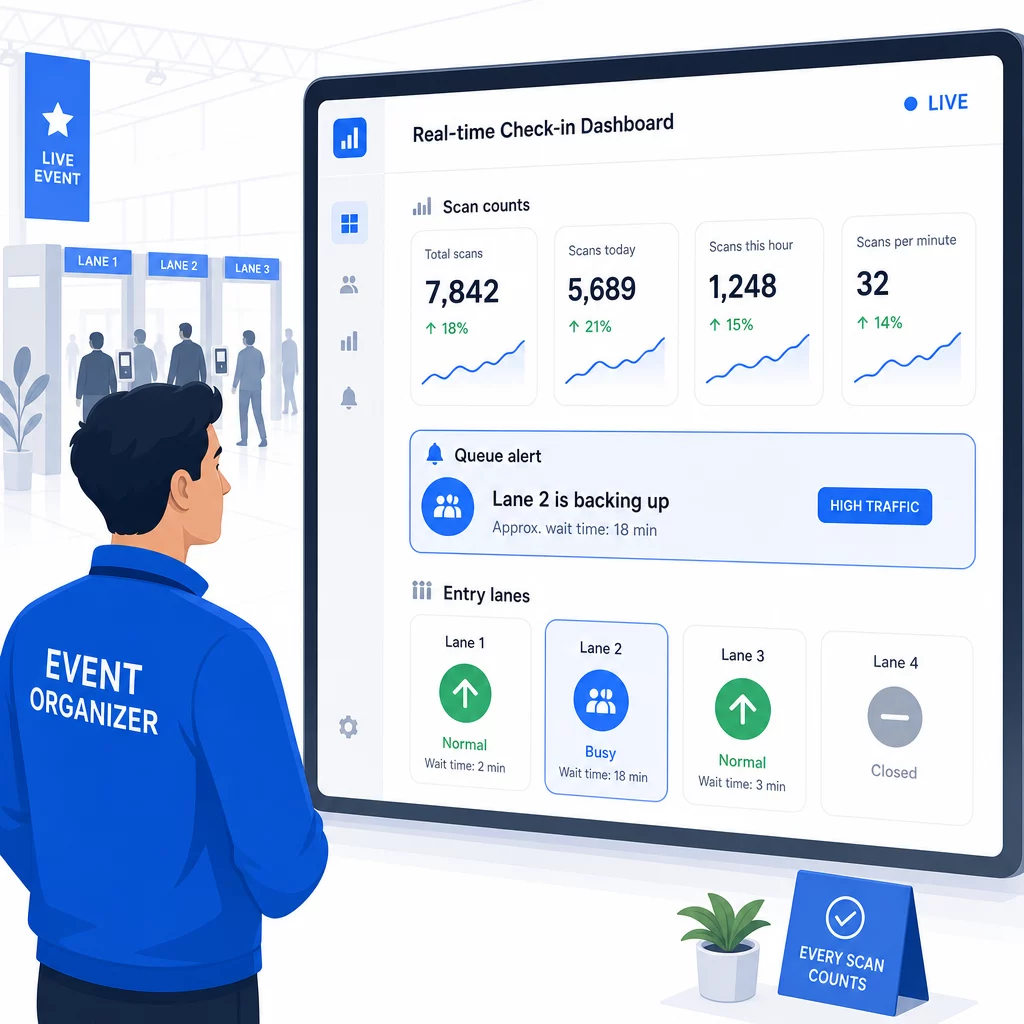
Yksi QR-pohjaisten järjestelmien käytännön eduista moniin RFID-toteutuksiin verrattuna on saavutettava, reaaliaikainen analytiikka ilman erikoisohjelmistoja.
Tapahtuman aikana seurattavat mittarit:
- Sisäänkirjautumisten kokonaismäärä milloin tahansa
- Keskimääräinen skannauksen käsittelyaika per osallistuja
- Jonon pituus ja saapumisen ruuhka-ajat
- Istuntokohtaiset skannausmäärät (jos käytetään istunto-QR-koodeja)
Kanssa QR-koodin seuranta Pagelootin kaltaisella alustalla jokainen skannaus kirjaa aikaleiman, laitteen tyypin ja sijainnin, antaen sinulle reaaliaikaisen kuvan siitä, minne väkijoukot kerääntyvät. Jos yksi sisääntulokaista ruuhkautuu, voit ohjata henkilökuntaa välittömästi. Jos istunto-QR-koodi näyttää odottamattoman suurta osallistujamäärää, voit säätää huoneen kapasiteettia ennen kuin siitä tulee ongelma.
Tapahtuman jälkeen nämä tiedot auttavat päätöksenteossa seuraavaa kertaa varten: milloin ovet avataan, kuinka monta sisääntulokaistaa tarvitaan ja mitkä sessiot keräsivät eniten osallistujia. Työkalut QR-koodin tapahtumaseurantaan tarjoavat tapahtuman jälkeisiä raportointivientejä, jotka syöttävät suoraan suunnittelutyönkulkuihin.
Turvallisuus ja tietosuoja
Sisäänkirjautumisjärjestelmät käsittelevät henkilötietoja, mikä luo sekä oikeudellisia että maineeseen liittyviä velvoitteita.
Erityisesti QR-koodijärjestelmien osalta:
- Käytä kertakäyttöisiä koodeja, jotka deaktivoituvat ensimmäisen skannauksen jälkeen estääksesi tunnusten jakamisen
- Salaa kaikki tiedot siirron aikana ja levossa – varmista, että QR-alustasi tukee tätä ennen sitoutumista
- Kerää vain tarvittavat tiedot: nimi, lipun tyyppi ja sisäänkirjautumisaika ovat yleensä riittäviä; kotiosoitteet ja puhelinnumerot harvoin ovat
- Käytä pääsynvalvontaa, jotta vain ne työntekijät, jotka tarvitsevat osallistujatietoja, voivat nähdä ne
- Sisällytä rekisteröintilomakkeeseesi selkeä tietosuojailmoitus, jossa kerrotaan, mitä tietoja keräät, miksi ja kuinka kauan säilytät niitä
Kalifornialaisia osallistujia sisältävissä tapahtumissa CCPA-vaatimustenmukaisuus on pakollista riippumatta siitä, missä tapahtumasi järjestetään. Osallistujilla on oikeus tietää, mitä tietoja olet kerännyt, ja pyytää niiden poistamista. Ohjeita näiden suojausten rakentamiseen lipunmyyntityönkulkuun alusta alkaen tarjoaa turvallisten QR-kooditapahtumalippujen opas käsittelee yksityiskohtaisesti salausta, tokenisointia ja kertakäyttövalidaatiota.
QR-koodialustoja arvioitaessa etsi SOC 2 -vaatimustenmukaisuutta, Yhdysvaltain palvelimille tallennettuja tietoja, jos tapahtumasi on kotimainen, auditointilokeja tietojen käyttöön ja selkeää käytäntöä, joka ilmoittaa, että säilytät täyden omistusoikeuden osallistujatietoihisi.
Varasuunnitelmat teknologian pettäessä
Hyvinkin testatut järjestelmät kohtaavat ongelmia tapahtumapäivänä. Rakenna varajärjestelmäsi ennen kuin tarvitset sitä.
Yleisiä skannausongelmia ja pikaohjeita:
- Huono valaistus: lisää LED-työvalaisimet jokaiselle pisteelle
- Vaurioituneet tai lukukelvottomat koodit: pidä tabletti jokaisella pisteellä, jotta henkilökunta voi hakea digitaalisen version osallistujan tiedoista
- Laitteiden yhteensopimattomuus: pyydä osallistujia pitämään puhelintaan 6–8 tuuman etäisyydellä skannerista; jos puhelimen oma kamerasovellus epäonnistuu, erillinen QR-skannerisovellus yleensä ratkaisee ongelman
Verkkovikojen varalta:
- Käytä alustaa, joka tallentaa sisäänkirjautumistiedot paikallisesti ja synkronoi ne yhteyden palatessa
- Pidä kaksi varaskannauslaitetta jokaisella sisäänkäynnillä
Jos kaikki digitaaliset järjestelmät pettävät:
- Pidä aakkosjärjestyksessä oleva tulostettu osallistujalista jokaisella sisäänkäynnillä
- Ohjeista henkilökuntaa nimellä hakemisesta, kadonneiden koodien käsittelystä ja väliaikaisten kulkukorttien myöntämisestä
- Käytä värikoodattuja leimoja tai tarroja manuaalisten sisäänkirjautumisten merkitsemiseen ja kaksoiskirjausten estämiseen
Tapahtumissa, joissa on VIP-tasoja tai rajoitettuja alueita, esitulosta värikoodatut väliaikaiset kulkukortit ennen tapahtumaa, jotta henkilökunta voi hallita pääsytasoja luottamatta digitaaliseen järjestelmään. Ilmoita viivästyksistä selkeästi: “Käytämme varajärjestelmäämme saadaksemme teidät sisään mahdollisimman nopeasti” riittää säilyttämään positiivisen osallistujakokemuksen teknisten vaikeuksien aikana.
Seurannan automatisointi sisäänkirjautumisen jälkeen
Keräämäsi sisäänkirjautumistiedot muuttuvat arvokkaammiksi tapahtuman päätyttyä. Yhdistämällä QR-skannausjärjestelmäsi sähköposti- tai markkinointialustaasi voit lähettää segmentoituja seurantoja sen perusteella, mitä kukin osallistuja todella teki.
Käytännöllinen tapahtuman jälkeinen automaatio:
- Lähetä kiitosviestit kahden tunnin kuluessa tapahtuman päättymisestä, sisältäen linkit dioihin tai materiaaleihin
- Moniosaisissa tapahtumissa käytä istuntokohtaista QR-skannaustietoa lähettääksesi vain sen sisällön, joka liittyy siihen, mihin kukin osallistuja osallistui
- Jaa palautekyselyt 24–48 tuntia tapahtuman jälkeen – pidä kysymysten määrä viidessä tai alle ja tarjoa pieni kannustin täyttämisestä
- Verkostoitumistapahtumissa kokoa yhteenveto tapaamisista sähköpostiin skannaustietojen perusteella, jotta osallistujilla on tiedossa, keitä he tapasivat
Seuraa avausprosentteja ja klikkausprosentteja seurantaviesteissä kalibroidaksesi ajoituksen ja sisällön tulevia tapahtumia varten.
Usein kysytyt kysymykset
Se riippuu tapahtumasi koosta, budjetista ja turvallisuusvaatimuksista. QR-koodit ovat edullisin vaihtoehto ja toimivat hyvin pienissä ja keskisuurissa tapahtumissa, joissa osallistujat tuovat omat laitteensa. RFID sopii suuriin tapahtumiin, joissa tarvitaan passiivista, kädet vapaana -sisäänpääsyä tuhansille osallistujille. NFC on vahvin valinta, kun tarvitset salattua vyöhykepohjaista kulunvalvontaa, käteisettömiä maksuja tai usean päivän tunnisteen uudelleenkäyttöä. Useimmat alle 500 osallistujan tapahtumat voivat hoitaa sujuvan sisäänkirjautumisen kokonaan QR-koodeilla ja luotettavalla alustalla.
Määritä jokaiselle rekisteröityneelle yksilöllinen QR-koodi ja määritä järjestelmäsi merkitsemään jokainen koodi käytetyksi välittömästi ensimmäisen skannauksen jälkeen. Kun koodi on skannattu, sitä ei voi käyttää uudelleen. Dynaamiset QR-koodit yhdistettynä reaaliaikaiseen validointitaustajärjestelmään havaitsevat välittömästi kaksoisskannausyritykset. Tapahtumissa, joissa henkilöllisyyden todentaminen on tärkeää, kouluta henkilökuntaa tarkistamaan kuvallinen henkilöllisyystodistus rekisteröintinimeä vasten, kun koodi skannataan.
Pidä tulostettu, aakkosjärjestyksessä oleva osallistujalista jokaisella sisääntulopisteellä ja kouluta henkilökunta kirjaamaan osallistujat sisään manuaalisesti nimen ja lipun numeron perusteella. Pidä vähintään kaksi varaskannauslaitetta per kaista ladatuilla akuilla tai kannettavilla virtapankeilla. Käytä alustaa, joka tallentaa sisäänkirjaukset paikallisesti ja synkronoi, kun internetyhteys palautuu, jotta tietoja ei katoa. Ohjeista tiimisi manuaalisesta prosessista ennen tapahtuman alkua, jotta siirtymä on saumaton tarvittaessa.