Ποια τεχνολογία check-in είναι η σωστή για την εκδήλωσή σας – και τι συμβαίνει όταν επιλέγετε τη λάθος; Τα σημεία συμφόρησης στην είσοδο, η κοινή χρήση διαπιστευτηρίων και τα κενά στην παρακολούθηση σε πραγματικό χρόνο κοστίζουν στους διοργανωτές χρόνο και την εμπιστοσύνη των συμμετεχόντων. Αυτός ο οδηγός αναλύει πώς συγκρίνονται οι κωδικοί QR, το RFID και το NFC για το check-in εκδηλώσεων και πώς να εφαρμόσετε όποια προσέγγιση ταιριάζει στη ρύθμισή σας.
Πώς λειτουργούν διαφορετικά οι κωδικοί QR, το RFID και το NFC
Πριν επιλέξετε ένα σύστημα check-in, είναι χρήσιμο να κατανοήσετε τι κάνει πραγματικά κάθε τεχνολογία – και πού υστερεί η καθεμία.
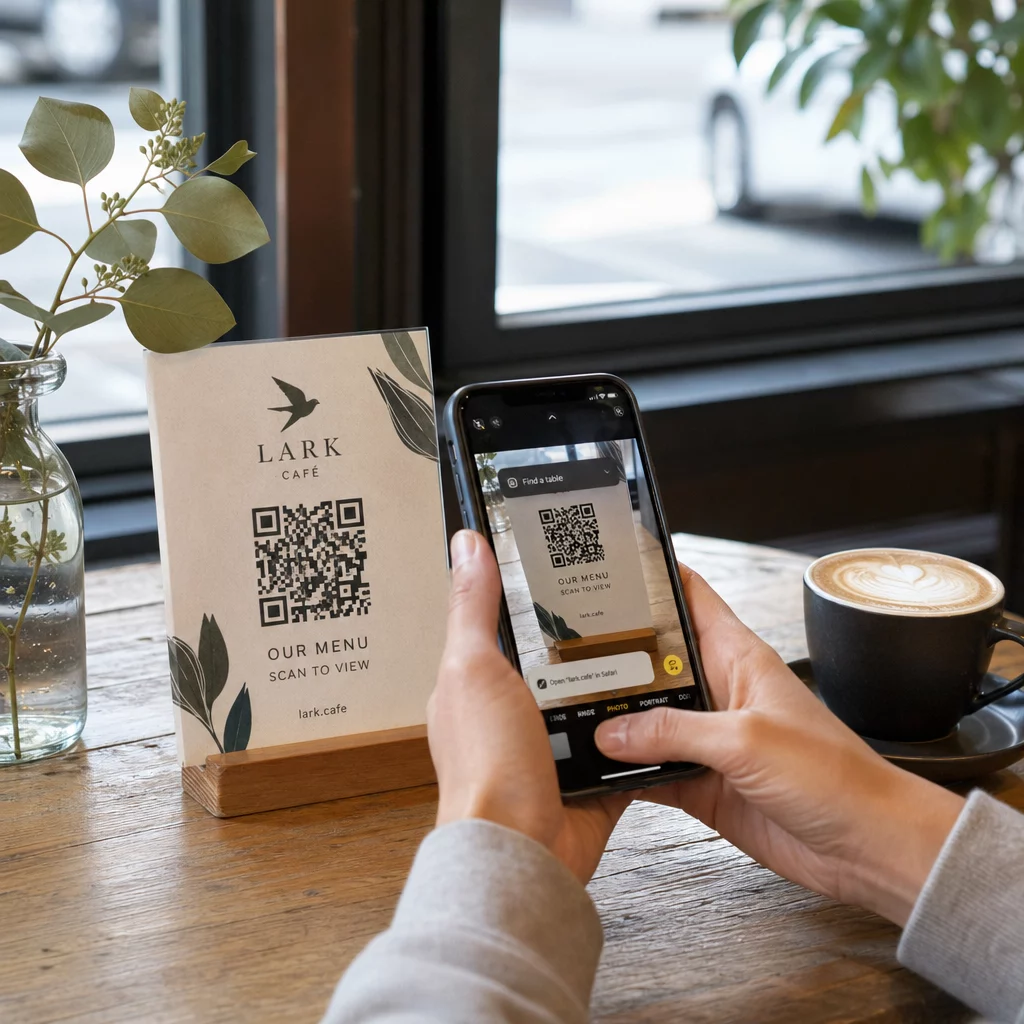
Κωδικοί QR είναι οπτικοί κωδικοί που βασίζονται σε κάμερα. Ένας σαρωτής ή η κάμερα ενός smartphone διαβάζει το μοτίβο, αποκωδικοποιεί τις πληροφορίες και αναζητά την εγγραφή του συμμετέχοντα. Απαιτούν οπτική επαφή και λειτουργούν καλύτερα όταν ο κωδικός είναι καθαρός, καλά φωτισμένος και άθικτος. Το check-in με κωδικό QR είναι η επιλογή με το χαμηλότερο κόστος για εφαρμογή: οι συμμετέχοντες λαμβάνουν έναν κωδικό μέσω email ή SMS και το προσωπικό τον σαρώνει με οποιαδήποτε συσκευή εξοπλισμένη με κάμερα.
RFID (Αναγνώριση μέσω Ραδιοσυχνοτήτων) χρησιμοποιεί ραδιοκύματα μεταξύ μιας ετικέτας ενσωματωμένης σε ένα σήμα ή βραχιόλι και μιας συσκευής ανάγνωσης. Οι συμμετέχοντες δεν χρειάζεται να κάνουν τίποτα – απλώς περπατούν κοντά σε έναν αναγνώστη και το σύστημα καταγράφει την είσοδό τους. Το RFID είναι πλήρως παθητικό από την πλευρά του συμμετέχοντα, γεγονός που το καθιστά εξαιρετικά γρήγορο σε μεγάλους όγκους. Οι αναγνώστες μπορούν να ανιχνεύσουν ετικέτες σε απόσταση λίγων ποδιών, πράγμα που σημαίνει ότι η είσοδος μπορεί να είναι εντελώς αφύλακτη στην πύλη.
NFC (Επικοινωνία Κοντινού Πεδίου) είναι ένα υποσύνολο τεχνολογίας RFID μικρής εμβέλειας, που απαιτεί το σήμα ή το βραχιόλι να βρίσκεται σε απόσταση περίπου 1-4 εκατοστών από τον αναγνώστη – ουσιαστικά ένα άγγιγμα. Η μικρή εμβέλεια είναι σκόπιμη: το NFC προσφέρει κρυπτογραφημένη, αμφίδρομη επικοινωνία που είναι δύσκολο να κλωνοποιηθεί, καθιστώντας το την ισχυρότερη επιλογή για ασφαλή έλεγχο πρόσβασης, ανέπαφες πληρωμές και διαχείριση ζωνών VIP.
Σύγκριση των τριών τεχνολογιών δίπλα-δίπλα
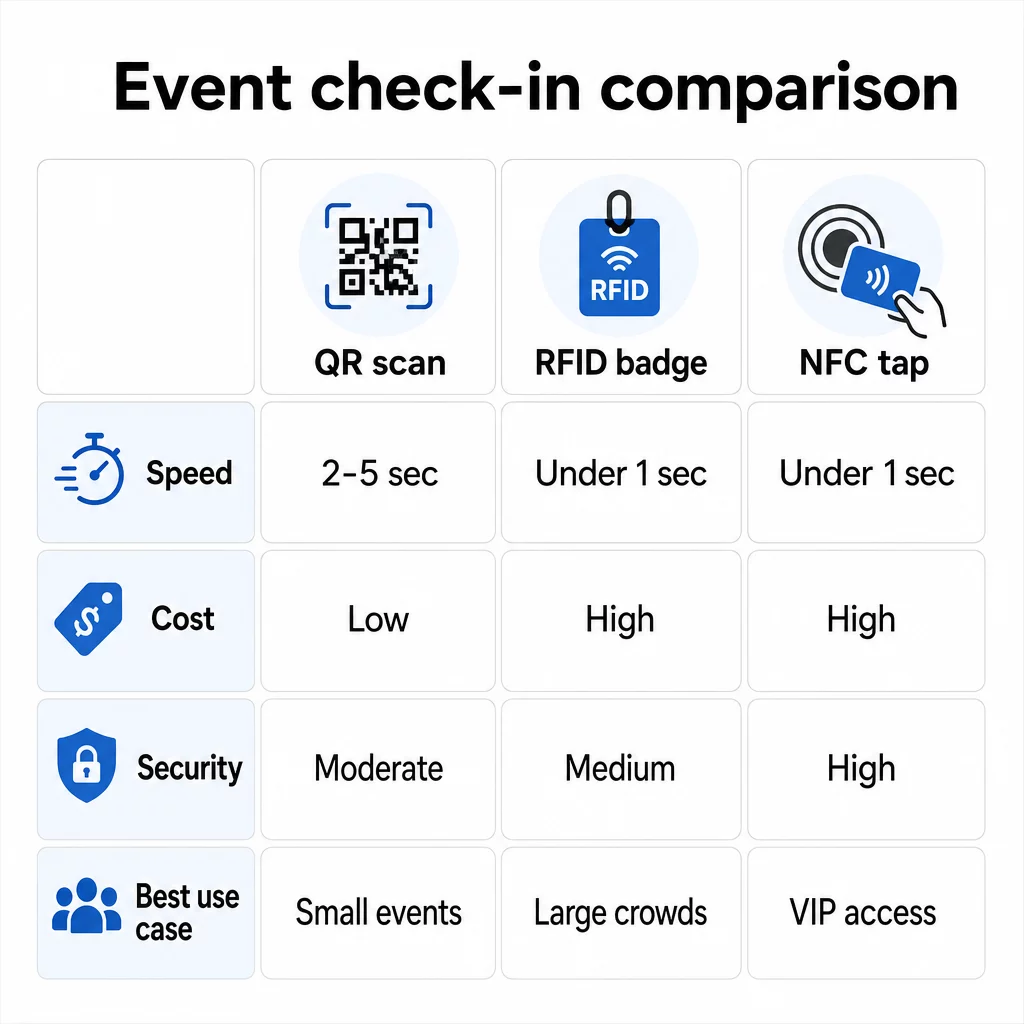
| ΛΕΙΤΟΥΡΓΙΑ | Κωδικός QR | RFID | NFC |
|---|---|---|---|
| ΠΩΣ ΛΕΙΤΟΥΡΓΕΙ | Η κάμερα σαρώνει οπτικό κωδικό | Ραδιοκύματα, χωρίς οπτική επαφή | Άγγιγμα μικρής εμβέλειας (1–4 εκ.) |
| Ταχύτητα ανά είσοδο | 2–5 δευτερόλεπτα | Κάτω από 1 δευτερόλεπτο, χωρίς χέρια | Κάτω από 1 δευτερόλεπτο |
| Κόστος υποδομής | Χαμηλό (οποιαδήποτε συσκευή κάμερας) | Υψηλό (αναγνώστες + κωδικοποιημένες κάρτες) | Υψηλό (αναγνώστες + κωδικοποιημένες κάρτες) |
| Ασφάλεια | Μέτριο (κοινοποιείται εύκολα μέσω στιγμιότυπου οθόνης) | Μεταβλητό | Υψηλό (κρυπτογραφημένο, δύσκολο να κλωνοποιηθεί) |
| Δυνατότητα εκτός σύνδεσης | Εξαρτάται από την πλατφόρμα | Γενικά ναι | Γενικά ναι |
| Επαναχρησιμοποίηση | Μίας χρήσης ή μίας εκτύπωσης | Επαναχρησιμοποιήσιμο σε διάφορες ημέρες ή εκδηλώσεις | Επαναχρησιμοποιήσιμο σε διάφορες ημέρες ή εκδηλώσεις |
| Παρακολούθηση κίνησης σε πραγματικό χρόνο | Μόνο στα σημεία σάρωσης | Σε ολόκληρο τον χώρο | Σε καθορισμένες ζώνες |
| Καλύτερο για | Μικρές έως μεσαίες εκδηλώσεις, χαμηλός προϋπολογισμός | Εκδηλώσεις υψηλού όγκου, φεστιβάλ | Ασφαλής πρόσβαση, ζώνες VIP, πληρωμές |
Οι κωδικοί QR είναι γρήγοροι αλλά εύθραυστοι. Λειτουργούν καλά υπό ιδανικές συνθήκες, αλλά γίνονται σημεία συμφόρησης όταν οι μπαταρίες των παρευρισκομένων εξαντλούνται, οι οθόνες είναι ραγισμένες ή η συνδεσιμότητα δικτύου πέφτει. Το RFID διαχειρίζεται μεγάλα πλήθη με ελάχιστη τριβή. Το NFC προσφέρει το ισχυρότερο προφίλ ασφαλείας, αλλά απαιτεί την εγγύτερη φυσική εγγύτητα.
Πότε να χρησιμοποιήσετε κωδικούς QR για check-in
Οι κωδικοί QR είναι η σωστή επιλογή για τις περισσότερες μικρές έως μεσαίες εκδηλώσεις, μονοήμερες διασκέψεις και κάθε περίπτωση όπου ο προϋπολογισμός ή ο χρόνος εγκατάστασης είναι περιορισμένος. Μπορείτε να εφαρμόσετε ένα πλήρες σύστημα check-in QR χωρίς εξειδικευμένο υλικό – απλώς μια αξιόπιστη πλατφόρμα κωδικών QR και μια συσκευή εξοπλισμένη με κάμερα σε κάθε σημείο εισόδου.
Τα πρακτικά πλεονεκτήματα των κωδικών QR περιλαμβάνουν:
- Δεν απαιτείται υλικό από τον παρευρισκόμενο – οι κωδικοί βρίσκονται σε οθόνη τηλεφώνου ή σε εκτυπωμένο εισιτήριο
- Εύκολη διανομή – αποστολή μέσω email, SMS ή εφαρμογών ανταλλαγής μηνυμάτων πριν την εκδήλωση
- Δυναμική ενημέρωση – εάν ο χώρος σας αλλάξει ή η ροή του check-in σας μετατοπιστεί, μπορείτε να ενημερώσετε πού δείχνει ένας δυναμικός κωδικός QR χωρίς να εκτυπώσετε τίποτα ξανά
- Αναλύσεις σάρωσης – παρακολούθηση ωρών check-in, τύπων συσκευών και όγκου εισόδων σε πραγματικό χρόνο
Τα κύρια αδύνατα σημεία που πρέπει να λάβετε υπόψη: Οι κωδικοί QR δεν επαληθεύουν εγγενώς την ταυτότητα, μόνο την κατοχή ενός κωδικού. Είναι εύκολο να γίνουν screenshot και να κοινοποιηθούν. Και δεν παρακολουθούν παθητικά πού πηγαίνουν οι παρευρισκόμενοι μεταξύ των σημείων σάρωσης.
Για να καλύψετε ορισμένα από αυτά τα κενά, αναθέστε σε κάθε εγγεγραμμένο έναν μοναδικό, εφάπαξ κωδικό QR που επισημαίνεται ως χρησιμοποιημένος στην πρώτη σάρωση. Αυτό αποτρέπει τις διπλοτυπίες και την κοινή χρήση διαπιστευτηρίων χωρίς να προσθέτει επιπλέον κόστος υλικού. Μπορείτε να μάθετε πώς λειτουργεί αυτό στην πράξη στο απόλυτο οδηγό για τους κωδικούς QR για check-in εκδηλώσεων.
Ρύθμιση Κωδικών Check-In Εκδηλώσεων με Δυνατότητα Παρακολούθησης Δημιουργήστε εξατομικευμένους, δυναμικούς κωδικούς QR για κάθε παρευρισκόμενο και παρακολουθήστε δεδομένα σάρωσης σε πραγματικό χρόνο από έναν ενιαίο πίνακα ελέγχου. Ξεκινήστε με το Γεννήτρια Κωδικών QR Εκδηλώσεων Pageloot.
Πότε να χρησιμοποιήσετε RFID ή NFC αντ' αυτού
Για μεγάλα φεστιβάλ, πολυήμερες διασκέψεις ή οποιαδήποτε εκδήλωση με 1.000+ παρευρισκόμενους που κινούνται σε πολλαπλές ζώνες πρόσβασης, το RFID και το NFC προσφέρουν σημαντικά καλύτερη απόδοση και βάθος παρακολούθησης.
Το RFID έχει νόημα όταν:
- Χρειάζεστε πλήρως αυτοματοποιημένες, μη επανδρωμένες πύλες εισόδου
- Οι παρευρισκόμενοι κινούνται σε πολλαπλές συνεδρίες ή περιοχές και χρειάζεστε παθητική παρακολούθηση του χώρου
- Η κοινή χρήση διαπιστευτηρίων αποτελεί σημαντικό κίνδυνο απάτης
- Εκδίδετε ούτως ή άλλως φυσικά βραχιόλια ή κονκάρδες
Το NFC έχει νόημα όταν:
- Χρειάζεστε έλεγχο πρόσβασης βάσει ζώνης με κρυπτογραφημένα διαπιστευτήρια (VIP, παρασκήνια, τύπος)
- Διαχειρίζεστε ανέπαφες πληρωμές παράλληλα με τη διαχείριση εισόδου
- Θέλετε αμφίδρομη ανταλλαγή δεδομένων μεταξύ καρτών και αναγνωστών
- Η μέγιστη αντίσταση στην κλωνοποίηση είναι απαίτηση ασφαλείας
Το αντάλλαγμα είναι η υποδομή. Το RFID και το NFC απαιτούν και τα δύο αρχική επένδυση σε αναγνώστες, κωδικοποιημένες κάρτες ή βραχιολάκια και ενσωμάτωση λογισμικού με την πλατφόρμα διαχείρισης εκδηλώσεών σας. Πρέπει επίσης να εκδώσετε διαπιστευτήρια εκ των προτέρων, κάτι που προσθέτει ένα βήμα προ-εκδήλωσης στην εφοδιαστική αλυσίδα που τα συστήματα κωδικών QR παραλείπουν εντελώς.
Ρύθμιση Check-In με Κωδικό QR: Μια Βήμα-Προς-Βήμα Προσέγγιση
Αν έχετε αποφασίσει ότι οι κωδικοί QR είναι η σωστή επιλογή, δείτε πώς να τους εφαρμόσετε σωστά.
Επιλέξτε Δυναμικούς Αντί Στατικών Κωδικών
Οι στατικοί κωδικοί QR κλειδώνουν έναν σταθερό προορισμό κατά τη στιγμή της δημιουργίας. Εάν η διεύθυνση URL της φόρμας check-in σας αλλάξει, ή η πλατφόρμα της εκδήλωσής σας πέσει και χρειαστεί να ανακατευθύνετε τους παρευρισκόμενους, πρέπει να επανεκτυπώσετε. Οι δυναμικοί κωδικοί QR σάς επιτρέπουν να ενημερώσετε τον προορισμό ανά πάσα στιγμή – ακόμη και κατά τη διάρκεια της εκδήλωσης – χωρίς να εκδώσετε νέους κωδικούς.
Για εκδηλώσεις όπου οποιαδήποτε λεπτομέρεια μπορεί να αλλάξει, οι δυναμικοί κωδικοί είναι η πρακτική προεπιλογή. Πλατφόρμες όπως η Pageloot's γεννήτρια κωδικών QR σας επιτρέπουν να δημιουργείτε επεξεργάσιμους κωδικούς και να παρακολουθείτε κάθε σάρωση σε πραγματικό χρόνο.
Αντιστοιχίστε Ατομικούς Κωδικούς σε Κάθε Παρευρισκόμενο
Ένας κωδικός ανά παρευρισκόμενο αποτρέπει την κοινή χρήση, δημιουργεί ένα ελεγχόμενο αρχείο check-in και επιτρέπει στο σύστημά σας να επισημαίνει κάθε κωδικό ως χρησιμοποιημένο στην πρώτη σάρωση. Διανείμετε τους κωδικούς μέσω email (ενσωματωμένοι ως εικόνα με εφεδρικό αρχείο PDF για λήψη) και μέσω SMS για τους παρευρισκόμενους που ενδέχεται να μην ελέγχουν αξιόπιστα το email τους. Στείλτε υπενθυμιστικά μηνύματα 48 και 24 ώρες πριν από την εκδήλωση για να μειώσετε τον αριθμό των ατόμων που φτάνουν χωρίς τον κωδικό τους.
Εάν δημιουργείτε μια πιο ολοκληρωμένη ρύθμιση – όπου οι κωδικοί QR προ-συμπληρώνουν δεδομένα παρευρισκομένων σε ένα CRM ή φόρμα κατά τη σάρωση – ο οδηγός για τη δημιουργία δυναμικών κωδικών QR για check-ins CRM περιγράφει λεπτομερώς την τεχνική υλοποίηση.
Ρυθμίστε τη Φόρμα Παρακολούθησης Συμμετοχών σας
Μια απλή και αποτελεσματική προσέγγιση: δημιουργήστε μια φόρμα check-in στο Google Forms ή σε ένα παρόμοιο εργαλείο, και στη συνέχεια δημιουργήστε έναν κωδικό QR που συνδέεται απευθείας με αυτήν. Όταν οι παρευρισκόμενοι σαρώνουν, υποβάλλουν τις πληροφορίες τους και τα δεδομένα τροφοδοτούν τον πίνακα ελέγχου παρακολούθησης. Το QR κωδικός παρακολούθησης παρουσιών η ρύθμιση στο Pageloot υποστηρίζει ακριβώς αυτή τη ροή εργασίας – οι διοργανωτές μπορούν να δουν όλα τα υποβληθέντα δεδομένα στον δημιουργό αφού οι παρευρισκόμενοι σαρώσουν και υποβάλουν.
Για εκδηλώσεις που χρησιμοποιούν QR κωδικούς σε εισιτήρια, συνδέστε τον κωδικό σε ένα ασφαλές σημείο επικύρωσης, ώστε το προσωπικό να μπορεί να επιβεβαιώσει την ταυτότητα του παρευρισκόμενου σε πραγματικό χρόνο αντί να βασίζεται σε μια παθητική υποβολή φόρμας.
Σχεδιάστε την Τοποθέτηση Προσεκτικά
Το πού τοποθετείτε τους QR κωδικούς έχει τόση σημασία όσο και το πώς τους δημιουργείτε. Βασικές αρχές τοποθέτησης:
- Τοποθετήστε τους σταθμούς σάρωσης σε ύψος περίπου 1,2 μέτρων για να εξυπηρετήσετε άνετα όλους τους χρήστες
- Δημιουργήστε πολλαπλά σημεία check-in για εκδηλώσεις με πάνω από 200 παρευρισκόμενους για να αποφύγετε συμφόρηση στις λωρίδες
- Εξασφαλίστε ισχυρό, ομοιόμορφο φωτισμό σε κάθε σταθμό – ειδικά για βραδινές ή εσωτερικές εκδηλώσεις
- Τοποθετήστε QR κωδικούς στα σημεία εξόδου συνδεδεμένους με μια φόρμα ανατροφοδότησης, ώστε οι επισκέπτες να μπορούν να μοιραστούν τις σκέψεις τους φεύγοντας
- Για εκδηλώσεις βασισμένες σε συνεδρίες, τοποθετήστε ξεχωριστούς QR κωδικούς σε κάθε είσοδο συνεδρίας για την παρακολούθηση της συμμετοχής
Περπατήστε στον χώρο πριν από την εκδήλωση σαν να είστε παρευρισκόμενος. Επαληθεύστε ότι οι κωδικοί σαρώνουν καθαρά από πολλαπλές γωνίες και υπό τις πραγματικές συνθήκες φωτισμού του χώρου.
Σχεδιάστε Κωδικούς που Σαρώνουν Αξιόπιστα
Ο οπτικός σχεδιασμός ενός QR κωδικού επηρεάζει άμεσα το αν σαρώνεται με συνέπεια σε όλες τις συσκευές και τα περιβάλλοντα.
- Ελάχιστο μέγεθος: 0,8 × 0,8 ίντσες (2 × 2 εκ.) για σάρωση από κοντινή απόσταση· μεγαλύτερο για οθόνες ή σήμανση
- Αντίθεση: σκούρες μονάδες σε ανοιχτόχρωμο φόντο, με αναλογία αντίθεσης τουλάχιστον 4:1
- Διόρθωση σφαλμάτων: χρησιμοποιήστε το επίπεδο H όταν προσθέτετε ένα λογότυπο στο κέντρο του κώδικα, καθώς επιτρέπει έως και το 30% του κώδικα να είναι καλυμμένο ενώ παραμένει αναγνώσιμο
- Για έντυπα εισιτήρια που ενδέχεται να λυγίσουν ή να τσαλακωθούν, χρησιμοποιήστε ματ εκτύπωση αντί για γυαλιστερά φινιρίσματα για να μειώσετε την αντανάκλαση
- Προσθέστε μια σύντομη παρότρυνση για δράση κάτω από τον κώδικα: Το “Σαρώστε για να κάνετε check-in” αφαιρεί την ασάφεια για τους παρευρισκόμενους
Μπορείτε να προσθέσετε χρώματα της επωνυμίας και το λογότυπο της εκδήλωσής σας διατηρώντας παράλληλα τη δυνατότητα σάρωσης – εργαλεία όπως η γεννήτρια της Pageloot εφαρμόζουν αυτόματα διόρθωση σφαλμάτων όταν ενσωματώνονται λογότυπα. Δοκιμάστε κάθε κώδικα σε πολλά μοντέλα τηλεφώνων και συνθήκες φωτισμού πριν από τη διανομή.
Για μια πιο εις βάθος ματιά στο πώς να κάνετε τους κώδικες προσβάσιμους σε όλους τους παρευρισκόμενους, συμπεριλαμβανομένων εκείνων με προβλήματα όρασης ή χωρίς smartphone, ο οδηγός κωδικών QR RSVP καλύπτει λεπτομερώς τις βέλτιστες πρακτικές προσβασιμότητας.
Παρακολούθηση Check-Ins σε Πραγματικό Χρόνο
Ένα από τα πρακτικά πλεονεκτήματα που έχουν τα συστήματα που βασίζονται σε QR έναντι πολλών υλοποιήσεων RFID είναι οι προσβάσιμες, αναλύσεις σε πραγματικό χρόνο χωρίς εξειδικευμένο λογισμικό.
Μετρήσεις που αξίζει να παρακολουθείτε κατά τη διάρκεια της εκδήλωσης:
- Συνολικές αφίξεις (check-ins) ανά πάσα στιγμή
- Μέσος χρόνος επεξεργασίας σάρωσης ανά παρευρισκόμενο
- Μήκος ουράς και παράθυρα αιχμής αφίξεων
- Αριθμός σαρώσεων ανά συνεδρία (εάν χρησιμοποιούνται κωδικοί QR συνεδριών)
Με Παρακολούθηση κώδικα QR σε μια πλατφόρμα όπως το Pageloot, κάθε σάρωση καταγράφει τη χρονική σήμανση, τον τύπο συσκευής και την τοποθεσία, δίνοντάς σας μια ζωντανή εικόνα του πού συγκεντρώνονται πλήθη. Εάν μια λωρίδα εισόδου έχει συμφόρηση, μπορείτε να ανακατευθύνετε αμέσως το προσωπικό. Εάν ένας κωδικός QR συνεδρίας δείχνει απροσδόκητα υψηλή προσέλευση, μπορείτε να προσαρμόσετε τη χωρητικότητα της αίθουσας πριν γίνει πρόβλημα.
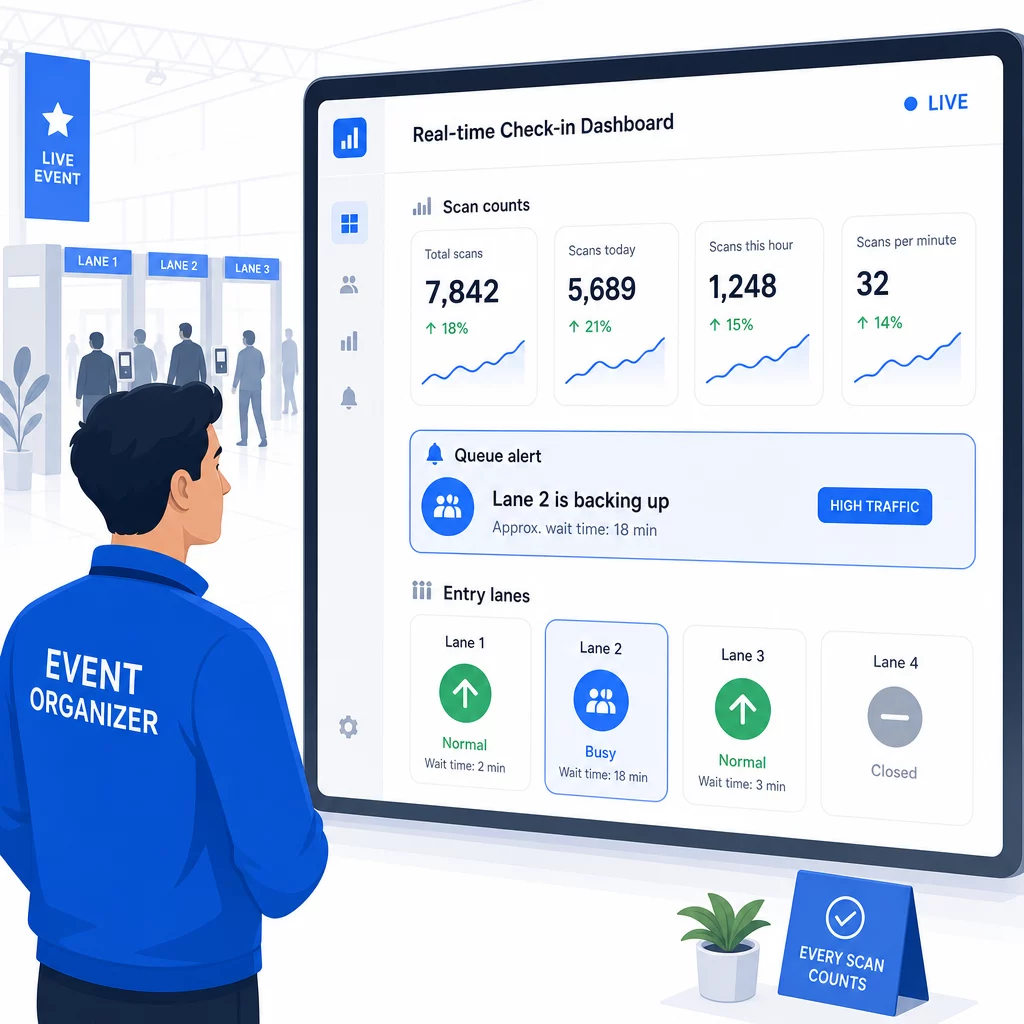
Μετά την εκδήλωση, αυτά τα δεδομένα ενημερώνουν τις αποφάσεις για την επόμενη φορά: πότε να ανοίξετε τις πόρτες, πόσες λωρίδες εισόδου χρειάζεστε και ποιες συνεδρίες προσέλκυσαν το μεγαλύτερο ενδιαφέρον. Εργαλεία για παρακολούθηση εκδηλώσεων με κωδικούς QR προσφέρουν εξαγωγές αναφορών μετά την εκδήλωση που ενσωματώνονται απευθείας στις ροές εργασίας του σχεδιασμού.
Ασφάλεια και Προστασία Δεδομένων
Τα συστήματα check-in χειρίζονται προσωπικά δεδομένα, γεγονός που δημιουργεί νομικές και φήμης υποχρεώσεις.
Ειδικά για τα συστήματα κωδικών QR:
- Χρησιμοποιήστε κωδικούς μίας χρήσης που απενεργοποιούνται μετά την πρώτη σάρωση για να αποτρέψετε την κοινή χρήση διαπιστευτηρίων
- Κρυπτογραφήστε όλα τα δεδομένα εν κινήσει και σε κατάσταση ηρεμίας – επιβεβαιώστε ότι η πλατφόρμα QR σας το υποστηρίζει πριν δεσμευτείτε
- Συλλέξτε μόνο ό,τι χρειάζεστε: όνομα, τύπος εισιτηρίου και χρονική σήμανση check-in είναι συνήθως επαρκή· οι διευθύνσεις κατοικίας και οι αριθμοί τηλεφώνου σπάνια είναι
- Εφαρμόστε ελέγχους πρόσβασης ώστε μόνο το προσωπικό που χρειάζεται τα δεδομένα των συμμετεχόντων να μπορεί να τα δει
- Συμπεριλάβετε μια σαφή ειδοποίηση απορρήτου στη φόρμα εγγραφής σας εξηγώντας τι συλλέγετε, γιατί και για πόσο καιρό το διατηρείτε
Για εκδηλώσεις με συμμετέχοντες από την Καλιφόρνια, απαιτείται συμμόρφωση με τον CCPA ανεξάρτητα από το πού διεξάγεται η εκδήλωσή σας. Οι συμμετέχοντες έχουν το δικαίωμα να γνωρίζουν ποια δεδομένα έχετε συλλέξει και να ζητήσουν τη διαγραφή τους. Για καθοδήγηση σχετικά με την ενσωμάτωση αυτών των προστασιών στη ροή εργασίας έκδοσης εισιτηρίων από την αρχή, ο οδηγός ασφαλών εισιτηρίων εκδηλώσεων με κωδικούς QR καλύπτει την κρυπτογράφηση, την κωδικοποίηση (tokenization) και την επικύρωση μίας χρήσης λεπτομερώς.
Κατά την αξιολόγηση πλατφορμών κωδικών QR, αναζητήστε συμμόρφωση με το SOC 2, δεδομένα αποθηκευμένα σε διακομιστές των ΗΠΑ εάν η εκδήλωσή σας είναι εγχώρια, αρχεία καταγραφής ελέγχου για την πρόσβαση στα δεδομένα και μια σαφή πολιτική που να δηλώνει ότι διατηρείτε την πλήρη ιδιοκτησία των δεδομένων των συμμετεχόντων σας.
Σχέδια Αντιγράφων Ασφαλείας για Όταν Αποτυγχάνει η Τεχνολογία
Ακόμη και συστήματα που έχουν δοκιμαστεί καλά αντιμετωπίζουν προβλήματα την ημέρα της εκδήλωσης. Δημιουργήστε το εφεδρικό σας σύστημα πριν το χρειαστείτε.
Συνηθισμένα προβλήματα σάρωσης και γρήγορες λύσεις:
- Κακός φωτισμός: προσθέστε φωτισμό εργασίας LED σε κάθε σταθμό
- Κατεστραμμένοι ή μη αναγνώσιμοι κωδικοί: διατηρήστε ένα tablet σε κάθε σταθμό, ώστε το προσωπικό να μπορεί να ανακτήσει μια ψηφιακή έκδοση από το αρχείο του συμμετέχοντα
- Ασυμβατότητα συσκευής: ζητήστε από τους συμμετέχοντες να κρατήσουν το τηλέφωνό τους 6–8 ίντσες από τον σαρωτή. Εάν η ενσωματωμένη εφαρμογή κάμερας αποτύχει, μια ειδική εφαρμογή σαρωτή QR συνήθως επιλύει το πρόβλημα
Για βλάβες δικτύου:
- Χρησιμοποιήστε μια πλατφόρμα που αποθηκεύει τα δεδομένα check-in τοπικά και συγχρονίζει όταν αποκατασταθεί η συνδεσιμότητα
- Διατηρήστε δύο εφεδρικές συσκευές σάρωσης σε κάθε σημείο εισόδου
Εάν όλα τα ψηφιακά συστήματα αποτύχουν:
- Έχετε μια αλφαβητική εκτυπωμένη λίστα συμμετεχόντων σε κάθε σημείο εισόδου
- Ενημερώστε το προσωπικό για το πώς να αναζητά με βάση το όνομα, να χειρίζεται χαμένους κωδικούς και να εκδίδει προσωρινές κάρτες εισόδου
- Χρησιμοποιήστε χρωματιστά σφραγίδες ή αυτοκόλλητα για να σημειώσετε τις χειροκίνητες καταχωρήσεις και να αποτρέψετε διπλές εγγραφές
Για εκδηλώσεις με VIP κατηγορίες ή περιορισμένες ζώνες, προεκτυπώστε χρωματιστές προσωρινές κάρτες εισόδου πριν από την εκδήλωση, ώστε το προσωπικό να μπορεί να διαχειρίζεται τα επίπεδα πρόσβασης χωρίς να βασίζεται στο ψηφιακό σύστημα. Επικοινωνήστε τυχόν καθυστερήσεις με σαφήνεια: “Χρησιμοποιούμε το εφεδρικό μας σύστημα για να σας βάλουμε μέσα όσο το δυνατόν γρηγορότερα” αρκεί για να διατηρηθεί μια θετική εμπειρία συμμετέχοντα κατά τη διάρκεια τεχνικών δυσκολιών.
Αυτοματοποίηση της παρακολούθησης μετά το Check-In
Τα δεδομένα check-in που συλλέγετε γίνονται πιο πολύτιμα μετά το τέλος της εκδήλωσης. Συνδέοντας το σύστημα σάρωσης QR με την πλατφόρμα email ή μάρκετινγκ, μπορείτε να στείλετε τμηματοποιημένες παρακολουθήσεις με βάση το τι έκανε πραγματικά κάθε συμμετέχων.
Πρακτική αυτοματοποίηση μετά την εκδήλωση:
- Στείλτε email ευχαριστίας εντός 2 ωρών από τη λήξη της εκδήλωσης, συμπεριλαμβάνοντας συνδέσμους για διαφάνειες ή πόρους
- Για εκδηλώσεις πολλαπλών συνεδριών, χρησιμοποιήστε δεδομένα σάρωσης QR ειδικά για κάθε συνεδρία για να στείλετε μόνο το περιεχόμενο που σχετίζεται με όσα παρακολούθησε ο κάθε συμμετέχων
- Μοιραστείτε έρευνες ανατροφοδότησης 24–48 ώρες μετά την εκδήλωση – διατηρήστε τις σε πέντε ερωτήσεις ή λιγότερες και προσφέρετε ένα μικρό κίνητρο για την ολοκλήρωσή τους
- Για εκδηλώσεις δικτύωσης, συντάξτε ένα email σύνοψης συνδέσεων από δεδομένα σάρωσης ώστε οι συμμετέχοντες να έχουν ένα αρχείο με το ποιους συνάντησαν
Παρακολουθήστε τα ποσοστά ανοίγματος και τα ποσοστά κλικ στα μηνύματα παρακολούθησης για να προσαρμόσετε το χρονοδιάγραμμα και το περιεχόμενο για μελλοντικές εκδηλώσεις.
Συχνές ερωτήσεις
Εξαρτάται από το μέγεθος της εκδήλωσής σας, τον προϋπολογισμό και τις απαιτήσεις ασφαλείας. Οι κωδικοί QR είναι η επιλογή με το χαμηλότερο κόστος και λειτουργούν καλά για μικρές έως μεσαίες εκδηλώσεις όπου οι συμμετέχοντες φέρνουν τις δικές τους συσκευές. Το RFID ταιριάζει σε εκδηλώσεις υψηλού όγκου όπου χρειάζεστε παθητική, hands-free είσοδο για χιλιάδες συμμετέχοντες. Το NFC είναι η ισχυρότερη επιλογή όταν χρειάζεστε κρυπτογραφημένο έλεγχο πρόσβασης βάσει ζώνης, ανέπαφες πληρωμές ή επαναχρησιμοποίηση διαπιστευτηρίων για πολλές ημέρες. Οι περισσότερες εκδηλώσεις με λιγότερους από 500 συμμετέχοντες μπορούν να πραγματοποιήσουν ένα ομαλό check-in εξ ολοκλήρου με κωδικούς QR και μια αξιόπιστη πλατφόρμα.
Εκχωρήστε έναν μοναδικό κωδικό QR σε κάθε εγγεγραμμένο και ρυθμίστε το σύστημά σας να επισημαίνει κάθε κωδικό ως χρησιμοποιημένο αμέσως μετά την πρώτη σάρωση. Μόλις σαρωθεί, ο κωδικός δεν μπορεί να χρησιμοποιηθεί ξανά. Δυναμικοί κωδικοί QR σε συνδυασμό με ένα backend επικύρωσης σε πραγματικό χρόνο εντοπίζουν άμεσα διπλές προσπάθειες σάρωσης. Για εκδηλώσεις όπου η επαλήθευση ταυτότητας έχει σημασία, εκπαιδεύστε το προσωπικό να διασταυρώνει μια φωτογραφική ταυτότητα με το όνομα εγγραφής όταν σαρωθεί ο κωδικός.
Να έχετε μια εκτυπωμένη, αλφαβητική λίστα παρευρισκομένων σε κάθε σημείο εισόδου και να εκπαιδεύσετε το προσωπικό να κάνει χειροκίνητο check-in στους παρευρισκόμενους χρησιμοποιώντας όνομα και αριθμό εισιτηρίου. Διατηρήστε τουλάχιστον δύο εφεδρικές συσκευές σάρωσης ανά λωρίδα με φορτισμένες μπαταρίες ή φορητά power banks. Χρησιμοποιήστε μια πλατφόρμα που αποθηκεύει τα check-in τοπικά και συγχρονίζει όταν επανέλθει η σύνδεση στο διαδίκτυο, ώστε να μην χαθούν δεδομένα. Ενημερώστε την ομάδα σας για τη χειροκίνητη διαδικασία πριν ξεκινήσει η εκδήλωση, ώστε η μετάβαση να είναι ομαλή αν χρειαστεί.