Potrzebujesz wygenerować setki – lub tysiące – kodów QR bez ręcznego tworzenia każdego z nich? Tworzenie ich pojedynczo jest niepraktyczne na dużą skalę i wprowadza niespójności w Twoich kampaniach. Ten przewodnik przeprowadzi Cię przez najszybsze i najbardziej niezawodne metody masowego tworzenia kodów QR, od przesyłania plików CSV po automatyzację na poziomie przedsiębiorstwa.
Dlaczego masowe tworzenie kodów QR ma znaczenie
Kiedy prowadzisz premierę produktu, zarządzasz rejestracjami na wydarzenia lub etykietujesz zapasy, indywidualne tworzenie kodów QR po prostu nie skaluje się. Nawet przy 50 kodach, ręczne generowanie pochłania godziny powtarzalnej pracy – a to jeszcze przed uwzględnieniem spójności projektu, organizacji plików lub konfiguracji śledzenia.
Narzędzia do masowego tworzenia kodów QR rozwiązują ten problem, umożliwiając zdefiniowanie wszystkich kodów w ustrukturyzowanym pliku – zazwyczaj CSV lub arkuszu kalkulacyjnym – i wygenerowanie całej partii w jednym procesie. Rezultatem jest spójny, gotowy do pobrania zestaw kodów, który można natychmiast wdrożyć.
Przypadki użycia obejmują niemal każdą branżę:
- Handel detaliczny i e-commerce: unikalne kody produktów na SKU, łączące ze specyfikacjami, recenzjami lub stronami zakupu
- Wydarzenia: kody dla każdego uczestnika do odprawy, dostępu do sesji lub programów cyfrowych
- Gościnność: kody menu dla poszczególnych stolików lub linki do informacji specyficznych dla pomieszczenia
- Logistyka i inwentaryzacja: etykiety zasobów łączące z rejestrami konserwacji lub danymi o lokalizacji
- Agencje marketingowe: kody specyficzne dla kampanii z indywidualnym śledzeniem dla każdego miejsca
Co potrzebujesz, zanim zaczniesz
Przed wygenerowaniem partii, kilka decyzji znacząco wpłynie na Twój proces pracy.
Kody statyczne vs. dynamiczne: Statyczne kody QR kodują miejsce docelowe bezpośrednio w wzorze. Po wydrukowaniu nie można ich zmienić. Dynamiczne kody QR używają krótkiego adresu URL przekierowania zarządzanego przez platformę, co oznacza, że możesz zaktualizować miejsce docelowe w dowolnym momencie – nawet po wydrukowaniu i rozprowadzeniu kodów. W przypadku kampanii masowych, gdzie treść może ewoluować, dynamiczne kody QR są lepszym wyborem.
Twój plik danych: Narzędzia do masowego generowania zazwyczaj akceptują plik CSV lub arkusz kalkulacyjny z jednym wierszem na kod QR. Co najmniej, każdy wiersz potrzebuje docelowego adresu URL lub treści. W zależności od platformy, możesz również uwzględnić pola dla nazwy kodu, przypisania do folderu, parametrów UTM lub szablonu projektu.
Spójność projektu: Jeśli Twoje kody mają zawierać kolory marki, logo lub specyficzne style ramek, upewnij się, że narzędzie pozwala zastosować wspólny szablon projektu dla całej partii, zamiast konfigurować każdy kod indywidualnie.
Wolumen: Zanim wybierzesz narzędzie, poznaj swoją skalę. Niektóre platformy ograniczają masowe generowanie do kilkuset kodów na partię; platformy klasy korporacyjnej, takie jak Pageloot, obsługują do 100 000 kodów QR za pomocą jednego przesłania pliku CSV.
Jak tworzyć kody QR masowo za pomocą przesyłania pliku CSV
Masowe generowanie oparte na CSV to najczęstsza metoda. Oto jak działa ten proces na platformie takiej jak Pageloot.
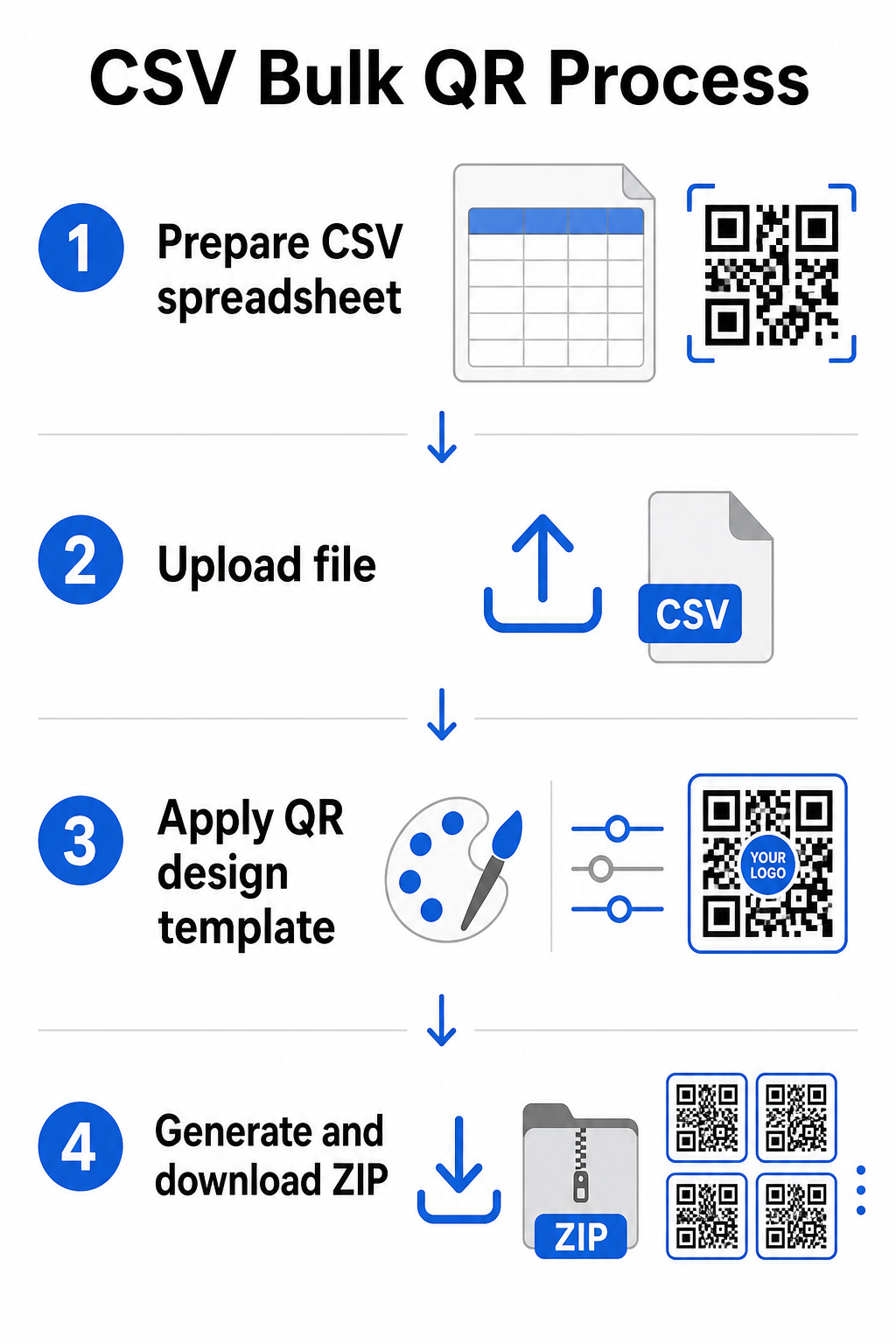
Krok 1: Przygotuj swój arkusz kalkulacyjny
Otwórz narzędzie do arkuszy kalkulacyjnych – Excel, Google Sheets lub dowolny edytor CSV – i ustrukturyzuj swoje dane. Każdy wiersz reprezentuje jeden kod QR. Uwzględnij co najmniej:
- Docelowy adres URL lub treść dla każdego kodu
- Nazwę lub etykietę dla każdego kodu (pomaga to w późniejszej organizacji)
- Wszelkie identyfikatory kampanii lub folderów, których chcesz użyć
Wyeksportuj plik jako CSV (wartości rozdzielone przecinkami), gdy będziesz gotowy do przesłania.
Krok 2: Prześlij plik CSV do generatora masowego
Zaloguj się na swoje konto Pageloot i przejdź do sekcji masowego tworzenia. Prześlij swój plik CSV. Platforma przeanalizuje każdy wiersz i ustawi kody w kolejce do wygenerowania. Przejrzyj podgląd, aby potwierdzić, że mapowanie jest poprawne – docelowe adresy URL powinny odpowiadać zamierzonym wierszom.
Krok 3: Zastosuj szablon projektu
Zamiast ręcznie stylizować każdy kod, wybierz wspólny szablon projektu do zastosowania w całej partii. To tutaj dodajesz logo swojej marki, wybierasz kolory i konfigurujesz style ramek. Zastosowanie spójnego projektu na tym etapie zapewnia, że wszystkie kody wyglądają jednolicie na opakowaniach, materiałach drukowanych lub oznakowaniu.
Krok 4: Generuj i pobieraj
Rozpocznij generowanie partii. Platforma generuje wszystkie kody jednocześnie i pakuje je do pobrania, zazwyczaj jako plik ZIP zawierający pojedyncze pliki graficzne (PNG, SVG, PDF lub EPS, w zależności od Twoich potrzeb wyjściowych). Nazwy plików zazwyczaj odpowiadają nazwom kodów z Twojego arkusza kalkulacyjnego, co ułatwia dopasowanie każdego kodu do jego zamierzonego zastosowania.
Wygeneruj całą partię za jednym razem Pomiń ręczną pracę i stwórz setki lub tysiące kodów QR z jednego arkusza kalkulacyjnego. Użyj Generator kodów QR lub eksploruj opcji dynamicznych kodów QR aby rozpocząć masowe tworzenie już dziś.
Używanie Google Sheets do masowych statycznych kodów QR
Jeśli Twój zespół już pracuje w Arkuszach Google, Pageloot obsługuje bezpośrednią integrację do generowania wielu statycznych kodów QR z danych arkusza kalkulacyjnego. To podejście jest szczególnie wygodne dla zespołów, które utrzymują dane na żywo w Arkuszach – katalogi produktów, listy uczestników wydarzeń lub katalogi lokalizacji – gdzie dane źródłowe są już ustrukturyzowane i aktualizowane wspólnie.
Proces odzwierciedla metodę CSV, ale zamiast eksportować i ponownie przesyłać, łączysz swój Arkusz bezpośrednio. Każdy wiersz w wyznaczonej kolumnie staje się danymi wejściowymi dla jednego kodu QR. Zmniejsza to tarcie dla zespołów, które nie chcą zarządzać oddzielnymi eksportami CSV za każdym razem, gdy zmieniają się dane źródłowe.
Organizowanie dużych partii po wygenerowaniu
Generowanie kodów to tylko część wyzwania. W dużej ilości, utrzymanie ich w porządku staje się osobnym zadaniem. Kilka praktyk znacząco pomaga.
Używaj folderów do sortowania kodów według kampanii, projektu, klienta lub linii produktów. Funkcja folderów kodów QR Pageloot ułatwia oddzielenie dziesiątek aktywnych kampanii, dzięki czemu członkowie zespołu mogą nawigować bez zamieszania. Ustanów jasną konwencję nazewnictwa w pliku CSV przed przesłaniem – coś w rodzaju `nazwa-kampaniiMIEJSCE UMIESZCZENIAwariant` – tak aby poszczególne kody były łatwe do zlokalizowania i dopasowania do ich danych analitycznych później. Na koniec, grupuj według przypadku użycia od samego początku: przechowuj kody wydarzeń, kody produktów i kody marketingowe w oddzielnych folderach, aby raportowanie wydajności pozostało przejrzyste i użyteczne.
Masowe kody QR z dynamiczną aktualizacją
Jednym z istotnych ograniczeń statycznych masowych kodów QR jest to, że każda zmiana miejsca docelowego wymaga ponownego wydruku. Jeśli wygenerujesz 5000 etykiet produktów, a adres URL połączonej strony docelowej ulegnie zmianie, te kody stają się nieaktualne w momencie ich dystrybucji.
Dynamiczne masowe kody QR eliminują ten problem. Każdy kod w Twojej partii wskazuje na krótki adres URL przekierowania utrzymywany przez Pageloot. Możesz aktualizować miejsce docelowe dla poszczególnych kodów – lub wprowadzać zmiany w całej partii – bez dotykania samego fizycznego kodu. Jest to szczególnie cenne w przypadku kampanii sezonowych, gdzie zmieniają się strony docelowe, opakowań produktów, gdzie strony informacyjne są aktualizowane po wydruku, oraz materiałów eventowych przygotowywanych z wyprzedzeniem, zanim zostaną potwierdzone ostateczne adresy URL.
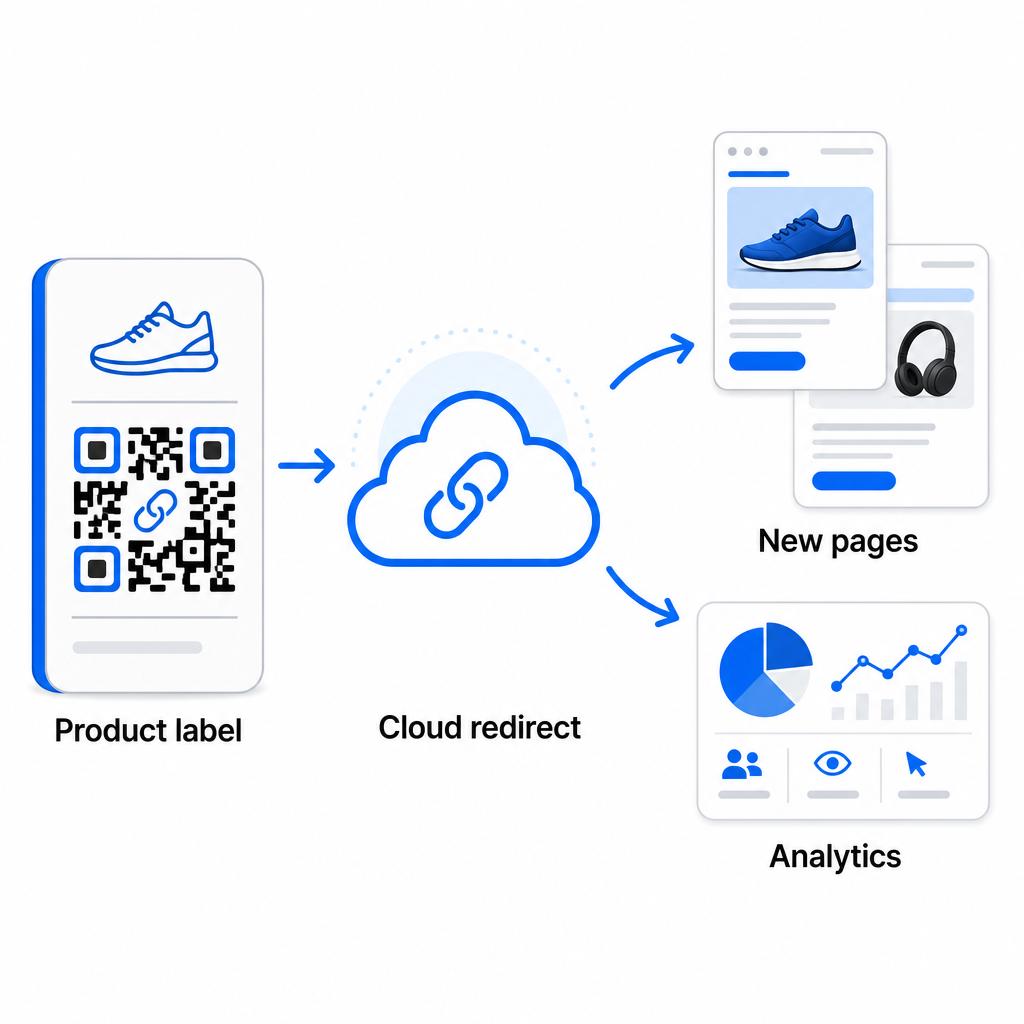
Poza elastycznością, dynamiczne kody odblokowują również szczegółowe analizy skanów: liczbę skanów, czasy skanowania, lokalizacje geograficzne, typy urządzeń, dane przeglądarki i systemu operacyjnego oraz śledzenie lokalizacji oparte na GPS. Dla każdego masowego wdrożenia, gdzie wydajność ma znaczenie, te dane dają bezpośredni wgląd w to, które kody działają i gdzie zaangażowanie jest najwyższe. Możesz dowiedzieć się więcej o tym, jak dynamiczne kody QR wspierają kampanie marketingowe i dlaczego ta elastyczność ma znaczenie na dużą skalę.
Śledź każde skanowanie w całej partii Dynamiczne kody QR pozwalają aktualizować miejsca docelowe i monitorować wydajność w czasie rzeczywistym – dla każdego kodu w Twojej kampanii. Poznaj Generator dynamicznych kodów QR do tworzenia śledzalnych kodów zbiorczych z pełnym pulpitem analitycznym.
Skalowanie do wolumenu korporacyjnego
Dla organizacji generujących dziesiątki tysięcy kodów – pomyśl o dużych sieciach handlowych, operacjach logistycznych przedsiębiorstw lub krajowych kampaniach marketingowych – przepływ pracy musi być bardziej solidny niż pojedyncze przesyłanie pliku CSV.
Pageloot platforma kodów QR dla przedsiębiorstw obsługuje generowanie partii na dużą skalę, z przepływami pracy opartymi na CSV, zdolnymi do wyprodukowania do 100 000 kodów QR w jednej operacji. Na tym poziomie wchodzą w grę dodatkowe kwestie.
integracja API całkowicie eliminuje ręczne kroki, automatyzując generowanie kodów bezpośrednio z wewnętrznych systemów, takich jak CRM, platformy zarządzania zapasami lub systemy zaplecza e-commerce. Przepływy pracy oparte na API pozwalają programowo generować, aktualizować i wycofywać kody w miarę zmian danych. Aby uzyskać głębszy wgląd w to, jak to działa w praktyce, zobacz przewodnik na temat Zarządzanie kodami QR oparte na API.
Dostęp oparty na rolach staje się ważny dla dużych zespołów, umożliwiając różnym użytkownikom zarządzanie konkretnymi kampaniami lub klientami bez dostępu do niepowiązanych danych.
Opcje white-label są szczególnie istotne dla agencji zarządzających masowymi wdrożeniami kodów QR w imieniu klientów. Dzięki funkcjom white-label, kody QR prowadzą do domen klientów, a pulpity nawigacyjne zawierają branding klienta – utrzymując płynne i profesjonalne doświadczenie klienta.
Typowe błędy, których należy unikać w generowaniu masowym
Kilka problemów pojawia się wielokrotnie, gdy zespoły generują kody QR w dużej ilości, a większość z nich jest łatwa do zapobieżenia dzięki niewielkiemu planowaniu z wyprzedzeniem.
Nietestowanie przed drukowaniem jest najkosztowniejszym błędem. Zawsze skanuj reprezentatywną próbkę z partii, zanim zdecydujesz się na druk. Pojedynczy błąd formatowania w pliku CSV może rozprzestrzenić się na setki uszkodzonych kodów. Podobnie, używanie statycznych kodów dla treści, które mogą się zmienić, jest ryzykiem, które dynamiczne kody całkowicie eliminują – jeśli istnieje jakakolwiek szansa, że docelowy adres URL lub strona docelowa zostanie zaktualizowana, wbuduj tę elastyczność od początku.
Wymagania dotyczące formatu plików również mają większe znaczenie, niż zespoły często oczekują. Produkcja drukowana wymaga formatów wektorowych (SVG, EPS, PDF) dla ostrego wydruku w dowolnym rozmiarze, podczas gdy pliki PNG działają do użytku cyfrowego, ale mogą ulec degradacji po skalowaniu do druku wielkoformatowego. Pomijanie organizacji przed generowaniem szybko prowadzi do problemów z zarządzaniem – ustaw strukturę folderów i konwencję nazewnictwa przed uruchomieniem partii, a nie po. Wreszcie, niespójny projekt w dużej partii wygląda nieprofesjonalnie i podważa wiarygodność marki; zastosowanie wspólnego szablonu w momencie generowania jest znacznie bardziej efektywne niż późniejsze indywidualne edytowanie kodów.
Najczęściej zadawane pytania
Większość narzędzi do masowego generowania kodów QR, w tym Pageloot, akceptuje pliki CSV (wartości oddzielone przecinkami). Możesz przygotować swoje dane w programie Excel lub Arkuszach Google i wyeksportować jako CSV. Każdy wiersz w Twoim pliku staje się jednym kodem QR. Pageloot obsługuje również bezpośrednią integrację z Arkuszami Google do statycznego masowego generowania bez konieczności eksportowania oddzielnego pliku.
Statyczne kody QR kodują miejsce docelowe na stałe – po wygenerowaniu i wydrukowaniu, miejsca docelowego nie można zmienić. Dynamiczne kody QR wykorzystują adres URL przekierowania zarządzany przez platformę, dzięki czemu możesz zaktualizować miejsce docelowe w dowolnym momencie bez ponownego drukowania. W przypadku dużych partii, gdzie treść może się zmieniać – takich jak strony produktów, szczegóły wydarzeń lub strony docelowe kampanii – dynamiczne kody są zdecydowanie zalecane. Zapewniają również szczegółowe analizy skanów, których statyczne kody nie mogą zaoferować.
Zależy to od platformy i planu. Narzędzia Pageloot na poziomie korporacyjnym obsługują generowanie do 100 000 kodów QR z jednego przesłanego pliku CSV, co czyni je odpowiednimi dla operacji handlu detalicznego, logistyki i marketingu na dużą skalę. Dla mniejszych partii, standardowe plany zaspokajają typowe potrzeby biznesowe, takie jak wydarzenia, linie produktów lub kampanie specyficzne dla lokalizacji.