Potřebujete vygenerovat stovky – nebo tisíce – QR kódů, aniž byste každý vytvářeli ručně? Jejich vytváření po jednom je v měřítku nepraktické a zavádí nekonzistentnost napříč vašimi kampaněmi. Tento průvodce vás provede nejrychlejšími a nejspolehlivějšími metodami pro hromadnou tvorbu QR kódů, od nahrávání CSV souborů po automatizaci na podnikové úrovni.
Proč je hromadná tvorba QR kódů důležitá
Když spouštíte produkt, spravujete registrace na události nebo označujete inventář, individuální tvorba QR kódů jednoduše neškáluje. I při 50 kódech spotřebuje ruční generování hodiny opakované práce – a to ještě před započtením konzistence designu, organizace souborů nebo nastavení sledování.
Nástroje pro hromadné QR kódy to řeší tím, že vám umožní definovat všechny vaše kódy ve strukturovaném souboru – typicky CSV nebo tabulce – a vygenerovat celou dávku v jednom pracovním postupu. Výsledkem je konzistentní, ke stažení připravená sada kódů, které lze okamžitě nasadit.
Případy použití pokrývají téměř každé odvětví:
- Maloobchod a e-commerce: unikátní produktové kódy na SKU odkazující na specifikace, recenze nebo nákupní stránky
- Akce: kódy pro každého účastníka pro odbavení, přístup k relacím nebo digitální programy
- Pohostinství: kódy menu pro jednotlivé stoly nebo odkazy na informace specifické pro místnost
- Logistika a inventář: štítky aktiv odkazující na záznamy o údržbě nebo údaje o poloze
- Marketingové agentury: kódy specifické pro kampaň s individuálním sledováním pro každé umístění
Co potřebujete, než začnete
Před vygenerováním vaší dávky několik rozhodnutí významně ovlivní váš pracovní postup.
Statické vs. dynamické kódy: Statické QR kódy kódují cíl přímo do vzoru. Jakmile jsou vytištěny, nelze je změnit. Dynamické QR kódy používají krátkou přesměrovací URL spravovanou platformou, což znamená, že cíl můžete kdykoli aktualizovat – i poté, co jsou kódy již vytištěny a distribuovány. Pro hromadné kampaně, kde se obsah může vyvíjet, dynamické QR kódy jsou lepší volbou.
Váš datový soubor: Nástroje pro hromadné generování typicky přijímají CSV nebo tabulku s jedním řádkem na QR kód. Minimálně každý řádek potřebuje cílovou URL nebo obsah. V závislosti na platformě můžete také zahrnout pole pro název kódu, přiřazení složky, parametry UTM nebo šablonu designu.
Konzistence designu: Pokud vaše kódy potřebují nést barvy značky, loga nebo specifické styly rámečků, potvrďte, že nástroj umožňuje aplikovat sdílenou šablonu designu napříč celou dávkou, spíše než konfigurovat každý kód individuálně.
Objem: Před výběrem nástroje znáte své měřítko. Některé platformy omezují hromadné generování na několik stovek kódů na dávku; platformy podnikové úrovně jako Pageloot podporují až 100 000 QR kódů prostřednictvím jednoho nahrání CSV.
Jak vytvářet QR kódy hromadně pomocí nahrání CSV
Hromadné generování založené na CSV je nejběžnější metodou. Zde je popsáno, jak proces funguje na platformě jako Pageloot.
Krok 1: Připravte si tabulku
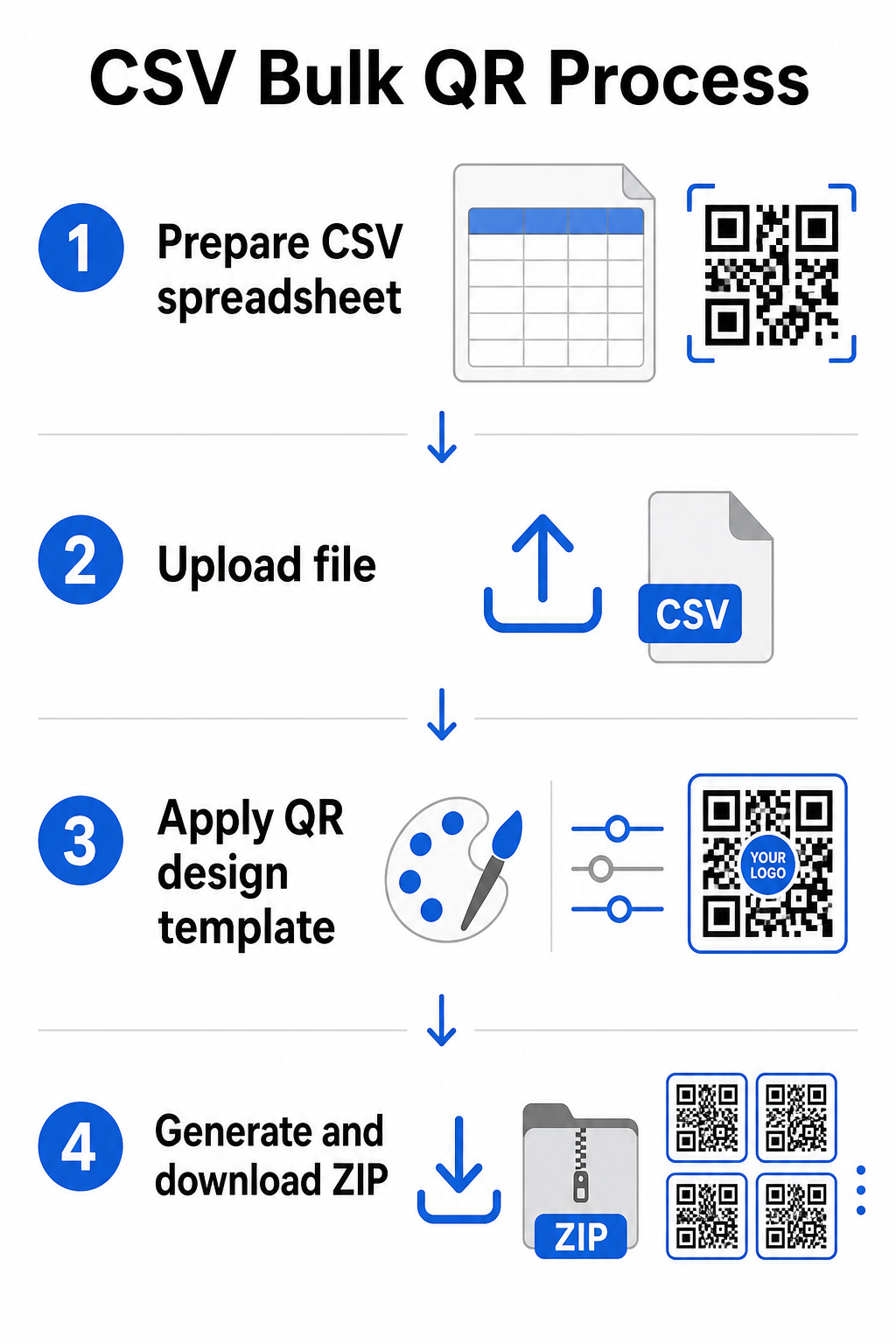
Otevřete nástroj pro tabulky – Excel, Google Sheets nebo jakýkoli editor CSV – a strukturojte svá data. Každý řádek představuje jeden QR kód. Zahrňte minimálně:
- Cílovou URL nebo obsah pro každý kód
- Název nebo štítek pro každý kód (to pomáhá s pozdější organizací)
- Jakékoli identifikátory kampaně nebo složky, které chcete použít
Exportujte soubor jako CSV (hodnoty oddělené čárkami), až budete připraveni k nahrání.
Krok 2: Nahrajte CSV do hromadného generátoru
Přihlaste se ke svému účtu Pageloot a přejděte do sekce hromadné tvorby. Nahrajte svůj soubor CSV. Platforma analyzuje každý řádek a zařadí kódy do fronty pro generování. Zkontrolujte náhled, abyste potvrdili, že mapování je správné – cílové URL by měly odpovídat zamýšleným řádkům.
Krok 3: Použijte šablonu designu
Namísto ručního stylizování každého kódu vyberte sdílenou šablonu designu, kterou aplikujete na celou dávku. Zde přidáte logo své značky, vyberete barvy a nakonfigurujete styly rámečků. Aplikace konzistentního designu v této fázi zajišťuje, že všechny kódy vypadají jednotně napříč obaly, tiskovými materiály nebo značkami.
Krok 4: Generujte a stáhněte
Spusťte dávku. Platforma vygeneruje všechny kódy současně a zabalí je ke stažení, typicky jako soubor ZIP obsahující jednotlivé obrazové soubory (PNG, SVG, PDF nebo EPS v závislosti na vašich výstupních potřebách). Názvy souborů obvykle odpovídají názvům kódů z vaší tabulky, což usnadňuje přiřazení každého kódu k jeho zamýšlenému použití.
Vygenerujte celou dávku najednou Přeskočte ruční práci a vytvořte stovky nebo tisíce QR kódů z jedné tabulky. Použijte Generátor QR kódů nebo prozkoumejte možnosti dynamických QR kódů a začněte s hromadnou tvorbou ještě dnes.
Použití Google Sheets pro hromadné statické QR kódy
Pokud váš tým již pracuje v Google Sheets, Pageloot podporuje přímou integraci pro generování více statických QR kódů z dat tabulky. Tento přístup je obzvláště vhodný pro týmy, které udržují živá data v Sheets – katalogy produktů, seznamy účastníků událostí, nebo adresáře míst – kde jsou zdrojová data již strukturovaná a aktualizovaná ve spolupráci.
Proces zrcadlí metodu CSV, ale namísto exportu a opětovného nahrávání připojíte svůj Sheet přímo. Každý řádek ve vyhrazeném sloupci se stane vstupem pro jeden QR kód. To snižuje tření pro týmy, které nechtějí spravovat samostatné exporty CSV pokaždé, když se zdrojová data změní.
Organizace velkých dávek po vygenerování
Generování kódů je pouze částí výzvy. Při velkém objemu se jejich organizace stává samostatným úkolem. Několik praktik významně pomáhá.
Používejte složky k třídění kódů podle kampaně, projektu, klienta, nebo produktové řady. Funkce složek QR kódů Pageloot usnadňuje oddělení desítek aktivních kampaní, aby se členové týmu mohli orientovat bez zmatků. Před nahráním si ve svém CSV stanovte jasnou konvenci pojmenování – něco jako `název-kampaněUMÍSTĚNÍvarianta` – aby bylo možné jednotlivé kódy později snadno lokalizovat a přiřadit k jejich analytickým datům. Nakonec seskupte podle případu použití hned od začátku: udržujte kódy událostí, produktové kódy, a marketingové kódy v samostatných složkách, aby hlášení o výkonu zůstalo čisté a použitelné.
Hromadné QR kódy s dynamickou aktualizací
Jedním významným omezením statických hromadných QR kódů je, že jakákoli změna cíle vyžaduje přetisk. Pokud vygenerujete 5 000 produktových štítků a URL odkazované vstupní stránky se změní, tyto kódy se stanou zastaralými v okamžiku jejich distribuce.
Dynamické hromadné QR kódy tento problém eliminují. Každý kód ve vaší dávce odkazuje na krátkou přesměrovací URL udržovanou Pagelootem. Cíl můžete aktualizovat pro jednotlivé kódy – nebo prosadit změny napříč celou dávkou – aniž byste se dotkli samotného fyzického kódu. To je obzvláště cenné pro sezónní kampaně, kde se mění vstupní stránky, balení produktů, kde se informace aktualizují po tisku, a materiály pro události připravené předem, než jsou potvrzeny finální URL.
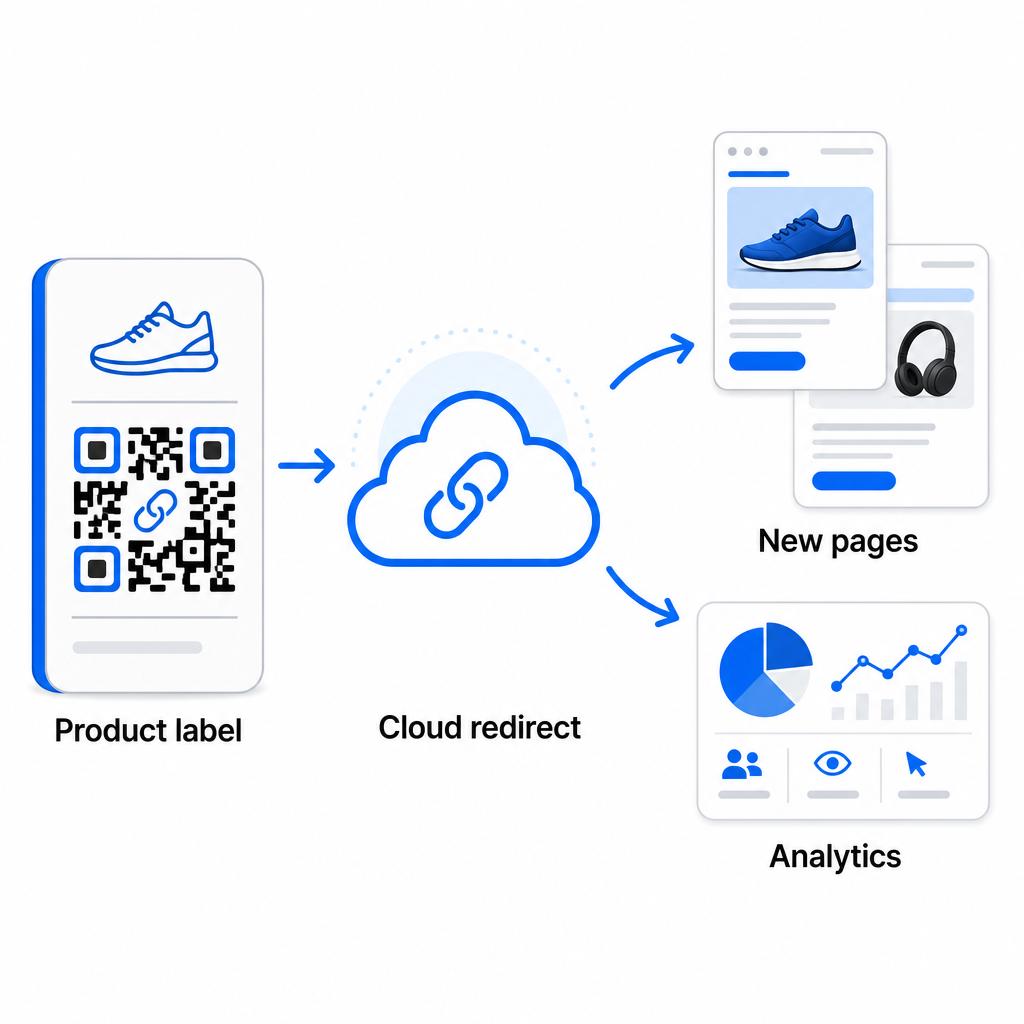
Kromě flexibility dynamické kódy také odemykají podrobné analytiky skenování: počet skenování, časy skenování, geografické lokace, typy zařízení, data prohlížeče a OS, a sledování polohy na základě GPS. Pro jakékoli hromadné nasazení, kde záleží na výkonu, vám tato data poskytují přímý pohled na to, které kódy fungují a kde je angažovanost nejvyšší. Více se dozvíte o tom, jak dynamické QR kódy podporují marketingové kampaně a proč je tato flexibilita důležitá ve velkém měřítku.
Sledujte každé skenování napříč celou vaší dávkou Dynamické QR kódy vám umožňují aktualizovat cíle a monitorovat výkon v reálném čase – napříč každým kódem ve vaší kampani. Prozkoumejte Dynamický QR kód k vytvoření sledovatelných hromadných kódů s plným analytickým panelem.
Škálování na podnikovou úroveň
Pro organizace generující desítky tisíc kódů – představte si velké maloobchodní řetězce, podnikové logistické operace, nebo národní marketingové kampaně – musí být pracovní postup robustnější než jedno nahrání CSV.
Pagelootův Podniková platforma QR kódů podporuje hromadné generování ve velkém měřítku, s pracovními postupy založenými na CSV, schopnými vyprodukovat až 100 000 QR kódů v jedné operaci. Na této úrovni vstupují do hry další úvahy.
integrace API zcela odstraňuje manuální kroky automatizací generování kódů přímo z interních systémů, jako jsou CRM, platformy pro správu zásob, nebo e-commerce backendy. Pracovní postupy založené na API vám umožňují programově generovat, aktualizovat a vyřazovat kódy, jak se vaše data mění. Pro hlubší pohled na to, jak to funguje v praxi, viz průvodce na Správa QR kódů na bázi API.
Přístup založený na rolích se stává důležitým pro velké týmy, což umožňuje různým uživatelům spravovat konkrétní kampaně nebo klienty bez přístupu k nesouvisejícím datům.
Možnosti white-label jsou obzvláště relevantní pro agentury spravující hromadné nasazení QR kódů jménem klientů. S funkcemi white-label se QR kódy překládají na klientské domény a panely nesou klientskou značku – udržují tak klientskou zkušenost bezproblémovou a profesionální.
Běžné chyby, kterým se vyhnout při hromadném generování
Několik problémů se opakovaně objevuje, když týmy generují QR kódy ve velkém objemu, a většině z nich lze snadno předejít s trochou plánování předem.
Netestování před tiskem je nejdražší chyba. Vždy naskenujte reprezentativní vzorek z vaší dávky, než se zavážete k tiskovému běhu. Jediná chyba formátování ve vašem CSV se může rozšířit na stovky nefunkčních kódů. Podobně, používání statických kódů pro obsah, který se může změnit, je riziko, které dynamické kódy zcela eliminují – pokud existuje jakákoli šance, že cílová URL nebo vstupní stránka bude aktualizována, zabudujte tuto flexibilitu od začátku.
Požadavky na formát souborů jsou také důležitější, než týmy často očekávají. Tisková produkce potřebuje vektorové formáty (SVG, EPS, PDF) pro ostrý výstup v jakékoli velikosti, zatímco soubory PNG fungují pro digitální použití, ale mohou se zhoršit při zvětšení pro velkoformátový tisk. Přeskočení organizace před generováním rychle vytváří problémy s řízením – nastavte si strukturu složek a konvenci pojmenování před spuštěním dávky, ne po něm. A konečně, nekonzistentní design napříč velkou dávkou vypadá neprofesionálně a podkopává důvěryhodnost značky; použití sdílené šablony v době generování je mnohem efektivnější než následné individuální úpravy kódů.
Často kladené otázky
Většina nástrojů pro hromadné QR kódy, včetně Pageloot, přijímá soubory CSV (hodnoty oddělené čárkami). Svá data můžete připravit v Excelu nebo Google Tabulkách a exportovat jako CSV. Každý řádek ve vašem souboru se stane jedním QR kódem. Pageloot také podporuje přímou integraci s Google Tabulkami pro statické hromadné generování bez nutnosti exportovat samostatný soubor.
Statické QR kódy kódují cíl trvale – jakmile jsou vygenerovány a vytištěny, cíl nelze změnit. Dynamické QR kódy používají přesměrovací URL spravovanou platformou, takže můžete aktualizovat cíl kdykoli bez opětovného tisku. Pro velké série, kde se obsah může měnit – jako jsou stránky produktů, podrobnosti o událostech nebo vstupní stránky kampaní – jsou dynamické kódy silně doporučeny. Poskytují také podrobné analytické údaje o skenování, které statické kódy nemohou nabídnout.
To závisí na platformě a plánu. Nástroje Pageloot na podnikové úrovni podporují generování až 100 000 QR kódů z jednoho nahrání CSV, což je činí vhodnými pro rozsáhlé maloobchodní, logistické a marketingové operace. Pro menší dávky standardní plány vyhovují typickým obchodním potřebám, jako jsou události, produktové řady nebo kampaně specifické pro dané místo.