Χρειάζεται να δημιουργήσετε εκατοντάδες – ή χιλιάδες – κωδικούς QR χωρίς να φτιάχνετε τον καθένα χειροκίνητα; Η δημιουργία τους ένας κάθε φορά είναι ανέφικτη σε κλίμακα και εισάγει ασυνέπεια σε όλες τις καμπάνιες σας. Αυτός ο οδηγός σας καθοδηγεί στις ταχύτερες, πιο αξιόπιστες μεθόδους για μαζική δημιουργία κωδικών QR, από μεταφορτώσεις CSV έως αυτοματοποίηση σε επίπεδο επιχείρησης.
Γιατί η μαζική δημιουργία κωδικών QR έχει σημασία
Όταν εκτελείτε μια κυκλοφορία προϊόντος, διαχειρίζεστε εγγραφές εκδηλώσεων ή επισημαίνετε απόθεμα, η ατομική δημιουργία κωδικών QR απλά δεν κλιμακώνεται. Ακόμη και στους 50 κωδικούς, η χειροκίνητη δημιουργία καταναλώνει ώρες επαναλαμβανόμενης εργασίας – και αυτό είναι πριν λάβετε υπόψη τη συνέπεια του σχεδιασμού, την οργάνωση αρχείων ή τη ρύθμιση παρακολούθησης.
Τα εργαλεία μαζικών κωδικών QR το λύνουν αυτό επιτρέποντάς σας να ορίσετε όλους τους κωδικούς σας σε ένα δομημένο αρχείο – συνήθως ένα CSV ή ένα υπολογιστικό φύλλο – και να δημιουργήσετε ολόκληρη την παρτίδα σε μία ροή εργασίας. Το αποτέλεσμα είναι ένα συνεπές, έτοιμο για λήψη σύνολο κωδικών που μπορούν να αναπτυχθούν άμεσα.
Οι περιπτώσεις χρήσης καλύπτουν σχεδόν κάθε κλάδο:
- Λιανικό εμπόριο και ηλεκτρονικό εμπόριο: μοναδικοί κωδικοί προϊόντων ανά SKU που συνδέονται με προδιαγραφές, κριτικές ή σελίδες αγοράς
- Εκδηλώσεις: κωδικοί ανά συμμετέχοντα για check-in, πρόσβαση σε συνεδρίες ή ψηφιακά προγράμματα
- Φιλοξενία: κωδικοί μενού ανά τραπέζι ή σύνδεσμοι πληροφοριών ανά δωμάτιο
- Logistics και απογραφή: ετικέτες περιουσιακών στοιχείων που συνδέονται με αρχεία συντήρησης ή δεδομένα τοποθεσίας
- Πρακτορεία μάρκετινγκ: κωδικοί ειδικοί για καμπάνιες με ατομική παρακολούθηση ανά τοποθέτηση
Τι Χρειάζεστε Πριν Ξεκινήσετε
Πριν τη δημιουργία της παρτίδας σας, μερικές αποφάσεις θα διαμορφώσουν σημαντικά τη ροή εργασίας σας.
Στατικοί έναντι δυναμικών κωδικών: Οι στατικοί κωδικοί QR κωδικοποιούν τον προορισμό απευθείας στο μοτίβο. Μόλις εκτυπωθούν, δεν μπορούν να αλλάξουν. Οι δυναμικοί κωδικοί QR χρησιμοποιούν μια σύντομη διεύθυνση URL ανακατεύθυνσης που διαχειρίζεται η πλατφόρμα, πράγμα που σημαίνει ότι μπορείτε να ενημερώσετε τον προορισμό ανά πάσα στιγμή – ακόμη και αφού οι κωδικοί έχουν ήδη εκτυπωθεί και διανεμηθεί. Για μαζικές καμπάνιες όπου το περιεχόμενο μπορεί να εξελιχθεί, δυναμικοί κωδικοί QR είναι η καλύτερη επιλογή.
Το αρχείο δεδομένων σας: Τα εργαλεία μαζικής δημιουργίας συνήθως δέχονται ένα CSV ή ένα υπολογιστικό φύλλο με μία γραμμή ανά κωδικό QR. Κατ' ελάχιστον, κάθε γραμμή χρειάζεται τη διεύθυνση URL προορισμού ή το περιεχόμενο. Ανάλογα με την πλατφόρμα, μπορείτε επίσης να συμπεριλάβετε πεδία για το όνομα του κωδικού, την ανάθεση φακέλου, τις παραμέτρους UTM ή το πρότυπο σχεδίασης.
Συνέπεια σχεδιασμού: Εάν οι κωδικοί σας πρέπει να φέρουν χρώματα επωνυμίας, λογότυπα ή συγκεκριμένα στυλ πλαισίου, επιβεβαιώστε ότι το εργαλείο σας επιτρέπει να εφαρμόσετε ένα κοινό πρότυπο σχεδίασης σε ολόκληρη την παρτίδα αντί να διαμορφώνετε κάθε κωδικό ξεχωριστά.
Όγκος: Γνωρίστε την κλίμακά σας πριν επιλέξετε ένα εργαλείο. Ορισμένες πλατφόρμες περιορίζουν τη μαζική δημιουργία σε μερικές εκατοντάδες κωδικούς ανά παρτίδα. Πλατφόρμες επιπέδου επιχείρησης όπως το Pageloot υποστηρίζουν έως 100.000 κωδικούς QR μέσω μιας ενιαίας μεταφόρτωσης CSV.
Πώς να δημιουργήσετε κωδικούς QR μαζικά χρησιμοποιώντας μεταφόρτωση CSV
Η μαζική δημιουργία βάσει CSV είναι η πιο κοινή μέθοδος. Δείτε πώς λειτουργεί η διαδικασία σε μια πλατφόρμα όπως το Pageloot.
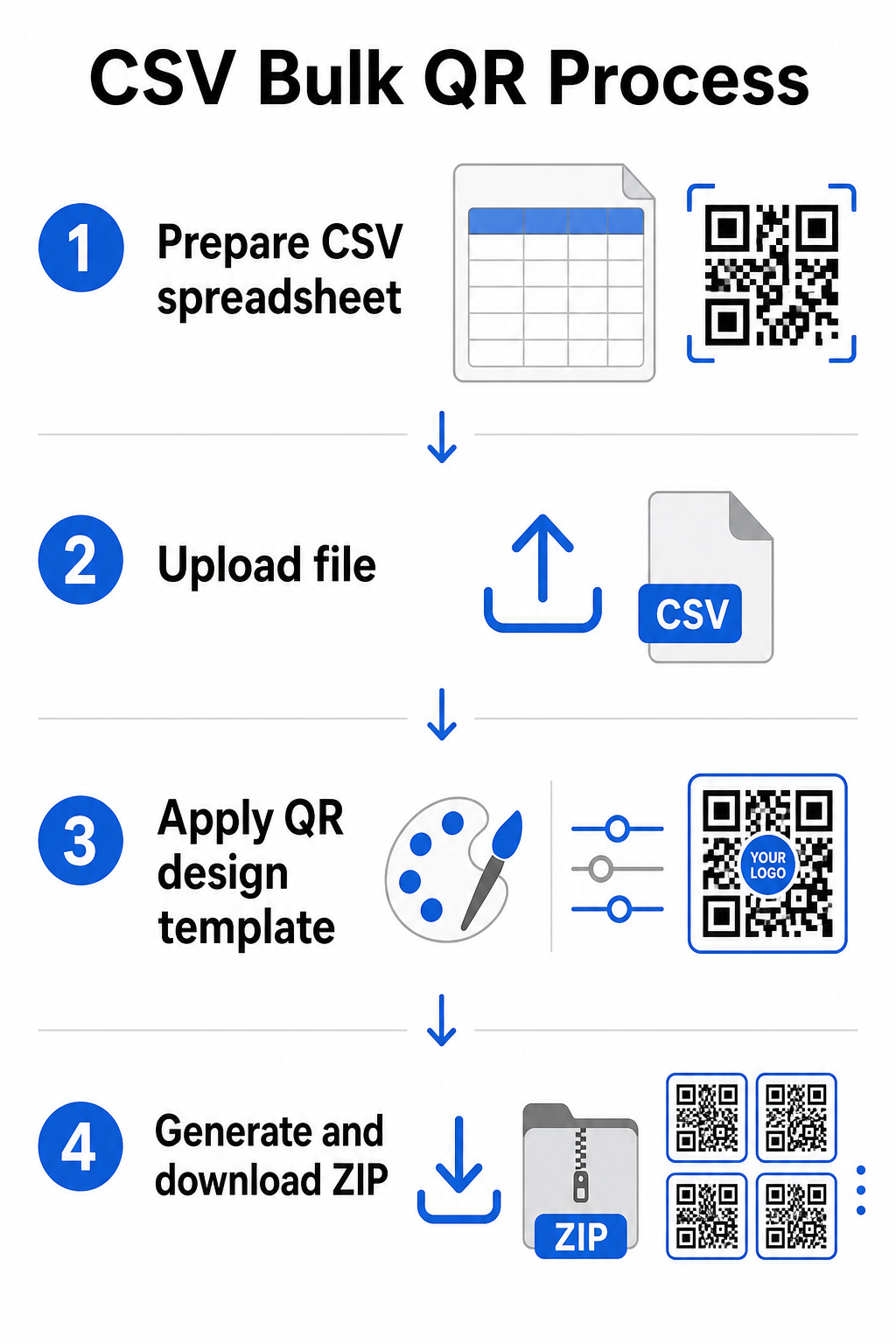
Βήμα 1: Προετοιμάστε το υπολογιστικό σας φύλλο
Ανοίξτε ένα εργαλείο υπολογιστικών φύλλων – Excel, Google Sheets ή οποιοδήποτε πρόγραμμα επεξεργασίας CSV – και δομήστε τα δεδομένα σας. Κάθε γραμμή αντιπροσωπεύει έναν κωδικό QR. Συμπεριλάβετε κατ' ελάχιστον:
- Τη διεύθυνση URL προορισμού ή το περιεχόμενο για κάθε κωδικό
- Ένα όνομα ή ετικέτα για κάθε κωδικό (αυτό βοηθά στην οργάνωση αργότερα)
- Οποιοιδήποτε αναγνωριστικοί κωδικοί καμπάνιας ή φακέλου που θέλετε να χρησιμοποιήσετε
Εξαγάγετε το αρχείο ως CSV (τιμές διαχωρισμένες με κόμμα) όταν είστε έτοιμοι να ανεβάσετε.
Βήμα 2: Ανεβάστε το CSV στον μαζικό δημιουργό
Συνδεθείτε στον λογαριασμό σας στο Pageloot και μεταβείτε στην ενότητα μαζικής δημιουργίας. Ανεβάστε το αρχείο CSV σας. Η πλατφόρμα θα αναλύσει κάθε γραμμή και θα βάλει σε ουρά τους κωδικούς για δημιουργία. Ελέγξτε την προεπισκόπηση για να επιβεβαιώσετε ότι η αντιστοίχιση είναι σωστή – οι διευθύνσεις URL προορισμού θα πρέπει να αντιστοιχούν στις επιθυμητές γραμμές.
Βήμα 3: Εφαρμόστε ένα πρότυπο σχεδίασης
Αντί να διαμορφώνετε κάθε κωδικό χειροκίνητα, επιλέξτε ένα κοινό πρότυπο σχεδίασης για εφαρμογή σε ολόκληρη την παρτίδα. Εδώ προσθέτετε το λογότυπο της επωνυμίας σας, επιλέγετε χρώματα και διαμορφώνετε στυλ πλαισίου. Η εφαρμογή ενός συνεπή σχεδιασμού σε αυτό το στάδιο διασφαλίζει ότι όλοι οι κωδικοί φαίνονται ομοιόμορφοι σε συσκευασίες, έντυπα υλικά ή σήμανση.
Βήμα 4: Δημιουργία και λήψη
Ξεκινήστε την παρτίδα. Η πλατφόρμα δημιουργεί όλους τους κωδικούς ταυτόχρονα και τους συσκευάζει για λήψη, συνήθως ως αρχείο ZIP που περιέχει μεμονωμένα αρχεία εικόνας (PNG, SVG, PDF ή EPS ανάλογα με τις ανάγκες εξόδου σας). Τα ονόματα αρχείων συνήθως αντιστοιχούν στα ονόματα κωδικών από το υπολογιστικό σας φύλλο, καθιστώντας εύκολη την αντιστοίχιση κάθε κωδικού με την προβλεπόμενη χρήση του.
Δημιουργήστε ολόκληρη την παρτίδα σας ταυτόχρονα Παραλείψτε τη χειροκίνητη εργασία και δημιουργήστε εκατοντάδες ή χιλιάδες κωδικούς QR από ένα μόνο υπολογιστικό φύλλο. Χρησιμοποιήστε τις Γεννήτρια Κωδικών QR ή εξερευνήστε επιλογές δυναμικών κωδικών QR για να ξεκινήσετε τη μαζική δημιουργία σήμερα.
Χρήση των Google Sheets για μαζικούς στατικούς κωδικούς QR
Εάν η ομάδα σας εργάζεται ήδη σε Google Sheets, το Pageloot υποστηρίζει άμεση ενσωμάτωση για τη δημιουργία πολλαπλών στατικών κωδικών QR από δεδομένα υπολογιστικών φύλλων. Αυτή η προσέγγιση είναι ιδιαίτερα βολική για ομάδες που διατηρούν ζωντανά δεδομένα σε Sheets – καταλόγους προϊόντων, λίστες συμμετεχόντων σε εκδηλώσεις, ή καταλόγους τοποθεσιών – όπου τα δεδομένα πηγής είναι ήδη δομημένα και ενημερώνονται συνεργατικά.
Η διαδικασία αντικατοπτρίζει τη μέθοδο CSV, αλλά αντί να εξάγετε και να ανεβάζετε εκ νέου, συνδέετε το Sheet σας απευθείας. Κάθε γραμμή στην καθορισμένη στήλη γίνεται η είσοδος για έναν κωδικό QR. Αυτό μειώνει την τριβή για ομάδες που δεν θέλουν να διαχειρίζονται ξεχωριστές εξαγωγές CSV κάθε φορά που αλλάζουν τα δεδομένα πηγής.
Οργάνωση Μεγάλων Παρτίδων Μετά τη Δημιουργία
Η δημιουργία κωδικών είναι μόνο μέρος της πρόκλησης. Σε μεγάλο όγκο, η διατήρησή τους οργανωμένων γίνεται ένα ξεχωριστό έργο. Λίγες πρακτικές βοηθούν σημαντικά.
Χρησιμοποιήστε φακέλους για να ταξινομήσετε κωδικούς ανά καμπάνια, έργο, πελάτη, ή γραμμή προϊόντων. Το Pageloot’s λειτουργία φακέλου κωδικών QR διευκολύνει τη διατήρηση δεκάδων ενεργών καμπανιών διαχωρισμένων, ώστε τα μέλη της ομάδας να μπορούν να πλοηγούνται χωρίς σύγχυση. Καθιερώστε μια σαφή σύμβαση ονομασίας στο CSV σας πριν ανεβάσετε – κάτι σαν `campaign-nameΤΟΠΟΘΕΤΗΣΗvariant` – έτσι ώστε οι μεμονωμένοι κωδικοί να είναι εύκολο να εντοπιστούν και να αντιστοιχιστούν στα δεδομένα αναλυτικών τους αργότερα. Τέλος, ομαδοποιήστε ανά περίπτωση χρήσης από την αρχή: κρατήστε κωδικούς εκδηλώσεων, κωδικούς προϊόντων, και κωδικούς μάρκετινγκ σε ξεχωριστούς φακέλους, ώστε η αναφορά απόδοσης να παραμένει καθαρή και εφαρμόσιμη.
Μαζικοί Κωδικοί QR με Δυναμική Ενημέρωση
Ένας σημαντικός περιορισμός των στατικών μαζικών κωδικών QR είναι ότι οποιαδήποτε αλλαγή προορισμού απαιτεί εκ νέου εκτύπωση. Εάν δημιουργήσετε 5.000 ετικέτες προϊόντων και η συνδεδεμένη διεύθυνση URL της σελίδας προορισμού αλλάξει, αυτοί οι κωδικοί καθίστανται παρωχημένοι τη στιγμή που διανέμονται.
Οι δυναμικοί μαζικοί κωδικοί QR εξαλείφουν αυτό το πρόβλημα. Κάθε κωδικός στην παρτίδα σας δείχνει σε μια σύντομη διεύθυνση URL ανακατεύθυνσης που διατηρείται από το Pageloot. Μπορείτε να ενημερώσετε τον προορισμό για μεμονωμένους κωδικούς – ή να προωθήσετε αλλαγές σε ολόκληρη την παρτίδα – χωρίς να αγγίξετε τον φυσικό κωδικό. Αυτό είναι ιδιαίτερα πολύτιμο για εποχιακές καμπάνιες όπου οι σελίδες προορισμού αλλάζουν, συσκευασίες προϊόντων όπου οι σελίδες πληροφοριών ενημερώνονται μετά την εκτύπωση, και υλικά εκδηλώσεων που προετοιμάζονται εκ των προτέρων πριν επιβεβαιωθούν οι τελικές διευθύνσεις URL.
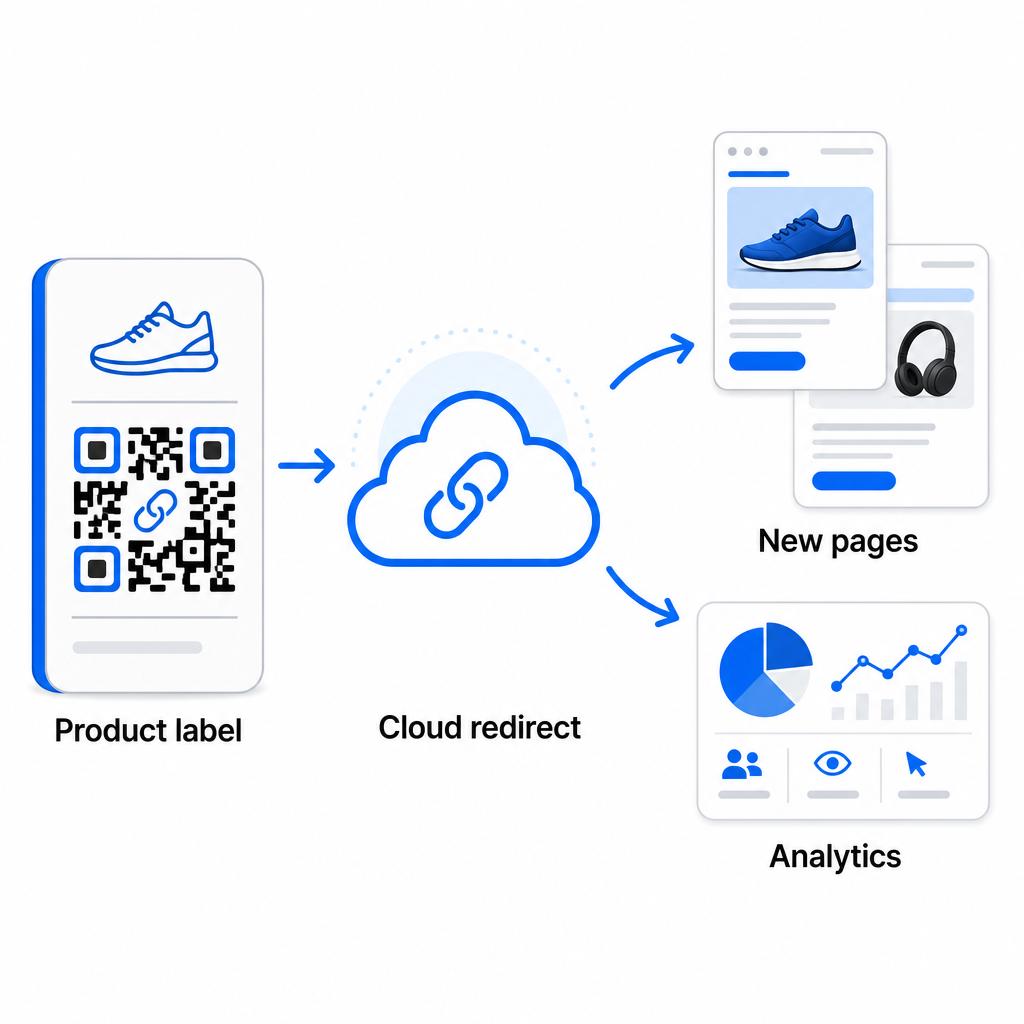
Πέρα από την ευελιξία, οι δυναμικοί κωδικοί ξεκλειδώνουν επίσης λεπτομερή αναλυτικά στοιχεία σάρωσης: αριθμός σαρώσεων, χρόνοι σάρωσης, γεωγραφικές τοποθεσίες, τύποι συσκευών, δεδομένα προγράμματος περιήγησης και λειτουργικού συστήματος, και παρακολούθηση τοποθεσίας βάσει GPS. Για οποιαδήποτε μαζική ανάπτυξη όπου η απόδοση έχει σημασία, αυτά τα δεδομένα σας δίνουν μια άμεση εικόνα για το ποιοι κωδικοί λειτουργούν και πού είναι η δέσμευση υψηλότερη. Μπορείτε να μάθετε περισσότερα σχετικά με πώς οι δυναμικοί κωδικοί QR υποστηρίζουν τις καμπάνιες μάρκετινγκ και γιατί αυτή η ευελιξία έχει σημασία σε κλίμακα.
Παρακολουθήστε Κάθε Σάρωση σε Ολόκληρη την Παρτίδα σας Οι δυναμικοί κωδικοί QR σας επιτρέπουν να ενημερώνετε προορισμούς και να παρακολουθείτε την απόδοση σε πραγματικό χρόνο – σε κάθε κωδικό της καμπάνιας σας. Εξερευνήστε το Δημιουργία dynamic QR code για να δημιουργήσετε ανιχνεύσιμους μαζικούς κωδικούς με ένα πλήρες ταμπλό αναλυτικών στοιχείων.
Κλιμάκωση σε Όγκο Επιχείρησης
Για οργανισμούς που δημιουργούν δεκάδες χιλιάδες κωδικούς – σκεφτείτε μεγάλες αλυσίδες λιανικής, επιχειρήσεις logistics επιχειρήσεων, ή εθνικές καμπάνιες μάρκετινγκ – η ροή εργασίας πρέπει να είναι πιο ισχυρή από μια απλή μεταφόρτωση CSV.
Το Pageloot πλατφόρμα κωδικών QR επιχείρησης υποστηρίζει τη δημιουργία παρτίδων σε κλίμακα, με ροές εργασίας βασισμένες σε CSV ικανές να παράγουν έως και 100.000 κωδικούς QR σε μία μόνο λειτουργία. Σε αυτό το επίπεδο, τίθενται επιπλέον ζητήματα.
η ενσωμάτωση API αφαιρεί πλήρως τα χειροκίνητα βήματα αυτοματοποιώντας τη δημιουργία κωδικών απευθείας από εσωτερικά συστήματα όπως CRMs, πλατφόρμες διαχείρισης αποθεμάτων, ή backends ηλεκτρονικού εμπορίου. Οι ροές εργασίας βασισμένες σε API σας επιτρέπουν να δημιουργείτε, να ενημερώνετε και να αποσύρετε κωδικούς προγραμματιστικά καθώς αλλάζουν τα δεδομένα σας. Για μια πιο εις βάθος ματιά στο πώς λειτουργεί αυτό στην πράξη, δείτε τον οδηγό για Διαχείριση κωδικών QR βάσει API.
Πρόσβαση βάσει ρόλων γίνεται σημαντική για μεγάλες ομάδες, επιτρέποντας σε διαφορετικούς χρήστες να διαχειρίζονται συγκεκριμένες καμπάνιες ή πελάτες χωρίς πρόσβαση σε άσχετα δεδομένα.
Επιλογές λευκής ετικέτας είναι ιδιαίτερα σημαντικές για πρακτορεία που διαχειρίζονται μαζικές αναπτύξεις QR για λογαριασμό πελατών. Με λειτουργίες λευκής ετικέτας, οι κωδικοί QR οδηγούν σε τομείς πελατών και τα ταμπλό φέρουν την επωνυμία του πελάτη – διατηρώντας την εμπειρία του πελάτη απρόσκοπτη και επαγγελματική.
Συνηθισμένα Λάθη που Πρέπει να Αποφύγετε στη Μαζική Δημιουργία
Λίγα ζητήματα εμφανίζονται επανειλημμένα όταν οι ομάδες δημιουργούν κωδικούς QR σε μεγάλο όγκο, και τα περισσότερα από αυτά είναι εύκολο να προληφθούν με λίγο προγραμματισμό εκ των προτέρων.
Η μη δοκιμή πριν την εκτύπωση είναι το πιο δαπανηρό λάθος. Πάντα να σαρώνετε ένα αντιπροσωπευτικό δείγμα από την παρτίδα σας πριν δεσμευτείτε για μια εκτύπωση. Ένα μόνο σφάλμα μορφοποίησης στο CSV σας μπορεί να εξαπλωθεί σε εκατοντάδες χαλασμένους κωδικούς. Ομοίως, η χρήση στατικών κωδικών για περιεχόμενο που μπορεί να αλλάξει είναι ένας κίνδυνος που οι δυναμικοί κωδικοί εξαλείφουν εντελώς – αν υπάρχει οποιαδήποτε πιθανότητα μια διεύθυνση URL προορισμού ή μια σελίδα προορισμού να ενημερωθεί, ενσωματώστε αυτή την ευελιξία από την αρχή.
Οι απαιτήσεις μορφής αρχείου επίσης έχουν μεγαλύτερη σημασία από ό,τι συχνά περιμένουν οι ομάδες. Η παραγωγή εκτυπώσεων χρειάζεται διανυσματικές μορφές (SVG, EPS, PDF) για ευκρινή έξοδο σε οποιοδήποτε μέγεθος, ενώ τα αρχεία PNG λειτουργούν για ψηφιακή χρήση αλλά μπορούν να υποβαθμιστούν όταν μεγεθύνονται για εκτύπωση μεγάλου μεγέθους. Η παράλειψη οργάνωσης πριν τη δημιουργία δημιουργεί γρήγορα πονοκεφάλους διαχείρισης – ρυθμίστε τη δομή φακέλων και τη σύμβαση ονοματοδοσίας σας πριν εκτελεστεί η παρτίδα, όχι μετά. Τέλος, ο ασυνεπής σχεδιασμός σε μια μεγάλη παρτίδα φαίνεται αντιεπαγγελματικός και υπονομεύει την αξιοπιστία της επωνυμίας· η εφαρμογή ενός κοινού προτύπου κατά τη στιγμή της δημιουργίας είναι πολύ πιο αποτελεσματική από την επεξεργασία κωδικών μεμονωμένα αργότερα.
Συχνές ερωτήσεις
Τα περισσότερα εργαλεία μαζικής δημιουργίας κωδικών QR, συμπεριλαμβανομένου του Pageloot, δέχονται αρχεία CSV (τιμές διαχωρισμένες με κόμμα). Μπορείτε να προετοιμάσετε τα δεδομένα σας σε Excel ή Google Φύλλα και να τα εξάγετε ως CSV. Κάθε γραμμή στο αρχείο σας γίνεται ένας κωδικός QR. Το Pageloot υποστηρίζει επίσης άμεση ενσωμάτωση με τα Google Φύλλα για στατική μαζική δημιουργία χωρίς να χρειάζεται να εξάγετε ένα ξεχωριστό αρχείο.
Στατικοί κωδικοί QR κωδικοποιούν τον προορισμό μόνιμα – μόλις δημιουργηθούν και εκτυπωθούν, ο προορισμός δεν μπορεί να αλλάξει. Οι δυναμικοί κωδικοί QR χρησιμοποιούν μια διεύθυνση URL ανακατεύθυνσης που διαχειρίζεται η πλατφόρμα, ώστε να μπορείτε να ενημερώσετε τον προορισμό ανά πάσα στιγμή χωρίς επανεκτύπωση. Για μεγάλες παρτίδες όπου το περιεχόμενο μπορεί να αλλάξει – όπως σελίδες προϊόντων, λεπτομέρειες εκδηλώσεων ή σελίδες προορισμού καμπάνιας – οι δυναμικοί κωδικοί συνιστώνται ανεπιφύλακτα. Παρέχουν επίσης λεπτομερή αναλυτικά στοιχεία σάρωσης που οι στατικοί κωδικοί δεν μπορούν να προσφέρουν.
Αυτό εξαρτάται από την πλατφόρμα και το πρόγραμμα. Τα εργαλεία εταιρικού επιπέ.