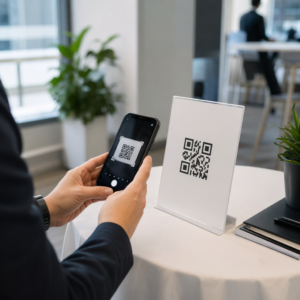
Perlu membuat ratusan – atau ribuan – kode QR tanpa membangunnya satu per satu secara manual? Membuatnya satu per satu tidak praktis dalam skala besar dan memperkenalkan inkonsistensi di seluruh kampanye Anda. Panduan ini memandu Anda melalui metode tercepat dan paling andal untuk pembuatan kode QR massal, mulai dari unggahan CSV hingga otomatisasi tingkat perusahaan.
Mengapa Pembuatan Kode QR Massal Penting
Saat Anda menjalankan peluncuran produk, mengelola pendaftaran acara, atau memberi label inventaris, pembuatan kode QR individual tidak dapat diskalakan. Bahkan pada 50 kode, pembuatan manual menghabiskan waktu berjam-jam kerja berulang – dan itu sebelum memperhitungkan konsistensi desain, organisasi file, atau pengaturan pelacakan.
Alat kode QR massal memecahkan masalah ini dengan memungkinkan Anda menentukan semua kode Anda dalam file terstruktur – biasanya CSV atau spreadsheet – dan menghasilkan seluruh batch dalam satu alur kerja. Hasilnya adalah seperangkat kode yang konsisten dan siap diunduh yang dapat segera digunakan.
Kasus penggunaan mencakup hampir setiap industri:
- Ritel dan e-commerce: kode produk unik per SKU yang menautkan ke spesifikasi, ulasan, atau halaman pembelian
- Acara: kode per peserta untuk check-in, akses sesi, atau program digital
- Keramahan: kode menu meja per meja atau tautan informasi khusus ruangan
- Logistik dan inventaris: tag aset yang menautkan ke catatan pemeliharaan atau data lokasi
- Agensi pemasaran: kode khusus kampanye dengan pelacakan individual per penempatan
Apa yang Anda Butuhkan Sebelum Memulai
Sebelum menghasilkan batch Anda, beberapa keputusan akan sangat membentuk alur kerja Anda.
Kode statis vs. dinamis: Kode QR statis mengkodekan tujuan langsung ke dalam pola. Setelah dicetak, kode tersebut tidak dapat diubah. Kode QR dinamis menggunakan URL pengalihan singkat yang dikelola oleh platform, yang berarti Anda dapat memperbarui tujuan kapan saja – bahkan setelah kode tersebut sudah dicetak dan didistribusikan. Untuk kampanye massal di mana konten dapat berkembang, kode QR dinamis adalah pilihan yang lebih baik.
File data Anda: Alat pembuatan massal biasanya menerima CSV atau spreadsheet dengan satu baris per kode QR. Minimal, setiap baris memerlukan URL tujuan atau konten. Tergantung pada platform, Anda juga dapat menyertakan bidang untuk nama kode, penugasan folder, parameter UTM, atau template desain.
Konsistensi desain: Jika kode Anda perlu membawa warna merek, logo, atau gaya bingkai tertentu, konfirmasikan bahwa alat tersebut memungkinkan Anda untuk menerapkan template desain bersama di seluruh batch daripada mengonfigurasi setiap kode secara individual.
Volume: Ketahui skala Anda sebelum memilih alat. Beberapa platform membatasi pembuatan massal pada beberapa ratus kode per batch; platform tingkat perusahaan seperti Pageloot mendukung hingga 100.000 kode QR melalui satu unggahan CSV.
Cara Membuat Kode QR Secara Massal Menggunakan Unggahan CSV
Pembuatan massal berbasis CSV adalah metode yang paling umum. Berikut cara kerja prosesnya pada platform seperti Pageloot.
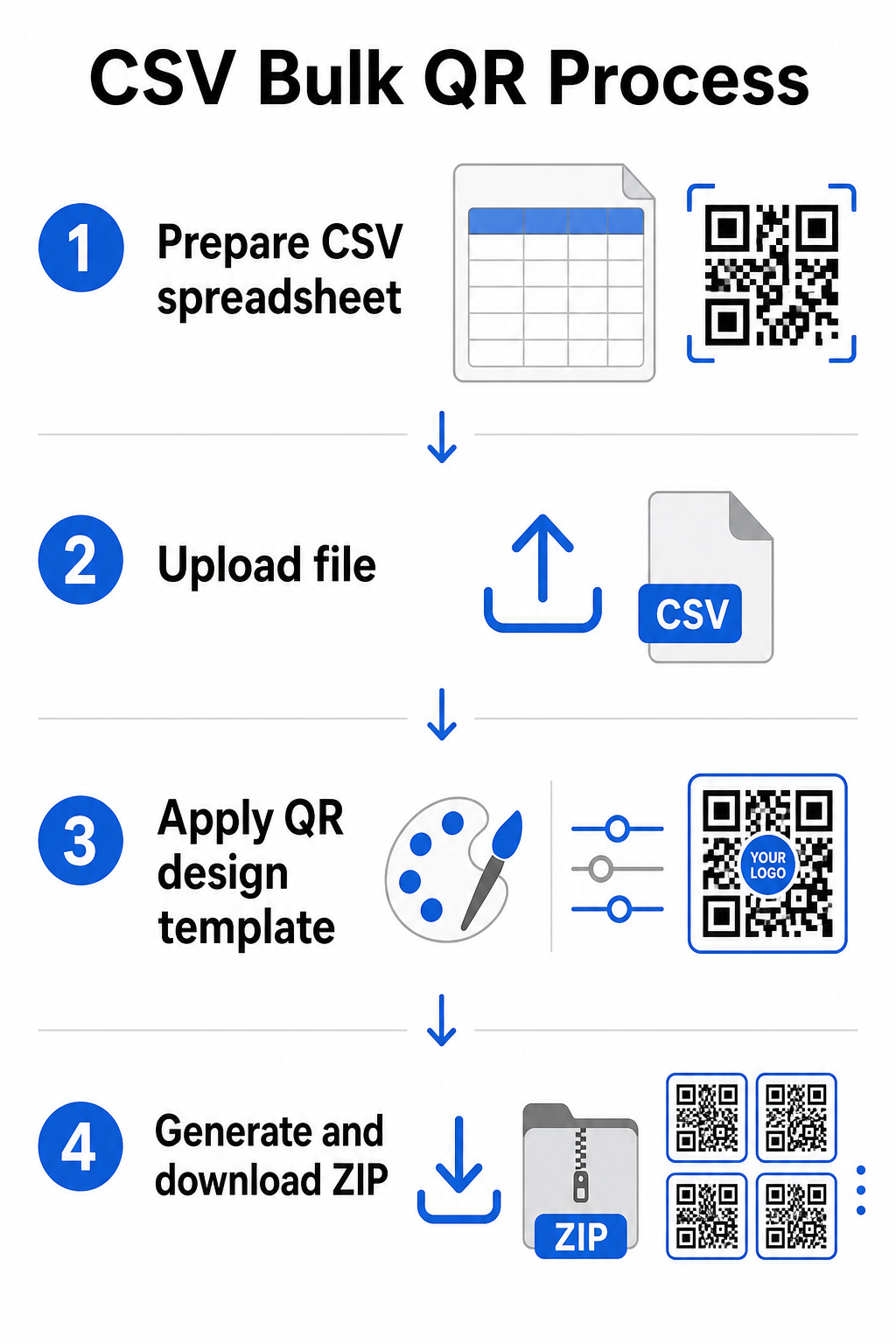
Langkah 1: Siapkan spreadsheet Anda
Buka alat spreadsheet – Excel, Google Sheets, atau editor CSV apa pun – dan strukturkan data Anda. Setiap baris mewakili satu kode QR. Sertakan minimal:
- URL tujuan atau konten untuk setiap kode
- Nama atau label untuk setiap kode (ini membantu dengan organisasi nanti)
- Pengidentifikasi kampanye atau folder apa pun yang ingin Anda gunakan
Ekspor file tersebut sebagai CSV (nilai yang dipisahkan koma) saat Anda siap untuk mengunggah.
Langkah 2: Unggah CSV ke generator massal
Masuk ke akun Pageloot Anda dan navigasikan ke bagian pembuatan massal. Unggah file CSV Anda. Platform akan mengurai setiap baris dan mengantrekan kode untuk pembuatan. Tinjau pratinjau untuk mengonfirmasi bahwa pemetaan sudah benar – URL tujuan harus cocok dengan baris yang dimaksud.
Langkah 3: Terapkan template desain
Daripada menata setiap kode secara manual, pilih template desain bersama untuk diterapkan di seluruh batch. Di sinilah Anda menambahkan logo merek Anda, memilih warna, dan mengonfigurasi gaya bingkai. Menerapkan desain yang konsisten pada tahap ini memastikan semua kode terlihat seragam di seluruh kemasan, bahan cetak, atau papan nama.
Langkah 4: Hasilkan dan unduh
Mulai batch. Platform menghasilkan semua kode secara bersamaan dan mengemasnya untuk diunduh, biasanya sebagai file ZIP yang berisi file gambar individual (PNG, SVG, PDF, atau EPS tergantung pada kebutuhan output Anda). Nama file biasanya sesuai dengan nama kode dari spreadsheet Anda, membuatnya mudah untuk mencocokkan setiap kode dengan penggunaan yang dimaksudkan.
Hasilkan Seluruh Batch Anda Sekaligus Lewati pekerjaan manual dan buat ratusan atau ribuan kode QR dari satu spreadsheet. Gunakan Generator Kode QR atau jelajahi Opsi Kode QR Dinamis untuk memulai pembuatan massal hari ini.
Menggunakan Google Sheets untuk Kode QR Statis Massal
Jika tim Anda sudah bekerja di Google Sheets, Pageloot mendukung integrasi langsung untuk menghasilkan beberapa kode QR statis dari data spreadsheet. Pendekatan ini sangat nyaman untuk tim yang memelihara data langsung di Sheets – katalog produk, daftar peserta acara, atau direktori lokasi – di mana data sumber sudah terstruktur dan diperbarui secara kolaboratif.
Prosesnya mencerminkan metode CSV, tetapi alih-alih mengekspor dan mengunggah ulang, Anda menghubungkan Sheet Anda secara langsung. Setiap baris di kolom yang ditentukan menjadi masukan untuk satu kode QR. Ini mengurangi gesekan bagi tim yang tidak ingin mengelola ekspor CSV terpisah setiap kali data sumber berubah.
Mengatur Batch Besar Setelah Pembuatan
Menghasilkan kode hanyalah bagian dari tantangan. Pada volume besar, menjaganya tetap terorganisir menjadi tugas tersendiri. Beberapa praktik sangat membantu.
Gunakan folder untuk mengurutkan kode berdasarkan kampanye, proyek, klien, atau lini produk. Pageloot's fitur folder kode QR memudahkan untuk menjaga puluhan kampanye aktif terpisah sehingga anggota tim dapat menavigasi tanpa kebingungan. Tetapkan konvensi penamaan yang jelas di CSV Anda sebelum Anda mengunggah – sesuatu seperti `nama-kampanye`PENEMPATANvarian` – sehingga kode individual mudah ditemukan dan dicocokkan dengan data analitiknya nanti. Terakhir, kelompokkan berdasarkan kasus penggunaan sejak awal: simpan kode acara, kode produk, dan kode pemasaran di folder terpisah sehingga pelaporan kinerja tetap bersih dan dapat ditindaklanjuti.
Kode QR Massal dengan Pembaruan Dinamis
Salah satu batasan signifikan dari kode QR massal statis adalah bahwa setiap perubahan tujuan memerlukan pencetakan ulang. Jika Anda menghasilkan 5.000 label produk dan URL halaman arahan yang tertaut berubah, kode-kode tersebut menjadi usang saat didistribusikan.
Kode QR massal dinamis menghilangkan masalah ini. Setiap kode dalam batch Anda mengarah ke URL pengalihan singkat yang dikelola oleh Pageloot. Anda dapat memperbarui tujuan untuk kode individual – atau mendorong perubahan di seluruh batch – tanpa menyentuh kode fisik itu sendiri. Ini sangat berharga untuk kampanye musiman di mana halaman arahan berubah, kemasan produk di mana halaman informasi diperbarui setelah dicetak, dan materi acara yang disiapkan sebelumnya sebelum URL akhir dikonfirmasi.
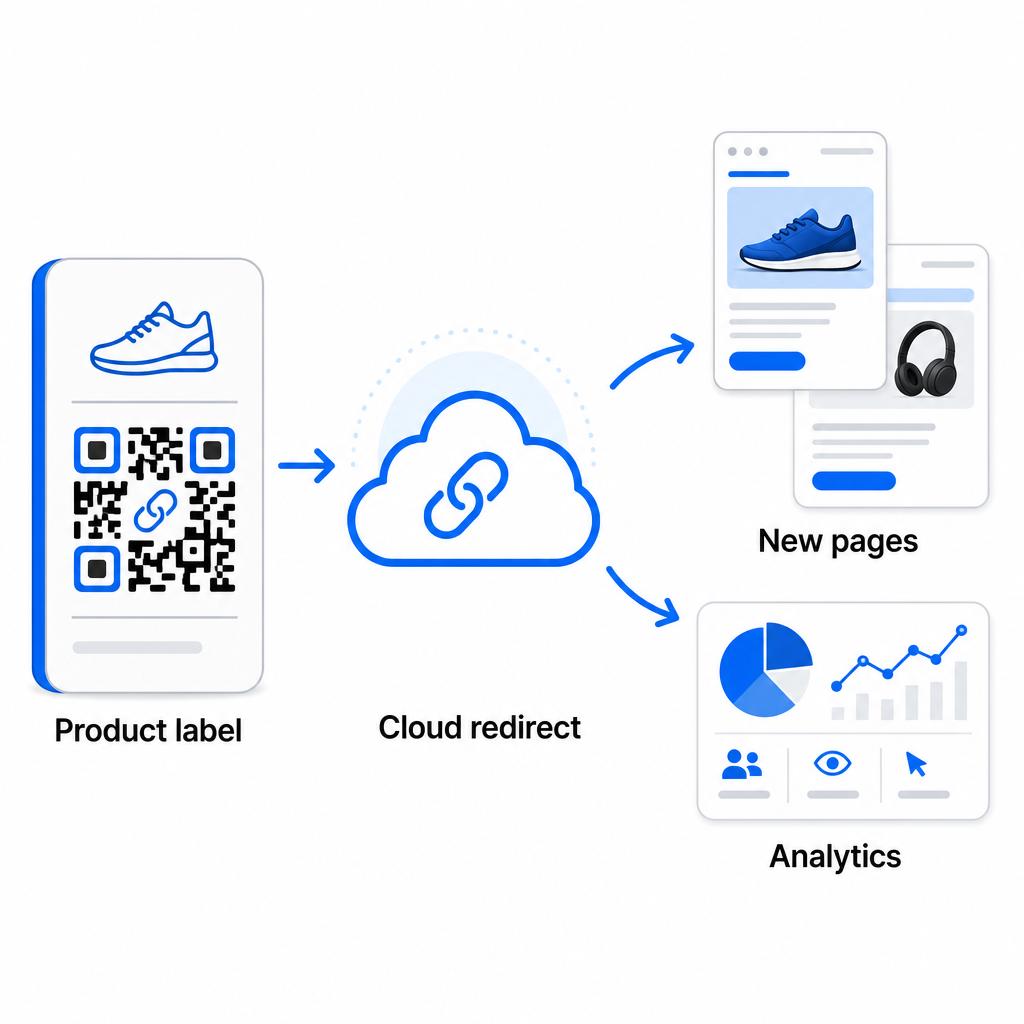
Selain fleksibilitas, kode dinamis juga membuka analitik pemindaian terperinci: jumlah pemindaian, waktu pemindaian, lokasi geografis, jenis perangkat, data browser dan OS, serta pelacakan lokasi berbasis GPS. Untuk setiap penerapan massal di mana kinerja penting, data ini memberi Anda pandangan langsung tentang kode mana yang berfungsi dan di mana keterlibatan tertinggi. Anda dapat mempelajari lebih lanjut tentang bagaimana kode QR dinamis mendukung kampanye pemasaran dan mengapa fleksibilitas itu penting dalam skala besar.
Lacak Setiap Pemindaian di Seluruh Batch Anda Kode QR dinamis memungkinkan Anda memperbarui tujuan dan memantau kinerja secara real time – di setiap kode dalam kampanye Anda. Jelajahi Generator QR Code Dinamis untuk membuat kode massal yang dapat dilacak dengan dasbor analitik lengkap.
Skala ke Volume Perusahaan
Untuk organisasi yang menghasilkan puluhan ribu kode – bayangkan rantai ritel besar, operasi logistik perusahaan, atau kampanye pemasaran nasional – alur kerja perlu lebih kuat daripada satu unggahan CSV.
Pageloot platform kode QR perusahaan mendukung pembuatan batch dalam skala besar, dengan alur kerja berbasis CSV yang mampu menghasilkan hingga 100.000 kode QR dalam satu operasi. Pada tingkat ini, pertimbangan tambahan mulai berlaku.
integrasi API menghilangkan langkah-langkah manual sepenuhnya dengan mengotomatiskan pembuatan kode langsung dari sistem internal seperti CRM, platform manajemen inventaris, atau backend e-commerce. Alur kerja berbasis API memungkinkan Anda menghasilkan, memperbarui, dan menghentikan kode secara terprogram saat data Anda berubah. Untuk melihat lebih dalam bagaimana ini bekerja dalam praktik, lihat panduan tentang manajemen kode QR berbasis API.
Akses berbasis peran menjadi penting bagi tim besar, memungkinkan pengguna yang berbeda untuk mengelola kampanye atau klien tertentu tanpa mengakses data yang tidak terkait.
Opsi label putih sangat relevan untuk agensi mengelola penerapan QR massal atas nama klien. Dengan fitur label putih, kode QR mengarah ke domain klien dan dasbor membawa branding klien – menjaga pengalaman klien tetap mulus dan profesional.
Kesalahan Umum yang Harus Dihindari dalam Pembuatan Massal
Beberapa masalah muncul berulang kali ketika tim menghasilkan kode QR dalam volume besar, dan sebagian besar mudah dicegah dengan sedikit perencanaan di muka.
Tidak menguji sebelum mencetak adalah kesalahan yang paling mahal. Selalu pindai sampel representatif dari batch Anda sebelum melakukan pencetakan. Satu kesalahan pemformatan di CSV Anda dapat menyebar ke ratusan kode yang rusak. Demikian pula, menggunakan kode statis untuk konten yang mungkin berubah adalah risiko yang dihilangkan sepenuhnya oleh kode dinamis – jika ada kemungkinan URL tujuan atau halaman arahan akan diperbarui, bangun fleksibilitas itu di dari awal.
Persyaratan format file juga lebih penting daripada yang sering diharapkan tim. Produksi cetak membutuhkan format vektor (SVG, EPS, PDF) untuk hasil yang tajam pada ukuran berapa pun, sementara file PNG berfungsi untuk penggunaan digital tetapi dapat menurun kualitasnya saat diperbesar untuk pencetakan format besar. Melewatkan organisasi sebelum pembuatan dengan cepat menimbulkan masalah manajemen – siapkan struktur folder dan konvensi penamaan Anda sebelum batch berjalan, bukan setelahnya. Akhirnya, desain yang tidak konsisten di seluruh batch besar terlihat tidak profesional dan merusak kredibilitas merek; menerapkan template bersama pada waktu pembuatan jauh lebih efisien daripada mengedit kode secara individual setelahnya.
Pertanyaan yang sering diajukan
Sebagian besar alat kode QR massal, termasuk Pageloot, menerima file CSV (nilai yang dipisahkan koma). Anda dapat menyiapkan data Anda di Excel atau Google Sheets dan mengekspor sebagai CSV. Setiap baris di file Anda menjadi satu kode QR. Pageloot juga mendukung integrasi Google Sheets langsung untuk pembuatan massal statis tanpa perlu mengekspor file terpisah.
Kode QR statis menyandikan tujuan secara permanen – setelah dibuat dan dicetak, tujuan tidak dapat diubah. Kode QR dinamis menggunakan URL pengalihan yang dikelola oleh platform, sehingga Anda dapat memperbarui tujuan kapan saja tanpa mencetak ulang. Untuk batch besar di mana konten dapat berubah – seperti halaman produk, detail acara, atau halaman arahan kampanye – kode dinamis sangat direkomendasikan. Mereka juga menyediakan analitik pemindaian terperinci yang tidak dapat ditawarkan oleh kode statis.
Ini tergantung pada platform dan paket. Alat tingkat perusahaan Pageloot mendukung pembuatan hingga 100.000 kode QR dari satu unggahan CSV, menjadikannya cocok untuk operasi ritel, logistik, dan pemasaran skala besar. Untuk batch yang lebih kecil, paket standar mengakomodasi kebutuhan bisnis umum seperti acara, lini produk, atau kampanye khusus lokasi.