ホーム > ガイド > How to Create QR Codes in Bulk
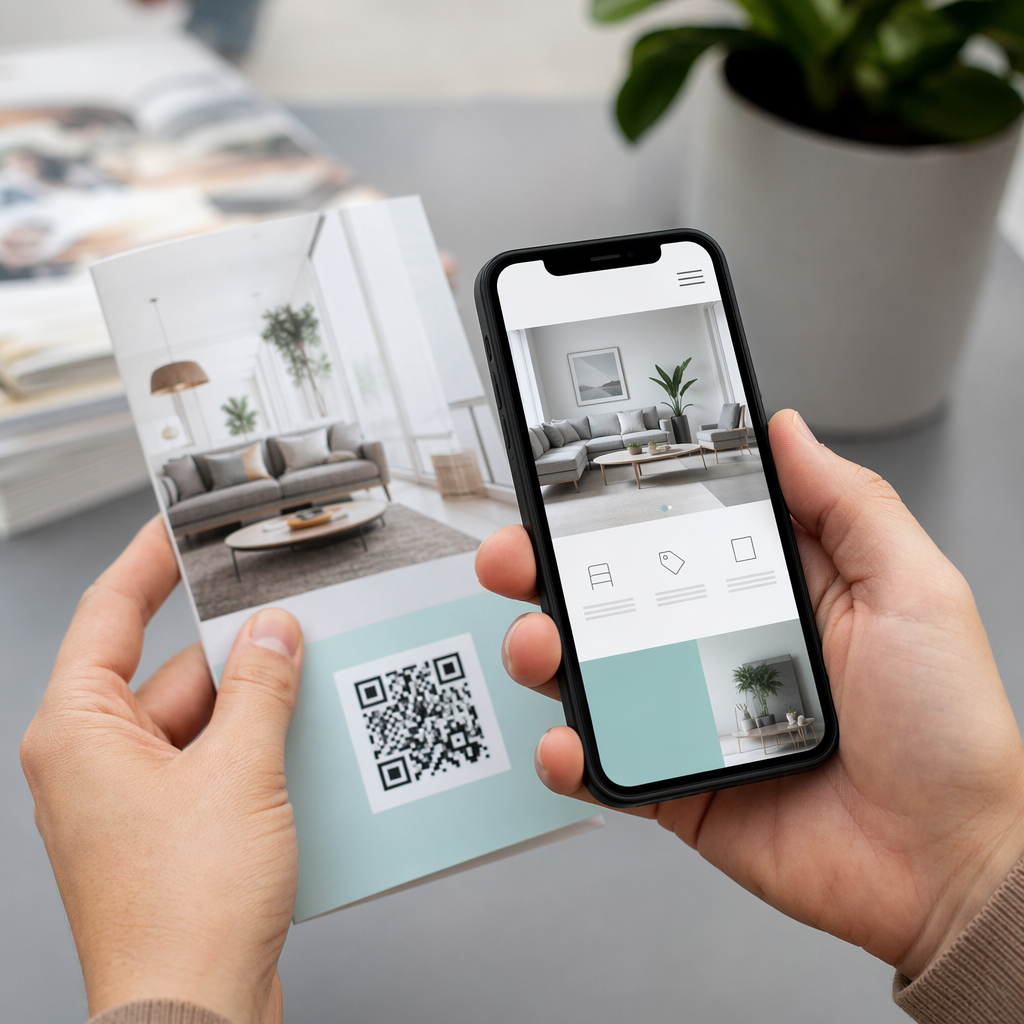
Bulk QR workflow

How to Create QR Codes in Bulk

Learn how to generate hundreds of QR codes at once using CSV uploads or Google Sheets. This guide covers bulk creation, tracking, and brand design consistency.
Updated on 7月 2, 2026
目次

Need to generate hundreds – or thousands – of QR codes without building each one manually? Creating them one at a time is impractical at scale and introduces inconsistency across your campaigns. This guide walks you through the fastest, most reliable methods for bulk QR code creation, from CSV uploads to enterprise-level automation.

Why Bulk QR Code Creation Matters

When you’re running a product launch, managing event registrations, or labeling inventory, individual QR code creation simply doesn’t scale. Even at 50 codes, manual generation consumes hours of repetitive work – and that’s before accounting for design consistency, file organization, or tracking setup.

Bulk QR code tools solve this by letting you define all your codes in a structured file – typically a CSV or spreadsheet – and generate the entire batch in one workflow. The result is a consistent, download-ready set of codes that can be deployed immediately.

The use cases span nearly every industry:

  • Retail and e-commerce: unique product codes per SKU linking to specs, reviews, or purchase pages
  • イベント情報: per-attendee codes for check-in, session access, or digital programs
  • ホスピタリティ: table-by-table menu codes or room-specific information links
  • Logistics and inventory: asset tags linking to maintenance records or location data
  • Marketing agencies: campaign-specific codes with individual tracking per placement

What You Need Before You Start

Before generating your batch, a few decisions will shape your workflow significantly.

Static vs. dynamic codes: Static QR codes encode the destination directly into the pattern. Once printed, they cannot be changed. Dynamic QR codes use a short redirect URL managed by the platform, which means you can update the destination at any time – even after the codes are already printed and distributed. For bulk campaigns where content may evolve, ダイナミックQRコード are the better choice.

Your data file: Bulk generation tools typically accept a CSV or spreadsheet with one row per QR code. At minimum, each row needs the destination URL or content. Depending on the platform, you can also include fields for the code’s name, folder assignment, UTM parameters, or design template.

Design consistency: If your codes need to carry brand colors, logos, or specific frame styles, confirm that the tool allows you to apply a shared design template across the entire batch rather than configuring each code individually.

Volume: Know your scale before selecting a tool. Some platforms cap bulk generation at a few hundred codes per batch; enterprise-grade platforms like Pageloot support up to 100,000 QR codes via a single CSV upload.

How to Create QR Codes in Bulk Using a CSV Upload

CSV-based bulk generation is the most common method. Here’s how the process works on a platform like Pageloot.

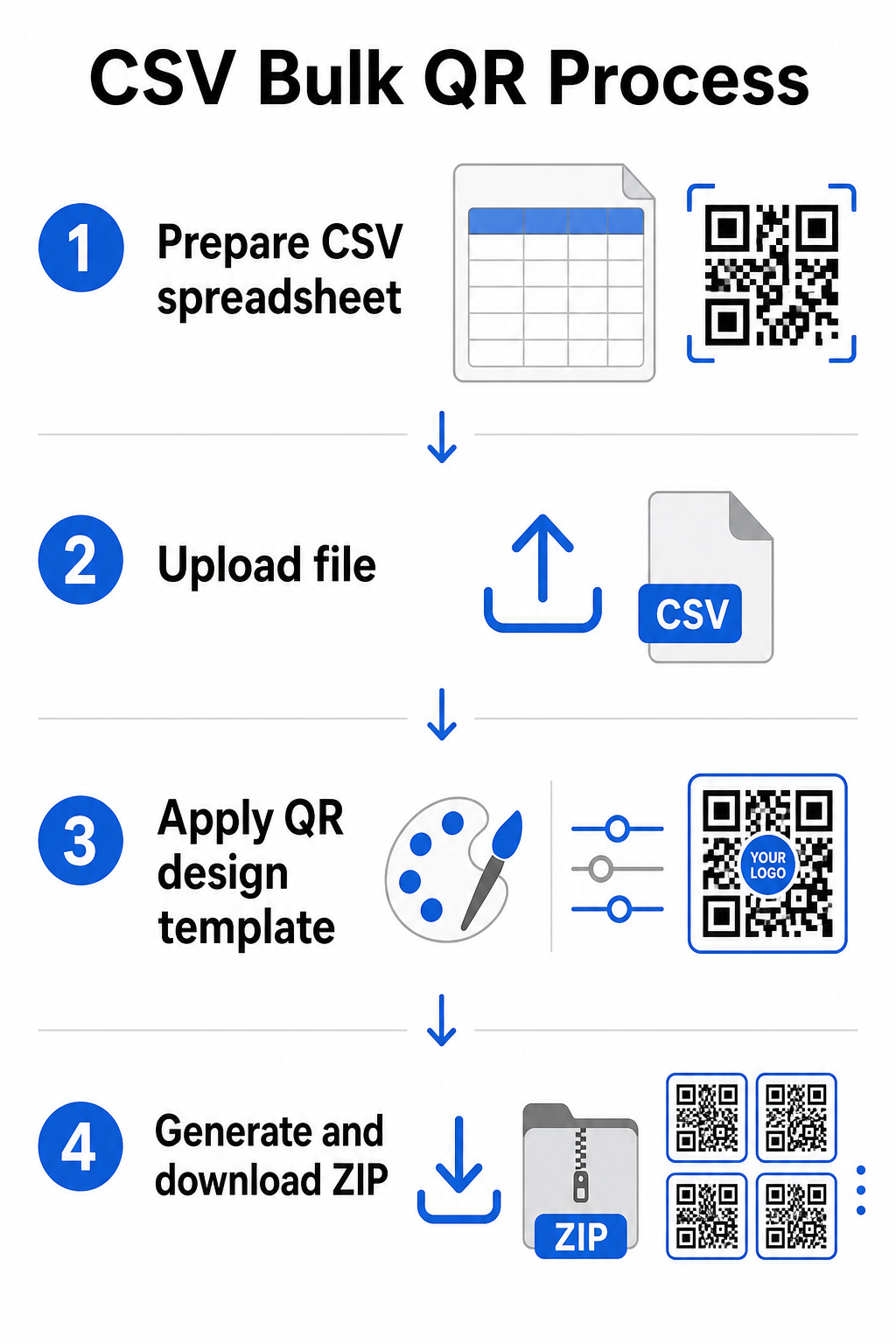
CSV bulk process

Step 1: Prepare your spreadsheet

Open a spreadsheet tool – Excel, Google Sheets, or any CSV editor – and structure your data. Each row represents one QR code. Include at minimum:

  • The destination URL or content for each code
  • A name or label for each code (this helps with organization later)
  • Any campaign or folder identifiers you want to use

Export the file as a CSV (comma-separated values) when you’re ready to upload.

Step 2: Upload the CSV to the bulk generator

Log into your Pageloot account and navigate to the bulk creation section. Upload your CSV file. The platform will parse each row and queue the codes for generation. Review the preview to confirm the mapping is correct – destination URLs should match the intended rows.

Step 3: Apply a design template

Rather than styling each code manually, select a shared design template to apply across the entire batch. This is where you add your brand logo, choose colors, and configure frame styles. Applying a consistent design at this stage ensures all codes look uniform across packaging, print materials, or signage.

Step 4: Generate and download

Initiate the batch. The platform generates all codes simultaneously and packages them for download, typically as a ZIP file containing individual image files (PNG, SVG, PDF, or EPS depending on your output needs). File names usually correspond to the code names from your spreadsheet, making it straightforward to match each code to its intended use.

Generate Your Entire Batch at Once Skip the manual work and create hundreds or thousands of QR codes from a single spreadsheet. Use the QRコードジェネレーター or explore Dynamic QR Code options to get started with bulk creation today.

Using Google Sheets for Bulk Static QR Codes

If your team already works in Google Sheets, Pageloot supports direct integration for generating multiple static QR codes from spreadsheet data. This approach is particularly convenient for teams that maintain live data in Sheets – product catalogs, event attendee lists, or location directories – where the source data is already structured and updated collaboratively.

The process mirrors the CSV method, but instead of exporting and re-uploading, you connect your Sheet directly. Each row in the designated column becomes the input for one QR code. This reduces friction for teams who don’t want to manage separate CSV exports every time the source data changes.

Organizing Large Batches After Generation

Generating codes is only part of the challenge. At volume, keeping them organized becomes its own task. A few practices help significantly.

Use folders to sort codes by campaign, project, client, or product line. Pageloot’s QR code folder feature makes it easy to keep dozens of active campaigns separated so team members can navigate without confusion. Establish a clear naming convention in your CSV before you upload – something like `campaign-nameplacementvariant` – so that individual codes are easy to locate and match to their analytics data later. Finally, group by use case from the start: keep event codes, product codes, and marketing codes in separate folders so that performance reporting stays clean and actionable.

Bulk QR Codes with Dynamic Updating

One significant limitation of static bulk QR codes is that any destination change requires reprinting. If you generate 5,000 product labels and the linked landing page URL changes, those codes become outdated the moment they’re distributed.

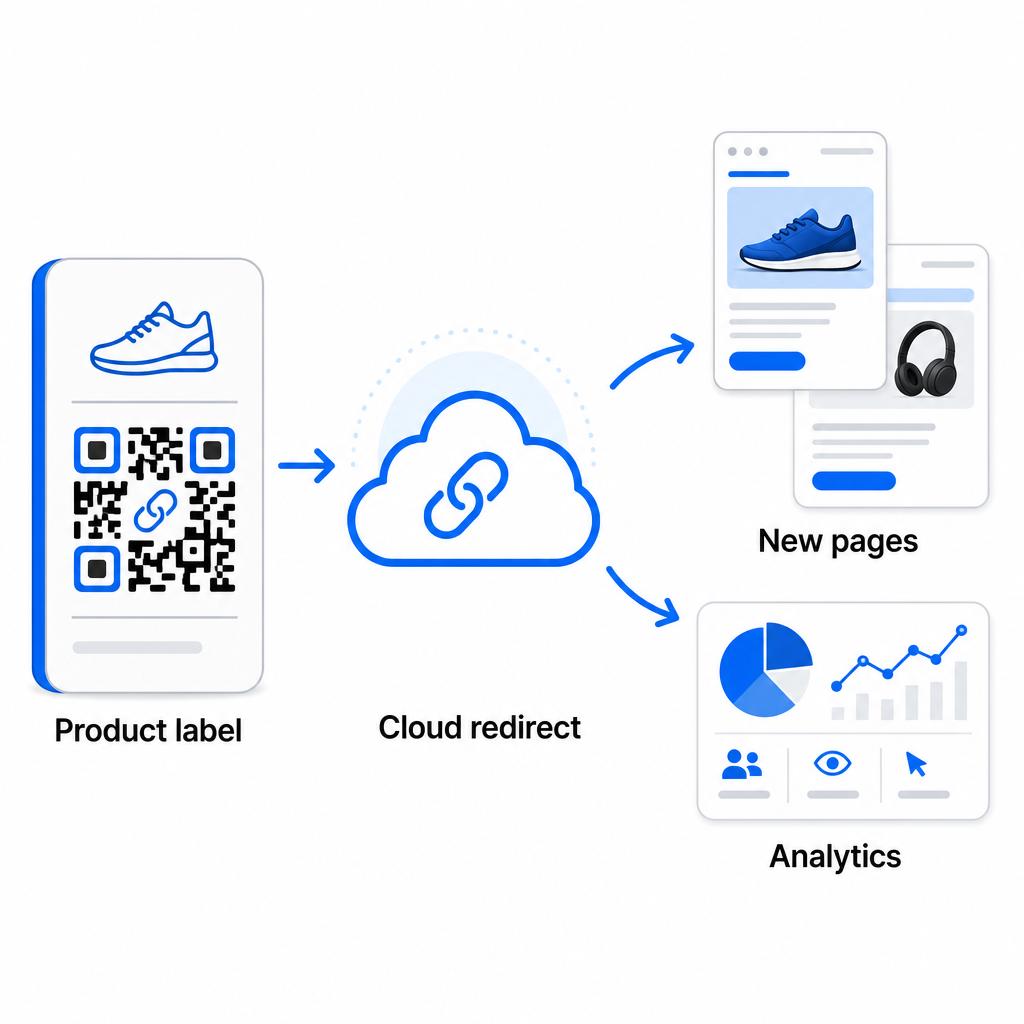
Dynamic bulk QR codes eliminate this problem. Each code in your batch points to a short redirect URL maintained by Pageloot. You can update the destination for individual codes – or push changes across an entire batch – without touching the physical code itself. This is particularly valuable for seasonal campaigns where landing pages change, product packaging where information pages are updated post-print, and event materials prepared in advance before final URLs are confirmed.

Dynamic QR updating

Beyond flexibility, dynamic codes also unlock detailed scan analytics: number of scans, scan times, geographic locations, device types, browser and OS data, and GPS-based location tracking. For any bulk deployment where performance matters, this data gives you a direct view into which codes are working and where engagement is highest. You can learn more about how dynamic QR codes support marketing campaigns and why that flexibility matters at scale.

Track Every Scan Across Your Entire Batch Dynamic QR codes let you update destinations and monitor performance in real time – across every code in your campaign. Explore the ダイナミックQRコードジェネレーター to create trackable bulk codes with a full analytics dashboard.

Scaling to Enterprise Volume

For organizations generating tens of thousands of codes – think large retail chains, enterprise logistics operations, or national marketing campaigns – the workflow needs to be more robust than a single CSV upload.

Pagelootの enterprise QR code platform supports batch generation at scale, with CSV-based workflows capable of producing up to 100,000 QR codes in a single operation. At this level, additional considerations come into play.

API integration removes manual steps entirely by automating code generation directly from internal systems such as CRMs, inventory management platforms, or e-commerce backends. API-based workflows allow you to generate, update, and retire codes programmatically as your data changes. For a deeper look at how this works in practice, see the guide on API-based QR code management.

Role-based access becomes important for large teams, allowing different users to manage specific campaigns or clients without accessing unrelated data.

White-label options are especially relevant for agencies managing bulk QR deployments on behalf of clients. With white-label features, QR codes resolve to client domains and dashboards carry client branding – keeping the client experience seamless and professional.

Common Mistakes to Avoid in Bulk Generation

A few issues appear repeatedly when teams generate QR codes at volume, and most of them are easy to prevent with a little planning upfront.

Not testing before printing is the most costly mistake. Always scan a representative sample from your batch before committing to a print run. A single formatting error in your CSV can propagate to hundreds of broken codes. Similarly, using static codes for content that might change is a risk that dynamic codes eliminate entirely – if there’s any chance a destination URL or landing page will be updated, build that flexibility in from the start.

File format requirements also matter more than teams often expect. Print production needs vector formats (SVG, EPS, PDF) for sharp output at any size, while PNG files work for digital use but can degrade when scaled up for large-format printing. Skipping organization before generation creates management headaches quickly – set up your folder structure and naming convention before the batch runs, not after. Finally, inconsistent design across a large batch looks unprofessional and undermines brand credibility; applying a shared template at generation time is far more efficient than editing codes individually afterward.

よくある質問

What file format do I need to upload for bulk QR code creation?

Most bulk QR code tools, including Pageloot, accept CSV (comma-separated values) files. You can prepare your data in Excel or Google Sheets and export as CSV. Each row in your file becomes one QR code. Pageloot also supports direct Google Sheets integration for static bulk generation without needing to export a separate file.

What is the difference between bulk static and bulk dynamic QR codes?

Static QR codes encode the destination permanently – once generated and printed, the destination cannot be changed. Dynamic QR codes use a redirect URL managed by the platform, so you can update the destination at any time without reprinting. For large batches where content may change – such as product pages, event details, or campaign landing pages – dynamic codes are strongly recommended. They also provide detailed scan analytics that static codes cannot offer.

How many QR codes can I generate in a single bulk operation?

This depends on the platform and plan. Pageloot’s enterprise-level tools support generating up to 100,000 QR codes from a single CSV upload, making it suitable for large-scale retail, logistics, and marketing operations. For smaller batches, standard plans accommodate typical business needs such as events, product lines, or location-specific campaigns.

著者について

Siim KostabiはPagelootのコンテンツリードです。Pagelootの革新的なQRコード生成サービスについて執筆しています。5年以上にわたるQRコードに関する深い専門知識を持つSiimは、この分野の専門家です。QRテクノロジーを活用してデジタルインタラクションを簡素化・拡張する上で、大きな進歩を遂げています。.

カテゴリー
について詳しくはこちら
利用者が図書館QRをスキャン
QRコード 図書館
✅ QRコードの#1ソリューション

オンラインでQRコードを作成する必要がある場合は QRコードを作る ここで無料で
ページルートは #1のGo-Toソリューション でQRコードを作成してスキャンすることができます。

BL-0286

ブログジェネ

売上、レビュー、フォロワーを増やすために 20,000 を超えるブランドから信頼されています。

クライアントのロゴ
トップブランドから信頼される
5 のうち 4.8 と評価しました

4.86 / 5つ星評価

ユーゴ・ローラン
ユーゴ・ローラン
レストランオーナー
最も簡単で信頼性の高いQRコードジェネレータです。PDFファイルを即座にアップロードできます。レストランのメニューがデジタル化されました。
ルーカス・ジャンセン
ルーカス・ジャンセン
不動産開発業者
これは優れたツールで、QRコードでちょうど欲しいところに連れて行ってくれます。私たちは位置情報のQRコードしか使っていませんが、とても便利な機能がたくさんあります。
エマ・モレッティ
エマ・モレッティ
小売製品
使いやすいし、早い。素晴らしい機能で、完璧な画像を作成してくれるので、社員は私のvCardをダウンロードすることができます。
ユーゴ・ローラン
ユーゴ・ローラン
レストランオーナー
最も簡単で信頼性の高いQRコードジェネレータです。PDFファイルを即座にアップロードできます。レストランのメニューがデジタル化されました。
ルーカス・ジャンセン
ルーカス・ジャンセン
不動産開発業者
これは優れたツールで、QRコードでちょうど欲しいところに連れて行ってくれます。私たちは位置情報のQRコードしか使っていませんが、とても便利な機能がたくさんあります。
エマ・モレッティ
エマ・モレッティ
小売製品
使いやすいし、早い。素晴らしい機能で、完璧な画像を作成してくれるので、社員は私のvCardをダウンロードすることができます。
QRコードをもっと見る
バーコードとQRコードの比較
バーコード vs QRコード
Marketing QR code scan
QRコードの仕組み マーケティングを強化する
利用者が図書館QRをスキャン
QRコード 図書館
あらゆるものをデジタル体験に変えよう 3分以内に。

14日間の無料トライアル。

クレジットカードは必要ありません。

初回購入で30%オフ

次のコードを使用してください:

MP3ファイルを共有

PDF QRコードを作成するにはサインアップしてください

必要なものをすべてアップロードして表示する。

  • オーディオファイル
  • ポッドキャスト
  • 音楽

サインアップで14日間無料トライアル。.
トライアル終了後、QRコードは期限切れになります。.

オーディオmp3 QRコードを作成するにはサインアップしてください

フレームでより多くのスキャンを獲得

QRコードにフレームを追加するにはサインアップしてください

コールトゥアクションフレームは、お客様が簡単にQRコードと対話できるようにします。ぜひお試しください。

サインアップで14日間無料トライアル。.
トライアル終了後、QRコードは期限切れになります。.

QRコードにフレームを追加するにはサインアップしてください

シェイプでスタイルを追加

より多くの図形を作成するにはサインアップしてください

QRコードは四角いものである必要はありません。あなたのブランドのイメージに合わせて変えてみてください。

サインアップで14日間無料トライアル。.
トライアル終了後、QRコードは期限切れになります。.

より多くの図形を作成するにはサインアップしてください

QRコードにロゴを追加

QRコードにロゴを追加するにはサインアップしてください

QRコードにロゴやブランドを入れることで、目立たせることができます。

サインアップで14日間無料トライアル。.
トライアル終了後、QRコードは期限切れになります。.

QRコードにロゴを追加するにはサインアップしてください

スマートなApp Storeリダイレクト

アプリストアのQRコードを作成するにはサインアップしてください

スマートなApp StoreのQRコードに、あなたのアプリのリンクを追加します。ユーザーは、デバイスに応じてリダイレクトされます。

サインアップで14日間無料トライアル。.
トライアル終了後、QRコードは期限切れになります。.

アプリストアのQRコードを作成するにはサインアップしてください

QRコードに画像をアップロード

画像QRコードを作成するにはサインアップしてください

画像を簡単に共有できます。どんな画像も、数秒でダイナミックに変化します。

サインアップで14日間無料トライアル。.
トライアル終了後、QRコードは期限切れになります。.

画像QRコードを作成するにはサインアップしてください

PDFファイルを共有

PDF QRコードを作成するにはサインアップしてください

必要なものをすべてアップロードして表示する。

  • メニュー&プライスリスト
  • 指示
  • 任意の書類

サインアップで14日間無料トライアル。.
トライアル終了後、QRコードは期限切れになります。.

PDF QRコードを作成するにはサインアップしてください

印刷せずに後で編集

再度印刷せずにQRコードを編集するにはサインアップしてください

ダイナミックQRコードは、新たにQRコードを印刷することなく、QRコードの内容を変更することができます。

サインアップで14日間無料トライアル。.
トライアル終了後、QRコードは期限切れになります。.

再度印刷せずにQRコードを編集するにはサインアップしてください

いつ?どこで?QRコードのスキャンを追跡

QRコードを追跡するにはサインアップしてください

どのQRコードが最も多くスキャンされ、何が最も顧客を喜ばせているのかを知ることができます。

サインアップで14日間無料トライアル。.
トライアル終了後、QRコードは期限切れになります。.

QRコードを追跡するにはサインアップしてください

印刷可能なファイルが利用可能

PDFやSVGのようなベクターQRコードを作成するにはサインアップしてください

.eps、.pdf、.svg

QRコードをHD解像度でダウンロードしたいですか?すぐに印刷できるベクターまたはピクセル形式を入手しましょう。

サインアップで14日間無料トライアル。.
トライアル終了後、QRコードは期限切れになります。.

PDFやSVGのようなベクターQRコードを作成するにはサインアップしてください

しばらくお待ちください。あなたのQRコードは ロード... ロード...

あなただけのものに

サインアップしてQRコードを後で保存してください

異なる色、ロゴ、コールトゥアクションフレームで素晴らしいQRコードを作成することで、より多くのスキャンを得ることができます。

サインアップで14日間無料トライアル。.
トライアル終了後、QRコードは期限切れになります。.

サインアップしてQRコードを後で保存してください