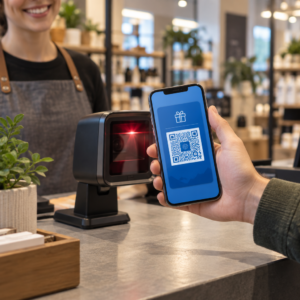
Reikia sugeneruoti šimtus – arba tūkstančius – QR kodų, nekuriant kiekvieno rankiniu būdu? Kūrimas po vieną yra nepraktiškas dideliu mastu ir sukelia nenuoseklumą jūsų kampanijose. Šis vadovas supažindins jus su greičiausiais ir patikimiausiais masinio QR kodų kūrimo metodais, nuo CSV įkėlimų iki įmonės lygio automatizavimo.
Kodėl masinis QR kodų kūrimas yra svarbus
Kai vykdote produkto pristatymą, tvarkote renginių registracijas arba žymite atsargas, individualus QR kodų kūrimas tiesiog nesiplečia. Net ir su 50 kodų, rankinis generavimas užima valandas pasikartojančio darbo – ir tai dar neatsižvelgiant į dizaino nuoseklumą, failų organizavimą ar sekimo nustatymus.
Masinio QR kodų įrankiai tai išsprendžia leisdami apibrėžti visus savo kodus struktūrizuotame faile – paprastai CSV arba skaičiuoklėje – ir sugeneruoti visą partiją viename darbo sraute. Rezultatas yra nuoseklus, paruoštas atsisiųsti kodų rinkinys, kurį galima nedelsiant panaudoti.
Naudojimo atvejai apima beveik kiekvieną pramonės šaką:
- Mažmeninė prekyba ir el. komercija: unikalūs produkto kodai pagal SKU, susiejantys su specifikacijomis, apžvalgomis arba pirkimo puslapiais
- Renginiai: kodai kiekvienam dalyviui, skirti registracijai, sesijos prieigai arba skaitmeninėms programoms
- Svetingumas: meniu kodai pagal lenteles arba konkrečios patalpos informacijos nuorodos
- Logistika ir atsargos: turto žymės, susiejamos su techninės priežiūros įrašais arba vietos duomenimis
- Rinkodaros agentūros: kampanijai skirti kodai su individualiu sekimu pagal vietą
Ko jums reikia prieš pradedant
Prieš generuojant partiją, keli sprendimai reikšmingai paveiks jūsų darbo eigą.
Statiniai vs. dinaminiai kodai: Statiniai QR kodai tiesiogiai užkoduoja paskirties vietą į raštą. Atspausdinus jų negalima pakeisti. Dinaminiai QR kodai naudoja trumpą nukreipimo URL, valdomą platformos, o tai reiškia, kad paskirties vietą galite atnaujinti bet kuriuo metu – net ir po to, kai kodai jau atspausdinti ir išplatinti. Masinėms kampanijoms, kuriose turinys gali keistis, dinaminiai QR kodai yra geresnis pasirinkimas.
Jūsų duomenų failas: Masinio generavimo įrankiai paprastai priima CSV arba skaičiuoklę su viena eilute vienam QR kodui. Mažiausiai, kiekvienai eilutei reikalingas paskirties URL arba turinys. Priklausomai nuo platformos, taip pat galite įtraukti laukus kodo pavadinimui, aplanko priskyrimui, UTM parametrams arba dizaino šablonui.
Dizaino nuoseklumas: Jei jūsų kodai turi atspindėti prekės ženklo spalvas, logotipus arba specifinius rėmelių stilius, patvirtinkite, kad įrankis leidžia pritaikyti bendrą dizaino šabloną visai partijai, o ne konfigūruoti kiekvieną kodą atskirai.
Apimtis: Žinokite savo mastą prieš pasirinkdami įrankį. Kai kurios platformos riboja masinį generavimą iki kelių šimtų kodų vienai partijai; įmonės lygio platformos, tokios kaip Pageloot, palaiko iki 100 000 QR kodų per vieną CSV įkėlimą.
Kaip sukurti QR kodus masiškai naudojant CSV įkėlimą
CSV pagrindu veikiantis masinis generavimas yra dažniausias metodas. Štai kaip procesas veikia tokioje platformoje kaip Pageloot.
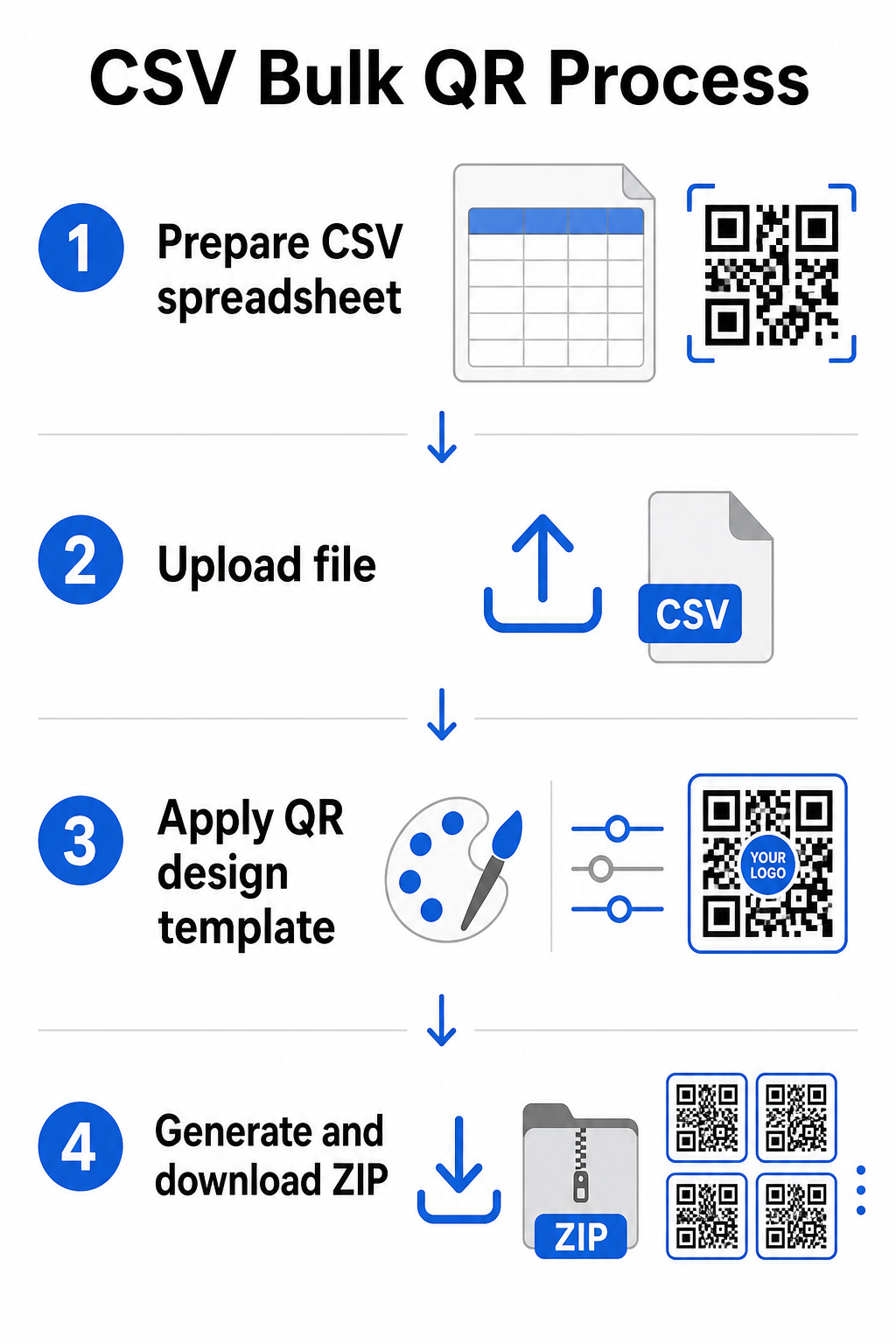
1 žingsnis: Paruoškite savo skaičiuoklę
Atidarykite skaičiuoklės įrankį – Excel, Google Sheets arba bet kurį CSV redaktorių – ir struktūrizuokite savo duomenis. Kiekviena eilutė atspindi vieną QR kodą. Įtraukite mažiausiai:
- Paskirties URL arba turinį kiekvienam kodui
- Pavadinimą arba etiketę kiekvienam kodui (tai padeda vėliau organizuoti)
- Bet kokius kampanijos arba aplankų identifikatorius, kuriuos norite naudoti
Eksportuokite failą kaip CSV (kableliais atskirtas reikšmes), kai būsite pasiruošę įkelti.
2 žingsnis: Įkelkite CSV į masinio generavimo įrankį
Prisijunkite prie savo Pageloot paskyros ir eikite į masinio kūrimo skyrių. Įkelkite savo CSV failą. Platforma apdoros kiekvieną eilutę ir įdės kodus į eilę generavimui. Peržiūrėkite peržiūrą, kad patvirtintumėte, jog susiejimas yra teisingas – paskirties URL turėtų atitikti numatytas eilutes.
3 žingsnis: Taikykite dizaino šabloną
Užuot stilizavę kiekvieną kodą rankiniu būdu, pasirinkite bendrą dizaino šabloną, kurį pritaikysite visai partijai. Čia pridedate savo prekės ženklo logotipą, pasirenkate spalvas ir konfigūruojate rėmelių stilius. Nuoseklaus dizaino pritaikymas šiame etape užtikrina, kad visi kodai atrodytų vienodai ant pakuotės, spausdintų medžiagų ar iškabose.
4 žingsnis: Generuoti ir atsisiųsti
Inicijuokite partiją. Platforma sugeneruoja visus kodus vienu metu ir supakuoja juos atsisiuntimui, paprastai kaip ZIP failą, kuriame yra atskiri paveikslėlių failai (PNG, SVG, PDF arba EPS, priklausomai nuo jūsų išvesties poreikių). Failų pavadinimai paprastai atitinka kodų pavadinimus iš jūsų skaičiuoklės, todėl lengva suderinti kiekvieną kodą su numatytu naudojimu.
Sugeneruokite visą savo partiją vienu metu Praleiskite rankinį darbą ir sukurkite šimtus ar tūkstančius QR kodų iš vienos skaičiuoklės. Naudokite QR kodo generatorius arba tyrinėkite Dinaminių QR kodų parinktis kad pradėtumėte masinį kūrimą šiandien.
Naudojant Google Sheets masiniams statiniams QR kodams
Jei jūsų komanda jau dirba „Google Sheets“, „Pageloot“ palaiko tiesioginę integraciją, skirtą generuoti kelis statinius QR kodus iš skaičiuoklės duomenų. Šis metodas ypač patogus komandoms, kurios tvarko gyvus duomenis „Sheets“ – produktų katalogus, renginių dalyvių sąrašus arba vietovių katalogus – kur šaltinio duomenys jau yra struktūrizuoti ir atnaujinami bendradarbiaujant.
Procesas atspindi CSV metodą, tačiau vietoj eksportavimo ir pakartotinio įkėlimo, jūs tiesiogiai prijungiate savo lapą. Kiekviena eilutė nurodytame stulpelyje tampa įvestimi vienam QR kodui. Tai sumažina trintį komandoms, kurios nenori tvarkyti atskirų CSV eksportų kiekvieną kartą, kai keičiasi šaltinio duomenys.
Didelių partijų organizavimas po generavimo
Kodų generavimas yra tik dalis iššūkio. Dideliu mastu, jų tvarkymas tampa atskira užduotimi. Kelios praktikos žymiai padeda.
Naudokite aplankus, kad rūšiuotumėte kodus pagal kampaniją, projektą, klientą arba produktų liniją. „Pageloot“ QR kodo aplankų funkcija leidžia lengvai atskirti dešimtis aktyvių kampanijų, kad komandos nariai galėtų naršyti be painiavos. Nustatykite aiškią pavadinimų suteikimo konvenciją savo CSV faile prieš įkeldami – kažką panašaus į `kampanijos-pavadinimasvietavariantas` – kad atskirus kodus būtų lengva rasti ir vėliau susieti su jų analizės duomenimis. Galiausiai, nuo pat pradžių grupuokite pagal naudojimo atvejį: laikykite renginių kodus, produktų kodus ir rinkodaros kodus atskiruose aplankuose, kad našumo ataskaitos būtų aiškios ir veiksmingos.
Masiniai QR kodai su dinaminiu atnaujinimu
Vienas reikšmingas statinių masinių QR kodų apribojimas yra tas, kad bet koks paskirties vietos pakeitimas reikalauja pakartotinio spausdinimo. Jei sugeneruojate 5 000 produktų etikečių ir susietos nukreipimo puslapio URL pasikeičia, tie kodai pasensta tą akimirką, kai jie yra platinami.
Dinaminiai masiniai QR kodai pašalina šią problemą. Kiekvienas kodas jūsų partijoje nukreipia į trumpą peradresavimo URL, kurį palaiko „Pageloot“. Galite atnaujinti atskirų kodų paskirties vietą – arba pritaikyti pakeitimus visai partijai – neliesdami paties fizinio kodo. Tai ypač vertinga sezoninėms kampanijoms, kuriose keičiasi nukreipimo puslapiai, produktų pakuotėms, kuriose informacijos puslapiai atnaujinami po spausdinimo, ir renginių medžiagoms, paruoštoms iš anksto, prieš patvirtinant galutinius URL.
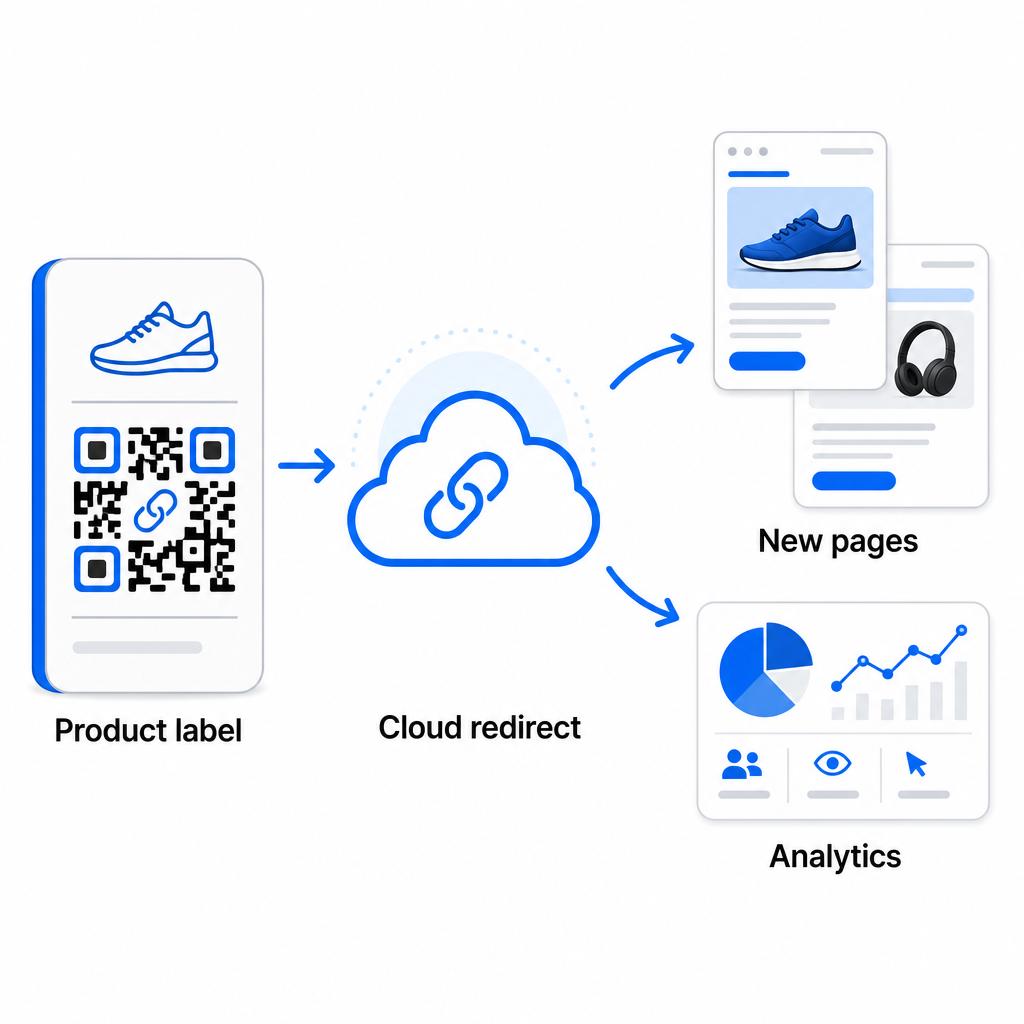
Be lankstumo, dinaminiai kodai taip pat atrakina išsamią nuskaitymo analizę: nuskaitymų skaičius, nuskaitymo laikai, geografinės vietos, įrenginių tipai, naršyklės ir OS duomenys, ir GPS pagrindu veikiantis vietos sekimas. Bet kokiam masiniam diegimui, kur svarbus našumas, šie duomenys suteikia tiesioginį vaizdą, kurie kodai veikia ir kur įsitraukimas yra didžiausias. Galite sužinoti daugiau apie kaip dinaminiai QR kodai palaiko rinkodaros kampanijas ir kodėl tas lankstumas yra svarbus dideliu mastu.
Stebėkite kiekvieną nuskaitymą visoje savo partijoje Dinaminiai QR kodai leidžia atnaujinti paskirties vietas ir stebėti našumą realiuoju laiku – kiekvienam kodui jūsų kampanijoje. Ištirkite Dinaminis QR kodo generatorius sukurti stebimus masinius kodus su išsamia analizės prietaisų skydeliu.
Mastelio didinimas iki įmonės apimties
Organizacijoms, generuojančioms dešimtis tūkstančių kodų – pagalvokite apie didelius mažmeninės prekybos tinklus, įmonių logistikos operacijas arba nacionalines rinkodaros kampanijas – darbo eiga turi būti tvirtesnė nei vienas CSV įkėlimas.
Pagelooto įmonės QR kodo platforma palaiko partijų generavimą dideliu mastu, su CSV pagrindu veikiančiomis darbo eigomis, galinčiomis sukurti iki 100 000 QR kodų vienu veiksmu. Šiame lygyje atsiranda papildomų aspektų.
API integravimas visiškai pašalina rankinius veiksmus, automatizuodama kodų generavimą tiesiogiai iš vidinių sistemų, tokių kaip CRM, atsargų valdymo platformos arba el. prekybos posistemės. API pagrindu veikiančios darbo eigos leidžia programiškai generuoti, atnaujinti ir pašalinti kodus, kai keičiasi jūsų duomenys. Norėdami giliau pažvelgti, kaip tai veikia praktikoje, žr. vadovą apie API pagrindu veikiantis QR kodų valdymas.
Prieiga pagal vaidmenis tampa svarbi didelėms komandoms, leidžianti skirtingiems vartotojams valdyti konkrečias kampanijas ar klientus nepasiekiant nesusijusių duomenų.
Baltos etiketės parinktys yra ypač aktualios agentūroms valdančioms masinius QR diegimus klientų vardu. Naudojant baltos etiketės funkcijas, QR kodai nukreipia į kliento domenus, o prietaisų skydeliai turi kliento prekės ženklą – išlaikant kliento patirtį sklandžią ir profesionalią.
Dažnos klaidos, kurių reikia vengti masiniame generavime
Keletas problemų pasikartoja, kai komandos generuoja QR kodus dideliu mastu, ir daugumos jų lengva išvengti šiek tiek planuojant iš anksto.
Netestavimas prieš spausdinimą yra brangiausia klaida. Visada nuskaitykite reprezentatyvų pavyzdį iš savo partijos prieš pradedant spausdinimo tiražą. Viena formatavimo klaida jūsų CSV faile gali išplisti į šimtus neveikiančių kodų. Panašiai, statinių kodų naudojimas turiniui, kuris gali keistis, yra rizika, kurią dinaminiai kodai visiškai pašalina – jei yra bent menkiausia tikimybė, kad paskirties URL arba nukreipimo puslapis bus atnaujintas, įdiekite tą lankstumą nuo pat pradžių.
Failų formato reikalavimai taip pat yra svarbesni, nei komandos dažnai tikisi. Spausdinimo gamybai reikalingi vektoriniai formatai (SVG, EPS, PDF), kad būtų užtikrinta ryški išvestis bet kokiu dydžiu, o PNG failai tinka skaitmeniniam naudojimui, tačiau gali pablogėti, kai mastelis padidinamas didelio formato spausdinimui. Praleidus organizavimą prieš generavimą, greitai atsiranda valdymo problemų – nustatykite savo aplankų struktūrą ir pavadinimų suteikimo konvenciją prieš partijos paleidimą, o ne po to. Galiausiai, nenuoseklus dizainas didelėje partijoje atrodo neprofesionaliai ir kenkia prekės ženklo patikimumui; bendro šablono taikymas generavimo metu yra daug efektyvesnis nei kodų redagavimas atskirai po to.
Dažniausiai užduodami klausimai
Dauguma masinio QR kodo įrankių, įskaitant Pageloot, priima CSV (kableliais atskirtų reikšmių) failus. Galite paruošti savo duomenis naudodami Excel arba Google Lenteles ir eksportuoti kaip CSV. Kiekviena eilutė jūsų faile tampa vienu QR kodu. Pageloot taip pat palaiko tiesioginę Google Lentelių integraciją statiniam masiniam generavimui, nereikalaujant eksportuoti atskiro failo.
Statiniai QR kodai užkoduoja paskirties vietą visam laikui – sugeneravus ir atspausdinus, paskirties vieta negali būti pakeista. Dinaminiai QR kodai naudoja platformos valdomą nukreipimo URL, todėl paskirties vietą galite atnaujinti bet kuriuo metu be pakartotinio spausdinimo. Didelėms partijoms, kuriose turinys gali keistis – pvz., produktų puslapiams, renginių detalėms ar kampanijų nukreipimo puslapiams – dinaminiai kodai yra labai rekomenduojami. Jie taip pat teikia išsamią nuskaitymo analizę, kurios statiniai kodai negali pasiūlyti.
Tai priklauso nuo platformos ir plano. Pageloot įmonės lygio įrankiai palaiko iki 100 000 QR kodų generavimą iš vieno CSV įkėlimo, todėl tinka didelio masto mažmeninei prekybai, logistikai ir rinkodaros operacijoms. Mažesnėms partijoms standartiniai planai atitinka tipinius verslo poreikius, tokius kaip renginiai, produktų linijos arba konkrečios vietos kampanijos.