Ali morate ustvariti na stotine – ali tisoče – QR kod, ne da bi vsako izdelali ročno? Ustvarjanje ene po ene je v velikem obsegu nepraktično in povzroča nedoslednost v vaših kampanjah. Ta vodnik vas popelje skozi najhitrejše in najbolj zanesljive metode za množično ustvarjanje QR kod, od nalaganja CSV datotek do avtomatizacije na ravni podjetja.
Zakaj je množično ustvarjanje QR kod pomembno
Ko izvajate lansiranje izdelka, upravljate prijave na dogodke ali označujete inventar, ustvarjanje posameznih QR kod preprosto ni razširljivo. Tudi pri 50 kodah ročno generiranje porabi ure ponavljajočega se dela – in to še preden upoštevamo doslednost oblikovanja, organizacijo datotek ali nastavitev sledenja.
Orodja za množično ustvarjanje QR kod to rešijo tako, da vam omogočajo, da vse svoje kode določite v strukturirani datoteki – običajno CSV ali preglednici – in ustvarite celotno serijo v enem delovnem toku. Rezultat je dosleden, za prenos pripravljen nabor kod, ki jih je mogoče takoj uporabiti.
Primeri uporabe zajemajo skoraj vsako industrijo:
- Maloprodaja in e-trgovina: edinstvene kode izdelkov na SKU, ki povezujejo s specifikacijami, ocenami ali stranmi za nakup
- Dogodki: kode za vsakega udeleženca za prijavo, dostop do sej ali digitalne programe
- Gostoljubnost: kode menijev po mizah ali povezave do informacij, specifičnih za sobo
- Logistika in inventar: oznake sredstev, ki povezujejo z zapisi o vzdrževanju ali podatki o lokaciji
- Marketinške agencije: kode, specifične za kampanjo, z individualnim sledenjem na postavitev
Kaj potrebujete, preden začnete
Preden ustvarite svojo serijo, bo nekaj odločitev bistveno oblikovalo vaš delovni tok.
Statične proti dinamičnim kodam: Statične QR kode kodirajo destinacijo neposredno v vzorec. Ko so natisnjene, jih ni mogoče spremeniti. Dinamične QR kode uporabljajo kratek preusmeritveni URL, ki ga upravlja platforma, kar pomeni, da lahko destinacijo posodobite kadar koli – tudi potem, ko so kode že natisnjene in razdeljene. Za množične kampanje, kjer se vsebina lahko razvija, dinamične QR kode so boljša izbira.
Vaša podatkovna datoteka: Orodja za množično generiranje običajno sprejemajo CSV ali preglednico z eno vrstico na QR kodo. Najmanj, vsaka vrstica potrebuje ciljni URL ali vsebino. Odvisno od platforme lahko vključite tudi polja za ime kode, dodelitev mape, parametre UTM ali predlogo oblikovanja.
Doslednost oblikovanja: Če morajo vaše kode vsebovati barve blagovne znamke, logotipe ali specifične sloge okvirjev, potrdite, da vam orodje omogoča uporabo skupne predloge oblikovanja za celotno serijo, namesto da bi vsako kodo konfigurirali posamezno.
Obseg: Spoznajte svoj obseg, preden izberete orodje. Nekatere platforme omejujejo množično generiranje na nekaj sto kod na serijo; platforme na ravni podjetja, kot je Pageloot, podpirajo do 100.000 QR kod z enim samim nalaganjem CSV datoteke.
Kako ustvariti QR kode v velikem obsegu z uporabo nalaganja CSV datoteke
Množično generiranje na podlagi CSV je najpogostejša metoda. Tukaj je opisano, kako postopek deluje na platformi, kot je Pageloot.
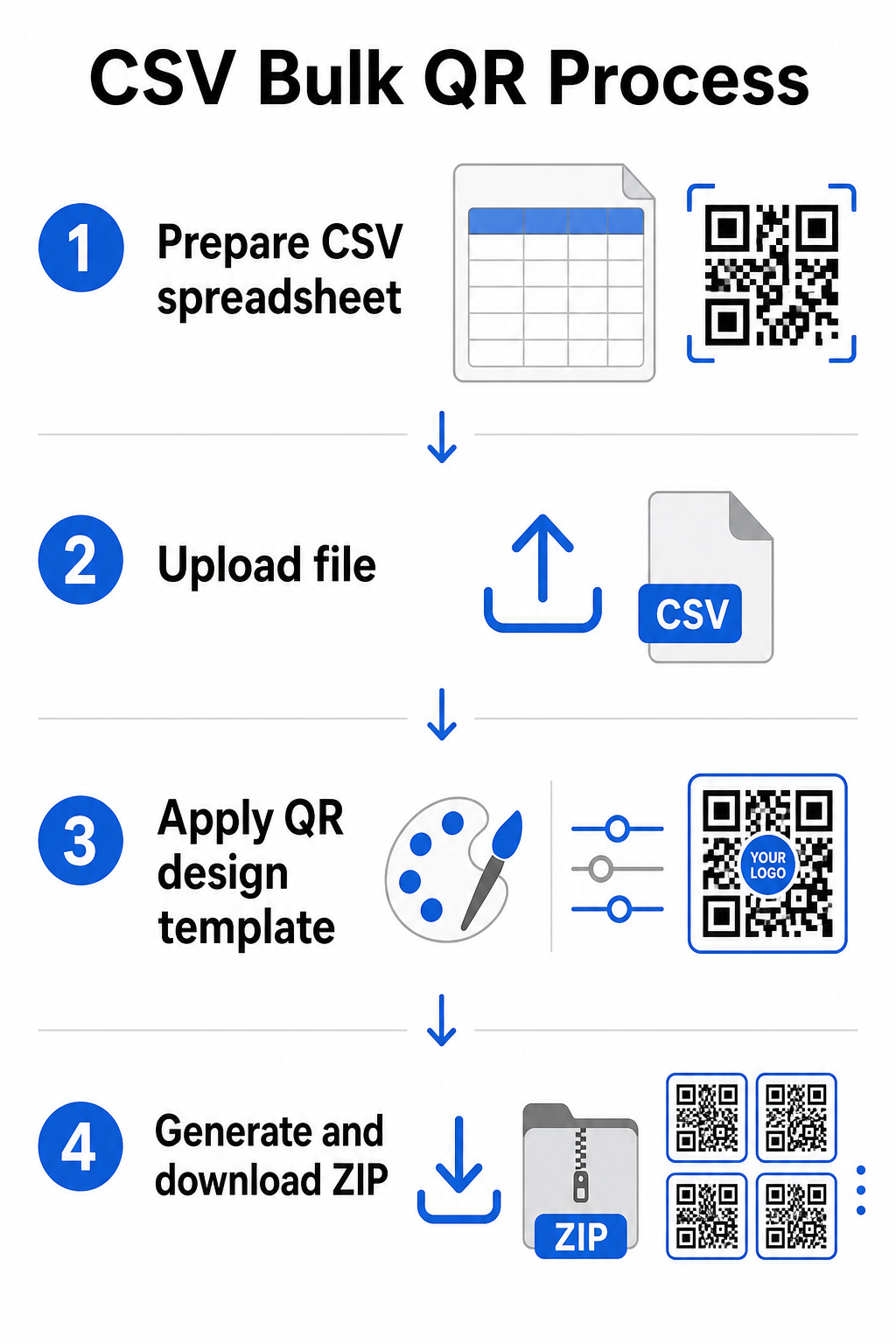
Korak 1: Pripravite svojo preglednico
Odprite orodje za preglednice – Excel, Google Sheets ali kateri koli urejevalnik CSV – in strukturirajte svoje podatke. Vsaka vrstica predstavlja eno QR kodo. Vključite najmanj:
- Ciljni URL ali vsebina za vsako kodo
- Ime ali oznaka za vsako kodo (to pomaga pri kasnejši organizaciji)
- Katere koli identifikatorje kampanje ali mape, ki jih želite uporabiti
Izvozite datoteko kot CSV (vrednosti, ločene z vejicami), ko ste pripravljeni za nalaganje.
Korak 2: Naložite CSV v množični generator
Prijavite se v svoj račun Pageloot in se pomaknite do razdelka za množično ustvarjanje. Naložite svojo datoteko CSV. Platforma bo razčlenila vsako vrstico in postavila kode v čakalno vrsto za generiranje. Preglejte predogled, da potrdite, da je preslikava pravilna – ciljni URL-ji se morajo ujemati z želenimi vrsticami.
Korak 3: Uporabite predlogo oblikovanja
Namesto ročnega oblikovanja vsake kode izberite skupno predlogo oblikovanja, ki jo boste uporabili za celotno serijo. Tukaj dodate logotip svoje blagovne znamke, izberete barve in konfigurirate sloge okvirjev. Uporaba doslednega oblikovanja na tej stopnji zagotavlja, da so vse kode videti enotno na embalaži, tiskovinah ali signalizaciji.
Korak 4: Generirajte in prenesite
Zaženite serijo. Platforma generira vse kode hkrati in jih zapakira za prenos, običajno kot ZIP datoteko, ki vsebuje posamezne slikovne datoteke (PNG, SVG, PDF ali EPS, odvisno od vaših potreb po izhodu). Imena datotek običajno ustrezajo imenom kod iz vaše preglednice, kar omogoča enostavno ujemanje vsake kode z njeno predvideno uporabo.
Generirajte celotno serijo naenkrat Preskočite ročno delo in ustvarite na stotine ali tisoče QR kod iz ene same preglednice. Uporabite Generator QR kod ali raziščite možnosti dinamičnih QR kod za začetek množičnega ustvarjanja danes.
Uporaba Google Sheets za množične statične QR kode
Če vaša ekipa že dela v Google Preglednicah, Pageloot podpira neposredno integracijo za generiranje več statičnih QR kod iz podatkov preglednic. Ta pristop je še posebej priročen za ekipe, ki vzdržujejo žive podatke v Preglednicah – katalogi izdelkov, seznami udeležencev dogodkov ali imeniki lokacij – kjer so izvorni podatki že strukturirani in posodobljeni v sodelovanju.
Postopek posnema metodo CSV, vendar namesto izvažanja in ponovnega nalaganja svojo Preglednico povežete neposredno. Vsaka vrstica v določenem stolpcu postane vhod za eno QR kodo. To zmanjšuje trenje za ekipe, ki ne želijo upravljati ločenih izvozov CSV vsakič, ko se izvorni podatki spremenijo.
Organiziranje velikih serij po generiranju
Generiranje kod je le del izziva. V velikem obsegu postane njihovo organiziranje samostojna naloga. Nekaj praks pomembno pomaga.
Uporabite mape za razvrščanje kod po kampanji, projektu, stranki ali liniji izdelkov. Pagelootova funkcija map za QR kode olajša ločevanje na desetine aktivnih kampanj, tako da se člani ekipe lahko orientirajo brez zmede. Vzpostavite jasno konvencijo poimenovanja v svojem CSV-ju, preden naložite – nekaj podobnega kot `ime-kampanjePOSTAVITEVrazličica` – tako da je posamezne kode enostavno najti in jih kasneje povezati z njihovimi analitičnimi podatki. Končno, od začetka združite po primeru uporabe: hranite kode dogodkov, kode izdelkov in marketinške kode v ločenih mapah, tako da poročanje o uspešnosti ostane čisto in uporabno.
Množične QR kode z dinamičnim posodabljanjem
Ena pomembna omejitev statičnih množičnih QR kod je, da vsaka sprememba destinacije zahteva ponovno tiskanje. Če ustvarite 5.000 etiket izdelkov in se URL povezanega ciljnega mesta spremeni, te kode postanejo zastarele v trenutku, ko so razdeljene.
Dinamične množične QR kode odpravljajo ta problem. Vsaka koda v vaši seriji kaže na kratek preusmeritveni URL, ki ga vzdržuje Pageloot. Lahko posodobite destinacijo za posamezne kode – ali potisnete spremembe po celotni seriji – ne da bi se dotaknili same fizične kode. To je še posebej dragoceno za sezonske kampanje, kjer se ciljne strani spreminjajo, embalažo izdelkov, kjer se informacijske strani posodobijo po tiskanju, in dogodkovne materiale, pripravljene vnaprej, preden so potrjeni končni URL-ji.
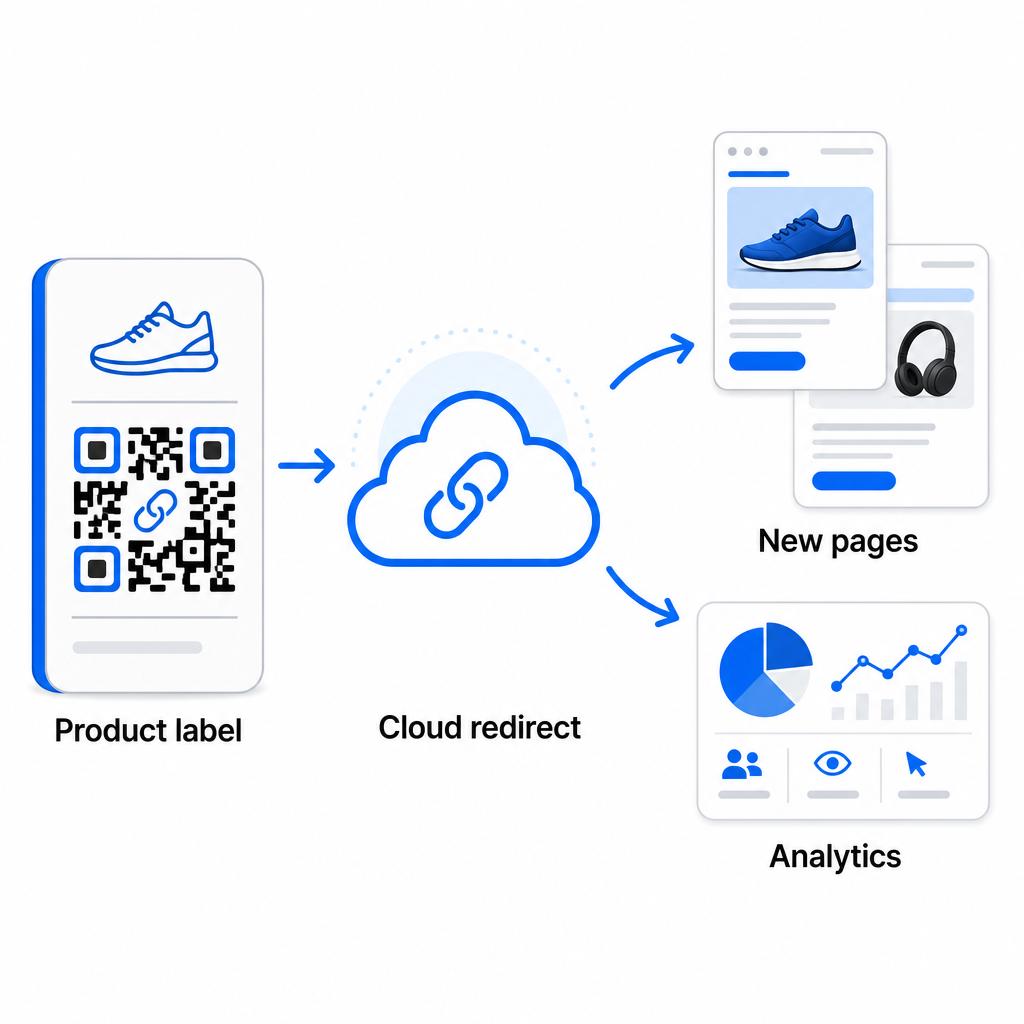
Poleg prilagodljivosti dinamične kode tudi omogočajo podrobno analitiko skeniranj: število skeniranj, čase skeniranj, geografske lokacije, vrste naprav, podatke o brskalniku in OS ter sledenje lokacije na podlagi GPS. Za vsako množično uvedbo, kjer je uspešnost pomembna, vam ti podatki omogočajo neposreden vpogled v to, katere kode delujejo in kje je angažiranost najvišja. Več o tem lahko izveste kako dinamične QR kode podpirajo marketinške kampanje in zakaj je ta prilagodljivost pomembna v velikem obsegu.
Sledite vsakemu skeniranju po celotni seriji Dinamične QR kode vam omogočajo posodabljanje destinacij in spremljanje uspešnosti v realnem času – za vsako kodo v vaši kampanji. Raziščite QR generator za dinamične QR kode za ustvarjanje sledljivih množičnih kod s popolno analitično nadzorno ploščo.
Skaliranje na podjetniški obseg
Za organizacije, ki generirajo desetine tisoč kod – pomislite na velike trgovske verige, podjetniške logistične operacije ali nacionalne marketinške kampanje – mora biti potek dela robustnejši kot en sam prenos CSV.
Pagelootov platforma za QR kode za podjetja podpira serijsko generiranje v velikem obsegu, z delovnimi tokovi, ki temeljijo na CSV in so sposobni proizvesti do 100.000 QR kod v eni sami operaciji. Na tej ravni pridejo v poštev dodatni premisleki.
integracija API-ja popolnoma odstrani ročne korake z avtomatizacijo generiranja kod neposredno iz notranjih sistemov, kot so CRM-ji, platforme za upravljanje zalog ali zaledni sistemi e-trgovine. Delovni tokovi, ki temeljijo na API-ju, vam omogočajo programsko generiranje, posodabljanje in umikanje kod, ko se vaši podatki spreminjajo. Za podrobnejši vpogled v to, kako to deluje v praksi, glejte vodnik o Upravljanje QR kod na osnovi API-ja.
Dostop na podlagi vlog postane pomemben za velike ekipe, kar omogoča različnim uporabnikom upravljanje specifičnih kampanj ali strank brez dostopa do nepovezanih podatkov.
Možnosti bele etikete so še posebej pomembne za agencije ki upravljajo množične uvedbe QR kod v imenu strank. S funkcijami bele etikete se QR kode razrešijo na domene strank in nadzorne plošče nosijo blagovno znamko stranke – ohranjajoč uporabniško izkušnjo stranke brezhibno in profesionalno.
Pogoste napake, ki se jim je treba izogniti pri množičnem generiranju
Nekaj težav se ponavlja, ko ekipe generirajo QR kode v velikem obsegu, in večino jih je enostavno preprečiti z malo predhodnega načrtovanja.
Netestiranje pred tiskanjem je najdražja napaka. Vedno skenirajte reprezentativen vzorec iz vaše serije, preden se zavežete k tiskanju. Ena sama napaka pri formatiranju v vaši CSV datoteki se lahko razširi na stotine pokvarjenih kod. Podobno je uporaba statičnih kod za vsebino, ki se lahko spremeni, tveganje, ki ga dinamične kode popolnoma odpravijo – če obstaja kakršnakoli možnost, da bo ciljni URL ali pristajalna stran posodobljena, vgradite to prilagodljivost že od začetka.
Zahteve glede formata datotek so prav tako pomembnejše, kot ekipe pogosto pričakujejo. Tiskarska produkcija potrebuje vektorske formate (SVG, EPS, PDF) za oster izpis pri kateri koli velikosti, medtem ko datoteke PNG delujejo za digitalno uporabo, vendar se lahko poslabšajo, ko so povečane za tiskanje velikega formata. Preskakovanje organizacije pred generiranjem hitro povzroči glavobole pri upravljanju – nastavite svojo strukturo map in konvencijo poimenovanja, preden se serija zažene, ne po njej. Končno, nedosleden dizajn v veliki seriji izgleda neprofesionalno in spodkopava verodostojnost blagovne znamke; uporaba skupne predloge ob času generiranja je veliko učinkovitejša kot individualno urejanje kod pozneje.
Pogosta vprašanja
Večina orodij za množično QR kode, vključno s Pagelootom, sprejema datoteke CSV (vrednosti, ločene z vejicami). Svoje podatke lahko pripravite v Excelu ali Google Preglednicah in izvozite kot CSV. Vsaka vrstica v vaši datoteki postane ena QR koda. Pageloot podpira tudi neposredno integracijo z Google Preglednicami za statično množično generiranje, ne da bi bilo treba izvoziti ločeno datoteko.
Statične QR kode trajno kodirajo destinacijo – ko so enkrat ustvarjene in natisnjene, destinacije ni mogoče spremeniti. Dinamične QR kode uporabljajo preusmeritveni URL, ki ga upravlja platforma, tako da lahko destinacijo posodobite kadar koli, ne da bi morali ponovno tiskati. Za velike serije, kjer se vsebina lahko spremeni – kot so strani izdelkov, podrobnosti dogodkov ali ciljne strani kampanj – so dinamične kode močno priporočljive. Zagotavljajo tudi podrobno analitiko skeniranja, ki je statične kode ne morejo ponuditi.
To je odvisno od platforme in načrta. Orodja Pageloot na ravni podjetja podpirajo generiranje do 100.000 QR kod iz enega samega nalaganja CSV, zaradi česar so primerna za obsežne maloprodajne, logistične in marketinške operacije. Za manjše serije standardni načrti ustrezajo tipičnim poslovnim potrebam, kot so dogodki, linije izdelkov ali lokacijsko specifične kampanje.