Treba da generišete stotine – ili hiljade – QR kodova bez ručnog kreiranja svakog pojedinačno? Kreiranje jednog po jednog je nepraktično u velikom obimu i uvodi nedoslednost u vaše kampanje. Ovaj vodič vas vodi kroz najbrže, najpouzdanije metode za masovno kreiranje QR kodova, od CSV otpremanja do automatizacije na nivou preduzeća.
Zašto je masovno kreiranje QR kodova važno
Kada pokrećete proizvod, upravljate registracijama za događaje, ili etiketirate inventar, kreiranje pojedinačnih QR kodova jednostavno nije skalabilno. Čak i za 50 kodova, ručno generisanje troši sate ponavljajućeg rada – i to pre nego što uzmete u obzir doslednost dizajna, organizaciju datoteka, ili podešavanje praćenja.
Alati za masovno kreiranje QR kodova rešavaju ovo tako što vam omogućavaju da definišete sve svoje kodove u strukturiranoj datoteci – obično CSV ili tabela – i generišete celu seriju u jednom radnom toku. Rezultat je dosledan, spreman za preuzimanje skup kodova koji se mogu odmah primeniti.
Slučajevi upotrebe obuhvataju skoro svaku industriju:
- Maloprodaja i e-trgovina: jedinstveni kodovi proizvoda po SKU-u koji vode do specifikacija, recenzija, ili stranica za kupovinu
- Događaji: kodovi po učesniku za prijavu, pristup sesiji, ili digitalne programe
- Хоспиталити: kodovi menija po stolu ili linkovi sa informacijama specifičnim za sobu
- Logistika i inventar: oznake imovine koje vode do evidencije održavanja ili podataka o lokaciji
- Marketing agencije: kodovi specifični za kampanju sa individualnim praćenjem po plasmanu
Šta vam je potrebno pre nego što počnete
Pre generisanja vaše serije, nekoliko odluka će značajno oblikovati vaš radni tok.
Statički vs. dinamički kodovi: Statički QR kodovi kodiraju odredište direktno u obrazac. Jednom odštampani, ne mogu se menjati. Dinamički QR kodovi koriste kratak URL za preusmeravanje kojim upravlja platforma, što znači da možete ažurirati odredište u bilo kom trenutku – čak i nakon što su kodovi već odštampani i distribuirani. Za masovne kampanje gde se sadržaj može razvijati, dinamički QR kodovi su bolji izbor.
Vaša datoteka podataka: Alati za masovno generisanje obično prihvataju CSV ili tabelu sa jednim redom po QR kodu. Minimalno, svaki red zahteva odredišni URL ili sadržaj. U zavisnosti od platforme, možete uključiti i polja za naziv koda, dodelu fascikle, UTM parametre, ili šablon dizajna.
Doslednost dizajna: Ako vaši kodovi treba da nose boje brenda, logotipe, ili specifične stilove okvira, potvrdite da alat omogućava primenu zajedničkog šablona dizajna na celu seriju, umesto da konfigurišete svaki kod pojedinačno.
Obim: Znajte svoj obim pre odabira alata. Neke platforme ograničavaju masovno generisanje na nekoliko stotina kodova po seriji; platforme poslovnog nivoa kao što je Pageloot podržavaju do 100.000 QR kodova putem jednog CSV otpremanja.
Kako kreirati QR kodove masovno koristeći CSV otpremanje
Masovno generisanje zasnovano na CSV-u je najčešća metoda. Evo kako proces funkcioniše na platformi kao što je Pageloot.
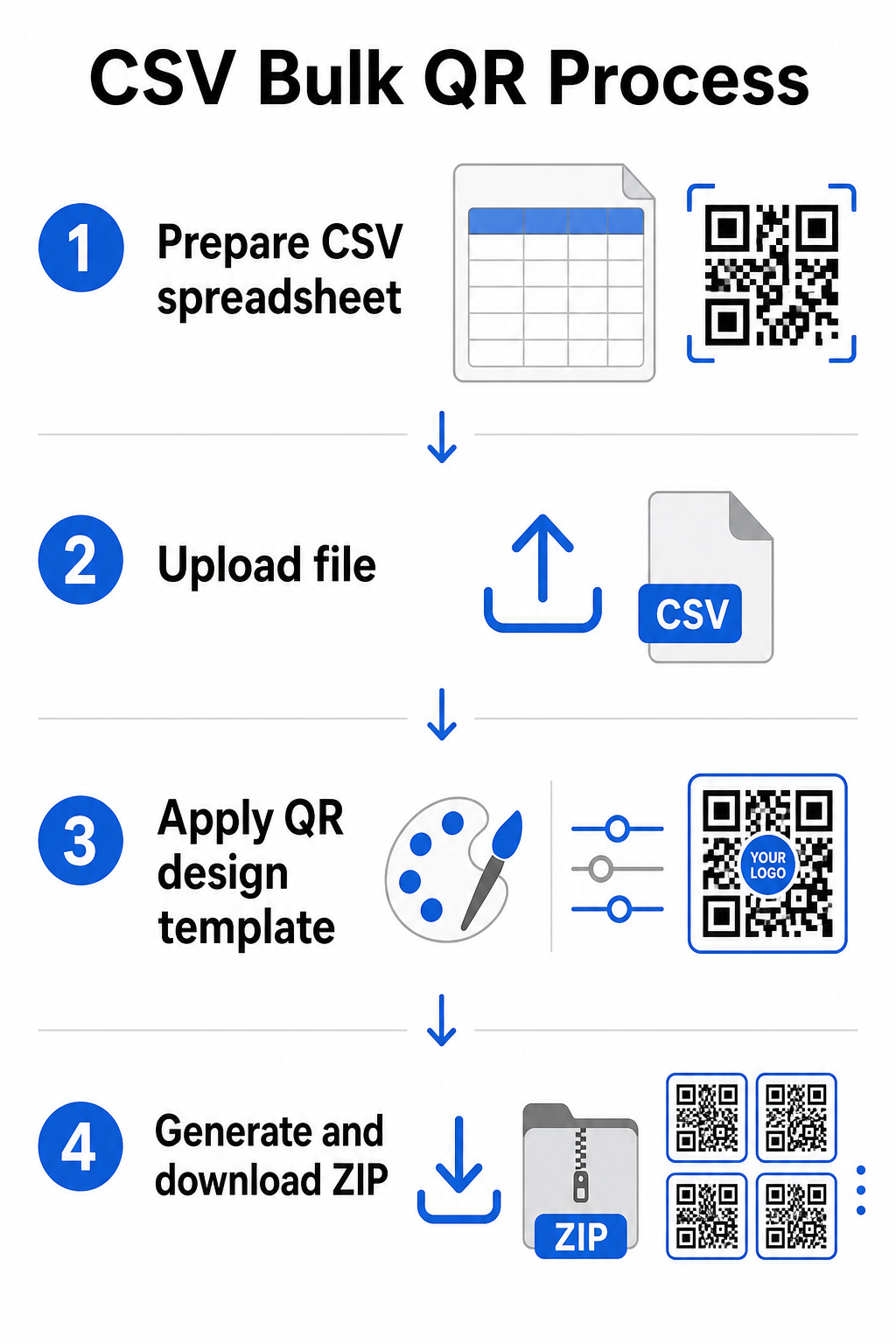
Korak 1: Pripremite svoju tabelu
Otvorite alat za tabele – Excel, Google Sheets, ili bilo koji CSV editor – i strukturirajte svoje podatke. Svaki red predstavlja jedan QR kod. Uključite minimalno:
- Odredišni URL ili sadržaj za svaki kod
- Naziv ili oznaka za svaki kod (ovo pomaže pri organizaciji kasnije)
- Bilo koji identifikatori kampanje ili fascikle koje želite da koristite
Izvezite datoteku kao CSV (vrednosti razdvojene zarezima) kada ste spremni za otpremanje.
Korak 2: Otpremite CSV u generator za masovno kreiranje
Prijavite se na svoj Pageloot nalog i idite na odeljak za masovno kreiranje. Otpremite svoju CSV datoteku. Platforma će analizirati svaki red i staviti kodove u red za generisanje. Pregledajte pregled da biste potvrdili da je mapiranje ispravno – odredišni URL-ovi treba da se podudaraju sa predviđenim redovima.
Korak 3: Primenite šablon dizajna
Umesto ručnog stilizovanja svakog koda, odaberite zajednički šablon dizajna koji ćete primeniti na celu seriju. Ovde dodajete logotip svog brenda, birate boje, i konfigurišete stilove okvira. Primena doslednog dizajna u ovoj fazi osigurava da svi kodovi izgledaju uniformno na ambalaži, štampanim materijalima, ili signalizaciji.
Korak 4: Generišite i preuzmite
Pokrenite seriju. Platforma generiše sve kodove istovremeno i pakuje ih za preuzimanje, obično kao ZIP datoteku koja sadrži pojedinačne slikovne datoteke (PNG, SVG, PDF, ili EPS u zavisnosti od vaših potreba za izlazom). Nazivi datoteka obično odgovaraju nazivima kodova iz vaše tabele, što olakšava podudaranje svakog koda sa njegovom namenjenom upotrebom.
Generišite celu seriju odjednom Preskočite ručni rad i kreirajte stotine ili hiljade QR kodova iz jedne tabele. Koristite Генератор QR kodova ili istražite Opcije dinamičkog QR koda da biste započeli sa masovnim kreiranjem danas.
Korišćenje Google Sheets-a za masovne statičke QR kodove
Ako vaš tim već radi u Google Sheets-u, Pageloot podržava direktnu integraciju za generisanje više statičkih QR kodova iz podataka tabele. Ovaj pristup je posebno pogodan za timove koji održavaju žive podatke u Sheets-u – kataloge proizvoda, liste učesnika događaja ili direktorijume lokacija – gde su izvorni podaci već strukturirani i ažuriraju se kolaborativno.
Proces ogleda CSV metodu, ali umesto izvoza i ponovnog učitavanja, direktno povezujete svoj Sheet. Svaki red u označenoj koloni postaje ulaz za jedan QR kod. Ovo smanjuje trenje za timove koji ne žele da upravljaju odvojenim CSV izvozima svaki put kada se izvorni podaci promene.
Organizovanje velikih serija nakon generisanja
Generisanje kodova je samo deo izazova. Pri velikom obimu, njihovo organizovanje postaje poseban zadatak. Nekoliko praksi značajno pomaže.
Koristite fascikle za sortiranje kodova po kampanji, projektu, klijentu ili liniji proizvoda. Pageloot-ova funkcija fascikle za QR kodove olakšava držanje desetina aktivnih kampanja odvojenim, tako da članovi tima mogu da se snalaze bez zabune. Uspostavite jasnu konvenciju imenovanja u svom CSV-u pre nego što ga otpremite – nešto poput `naziv-kampanjePOLOŽAJvarijanta` – tako da se pojedinačni kodovi lako lociraju i kasnije podudaraju sa njihovim analitičkim podacima. Konačno, grupišite po slučaju upotrebe od samog početka: držite kodove događaja, kodove proizvoda i marketinške kodove u odvojenim fasciklama kako bi izveštavanje o performansama ostalo čisto i upotrebljivo.
Masovni QR kodovi sa dinamičkim ažuriranjem
Jedno značajno ograničenje statičkih masovnih QR kodova je to što svaka promena odredišta zahteva ponovno štampanje. Ako generišete 5.000 etiketa proizvoda i URL povezanog odredišta se promeni, ti kodovi postaju zastareli onog trenutka kada se distribuiraju.
Dinamički masovni QR kodovi eliminišu ovaj problem. Svaki kod u vašoj seriji upućuje na kratak URL za preusmeravanje koji održava Pageloot. Možete ažurirati odredište za pojedinačne kodove – ili primeniti promene na celu seriju – bez dodirivanja samog fizičkog koda. Ovo je posebno vredno za sezonske kampanje gde se odredišne stranice menjaju, pakovanja proizvoda gde se informacione stranice ažuriraju nakon štampanja, i materijale za događaje pripremljene unapred pre nego što se potvrde konačni URL-ovi.
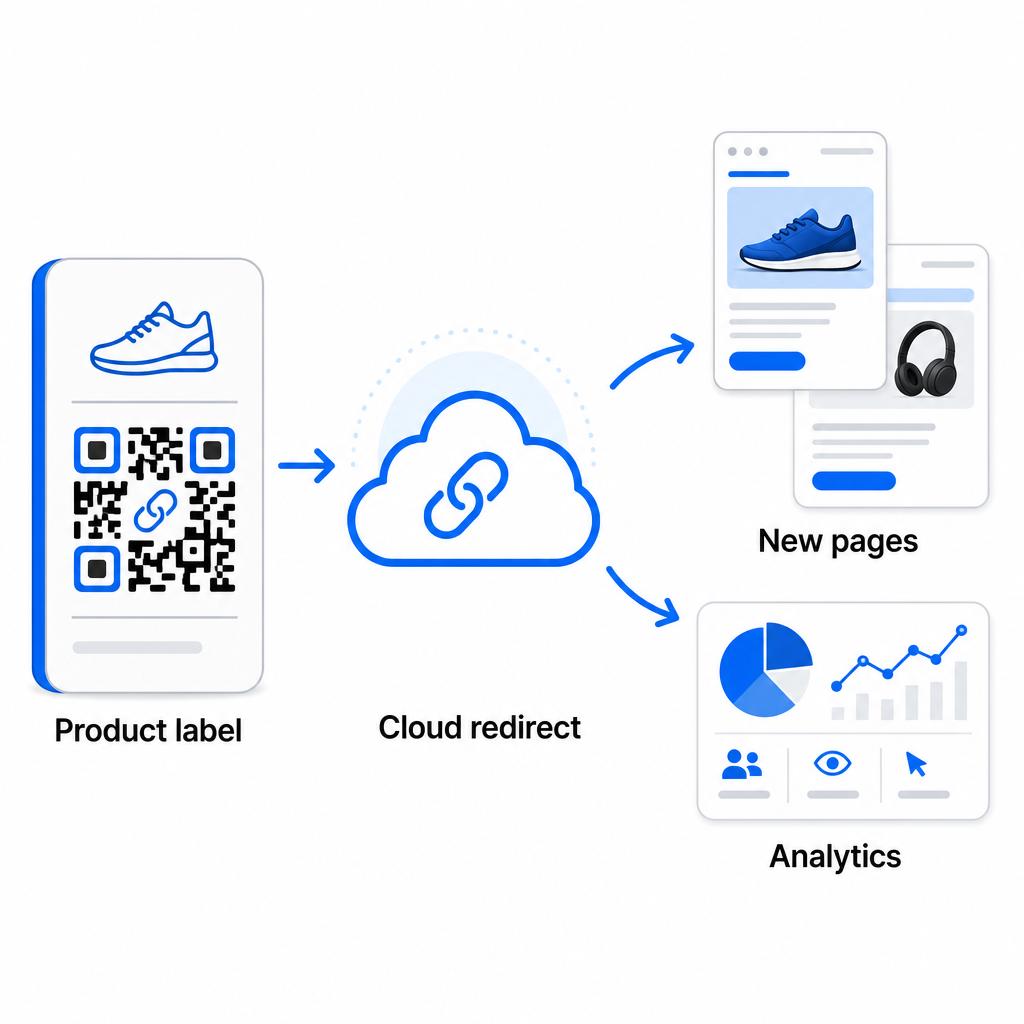
Pored fleksibilnosti, dinamički kodovi takođe otključavaju detaljnu analitiku skeniranja: broj skeniranja, vreme skeniranja, geografske lokacije, tipovi uređaja, podaci o pretraživaču i OS-u, i praćenje lokacije zasnovano na GPS-u. Za svako masovno postavljanje gde su performanse važne, ovi podaci vam daju direktan uvid u to koji kodovi funkcionišu i gde je angažovanje najveće. Možete saznati više o tome kako dinamički QR kodovi podržavaju marketinške kampanje i zašto je ta fleksibilnost važna u velikom obimu.
Pratite svako skeniranje u celoj seriji Dinamički QR kodovi vam omogućavaju da ažurirate odredišta i pratite performanse u realnom vremenu – za svaki kod u vašoj kampanji. Istražite Dinamički QR kod generator da biste kreirali masovne kodove koji se mogu pratiti sa potpunom analitičkom kontrolnom tablom.
Skaliranje na preduzetnički obim
Za organizacije koje generišu desetine hiljada kodova – pomislite na velike maloprodajne lance, logističke operacije preduzeća ili nacionalne marketinške kampanje – tok posla mora biti robusniji od jednog CSV otpremanja.
Pageloot-ov platforma za QR kodove za preduzeća podržava generisanje serija u velikom obimu, sa CSV-baziranim tokovima posla sposobnim da proizvedu do 100.000 QR kodova u jednoj operaciji. Na ovom nivou, dodatna razmatranja dolaze u obzir.
API integracija u potpunosti uklanja ručne korake automatizacijom generisanja kodova direktno iz internih sistema kao što su CRM-ovi, platforme za upravljanje zalihama ili e-commerce pozadine. API-bazirani tokovi posla omogućavaju vam da programski generišete, ažurirate i povlačite kodove kako se vaši podaci menjaju. Za dublji uvid u to kako ovo funkcioniše u praksi, pogledajte vodič o Upravljanje QR kodovima zasnovano na API-ju.
Pristup zasnovan na ulogama postaje važan za velike timove, omogućavajući različitim korisnicima da upravljaju specifičnim kampanjama ili klijentima bez pristupa nepovezanim podacima.
Opcije bele etikete su posebno relevantne za agencije koje upravljaju masovnim QR implementacijama u ime klijenata. Sa funkcijama bele etikete, QR kodovi se rešavaju na domene klijenata, a kontrolne table nose brendiranje klijenata – čime se klijentsko iskustvo održava besprekornim i profesionalnim.
Uobičajene greške koje treba izbegavati pri masovnom generisanju
Nekoliko problema se ponavlja kada timovi generišu QR kodove u velikom obimu, a većinu njih je lako sprečiti uz malo planiranja unapred.
Netestiranje pre štampanja je najskuplja greška. Uvek skenirajte reprezentativni uzorak iz vaše serije pre nego što se obavežete na štampanje. Jedna greška u formatiranju u vašem CSV-u može se proširiti na stotine pokvarenih kodova. Slično tome, korišćenje statičkih kodova za sadržaj koji se može promeniti je rizik koji dinamički kodovi u potpunosti eliminišu – ako postoji bilo kakva šansa da se odredišni URL ili odredišna stranica ažuriraju, ugradite tu fleksibilnost od samog početka.
Zahtevi za format datoteke takođe su važniji nego što timovi često očekuju. Štampana produkcija zahteva vektorske formate (SVG, EPS, PDF) za oštar izlaz u bilo kojoj veličini, dok PNG datoteke rade za digitalnu upotrebu, ali se mogu degradirati kada se skaliraju za štampanje velikog formata. Preskakanje organizacije pre generisanja brzo stvara glavobolje u upravljanju – postavite strukturu fascikli i konvenciju imenovanja pre nego što se serija pokrene, a ne posle. Konačno, nedosledan dizajn u velikoj seriji izgleda neprofesionalno i podriva kredibilitet brenda; primena zajedničkog šablona u vreme generisanja je daleko efikasnija od pojedinačnog uređivanja kodova nakon toga.
Često postavljana pitanja
Većina alata za masovne QR kodove, uključujući Pageloot, prihvata CSV (vrednosti razdvojene zarezima) datoteke. Možete pripremiti vaše podatke u Excelu ili Google Sheets-u i izvesti ih kao CSV. Svaki red u vašoj datoteci postaje jedan QR kod. Pageloot takođe podržava direktnu integraciju sa Google Sheets-om za statičnu masovnu generaciju bez potrebe za izvozom zasebne datoteke.
Statički QR kodovi trajno kodiraju odredište – jednom generisani i odštampani, odredište se ne može promeniti. Dinamički QR kodovi koriste URL za preusmeravanje kojim upravlja platforma, tako da možete ažurirati odredište u bilo kom trenutku bez ponovnog štampanja. Za velike serije gde se sadržaj može promeniti – kao što su stranice proizvoda, detalji događaja ili odredišne stranice kampanje – dinamički kodovi se snažno preporučuju. Oni takođe pružaju detaljnu analitiku skeniranja koju statički kodovi ne mogu ponuditi.
Ovo zavisi od platforme i plana. Pageloot-ovi alati na nivou preduzeća podržavaju generisanje do 100.000 QR kodova iz jednog CSV otpremanja, što ga čini pogodnim za maloprodaju velikih razmera, logistiku i marketinške operacije. Za manje serije, standardni planovi zadovoljavaju tipične poslovne potrebe kao što su događaji, linije proizvoda ili kampanje specifične za lokaciju.