> 가이드 > How to Create QR Codes in Bulk
Bulk QR workflow

How to Create QR Codes in Bulk

Learn how to generate hundreds of QR codes at once using CSV uploads or Google Sheets. This guide covers bulk creation, tracking, and brand design consistency.
Updated on 7월 2, 2026
목차

Need to generate hundreds – or thousands – of QR codes without building each one manually? Creating them one at a time is impractical at scale and introduces inconsistency across your campaigns. This guide walks you through the fastest, most reliable methods for bulk QR code creation, from CSV uploads to enterprise-level automation.

Why Bulk QR Code Creation Matters

When you’re running a product launch, managing event registrations, or labeling inventory, individual QR code creation simply doesn’t scale. Even at 50 codes, manual generation consumes hours of repetitive work – and that’s before accounting for design consistency, file organization, or tracking setup.

Bulk QR code tools solve this by letting you define all your codes in a structured file – typically a CSV or spreadsheet – and generate the entire batch in one workflow. The result is a consistent, download-ready set of codes that can be deployed immediately.

The use cases span nearly every industry:

  • Retail and e-commerce: unique product codes per SKU linking to specs, reviews, or purchase pages
  • 이벤트: per-attendee codes for check-in, session access, or digital programs
  • 환대: table-by-table menu codes or room-specific information links
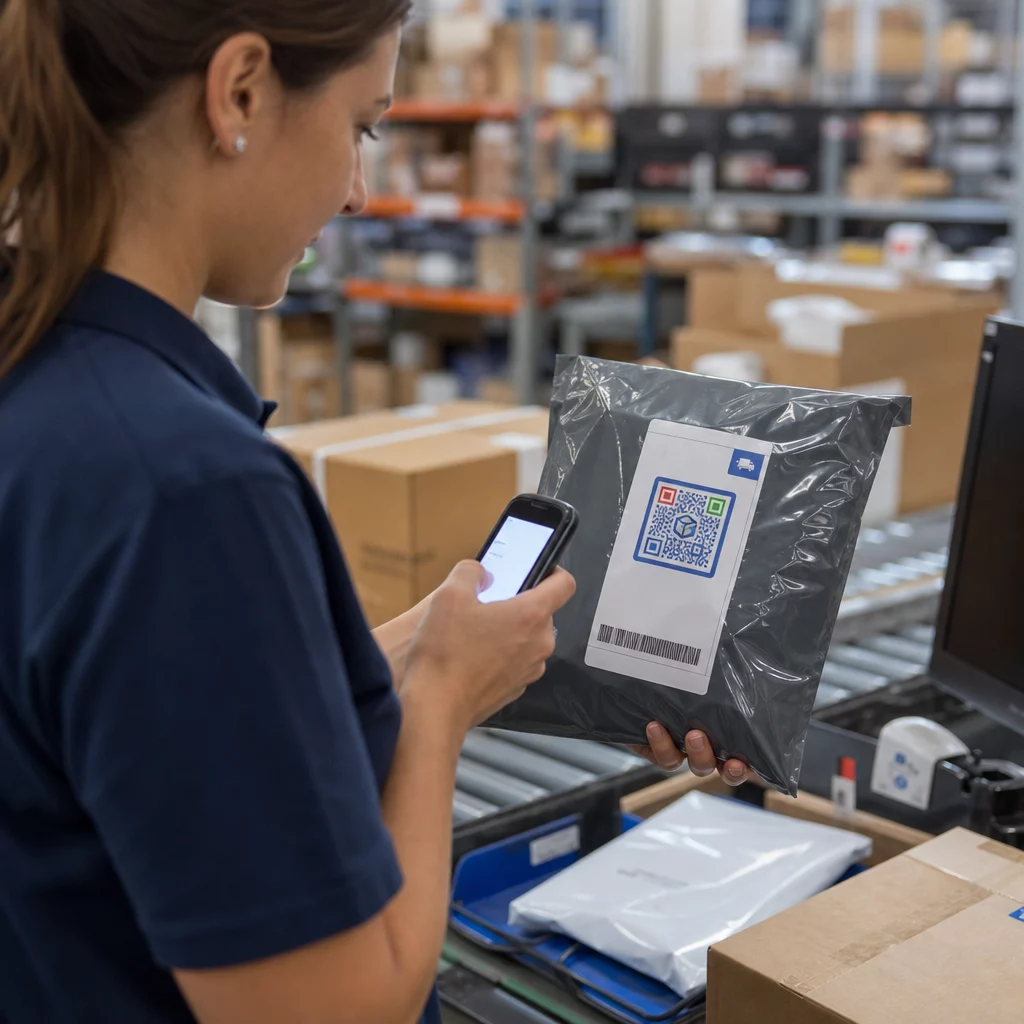
  • Logistics and inventory: asset tags linking to maintenance records or location data
  • Marketing agencies: campaign-specific codes with individual tracking per placement

What You Need Before You Start

Before generating your batch, a few decisions will shape your workflow significantly.

Static vs. dynamic codes: Static QR codes encode the destination directly into the pattern. Once printed, they cannot be changed. Dynamic QR codes use a short redirect URL managed by the platform, which means you can update the destination at any time – even after the codes are already printed and distributed. For bulk campaigns where content may evolve, 동적 QR 코드 are the better choice.

Your data file: Bulk generation tools typically accept a CSV or spreadsheet with one row per QR code. At minimum, each row needs the destination URL or content. Depending on the platform, you can also include fields for the code’s name, folder assignment, UTM parameters, or design template.

Design consistency: If your codes need to carry brand colors, logos, or specific frame styles, confirm that the tool allows you to apply a shared design template across the entire batch rather than configuring each code individually.

Volume: Know your scale before selecting a tool. Some platforms cap bulk generation at a few hundred codes per batch; enterprise-grade platforms like Pageloot support up to 100,000 QR codes via a single CSV upload.

How to Create QR Codes in Bulk Using a CSV Upload

CSV-based bulk generation is the most common method. Here’s how the process works on a platform like Pageloot.

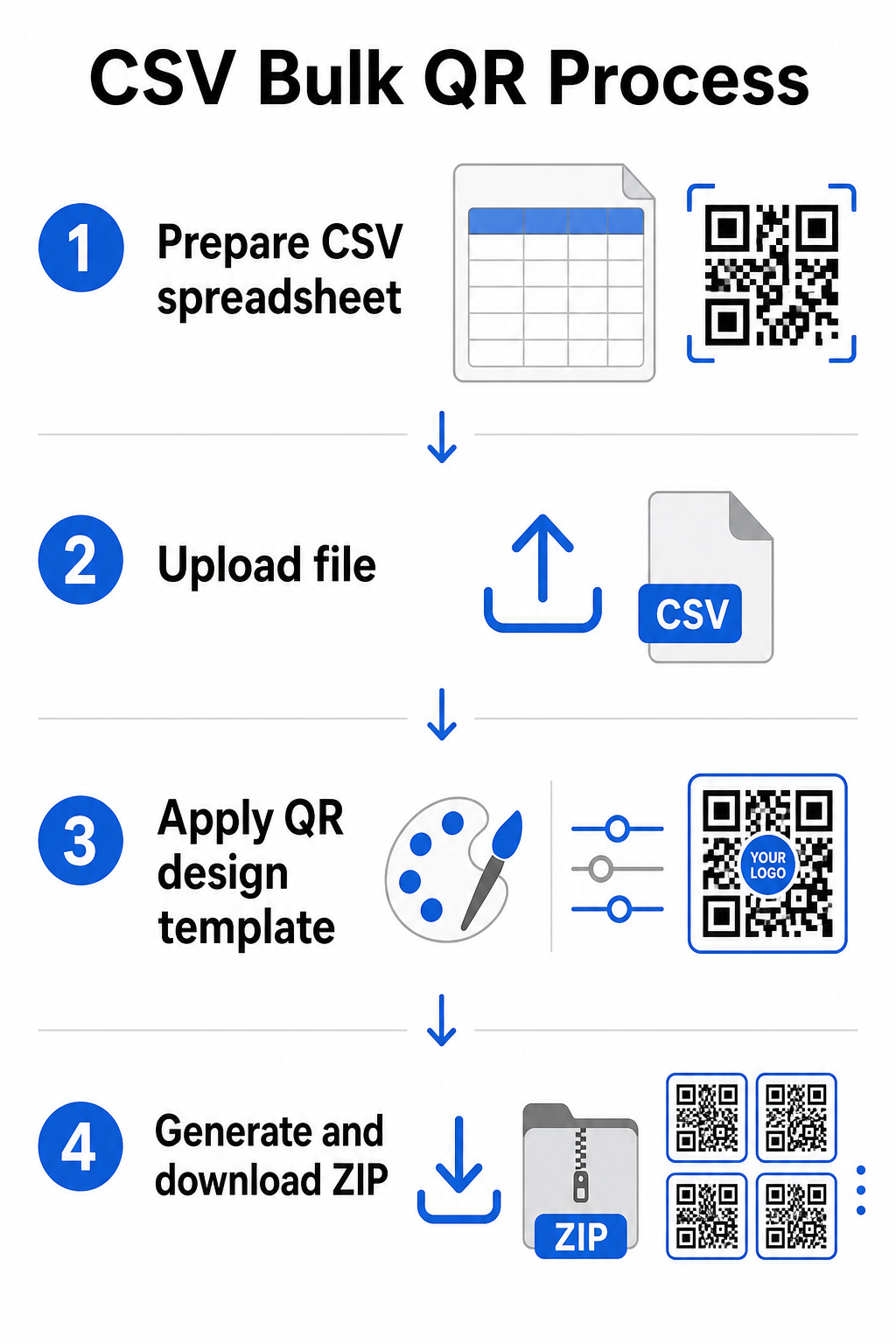
CSV bulk process

Step 1: Prepare your spreadsheet

Open a spreadsheet tool – Excel, Google Sheets, or any CSV editor – and structure your data. Each row represents one QR code. Include at minimum:

  • The destination URL or content for each code
  • A name or label for each code (this helps with organization later)
  • Any campaign or folder identifiers you want to use

Export the file as a CSV (comma-separated values) when you’re ready to upload.

Step 2: Upload the CSV to the bulk generator

Log into your Pageloot account and navigate to the bulk creation section. Upload your CSV file. The platform will parse each row and queue the codes for generation. Review the preview to confirm the mapping is correct – destination URLs should match the intended rows.

Step 3: Apply a design template

Rather than styling each code manually, select a shared design template to apply across the entire batch. This is where you add your brand logo, choose colors, and configure frame styles. Applying a consistent design at this stage ensures all codes look uniform across packaging, print materials, or signage.

Step 4: Generate and download

Initiate the batch. The platform generates all codes simultaneously and packages them for download, typically as a ZIP file containing individual image files (PNG, SVG, PDF, or EPS depending on your output needs). File names usually correspond to the code names from your spreadsheet, making it straightforward to match each code to its intended use.

Generate Your Entire Batch at Once Skip the manual work and create hundreds or thousands of QR codes from a single spreadsheet. Use the QR 코드 생성기 or explore Dynamic QR Code options to get started with bulk creation today.

Using Google Sheets for Bulk Static QR Codes

If your team already works in Google Sheets, Pageloot supports direct integration for generating multiple static QR codes from spreadsheet data. This approach is particularly convenient for teams that maintain live data in Sheets – product catalogs, event attendee lists, or location directories – where the source data is already structured and updated collaboratively.

The process mirrors the CSV method, but instead of exporting and re-uploading, you connect your Sheet directly. Each row in the designated column becomes the input for one QR code. This reduces friction for teams who don’t want to manage separate CSV exports every time the source data changes.

Organizing Large Batches After Generation

Generating codes is only part of the challenge. At volume, keeping them organized becomes its own task. A few practices help significantly.

Use folders to sort codes by campaign, project, client, or product line. Pageloot’s QR code folder feature makes it easy to keep dozens of active campaigns separated so team members can navigate without confusion. Establish a clear naming convention in your CSV before you upload – something like `campaign-nameplacementvariant` – so that individual codes are easy to locate and match to their analytics data later. Finally, group by use case from the start: keep event codes, product codes, and marketing codes in separate folders so that performance reporting stays clean and actionable.

Bulk QR Codes with Dynamic Updating

One significant limitation of static bulk QR codes is that any destination change requires reprinting. If you generate 5,000 product labels and the linked landing page URL changes, those codes become outdated the moment they’re distributed.

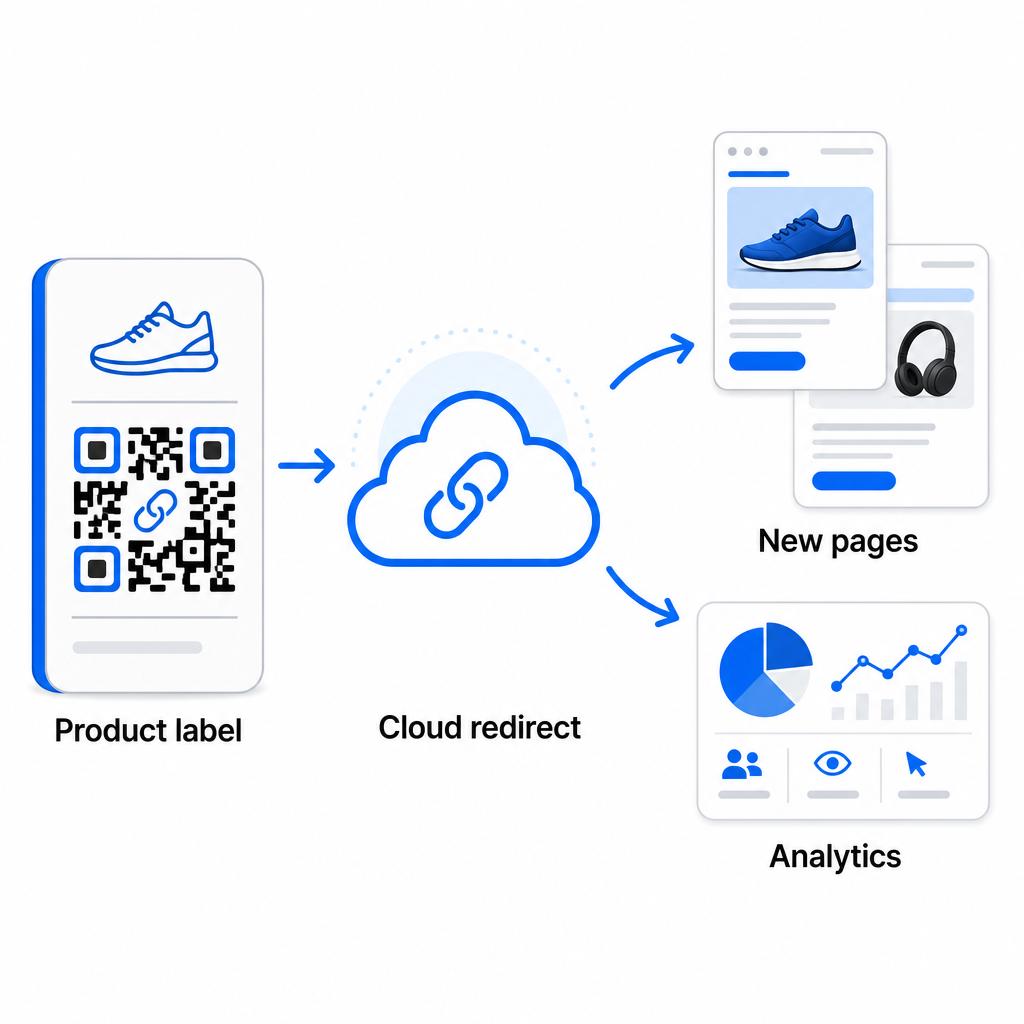
Dynamic bulk QR codes eliminate this problem. Each code in your batch points to a short redirect URL maintained by Pageloot. You can update the destination for individual codes – or push changes across an entire batch – without touching the physical code itself. This is particularly valuable for seasonal campaigns where landing pages change, product packaging where information pages are updated post-print, and event materials prepared in advance before final URLs are confirmed.

Dynamic QR updating

Beyond flexibility, dynamic codes also unlock detailed scan analytics: number of scans, scan times, geographic locations, device types, browser and OS data, and GPS-based location tracking. For any bulk deployment where performance matters, this data gives you a direct view into which codes are working and where engagement is highest. You can learn more about how dynamic QR codes support marketing campaigns and why that flexibility matters at scale.

Track Every Scan Across Your Entire Batch Dynamic QR codes let you update destinations and monitor performance in real time – across every code in your campaign. Explore the 동적 QR 코드 생성기 to create trackable bulk codes with a full analytics dashboard.

Scaling to Enterprise Volume

For organizations generating tens of thousands of codes – think large retail chains, enterprise logistics operations, or national marketing campaigns – the workflow needs to be more robust than a single CSV upload.

페이지루트의 enterprise QR code platform supports batch generation at scale, with CSV-based workflows capable of producing up to 100,000 QR codes in a single operation. At this level, additional considerations come into play.

API integration removes manual steps entirely by automating code generation directly from internal systems such as CRMs, inventory management platforms, or e-commerce backends. API-based workflows allow you to generate, update, and retire codes programmatically as your data changes. For a deeper look at how this works in practice, see the guide on API-based QR code management.

Role-based access becomes important for large teams, allowing different users to manage specific campaigns or clients without accessing unrelated data.

White-label options are especially relevant for agencies managing bulk QR deployments on behalf of clients. With white-label features, QR codes resolve to client domains and dashboards carry client branding – keeping the client experience seamless and professional.

Common Mistakes to Avoid in Bulk Generation

A few issues appear repeatedly when teams generate QR codes at volume, and most of them are easy to prevent with a little planning upfront.

Not testing before printing is the most costly mistake. Always scan a representative sample from your batch before committing to a print run. A single formatting error in your CSV can propagate to hundreds of broken codes. Similarly, using static codes for content that might change is a risk that dynamic codes eliminate entirely – if there’s any chance a destination URL or landing page will be updated, build that flexibility in from the start.

File format requirements also matter more than teams often expect. Print production needs vector formats (SVG, EPS, PDF) for sharp output at any size, while PNG files work for digital use but can degrade when scaled up for large-format printing. Skipping organization before generation creates management headaches quickly – set up your folder structure and naming convention before the batch runs, not after. Finally, inconsistent design across a large batch looks unprofessional and undermines brand credibility; applying a shared template at generation time is far more efficient than editing codes individually afterward.

자주 묻는 질문

What file format do I need to upload for bulk QR code creation?

Most bulk QR code tools, including Pageloot, accept CSV (comma-separated values) files. You can prepare your data in Excel or Google Sheets and export as CSV. Each row in your file becomes one QR code. Pageloot also supports direct Google Sheets integration for static bulk generation without needing to export a separate file.

What is the difference between bulk static and bulk dynamic QR codes?

Static QR codes encode the destination permanently – once generated and printed, the destination cannot be changed. Dynamic QR codes use a redirect URL managed by the platform, so you can update the destination at any time without reprinting. For large batches where content may change – such as product pages, event details, or campaign landing pages – dynamic codes are strongly recommended. They also provide detailed scan analytics that static codes cannot offer.

How many QR codes can I generate in a single bulk operation?

This depends on the platform and plan. Pageloot’s enterprise-level tools support generating up to 100,000 QR codes from a single CSV upload, making it suitable for large-scale retail, logistics, and marketing operations. For smaller batches, standard plans accommodate typical business needs such as events, product lines, or location-specific campaigns.

작성자 정보

시임 코스타비는 페이지루트의 콘텐츠 책임자입니다. 그는 페이지루트의 혁신적인 QR 코드 생성 서비스에 대한 글을 쓰고 있습니다. 5년 이상 QR 코드 분야에서 쌓아온 깊이 있는 전문 지식을 바탕으로, 시임은 이 분야의 전문가로 인정받고 있습니다. 그는 QR 기술을 활용하여 디지털 상호작용을 간소화하고 향상시키는 데 크게 기여하고 있습니다.

범주
에 대해 자세히 알아보기
Reader scanning QR code
QR 코드 출판사

온라인으로 QR 코드를 생성해야하는 경우 QR 코드 만들기 무료로 여기!
Pageloot는 #1 Go-To 솔루션 QR 코드를 만들고 스캔합니다.

BL-0286

블로그 세대

20,000개 이상의 브랜드로부터 신뢰를 받아 더 많은 매출, 리뷰, 팔로워를 확보했습니다.

클라이언트 로고
최고 브랜드의 신뢰
5 중 4.8 평가

4.86 / 5 별점

휴고 로랑
휴고 로랑
레스토랑 주인
가장 쉽고 안정적인 QR 코드 생성기. PDF 파일을 즉시 업로드할 수 있습니다. 이제 레스토랑 메뉴가 디지털화되었습니다.
루카스 얀센
루카스 얀센
부동산 개발사
이것은 훌륭한 도구이며 QR 코드를 사용하면 원하는 곳으로 이동할 수 있습니다. 우리는 위치 QR 코드만 사용하지만 유용한 기능이 너무 많습니다.
엠마 모레티
엠마 모레티
소매 제품
사용하기 쉽고 빠릅니다. 그것은 훌륭하게 작동하고 완벽한 이미지를 생성하므로 직원들이 내 vCard를 다운로드할 수 있습니다.
휴고 로랑
휴고 로랑
레스토랑 주인
가장 쉽고 안정적인 QR 코드 생성기. PDF 파일을 즉시 업로드할 수 있습니다. 이제 레스토랑 메뉴가 디지털화되었습니다.
루카스 얀센
루카스 얀센
부동산 개발사
이것은 훌륭한 도구이며 QR 코드를 사용하면 원하는 곳으로 이동할 수 있습니다. 우리는 위치 QR 코드만 사용하지만 유용한 기능이 너무 많습니다.
엠마 모레티
엠마 모레티
소매 제품
사용하기 쉽고 빠릅니다. 그것은 훌륭하게 작동하고 완벽한 이미지를 생성하므로 직원들이 내 vCard를 다운로드할 수 있습니다.
더 많은 QR 코드보기
QR 코드 유형 선택
사용하는 방법 동적 QR 코드
QR 코드 스캔
URL을 다음으로 변환 QR 코드
무엇이든 디지털 경험으로 전환하세요 3분 이내에.

14일 무료 체험.

신용카드는 필요 없습니다.

첫 구매 시 30% 할인

코드를 사용하세요:

MP3 파일 공유

PDF QR 코드를 생성하려면 가입하세요

필요한 모든 것을 업로드하고 표시합니다.

  • 오디오 파일
  • 팟캐스트
  • 음악

가입 시 14일 무료 체험.
체험 기간 후 QR 코드 만료.

오디오 mp3 QR 코드를 생성하려면 가입하세요

프레임으로 더 많은 스캔 확보

QR 코드에 더 많은 프레임을 추가하려면 가입하세요

클릭 유도 문안 프레임은 고객이 QR 코드와 쉽게 상호 작용할 수 있도록 도와줍니다. 사용해 보세요!

가입 시 14일 무료 체험.
체험 기간 후 QR 코드 만료.

QR 코드에 더 많은 프레임을 추가하려면 가입하세요

도형으로 더 많은 스타일 추가

더 많은 도형을 만들려면 가입하세요

QR 코드는 정사각형일 필요가 없습니다. 브랜드 이미지에 맞게 전환해 보세요.

가입 시 14일 무료 체험.
체험 기간 후 QR 코드 만료.

더 많은 도형을 만들려면 가입하세요

QR 코드에 로고 추가

QR 코드에 로고를 추가하려면 가입하세요

로고와 브랜드를 추가하여 QR 코드를 돋보이게 만드세요.

가입 시 14일 무료 체험.
체험 기간 후 QR 코드 만료.

QR 코드에 로고를 추가하려면 가입하세요

스마트 앱 스토어 리디렉션

앱 스토어 QR 코드를 생성하려면 가입하세요

스마트 앱 스토어 QR 코드에 앱 링크를 추가하세요. 사용자는 장치에 따라 리디렉션됩니다.

가입 시 14일 무료 체험.
체험 기간 후 QR 코드 만료.

앱 스토어 QR 코드를 생성하려면 가입하세요

QR 코드에 이미지 업로드

이미지 QR 코드를 생성하려면 가입하세요

이미지를 쉽게 공유하세요. 몇 초 안에 동적으로 이미지를 변경하십시오.

가입 시 14일 무료 체험.
체험 기간 후 QR 코드 만료.

이미지 QR 코드를 생성하려면 가입하세요

PDF 파일 공유

PDF QR 코드를 생성하려면 가입하세요

필요한 모든 것을 업로드하고 표시합니다.

  • 메뉴 및 가격표
  • 명령
  • 모든 문서

가입 시 14일 무료 체험.
체험 기간 후 QR 코드 만료.

PDF QR 코드를 생성하려면 가입하세요

인쇄 없이 나중에 편집

다시 인쇄하지 않고 QR 코드를 편집하려면 가입하세요

동적 QR 코드를 사용하면 새 QR 코드를 인쇄하지 않고도 QR 코드의 내용을 변경할 수 있습니다.

가입 시 14일 무료 체험.
체험 기간 후 QR 코드 만료.

다시 인쇄하지 않고 QR 코드를 편집하려면 가입하세요

언제? 어디서? QR 코드 스캔 추적

QR 코드를 추적하려면 가입하세요

어떤 QR 코드가 가장 많이 스캔되고 무엇이 고객을 가장 흥분시키는지 알아보십시오.

가입 시 14일 무료 체험.
체험 기간 후 QR 코드 만료.

QR 코드를 추적하려면 가입하세요

인쇄 준비 파일 제공

PDF 및 SVG와 같은 벡터 QR 코드를 생성하려면 가입하세요.

.EPS, .PDF, .SVG

HD 해상도로 QR 코드를 다운로드하고 싶으신가요? 인쇄할 준비가 된 벡터 또는 픽셀 형식을 가져옵니다.

가입 시 14일 무료 체험.
체험 기간 후 QR 코드 만료.

PDF 및 SVG와 같은 벡터 QR 코드를 생성하려면 가입하세요.

기다리세요. 귀하의 QR 코드는 로드 중... 로드 중...

나만의 것으로 만들기

나중을 위해 QR 코드를 저장하려면 가입하세요.

다양한 색상, 로고 및 클릭 유도문안 프레임으로 멋진 QR 코드를 만들어 더 많은 스캔을 받으세요.

가입 시 14일 무료 체험.
체험 기간 후 QR 코드 만료.

나중을 위해 QR 코드를 저장하려면 가입하세요.