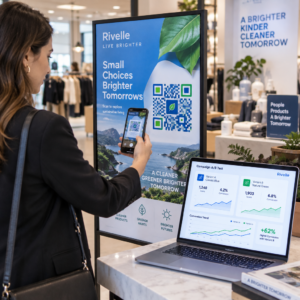
¿Necesita generar cientos – o miles – de códigos QR sin construir cada uno manualmente? Crearlos uno a la vez es poco práctico a escala e introduce inconsistencia en sus campañas. Esta guía le lleva a través de los métodos más rápidos y fiables para la creación masiva de códigos QR, desde cargas CSV hasta automatización a nivel empresarial.
Por qué la creación masiva de códigos QR importa
Cuando está ejecutando el lanzamiento de un producto, gestionando registros de eventos o etiquetando inventario, la creación individual de códigos QR simplemente no escala. Incluso con 50 códigos, la generación manual consume horas de trabajo repetitivo – y eso es antes de tener en cuenta la consistencia del diseño, la organización de archivos o la configuración de seguimiento.
Las herramientas de códigos QR masivos resuelven esto permitiéndole definir todos sus códigos en un archivo estructurado – típicamente un CSV o una hoja de cálculo – y generar el lote completo en un solo flujo de trabajo. El resultado es un conjunto consistente y listo para descargar de códigos que se pueden implementar inmediatamente.
Los casos de uso abarcan casi todas las industrias:
- Comercio minorista y comercio electrónico: códigos de producto únicos por SKU que enlazan a especificaciones, reseñas o páginas de compra
- Eventos: códigos por asistente para el registro, acceso a sesiones o programas digitales
- Hospitalidad: códigos de menú mesa por mesa o enlaces de información específicos de la sala
- Logística e inventario: etiquetas de activos que enlazan a registros de mantenimiento o datos de ubicación
- Agencias de marketing: códigos específicos de campaña con seguimiento individual por ubicación
Lo que necesitas antes de empezar
Antes de generar su lote, algunas decisiones darán forma a su flujo de trabajo de manera significativa.
Códigos estáticos vs. dinámicos: Los códigos QR estáticos codifican el destino directamente en el patrón. Una vez impresos, no se pueden cambiar. Los códigos QR dinámicos usan una URL de redirección corta gestionada por la plataforma, lo que significa que puede actualizar el destino en cualquier momento – incluso después de que los códigos ya estén impresos y distribuidos. Para campañas masivas donde el contenido puede evolucionar, códigos QR dinámicos son la mejor opción.
Su archivo de datos: Las herramientas de generación masiva típicamente aceptan un CSV o una hoja de cálculo con una fila por código QR. Como mínimo, cada fila necesita la URL de destino o el contenido. Dependiendo de la plataforma, también puede incluir campos para el nombre del código, la asignación de carpeta, los parámetros UTM o la plantilla de diseño.
Consistencia del diseño: Si sus códigos necesitan llevar colores de marca, logotipos o estilos de marco específicos, confirme que la herramienta le permite aplicar una plantilla de diseño compartida a todo el lote en lugar de configurar cada código individualmente.
Volumen: Conozca su escala antes de seleccionar una herramienta. Algunas plataformas limitan la generación masiva a unos pocos cientos de códigos por lote; las plataformas de nivel empresarial como Pageloot admiten hasta 100.000 códigos QR mediante una única carga CSV.
Cómo crear códigos QR en masa usando una carga CSV
La generación masiva basada en CSV es el método más común. Así es como funciona el proceso en una plataforma como Pageloot.
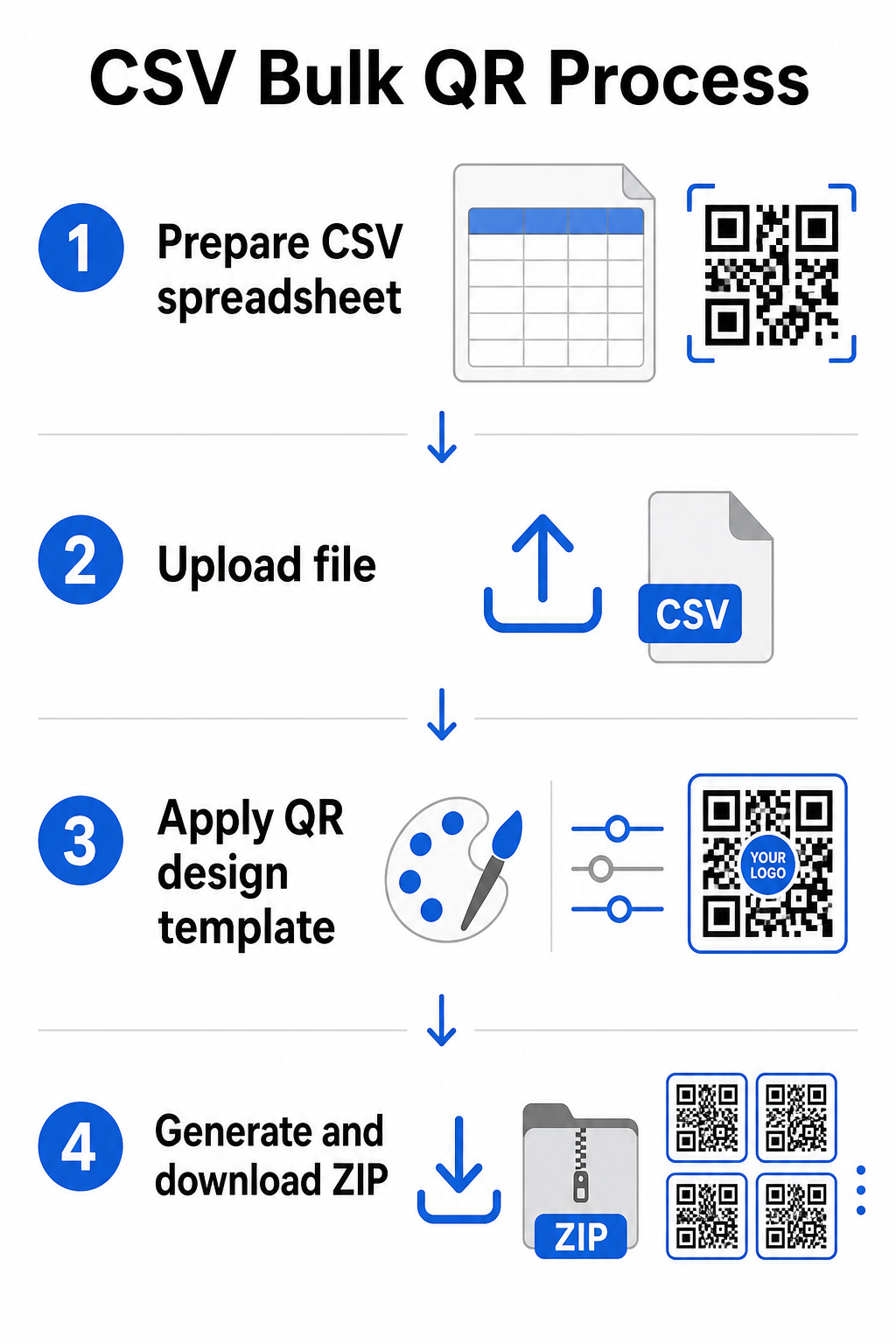
Paso 1: Prepare su hoja de cálculo
Abra una herramienta de hoja de cálculo – Excel, Google Sheets o cualquier editor CSV – y estructure sus datos. Cada fila representa un código QR. Incluya como mínimo:
- La URL de destino o el contenido para cada código
- Un nombre o etiqueta para cada código (esto ayuda con la organización más tarde)
- Cualquier identificador de campaña o carpeta que desee usar
Exporte el archivo como CSV (valores separados por comas) cuando esté listo para cargar.
Paso 2: Cargue el CSV al generador masivo
Inicie sesión en su cuenta de Pageloot y navegue a la sección de creación masiva. Cargue su archivo CSV. La plataforma analizará cada fila y pondrá en cola los códigos para su generación. Revise la vista previa para confirmar que el mapeo es correcto – las URL de destino deben coincidir con las filas previstas.
Paso 3: Aplique una plantilla de diseño
En lugar de estilizar cada código manualmente, seleccione una plantilla de diseño compartida para aplicar a todo el lote. Aquí es donde añade el logotipo de su marca, elige colores y configura estilos de marco. Aplicar un diseño consistente en esta etapa asegura que todos los códigos se vean uniformes en empaques, materiales impresos o señalización.
Paso 4: Genere y descargue
Inicie el lote. La plataforma genera todos los códigos simultáneamente y los empaqueta para su descarga, típicamente como un archivo ZIP que contiene archivos de imagen individuales (PNG, SVG, PDF o EPS dependiendo de sus necesidades de salida). Los nombres de archivo suelen corresponder a los nombres de los códigos de su hoja de cálculo, lo que facilita la correspondencia de cada código con su uso previsto.
Genere su lote completo de una vez Omita el trabajo manual y cree cientos o miles de códigos QR desde una sola hoja de cálculo. Utilice las Generador de códigos QR o explora opciones de códigos QR dinámicos para empezar con la creación masiva hoy mismo.
Uso de Google Sheets para códigos QR estáticos masivos
Si tu equipo ya trabaja en Google Sheets, Pageloot admite la integración directa para generar múltiples códigos QR estáticos a partir de datos de hojas de cálculo. Este enfoque es particularmente conveniente para equipos que mantienen datos en vivo en Sheets – catálogos de productos, listas de asistentes a eventos o directorios de ubicaciones – donde los datos de origen ya están estructurados y se actualizan de forma colaborativa.
El proceso es similar al método CSV, pero en lugar de exportar y volver a cargar, conectas tu Hoja directamente. Cada fila en la columna designada se convierte en la entrada para un código QR. Esto reduce la fricción para los equipos que no quieren gestionar exportaciones CSV separadas cada vez que cambian los datos de origen.
Organización de grandes lotes después de la generación
Generar códigos es solo parte del desafío. A gran volumen, mantenerlos organizados se convierte en una tarea propia. Algunas prácticas ayudan significativamente.
Usa carpetas para clasificar códigos por campaña, proyecto, cliente o línea de productos. La función de carpeta de códigos QR facilita mantener docenas de campañas activas separadas para que los miembros del equipo puedan navegar sin confusión. Establece una convención de nombres clara en tu CSV antes de subirlo – algo como `nombre-de-campaña`UBICACIÓN DEL CÓDIGO`variante` – para que los códigos individuales sean fáciles de localizar y de asociar con sus datos analíticos más tarde. Finalmente, agrupa por caso de uso desde el principio: mantén los códigos de eventos, los códigos de productos y los códigos de marketing en carpetas separadas para que los informes de rendimiento se mantengan claros y accionables.
Códigos QR masivos con actualización dinámica
Una limitación significativa de los códigos QR estáticos masivos es que cualquier cambio de destino requiere reimpresión. Si generas 5.000 etiquetas de productos y la URL de la página de destino vinculada cambia, esos códigos quedan obsoletos en el momento en que se distribuyen.
Los códigos QR dinámicos masivos eliminan este problema. Cada código de tu lote apunta a una URL de redirección corta mantenida por Pageloot. Puedes actualizar el destino de códigos individuales – o aplicar cambios a todo un lote – sin tocar el código físico en sí. Esto es particularmente valioso para campañas estacionales donde las páginas de destino cambian, embalajes de productos donde las páginas de información se actualizan después de la impresión, y materiales de eventos preparados con antelación antes de que se confirmen las URL finales.
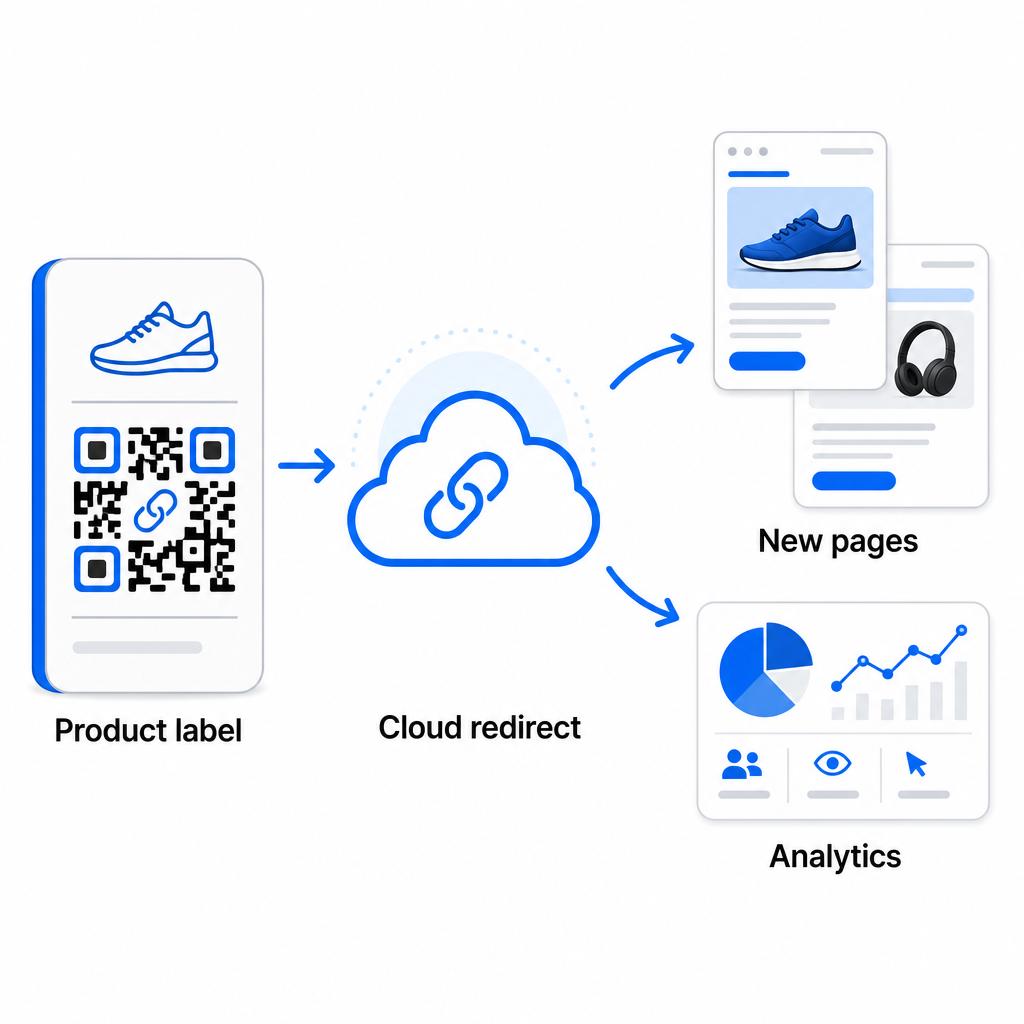
Más allá de la flexibilidad, los códigos dinámicos también desbloquean análisis detallados de escaneos: número de escaneos, tiempos de escaneo, ubicaciones geográficas, tipos de dispositivos, datos de navegador y sistema operativo, y seguimiento de ubicación basado en GPS. Para cualquier implementación masiva donde el rendimiento importa, estos datos te dan una visión directa de qué códigos están funcionando y dónde el engagement es más alto. Puedes aprender más sobre cómo los códigos QR dinámicos apoyan las campañas de marketing y por qué esa flexibilidad importa a escala.
Rastrea cada escaneo en todo tu lote Los códigos QR dinámicos te permiten actualizar destinos y monitorear el rendimiento en tiempo real – en cada código de tu campaña. Explora el Generador de códigos QR dinámicos para crear códigos masivos rastreables con un panel de análisis completo.
Escalando a volumen empresarial
Para organizaciones que generan decenas de miles de códigos – piensa en grandes cadenas minoristas, operaciones de logística empresarial o campañas de marketing nacionales – el flujo de trabajo necesita ser más robusto que una única carga CSV.
De Pageloot plataforma de códigos QR empresarial admite la generación por lotes a escala, con flujos de trabajo basados en CSV capaces de producir hasta 100.000 códigos QR en una sola operación. A este nivel, entran en juego consideraciones adicionales.
la integración de API elimina por completo los pasos manuales al automatizar la generación de códigos directamente desde sistemas internos como CRMs, plataformas de gestión de inventario o backends de comercio electrónico. Los flujos de trabajo basados en API te permiten generar, actualizar y retirar códigos programáticamente a medida que tus datos cambian. Para una mirada más profunda a cómo funciona esto en la práctica, consulta la guía sobre Gestión de códigos QR basada en API.
Acceso basado en roles se vuelve importante para equipos grandes, permitiendo a diferentes usuarios gestionar campañas o clientes específicos sin acceder a datos no relacionados.
Opciones de marca blanca son especialmente relevantes para agencias que gestionan implementaciones masivas de QR en nombre de clientes. Con las características de marca blanca, los códigos QR se resuelven en dominios de cliente y los paneles de control llevan la marca del cliente – manteniendo la experiencia del cliente fluida y profesional.
Errores comunes a evitar en la generación masiva
Algunos problemas aparecen repetidamente cuando los equipos generan códigos QR a gran volumen, y la mayoría de ellos son fáciles de prevenir con un poco de planificación previa.
No probar antes de imprimir es el error más costoso. Siempre escanee una muestra representativa de su lote antes de comprometerse con una tirada de impresión. Un solo error de formato en su CSV puede propagarse a cientos de códigos rotos. De manera similar, usar códigos estáticos para contenido que podría cambiar es un riesgo que los códigos dinámicos eliminan por completo – si hay alguna posibilidad de que una URL de destino o una página de aterrizaje se actualice, incorpore esa flexibilidad desde el principio.
Los requisitos de formato de archivo también importan más de lo que los equipos suelen esperar. La producción de impresión necesita formatos vectoriales (SVG, EPS, PDF) para una salida nítida a cualquier tamaño, mientras que los archivos PNG funcionan para uso digital pero pueden degradarse cuando se escalan para impresión de gran formato. Omitir la organización antes de la generación crea rápidamente dolores de cabeza de gestión – configure su estructura de carpetas y convención de nombres antes de que se ejecute el lote, no después. Finalmente, un diseño inconsistente en un lote grande parece poco profesional y socava la credibilidad de la marca; aplicar una plantilla compartida en el momento de la generación es mucho más eficiente que editar códigos individualmente después.
Preguntas frecuentes
La mayoría de las herramientas de códigos QR masivos, incluyendo Pageloot, aceptan archivos CSV (valores separados por comas). Puede preparar sus datos en Excel o Google Sheets y exportar como CSV. Cada fila en su archivo se convierte en un código QR. Pageloot también es compatible con la integración directa con Google Sheets para la generación masiva estática sin necesidad de exportar un archivo separado.
Los códigos QR estáticos codifican el destino de forma permanente – una vez generados e impresos, el destino no se puede cambiar. Los códigos QR dinámicos utilizan una URL de redirección gestionada por la plataforma, por lo que puedes actualizar el destino en cualquier momento sin reimprimir. Para grandes lotes donde el contenido puede cambiar – como páginas de productos, detalles de eventos o páginas de destino de campañas – se recomiendan encarecidamente los códigos dinámicos. También proporcionan análisis de escaneo detallados que los códigos estáticos no pueden ofrecer.
Esto depende de la plataforma y el plan. Las herramientas de nivel empresarial de Pageloot admiten la generación de hasta 100.000 códigos QR desde una única carga CSV, lo que lo hace adecuado para operaciones de venta minorista, logística y marketing a gran escala. Para lotes más pequeños, los planes estándar se adaptan a las necesidades comerciales típicas, como eventos, líneas de productos o campañas específicas de ubicación.