Weet u niet zeker of uw bedrijf wettelijk verplicht is om QR-codes toegankelijk te maken onder de ADA? Als u dit verkeerd aanpakt, kan uw organisatie worden blootgesteld aan nalevingsrisico's en klanten met een handicap uitsluiten van inhoud waartoe zij recht hebben. Deze gids legt uit welke sectoren de duidelijkste wettelijke verplichtingen hebben en welke toegankelijkheidsnormen van toepassing zijn wanneer QR-codes deel uitmaken van uw klantgerichte communicatie.
De Kern van de Juridische Realiteit: Geen Wet Vereist QR-codes, Maar Toegankelijkheidswetten Blijven Van Toepassing
Voordat we ingaan op specifieke sectoren, één belangrijke verduidelijking: geen enkele bepaling van de Americans with Disabilities Act schrijft specifiek voor dat een bedrijf of instantie QR-codes moet gebruiken. De ADA richt zich op het waarborgen van effectieve, gelijke communicatie met mensen met een handicap – ongeacht welke technologie u kiest om die communicatie te leveren.
De cruciale implicatie is deze: zodra u ervoor kiest om een QR-code te gebruiken als onderdeel van uw klantgerichte communicatie, volgen toegankelijkheidsverplichtingen. Als uw QR-code de primaire of enige methode is om belangrijke informatie te verkrijgen, moet deze bruikbaar zijn voor iedereen – inclusief mensen met visuele beperkingen, beperkte mobiliteit of andere handicaps.
Zie het zo: u bent niet verplicht om een hellingbaan te installeren, maar als uw gebouw trappen heeft die klanten moeten gebruiken om toegang te krijgen tot uw diensten, bepalen de ADA-normen hoe die hellingbaan moet worden gebouwd. Op dezelfde manier, als een QR-code de manier is waarop u een menu, een formulier of cruciale openbare informatie levert, dan moeten die QR-code en de inhoud waarnaar deze linkt toegankelijk zijn.
Titel II: Overheids- en Publieke Sectororganisaties
Staats- en lokale overheden dragen enkele van de meest expliciete en goed gedocumenteerde digitale toegankelijkheidsverplichtingen onder de ADA. Titel II van de ADA vereist dat alle staats- en lokale overheidsinstanties net zo effectief communiceren met mensen met een handicap als met anderen. Dit omvat elk niveau van overheidsactiviteiten – politiediensten, rechtbanken, stemdiensten, openbare scholen, community colleges, openbare bibliotheken, waterdistricten en andere speciale districts.
In 2024 heeft het Amerikaanse Ministerie van Justitie een regel onder Titel II afgerond die WCAG 2.1 Niveau AA als de technische standaard aanwijst voor webinhoud en mobiele applicaties van staats- en lokale overheden. Dit betekent dat wanneer een overheidsinstantie een QR-code plaatst op een openbaar document, bord of fysieke locatie, de digitale inhoud waarnaar die QR-code linkt, moet voldoen aan de succescriteria van WCAG 2.1 Niveau A en Niveau AA.
Federale richtlijnen maken ook duidelijk dat QR-codes die in federale publicaties worden gebruikt, moeten voldoen aan Sectie 508 van de Rehabilitation Act, die QR-codes behandelt als een vorm van Informatie- en Communicatietechnologie (ICT). Volgens Sectie 508 moet een QR-code in een digitaal document zowel worden behandeld als een afbeelding die beschrijvende alt-tekst vereist, als een link die een toegankelijk tekstalternatief vereist – zodat gebruikers die de code niet kunnen scannen, toch dezelfde informatie kunnen bereiken.
Praktische vereisten voor het gebruik van QR-codes door de overheid zijn onder andere:
- Aangrenzende toegankelijke tekst: Geef de bestemmings-URL of een kort getypt alternatief naast elke QR-code, zodat gebruikers die deze niet kunnen scannen, toch toegang hebben tot de inhoud
- Beschrijvende alt-tekst: In digitale documenten moet de alt-tekst beschrijven wat de QR-code doet (bijv. “QR-code die linkt naar de aanvraag voor een toegankelijke parkeervergunning van de stad”), niet alleen het uiterlijk ervan
- Fysieke plaatsing: Gedrukte QR-codes moeten zo worden geplaatst dat mensen in rolstoelen ze comfortabel kunnen scannen – richtlijnen adviseren een hoogte tussen 3,5 en 4,5 voet
- Toegankelijke bestemmingsinhoud: De webpagina of het document dat via de QR-code wordt bereikt, moet zelf voldoen aan WCAG 2.1 Niveau AA
Voor gedetailleerde plaatsingsrichtlijnen specifiek voor overheidsgebruik, zie onze gids over beste QR-codeplaatsingen voor overheidsinstanties.
Houd QR-codes van de overheid up-to-date zonder opnieuw te printen Moet u een bestemmings-URL op een geplaatst overheidsbord bijwerken zonder het fysieke materiaal te vervangen? Gebruik de Dynamische QR code generator om de gekoppelde inhoud op elk moment te wijzigen – geen herdruk vereist.
Titel III: Bedrijven en organisaties die open zijn voor het publiek
Particuliere bedrijven en non-profitorganisaties die het publiek bedienen, vallen onder Titel III van de ADA, die deze definieert als “openbare voorzieningen”. De lijst van gedekte entiteiten is breed en omvat bijna elk type klantgericht bedrijf. Onder Titel III moeten deze organisaties zorgen voor effectieve communicatie voor klanten met visuele, auditieve en spraakbeperkingen, onder meer door middel van hulpmiddelen en diensten indien nodig.
De volgende categorieën worden expliciet geïdentificeerd als openbare voorzieningen onder de ADA:
| Categorie | Voorbeelden |
|---|---|
| Logiesgelegenheden | Hotels, motels, herbergen |
| Eet- en drinkgelegenheden | Restaurants, bars |
| Entertainmentlocaties | Theaters, stadions, concertzalen |
| Openbare ontmoetingsplaatsen | Congrescentra, auditoria |
| Verkoop- en verhuurinrichtingen | Kruidenierszaken, winkelcentra, bouwmarkten |
| Dienstverlenende instellingen | Banken, apotheken, zorgverleners, advocatenkantoren, ziekenhuizen |
| Transportterminals | Bus- en treinstations |
| Openbare tentoonstelling of collectie | Musea, bibliotheken, galerieën |
| Recreatie | Parken, dierentuinen, pretparken |
| Onderwijsinstellingen | Particuliere kinderdagverblijven tot en met masteropleidingen |
| Sociale diensten | Kinderdagverblijven, seniorencentra, opvangcentra voor daklozen, voedselbanken |
| Lichaamsbeweging en recreatie | Sportscholen, kuuroorden, bowlingbanen, golfbanen |
Als uw organisatie in deze lijst voorkomt en u QR-codes gebruikt in een klantgerichte context – bewegwijzering, menu's, productdisplays, betaalterminals of informatiemateriaal – gelden effectieve communicatieverplichtingen voor die QR-code-ervaring.
Gezondheidszorg: Verhoogde Verplichtingen en Praktische Belangen
Ziekenhuizen, klinieken, apotheken en particuliere zorgverleners vallen onder Titel III als dienstverlenende instellingen. Maar zorgorganisaties opereren vaak onder aanvullende privacy- en informatiestandaarden die toegankelijke communicatie bijzonder belangrijk maken.
Wanneer een QR-code linkt naar ontslaginstructies, medicatie-informatie, afspraakplanning of patiëntenformulieren, zijn de gevolgen van ontoegankelijkheid niet alleen juridisch – ze zijn klinisch. Een patiënt met slechtziendheid die geen toegang heeft tot doseringsinstructies omdat een QR-code geen terugvaloptie heeft, loopt een aanzienlijk gezondheidsrisico.
QR-codes in zorginstellingen moeten altijd vergezeld gaan van toegankelijke alternatieven zoals grootletterfolders, audio-uitleg of personeelshulp. Voor openbare gezondheidsfaciliteiten die ook overheidsinstanties zijn, gelden Titel II-verplichtingen bovenop de standaard communicatievereisten in de gezondheidszorg.
Ontdek hoe QR-codes worden gebruikt in ziekenhuizen en zorginstellingen voor praktische implementatievoorbeelden.
Horeca: Menu's, Check-in en Gastenservice
De horeca – hotels, restaurants en bars – heeft QR-codes in een opmerkelijk tempo overgenomen, vooral voor digitale menu's. Omdat restaurants en hotels expliciet worden vermeld als openbare voorzieningen onder Titel III, brengt elke via QR geleverde gastervaring een effectieve communicatieverplichting met zich mee.
Een restaurant dat uitsluitend vertrouwt op een QR-codemenu moet ervoor zorgen dat dit menu toegankelijk is voor gasten met visuele beperkingen. Dit betekent dat de landingspagina waarnaar de QR-code linkt, compatibel moet zijn met schermlezers, voldoende kleurcontrast moet gebruiken en een logische kopstructuur moet hebben. Gasten die geen QR-code kunnen gebruiken – of dit nu komt door visuele beperkingen, onbekendheid met smartphones of motorische beperkingen – moeten een alternatieve manier hebben om toegang te krijgen tot dezelfde informatie.
Voor toegankelijke menu-implementatie, de QR-code menukaart maken stelt u in staat om te linken naar een digitaal menu dat u direct kunt bijwerken zonder fysiek materiaal opnieuw af te drukken – handig wanneer de beschikbaarheid van items verandert of wanneer u de gelinkte pagina moet bijwerken om de toegankelijkheid te verbeteren.
Voor richtlijnen over het toegankelijk maken van QR-codebetalingen in horeca- en retailomgevingen, zie ons artikel over beste praktijken voor toegankelijkheid van QR-codebetalingen.
Onderwijs: Openbare en Particuliere Scholen
Onderwijsinstellingen vallen onder zowel Titel II als Titel III, afhankelijk van of ze openbaar of particulier worden geëxploiteerd. Openbare K–12 scholen, community colleges en staatsuniversiteiten vallen onder Titel II, inclusief de DOJ-regel die WCAG 2.1 Niveau AA-conformiteit vereist voor webinhoud en mobiele apps. Particuliere scholen op alle niveaus vallen onder Titel III als openbare voorzieningen.
In beide gevallen, wanneer scholen QR-codes gebruiken om cursusmateriaal, evenementinformatie, formulieren of leermiddelen te verspreiden, moeten die materialen toegankelijk zijn. Een student met een visuele beperking moet toegang kunnen krijgen tot dezelfde inhoud als zijn of haar leeftijdsgenoten. In de praktijk betekent dit:
- Gekoppelde PDF's moeten getagd en schermlezer-compatibel zijn
- Webinhoud die via QR-codes wordt bereikt, moet voldoen aan de WCAG-standaarden
- Fysieke plaatsing van QR-codes in klaslokalen of gangen moet op hoogtes zijn die toegankelijk zijn voor studenten die rolstoelen gebruiken
Zie hoe QR-codes worden gebruikt in scholen en onderwijs voor specifieke ideeën voor gebruiksscenario's, en verken de PDF naar QR code maken voor het verspreiden van toegankelijke cursusdocumenten.
Detailhandel: Winkels, Verpakkingen en In-Store Displays
Detailhandelszaken, winkelcentra en supermarkten worden vermeld als openbare voorzieningen onder Titel III. Naarmate QR-codes vaker voorkomen op productverpakkingen, schapdisplays en kassa's, worden detailhandelsorganisaties steeds meer geconfronteerd met verplichtingen voor effectieve communicatie.
Een QR-code op een productetiket die linkt naar gebruiksinstructies, ingrediëntenlijsten of garantie-informatie, moet bruikbaar zijn voor klanten met visuele beperkingen. Als de code de primaire manier is om toegang te krijgen tot die informatie – en er geen gelijkwaardig alternatief wordt geboden – voldoet de retailer mogelijk niet aan zijn verplichtingen voor effectieve communicatie.
Belangrijke toegankelijkheidsoverwegingen voor de implementatie van QR-codes in de detailhandel zijn:
- Het verstrekken van een getypte URL of een gedrukt equivalent naast QR-codes op verpakkingen
- Ervoor zorgen dat productinformatiepagina's die via QR-codes zijn gekoppeld, voldoen aan de WCAG-contrast- en navigatiestandaarden
- Het plaatsen van in-store QR-codes op hoogtes en posities die toegankelijk zijn voor rolstoelgebruikers
Voor plaatsingsstrategie, zie onze gids over beste QR-codeplaatsingen voor winkels.
De technische standaarden die van toepassing zijn in alle sectoren
Ongeacht in welke sector u actief bent, gelden dezelfde kernnormen voor toegankelijkheid wanneer u QR-codes implementeert. Deze zijn afkomstig van WCAG 2.1 en Section 508-richtlijnen, en ze omvatten zowel de fysieke QR-code zelf als de digitale inhoud waarnaar deze verwijst.
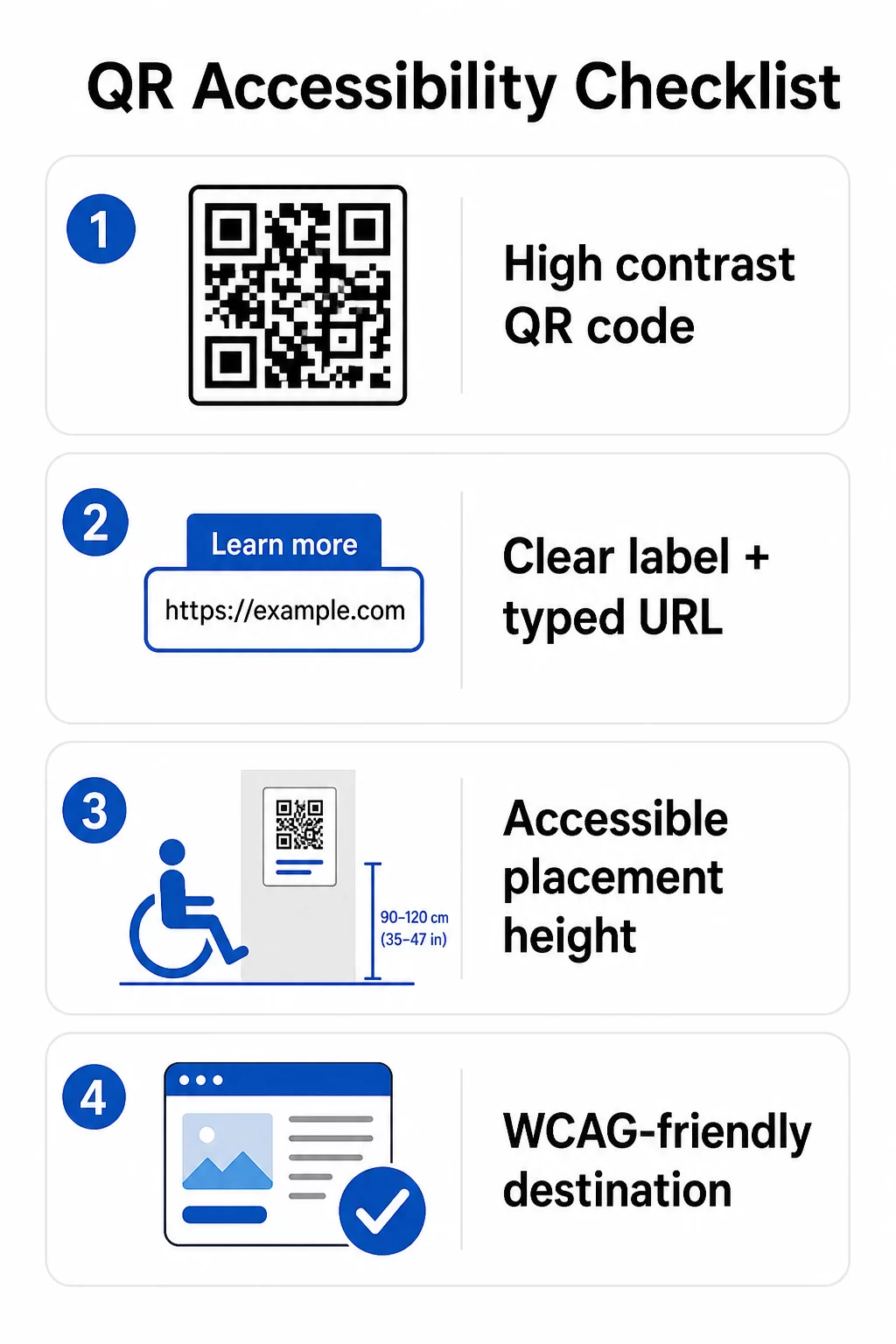
Voor de fysieke QR-code:
- Gebruik een donkere voorgrond op een lichte achtergrond, met een contrastverhouding van minimaal 4.5:1 voor volledige toegankelijkheid
- Print codes met een minimale grootte van 1 inch × 1 inch, en volg de 10:1-regel voor scanafstand (1 inch codebreedte per 10 inch verwachte kijkafstand)
- Plaats geprinte codes tussen 3.5 en 4.5 voet van de vloer, zodat rolstoelgebruikers ze comfortabel kunnen bereiken
- Voeg een duidelijk label of call-to-action toe in de buurt, zodat gebruikers begrijpen wat de code doet voordat ze scannen
- Bied een aangrenzende tekst-URL of gelijkwaardig alternatief, zodat gebruikers die de QR-code niet kunnen scannen, toch toegang hebben tot de inhoud
Voor de gekoppelde digitale inhoud:
- Bestemmingswebpagina's moeten voldoen aan de WCAG 2.1 Level A en AA succescriteria
- In digitale documenten hebben QR-codes beschrijvende alt-tekst nodig die het doel van de code uitlegt – niet het visuele uiterlijk (WCAG Succescriterium 1.1.1)
- Het niet-tekstuele contrast van QR-codemodules tegen hun achtergrond moet minimaal een verhouding van 3:1 hebben (WCAG Succescriterium 1.4.11)
- Als de QR-code functioneert als een link, moet de alt-tekst beschrijven waar deze naartoe leidt (WCAG Succescriterium 2.4.4)
Voor een complete implementatiechecklist, zie onze gids over hoe QR-codes ADA-conform te maken en onze bredere best practices voor de bruikbaarheid van QR-codes.
U kunt ook verkennen spraakgestuurde QR-codes en tactiele signalen als geavanceerde strategieën voor het bedienen van gebruikers met visuele beperkingen – bijzonder relevant voor implementaties in de gezondheidszorg, het onderwijs en de overheid.
Creëer Toegankelijke QR-codes Vanaf het Begin Gebruik de QR-codegenerator om QR-codes met hoog contrast en de juiste afmetingen te bouwen, voorzien van duidelijke labels en branding – en deze vervolgens te koppelen aan toegankelijke inhoud die voldoet aan de WCAG-standaarden.
Waarom Toegankelijke QR-codes Goede Praktijk Zijn Buiten Wettelijke Naleving
Afgezien van wettelijke verplichtingen, vergroot het toegankelijk maken van QR-codes het publiek dat zich met uw inhoud kan bezighouden. Een ontoegankelijke QR-code creëert niet alleen juridische risico's – het creëert een lacune in uw klantervaring. Een gast in een restaurant die het QR-menu niet kan lezen, een patiënt die geen toegang heeft tot medicatie-instructies, of een student die geen cursusmateriaal kan downloaden vanwege een ontoegankelijke PDF, vertegenwoordigen allemaal momenten waarop uw organisatie er niet in geslaagd is effectief te communiceren.
Praktijken voor toegankelijke QR-codes verbeteren ook vaak de ervaring voor iedereen. Voldoende contrast helpt codes sneller te scannen bij slechte verlichting. De juiste afmetingen helpen gebruikers van alle leeftijden om vanaf een comfortabele afstand te scannen. Duidelijke labels verminderen verwarring voor beginnende QR-codegebruikers. Deze verbeteringen komen uw hele publiek ten goede, niet alleen gebruikers met een beperking.
Voor een diepere blik op contrast, afmetingen, leesbaarheid en plaatsing, bekijk onze gidsen over best practices voor de leesbaarheid van QR-codes en best practices voor kleurcontrast van QR-codes.
Toegankelijkheidsverplichtingen gelden breed voor overheid, gezondheidszorg, onderwijs, horeca en detailhandel – en dezelfde technische standaarden gelden voor allemaal. Het praktische startpunt is eenvoudig: als een QR-code de manier is waarop u belangrijke informatie communiceert, moet die communicatie toegankelijk zijn. Gebruik dynamische QR-codes zodat u gekoppelde inhoud kunt bijwerken om naleving te handhaven zonder opnieuw te printen, en verken het volledige aanbod van branchespecifieke QR-codeoplossingen om de juiste implementatie voor uw sector te vinden.
Veelgestelde vragen
Geen enkele wet verplicht bedrijven specifiek om QR-codes te gebruiken. Echter, als u ervoor kiest om QR-codes te gebruiken als onderdeel van uw klantgerichte communicatie, zijn de effectieve communicatievereisten van de ADA van toepassing. Als een QR-code de primaire of enige manier is waarop klanten toegang hebben tot informatie, moet die ervaring toegankelijk zijn voor mensen met een beperking – inclusief mensen met visuele beperkingen of beperkte mobiliteit.
Staats- en lokale overheidsinstanties staan voor de meest expliciete verplichtingen onder Titel II van de ADA en de definitieve regel van het DOJ uit 2024, die WCAG 2.1 Niveau AA-naleving vereist voor webinhoud en mobiele apps. Particuliere bedrijven die open zijn voor het publiek – inclusief restaurants, hotels, ziekenhuizen, winkels, privéscholen, banken en sportscholen – vallen onder Titel III en moeten effectieve communicatie bieden via hulpmiddelen en diensten. Federale instanties vallen bovendien onder Sectie 508 van de Rehabilitation Act.
Er is geen enkele checklist die door de ADA specifiek voor QR-codes is voorgeschreven, maar best practices, afgeleid van de richtlijnen van WCAG 2.1 en Section 508, omvatten: het gebruik van een donkere voorgrond op een lichte achtergrond met een contrastverhouding van minimaal 4.5:1; codes afdrukken met een minimale grootte van 1 inch × 1 inch; fysieke codes op toegankelijke hoogtes plaatsen (3.5–4.5 voet van de vloer); een nabijgelegen tekst-URL aanbieden als alternatief voor gebruikers die niet kunnen scannen; beschrijvende alt-tekst toevoegen in digitale documenten; en ervoor zorgen dat de bestemmingsinhoud voldoet aan de WCAG 2.1 Level AA-standaarden.