Vous ne savez pas si votre entreprise est légalement tenue de rendre les codes QR accessibles en vertu de l'ADA ? Une erreur à ce sujet peut exposer votre organisation à des risques de non-conformité et exclure les clients handicapés du contenu auquel ils ont droit d'accéder. Ce guide détaille les secteurs qui ont les obligations légales les plus claires et les normes d'accessibilité qui s'appliquent lorsque les codes QR font partie de vos communications destinées aux clients.
La réalité juridique fondamentale : Aucune loi n'exige les codes QR, mais les lois sur l'accessibilité s'appliquent toujours
Avant de nous plonger dans des secteurs spécifiques, une clarification importante : aucune disposition de l'Americans with Disabilities Act n'exige spécifiquement qu'une entreprise ou une agence utilise des codes QR. L'ADA vise à assurer une communication efficace et égale avec les personnes handicapées – quelle que soit la technologie que vous choisissez pour diffuser cette communication.
L'implication essentielle est la suivante : une fois que vous choisissez d'utiliser un code QR dans le cadre de vos communications destinées aux clients, des obligations d'accessibilité s'ensuivent. Si votre code QR est la méthode principale ou unique d'accès à des informations importantes, il doit être utilisable par tous – y compris les personnes ayant une déficience visuelle, une mobilité réduite ou d'autres handicaps.
Pensez-y de cette façon : vous n'êtes pas obligé d'installer une rampe, mais si votre bâtiment a des marches que les clients doivent utiliser pour accéder à vos services, les normes de l'ADA régissent la manière dont cette rampe doit être construite. De même, si un code QR est la façon dont vous fournissez un menu, un formulaire ou des informations publiques essentielles, alors ce code QR et le contenu auquel il renvoie doivent être accessibles.
Titre II : Organismes gouvernementaux et du secteur public
Les gouvernements des États et les collectivités locales ont certaines des obligations d'accessibilité numérique les plus explicites et les mieux documentées en vertu de l'ADA. Le Titre II de l'ADA exige que toutes les entités gouvernementales des États et locales communiquent avec les personnes handicapées aussi efficacement qu'elles communiquent avec les autres. Cela couvre tous les niveaux de fonctionnement du gouvernement – les services de police, les tribunaux, les services de vote, les écoles publiques, les collèges communautaires, les bibliothèques publiques, les districts d'approvisionnement en eau et d'autres districts à vocation spéciale.
En 2024, le Département de la Justice des États-Unis a finalisé une règle en vertu du Titre II désignant WCAG 2.1 Niveau AA comme norme technique pour le contenu web et les applications mobiles des gouvernements des États et locaux. Cela signifie que lorsqu'une agence gouvernementale place un code QR sur un document public, un panneau ou un emplacement physique, le contenu numérique auquel ce code QR renvoie doit être conforme aux critères de succès WCAG 2.1 Niveau A et Niveau AA.
Les directives fédérales précisent également que les codes QR utilisés dans les publications fédérales doivent respecter la Section 508 de la loi sur la réadaptation, qui considère les codes QR comme une forme de technologie de l'information et de la communication (TIC). En vertu de la Section 508, un code QR dans un document numérique doit être traité à la fois comme une image nécessitant un texte alternatif descriptif et comme un lien nécessitant une alternative textuelle accessible – afin que les utilisateurs qui ne peuvent pas scanner le code puissent toujours accéder aux mêmes informations.
Les exigences pratiques pour l'utilisation des codes QR par le gouvernement incluent :
- Texte accessible adjacent: Fournissez l'URL de destination ou une courte alternative tapée à côté de chaque code QR afin que les utilisateurs qui ne peuvent pas le scanner puissent toujours accéder au contenu
- Texte alternatif descriptif: Dans les documents numériques, le texte alternatif doit décrire ce que fait le code QR (par exemple, “ Code QR menant à la demande de permis de stationnement accessible de la ville ”), et non seulement son apparence
- Emplacement physique: Les codes QR imprimés doivent être positionnés de manière à ce que les personnes en fauteuil roulant puissent les scanner confortablement – les directives recommandent une hauteur entre 3,5 et 4,5 pieds
- Contenu de destination accessible: La page web ou le document accessible via le code QR doit lui-même respecter les WCAG 2.1 Niveau AA
Pour des directives détaillées sur le placement spécifiques à l'utilisation gouvernementale, consultez notre guide sur les meilleurs emplacements de codes QR pour les agences gouvernementales.
Maintenez les codes QR gouvernementaux à jour sans réimpression Besoin de mettre à jour une URL de destination sur un panneau gouvernemental affiché sans remplacer le matériel physique ? Utilisez le Générateur de QR code dynamique pour modifier le contenu lié à tout moment – aucune réimpression requise.
Titre III : Entreprises et organisations ouvertes au public
Les entreprises privées et les organisations à but non lucratif qui servent le public sont couvertes par le Titre III de l'ADA, qui les définit comme des “ lieux d'hébergement publics ”. La liste des entités couvertes est large et comprend presque tous les types d'entreprises en contact avec la clientèle. En vertu du Titre III, ces organisations doivent fournir une communication efficace pour les clients ayant des déficiences visuelles, auditives et d'élocution, y compris par le biais d'aides et de services auxiliaires si nécessaire.
Les catégories suivantes sont explicitement identifiées comme des lieux d'hébergement publics en vertu de l'ADA :
| Catégorie | Exemples |
|---|---|
| Lieux d'hébergement | Hôtels, motels, auberges |
| Établissements de restauration et de boissons | Restaurants, bars |
| Lieux de divertissement | Théâtres, stades, salles de concert |
| Lieux de rassemblement publics | Centres de congrès, auditoriums |
| Établissements de vente et de location | Épiceries, centres commerciaux, quincailleries |
| Établissements de services | Banques, pharmacies, prestataires de soins de santé, cabinets d'avocats, hôpitaux |
| Terminaux de transport | Gares routières et ferroviaires |
| Exposition ou collection publique | Musées, bibliothèques, galeries |
| Loisirs | Parcs, zoos, parcs d'attractions |
| Établissements d'enseignement | Écoles maternelles privées jusqu'aux programmes d'études supérieures |
| Services sociaux | Garderies, centres pour personnes âgées, refuges pour sans-abri, banques alimentaires |
| Exercice et loisirs | Salles de sport, spas, pistes de bowling, terrains de golf |
Si votre organisation apparaît dans cette liste et que vous utilisez des codes QR dans un contexte de contact client – signalisation, menus, affichages de produits, terminaux de paiement ou supports d'information – des obligations de communication efficace s'appliquent à cette expérience de code QR.
Soins de santé : Obligations accrues et enjeux pratiques
Les hôpitaux, cliniques, pharmacies et prestataires de soins de santé privés apparaissent sous le Titre III en tant qu'établissements de services. Mais les organisations de soins de santé opèrent souvent sous des normes supplémentaires de confidentialité et d'information qui rendent la communication accessible particulièrement importante.
Lorsqu'un code QR renvoie à des instructions de sortie, des informations sur les médicaments, la prise de rendez-vous ou des formulaires de patient, les conséquences de l'inaccessibilité ne sont pas seulement légales – elles sont cliniques. Un patient malvoyant qui ne peut pas accéder aux instructions de dosage parce qu'un code QR n'offre pas d'option de secours fait face à un risque de santé significatif.
Les codes QR dans les établissements de soins de santé devraient toujours être accompagnés d'alternatives accessibles telles que des documents en grands caractères, des explications audio ou l'assistance du personnel. Pour les établissements de santé publique qui sont également des entités gouvernementales, les obligations du Titre II s'appliquent en plus des exigences standard de communication en matière de soins de santé.
Découvrez comment les codes QR sont utilisés dans les hôpitaux et les établissements de santé pour des exemples de mise en œuvre pratique.
Hôtellerie : Menus, enregistrement et services aux clients
L'industrie hôtelière – hôtels, restaurants et bars – a adopté les codes QR à un rythme remarquable, en particulier pour les menus numériques. Étant donné que les restaurants et les hôtels sont explicitement répertoriés comme établissements ouverts au public en vertu du Titre III, chaque expérience client fournie par code QR implique une obligation de communication efficace.
Un restaurant qui s'appuie uniquement sur un menu par code QR doit s'assurer que ce menu est accessible aux clients malvoyants. Cela signifie que la page de destination vers laquelle le code QR renvoie doit être compatible avec les lecteurs d'écran, utiliser un contraste de couleurs suffisant et avoir une structure de titres logique. Les clients qui ne peuvent pas utiliser un code QR – que ce soit en raison d'une déficience visuelle, d'une méconnaissance des smartphones ou de limitations motrices – doivent disposer d'un moyen alternatif pour accéder aux mêmes informations.
Pour une mise en œuvre de menu accessible, le Générateur de QR code pour menu vous permet de créer un lien vers un menu numérique que vous pouvez mettre à jour instantanément sans réimprimer de supports physiques – utile lorsque la disponibilité des articles change ou lorsque vous devez mettre à jour la page liée pour améliorer l'accessibilité.
Pour des conseils sur la manière de rendre les paiements par code QR accessibles dans les secteurs de l'hôtellerie et du commerce de détail, consultez notre article sur meilleures pratiques d'accessibilité des paiements par code QR.
Éducation : Écoles publiques et privées
Les établissements d'enseignement relèvent à la fois du Titre II et du Titre III selon qu'ils sont gérés publiquement ou privément. Les écoles publiques de la maternelle à la 12e année, les collèges communautaires et les universités d'État relèvent du Titre II, y compris la règle du DOJ exigeant la conformité WCAG 2.1 Niveau AA pour le contenu web et les applications mobiles. Les écoles privées de tous niveaux sont couvertes par le Titre III en tant qu'établissements ouverts au public.
Dans les deux cas, lorsque les écoles utilisent des codes QR pour distribuer des supports de cours, des informations sur les événements, des formulaires ou des ressources d'apprentissage, ces supports doivent être accessibles. Un élève malvoyant doit pouvoir accéder au même contenu que ses pairs. En pratique, cela signifie :
- Les PDF liés doivent être balisés et compatibles avec les lecteurs d'écran
- Le contenu web accessible via les codes QR doit respecter les normes WCAG
- Les emplacements physiques des codes QR dans les salles de classe ou les couloirs doivent être à des hauteurs accessibles aux élèves en fauteuil roulant
Découvrez comment les codes QR sont utilisés dans les écoles et l'éducation pour des idées de cas d'utilisation spécifiques, et explorez le Générateur de QR code PDF pour la distribution de documents de cours accessibles.
Commerce de détail : Magasins, emballages et présentoirs en magasin
Les magasins de détail, les centres commerciaux et les épiceries sont répertoriés comme des lieux d'hébergement public en vertu du Titre III. À mesure que les codes QR deviennent plus courants sur les emballages de produits, les présentoirs et les zones de caisse, les organisations de vente au détail sont de plus en plus exposées aux obligations de communication efficace.
Un code QR sur une étiquette de produit qui renvoie à des instructions d'utilisation, des listes d'ingrédients ou des informations de garantie doit être utilisable par les clients malvoyants. Si le code est le principal moyen d'accéder à ces informations – et qu'aucune alternative équivalente n'est fournie – le détaillant pourrait ne pas respecter ses obligations de communication efficace.
Les principales considérations d'accessibilité pour les déploiements de codes QR dans le commerce de détail incluent :
- Fournir une URL tapée ou un équivalent imprimé à côté des codes QR sur les emballages
- S'assurer que les pages d'informations sur les produits liées à partir des codes QR respectent les normes de contraste et de navigation WCAG
- Placer les codes QR en magasin à des hauteurs et dans des positions accessibles aux utilisateurs de fauteuils roulants
Pour la stratégie de placement, consultez notre guide sur meilleurs emplacements de codes QR pour les magasins de détail.
Les normes techniques qui s'appliquent à toutes les industries
Quel que soit le secteur dans lequel vous opérez, les mêmes normes d'accessibilité fondamentales s'appliquent lorsque vous déployez des codes QR. Celles-ci proviennent des directives WCAG 2.1 et de la Section 508, et elles couvrent à la fois le code QR physique lui-même et le contenu numérique auquel il renvoie.
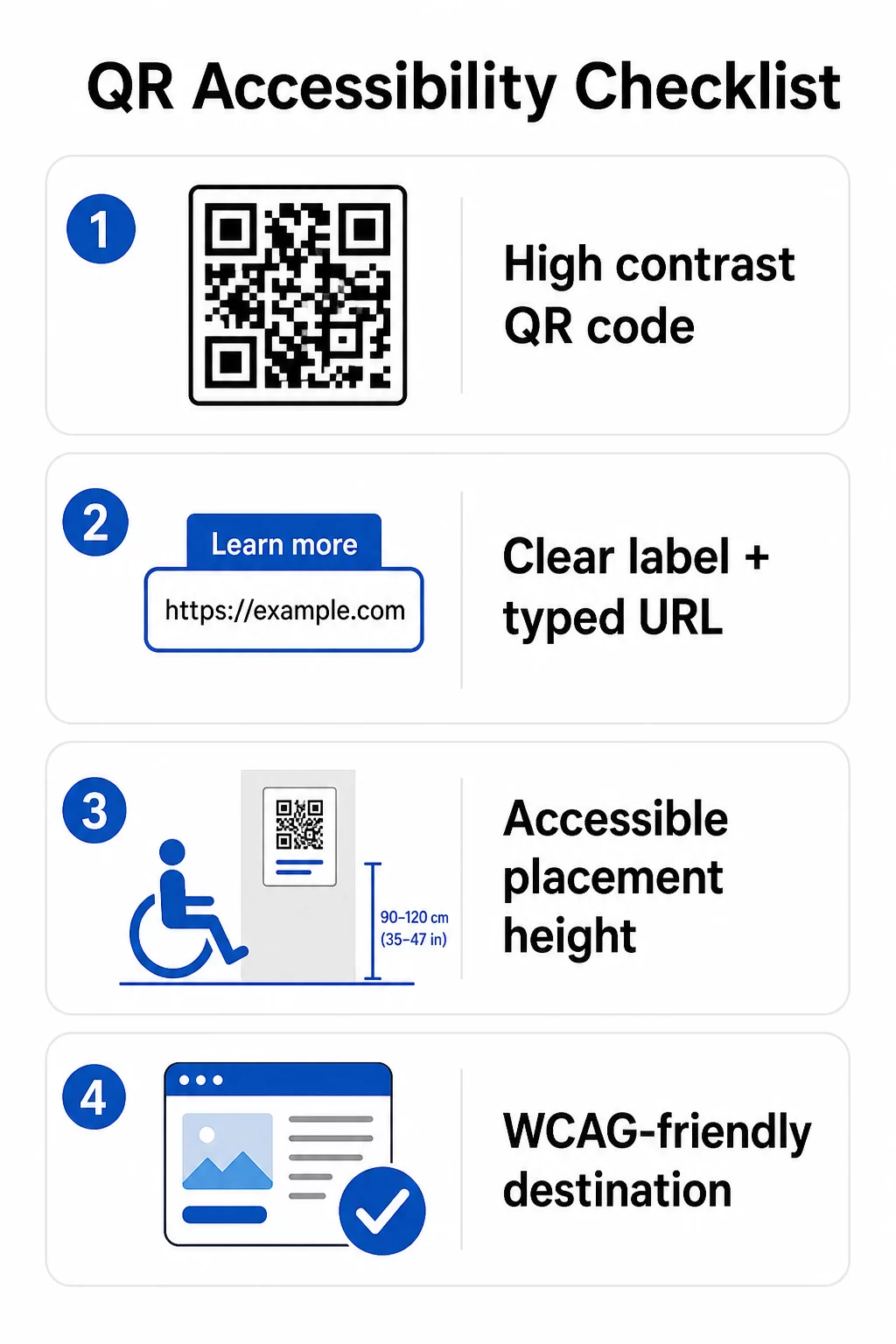
Pour le code QR physique :
- Utilisez un premier plan sombre sur un arrière-plan clair, en visant un rapport de contraste d'au moins 4.5:1 pour une accessibilité totale
- Imprimez les codes à une taille minimale de 1 pouce × 1 pouce, et suivez la règle du 10:1 pour la distance de numérisation (1 pouce de largeur de code pour 10 pouces de distance de visualisation prévue)
- Placez les codes imprimés entre 3,5 et 4,5 pieds du sol afin que les utilisateurs de fauteuils roulants puissent les atteindre confortablement
- Ajoutez une étiquette claire ou un appel à l'action à proximité afin que les utilisateurs comprennent ce que fait le code avant de le scanner
- Fournissez une URL textuelle adjacente ou une alternative équivalente afin que les utilisateurs qui ne peuvent pas scanner le code QR puissent toujours accéder au contenu
Pour le contenu numérique lié :
- Les pages web de destination doivent respecter les critères de succès WCAG 2.1 de niveau A et AA
- Dans les documents numériques, les codes QR nécessitent un texte alternatif descriptif expliquant le but du code – et non son apparence visuelle (Critère de succès WCAG 1.1.1)
- Le contraste non textuel des modules de code QR par rapport à leur arrière-plan doit respecter un rapport d'au moins 3:1 (Critère de succès WCAG 1.4.11)
- Si le code QR fonctionne comme un lien, le texte alternatif doit décrire où il mène (Critère de succès WCAG 2.4.4)
Pour une liste de contrôle complète de la mise en œuvre, consultez notre guide sur comment rendre les codes QR conformes à l'ADA et notre plus large meilleures pratiques d'utilisation des codes QR.
Vous pouvez également explorer codes QR activés par la voix et les repères tactiles comme stratégies avancées pour servir les utilisateurs malvoyants – particulièrement pertinent pour les déploiements dans les secteurs de la santé, de l'éducation et du gouvernement.
Créez des codes QR accessibles dès le départ Utilisez le Générateur de codes QR pour créer des codes QR à contraste élevé, de taille appropriée, avec des étiquettes claires et une image de marque – puis les lier à un contenu accessible qui respecte les normes WCAG.
Pourquoi les codes QR accessibles sont une bonne pratique au-delà de la conformité légale
Obligations légales mises à part, rendre les codes QR accessibles élargit l'audience qui peut interagir avec votre contenu. Un code QR inaccessible ne crée pas seulement une exposition légale – il crée une lacune dans votre expérience client. Un client de restaurant qui ne peut pas lire le menu QR, un patient qui ne peut pas accéder aux instructions de médicaments, ou un étudiant qui ne peut pas télécharger de matériel de cours à cause d'un PDF inaccessible représentent tous des moments où votre organisation n'a pas réussi à communiquer efficacement.
Les pratiques de codes QR accessibles ont également tendance à améliorer l'expérience pour tout le monde. Un contraste suffisant aide les codes à scanner plus rapidement dans un éclairage faible. Une taille appropriée aide les utilisateurs de tous âges à scanner à une distance confortable. Des étiquettes claires réduisent la confusion pour les utilisateurs de codes QR novices. Ces améliorations bénéficient à l'ensemble de votre public, pas seulement aux utilisateurs handicapés.
Pour un examen plus approfondi du contraste, du dimensionnement, de la lisibilité et du placement, explorez nos guides sur les meilleures pratiques de lisibilité des codes QR et meilleures pratiques de contraste des couleurs des codes QR.
Les obligations d'accessibilité s'appliquent largement aux secteurs du gouvernement, de la santé, de l'éducation, de l'hôtellerie et du commerce de détail – et les mêmes normes techniques les régissent toutes. Le point de départ pratique est simple : si un code QR est la manière dont vous communiquez des informations importantes, cette communication doit être accessible. Utilisez les codes QR dynamiques afin que vous puissiez mettre à jour le contenu lié pour maintenir la conformité sans réimpression, et explorez la gamme complète de solutions de codes QR spécifiques à l'industrie pour trouver la bonne implémentation pour votre secteur.
Questions fréquentes
Aucune loi n'exige spécifiquement des entreprises d'utiliser des codes QR. Cependant, si vous choisissez d'utiliser des codes QR dans le cadre de vos communications destinées aux clients, les exigences de communication efficace de l'ADA s'appliquent. Si un code QR est le moyen principal ou unique par lequel les clients peuvent accéder à l'information, cette expérience doit être accessible aux personnes handicapées – y compris celles ayant une déficience visuelle ou une mobilité réduite.
Les agences gouvernementales étatiques et locales sont soumises aux obligations les plus explicites en vertu du Titre II de l'ADA et de la règle finale de 2024 du DOJ, qui exige la conformité WCAG 2.1 Niveau AA pour le contenu web et les applications mobiles. Les entreprises privées ouvertes au public – y compris les restaurants, les hôtels, les hôpitaux, les magasins de détail, les écoles privées, les banques et les salles de sport – sont couvertes par le Titre III et doivent assurer une communication efficace par le biais d'aides et de services auxiliaires. Les agences fédérales sont en outre régies par la Section 508 de la loi sur la réadaptation.
Il n'existe pas de liste de contrôle unique imposée par l'ADA spécifiquement pour les codes QR, mais les meilleures pratiques tirées des directives WCAG 2.1 et de la Section 508 incluent : l'utilisation d'un premier plan sombre sur un arrière-plan clair avec un rapport de contraste d'au moins 4,5:1 ; l'impression des codes à une taille minimale de 1 pouce × 1 pouce ; le placement des codes physiques à des hauteurs accessibles (3,5–4,5 pieds du sol) ; la fourniture d'une URL textuelle à proximité comme alternative pour les utilisateurs qui ne peuvent pas scanner ; l'ajout de texte alternatif descriptif dans les documents numériques ; et la garantie que le contenu de destination respecte les normes WCAG 2.1 Niveau AA.