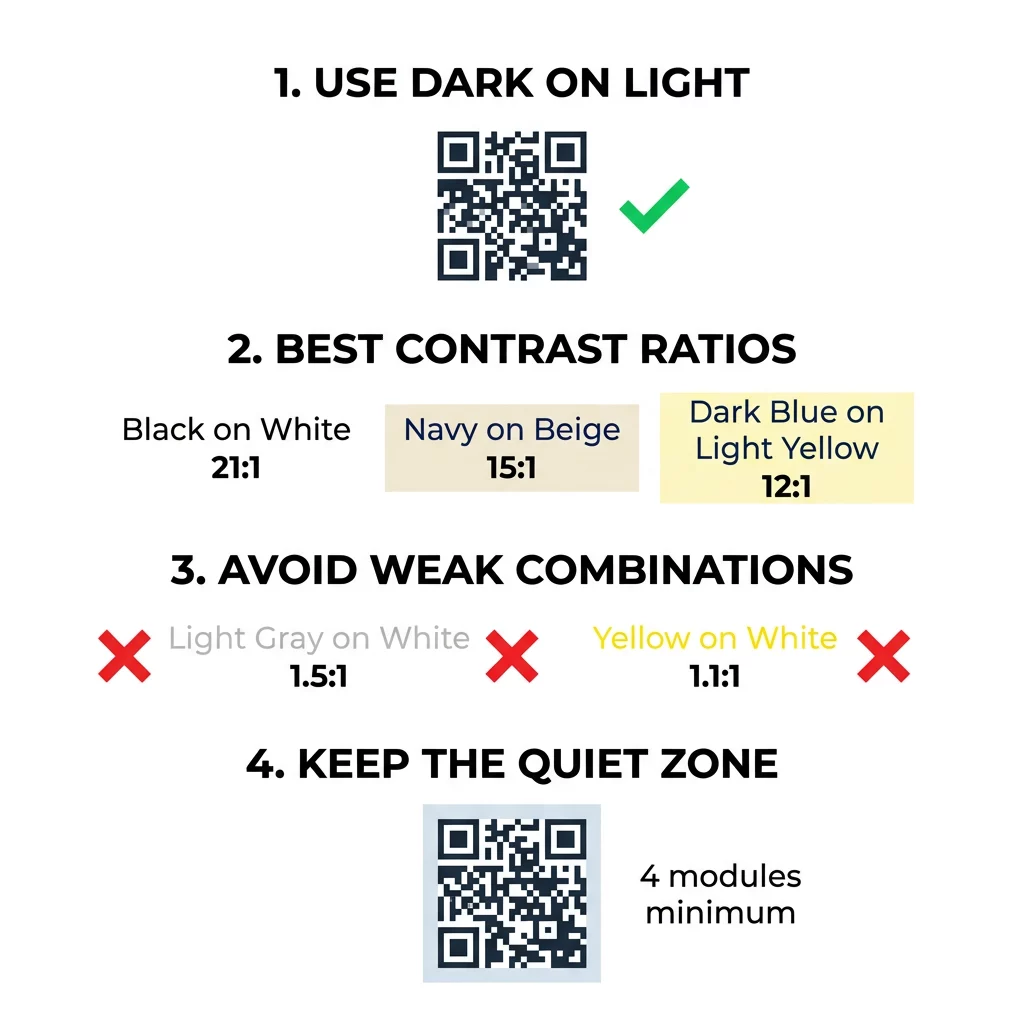
De beste QR-codekleuren zijn donkere modules (de vierkanten) op een lichte achtergrond, en ja, QR-codes kunnen gekleurd zijn. De regel is eenvoudig: de modules moeten duidelijk donkerder zijn dan de achtergrond. Zwart op wit geeft een contrastverhouding van 21:1 en is de veiligste keuze. Voor een code met merkuitstraling, streef naar minimaal 4:1, en gebruik 7:1 of meer voor buitenreclame, waar zonlicht en afstand het effectieve contrast verminderen. Deze gids geeft de cijfers, een kleurentabel en een testroutine.
Welke QR-codekleuren werken, en kunnen QR-codes gekleurd zijn?
Een QR-code kan bijna elke kleur hebben, en kan verschillende kleuren gebruiken voor de modules en de achtergrond. Een telefooncamera ziet geen tint. Het zet de afbeelding om naar grijswaarden en beslist, vierkant voor vierkant, wat donker en wat licht is. De vraag is dus niet welke kleur je kiest, maar hoe verschillend de twee grijswaarden zijn.
- Werkt: marineblauw, donkergroen, antraciet, donkerpaars, donkerbruine of zwarte modules op een witte, crèmekleurige of een andere zeer lichte achtergrond.
- Werkt met een test: donkerrood, donkerblauwgroen en donkeroranje op wit. Controleer eerst de verhouding en scan een gedrukte proef.
- Werkt niet: gele, lichtgrijze, pastel- of neonmodules, en elk paar kleuren met dezelfde helderheid, zoals middengroen op middenrood.
- Risicovol: lichte modules op een donkere achtergrond (geïnverteerde codes). Veel scanner-apps lezen ze, maar sommige niet, dus vermijd ze op alles wat belangrijk is.
Waarom contrast de scanbaarheid van QR-codes bepaalt
Optische sensoren lezen QR-codes door het verschil in reflectie tussen donkere en lichte modules te meten. De QR-codestandaard, ISO/IEC 18004, gaat uit van donkere modules op een lichte achtergrond. Donkere modules absorberen licht en de lichte achtergrond reflecteert het. Als het verschil te klein is, kan de decoder het datapatroon niet van de achtergrond scheiden.
In barcode testing (ISO/IEC 15415), symbol contrast is the difference between the brightest and darkest reflectance in the code. A symbol contrast of 70% or more earns the top grade, and below 20% fails. Graders also check modulation, which shows how evenly the light and dark modules reflect across the whole symbol. Uneven colors or weak separation make the scanner miss module edges.
Normal polarity, with dark modules on a light background, works on every device. Some built-in phone camera apps cannot read light codes on dark backgrounds, and support differs by phone model and software version. Use normal polarity unless you have tested the inverted version on the devices your audience uses.
Evaluating Color Contrast Ratios and Thresholds
The contrast ratio is a number from 1:1 (no difference) to 21:1 (black on white). The ratio comes from the accessibility rules in the Web Content Accessibility Guidelines (WCAG), which were written for text but are a practical way to check QR colors. A contrast checker (search for "WCAG contrast checker") accepts two hex codes and returns the ratio. For more on inclusive design, read our guide on QR-codes ADA-conform maken.
Use these targets. At least 4:1 is the minimum for indoor print and screens. 7:1 or more is safer for packaging, flyers and anything photographed in varied light. 10:1 or more is the target for outdoor signage. The ratios below are approximate and depend on the exact shade.
| Kleurcombinatie | Approximate Contrast Ratio | Scannability Assessment |
|---|---|---|
| Zwart op Wit | 21:1 | Optimal (industry standard) |
| Marineblauw op Beige | ~15:1 | Uitstekend |
| Donkerblauw op Lichtgeel | ~12:1 | Zeer Goed |
| Dark Brown on Off-White | ~8:1 | Goed |
| Pure Red (#FF0000) on White | ~4:1 | Borderline, test before printing |
| Dark Red (#8B0000) on White | ~11:1 | Zeer Goed |
| Lichtgrijs op wit | ~1.5:1 | Poor (frequent scan failures) |
| Geel op wit | ~1.1:1 | Onscanbaar |
Customize Codes Without Sacrificing Scannability Test colors and preview your design in real time using our QR code met logo maken to balance brand aesthetics with reliable scanning.
Best QR Code Contrast Ratio for Outdoor Signage
Geen enkele standaard stelt een vereiste verhouding vast voor QR-codes buitenshuis, maar buitenomstandigheden verminderen het contrast op drie manieren: direct zonlicht vervaagt de lichte gebieden, schittering verbergt delen van de code, en afstand vervaagt kleine modules. Houd rekening met een grotere veiligheidsmarge dan binnenshuis.
- Gebruik zwart of een zeer donkere kleur op wit. Streef naar een verhouding van 10:1 of hoger.
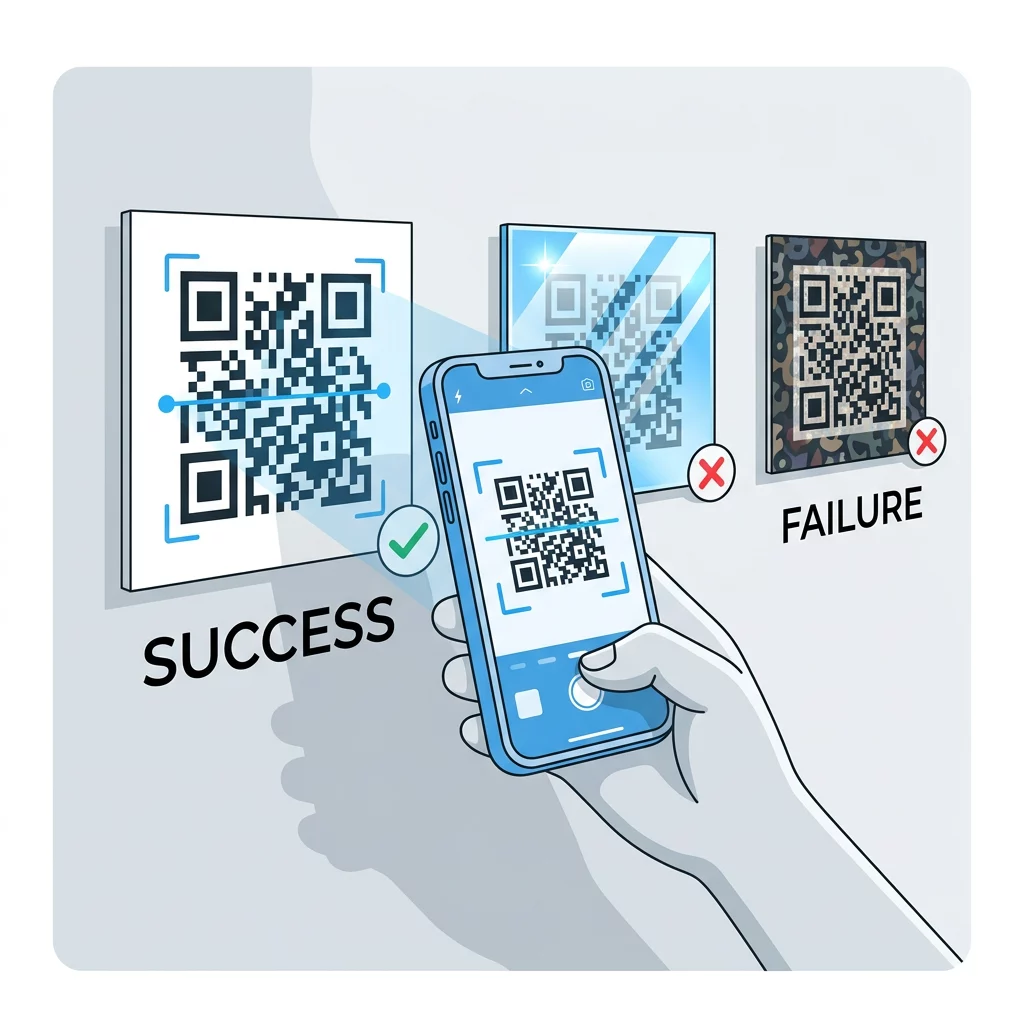
- Print op mat materiaal of voeg een matte laminaatlaag toe. Glanzend vinyl en glas weerkaatsen de zon en verstoren het patroon.
- Pas de grootte van de code aan de scanafstand aan. Een veelvoorkomende regel is 1 eenheid codeweek voor elke 10 eenheden afstand, dus een code die vanaf 2 meter (ongeveer 6,5 voet) wordt gescand, moet ongeveer 20 cm (8 inch) breed zijn.
- Behoud de volledige stille zone en plaats de code op een effen licht paneel in plaats van op een foto.
- Vermijd het plaatsen van de code waar deze in de lage zon staat of achter glas zit, en scan het gedrukte bord op de daadwerkelijke locatie voordat u een volledige oplage bestelt.
Barcodecontrast: QR-codes versus lineaire barcodes
Dezelfde contrastregels gelden voor andere barcodes met hoog contrast, zoals Code 128 of EAN. Retailscanners gebruiken vaak een rode laser, en rood licht ziet rode balken of rode inkt niet als donker. Voor lineaire barcodes, print balken in zwart, donkerblauw of donkergroen op wit, en nooit in rood of oranje. QR-codes die met een telefooncamera worden gelezen, zijn minder gevoelig voor kleur, maar hetzelfde advies geeft het meest betrouwbare resultaat voor beide.
De stille zone en codeafmetingen waarborgen
Hoog contrast moet zich uitstrekken tot aan de rand van de code. De blanco marge rond het patroon is de stille zone. Deze vertelt de camera waar de code begint en waar andere afbeeldingen eindigen.
- Houd een stille zone van minimaal vier modulebreedtes breed aan alle vier de zijden.
- Houd deze marge vrij van tekst, illustraties en randen.
- Stem de stille zone af op uw lichte achtergrondkleur, zodat de grens schoon is.
- Print codes van minimaal 2 x 2 cm (0,8 x 0,8 inch) voor dichtbij, handheld scannen. Ga groter voor langere links, want meer data betekent kleinere modules.
- Geef de voorkeur aan een korte link. Een korte URL zorgt voor een eenvoudiger patroon met grotere modules die beter scannen bij weinig licht.
Tekst of artwork binnen de stille zone is een veelvoorkomende oorzaak van scanfouten op merkmaterialen. Onze gids voor best practices voor de leesbaarheid van QR-codes laat zien hoe u de marges behoudt terwijl uw lay-out past.
Veelvoorkomende kleur- en stijlfouten vermijden
Het aanpassen van een code kan de leesbaarheid schaden. Camera's converteren de afbeelding naar grijstinten, zodat twee verschillende tinten dezelfde helderheid kunnen krijgen en samensmelten tot één grijs.
- Vermijd pastelmodules zoals babyblauw, mint of lichtgeel.
- Vermijd felrode of oranje modules. Laserscanners lezen rood als licht, en de contrastverhouding is vaak lager dan 5:1. Een donkerrood zoals bordeauxrood is veel veiliger.
- Vermijd verlopen waarbij het lichtste deel van de modulekleur dicht bij de achtergrond ligt.
- Vermijd transparante achtergronden over foto's, gestructureerd papier of verpakkingen met patronen. Plaats de code op een effen licht paneel.
- Vermijd omgekeerde ontwerpen met lichte modules op een donkere achtergrond, tenzij u deze hebt getest op de telefoons die uw doelgroep gebruikt.
- Vermijd grote logo's. Een logo dat te veel modules bedekt, kan de foutcorrectie van de code overschrijden.
Het kennen van deze limieten stelt u in staat te leren hoe u een aangepaste QR-code maakt die uw merk toont zonder de decodering te verstoren.
Testen en valideren in reële omgevingen
Een code die van een helder beeldscherm scant, kan op papier mislukken. Kamerlicht, kijkhoek en materiaaltextuur veranderen allemaal het contrast dat de lens bereikt. Direct zonlicht vervaagt kleine kleurverschillen, schemerige ruimtes verminderen het vermogen van de sensor om modules te scheiden, en glanzende afwerkingen voegen schittering toe.
Voer deze controle uit vóór elke printtaak:
- Controleer het kleurenpaar in een contrastchecker. De verhouding moet minimaal 4:1 zijn, en 7:1 of meer voor verpakkingen en buitengebruik.
- Druk een proef af op het echte materiaal, op ware grootte, met de echte afwerking.
- Scan het met de ingebouwde camera van minstens één iPhone en één Android-telefoon, één oudere telefoon indien mogelijk, en een browsergebaseerde QR-code scanner.
- Scan in het slechtste licht dat de code zal tegenkomen: schemerige kamer, direct zonlicht en onder een hoek.
- Als deze aarzelt, verhoog dan het contrast, vergroot de code, verkort de link of herstel de rustzone.
Onze gids over QR-code testen voor het printen: voorkom fouten behandelt dit in meer detail, en hoe je de leesbaarheid van een QR-code verbetert behandelt oplossingen voor codes die falen.
Maximale betrouwbaarheid en betrokkenheid van QR-codes
Behandel contrast als een technische vereiste, niet als een laatste detail. Kies een donkere kleur op een lichte achtergrond, behoud de rustzone en test een afgedrukte proef onder het licht dat deze zal tegenkomen. Dat beschermt uw printbudget tegen codes die niet scannen.
Maak uw contrastrijke code met onze QR-codegenerator. Stel de module- en achtergrondkleuren in en download een PNG, SVG of PDF. Als u een code afdrukt en de link later moet wijzigen, gebruik dan een dynamische code: u kunt de bestemming na het afdrukken bewerken en scanstatistieken bekijken. Dynamische codes worden geleverd met een gratis proefperiode van 14 dagen, en de abonnementen staan vermeld op https://pageloot.com/pricing/.
Veelgestelde vragen
Streef naar minstens 4:1 tussen de modules en de achtergrond. Gebruik 7:1 of meer voor verpakkingen en flyers, en 10:1 of meer voor buitenreclame. Zwart op wit is 21:1.
Ja. Elke kleur werkt als de modules duidelijk donkerder zijn dan de achtergrond. Diep marineblauw, bosgroen, houtskool en kastanjebruin op wit of crème werken goed. Geel, lichtgrijs en pasteltinten niet.
De modules en de achtergrond kunnen verschillende kleuren hebben, en u kunt elke tint gebruiken, maar alleen het helderheidsverschil is van belang. Een telefoon leest de code in grijswaarden, dus twee kleuren met gelijke helderheid zullen mislukken. Controleer de verhouding en scan een gedrukte proef.
Er is geen officiële standaard. Een verhouding van 10:1 of hoger is een veilige richtlijn, zoals zwart op wit. Gebruik een matte afwerking om schittering te verminderen, houd de grootte van de code op ongeveer 1/10 van de scanafstand en test deze ter plaatse.
Ja, als uw merkkleur donker genoeg is, zoals diep marineblauw, bosgroen of antraciet, en op een egale lichte achtergrond staat. Als uw merkkleur licht is, gebruik dan een donkere tint daarvan voor de modules.
De QR-standaard definieert donkere modules op een lichte achtergrond. Veel camera-apps zoeken eerst naar dat patroon, en sommige kunnen lichte modules op een donkere achtergrond niet lezen. Ondersteuning verschilt per telefoon, dus test voordat je afdrukt.
Ja. Lineaire barcodes zoals Code 128 of EAN hebben ook donkere balken op een lichte achtergrond nodig. Laser scanners in de detailhandel gebruiken rood licht, dus print de balken nooit in rood of oranje.