Adakah anda kehilangan bakal peserta kerana mereka terlupa untuk menaip butiran acara anda secara manual ke dalam kalendar mudah alih mereka? Apabila halangan menghalang tetamu daripada menyimpan tarikh anda, jumlah kehadiran keseluruhan menurun dengan ketara. Mencipta kod QR kalendar tersuai membolehkan penonton anda menambah butiran acara anda terus ke kalendar telefon pintar mereka dengan satu imbasan.
Cara Kod QR Acara Kalendar Berfungsi
Kod QR kalendar mengekod maklumat acara berstruktur ke dalam imej yang boleh diimbas yang dibaca serta-merta oleh sistem pengendalian mudah alih. Apabila pengguna mengimbas kod dengan kamera telefon pintar mereka, sistem pengendalian menghuraikan data yang dikodkan dan menggesa pengguna untuk menyimpan acara tersebut terus ke Apple Calendar, Google Calendar, atau Microsoft Outlook.
Di sebalik tabir, kod QR kalendar memformatkan butiran acara menggunakan dua kaedah teknikal utama:
- Data iCalendar (.ics): Mengekod sintaks acara mentah terus ke dalam kod QR berdasarkan piawaian kalendar universal RFC 5545. Struktur ini termasuk medan penting seperti `BEGIN:VCALENDAR`, `DTSTART` (tarikh dan masa mula), `DTEND` (tarikh dan masa tamat), `SUMMARY` (tajuk acara), dan `LOCATION`. Peranti mudah alih mentafsir teks mentah ini dan melancarkan aplikasi kalendar asli untuk menjana entri baharu.
- URL Praisi Kalendar: Memformatkan destinasi kod QR sebagai pautan web yang mengandungi parameter acara yang dipraisi. Contohnya, pautan Google Calendar menggunakan parameter URL tertentu seperti `action=TEMPLATE`, `dates` dalam format ISO 8601 UTC (YYYYMMDDTHHMMSSZ), `text` untuk tajuk, `location`, dan `details` untuk penerangan acara.
Menggunakan yang khusus Cara buat QR code pendaftaran acara mengautomasikan proses pemformatan ini supaya anda tidak perlu menulis sintaks kod yang rumit secara manual. Tambahan pula, memilih kod QR dinamik membolehkan anda mengubah suai parameter acara – seperti melaraskan waktu mula atau mengemas kini lokasi – pada papan pemuka dalam talian anda tanpa mencetak semula bahan promosi fizikal anda.
Cara Menjana Kod QR Acara Kalendar
Menyiapkan entri kalendar automatik memerlukan konfigurasi parameter acara utama anda sebelum memuat turun fail grafik akhir anda.
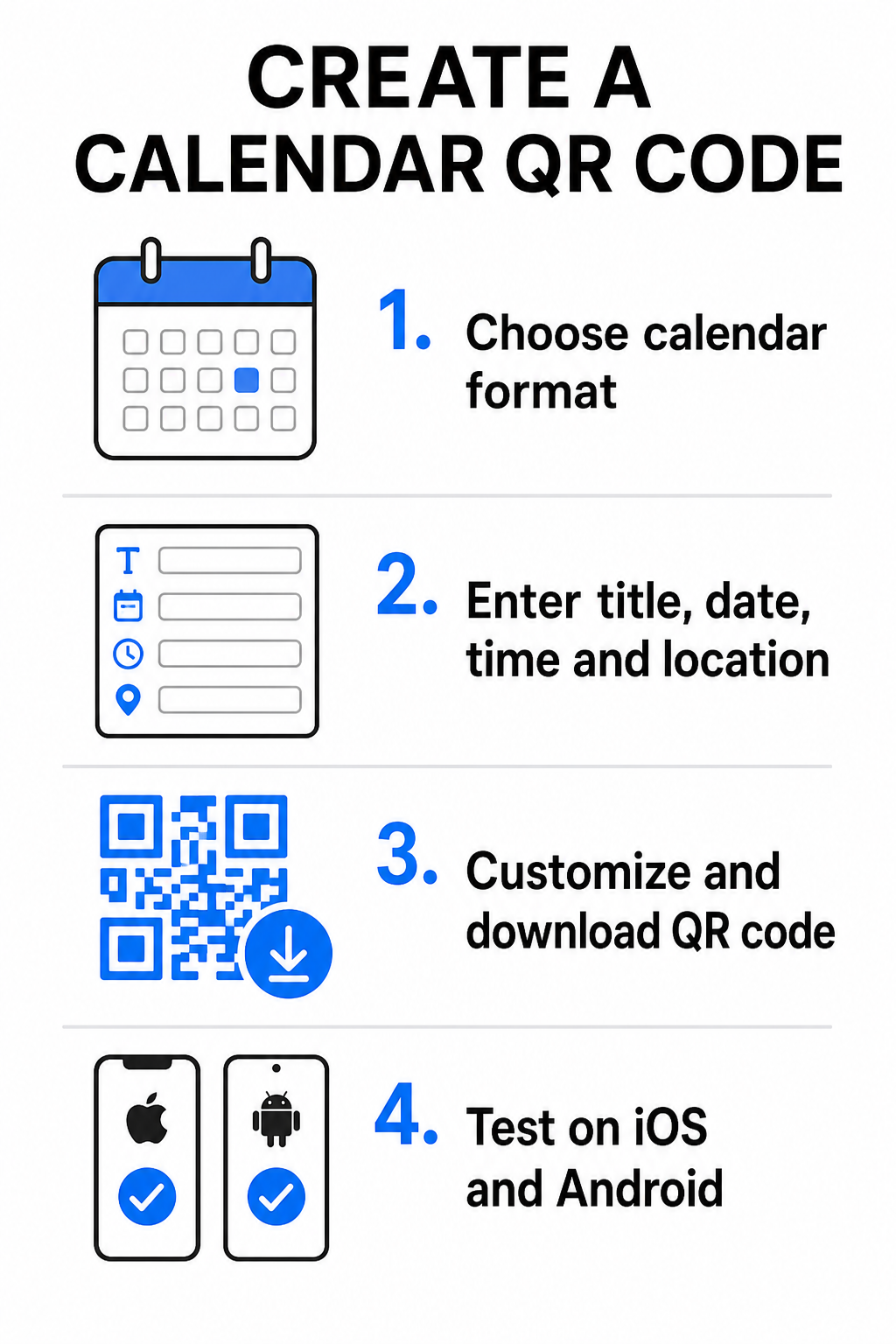
- Pilih format acara: Pilih sama ada untuk memaut terus ke jemputan Google Calendar, mencetuskan muat turun fail .ics, atau menghantar pengguna ke halaman pendaratan acara tersuai. Untuk pautan kalendar berasaskan web, gunakan Kod QR Google Calendar.
- Masukkan parameter acara penting: Masukkan tajuk acara, tarikh mula dan akhir yang tepat, waktu mula dan akhir, zon waktu, lokasi fizikal, dan penerangan. Letakkan pautan persidangan web atau nota tempat di medan penerangan.
- Sesuaikan reka bentuk visual: Gunakan warna jenama, laraskan corak latar belakang, dan masukkan logo anda sambil mengekalkan kontras yang tinggi antara elemen.
- Muat turun fail vektor resolusi tinggi: Simpan fail anda dalam format SVG atau EPS untuk percetakan komersial, atau sebagai PNG kepadatan tinggi untuk paparan digital. Format vektor memastikan garis yang jelas dan mencegah pikselasi apabila diperbesarkan.
- Uji pada peranti mudah alih: Imbas kod yang telah siap menggunakan telefon pintar iOS dan Android, menyemak kedua-dua aplikasi kamera asli dan pengimbas pelayar khusus untuk mengesahkan bahawa semua medan acara diisi dengan betul.
Permudahkan Persediaan Acara Anda Hari Ini Ingin meningkatkan kehadiran dan memperkemas pendaftaran tetamu? Gunakan Cara buat QR code pendaftaran acara untuk mencipta kod kalendar yang boleh disesuaikan dan boleh dijejak dalam beberapa saat.
Amalan Terbaik untuk Penempatan Cetak dan Digital
Untuk kod QR kalendar mendorong penukaran tetamu, pengguna mesti dapat mengimbasnya dengan cepat tanpa ralat teknikal. Menggunakan prinsip reka bentuk fizikal standard menjamin kebolehimbasan yang konsisten merentasi media cetak dan digital.
Saiz dan Jarak Pandangan
Gunakan nisbah pengimbasan 10:1 peraturan untuk menentukan lebar fizikal minimum kod QR anda: bahagikan jarak pengimbasan yang dijangkakan dengan 10. Jika seorang hadirin mengimbas poster dari jarak 50 cm (kira-kira 20 inci), corak kod QR mesti berukuran sekurang-kurangnya 5 × 5 cm. Untuk bahan cetak jarak dekat seperti risalah, kad perniagaan, atau jemputan perkahwinan digital, kekalkan saiz cetak minimum 2 × 2 cm (0.8 × 0.8 inci).
Kontras Warna dan Zon Senyap
Sensor kamera bergantung pada pantulan cahaya untuk membaca modul kod. Warna yang lebih gelap menyerap cahaya, manakala warna yang lebih cerah memantulkannya kembali ke lensa. Kekalkan nisbah kontras sekurang-kurangnya 4:1 – atau sasarkan sekurang-kurangnya kontras 55% antara corak latar depan gelap dan latar belakang cerah. Sentiasa kekalkan zon senyap yang jelas (sempadan kosong di sekeliling kod) bebas daripada teks, tindanan grafik, atau tekstur latar belakang.
Butiran Lokasi Strategik
Jika acara anda berlangsung di lokasi fizikal, pastikan peserta dapat tiba ke sana tanpa masalah. Anda boleh menyertakan koordinat geografi dalam keterangan acara atau padankan entri kalendar anda dengan Cara buat QR location Google Maps untuk membuka navigasi belokan demi belokan terus dari jemputan.
Panggilan Tindakan yang Jelas
Penglibatan imbasan meningkat dengan ketara apabila pengguna tahu hasil yang akan diperoleh. Elakkan memaparkan kod QR yang berdiri sendiri tanpa konteks. Letakkan teks seruan tindak yang jelas di bawah atau di sekeliling kod, seperti “Imbas untuk Tambah Acara ke Kalendar” atau “Imbas untuk Simpan Tarikh.”

Memaksimumkan Kehadiran dengan Kod Acara Pintar
Mengintegrasikan alat kalendar automatik menghilangkan kemasukan data manual untuk peserta anda, secara mendadak mengurangkan kadar penurunan antara minat awal dan kehadiran sebenar. Sama ada anda meletakkan kod anda pada promosi poster, papan tanda acara, atau jemputan fizikal, memberikan tetamu cara segera untuk menyekat jadual mereka memastikan acara anda kekal dalam perhatian mereka.
Untuk meneroka kod dinamik yang menawarkan analitik imbasan dan penyuntingan selepas cetak, sediakan acara anda yang seterusnya menggunakan alat fleksibel yang tersedia dalam Pageloot’s all-in-one penjana kod QR. Kod QR RSVP untuk acara dan khusus Kod QR untuk acara,
Soalan lazim
Mengimbas kod akan membuka aplikasi kalendar telefon pintar lalai pengguna dengan medan acara yang telah diisi – termasuk tajuk, masa mula dan tamat, lokasi, dan keterangan – membolehkan mereka menyimpan acara dengan sekali ketik.
Ya, dengan syarat anda menjana kod QR dinamik. Kod dinamik menyimpan URL pengalihan pendek, membolehkan anda mengedit tarikh, masa, atau lokasi acara di papan pemuka dalam talian anda tanpa perlu mencetak semula risalah atau poster fizikal anda.
Kod QR kalendar standard menggunakan format iCalendar (.ics) universal dan parameter prapengisian URL web standard. Ia disokong secara asli oleh Apple Calendar, Google Calendar, Microsoft Outlook, dan kebanyakan aplikasi kalendar pihak ketiga utama pada iOS dan Android.