คุณกำลังเสียผู้เข้าร่วมงานที่อาจเกิดขึ้นหรือไม่ เพราะพวกเขาลืมที่จะพิมพ์รายละเอียดงานของคุณลงในปฏิทินมือถือด้วยตนเอง? เมื่อความไม่สะดวกทำให้แขกไม่บันทึกวันที่ของคุณ จำนวนผู้เข้าร่วมโดยรวมจะลดลงอย่างมาก การสร้างคิวอาร์โค้ดปฏิทินแบบกำหนดเองช่วยให้ผู้ชมของคุณสามารถเพิ่มรายละเอียดงานของคุณลงในปฏิทินสมาร์ทโฟนได้โดยตรงด้วยการสแกนเพียงครั้งเดียว
คิวอาร์โค้ดสำหรับกิจกรรมในปฏิทินทำงานอย่างไร
คิวอาร์โค้ดปฏิทินเข้ารหัสข้อมูลกิจกรรมที่มีโครงสร้างลงในรูปภาพที่สแกนได้ ซึ่งระบบปฏิบัติการมือถือสามารถอ่านได้ทันที เมื่อผู้ใช้สแกนโค้ดด้วยกล้องสมาร์ทโฟน ระบบปฏิบัติการจะแยกวิเคราะห์ข้อมูลที่เข้ารหัสและแจ้งให้ผู้ใช้บันทึกกิจกรรมโดยตรงลงใน Apple Calendar, Google Calendar หรือ Microsoft Outlook
เบื้องหลัง คิวอาร์โค้ดปฏิทินจะจัดรูปแบบรายละเอียดกิจกรรมโดยใช้วิธีการทางเทคนิคหลักสองวิธี:
- ข้อมูล iCalendar (.ics): เข้ารหัสไวยากรณ์กิจกรรมดิบโดยตรงลงในคิวอาร์โค้ดตามมาตรฐานปฏิทิน RFC 5545 สากล โครงสร้างนี้รวมถึงฟิลด์ที่จำเป็น เช่น `BEGIN:VCALENDAR`, `DTSTART` (วันและเวลาเริ่มต้น), `DTEND` (วันและเวลาสิ้นสุด), `SUMMARY` (ชื่อกิจกรรม) และ `LOCATION` อุปกรณ์มือถือจะตีความข้อความดิบนี้และเปิดแอปพลิเคชันปฏิทินดั้งเดิมเพื่อสร้างรายการใหม่
- URL สำหรับกรอกข้อมูลปฏิทินล่วงหน้า: จัดรูปแบบปลายทางของคิวอาร์โค้ดเป็นลิงก์เว็บที่มีพารามิเตอร์กิจกรรมที่กรอกไว้ล่วงหน้า ตัวอย่างเช่น ลิงก์ Google Calendar ใช้พารามิเตอร์ URL เฉพาะ เช่น `action=TEMPLATE`, `dates` ในรูปแบบ ISO 8601 UTC (YYYYMMDDTHHMMSSZ), `text` สำหรับชื่อเรื่อง, `location` และ `details` สำหรับคำอธิบายกิจกรรม
การใช้เครื่องมือพิเศษ การสร้าง QR Code ลงทะเบียนอบรม ทำให้กระบวนการจัดรูปแบบนี้เป็นไปโดยอัตโนมัติ คุณจึงไม่ต้องเขียนไวยากรณ์โค้ดที่ซับซ้อนด้วยตนเอง นอกจากนี้ การเลือกคิวอาร์โค้ดแบบไดนามิกยังช่วยให้คุณสามารถแก้ไขพารามิเตอร์กิจกรรม – เช่น การปรับเวลาเริ่มต้น หรือการอัปเดตสถานที่ – ได้บนแดชบอร์ดออนไลน์ของคุณโดยไม่ต้องพิมพ์สื่อส่งเสริมการขายของคุณใหม่
วิธีสร้างคิวอาร์โค้ดสำหรับกิจกรรมในปฏิทิน
การตั้งค่ารายการปฏิทินอัตโนมัติจำเป็นต้องกำหนดค่าพารามิเตอร์ของกิจกรรมหลักของคุณก่อนดาวน์โหลดไฟล์กราฟิกสุดท้าย
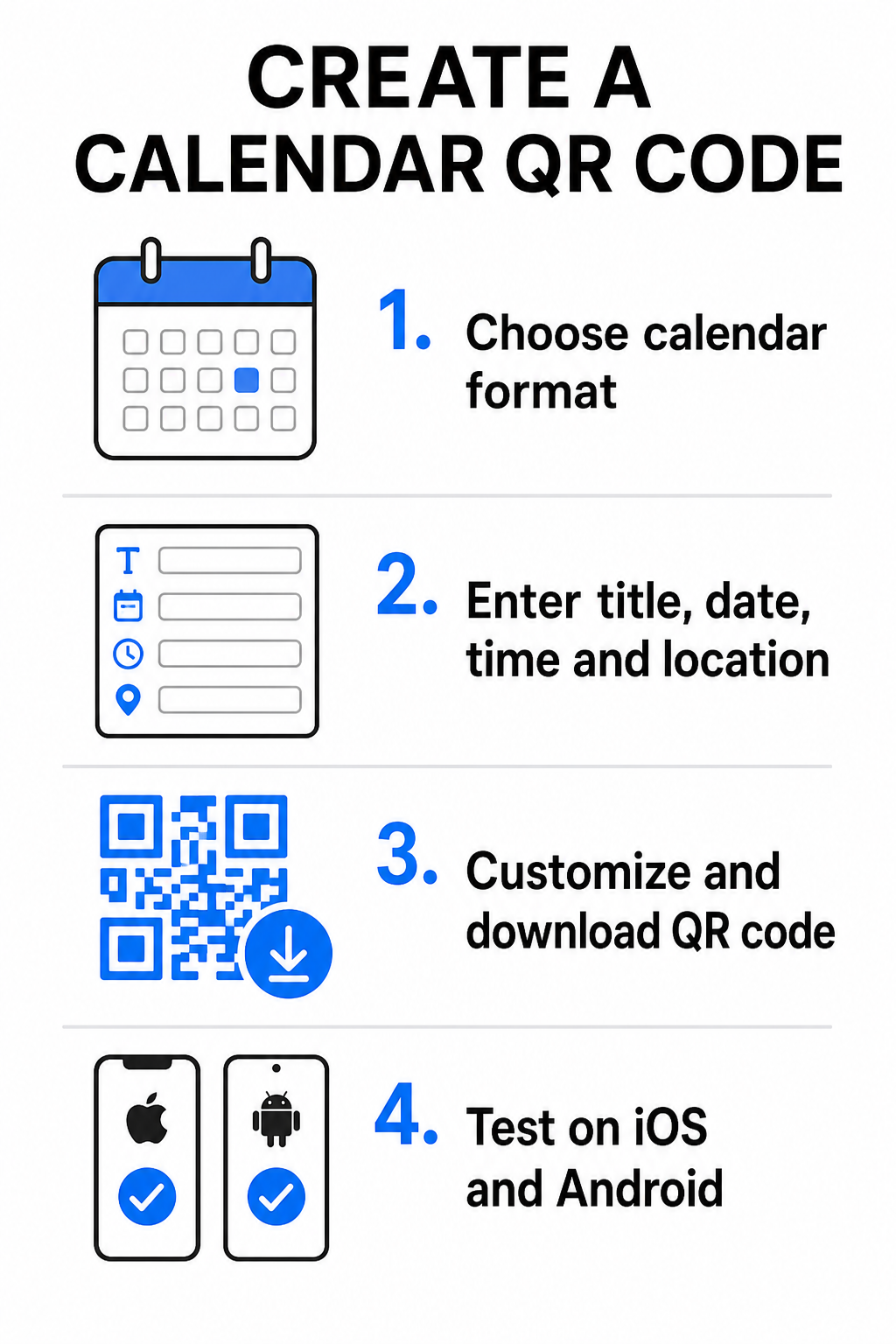
- เลือกรูปแบบกิจกรรม: เลือกว่าจะเชื่อมโยงโดยตรงไปยังคำเชิญใน Google Calendar, ทริกเกอร์การดาวน์โหลดไฟล์ .ics หรือส่งผู้ใช้ไปยังหน้า Landing Page ของกิจกรรมที่กำหนดเอง สำหรับลิงก์ปฏิทินบนเว็บ ให้ใช้ สร้าง QR Code Google Calendar.
- ป้อนพารามิเตอร์กิจกรรมที่จำเป็น: ป้อนชื่อกิจกรรม, วันที่เริ่มต้นและสิ้นสุดที่แน่นอน, เวลาเริ่มต้นและสิ้นสุด, เขตเวลา, สถานที่จริง และคำอธิบาย ใส่ลิงก์การประชุมผ่านเว็บหรือหมายเหตุสถานที่จัดงานในช่องคำอธิบาย
- ปรับแต่งการออกแบบภาพ: ใช้สีของแบรนด์, ปรับรูปแบบพื้นหลัง และใส่โลโก้ของคุณ โดยรักษาระดับความคมชัดสูงระหว่างองค์ประกอบต่างๆ
- ดาวน์โหลดไฟล์เวกเตอร์ความละเอียดสูง: บันทึกไฟล์ของคุณในรูปแบบ SVG หรือ EPS สำหรับการพิมพ์เชิงพาณิชย์ หรือเป็น PNG ความหนาแน่นสูงสำหรับการแสดงผลแบบดิจิทัล รูปแบบเวกเตอร์ช่วยให้ได้เส้นที่คมชัดและป้องกันการแตกของภาพเมื่อขยายขนาด
- ทดสอบบนอุปกรณ์มือถือ: สแกนโค้ดที่สมบูรณ์โดยใช้สมาร์ทโฟน iOS และ Android โดยตรวจสอบทั้งแอปกล้องในเครื่องและเครื่องสแกนเบราว์เซอร์เฉพาะ เพื่อยืนยันว่าข้อมูลในช่องกิจกรรมทั้งหมดปรากฏอย่างถูกต้อง
ทำให้การตั้งค่ากิจกรรมของคุณง่ายขึ้นวันนี้ ต้องการเพิ่มผู้เข้าร่วมและปรับปรุงการลงทะเบียนแขกหรือไม่? ใช้ การสร้าง QR Code ลงทะเบียนอบรม เพื่อสร้างรหัสปฏิทินที่ปรับแต่งได้และติดตามได้ในไม่กี่วินาที
แนวปฏิบัติที่ดีที่สุดสำหรับการจัดวางทั้งบนสิ่งพิมพ์และสื่อดิจิทัล
เพื่อให้รหัส QR ปฏิทินสามารถกระตุ้นการเปลี่ยนลูกค้าได้ ผู้ใช้จะต้องสามารถสแกนได้อย่างรวดเร็วโดยไม่มีข้อผิดพลาดทางเทคนิค การใช้หลักการออกแบบทางกายภาพมาตรฐานช่วยรับประกันความสามารถในการสแกนที่สม่ำเสมอทั้งในสื่อสิ่งพิมพ์และดิจิทัล
ขนาดและระยะการมอง
ใช้ อัตราส่วนการสแกน 10:1 กฎเพื่อกำหนดความกว้างทางกายภาพขั้นต่ำของรหัส QR ของคุณ: หารระยะการสแกนที่คาดหวังด้วย 10 หากผู้เข้าร่วมสแกนโปสเตอร์จากระยะ 50 ซม. (ประมาณ 20 นิ้ว) รูปแบบรหัส QR ต้องมีขนาดอย่างน้อย 5 × 5 ซม. สำหรับวัสดุพิมพ์ระยะใกล้ เช่น แผ่นพับ, นามบัตร หรือ การ์ดเชิญงานแต่งงานดิจิทัลให้รักษาระดับขนาดสิ่งพิมพ์ขั้นต่ำที่ 2 × 2 ซม. (0.8 × 0.8 นิ้ว)
ความคมชัดของสีและพื้นที่ว่าง
เซ็นเซอร์กล้องอาศัยการสะท้อนแสงเพื่ออ่านโมดูลโค้ด สีเข้มจะดูดซับแสง ในขณะที่สีอ่อนจะสะท้อนแสงกลับไปยังเลนส์ รักษาสัดส่วนความคมชัดอย่างน้อย 4:1 – หรือตั้งเป้าอย่างน้อย ความคมชัด 55% ระหว่างรูปแบบพื้นหน้าสีเข้มและพื้นหลังสีอ่อน ควรเว้นพื้นที่ว่างที่ชัดเจน (ขอบว่างรอบโค้ด) ให้ปราศจากข้อความ การซ้อนทับกราฟิก หรือพื้นผิวพื้นหลัง
รายละเอียดตำแหน่งที่ตั้งเชิงกลยุทธ์
หากกิจกรรมของคุณจัดขึ้นในสถานที่จริง ตรวจสอบให้แน่ใจว่าผู้เข้าร่วมสามารถเดินทางไปที่นั่นได้โดยไม่มีอุปสรรค คุณสามารถฝังพิกัดทางภูมิศาสตร์ในคำอธิบายกิจกรรม หรือจับคู่รายการปฏิทินของคุณกับ ทำคิวอาร์โค้ด แผนที่ Google Maps เพื่อเปิดการนำทางแบบเลี้ยวต่อเลี้ยวได้โดยตรงจากคำเชิญ
คำกระตุ้นการตัดสินใจที่ชัดเจน
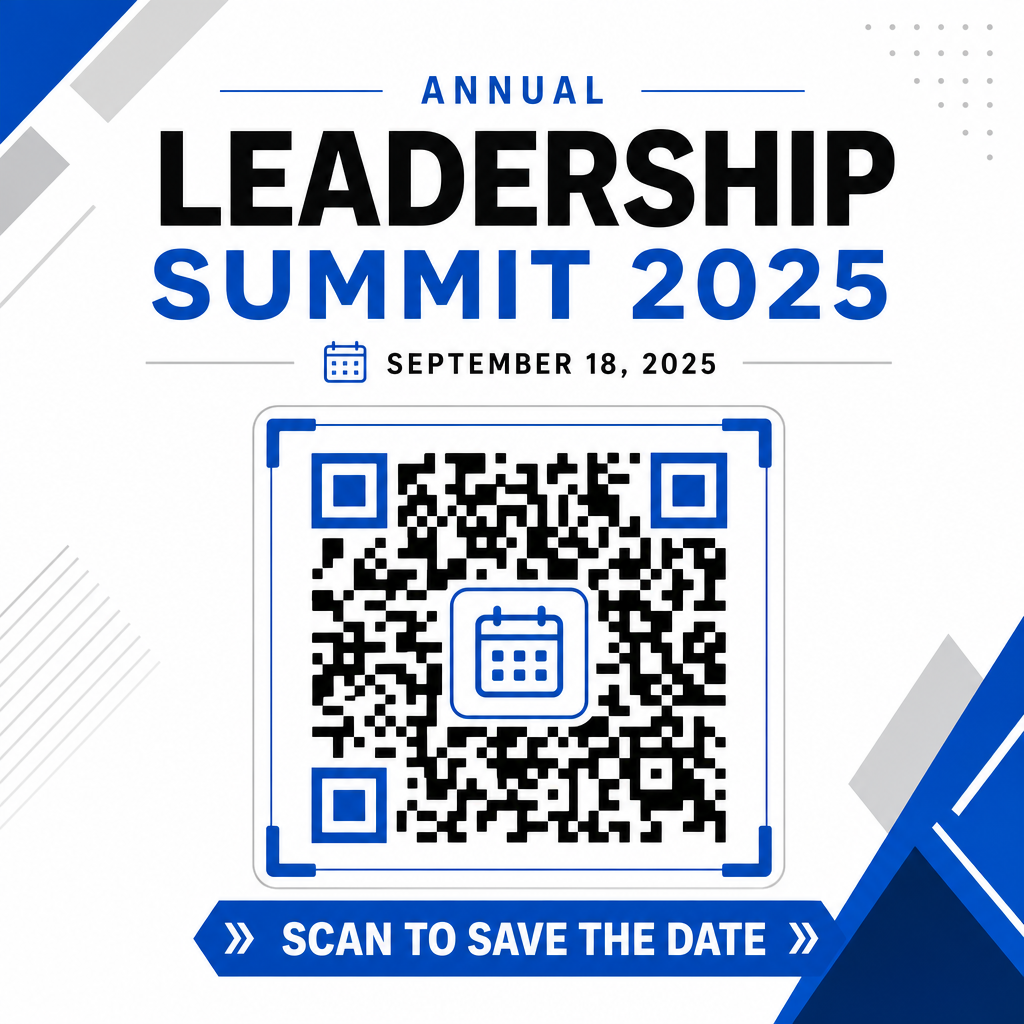
การมีส่วนร่วมในการสแกนจะเพิ่มขึ้นอย่างมากเมื่อผู้ใช้รู้ว่าคาดหวังผลลัพธ์อะไร หลีกเลี่ยงการแสดงรหัส QR แบบเดี่ยวโดยไม่มีบริบท วางข้อความกระตุ้นการตัดสินใจที่ชัดเจนไว้ใต้หรือรอบรหัส เช่น “สแกนเพื่อเพิ่มกิจกรรมลงในปฏิทิน” หรือ “สแกนเพื่อบันทึกวันสำคัญ”
เพิ่มผู้เข้าร่วมสูงสุดด้วยรหัสกิจกรรมอัจฉริยะ
การรวมเครื่องมือปฏิทินอัตโนมัติช่วยลดการป้อนข้อมูลด้วยตนเองสำหรับผู้เข้าร่วมของคุณ ซึ่งช่วยลดอัตราการละทิ้งอย่างมากระหว่างความสนใจเริ่มต้นและการเข้าร่วมจริง ไม่ว่าคุณจะวางรหัสของคุณบนสื่อส่งเสริมการขาย โปสเตอร์, ป้ายกิจกรรม หรือคำเชิญแบบกระดาษ การให้แขกมีวิธีบล็อกตารางเวลาได้ทันทีจะช่วยให้กิจกรรมของคุณยังคงอยู่ในความสนใจของพวกเขา
หากต้องการสำรวจรหัสไดนามิกที่นำเสนอการวิเคราะห์การสแกนและการแก้ไขหลังการพิมพ์ ให้ตั้งค่ากิจกรรมถัดไปของคุณโดยใช้เครื่องมือที่ยืดหยุ่นที่มีอยู่ในแพลตฟอร์มแบบครบวงจรของ Pageloot เครื่องสร้างรหัส QR. Combined with specialized landing pages for คิวอาร์โค้ด RSVP สำหรับกิจกรรม และเฉพาะสำหรับ รหัส QR สำหรับกิจกรรม, คุณสามารถสร้างระบบดิจิทัลที่ราบรื่นตั้งแต่การสแกนเริ่มต้นจนถึงการเช็คอินครั้งสุดท้าย
คำถามที่พบบ่อย
การสแกนโค้ดจะเปิดแอปพลิเคชันปฏิทินเริ่มต้นบนสมาร์ทโฟนของผู้ใช้ โดยมีข้อมูลกิจกรรมที่กรอกไว้ล่วงหน้า เช่น ชื่อกิจกรรม เวลาเริ่มต้นและสิ้นสุด สถานที่ และคำอธิบาย ซึ่งช่วยให้พวกเขาสามารถบันทึกกิจกรรมได้ด้วยการแตะเพียงครั้งเดียว
ใช่ หากคุณสร้างรหัส QR แบบไดนามิก รหัสแบบไดนามิกจะเก็บ URL การเปลี่ยนเส้นทางแบบสั้นไว้ ทำให้คุณสามารถแก้ไขวัน เวลา หรือสถานที่ของกิจกรรมบนแดชบอร์ดออนไลน์ของคุณได้ โดยไม่ต้องพิมพ์ใบปลิวหรือโปสเตอร์ฉบับจริงของคุณใหม่
คิวอาร์โค้ดปฏิทินมาตรฐานใช้รูปแบบ iCalendar (.ics) สากลและพารามิเตอร์ URL เว็บมาตรฐานสำหรับการเติมข้อมูลล่วงหน้า ซึ่งได้รับการรองรับโดยตรงจาก Apple Calendar, Google Calendar, Microsoft Outlook รวมถึงแอปพลิเคชันปฏิทินของบุคคลที่สามหลัก ๆ ส่วนใหญ่บน iOS และ Android