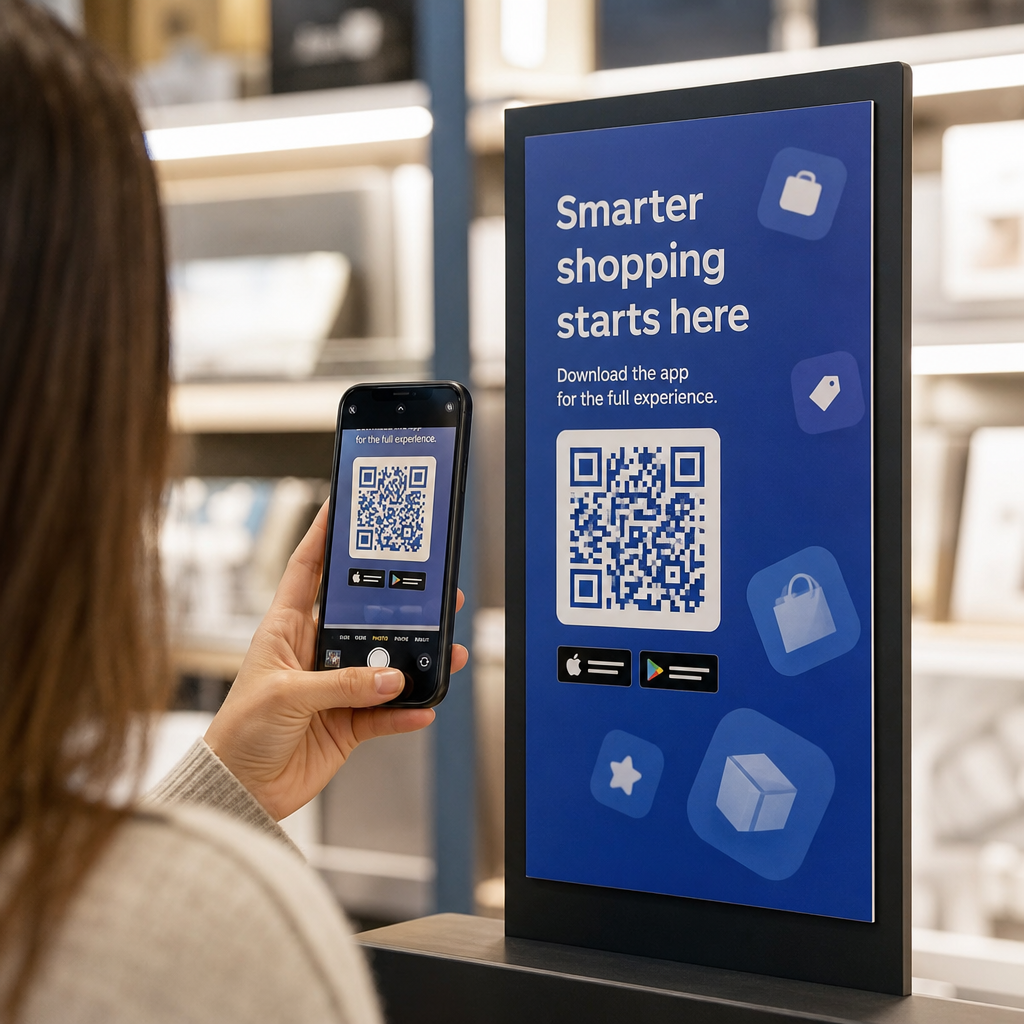
Ingin mengembangkan senarai e-mel anda daripada poster, pembungkusan, atau acara bersemuka – tetapi tidak tahu cara untuk mendapatkan orang daripada titik sentuh fizikal ke borang pendaftaran? Jurang antara kehadiran luar talian dan pelanggan dalam talian menyebabkan anda kehilangan petunjuk sebenar. Halaman ini menunjukkan kepada anda dengan tepat cara untuk merapatkan jurang tersebut menggunakan kod QR.
Mengapa Kod QR Berfungsi untuk Pengumpulan E-mel
Pemasaran e-mel mengembalikan purata $36 untuk setiap $1 yang dibelanjakan – tetapi pulangan itu hanya akan menjadi kenyataan jika anda benar-benar boleh mendapatkan orang ke dalam senarai anda. Cabaran bagi perniagaan yang menggunakan bahan cetak, acara, atau lokasi fizikal ialah tiada cara yang lancar untuk mengarahkan seseorang daripada risalah ke borang pendaftaran. Menaip URL adalah halangan yang kebanyakan orang tidak akan pedulikan.
Kod QR menghapuskan halangan itu sepenuhnya. Satu imbasan menghantar seseorang terus ke borang pendaftaran anda, dimuatkan terlebih dahulu dan sedia untuk diisi pada telefon mereka. Dengan penggunaan kod QR di AS dijangka mencapai 99.5 juta pengguna, ini bukan lagi taktik khusus – ia adalah saluran arus perdana untuk pertumbuhan senarai.
Terdapat dua pendekatan utama:
- Pautkan ke borang pendaftaran – Halakan kod QR ke halaman pendaratan atau borang (Mailchimp, Mailerlite, Google Forms, dsb.) di mana pelawat memasukkan alamat e-mel mereka
- Pra-isi tindakan e-mel – Gunakan an kod QR e-mel untuk membuka aplikasi mel pengguna dengan mesej yang telah ditulis, supaya mereka hanya perlu menekan hantar untuk menghubungi anda atau mendaftar
Kedua-dua kaedah adalah sah. Pilihan anda bergantung pada sama ada anda mahukan data borang berstruktur atau titik sentuh e-mel yang mudah.
Cipta Kod QR untuk Pendaftaran E-mel Menggunakan Penjana Kod QR Pautan Pageloot untuk menukar mana-mana URL borang pendaftaran menjadi kod yang boleh diimbas dalam beberapa saat – tiada pengetahuan teknikal diperlukan.
Cara Menyediakan Kod QR untuk Pendaftaran E-mel
Tentukan Apa yang Anda Kumpul
Sebelum menjana apa-apa, tentukan apa yang anda perlukan. Alamat e-mel sahaja menjadikan pendaftaran pantas dan kadar penukaran tinggi. Menambah nama pertama membolehkan pemperibadian dalam kempen. Setiap medan tambahan yang anda perlukan mengurangkan peratusan orang yang melengkapkannya, jadi pastikan borang itu sesingkat yang dibenarkan oleh kes penggunaan anda.
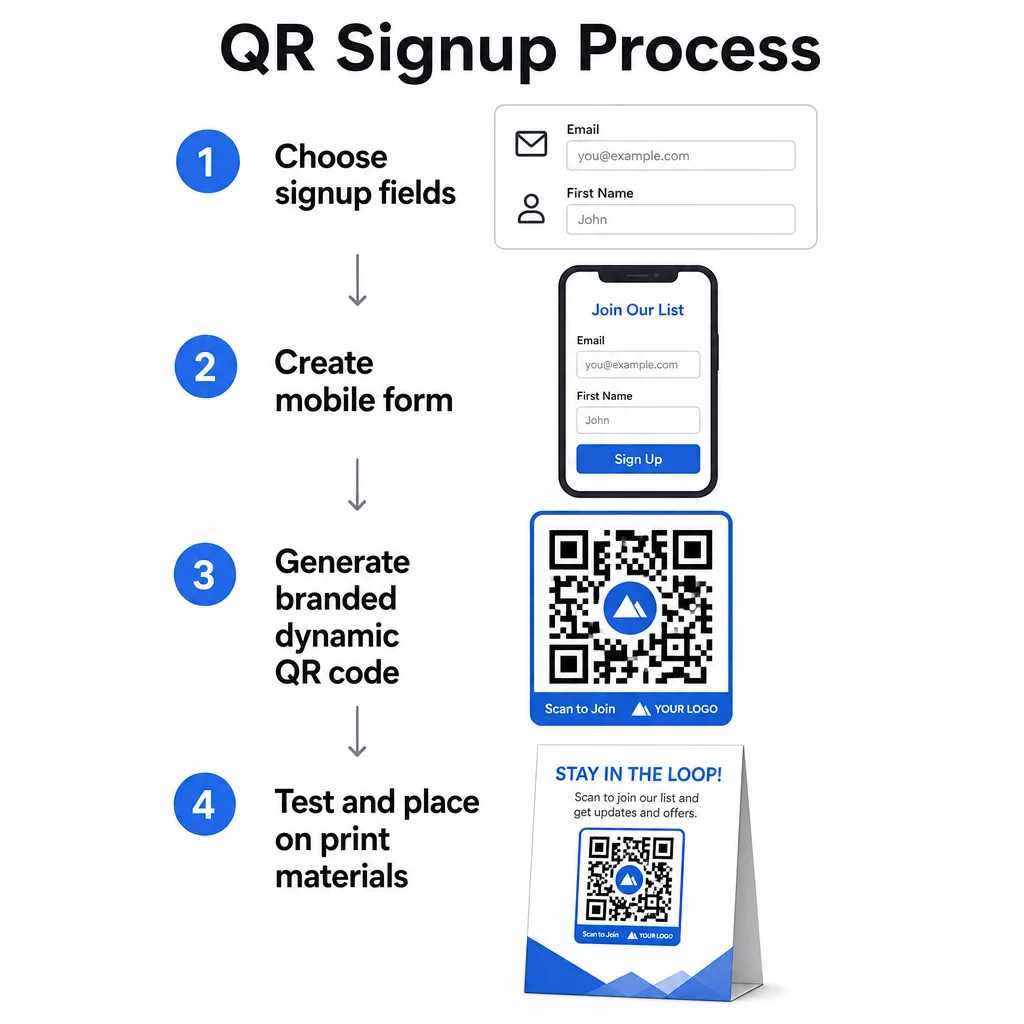
Cipta atau Pilih Borang Pendaftaran Anda
Anda memerlukan URL untuk menunjuk kod QR anda. Pilihan termasuk:
- Halaman pendaratan dari platform e-mel anda (Mailchimp, Klaviyo, ConvertKit, dll.)
- A Borang Google dikonfigurasi untuk mengumpul alamat e-mel
- Sebuah tersuai halaman pendaratan kod QR dibina di dalam Pageloot, yang membolehkan anda menggabungkan pautan pendaftaran dengan kandungan relevan lain dalam satu halaman berjenama, mesra mudah alih
Pastikan halaman destinasi dimuatkan dengan cepat pada mudah alih dan mempunyai satu tindakan yang jelas untuk diambil oleh pelawat. Untuk amalan terbaik dalam membina halaman yang dioptimumkan untuk mudah alih yang menukar, lihat amalan terbaik halaman pendaratan kod QR mudah alih.
Jana Kod QR Anda
Tampal URL borang pendaftaran anda ke dalam Penjana kod QR Pageloot. Penjana mencipta kod yang boleh diimbas serta-merta. Dari sini anda boleh:
- Tambah logo dan warna jenama anda
- Guna bingkai seruan tindakan (cth., “Imbas untuk melanggan”)
- Muat turun dalam format sedia cetak termasuk PNG, PDF, SVG, dan EPS
Gunakan kod QR dinamik berbanding yang statik. Kod dinamik membolehkan anda menukar URL destinasi selepas kod telah dicetak atau digunakan – jadi jika URL borang pendaftaran anda berubah, anda mengemas kini pautan dalam papan pemuka anda daripada mencetak semula semua bahan anda. Kod dinamik juga membuka kunci penjejakan imbasan.
Uji Sebelum Anda Guna
Imbas kod pada pelbagai peranti – kedua-dua iOS dan Android – sebelum mencetak. Sahkan borang dimuatkan dengan betul, medan berfungsi, dan butang hantar berfungsi. Pengujian dalam keadaan pencahayaan sebenar dan pada jarak sebenar di mana kod akan muncul (pada poster, pembungkusan, kad meja, dll.) mencegah masalah selepas bahan telah diedarkan. Untuk panduan penempatan, panduan muktamad penempatan kod QR dalam pemasaran meliputi saiz, kedudukan, dan pertimbangan persekitaran secara terperinci.
Amalan Terbaik untuk Pengumpulan E-mel Kod QR
Tulis seruan tindakan yang spesifik. “Imbas untuk melanggan” tidak memberitahu apa-apa kepada orang ramai. “Imbas untuk diskaun 15% untuk pesanan pertama anda” atau “Imbas untuk menyertai senarai tawaran mingguan kami” menerangkan dengan tepat apa yang mereka akan dapat. Semakin konkrit manfaatnya, semakin tinggi kadar imbasan.
Tawarkan sesuatu sebagai balasan. Diskaun, sumber yang boleh dimuat turun, akses awal, atau kandungan eksklusif memberi orang sebab untuk memberikan alamat e-mel mereka. Tanpa insentif, kebanyakan orang yang lalu-lalang tidak mempunyai motivasi untuk berhenti dan mengimbas.
Pastikan halaman pendaratan fokus. Sebaik sahaja seseorang mengimbas, halaman yang mereka tuju sepatutnya mempunyai satu tugas: mengumpul alamat e-mel. Elakkan menu navigasi, pautan tidak berkaitan, atau elemen yang mengganggu. Satu tajuk utama, pernyataan nilai ringkas, dan medan borang dengan butang hantar selalunya sudah mencukupi.
Bersikap telus tentang privasi. Beritahu orang ramai apa yang akan anda hantar kepada mereka dan kekerapan. Pautkan ke dasar privasi anda. Di bawah Akta CAN-SPAM, setiap e-mel komersial mesti menyertakan alamat fizikal yang sah dan mekanisme berhenti langganan yang berfungsi – pastikan platform e-mel anda mengendalikan ini secara automatik.
Letakkan kod di mana orang ramai mempunyai masa untuk berhenti. Kod QR pada papan tanda bergerak pantas atau dalam persekitaran cahaya malap akan diabaikan. Penempatan yang baik termasuk kaunter pembayaran, khemah meja, pembungkusan produk, program acara, dan bahan edaran bercetak. Paras mata (kira-kira 3.5 hingga 5.5 kaki) dan latar belakang yang tenang, tidak berserabut meningkatkan kadar imbasan.
Jejaki Penempatan Mana yang Mendorong Pendaftaran Terbanyak Dengan Penjejakan kod QR Pageloot, anda boleh memantau jumlah imbasan, lokasi, jenis peranti, dan masa dalam sehari – supaya anda tahu bahan mana yang sebenarnya menukar dan di mana untuk melabur lebih banyak.
Kebaikan dan Keburukan Pendaftaran Kod QR
| Kelebihan | Potensi Kelemahan | Penyelesaian |
|---|---|---|
| Tidak perlu menaip URL secara manual | Peranti lama mungkin tiada pengimbas terbina dalam | Sediakan alternatif URL pendek di bawah kod |
| Berfungsi secara semula jadi pada mudah alih | Tujuan mungkin tidak jelas tanpa konteks | Gunakan bingkai CTA yang jelas di sekeliling kod |
| Tanpa sentuhan dan mudah | Sesetengah pengguna tidak mempercayai kod QR yang tidak dikenali | Paparkan URL dan dasar privasi anda bersama |
| Boleh dijejak dengan kod dinamik | Kod statik tidak boleh dikemas kini jika URL borang berubah | Sentiasa gunakan kod QR dinamik untuk kempen |
Menghubungkan E-mel dan Saluran Luar Talian
Kod QR paling berkesan apabila ia adalah sebahagian daripada strategi yang disengajakan yang menghubungkan pemasaran fizikal dan digital anda. Kod pada sisipan produk boleh mengembangkan senarai anda daripada pelanggan yang sudah membeli sesuatu. Kod di gerai acara boleh menangkap petunjuk yang tidak akan pernah menemui borang pendaftaran anda. Kod dalam sekeping mel langsung memberikan penerima laluan segera untuk memilih masuk.
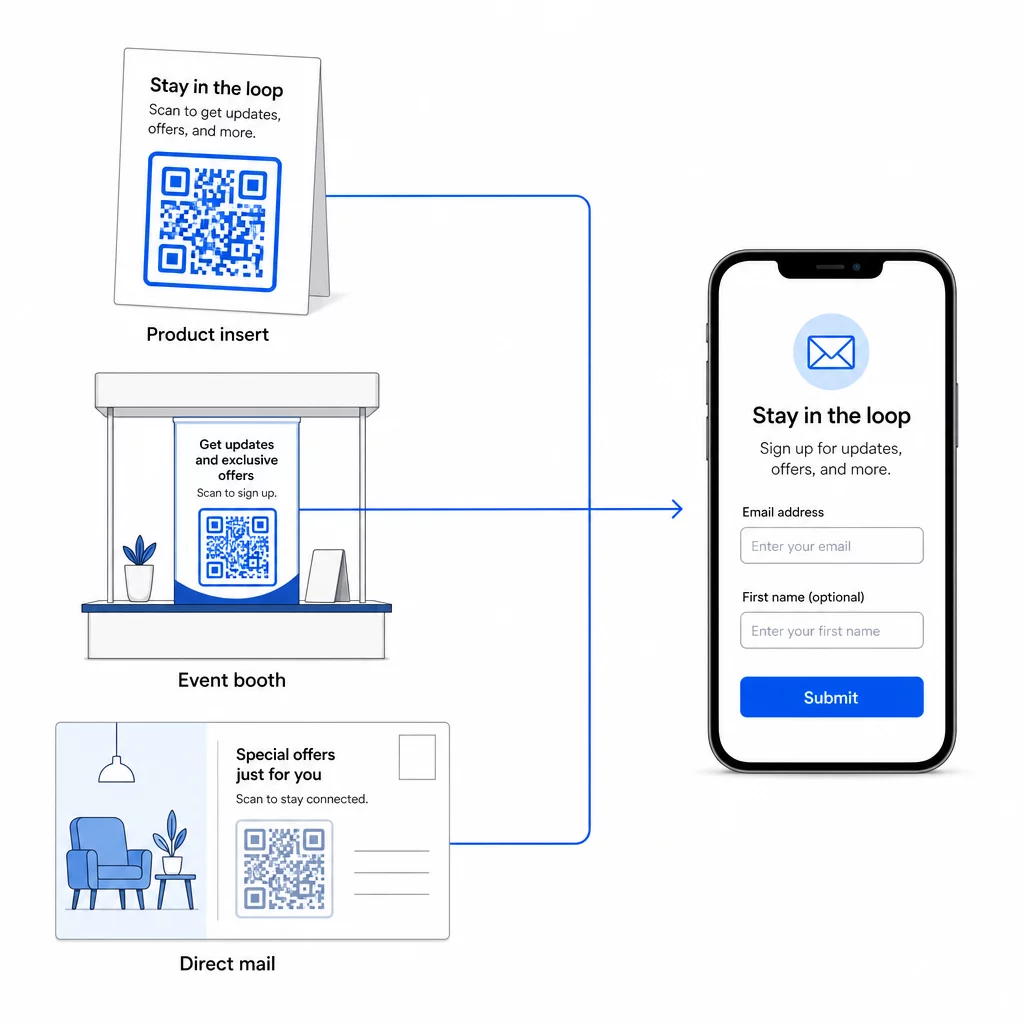
Untuk melihat dengan lebih luas bagaimana kod QR menghubungkan saluran ini, lihat bagaimana kod QR menghubungkan media sosial dan e-mel dan cara menggunakan kod QR dalam pemasaran.
Prinsip terasnya mudah: setiap titik sentuhan fizikal yang perniagaan anda ada adalah titik pemerolehan pelanggan berpotensi. Kod QR adalah apa yang membolehkan penukaran itu.
Mula Mengumpul E-mel daripada Bahan Fizikal Cipta kod QR dinamik, boleh dijejak yang dipautkan ke borang pendaftaran anda menggunakan Penjana Kod Pageloot QR. Percubaan percuma 14 hari – tiada kad kredit diperlukan.
Soalan Lazim
Kod QR e-mel membuka aplikasi mel pengguna dengan mesej yang telah diisi – penerima, subjek, dan badan mesej sudah diisi, dan pengguna hanya perlu mengetik hantar. Kod QR borang pendaftaran memaut ke halaman web di mana pengguna memasukkan alamat e-mel mereka terus ke dalam borang. Gunakan pendekatan QR e-mel untuk aliran hubungan atau pertanyaan yang mudah, dan pendekatan borang apabila anda ingin menambah pelanggan ke senarai pemasaran e-mel secara automatik.
Tidak jika anda menggunakan kod QR dinamik. Kod dinamik menyimpan destinasi dalam pautan pengalihan yang boleh anda kemas kini dalam papan pemuka Pageloot anda pada bila-bila masa. Kod yang dicetak itu sendiri tidak berubah – hanya destinasi yang ditujunya. Ini amat berguna untuk kempen di mana bahan-bahan sudah dicetak atau diedarkan.
Ya, dengan kod QR dinamik anda boleh menjejaki jumlah imbasan, imbasan unik, lokasi imbasan, jenis peranti, dan masa dalam sehari. Papan pemuka Pageloot menunjukkan data ini dalam masa nyata, jadi anda boleh membandingkan prestasi merentasi penempatan atau kempen yang berbeza dan mengoptimumkan sewajarnya. Ketahui lebih lanjut tentang menjejaki imbasan kod QR dan analitik.