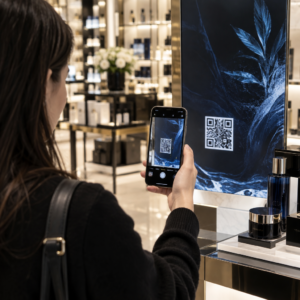
רוצה להגדיל את רשימת התפוצה שלך מכרזות, אריזות או אירועים פרונטליים – אבל לא מצליח להבין איך להעביר אנשים מנקודת מגע פיזית לטופס הרשמה? הפער בין נוכחות לא מקוונת למנויים מקוונים עולה לך בלידים אמיתיים. עמוד זה מראה לך בדיוק איך לגשר על הפער הזה באמצעות קודי QR.
למה קודי QR עובדים לאיסוף מיילים
שיווק בדוא"ל מחזיר ממוצע של $36 על כל $1 שהוצא – אבל ההחזר הזה מתממש רק אם אתה באמת מצליח להכניס אנשים לרשימה שלך. האתגר עבור עסקים המשתמשים בחומרי דפוס, אירועים או מיקומים פיזיים הוא שאין דרך חלקה להפנות מישהו מפלייר לטופס הרשמה. הקלדת כתובת אתר היא מחסום שרוב האנשים לא יטרחו איתו.
קוד QR מסיר את המחסום הזה לחלוטין. סריקה אחת שולחת מישהו ישירות לטופס ההרשמה שלך, טעון מראש ומוכן למילוי בטלפון שלו. עם השימוש בקודי QR בארה"ב שצפוי להגיע ל-99.5 מיליון משתמשים, זו כבר לא טקטיקה נישתית – זהו ערוץ מיינסטרים לצמיחת רשימות.
ישנן שתי גישות עיקריות:
- קישור לטופס הרשמה – הפנה את קוד ה-QR לדף נחיתה או טופס (Mailchimp, Mailerlite, Google Forms וכו') שבו המבקרים מזינים את כתובת הדוא"ל שלהם
- מילוי מראש של פעולת דוא"ל – השתמש ב- קוד QR לדוא"ל כדי לפתוח את אפליקציית הדוא"ל של המשתמש עם הודעה כתובה מראש, כך שהם פשוט לוחצים על שלח כדי ליצור איתך קשר או להצטרף
שתי השיטות לגיטימיות. הבחירה שלך תלויה אם אתה רוצה נתוני טופס מובנים או נקודת מגע פשוטה בדוא"ל.
צור קוד QR להרשמות לדוא"ל להשתמש ב מחולל קודי QR לקישורים של Pageloot כדי להפוך כל כתובת URL של טופס הרשמה לקוד סריקה תוך שניות – ללא צורך בידע טכני.
כיצד להגדיר קוד QR עבור הרשמות לאימייל
החלט מה אתה אוסף
לפני יצירת משהו, הגדר מה אתה צריך. כתובת דוא"ל בלבד שומרת על הרשמה מהירה ושיעורי המרה גבוהים. הוספת שם פרטי מאפשרת התאמה אישית בקמפיינים. כל שדה נוסף שאתה דורש מפחית את אחוז האנשים שממלאים אותו, לכן שמור את הטופס קצר ככל שהמקרה שלך מאפשר.
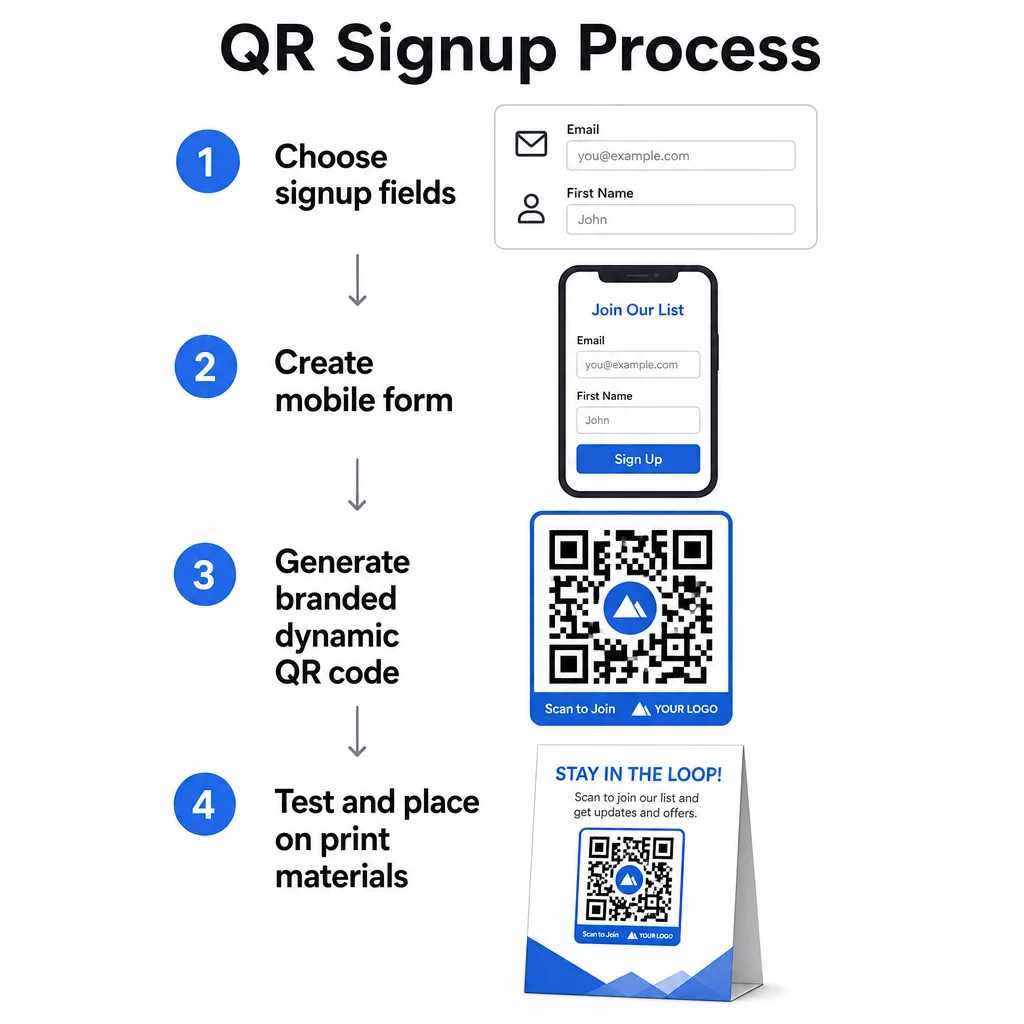
צור או בחר את טופס ההרשמה שלך
אתה צריך כתובת URL שאליה יפנה קוד ה-QR שלך. האפשרויות כוללות:
- דף נחיתה מפלטפורמת האימייל שלך (Mailchimp, Klaviyo, ConvertKit וכו')
- א טופס Google מוגדר לאיסוף כתובות אימייל
- מותאם אישית דף נחיתה של קוד QR נבנה בתוך Pageloot, המאפשר לך לשלב קישור הרשמה עם תוכן רלוונטי אחר בדף ממותג אחד, ידידותי למובייל
ודא שדף היעד נטען במהירות במובייל ושיש לו פעולה אחת וברורה שהמבקר צריך לבצע. לשיטות עבודה מומלצות לבניית דפים מותאמים למובייל שממירים, ראה שיטות עבודה מומלצות לדפי נחיתה של קוד QR במובייל.
הפק את קוד ה-QR שלך
הדבק את כתובת ה-URL של טופס ההרשמה שלך ב- מחולל קודי QR של Pageloot. המחולל יוצר קוד סריקה באופן מיידי. מכאן תוכל:
- הוסיפו את הלוגו ואת צבעי המותג
- החל מסגרת קריאה לפעולה (לדוגמה, “סרוק כדי להירשם”)
- הורד בפורמטים מוכנים להדפסה כולל PNG, PDF, SVG ו-EPS
השתמש בקוד QR דינמי במקום סטטי. קודים דינמיים מאפשרים לך לשנות את כתובת ה-URL של היעד לאחר שהקוד כבר הודפס או נפרס – כך שאם כתובת ה-URL של טופס ההרשמה שלך משתנה, אתה מעדכן את הקישור בלוח המחוונים שלך במקום להדפיס מחדש את כל החומרים שלך. קודים דינמיים גם מאפשרים מעקב סריקות.
בחנו לפני הפריסה
סרוק את הקוד במספר מכשירים – גם iOS וגם Android – לפני ההדפסה. ודא שהטופס נטען כהלכה, שהשדות פועלים, וכפתור השליחה פונקציונלי. בדיקה בתנאי התאורה בפועל ובמרחק בפועל שבו הקוד יופיע (על פוסטר, אריזה, כרטיס שולחן וכו') מונעת בעיות לאחר שהחומרים כבר הופצו. להנחיות מיקום, ה- מדריך אולטימטיבי למיקום קוד QR בשיווק מכסה שיקולי גודל, מיקום וסביבה בפירוט.
שיטות עבודה מומלצות לאיסוף מיילים באמצעות קוד QR
כתוב קריאה ספציפית לפעולה. “סרוק כדי להירשם” לא אומר לאנשים כלום. “סרוק לקבלת 15% הנחה על ההזמנה הראשונה שלך” או “סרוק כדי להצטרף לרשימת המבצעים השבועית שלנו” מסביר בדיוק מה הם מקבלים. ככל שההטבה קונקרטית יותר, כך שיעור הסריקה גבוה יותר.
הצע משהו בתמורה. הנחה, משאב להורדה, גישה מוקדמת או תוכן בלעדי נותנים לאנשים סיבה למסור את כתובת המייל שלהם. ללא תמריץ, לרוב העוברים ושבים אין מוטיבציה לעצור ולסרוק.
שמור על דף הנחיתה ממוקד. ברגע שמישהו סורק, לדף הנחיתה שלו צריכה להיות משימה אחת: לאסוף את כתובת המייל. הימנע מתפריטי ניווט, קישורים לא קשורים או אלמנטים מסיחים. כותרת אחת, הצהרת ערך קצרה ושדה טופס עם כפתור שליחה הם לרוב כל מה שאתה צריך.
היה שקוף לגבי פרטיות. ספר לאנשים מה תשלח להם ובאיזו תדירות. קשר למדיניות הפרטיות שלך. על פי חוק CAN-SPAM, כל מייל מסחרי חייב לכלול כתובת פיזית תקפה ומנגנון ביטול הרשמה פעיל – וודא שפלטפורמת המייל שלך מטפלת בכך באופן אוטומטי.
מקם את הקוד במקום שבו לאנשים יש רגע לעצור. קודי QR על שלטים נעים במהירות או בסביבות תאורה חלשה זוכים להתעלמות. מיקומים טובים כוללים דלפקי קופה, שלטי שולחן, אריזות מוצרים, תוכניות אירועים וחומרי חלוקה מודפסים. גובה העיניים (בערך 1.05 עד 1.65 מטר) ורקע שקט ולא עמוס משפרים את שיעורי הסריקה.
עקוב אחר אילו מיקומים מניבים את מירב ההרשמות עם מעקב קודי QR של Pageloot, תוכל לנטר את נפח הסריקות, מיקום, סוג המכשיר ושעת היום – כך תדע אילו חומרים באמת ממירים והיכן להשקיע יותר.
יתרונות וחסרונות של הרשמה באמצעות קוד QR
| יתרון | חיסרון פוטנציאלי | פִּתָרוֹן |
|---|---|---|
| אין צורך בהקלדת כתובת אתר (URL) ידנית | ייתכן שלמכשירים ישנים יותר אין סורק מובנה | ספק חלופת כתובת אתר (URL) קצרה מתחת לקוד |
| עובד באופן טבעי בנייד | המטרה עשויה להיות לא ברורה ללא הקשר | השתמש במסגרת קריאה לפעולה (CTA) ברורה סביב הקוד |
| ללא מגע ונוח | חלק מהמשתמשים אינם בוטחים בקודי QR לא מוכרים | הצג את כתובת האתר (URL) ומדיניות הפרטיות שלך לצד הקוד |
| ניתן למעקב באמצעות קודים דינמיים | לא ניתן לעדכן קודים סטטיים אם כתובת האתר (URL) של הטופס משתנה | השתמש תמיד בקודי QR דינמיים עבור קמפיינים |
חיבור דוא"ל וערוצים לא מקוונים
קודי QR יעילים ביותר כשהם חלק מאסטרטגיה מכוונת המחברת את השיווק הפיזי והדיגיטלי שלך. קוד על עלון מוצר יכול להגדיל את הרשימה שלך מלקוחות שכבר רכשו משהו. קוד בדוכן אירועים יכול ללכוד לידים שלעולם לא היו מוצאים את טופס ההרשמה שלך בדרך אחרת. קוד בפריט דיוור ישיר מעניק לנמענים נתיב מיידי להצטרפות.
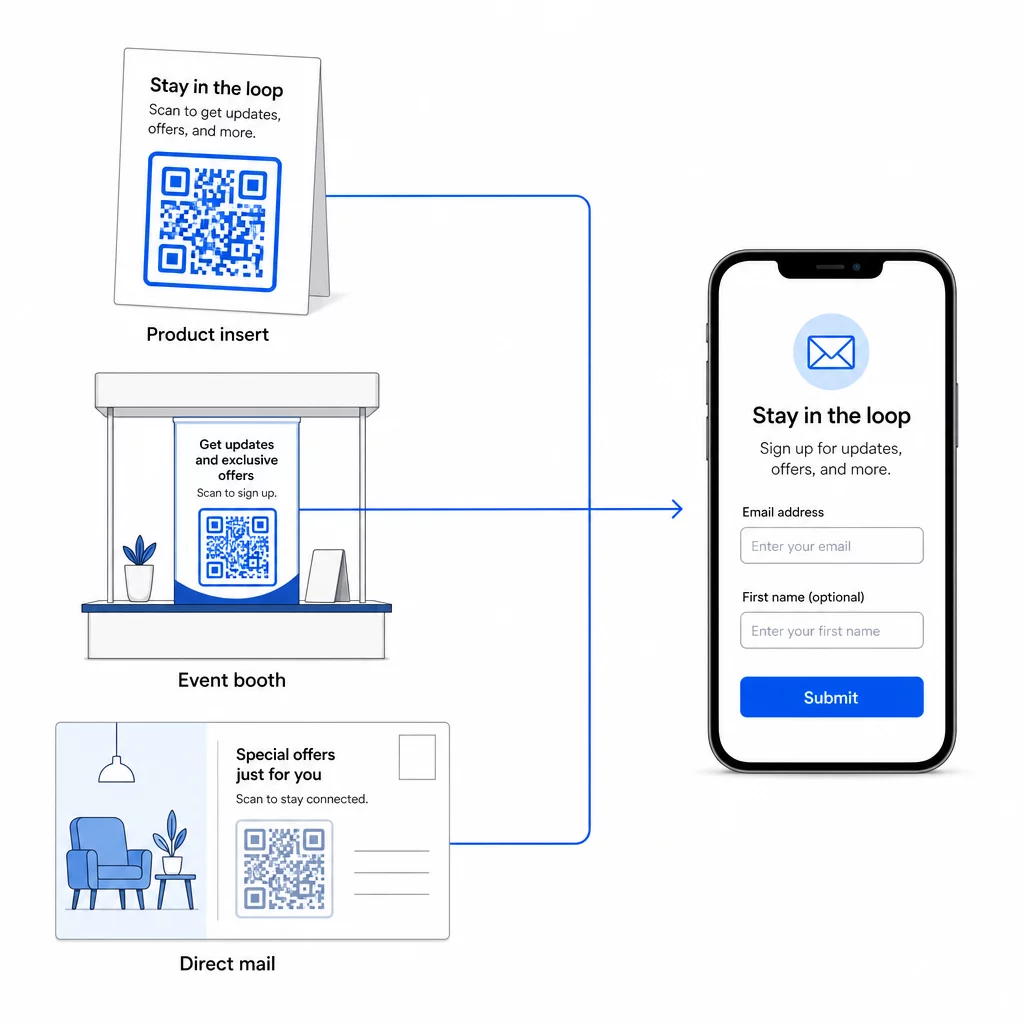
למבט רחב יותר על האופן שבו קודי QR מחברים ערוצים אלה, ראה כיצד קודי QR מחברים מדיה חברתית ודוא"ל ו איך להשתמש בקודי QR בשיווק.
העיקרון המרכזי פשוט: כל נקודת מגע פיזית שיש לעסק שלך היא נקודת רכישת מנויים פוטנציאלית. קוד QR הוא מה שהופך את ההמרה הזו לאפשרית.
התחל לאסוף מיילים מחומרים פיזיים צור קוד QR דינמי וניתן למעקב המקושר לטופס ההרשמה שלך באמצעות ה- מחולל קוד QR של Pageloot. ניסיון חינם למשך 14 יום – ללא צורך בכרטיס אשראי.
שאלות נפוצות
קוד QR למייל פותח את אפליקציית המייל של המשתמש עם הודעה מלאה מראש – הנמען, הנושא והגוף כבר מלאים, והמשתמש פשוט מקיש על שלח. קוד QR לטופס הרשמה מקשר לדף אינטרנט שבו המשתמש מזין את כתובת המייל שלו ישירות לתוך טופס. השתמש בגישת קוד ה-QR למייל עבור זרימות יצירת קשר או פניות פשוטות, ובגישת הטופס כאשר ברצונך להוסיף מנויים לרשימת דיוור באופן אוטומטי.
לא אם אתה משתמש בקוד QR דינמי. קודים דינמיים מאחסנים את היעד בקישור הפניה מחדש שתוכל לעדכן בלוח המחוונים של Pageloot בכל עת. הקוד המודפס עצמו אינו משתנה – רק היעד שאליו הוא מצביע. זה שימושי במיוחד עבור קמפיינים שבהם חומרים כבר הודפסו או הופצו.
כן, עם קוד QR דינמי תוכל לעקוב אחר סך הסריקות, סריקות ייחודיות, מיקום סריקה, סוג מכשיר ושעת היום. לוח המחוונים של Pageloot מציג נתונים אלה בזמן אמת, כך שתוכל להשוות ביצועים בין מיקומים או קמפיינים שונים ולבצע אופטימיזציה בהתאם. למד עוד על מעקב אחר סריקות קוד QR וניתוח נתונים.