Haluatko kasvattaa sähköpostilistaasi julisteista, pakkauksista tai henkilökohtaisista tapahtumista – mutta et keksi, miten saada ihmiset fyysisestä kosketuspisteestä ilmoittautumislomakkeeseen? Kuilu offline-läsnäolon ja online-tilaajien välillä maksaa sinulle todellisia liidejä. Tämä sivu näyttää tarkalleen, miten voit ylittää tämän kuilun QR-koodien avulla.
Miksi QR-koodit toimivat sähköpostin keräämisessä
Sähköpostimarkkinointi tuottaa keskimäärin 36 euroa jokaista käytettyä euroa kohden – mutta tämä tuotto toteutuu vain, jos saat ihmiset todella listallesi. Haaste yrityksille, jotka käyttävät painettuja materiaaleja, tapahtumia tai fyysisiä sijainteja, on se, ettei ole kitkatonta tapaa ohjata ketään esitteestä ilmoittautumislomakkeeseen. URL-osoitteen kirjoittaminen on este, jota useimmat ihmiset eivät vaivaudu ylittämään.
QR-koodi poistaa tämän esteen kokonaan. Yksi skannaus lähettää henkilön suoraan ilmoittautumislomakkeeseesi, joka on esiladattu ja valmis täytettäväksi hänen puhelimellaan. Kun QR-koodien käyttö Yhdysvalloissa ennustetaan nousevan 99,5 miljoonaan käyttäjään, tämä ei ole enää kapea-alainen taktiikka – se on valtavirran kanava listan kasvattamiseen.
On kaksi pääasiallista lähestymistapaa:
- Linkitä ilmoittautumislomakkeeseen – Ohjaa QR-koodi laskeutumissivulle tai lomakkeeseen (Mailchimp, Mailerlite, Google Forms jne.), johon kävijät syöttävät sähköpostiosoitteensa.
- Esitäytä sähköpostitoiminto – Käytä sähköpostin QR-koodia avataksesi käyttäjän sähköpostisovelluksen valmiiksi kirjoitetulla viestillä, jotta he voivat yksinkertaisesti painaa lähetä-painiketta ottaakseen sinuun yhteyttä tai liittyäkseen.
Molemmat menetelmät ovat oikeutettuja. Valintasi riippuu siitä, haluatko jäsenneltyä lomakedataa vai yksinkertaisen sähköpostiyhteyden.
Luo QR-koodi sähköpostin ilmoittautumisia varten Käytä Pageloot Link QR-koodigeneraattorilla muuttaaksesi minkä tahansa ilmoittautumislomakkeen URL-osoitteen skannattavaksi koodiksi sekunneissa – ilman teknistä osaamista.
QR-koodin määrittäminen sähköposti-ilmoittautumisia varten
Päätä, mitä keräät
Ennen kuin luot mitään, määrittele, mitä tarvitset. Pelkkä sähköpostiosoite pitää ilmoittautumisen nopeana ja konversioprosentit korkeina. Etunimen lisääminen mahdollistaa personoinnin kampanjoissa. Jokainen ylimääräinen kenttä, jonka vaadit, vähentää sen täyttävien ihmisten prosenttiosuutta, joten pidä lomake niin lyhyenä kuin käyttötapauksesi sallii.
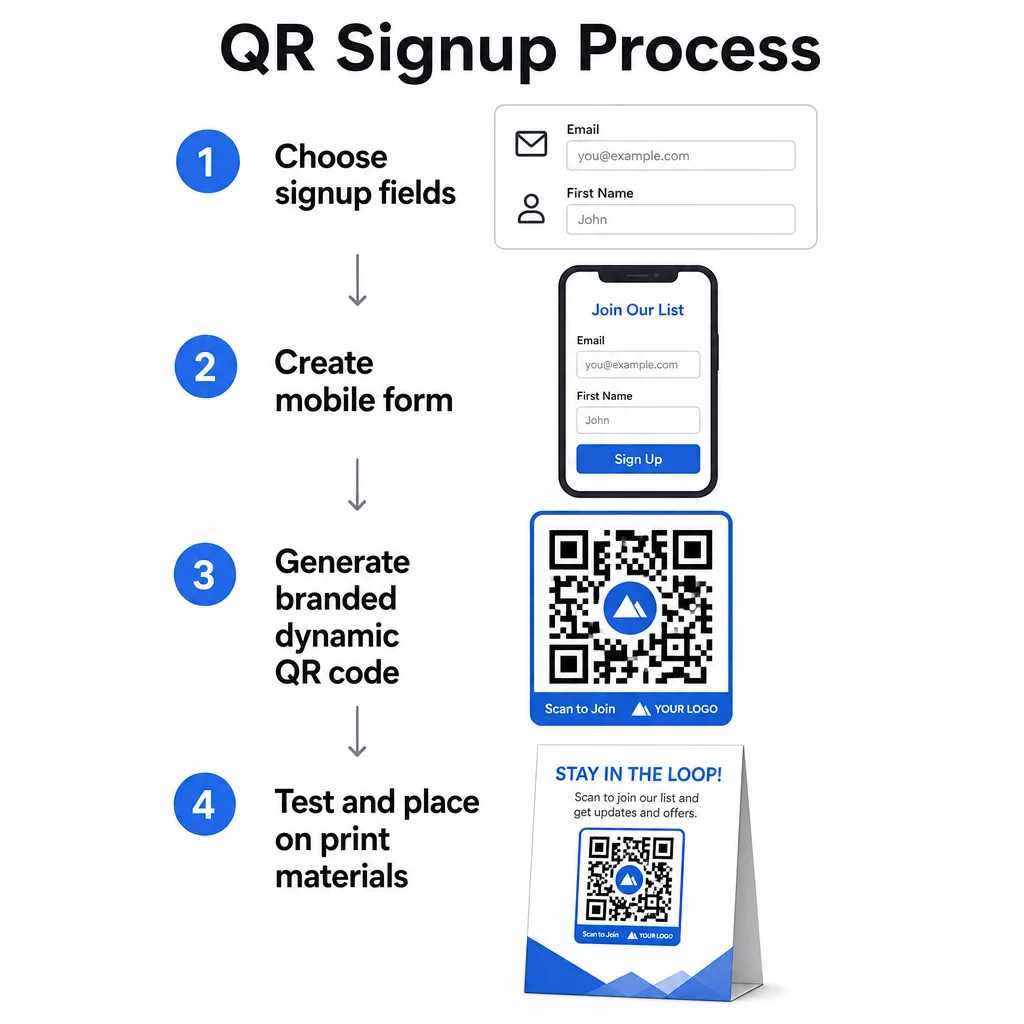
Luo tai valitse ilmoittautumislomakkeesi
Tarvitset URL-osoitteen, johon QR-koodisi osoittaa. Vaihtoehtoja ovat:
- Sähköpostialustasi (Mailchimp, Klaviyo, ConvertKit jne.) laskeutumissivu
- A Google Forms määritetty keräämään sähköpostiosoitteita
- Mukautettu QR-koodin aloitussivu rakennettu Pagelootin sisällä, jonka avulla voit yhdistää ilmoittautumislinkin ja muun asiaankuuluvan sisällön yhdelle brändätylle, mobiiliystävälliselle sivulle
Varmista, että kohdesivu latautuu nopeasti mobiililaitteella ja että sillä on yksi selkeä toiminto, jonka kävijä voi suorittaa. Parhaat käytännöt mobiilioptimoidun ja konvertoivan sivun rakentamiseen löydät kohdasta mobiili-QR-koodin laskeutumissivun parhaita käytäntöjä.
Luo QR-koodi
Liitä ilmoittautumislomakkeesi URL-osoite kohtaan Pageloot QR-koodigeneraattori. Generaattori luo skannattavan koodin välittömästi. Tästä eteenpäin voit:
- Lisää logosi ja brändivärisi
- Käytä toimintakehys (esim. “Skannaa tilataksesi”)
- Lataa tulostusvalmiissa muodoissa, kuten PNG, PDF, SVG ja EPS
Käytä dynaamista QR-koodia staattisen sijaan. Dynaamisten koodien avulla voit muuttaa kohde-URL-osoitetta sen jälkeen, kun koodi on jo tulostettu tai otettu käyttöön – joten jos ilmoittautumislomakkeesi URL-osoite muuttuu, päivität linkin hallintapaneelissasi sen sijaan, että tulostaisit kaikki materiaalit uudelleen. Dynaamiset koodit mahdollistavat myös skannausten seurannan.
Testaa ennen käyttöönottoa
Skannaa koodi useilla laitteilla – sekä iOS- että Android-laitteilla – ennen tulostamista. Varmista, että lomake latautuu oikein, kentät toimivat ja lähetä-painike on toiminnallinen. Testaaminen todellisissa valaistusolosuhteissa ja todellisella etäisyydellä, jolla koodi ilmestyy (julisteessa, pakkauksessa, pöytäkortissa jne.), estää ongelmia sen jälkeen, kun materiaalit on jo jaettu. Sijoitusohjeita varten lopullinen opas QR-koodien sijoitteluun markkinoinnissa käsittelee kokoa, sijaintia ja ympäristönäkökulmia yksityiskohtaisesti.
Best Practices for QR Code Email Collection
Kirjoita selkeä toimintakehote. “Scan to subscribe” tells people nothing. “Scan for 15% off your first order” or “Scan to join our weekly deals list” explains exactly what they’re getting. The more concrete the benefit, the higher the scan rate.
Offer something in exchange. A discount, a downloadable resource, early access, or exclusive content gives people a reason to hand over their email address. Without an incentive, most passersby have no motivation to stop and scan.
Keep the landing page focused. Once someone scans, the page they land on should have one job: collect the email address. Avoid navigation menus, unrelated links, or distracting elements. A single headline, a brief value statement, and a form field with a submit button is often all you need.
Be transparent about privacy. Tell people what you’ll send them and how often. Link to your privacy policy. Under the CAN-SPAM Act, every commercial email must include a valid physical address and a working unsubscribe mechanism – make sure your email platform handles this automatically.
Place the code where people have a moment to stop. QR codes on fast-moving signage or in low-light environments get ignored. Good placements include checkout counters, table tents, product packaging, event programs, and printed handouts. Eye level (roughly 3.5 to 5.5 feet) and a quiet, uncluttered background improve scan rates.
Track Which Placements Drive the Most Sign-ups Kanssa Pageloot’s QR code tracking, you can monitor scan volume, location, device type, and time of day – so you know which materials are actually converting and where to invest more.
Pros and Cons of QR Code Sign-ups
| Advantage | Potential Drawback | Ratkaisu |
|---|---|---|
| Manuaalista URL-osoitteen syöttämistä ei tarvita | Vanhemmista laitteista saattaa puuttua sisäänrakennettu skanneri | Tarjoa lyhyt URL-vaihtoehto koodin alapuolella |
| Toimii luontevasti mobiililaitteilla | Tarkoitus voi olla epäselvä ilman kontekstia | Käytä selkeää toimintakehote-kehystä koodin ympärillä |
| Kontaktiton ja kätevä | Jotkut käyttäjät epäilevät tuntemattomia QR-koodeja | Näytä URL-osoitteesi ja tietosuojakäytäntösi rinnalla |
| Seurattavissa dynaamisilla koodeilla | Staattisia koodeja ei voi päivittää, jos lomakkeen URL-osoite muuttuu | Käytä aina dynaamisia QR-koodeja kampanjoissa |
Sähköpostin ja offline-kanavien yhdistäminen
QR-koodit ovat tehokkaimpia, kun ne ovat osa harkittua strategiaa, joka yhdistää fyysisen ja digitaalisen markkinointisi. Tuotepakkauksen sisällä oleva koodi voi kasvattaa listasi asiakkaista, jotka ovat jo ostaneet jotain. Tapahtumakojussa oleva koodi voi kerätä liidejä, jotka eivät muuten koskaan löytäisi ilmoittautumislomakettasi. Suoramainoksessa oleva koodi antaa vastaanottajille välittömän tavan liittyä mukaan.
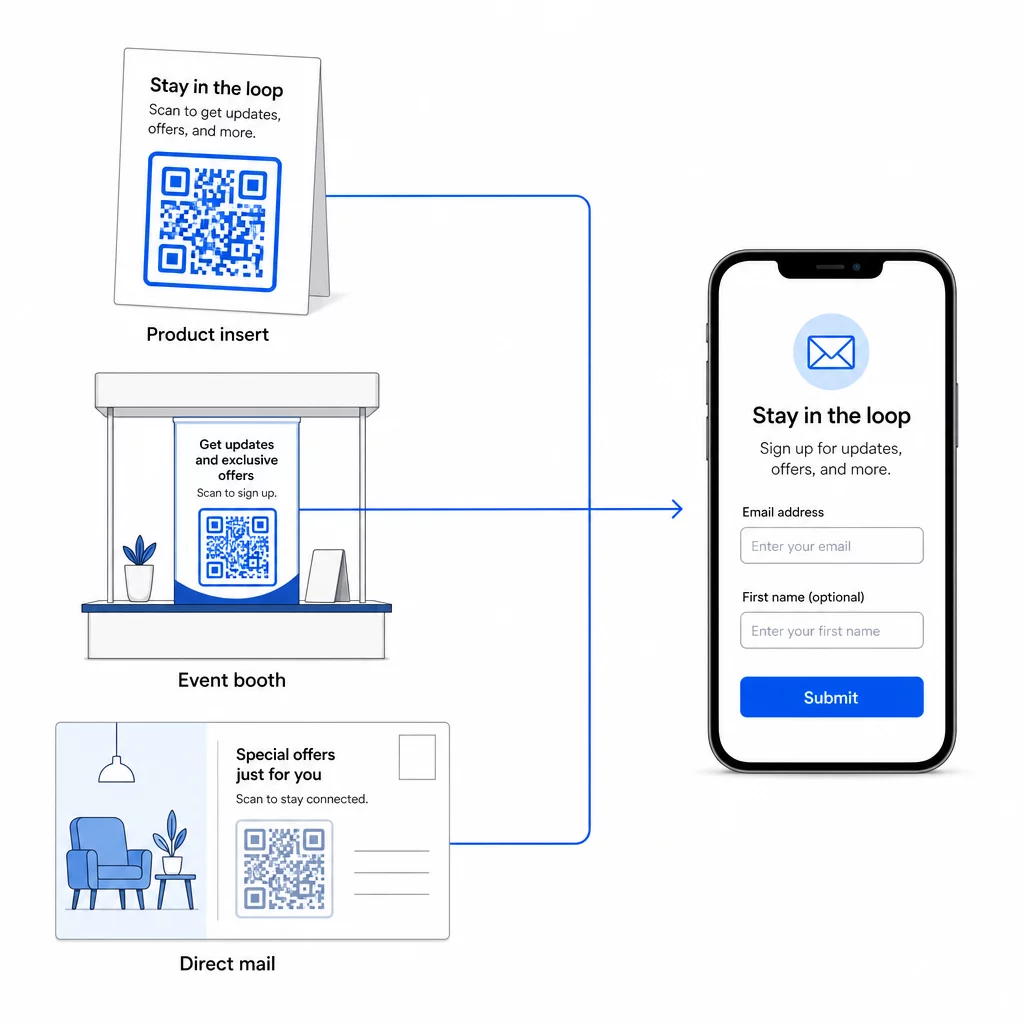
Laajemman katsauksen siitä, miten QR-koodit yhdistävät nämä kanavat, katso miten QR-koodit yhdistävät sosiaalisen median ja sähköpostin ja miten käyttää QR-koodeja markkinoinnissa.
Ydinasia on yksinkertainen: jokainen yrityksesi fyysinen kosketuspiste on potentiaalinen tilaajien hankintapiste. QR-koodi tekee tästä konversiosta mahdollisen.
Aloita sähköpostiosoitteiden kerääminen fyysisistä materiaaleista Luo dynaaminen, seurattava QR-koodi, joka on linkitetty ilmoittautumislomakkeeseesi käyttämällä Pageloot QR-koodigeneraattori. Ilmainen 14 päivän kokeilu – luottokorttia ei tarvita.
Usein kysytyt kysymykset
Sähköposti-QR-koodi avaa käyttäjän sähköpostisovelluksen esitäytetyllä viestillä – vastaanottaja, aihe ja viestin sisältö on jo täytetty, ja käyttäjä napauttaa vain lähetä. Ilmoittautumislomakkeen QR-koodi linkittää verkkosivulle, jossa käyttäjä syöttää sähköpostiosoitteensa suoraan lomakkeeseen. Käytä sähköposti-QR-lähestymistapaa yksinkertaisiin yhteydenotto- tai tiedusteluvirtoihin, ja lomakelähestymistapaa, kun haluat lisätä tilaajia sähköpostimarkkinointilistalle automaattisesti.
Ei, jos käytät dynaamista QR-koodia. Dynaamiset koodit tallentavat kohteen uudelleenohjauslinkkiin, jonka voit päivittää Pageloot-hallintapaneelissasi milloin tahansa. Itse painettu koodi ei muutu – vain kohde, johon se osoittaa. Tämä on erityisen hyödyllistä kampanjoissa, joissa materiaalit on jo painettu tai jaettu.
Kyllä, dynaamisella QR-koodilla voit seurata skannausten kokonaismäärää, yksilöllisiä skannauksia, skannauspaikkaa, laitetyyppiä ja kellonaikaa. Pagelootin hallintapaneeli näyttää nämä tiedot reaaliaikaisesti, jotta voit vertailla suorituskykyä eri sijoittelujen tai kampanjoiden välillä ja optimoida sen mukaisesti. Lue lisää QR-koodiskannausten ja analytiikan seurannasta.