Have you ever scanned a marketing QR code only to encounter a camera reading failure or a broken mobile landing page? A failed scan immediately frustrates users, damages brand credibility, and leads to abandoned visits. By following a structured testing process for physical scan reliability, mobile-first page usability, and security verification, you can deliver an effortless experience across every smartphone.
Calibrating Code Dimensions and Optical Contrast
Reliable scanning begins with the physical geometry of your code. If a code is too small or placed too far from the user, smartphone camera sensors cannot distinguish the individual data modules. You should calculate physical dimensions using the 10:1 scanning ratio, where the code width is at least one-tenth of the intended distance between the phone and the surface. For close-range materials such as business cards or packaging, maintain a minimum size of 2 x 2 cm (0.8 x 0.8 inches). Reviewing a comprehensive QRコードサイズガイド helps ensure your dimensions match your real-world display environment before mass distribution.
Camera lenses rely on optical distinction to interpret matrix symbols. Dark modules absorb light while light backgrounds reflect it, enabling the camera software to locate data patterns rapidly. You should maintain a contrast ratio of at least 4.5:1 between the foreground pattern and the background surface. Applying established QRコードの色のコントラストに関するベストプラクティス means using solid dark colors on light backgrounds and skipping decorative gradients or drop shadows that blur module borders.
Every printed or digital symbol also requires an unobstructed border known as the quiet zone. This margin should measure at least four modules wide on all four sides. Without this empty space, mobile scanners often mistake surrounding graphics, typography, or packaging borders for encoded data, causing scan errors.
Testing Across Operating Systems and Real-World Conditions
Smartphone hardware varies widely between manufacturers, camera optics, and operating systems. While recent Apple iPhones running iOS 11 or later and Android devices running Android 9 or newer feature native QR detection in their default camera apps, camera sensor sensitivities differ. Mid-range and budget smartphones often feature slower autofocus systems and struggle in environments with glare or limited ambient lighting.
A comprehensive testing matrix must evaluate the code across physical setups:
- Scan under bright, direct light to verify that reflections on glossy paper or plastic do not wash out the modules.
- Test the code in dim lighting conditions to confirm that mobile camera sensors can still detect the finder patterns.
- Inspect codes applied to curved containers, such as bottles or cans, to ensure curvature does not warp the data grid beyond recognition.
- Evaluate scan times across both Wi-Fi and mobile data connections (4G and 5G), targeting a scan-to-decode duration between 0 and 3 seconds.
- Validate codes with both native smartphone camera software and an online QRコード読み取り(スキャナー) to verify that different decoders parse your destination accurately.
Performing a physical test run is essential. Following a checklist to test a QR code before printing on your actual production materials prevents expensive reprints caused by unexpected material textures or ink absorption.
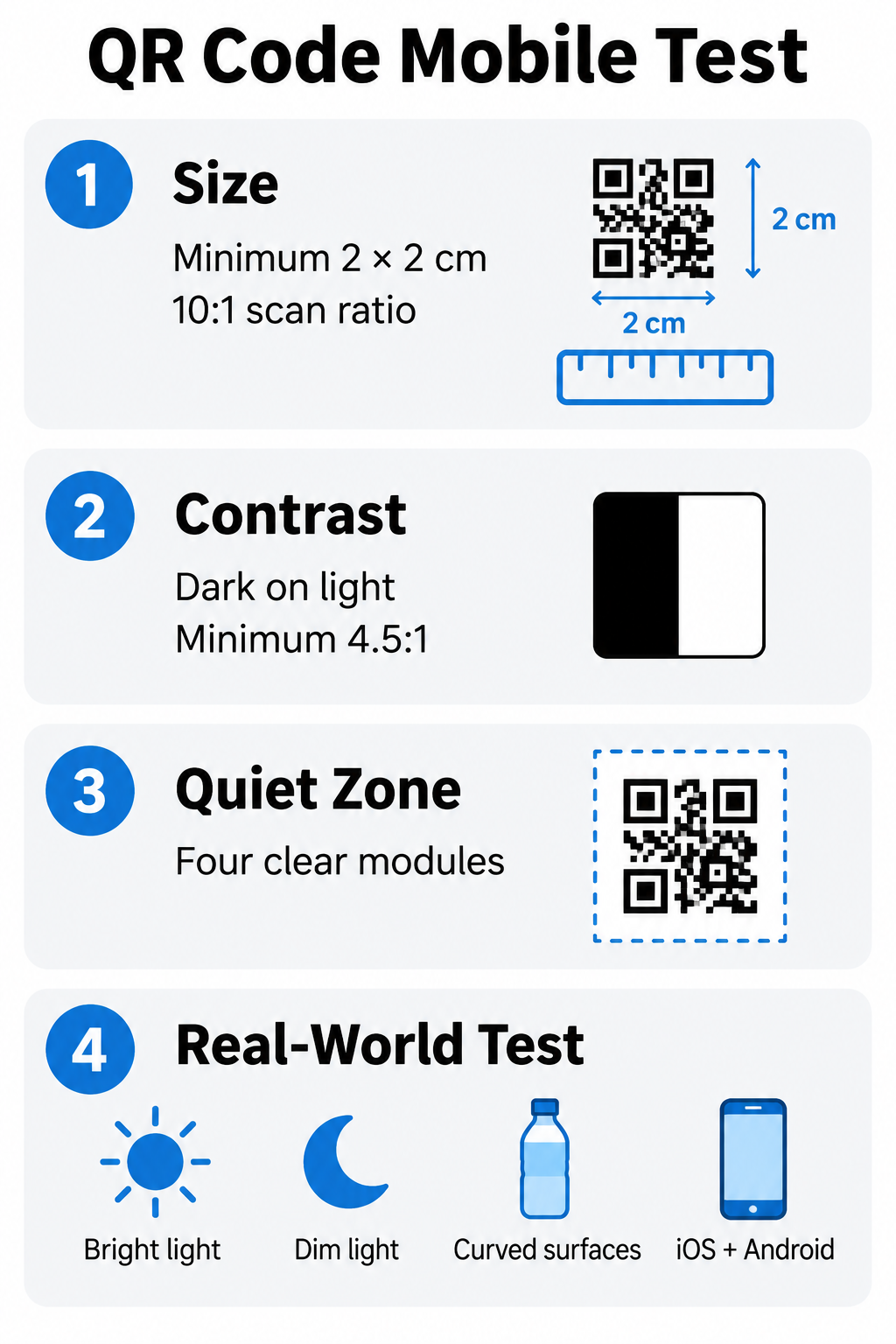
| Usability Factor | 推奨される基準 | Common Mobile Failure Risk |
|---|---|---|
| 物理的サイズ | 10:1 distance-to-size ratio (minimum 2 x 2 cm) | Blurry focus on budget cameras |
| カラーコントラスト | Minimum 4.5:1 ratio (dark on light) | Decoding failure in low-light environments |
| クワイエットゾーン | 4 modules of clear space on all sides | Graphic clipping from adjacent design elements |
| Target Decode Time | Under 3 seconds | User abandonment before page load initiates |
| Tap Target Size | Minimum 44 x 44 CSS pixels (ideally 48px) | Accidental misclicks on touchscreen devices |
スキャン後のモバイルランディングページの評価
A fast scan is meaningless if the destination URL delivers a frustrating mobile experience. Because mobile users often scan on the go with limited time or fluctuating cellular connections, post-scan performance directly determines your conversion rate. Your destination site must follow proven モバイルQRコードランディングページのベストプラクティス to keep visitors engaged.
Mobile performance testing should focus on core usability and interface standards:
- Configure a fluid, mobile-first layout using a responsive viewport so the page fits the screen width without requiring horizontal scrolling or manual zooming.
- Maintain Core Web Vitals targets at the 75th percentile of visits, keeping Largest Contentful Paint (LCP) within 2.5 seconds, Interaction to Next Paint (INP) below 200 milliseconds, and Cumulative Layout Shift (CLS) under 0.1.
- Design touch-friendly interactive elements by ensuring buttons and link targets are at least 44 by 44 CSS pixels (preferably 48 pixels wide) with adequate spacing to prevent accidental taps.
- Set base typography to a minimum of 16 pixels to preserve legibility without forcing users to pinch and zoom on compact screens.
- Eliminate intrusive pop-ups and full-screen interstitials that block primary content immediately after page arrival.
For enterprise applications and automated builds, aligning your manual checks with the ultimate guide to QR code testing in software helps development teams catch URL and formatting regressions early in the deployment pipeline.
Verifying Security, Links, and User Safety
User security is a fundamental component of usability. Because the encoded contents of a QR code cannot be read by the naked eye, users must trust that your link leads to a secure destination. Scammers frequently exploit this visual opacity through QR spoofing or placing physical stickers over legitimate public codes.
To protect your audience and uphold your brand reputation, test your deployment against safety protocols:
- Serve all destination URLs over secure HTTPS connections with valid SSL certificates to safeguard transmitted data.
- Check physical displays in public areas regularly to ensure unauthorized individuals have not pasted malicious adhesive overlays on top of your codes.
- Inspect the decoded URL preview on your mobile screen before clicking to confirm that domain names match your official web property without typos or deceptive subdomains.
- Avoid directing users to immediate app installation prompts or unexpected login fields directly from a physical scan without clear context.
Understanding potential QRコードのプライバシーリスクとその回避方法 enables your team to deploy transparent campaigns that collect only essential aggregate data while protecting visitor personal information.
Managing Deployments with Dynamic QR Codes
Static QR codes hardcode the destination web address directly into the black-and-white module pattern. If you discover a broken link, update a landing page URL, or catch a typo after production, a static code cannot be corrected, rendering your physical marketing materials useless.
Using an online QRコードジェネレーター with dynamic code capabilities solves this problem by routing scans through an editable short URL.
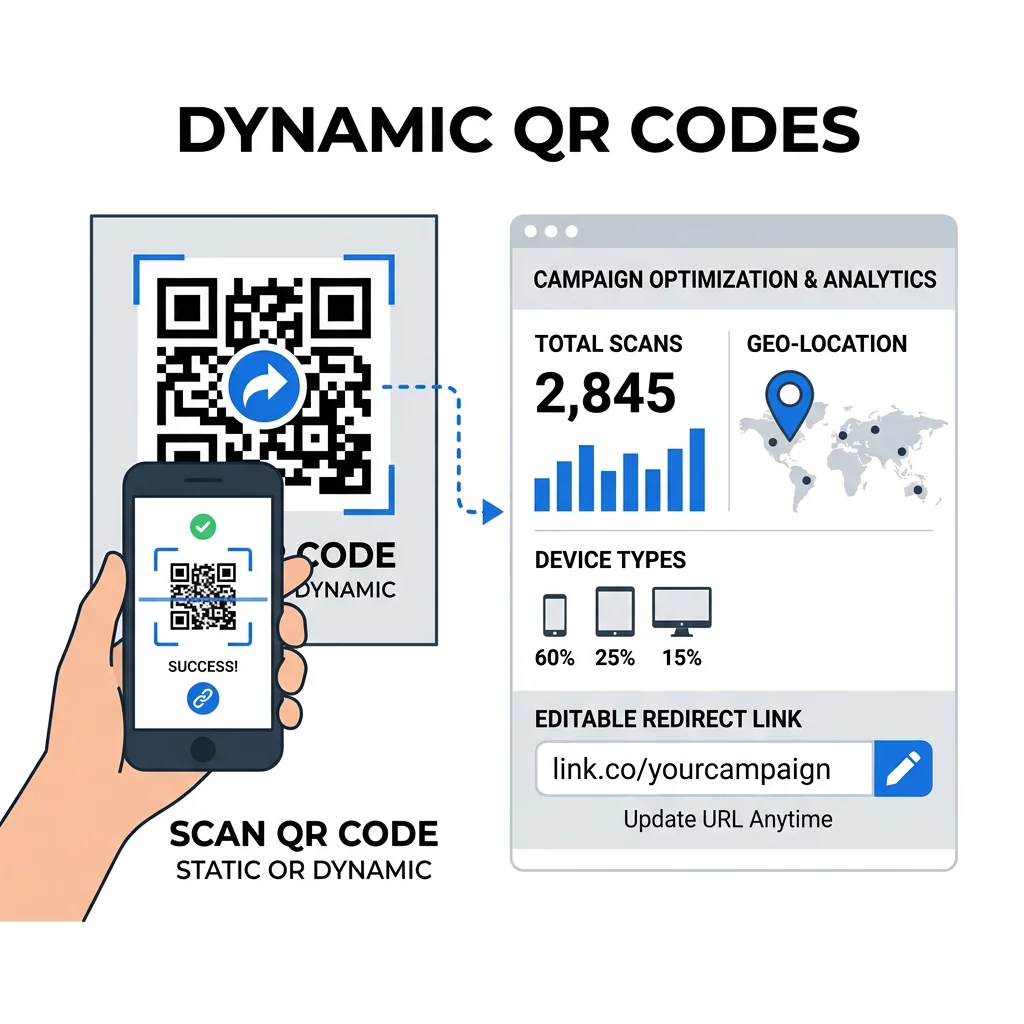
Dynamic codes keep data patterns simple and uncluttered, which improves camera recognition speed even at small sizes. Furthermore, dynamic platforms provide campaign tracking metrics that allow you to monitor scan counts, user operating systems, and scanning timestamps in real time. Following established QRコードのユーザビリティに関するベストプラクティス ensures your campaigns maintain the right balance between design customization, scanning speed, and long-term link maintenance.
Manage and Monitor Every Mobile Scan Looking to track user engagement and modify campaign landing pages without reprinting your materials? Explore the ダイナミックQRコード作成ツール to build editable codes and monitor real-time scan analytics from one central dashboard.
A disciplined mobile testing routine bridges the gap between your physical touchpoints and digital campaigns. By validating physical scanning dimensions, ensuring fast mobile landing page performance, and securing your destination links, you create a frictionless journey for every customer. Test your codes across varied devices and real-world conditions today using the comprehensive creation and scanning tools available on Pageloot.
よくある質問
The practical minimum size for print materials is 2 x 2 cm (0.8 x 0.8 inches). For codes viewed from greater distances, apply the 10:1 scanning ratio, ensuring the width of the code is at least one-tenth of the distance between the camera and the surface.
A responsive QR code should decode on a smartphone camera within 0 to 3 seconds. The linked landing page should achieve a Largest Contentful Paint (LCP) within 2.5 seconds on mobile connections to minimize bounce rates.
Inconsistent scanning usually stems from low color contrast, insufficient quiet zone margins, or overly dense data patterns. Budget smartphone cameras often lack advanced autofocus and contrast compensation, requiring clean dark-on-light patterns with at least a 4.5:1 contrast ratio.