Apakah Anda kesulitan membuat perekrut memperhatikan portofolio atau profil LinkedIn Anda? Sebuah kode QR pada resume Anda menjembatani kesenjangan antara halaman cetak dan kehadiran digital penuh Anda – panduan ini menjelaskan cara membuatnya, tempat menempatkannya, dan cara menghindari kesalahan yang membuatnya terlihat tidak profesional.
Apa yang Sebenarnya Dilakukan Kode QR Resume
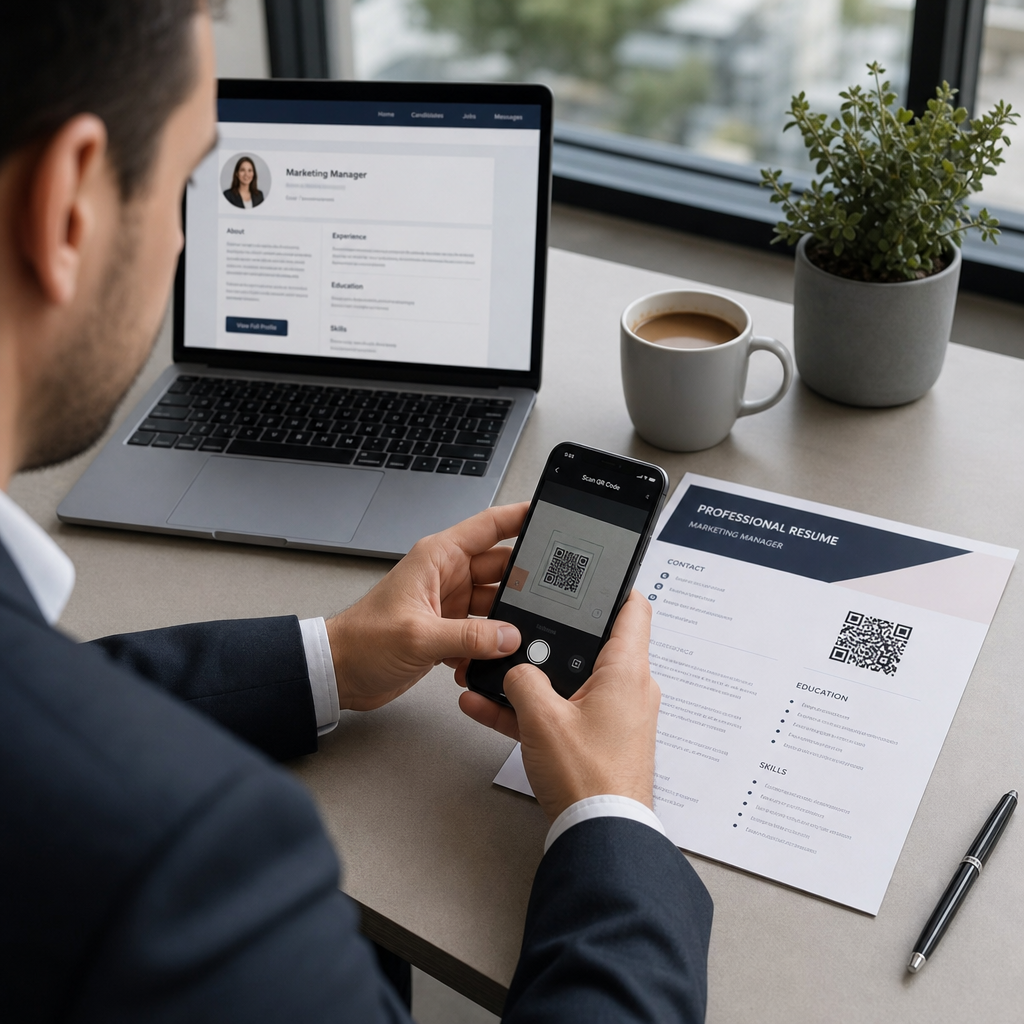
Sebuah kode QR adalah gambar yang dapat dipindai yang mengkodekan URL atau data lain. Ketika seorang perekrut mengarahkan kamera ponsel mereka ke sana, itu membuka portofolio, profil LinkedIn, atau resume digital Anda langsung di browser mereka – tidak perlu mengetik.
Pada resume, ini memecahkan masalah nyata: perekrut yang membaca salinan cetak tidak memiliki cara mudah untuk mengklik tautan Anda. Sebuah kode QR mengubah halaman statis menjadi interaktif tanpa menambahkan kekacauan. Jenis tujuan yang dapat Anda tautkan meliputi:
- profil LinkedIn – memungkinkan perekrut meninjau riwayat pekerjaan, rekomendasi, dan aktivitas penuh Anda
- Portofolio online – menunjukkan pekerjaan proyek, studi kasus, atau contoh kreatif
- Resume PDF – memberikan akses ke versi resume Anda yang diperluas atau diformat
- Kartu kontak digital (vCard) – memungkinkan perekrut menyimpan detail kontak Anda langsung ke ponsel mereka
Kapan Menambahkan Kode QR Masuk Akal
Sebuah kode QR menambah nilai dalam situasi tertentu. Ini bekerja paling baik ketika resume Anda akan dicetak dan diserahkan kepada seseorang secara langsung – pada wawancara, pameran karier, atau acara jejaring – dan ketika Anda memiliki portofolio, situs pribadi, atau profil LinkedIn yang layak dikunjungi. Ini sangat efektif di bidang-bidang di mana menunjukkan pekerjaan itu penting: desain, pengembangan, penulisan, pemasaran, atau disiplin kreatif apa pun di mana seorang perekrut mendapat manfaat dari melihat contoh di luar apa yang muat di halaman.
Ini menambah nilai lebih sedikit ketika resume Anda hanya akan dikirimkan melalui portal aplikasi online. Dalam kasus tersebut, perekrut jarang mencetak resume, sehingga kode QR tidak dipindai. Anggaplah itu sebagai fitur untuk pengalaman tatap muka, bukan pengganti tautan teks biasa yang berfungsi di mana saja.
Bagaimana Sistem ATS Menangani Kode QR
Sebelum menambahkan kode QR, Anda perlu memahami cara kerja sistem pelacakan pelamar. Platform ATS membaca teks dan sebagian besar mengabaikan elemen gambar – sebuah kode QR diperlakukan sebagai grafik non-teks dan hanya dilewati selama parsing. Ini berarti kode itu sendiri tidak akan merugikan skor ATS Anda, tetapi juga tidak akan membantunya. Yang penting bagi ATS adalah teks pada resume Anda.
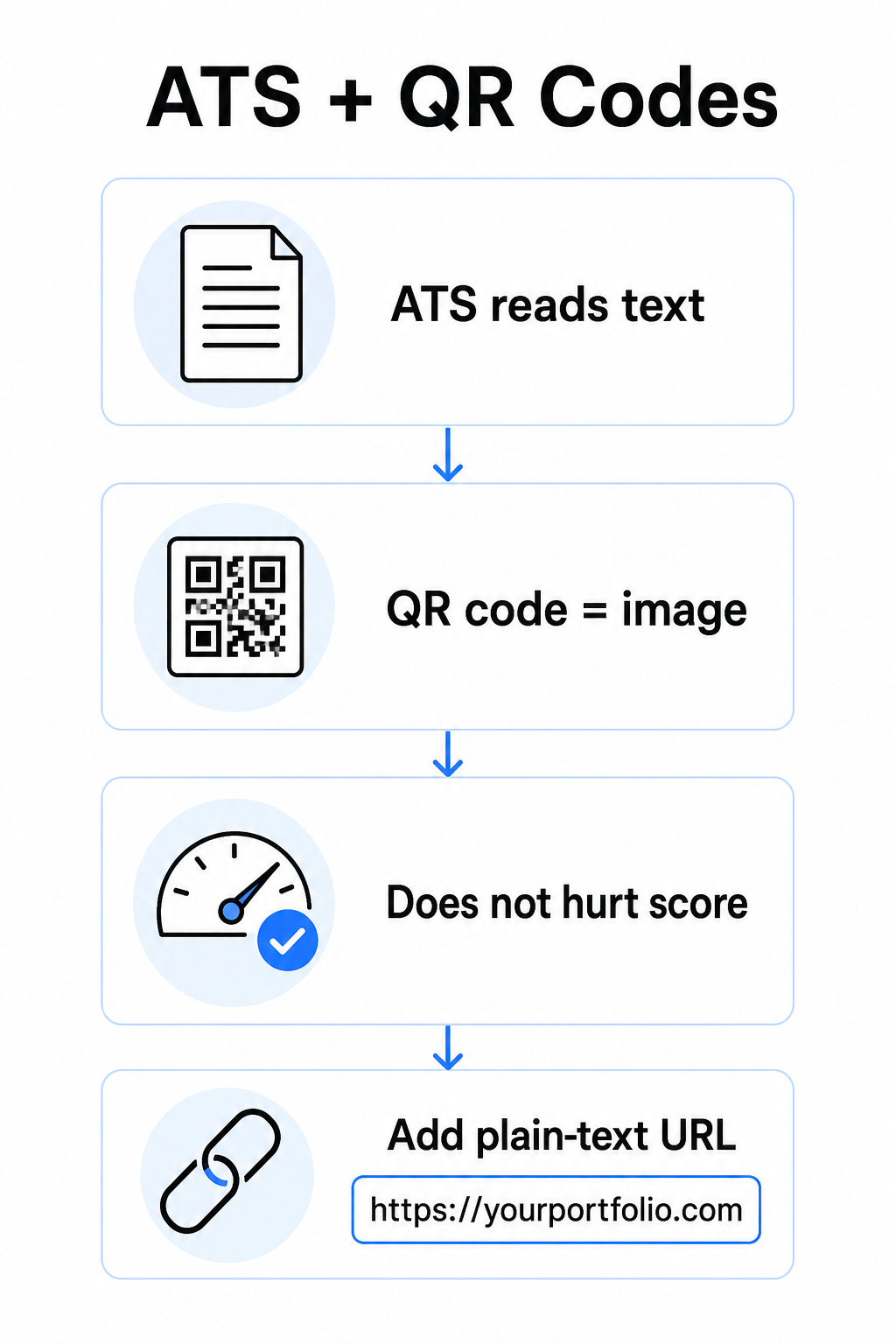
Selalu sertakan URL teks biasa di samping kode QR Anda. Tulis tautan lengkap dalam teks yang mudah dibaca (misalnya, `linkedin.com/in/yourname`) agar tujuan tetap dapat diakses oleh perangkat lunak ATS dan perekrut mana pun yang meninjau salinan digital yang tidak dapat memindai gambar.
Jaga format resume Anda secara keseluruhan tetap sederhana. Tata letak yang kompleks, kotak teks, beberapa kolom, dan grafik berat dapat membingungkan parser ATS – jadi kode QR Anda harus berada dengan rapi dalam tata letak yang bersih dan standar daripada mendominasi desain.
Buat Kode QR untuk Resume Anda Siap menautkan portofolio atau profil LinkedIn Anda dengan kode yang dapat dipindai? Gunakan Generator Kode QR untuk membuat kode QR yang disesuaikan dan profesional dalam hitungan menit – tidak perlu pengalaman desain.
Mempersiapkan Tujuan Anda Sebelum Anda Membuat
Kode QR hanya sekuat apa yang ditautkannya. Sebelum Anda membuatnya, pastikan tujuan sudah siap untuk dilihat perekrut.
Profil LinkedIn
Mulailah dengan membuat URL LinkedIn kustom – seperti `linkedin.com/in/firstname-lastname` – agar tautan terlihat bersih daripada serangkaian karakter acak. Tambahkan foto profil profesional, yang meningkatkan kredibilitas dan tampilan profil. Tulis judul dan ringkasan yang jelas, relevan dengan kata kunci menggunakan jabatan yang dikenal dan pencapaian yang terukur yang diambil dari peran target Anda. Kemudian perbarui riwayat pekerjaan, pendidikan, dan contoh media apa pun yang menampilkan pekerjaan Anda sebelum membagikan tautan di mana pun.
Anda dapat mempelajari lebih lanjut tentang Cara menemukan dan memakai barcode LinkedIn Anda dan membuat yang kustom dengan Generator QR Code LinkedIn.
Situs Portofolio
Kurasi 4–6 proyek yang relevan langsung dengan peran yang Anda lamar, dan sertakan hasil yang terukur untuk setiap proyek – hasil, dampak, dan apa yang secara spesifik Anda kontribusikan. Tulis deskripsi dalam bahasa Inggris sederhana dan periksa secara menyeluruh ejaan dan tata bahasa. Uji situs di perangkat seluler dan desktop untuk memastikan pemuatan cepat dan format yang bersih, dan gunakan URL pendek, profesional dengan slug kustom. Hindari tautan yang terlihat seperti serangkaian angka dan tanda hubung, yang dapat terlihat seperti spam atau tidak dapat dipercaya oleh perekrut.
Resume PDF
Jika Anda ingin menautkan ke versi resume Anda yang lebih panjang atau lebih diformat secara visual, kode QR PDF adalah pilihan yang mudah. Gunakan Ubah PDF ke QR Code untuk mengunggah dokumen Anda dan menghasilkan tautan yang dapat dipindai langsung ke sana.
Kartu Kontak (vCard)
Sebuah kode QR vCard menyandikan detail kontak Anda – nama, telepon, email, dan situs web – langsung ke dalam kode itu. Ketika seseorang memindainya, mereka dapat menyimpan Anda ke kontak mereka secara instan tanpa mengetik satu karakter pun. Ini berfungsi sangat baik di bagian kontak dari resume atau pada kartu nama yang Anda berikan saat wawancara. The Generator kode QR vCard membuat pembuatannya mudah, dan Anda dapat membaca lebih lanjut tentang cara membuat kode QR untuk info kontak untuk mendapatkan hasil maksimal dari format ini.
Cara Membuat Kode QR Resume Anda
Setelah tujuan Anda siap, menghasilkan kode QR itu hanya membutuhkan beberapa langkah.
Pertama, pilih generator yang tepat untuk tujuan Anda. Gunakan the Generator QR Code LinkedIn untuk tautan profil, the Ubah PDF ke QR Code untuk dokumen, the Generator kode QR vCard untuk detail kontak, atau the Generator Kode QR Tautan untuk URL lainnya. Kemudian tempelkan URL tujuan Anda atau unggah file Anda.
Pada tahap ini, pertimbangkan apakah akan menggunakan sebuah kode QR dinamis. Kode dinamis menyimpan URL pengalihan singkat di dalam kode itu daripada menyandikan tujuan penuh secara langsung. Ini berarti Anda dapat memperbarui ke mana kode itu mengarah – bahkan setelah dicetak – tanpa mengubah kode itu sendiri. Jika URL portofolio Anda berubah atau Anda memperbarui alamat LinkedIn Anda, sebuah kode dinamis menyelamatkan Anda dari mencetak ulang resume Anda.
Selanjutnya, sesuaikan desain nya. Sesuaikan warna untuk mencocokkan palet resume Anda, menjaga latar depan gelap dan latar belakang terang. Hitam di atas putih tetap menjadi kombinasi yang paling andal untuk pemindai. Hindari gradien, bayangan, atau desain terbalik (kode terang di latar belakang gelap), karena ini dapat menyebabkan kegagalan pemindaian pada beberapa perangkat.
Ketika Anda siap untuk mengunduh, ekspor sebagai SVG atau EPS untuk hasil yang paling tajam. Format vektor ini berskala tanpa kehilangan kualitas, mencegah keburaman yang menyebabkan kegagalan pemindaian pada bahan cetak. Akhirnya, uji kode itu pada beberapa perangkat dan dalam kondisi pencahayaan yang berbeda sebelum menambahkannya ke resume Anda. Konfirmasikan tujuan memuat dengan benar dan cepat pada koneksi Wi-Fi dan seluler.
Tautkan URL Apa Pun ke Kode yang Dapat Dipindai Apakah tujuan Anda adalah sebuah portofolio, situs pribadi, atau halaman web lainnya, the Generator Kode QR Tautan memungkinkan Anda membuat sebuah kode yang disesuaikan, dapat dilacak dalam hitungan detik.
Standar Desain Kode QR untuk Resume
Sebuah kode QR pada resume perlu terlihat disengaja, bukan hanya ditambahkan sebagai pemikiran terakhir. Pedoman teknis berikut memastikan itu memindai dengan andal dan pas di halaman dengan rapi.
Ukuran
Ukuran minimum yang direkomendasikan untuk sebuah kode QR dalam konteks pemindaian jarak dekat – seperti resume yang dipegang sejauh lengan – adalah 0,8 x 0,8 inci (2 x 2 cm). Ukuran yang lebih kecil berisiko kegagalan pemindaian; apa pun sekitar 0,4 x 0,4 inci (1 x 1 cm) terlalu kecil untuk penggunaan yang konsisten. The Panduan Ukuran QR Code di Kartu Nama berlaku sama untuk resume dan layak ditinjau sebelum Anda menyelesaikan tata letak Anda.
Kontras Warna
Pemindai bekerja dengan mendeteksi kontras antara modul gelap dan terang. Targetkan rasio kontras setidaknya 4,5:1 untuk kode QR kecil, sejalan dengan pedoman aksesibilitas. Hitam di atas putih mencapai rasio 21:1 dan merupakan pilihan teraman. Hindari abu-abu muda di atas putih, kuning di atas putih, atau pasangan apa pun di mana kode itu menyatu dengan latar belakang halaman. The full praktik terbaik kontras warna kode QR panduan menyediakan rekomendasi pasangan terperinci dan contoh rasio kontras.
Zona Tenang
Zona tenang adalah batas kosong yang mengelilingi kode QR itu. Menurut ISO/IEC 18004, itu harus setidaknya empat modul lebar di semua sisi – yaitu, empat kali lebar dari satu kotak kecil di kisi kode itu. Jangan pernah menempatkan teks, garis, atau elemen desain lainnya di dalam margin ini. Zona tenang yang hilang atau ramai adalah salah satu alasan paling umum sebuah kode QR gagal dipindai, dan mudah untuk secara tidak sengaja melanggar saat memasukkan kode ke dalam tata letak resume yang ketat.
Resolusi
Ekspor kode QR Anda minimal 300 DPI untuk dicetak. Lebih baik lagi, gunakan format vektor (SVG atau EPS) sehingga kode itu berskala dengan rapi terlepas dari ukuran cetak, tanpa pikselasi. The praktik terbaik untuk keterbacaan kode QR mencakup resolusi, zona tenang, dan kontras di satu tempat jika Anda menginginkan referensi yang komprehensif.
Di Mana Menempatkan Kode QR itu pada Resume Anda
Penempatan menandakan profesionalisme. Sebuah kode QR yang diletakkan secara acak di tengah bagian pengalaman Anda terlihat seperti kecelakaan. Dua posisi paling efektif adalah di dekat informasi kontak Anda di bagian atas halaman – di mana perekrut mencari pertama untuk cara menghubungi Anda – atau di sudut kanan atas, yang menjaga kode itu terlihat tanpa bersaing dengan teks utama resume.
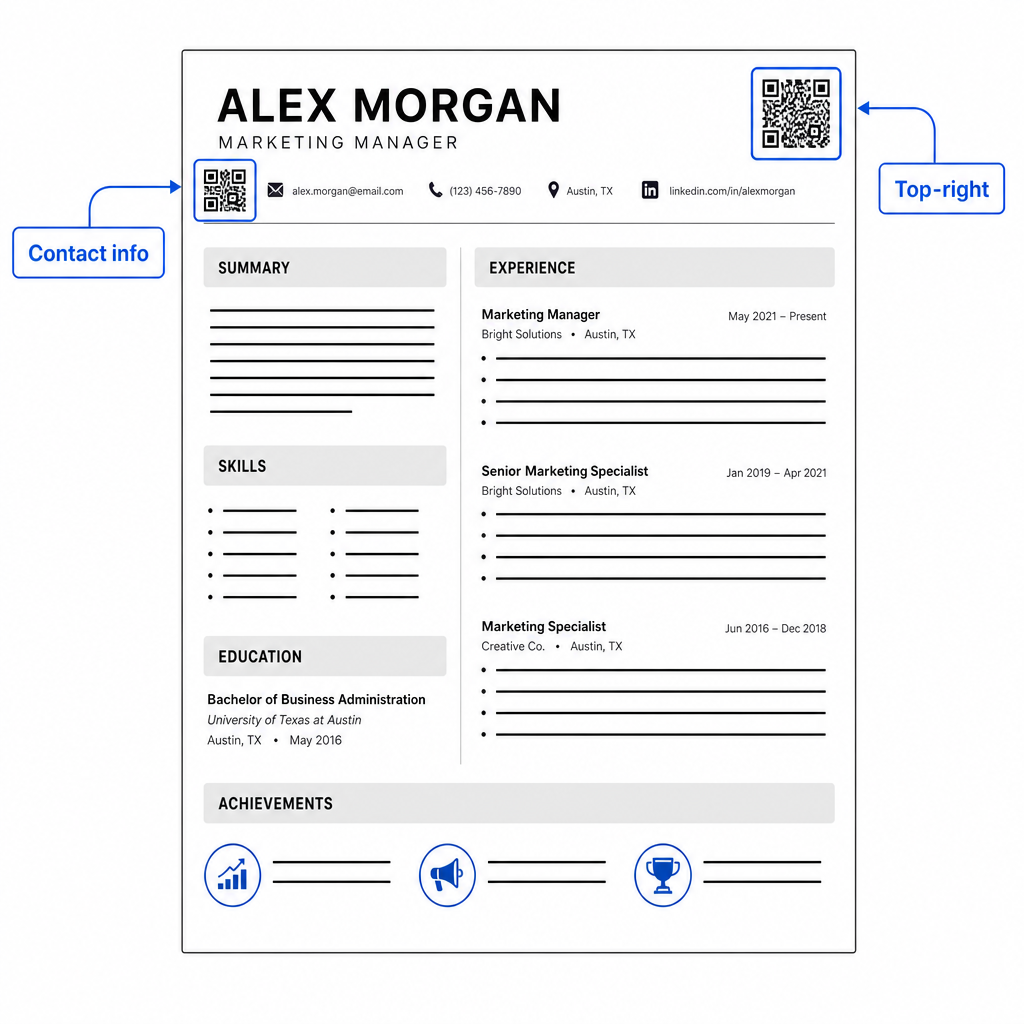
Jaga kode itu cukup kecil agar tetap tidak mencolok: sekitar 0,8 hingga 1 inci persegi cocok untuk resume standar. Tambahkan label teks singkat di bawahnya, seperti Pindai untuk melihat portofolio atau Pindai untuk LinkedIn, sehingga perekrut tahu sekilas ke mana kode tersebut mengarah. Tempatkan URL teks biasa langsung di samping atau di bawah kode.
Tabel di bawah membandingkan pendekatan penempatan umum:
| PENEMPATAN | Kelebihan | Kekurangan |
|---|---|---|
| Dekat info kontak di atas | Lokasi alami, langsung terlihat | Perlu tetap kecil untuk menghindari keramaian |
| Sudut kanan atas | Bersih, tidak mengganggu | Mungkin terlewat jika perekrut membaca dari kiri ke kanan |
| Footer resume | Menjaga konten utama bersih | Mungkin terabaikan atau terpotong saat mencetak |
| Di samping peran tertentu | Menghubungkan portofolio secara kontekstual ke pekerjaan itu | Hanya masuk akal untuk satu item yang terhubung |
Kesalahan Umum yang Harus Dihindari
- Menjadikan kode QR satu-satunya rute akses – Selalu sertakan URL teks biasa. Perekrut yang meninjau PDF di layar tidak dapat memindai kode QR.
- Menghubungkan ke tujuan yang tidak siap – Profil LinkedIn tanpa foto, ringkasan yang jarang, atau pengalaman yang usang mencerminkan buruk. Hanya tautkan ketika tujuan lengkap dan terkini.
- Menggunakan kode QR statis ketika tautan Anda mungkin berubah – Jika URL portofolio Anda atau alamat LinkedIn berubah, kode statis menjadi rusak dan tidak berguna. Kode dinamis dapat diperbarui tanpa mencetak ulang apa pun.
- Melewatkan tes – Selalu pindai kode akhir Anda dari salinan cetak – bukan hanya dari layar Anda – sebelum mengirimkan atau membagikan resume Anda.
- Kontras buruk atau zona tenang yang ramai – Keduanya akan menyebabkan kode gagal pada beberapa perangkat. Ikuti panduan ukuran dan kontras di atas dan sisakan ruang kosong di sekitar kode di semua sisi.
- Menggunakan gambar resolusi rendah – Kode QR berpiksel pada resume cetak terlihat tidak profesional dan mungkin tidak dapat dipindai. Ekspor dalam SVG atau EPS, atau minimal 300 DPI PNG.
Mengatasi Skeptisisme Perekrut
Tidak setiap perekrut akan memindai kode QR. Beberapa mungkin tidak terbiasa dengan kebiasaan tersebut, berhati-hati terhadap tautan yang tidak dikenal, atau hanya meninjau resume di desktop di mana pemindaian tidak praktis. Ini bukan alasan untuk menghindari kode QR sepenuhnya – tetapi ini adalah alasan untuk memperlakukannya sebagai suplemen, bukan pengganti, untuk tautan teks biasa.
Labeli kode Anda dengan jelas dan jaga agar URL terlihat dalam teks. Perekrut yang tidak memindai masih akan melihat URL dan dapat mengetik atau mengkliknya. Perekrut yang meninjau resume Anda secara langsung memiliki opsi untuk memindai segera. Tujuannya adalah untuk memberikan setiap pembaca jalur termudah menuju pekerjaan Anda, terlepas dari bagaimana mereka membaca resume Anda.
Jadikan Resume Anda Lebih Interaktif Tambahkan kode QR profesional ke resume Anda yang terhubung langsung ke portofolio Anda, profil LinkedIn, atau resume digital. Mulai dengan Generator Kode QR – gratis untuk dibuat, dengan opsi untuk melacak pemindaian dan memperbarui tujuan Anda kapan saja.
Menambahkan kode QR ke resume Anda adalah perubahan kecil yang dapat membuat kesan berarti – terutama ketika Anda menyerahkan resume Anda kepada seseorang secara langsung. Kuncinya adalah persiapan: pastikan tujuan Anda dipoles, kode Anda memenuhi standar desain dasar, dan Anda selalu menyertakan URL teks biasa yang dapat dibaca di sampingnya. Gunakan kode dinamis agar Anda dapat memperbarui tujuan tanpa mencetak ulang, dan uji semuanya pada cetakan fisik sebelum wawancara atau pameran karier Anda berikutnya.
Pertanyaan yang sering diajukan
Tidak – platform ATS memperlakukan kode QR sebagai gambar dan melewatkannya selama penguraian teks, jadi kode itu sendiri tidak secara negatif memengaruhi skor ATS Anda. Namun, untuk memastikan portofolio atau URL LinkedIn Anda juga dapat dibaca mesin, selalu sertakan versi teks biasa dari tautan di samping kode QR.
Tujuan terbaik bergantung pada bidang Anda. Situs portofolio atau portofolio PDF berfungsi baik untuk peran kreatif dan teknis. Profil LinkedIn cocok untuk sebagian besar industri. Kode QR vCard berguna jika tujuan utama Anda adalah mempermudah perekrut untuk menyimpan detail kontak Anda. Apa pun yang Anda tautkan, pastikan itu lengkap, terkini, dan dioptimalkan sebelum dicetak.
Sebuah kode QR statis mengkodekan URL tujuan Anda langsung ke dalam pola kode – jika URL berubah, kode tersebut menjadi rusak dan Anda perlu mencetak ulang. Sebuah kode QR dinamis mengkodekan URL pengalihan singkat yang dapat Anda perbarui kapan saja tanpa mengubah kode yang dicetak. Untuk sebuah resume yang mungkin Anda bagikan selama beberapa bulan, kode dinamis adalah pilihan yang lebih aman dan lebih fleksibel.