Borite li se da regruteri primijete vaš portfolio ili LinkedIn profil? QR kod na vašem životopisu premošćuje jaz između ispisane stranice i vaše potpune digitalne prisutnosti – ovaj vodič objašnjava kako ga stvoriti, gdje ga postaviti i kako izbjeći pogreške koje ga čine neprofesionalnim.
Što zapravo radi QR kod za životopis
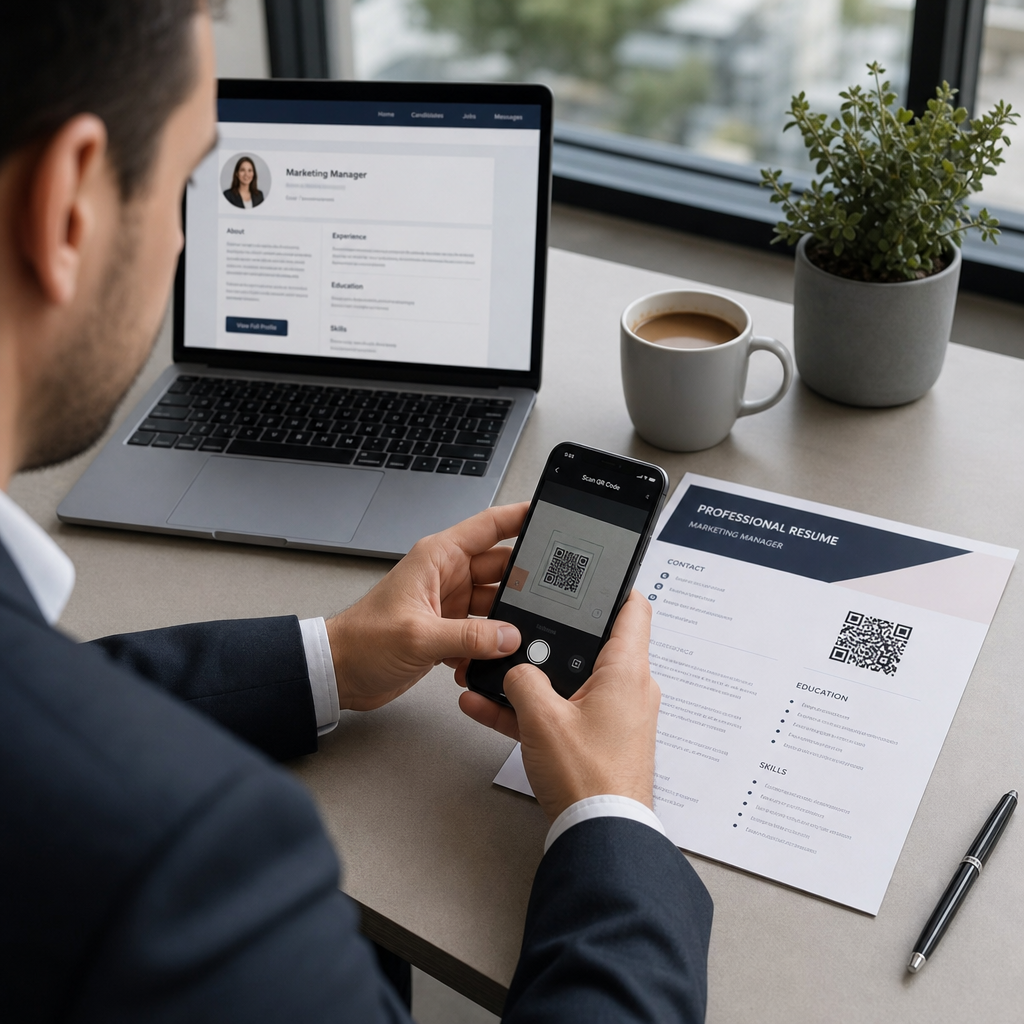
QR kod je slika koja se može skenirati i koja kodira URL ili druge podatke. Kada regruter usmjeri kameru svog telefona na njega, otvara vaš portfolio, LinkedIn profil ili digitalni životopis izravno u njihovom pregledniku – bez potrebe za tipkanjem.
Na životopisu, ovo rješava stvarni problem: regruteri koji čitaju ispisani primjerak nemaju jednostavan način da kliknu vaše poveznice. QR kod pretvara statičnu stranicu u interaktivnu bez dodavanja nereda. Vrste odredišta na koja se možete povezati uključuju:
- LinkedIn profil – omogućuje regruterima da pregledaju vašu potpunu radnu povijest, preporuke i aktivnosti
- Internetski portfelj – prikazuje projektni rad, studije slučaja ili kreativne uzorke
- PDF životopis – omogućuje pristup proširenoj ili formatiranoj verziji vašeg životopisa
- Digitalna kontakt kartica (vCard) – omogućuje regruterima da vaše kontakt podatke spremaju izravno na svoj telefon
Kada dodavanje QR koda ima smisla
QR kod dodaje vrijednost u specifičnim situacijama. Najbolje funkcionira kada će vaš životopis biti ispisan i predan nekome osobno – na razgovorima za posao, sajmovima karijera ili događajima umrežavanja – i kada imate portfolio, osobnu stranicu ili LinkedIn profil vrijedan posjeta. Posebno je učinkovit u područjima gdje je pokazivanje rada važno: dizajn, razvoj, pisanje, marketing ili bilo koja kreativna disciplina gdje regruter ima koristi od pregledavanja uzoraka izvan onoga što stane na stranicu.
Manje vrijednosti dodaje kada će vaš životopis biti poslan samo putem online portala za prijave. U tim slučajevima, regruteri rijetko ispisuju životopise, pa QR kod ostaje neskeniran. Zamislite ga kao značajku za osobno iskustvo, a ne kao zamjenu za obične tekstualne poveznice koje rade svugdje.
Kako ATS sustavi obrađuju QR kodove
Prije dodavanja QR koda, morate razumjeti kako funkcioniraju sustavi za praćenje kandidata (ATS). ATS platforme čitaju tekst i uglavnom ignoriraju slikovne elemente – QR kod se tretira kao netekstualna grafika i jednostavno se preskače tijekom parsiranja. To znači da sam kod neće naštetiti vašem ATS rezultatu, ali ga ni neće poboljšati. Ono što je važno za ATS je tekst u vašem životopisu.
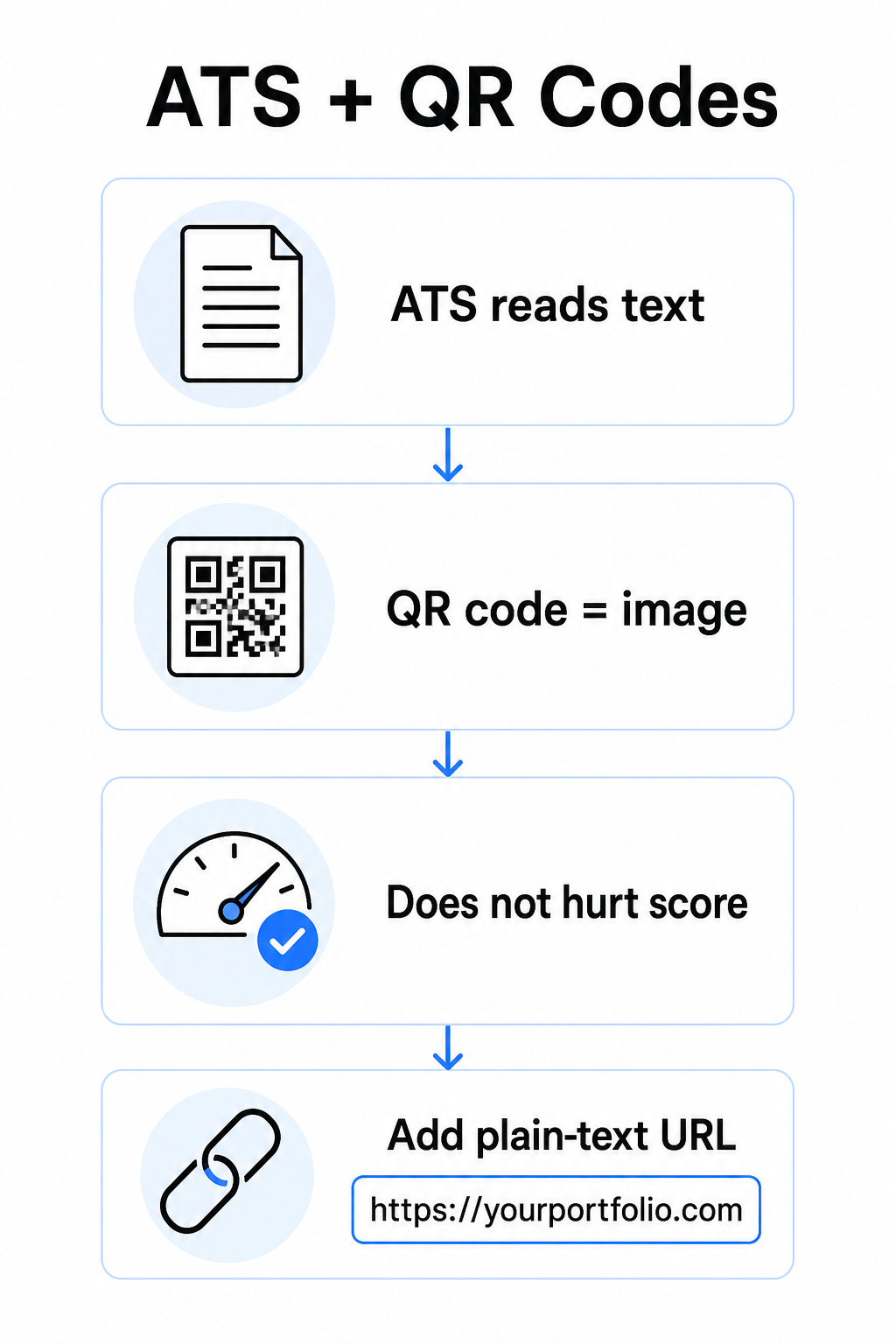
Uvijek uključite običan tekstualni URL uz vaš QR kod. Napišite cijelu poveznicu u čitljivom tekstu (na primjer, `linkedin.com/in/yourname`) tako da odredište ostane dostupno i ATS softveru i svakom regruteru koji pregledava digitalnu kopiju, a ne može skenirati sliku.
Neka vaš cjelokupni format životopisa bude jednostavan. Složeni rasporedi, tekstualni okviri, više stupaca i teška grafika mogu zbuniti ATS parsere – stoga bi vaš QR kod trebao uredno stajati unutar čistog, standardnog rasporeda, a ne dominirati dizajnom.
Stvorite QR kod za vaš životopis Spremni ste povezati svoj portfolio ili LinkedIn profil s kodom koji se može skenirati? Koristite Generator QR kodova za stvaranje prilagođenog, profesionalnog QR koda u nekoliko minuta – nije potrebno dizajnersko iskustvo.
Priprema vašeg odredišta prije generiranja
QR kod je jak onoliko koliko je jako ono na što se povezuje. Prije nego što ga stvorite, provjerite je li odredište spremno za oči regrutera.
LinkedIn profil
Započnite stvaranjem prilagođenog LinkedIn URL-a – nešto poput `linkedin.com/in/firstname-lastname` – tako da poveznica izgleda čisto, a ne kao niz nasumičnih znakova. Dodajte profesionalnu profilnu fotografiju, što povećava vjerodostojnost i preglede profila. Napišite jasan, ključnim riječima relevantan naslov i sažetak koristeći poznate nazive radnih mjesta i mjerljiva postignuća preuzeta iz vaših ciljanih uloga. Zatim ažurirajte svoju radnu povijest, obrazovanje i sve medijske uzorke koji prikazuju vaš rad prije nego što podijelite poveznicu bilo gdje.
Možete saznati više o kako pronaći i koristiti vaš LinkedIn QR kod i generirajte prilagođeni s LinkedIn QR kod generator.
Stranica portfolija
Odaberite 4-6 projekata koji su izravno relevantni za uloge za koje se prijavljujete i uključite mjerljive rezultate za svaki – rezultate, utjecaj i ono što ste specifično doprinijeli. Napišite opise na jednostavnom engleskom jeziku i temeljito provjerite pravopis i gramatiku. Testirajte stranicu na mobilnim i stolnim uređajima kako biste potvrdili brzo učitavanje i čisto formatiranje, te koristite kratak, profesionalan URL s prilagođenim slugom. Izbjegavajte poveznice koje izgledaju kao niz brojeva i crtica, što regruterima može izgledati kao spam ili nepouzdano.
PDF životopis
Ako želite povezati na dužu ili vizualno formatiraniju verziju vašeg životopisa, PDF QR kod je jednostavna opcija. Koristite QR kod PDF generator za prijenos vašeg dokumenta i generiranje skenabilne veze izravno na njega.
Kontakt kartica (vCard)
QR kod vCard kartice kodira vaše kontakt podatke – ime, telefon, e-mail i web stranicu – izravno u kod. Kada ga netko skenira, može vas odmah spremiti u svoje kontakte bez upisivanja ijednog znaka. Ovo posebno dobro funkcionira u odjeljku za kontakte životopisa ili na posjetnici koju dijelite na razgovorima za posao. The vCard QR kod generator čini izradu jednostavnom, a više možete pročitati o tome kako izraditi QR kod za kontakt podatke kako biste maksimalno iskoristili ovaj format.
Kako izraditi QR kod za svoj životopis
Kada je vaše odredište spremno, generiranje QR koda traje samo nekoliko koraka.
Prvo, odaberite pravi generator za svoje odredište. Koristite LinkedIn QR kod generator za poveznicu profila, QR kod PDF generator za dokument, vCard QR kod generator za kontakt podatke, ili Generator QR kodova za linkove za bilo koji drugi URL. Zatim zalijepite URL odredišta ili prenesite svoju datoteku.
U ovoj fazi razmislite o korištenju dinamički QR kod. Dinamički kodovi pohranjuju kratki URL za preusmjeravanje unutar koda umjesto da izravno kodiraju cijelo odredište. To znači da možete ažurirati na što kod pokazuje – čak i nakon ispisa – bez promjene samog koda. Ako se URL vašeg portfelja promijeni ili ažurirate svoju LinkedIn adresu, dinamički kod vas spašava od ponovnog ispisa životopisa.
Zatim prilagodite dizajn. Prilagodite boje kako bi odgovarale paleti vašeg životopisa, držeći prednji plan tamnim, a pozadinu svijetlom. Crna na bijeloj ostaje najpouzdanija kombinacija za skenere. Izbjegavajte gradijente, sjene ili obrnute dizajne (svijetli kod na tamnoj pozadini), jer to može uzrokovati neuspjeh skeniranja na nekim uređajima.
Kada ste spremni za preuzimanje, izvezite kao SVG ili EPS za najoštriji rezultat. Ovi vektorski formati skaliraju se bez gubitka kvalitete, sprječavajući zamućenost koja uzrokuje neuspjeh skeniranja na tiskanim materijalima. Na kraju, testirajte kod na više uređaja i u različitim uvjetima osvjetljenja prije nego što ga dodate u svoj životopis. Potvrdite da se odredište učitava ispravno i brzo na Wi-Fi i mobilnim vezama.
Povežite bilo koji URL s kodom koji se može skenirati Bez obzira je li vaše odredište portfolio, osobna stranica ili bilo koja druga web stranica, Generator QR kodova za linkove omogućuje vam da u nekoliko sekundi izradite prilagođeni kod koji se može pratiti.
Standardi dizajna QR koda za životopise
QR kod u životopisu mora izgledati namjerno, a ne kao naknadna misao. Sljedeće tehničke smjernice osiguravaju pouzdano skeniranje i uredno uklapanje na stranicu.
Veličina
Minimalna preporučena veličina za QR kod u kontekstu skeniranja iz blizine – kao što je životopis držan na dohvat ruke – je 0,8 x 0,8 inča (2 x 2 cm). Smanjivanje veličine riskira neuspjeh skeniranja; bilo što oko 0,4 x 0,4 inča (1 x 1 cm) premalo je za dosljednu upotrebu. Smjernice za veličinu QR koda na posjetnicama jednako se primjenjuju na životopise i vrijedi ih pregledati prije nego što finalizirate svoj izgled.
Kontrast boja
Skeneri rade tako što detektiraju kontrast između tamnih i svijetlih modula. Ciljajte na omjer kontrasta od najmanje 4,5:1 za male QR kodove, u skladu sa smjernicama za pristupačnost. Crna na bijeloj postiže omjer 21:1 i najsigurniji je izbor. Izbjegavajte svijetlosivu na bijeloj, žutu na bijeloj ili bilo koju kombinaciju gdje se kod stapa s pozadinom stranice. Potpuni najbolje prakse za kontrast boja QR koda vodič pruža detaljne preporuke za kombinacije i primjere omjera kontrasta.
Mirna zona
Tiha zona je prazan rub koji okružuje QR kod. Prema ISO/IEC 18004, mora biti široka najmanje četiri modula sa svih strana – to jest, četiri puta širina jednog malog kvadrata u mreži koda. Nikada ne postavljajte tekst, linije ili druge elemente dizajna unutar ove margine. Nedostajuća ili pretrpana tiha zona jedan je od najčešćih razloga zašto se QR kod ne skenira, a lako je slučajno prekršiti pravilo kada se kod uklapa u uski raspored životopisa.
Rezolucija
Izvezite svoj QR kod s minimalnom rezolucijom od 300 DPI za ispis. Još bolje, koristite vektorski format (SVG ili EPS) tako da se kod čisto skalira bez obzira na veličinu ispisa, bez pikselizacije. najbolje prakse za čitljivost QR koda pokriva rezoluciju, tihe zone i kontrast na jednom mjestu ako želite sveobuhvatnu referencu.
Gdje postaviti QR kod u životopisu
Položaj signalizira profesionalnost. QR kod nasumično smješten usred vašeg odjeljka o iskustvu izgleda kao nesreća. Dva najučinkovitija položaja su blizu vaših kontaktnih informacija na vrhu stranice – gdje regruteri prvo traže načine da vas kontaktiraju – ili u gornjem desnom kutu, što kod čini vidljivim bez natjecanja s glavnim tekstom životopisa.
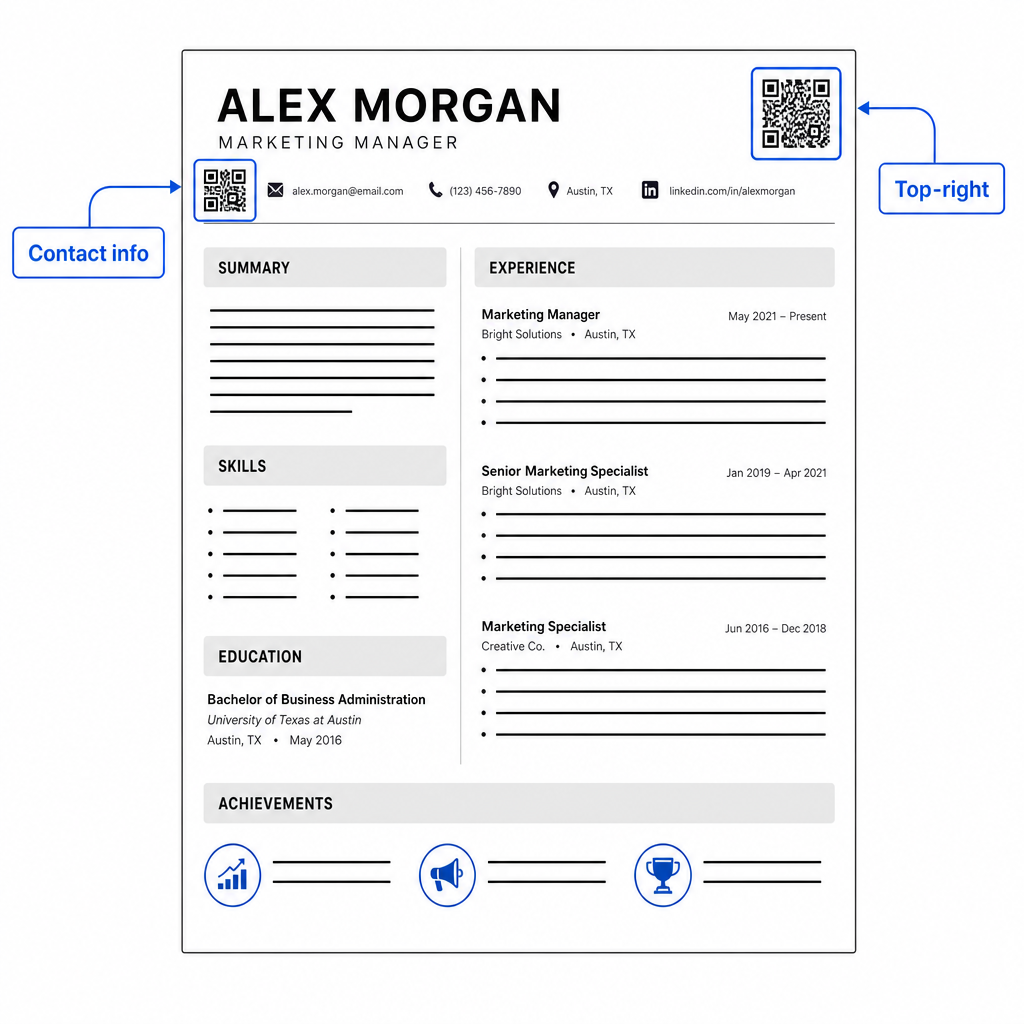
Neka kod bude dovoljno malen da ostane nenametljiv: kvadrat veličine približno 0,8 do 1 inča odgovara standardnom životopisu. Dodajte kratku tekstualnu oznaku ispod njega, kao što je Skenirajte za pregled portfelja ili Skenirajte za LinkedIn, tako da regruter na prvi pogled zna kamo vodi kod. Postavite URL u običnom tekstu izravno pored ili ispod koda.
Tablica u nastavku uspoređuje uobičajene pristupe postavljanju:
| SMJEŠTAJ | Prednosti | Protiv |
|---|---|---|
| Blizu kontaktnih podataka na vrhu | Prirodna lokacija, odmah vidljiva | Mora ostati mali kako bi se izbjegla gužva |
| Gornji desni kut | Čisto, nenametljivo | Može biti propušteno ako regruter čita s lijeva na desno |
| Podnožje životopisa | Održava glavni sadržaj čistim | Može biti previđeno ili odrezano prilikom ispisa |
| Pored određene uloge | Kontekstualno povezuje portfolio s tim poslom | Ima smisla samo za jednu povezanu stavku |
Uobičajene pogreške koje treba izbjegavati
- Činjenje QR koda jedinim putem pristupa – Uvijek uključite URL u običnom tekstu. Regruter koji pregledava PDF na zaslonu ne može skenirati QR kod.
- Povezivanje na nepripremljeno odredište – LinkedIn profil bez fotografije, oskudnog sažetka ili zastarjelog iskustva loše se odražava. Povežite samo kada je odredište potpuno i aktualno.
- Korištenje statičnog QR koda kada se vaše veze mogu promijeniti – Ako se vaš URL portfolija ili LinkedIn adresa promijeni, statični kod postaje pokvaren i beskoristan. Dinamički kod se može ažurirati bez ponovnog ispisa ičega.
- Preskakanje testa – Uvijek skenirajte svoj konačni kod s ispisane kopije – ne samo sa zaslona – prije slanja ili dijeljenja vašeg životopisa.
- Loš kontrast ili pretrpana tiha zona – Oboje će uzrokovati da kod ne radi na nekim uređajima. Slijedite smjernice za veličinu i kontrast iznad i ostavite jasan prostor oko koda sa svih strana.
- Korištenje slike niske rezolucije – Pikselizirani QR kod na ispisanoj životopisu izgleda neprofesionalno i možda se neće skenirati. Izvezite u SVG ili EPS, ili barem 300 DPI PNG.
Rješavanje skepticizma regrutera
Neće svaki regruter skenirati QR kod. Neki možda nisu upoznati s tom navikom, oprezni su zbog nepoznatih veza ili jednostavno pregledavaju životopise na stolnom računalu gdje je skeniranje nepraktično. To nije razlog za potpuno izbjegavanje QR kodova – ali je razlog da ih tretirate kao dodatak, a ne zamjenu, za veze u običnom tekstu.
Jasno označite svoj kod i držite URL vidljivim u tekstu. Regruter koji ne skenira i dalje će vidjeti URL i može ga upisati ili kliknuti. Regruter koji pregledava vaš životopis osobno ima opciju skeniranja odmah. Cilj je svakom čitatelju pružiti najlakši mogući put do vašeg rada, bez obzira na to kako čita vaš životopis.
Učinite svoj životopis interaktivnijim Dodajte profesionalni QR kod svom životopisu koji izravno povezuje na vaš portfolio, LinkedIn profil ili digitalni životopis. Započnite s Generator QR kodova – besplatno za izradu, s opcijama za praćenje skeniranja i ažuriranje vašeg odredišta u bilo kojem trenutku.
Dodavanje QR koda vašem životopisu je mala promjena koja može ostaviti značajan dojam – posebno kada osobno predate svoj životopis nekome. Ključ je priprema: pobrinite se da je vaše odredište dotjerano, vaš kod zadovoljava osnovne standarde dizajna i da uvijek uključite čitljiv URL u običnom tekstu pored njega. Koristite dinamički kod kako biste mogli ažurirati odredište bez ponovnog ispisa i testirajte sve na fizičkom ispisu prije vašeg sljedećeg intervjua ili sajma karijera.
Često postavljana pitanja
Ne – ATS platforme tretiraju QR kodove kao slike i preskaču ih tijekom parsiranja teksta, tako da sam kod ne utječe negativno na vaš ATS rezultat. Međutim, kako biste osigurali da je vaš portfolio ili LinkedIn URL također strojno čitljiv, uvijek uključite verziju poveznice u običnom tekstu uz QR kod.
Najbolja destinacija ovisi o vašem području. Web stranica s portfoliom ili PDF portfolio dobro funkcionira za kreativne i tehničke uloge. LinkedIn profil odgovara većini industrija. vCard QR kod je koristan ako je vaš primarni cilj olakšati regruterima spremanje vaših kontakt podataka. Što god povežete, pobrinite se da je to potpuno, ažurno i optimizirano prije ispisa.
Statični QR kod kodira vaš odredišni URL izravno u uzorak koda – ako se URL promijeni, kod postaje neispravan i morate ga ponovno ispisati. Dinamični QR kod kodira kratki URL za preusmjeravanje koji možete ažurirati bilo kada bez promjene ispisanog koda. Za životopis koji možete dijeliti tijekom nekoliko mjeseci, dinamični kod je sigurniji i fleksibilniji izbor.