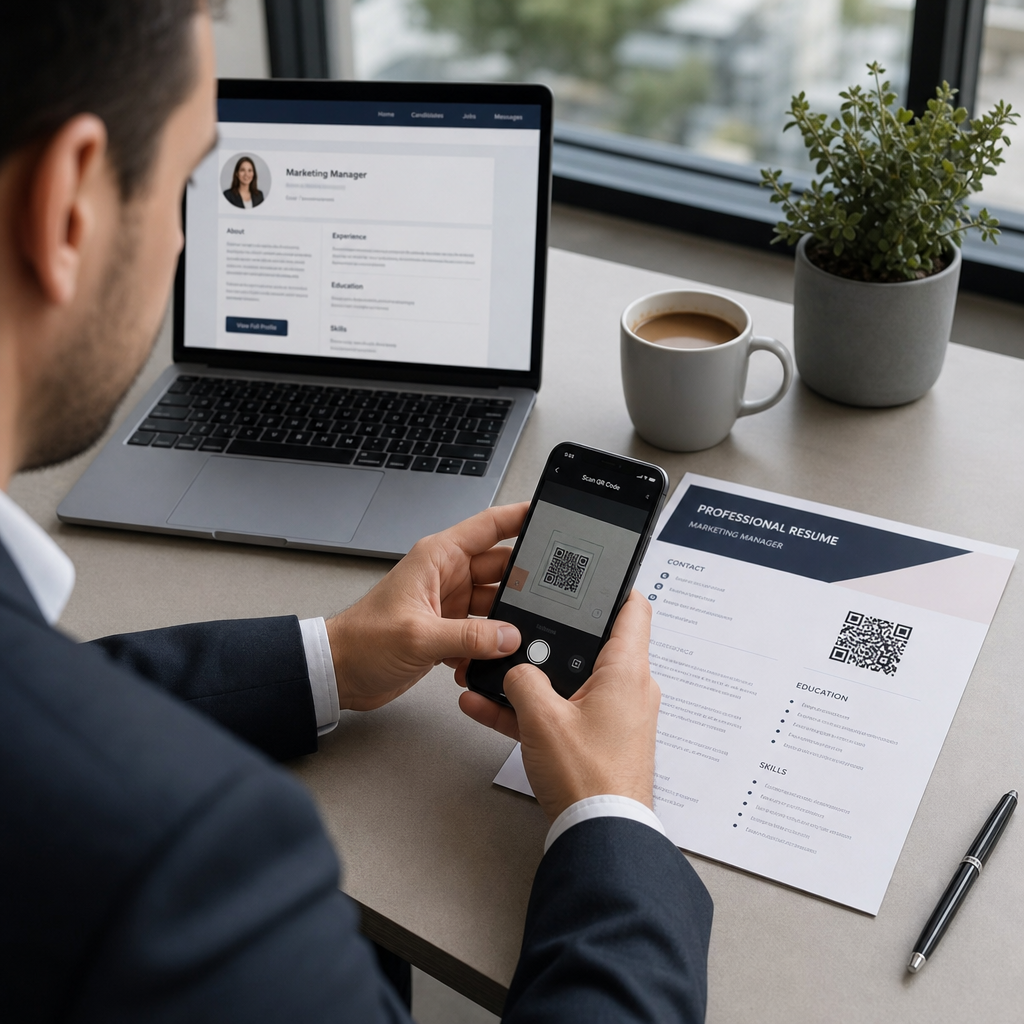
Bojujete s tím, aby si náboráři všimli vašeho portfolia nebo profilu na LinkedInu? QR kód na vašem životopise překlenuje propast mezi tištěnou stránkou a vaší plnou digitální přítomností – tento průvodce vysvětluje, jak jej vytvořit, kam jej umístit a jak se vyhnout chybám, které by ho mohly učinit neprofesionálním.
Co vlastně dělá QR kód v životopise
QR kód je skenovatelný obrázek, který kóduje URL nebo jiná data. Když na něj náborář namíří fotoaparát svého telefonu, otevře se vaše portfolio, profil na LinkedInu nebo digitální životopis přímo v jeho prohlížeči – bez nutnosti psaní.
V životopise to řeší skutečný problém: náboráři čtoucí tištěnou kopii nemají snadný způsob, jak kliknout na vaše odkazy. QR kód promění statickou stránku v interaktivní, aniž by přidával nepořádek. Typy destinací, na které můžete odkazovat, zahrnují:
- profil na LinkedIn – umožňuje náborářům zkontrolovat vaši kompletní pracovní historii, doporučení a aktivitu
- Online portfolio – ukazuje projektovou práci, případové studie nebo kreativní ukázky
- PDF životopis – poskytuje přístup k rozšířené nebo formátované verzi vašeho životopisu
- Digitální vizitka (vCard) – umožňuje náborářům uložit vaše kontaktní údaje přímo do jejich telefonu
Kdy má smysl přidat QR kód
QR kód přidává hodnotu v konkrétních situacích. Funguje nejlépe, když bude váš životopis vytištěn a předán někomu osobně – na pohovorech, veletrzích práce nebo networkingových akcích – a když máte portfolio, osobní web nebo profil na LinkedInu, který stojí za návštěvu. Je obzvláště účinný v oborech, kde záleží na ukázce práce: design, vývoj, psaní, marketing nebo jakákoli kreativní disciplína, kde náborář těží z prohlížení ukázek nad rámec toho, co se vejde na stránku.
Méně hodnoty přidává, když bude váš životopis odeslán pouze prostřednictvím online aplikačního portálu. V takových případech náboráři životopisy zřídka tisknou, takže QR kód zůstane naskenován. Berte to jako funkci pro osobní zkušenost, nikoli jako náhradu za prosté textové odkazy, které fungují všude.
Jak systémy ATS zpracovávají QR kódy
Před přidáním QR kódu musíte pochopit, jak fungují systémy pro sledování uchazečů (ATS). Platformy ATS čtou text a do značné míry ignorují obrazové prvky – QR kód je považován za netextovou grafiku a je jednoduše přeskočen během analýzy. To znamená, že samotný kód nepoškodí vaše skóre ATS, ale ani mu nepomůže. Pro ATS je důležitý text ve vašem životopise.
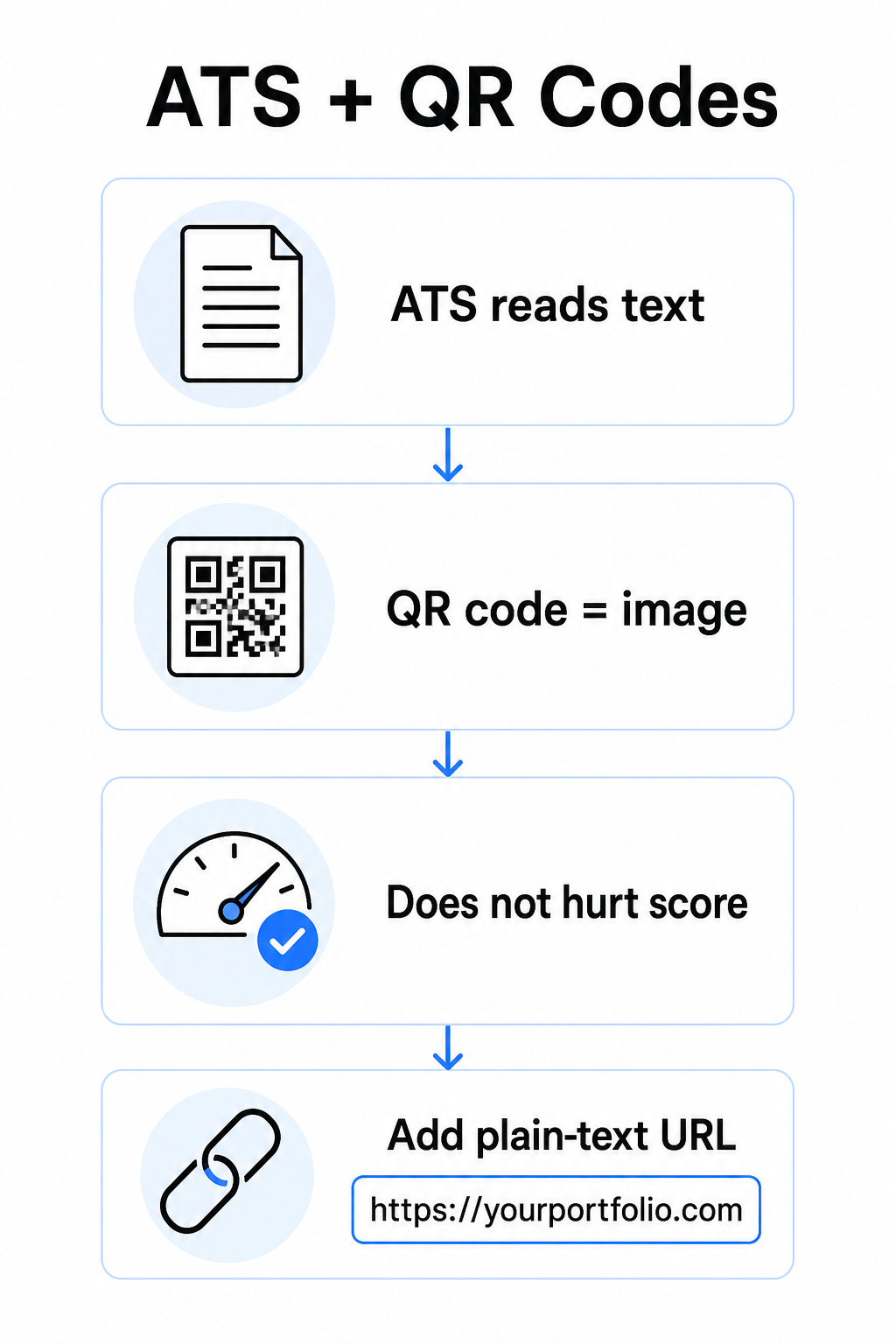
Vždy uveďte URL adresu v prostém textu vedle vašeho QR kódu. Napište celý odkaz čitelným textem (například `linkedin.com/in/yourname`), aby cíl zůstal přístupný jak softwaru ATS, tak každému náboráři, který prohlíží digitální kopii a nemůže naskenovat obrázek.
Udržujte celkový formát vašeho životopisu jednoduchý. Složitá rozvržení, textová pole, více sloupců a těžká grafika mohou zmást analyzátory ATS – takže váš QR kód by měl úhledně zapadat do čistého, standardního rozvržení, spíše než dominovat designu.
Vytvořte QR kód pro váš životopis Jste připraveni propojit vaše portfolio nebo profil na LinkedInu se skenovatelným kódem? Použijte Generátor QR kódů k vytvoření přizpůsobeného, profesionálního QR kódu během několika minut – není potřeba žádná zkušenost s designem.
Příprava vaší destinace před generováním
QR kód je jen tak silný, jako to, na co odkazuje. Než jej vytvoříte, ujistěte se, že je destinace připravena pro oči náboráře.
Profil na LinkedIn
Začněte vytvořením vlastní URL adresy na LinkedInu – něco jako `linkedin.com/in/firstname-lastname` – aby odkaz vypadal čistě, spíše než jako řetězec náhodných znaků. Přidejte profesionální profilovou fotografii, která zvyšuje důvěryhodnost a počet zobrazení profilu. Napište jasný, klíčovými slovy relevantní nadpis a shrnutí s použitím známých pracovních pozic a měřitelných úspěchů čerpaných z vašich cílových rolí. Poté aktualizujte svou pracovní historii, vzdělání a jakékoli mediální ukázky, které prezentují vaši práci, než odkaz kdekoli sdílíte.
Můžete se dozvědět více o jak najít a použít váš QR kód na LinkedInu a vygenerujte si vlastní pomocí LinkedIn QR kód generátor.
Portfolio web
Vyberte 4–6 projektů, které jsou přímo relevantní pro role, o které se ucházíte, a pro každý uveďte měřitelné výsledky – výsledky, dopad a to, čím jste konkrétně přispěli. Napište popisy v jednoduché angličtině a důkladně zkontrolujte pravopis a gramatiku. Otestujte web na mobilu i desktopu, abyste potvrdili rychlé načítání a čisté formátování, a použijte krátkou, profesionální URL adresu s vlastním slugem. Vyhněte se odkazům, které vypadají jako řetězec čísel a pomlček, což se náborářům může zdát jako spam nebo nedůvěryhodné.
PDF životopis
Pokud chcete odkázat na delší nebo vizuálně formátovanou verzi vašeho životopisu, QR kód PDF je přímočará možnost. Použijte QR kód PDF generátor k nahrání vašeho dokumentu a vygenerování skenovatelného odkazu přímo na něj.
Kontaktní karta (vCard)
QR kód vCard kóduje vaše kontaktní údaje – jméno, telefon, e-mail a webové stránky – přímo do kódu. Když jej někdo naskenuje, může si vás okamžitě uložit do svých kontaktů bez zadání jediného znaku. To funguje obzvláště dobře v kontaktní sekci životopisu nebo na vizitce, kterou rozdáváte na pohovorech. Nástroj QR vizitka s vCard usnadňuje jeho vytvoření a můžete si přečíst více o tom, jak vytvořit QR kód pro kontaktní informace abyste z tohoto formátu získali maximum.
Jak vytvořit váš QR kód pro životopis
Jakmile je váš cíl připraven, vygenerování QR kódu trvá jen několik kroků.
Nejprve si vyberte správný generátor pro váš cíl. Použijte nástroj LinkedIn QR kód generátor pro odkaz na profil, nástroj QR kód PDF generátor pro dokument, nástroj QR vizitka s vCard pro kontaktní údaje, nebo nástroj Generátor QR kódů pro odkazy pro jakoukoli jinou URL. Poté vložte vaši cílovou URL nebo nahrajte váš soubor.
V této fázi zvažte, zda použít dynamický QR kód. dynamický kód. Dynamické kódy ukládají krátkou přesměrovací URL uvnitř kódu namísto přímého kódování celého cíle. To znamená, že můžete aktualizovat, kam kód směřuje – i po vytištění – aniž byste změnili samotný kód. Pokud se změní vaše URL portfolia nebo aktualizujete vaši LinkedIn adresu, dynamický kód vás ušetří opětovného tisku vašeho životopisu.
Dále si přizpůsobte design. Upravte barvy tak, aby odpovídaly paletě vašeho životopisu, udržujte popředí tmavé a pozadí světlé. Černá na bílé zůstává nejspolehlivější kombinací pro skenery. Vyhněte se gradientům, stínům nebo obráceným designům (světlý kód na tmavém pozadí), protože tyto mohou způsobit selhání skenování na některých zařízeních.
Až budete připraveni ke stažení, exportujte jako SVG nebo EPS pro nejostřejší výsledek. Tyto vektorové formáty se škálují bez ztráty kvality, čímž zabraňují rozmazání, které způsobuje selhání skenování na tištěných materiálech. Nakonec otestujte kód na více zařízeních a v různých světelných podmínkách předtím, než jej přidáte do vašeho životopisu. Potvrďte, že se cíl načítá správně a rychle na Wi-Fi i mobilních připojeních.
Propojte jakoukoli URL se skenovatelným kódem Ať už je váš cíl portfolio, osobní stránka nebo jakákoli jiná webová stránka, nástroj Generátor QR kódů pro odkazy vám umožní vytvořit přizpůsobený, sledovatelný kód během několika sekund.
Standardy designu QR kódů pro životopisy
QR kód na životopisu musí vypadat záměrně, ne jako dodatečný nápad. Následující technické pokyny zajišťují, že se skenuje spolehlivě a čistě zapadá na stránku.
Velikost
Minimální doporučená velikost pro QR kód v kontextu skenování zblízka – jako je životopis držený na délku paže – je 0,8 x 0,8 palce (2 x 2 cm). 0,8 x 0,8 palce (2 x 2 cm). Menší velikost riskuje selhání skenování; cokoli kolem 0,4 x 0,4 palce (1 x 1 cm) je příliš malé pro konzistentní použití. Pokyny Zásady velikosti QR kódu na vizitkách platí stejně pro životopisy a stojí za to je zkontrolovat, než dokončíte vaše rozvržení.
Barevný kontrast
Skenery fungují tak, že detekují kontrast mezi tmavými a světlými moduly. Usilujte o kontrastní poměr alespoň 4,5:1 pro malé QR kódy, v souladu s pokyny pro přístupnost. Černá na bílé dosahuje poměru 21:1 a je nejbezpečnější volbou. Vyhněte se světle šedé na bílé, žluté na bílé, nebo jakékoli kombinaci, kde se kód prolíná s pozadím stránky. Úplný osvědčené postupy pro barevný kontrast QR kódů průvodce poskytuje podrobná doporučení pro párování a příklady kontrastních poměrů.
Tichá zóna
Tichá zóna je prázdný okraj obklopující QR kód. Podle ISO/IEC 18004 musí být široká alespoň čtyři moduly na všech stranách široká čtyři moduly – to znamená, čtyřnásobek šířky jednoho malého čtverce v mřížce kódu. Nikdy neumisťujte text, čáry nebo jiné designové prvky do tohoto okraje. Chybějící nebo přeplněná tichá zóna je jedním z nejčastějších důvodů, proč se QR kód nedaří naskenovat, a je snadné ji náhodně porušit při vkládání kódu do těsného rozvržení životopisu.
Rozlišení
Exportujte váš QR kód s minimálním rozlišením 300 DPI 300 DPI pro tisk. Ještě lépe, použijte vektorový formát (SVG nebo EPS) aby se kód čistě škáloval bez ohledu na velikost tisku, bez pixelizace. Průvodce osvědčené postupy pro čitelnost QR kódů pokrývá rozlišení, tiché zóny a kontrast na jednom místě, pokud chcete komplexní referenci.
Kam umístit QR kód do vašeho životopisu
Umístění signalizuje profesionalitu. QR kód náhodně vložený doprostřed vaší sekce zkušeností vypadá jako nehoda. Dvě nejúčinnější pozice jsou poblíž vašich kontaktních informací v horní části stránky – kde náboráři hledají nejprve způsoby, jak vás kontaktovat – nebo v pravém horním rohu, což udržuje kód viditelný, aniž by konkuroval hlavnímu textu životopisu.
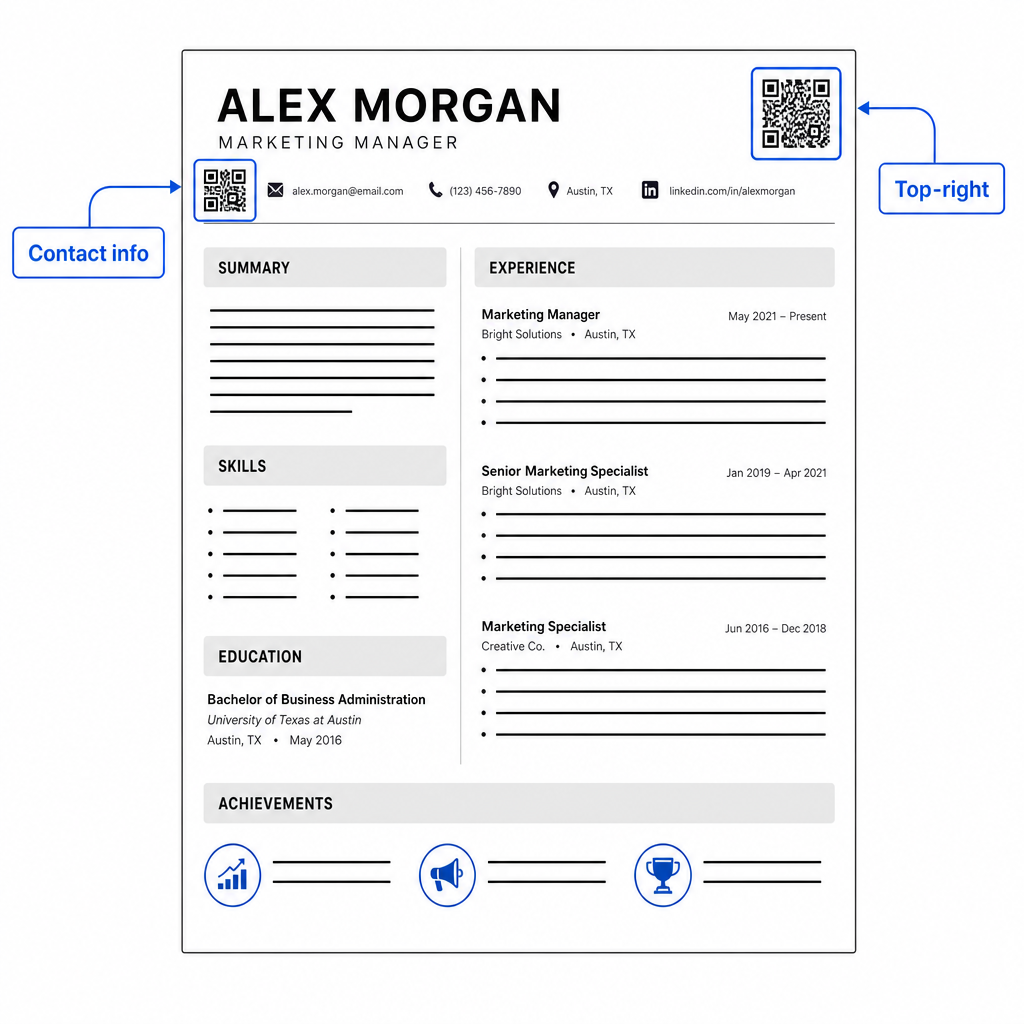
Udržujte kód dostatečně malý, aby zůstal nenápadný: přibližně 0,8 až 1 palec čtvereční se hodí pro standardní životopis. Přidejte pod něj krátký textový popisek, například Naskenujte pro zobrazení portfolia nebo Naskenujte pro LinkedIn, takže náborář na první pohled ví, k čemu kód vede. Umístěte URL v prostém textu přímo vedle nebo pod kód.
Níže uvedená tabulka porovnává běžné přístupy k umístění:
| UMÍSTĚNÍ | Klady | Nevýhody |
|---|---|---|
| Blízko kontaktních informací nahoře | Přirozené umístění, ihned viditelné | Musí zůstat malý, aby se zabránilo přeplnění |
| Pravý horní roh | Čisté, nenápadné | Může být přehlédnuto, pokud náborář čte zleva doprava |
| Patička životopisu | Udržuje hlavní obsah čistý | Může být přehlédnuto nebo oříznuto při tisku |
| Vedle konkrétní role | Kontextově propojuje portfolio s danou pozicí | Dává smysl pouze pro jednu propojenou položku |
Běžné chyby, kterým je třeba se vyhnout
- Udělat QR kód jedinou přístupovou cestou – Vždy zahrňte URL v prostém textu. Náborář, který si prohlíží PDF na obrazovce, nemůže naskenovat QR kód.
- Odkazování na nepřipravenou destinaci – Profil na LinkedIn bez fotografie, stručným shrnutím nebo zastaralými zkušenostmi působí špatně. Odkazujte pouze, když je destinace kompletní a aktuální.
- Používání statického QR kódu, když se vaše odkazy mohou změnit – Pokud se vaše URL portfolia nebo adresa LinkedIn změní, statický kód se stane nefunkčním a zbytečným. Dynamický kód lze aktualizovat bez opětovného tisku čehokoli.
- Přeskočení testu – Vždy naskenujte svůj finální kód z tištěné kopie – nejen z vaší obrazovky – před odesláním nebo rozdáním vašeho životopisu.
- Špatný kontrast nebo přeplněná klidová zóna – Obojí způsobí, že kód selže na některých zařízeních. Dodržujte výše uvedené pokyny pro velikost a kontrast a ponechte kolem kódu na všech stranách volný prostor.
- Používání obrázku s nízkým rozlišením – Pixelovaný QR kód na tištěném životopisu vypadá neprofesionálně a nemusí se naskenovat. Exportujte ve formátu SVG nebo EPS, nebo minimálně 300 DPI PNG.
Řešení skepticismu náborářů
Ne každý náborář naskenuje QR kód. Někteří nemusí být zvyklí, opatrní ohledně neznámých odkazů, nebo si jednoduše prohlížejí životopisy na stolním počítači, kde je skenování nepraktické. To není důvod k úplnému vyhýbání se QR kódům – ale je to důvod k tomu, abychom je považovali za doplněk, nikoli náhradu, za odkazy v prostém textu.
Jasně označte svůj kód a udržujte URL viditelné v textu. Náborář, který neskenuje, stále uvidí URL a může jej zadat nebo kliknout. Náborář, který si prohlíží váš životopis osobně, má možnost okamžitě naskenovat. Cílem je poskytnout každému čtenáři nejsnazší možnou cestu k vaší práci, bez ohledu na to, jak čtou váš životopis.
Udělejte svůj životopis interaktivnější Přidejte profesionální QR kód do vašeho životopisu, který odkazuje přímo na vaše portfolio, profil na LinkedIn nebo digitální životopis. Začněte s Generátor QR kódů – zdarma k vytvoření, s možnostmi sledování skenů a aktualizace vaší destinace kdykoli.
Přidání QR kódu do vašeho životopisu je malá změna, která může udělat smysluplný dojem – zejména když předáváte svůj životopis někomu osobně. Klíčem je příprava: ujistěte se, že vaše destinace je vyleštěná, váš kód splňuje základní designové standardy a vždy zahrňte čitelnou URL v prostém textu vedle něj. Použijte dynamický kód, abyste mohli aktualizovat destinaci bez opětovného tisku, a vše otestujte na fyzickém výtisku před vaším dalším pohovorem nebo veletrhem práce.
Často kladené otázky
Ne – platformy ATS zacházejí s QR kódy jako s obrázky a přeskočí je během analýzy textu, takže samotný kód neovlivňuje negativně vaše skóre ATS. Nicméně, abyste zajistili, že vaše portfolio nebo URL adresa LinkedIn je také strojově čitelná, vždy zahrňte verzi odkazu v prostém textu vedle QR kódu.
Nejlepší cíl závisí na vašem oboru. Portfolio web nebo PDF portfolio funguje dobře pro kreativní a technické role. Profil na LinkedIn se hodí pro většinu odvětví. QR kód vCard je užitečný, pokud je vaším primárním cílem usnadnit náborářům uložení vašich kontaktních údajů. Ať už odkazujete na cokoli, ujistěte se, že je to kompletní, aktuální a optimalizované před tiskem.
Statický QR kód kóduje vaši cílovou URL přímo do vzoru kódu – pokud se URL změní, kód se stane nefunkčním a vy jej musíte znovu vytisknout. Dynamický QR kód kóduje krátkou přesměrovávací URL, kterou můžete kdykoli aktualizovat, aniž byste změnili vytištěný kód. Pro životopis, který můžete rozdávat po dobu několika měsíců, je dynamický kód bezpečnější a flexibilnější volbou.