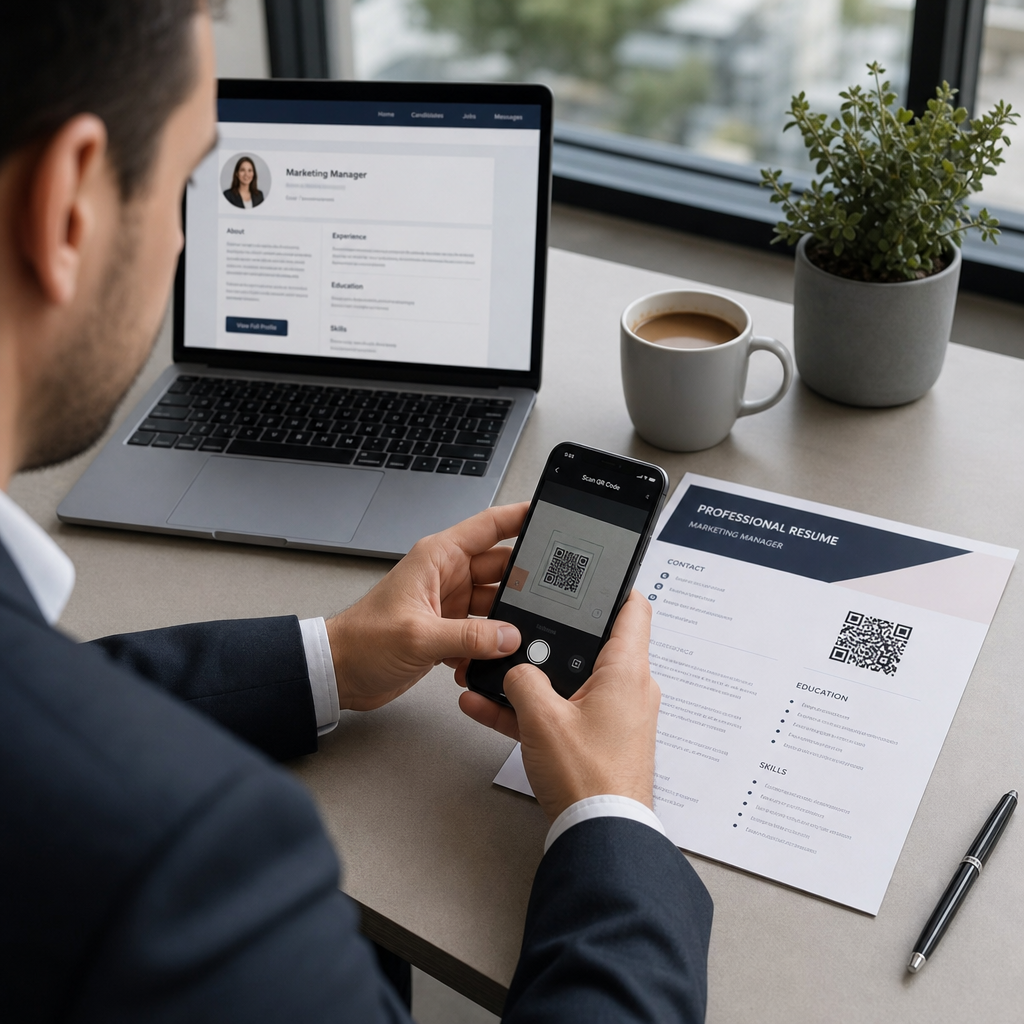
Bojujete s tým, aby si náborári všimli vaše portfólio alebo profil na LinkedIn? QR kód na vašom životopise prekonáva priepasť medzi vytlačenou stránkou a vašou plnou digitálnou prítomnosťou – tento sprievodca vysvetľuje, ako ho vytvoriť, kam ho umiestniť a ako sa vyhnúť chybám, ktoré ho robia neprofesionálnym.
Čo vlastne robí QR kód v životopise
QR kód je skenovateľný obrázok, ktorý kóduje URL adresu alebo iné dáta. Keď naň náborár namieri fotoaparát svojho telefónu, otvorí sa vaše portfólio, profil na LinkedIn alebo digitálny životopis priamo v ich prehliadači – bez nutnosti písania.
V životopise to rieši skutočný problém: náborári čítajúci vytlačenú kópiu nemajú jednoduchý spôsob, ako kliknúť na vaše odkazy. QR kód premení statickú stránku na interaktívnu bez pridania neporiadku. Typy destinácií, na ktoré môžete odkazovať, zahŕňajú:
- profil na LinkedIn – umožňuje náborárom prezrieť si vašu kompletnú pracovnú históriu, odporúčania a aktivitu
- Online portfólio – zobrazuje projektovú prácu, prípadové štúdie alebo kreatívne vzorky
- PDF životopis – poskytuje prístup k rozšírenej alebo formátovanej verzii vášho životopisu
- Digitálna vizitka (vCard) – umožňuje náborárom uložiť vaše kontaktné údaje priamo do ich telefónu
Kedy má pridanie QR kódu zmysel
QR kód pridáva hodnotu v špecifických situáciách. Najlepšie funguje, keď bude váš životopis vytlačený a odovzdaný niekomu osobne – na pohovoroch, kariérnych veľtrhoch alebo networkingových podujatiach – a keď máte portfólio, osobnú stránku alebo profil na LinkedIn, ktorý stojí za návštevu. Je obzvlášť účinný v oblastiach, kde záleží na ukážke práce: dizajn, vývoj, písanie, marketing alebo akákoľvek kreatívna disciplína, kde náborár profituje z videnia vzoriek nad rámec toho, čo sa zmestí na stránku.
Menej hodnoty pridáva, keď bude váš životopis odoslaný iba prostredníctvom online aplikačného portálu. V takýchto prípadoch náborári zriedka tlačia životopisy, takže QR kód zostane neskenovaný. Myslite na to ako na funkciu pre osobnú skúsenosť, nie ako náhradu za obyčajné textové odkazy, ktoré fungujú všade.
Ako systémy ATS spracovávajú QR kódy
Pred pridaním QR kódu musíte pochopiť, ako fungujú systémy na sledovanie uchádzačov (ATS). Platformy ATS čítajú text a do značnej miery ignorujú obrazové prvky – QR kód je považovaný za netextovú grafiku a je jednoducho preskočený počas analýzy. To znamená, že samotný kód nepoškodí vaše skóre ATS, ale ani mu nepomôže. Pre ATS je dôležitý text vo vašom životopise.
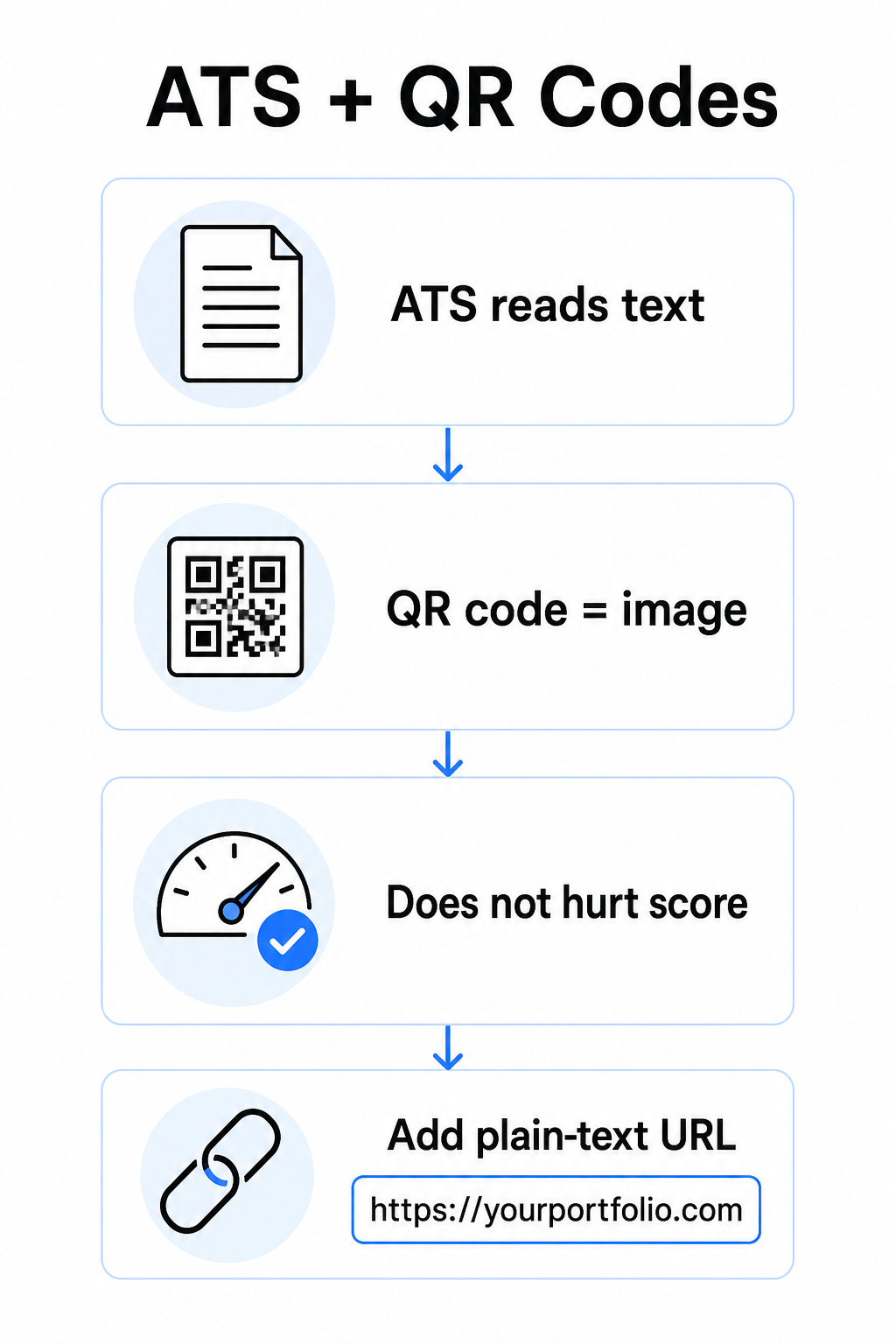
Vždy uveďte URL adresu v obyčajnom texte spolu s vaším QR kódom. Napíšte celý odkaz v čitateľnom texte (napríklad, `linkedin.com/in/yourname`), aby cieľ zostal prístupný pre softvér ATS aj pre každého náborára, ktorý prezerá digitálnu kópiu a nemôže naskenovať obrázok.
Udržujte celkový formát vášho životopisu jednoduchý. Komplexné rozloženia, textové polia, viacero stĺpcov a rozsiahla grafika môžu zmiasť analyzátory ATS – takže váš QR kód by mal byť úhľadne umiestnený v čistom, štandardnom rozložení, namiesto aby dominoval dizajnu.
Vytvorte QR kód pre váš životopis Ste pripravení prepojiť svoje portfólio alebo profil na LinkedIn so skenovateľným kódom? Použite Generátor QR kódov na vytvorenie prispôsobeného, profesionálneho QR kódu za pár minút – bez potreby skúseností s dizajnom.
Príprava vašej destinácie pred generovaním
QR kód je len taký silný, ako to, na čo odkazuje. Predtým, ako ho vytvoríte, uistite sa, že destinácia je pripravená pre oči náborára.
Profil LinkedIn
Začnite vytvorením vlastnej URL adresy na LinkedIn – niečo ako `linkedin.com/in/firstname-lastname` – aby odkaz vyzeral čisto, namiesto reťazca náhodných znakov. Pridajte profesionálnu profilovú fotografiu, ktorá zvyšuje dôveryhodnosť a zobrazenia profilu. Napíšte jasný, kľúčovými slovami relevantný nadpis a zhrnutie s použitím známych pracovných pozícií a merateľných úspechov čerpaných z vašich cieľových rolí. Potom aktualizujte svoju pracovnú históriu, vzdelanie a akékoľvek mediálne vzorky, ktoré prezentujú vašu prácu, predtým ako odkaz kdekoľvek zdieľate.
Viac sa dozviete o ako nájsť a použiť váš QR kód na LinkedIn a vygenerujte si vlastný pomocou QR kód LinkedIn profil.
Portfóliová stránka
Vyberte 4–6 projektov, ktoré sú priamo relevantné pre pozície, o ktoré sa uchádzate, a pre každý uveďte merateľné výsledky – výsledky, dopad a to, čím ste konkrétne prispeli. Napíšte popisy v jednoduchom anglickom jazyku a dôkladne skontrolujte pravopis a gramatiku. Otestujte stránku na mobilnom aj stolnom počítači, aby ste potvrdili rýchle načítanie a čisté formátovanie, a použite krátku, profesionálnu URL adresu s vlastným slugom. Vyhnite sa odkazom, ktoré vyzerajú ako reťazec čísel a pomlčiek, ktoré sa môžu náborárom javiť ako spamové alebo nedôveryhodné.
PDF životopis
Ak chcete odkazovať na dlhšiu alebo vizuálne formátovanejšiu verziu vášho životopisu, QR kód PDF je jednoduchá možnosť. Použite PDF QR kód generátor na nahranie vášho dokumentu a vygenerovanie skenovateľného odkazu priamo naň.
Kontaktná karta (vCard)
QR kód vCard kóduje vaše kontaktné údaje – meno, telefón, e-mail a webovú stránku – priamo do kódu. Keď ho niekto naskenuje, môže si vás okamžite uložiť do svojich kontaktov bez zadania jediného znaku. To funguje obzvlášť dobre v sekcii kontaktov životopisu alebo na vizitke, ktorú rozdávate na pohovoroch. The QR vCard: generátor vCard QR kódu robí jeho vytvorenie jednoduchým, a môžete si prečítať viac o ako vytvoriť QR kód pre kontaktné informácie aby ste z tohto formátu vyťažili maximum.
Ako vytvoriť váš QR kód pre životopis
Akonáhle je vaša destinácia pripravená, vygenerovanie QR kódu trvá len niekoľko krokov.
Najprv si vyberte správny generátor pre vašu destináciu. Použite the QR kód LinkedIn profil pre odkaz na profil, the PDF QR kód generátor pre dokument, the QR vCard: generátor vCard QR kódu pre kontaktné údaje, alebo the Generátor QR kódov pre odkazy pre akúkoľvek inú URL. Potom vložte vašu cieľovú URL alebo nahrajte váš súbor.
V tejto fáze zvážte, či použiť a dynamický QR kód. Dynamické kódy ukladajú krátku presmerovaciu URL adresu vo vnútri kódu namiesto priameho kódovania celej destinácie. To znamená, že môžete aktualizovať, kam kód smeruje – dokonca aj po vytlačení – bez zmeny samotného kódu. Ak sa zmení vaša URL adresa portfólia alebo aktualizujete vašu LinkedIn adresu, dynamický kód vás ušetrí od znova vytlačenia vášho životopisu.
Ďalej prispôsobte design. Upravte farby tak, aby zodpovedali palete vášho životopisu, pričom popredie udržujte tmavé a pozadie svetlé. Čierna na bielej zostáva najspoľahlivejšou kombináciou pre skenery. Vyhnite sa prechodom, tieňom alebo obráteným designom (svetlé kódy na tmavom pozadí), pretože tieto môžu spôsobiť zlyhanie skenovania na niektorých zariadeniach.
Keď ste pripravení na stiahnutie, exportujte ako SVG alebo EPS pre najostrejší výsledok. Tieto vektorové formáty sa škálujú bez straty kvality, čím zabraňujú rozmazaniu, ktoré spôsobuje zlyhanie skenovania na tlačených materiáloch. Nakoniec otestujte kód na viacerých zariadeniach a v rôznych svetelných podmienkach predtým, ako ho pridáte do vášho životopisu. Potvrďte, že destinácia sa načíta správne a rýchlo na Wi-Fi aj mobilných pripojeniach.
Prepojte akúkoľvek URL so skenovateľným kódom Či už je vaša destinácia portfólio, osobná stránka alebo akákoľvek iná webová stránka, the Generátor QR kódov pre odkazy vám umožní vytvoriť prispôsobený, sledovateľný kód v priebehu sekúnd.
Štandardy designu QR kódu pre životopisy
QR kód na životopise musí vyzerať zámerne, nie ako dodatočný prvok. Nasledujúce technické pokyny zabezpečujú, že sa spoľahlivo naskenuje a čisto zapadne na stránku.
Veľkosť
Minimálna odporúčaná veľkosť pre QR kód v kontexte skenovania zblízka – ako je životopis držaný na dĺžku paže – je 0,8 x 0,8 palca (2 x 2 cm). Menšia veľkosť riskuje zlyhanie skenovania; čokoľvek okolo 0,4 x 0,4 palca (1 x 1 cm) je príliš malé na konzistentné použitie. The Zásady veľkosti QR kódov na vizitkách platia rovnako pre životopisy a oplatí sa ich preštudovať predtým, ako dokončíte vaše rozloženie.
Farebný kontrast
Skenery fungujú detekciou kontrastu medzi tmavými a svetlými modulmi. Snažte sa o kontrastný pomer aspoň 4,5:1 pre malé QR kódy, v súlade s pokynmi pre prístupnosť. Čierna na bielej dosahuje pomer 21:1 a je najbezpečnejšou voľbou. Vyhnite sa svetlosivej na bielej, žltej na bielej alebo akejkoľvek kombinácii, kde sa kód spája s pozadím stránky. The full osvedčené postupy pre farebný kontrast QR kódov sprievodca poskytuje podrobné odporúčania pre párovanie a príklady kontrastného pomeru.
Tichá zóna
Tichá zóna je prázdny okraj obklopujúci QR kód. Podľa ISO/IEC 18004 musí byť široká aspoň štyri moduly na všetkých stranách – to znamená, štyrikrát šírka jedného malého štvorca v mriežke kódu. Nikdy neumiestňujte text, čiary ani iné designové prvky do tohto okraja. Chýbajúca alebo preplnená tichá zóna je jedným z najčastejších dôvodov, prečo sa QR kód nepodarí naskenovať, a je ľahké ju náhodne porušiť pri vkladaní kódu do tesného rozloženia životopisu.
Rozlíšenie
Exportujte váš QR kód s minimálnym rozlíšením 300 DPI pre tlač. Ešte lepšie je použiť vektorový formát (SVG alebo EPS), aby sa kód čisto škáloval bez ohľadu na veľkosť tlače, bez pixelizácie. The osvedčených postupov pre čitateľnosť QR kódov pokrýva rozlíšenie, tiché zóny a kontrast na jednom mieste, ak chcete komplexnú referenciu.
Kam umiestniť QR kód do vášho životopisu
Umiestnenie signalizuje profesionalitu. QR kód náhodne umiestnený do stredu vašej sekcie skúseností vyzerá ako nehoda. Dve najefektívnejšie pozície sú blízko vašich kontaktných informácií v hornej časti stránky – kde náboroví pracovníci hľadajú najprv spôsoby, ako vás kontaktovať – alebo v pravom hornom rohu, čo udržuje kód viditeľný bez toho, aby konkuroval hlavnému textu životopisu.
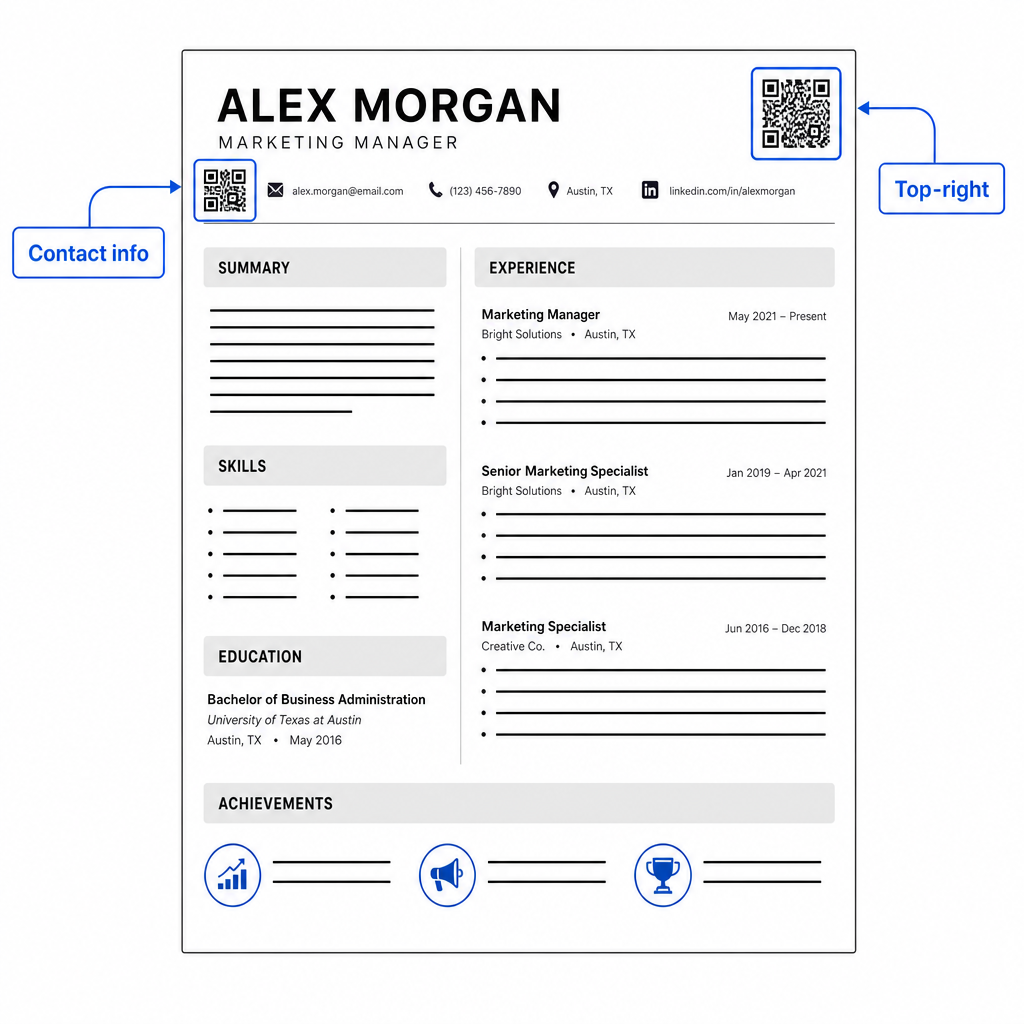
Udržujte kód dostatočne malý, aby zostal nenápadný: približne 0,8 až 1 palec štvorcový vyhovuje štandardnému životopisu. Pridajte pod neho krátky textový štítok, napríklad Naskenujte pre zobrazenie portfólia alebo Naskenujte pre LinkedIn, takže náborový pracovník vie na prvý pohľad, kam kód vedie. Umiestnite URL adresu v obyčajnom texte priamo vedľa alebo pod kód.
Tabuľka nižšie porovnáva bežné prístupy k umiestneniu:
| UMIESTNENIE | Klady | Nevýhody |
|---|---|---|
| Blízko kontaktných informácií navrchu | Prirodzené umiestnenie, okamžite viditeľné | Musí zostať malé, aby sa predišlo preplneniu |
| Pravý horný roh | Čisté, nenápadné | Môže byť prehliadnuté, ak náborový pracovník číta zľava doprava |
| Päta životopisu | Udržuje hlavný obsah čistý | Môže byť prehliadnuté alebo odrezané pri tlači |
| Vedľa konkrétnej pozície | Kontextuálne spája portfólio s danou prácou | Má zmysel len pre jednu prepojenú položku |
Bežné chyby, ktorým sa treba vyhnúť
- Robiť QR kód jedinou prístupovou cestou – Vždy zahrňte URL adresu v obyčajnom texte. Náborový pracovník, ktorý si prezerá PDF na obrazovke, nemôže naskenovať QR kód.
- Odkazovanie na nepripravenú destináciu – Profil na LinkedIn bez fotografie, riedky súhrn alebo zastarané skúsenosti pôsobia zle. Odkazujte len vtedy, keď je destinácia kompletná a aktuálna.
- Používanie statického QR kódu, keď sa vaše odkazy môžu zmeniť – Ak sa zmení URL adresa vášho portfólia alebo adresa LinkedIn, statický kód sa stane nefunkčným a zbytočným. Dynamický kód je možné aktualizovať bez opätovnej tlače čohokoľvek.
- Vynechanie testu – Vždy naskenujte svoj finálny kód z vytlačenej kópie – nielen z obrazovky – pred odoslaním alebo odovzdaním vášho životopisu.
- Slabý kontrast alebo preplnená tichá zóna – Oboje spôsobí zlyhanie kódu na niektorých zariadeniach. Dodržujte vyššie uvedené pokyny pre veľkosť a kontrast a ponechajte voľný priestor okolo kódu zo všetkých strán.
- Používanie obrázka s nízkym rozlíšením – Pixelovaný QR kód na vytlačenom životopise vyzerá neprofesionálne a nemusí sa dať naskenovať. Exportujte vo formáte SVG alebo EPS, alebo minimálne 300 DPI PNG.
Riešenie skepticizmu náborových pracovníkov
Nie každý náborový pracovník naskenuje QR kód. Niektorí nemusia byť zvyknutí, opatrní voči neznámym odkazom, alebo si jednoducho prezerajú životopisy na počítači, kde je skenovanie nepraktické. Toto nie je dôvod úplne sa vyhýbať QR kódom – ale je to dôvod, prečo ich považovať za doplnok, nie za náhradu, pre odkazy v obyčajnom texte.
Jasne označte svoj kód a udržujte URL adresu viditeľnú v texte. Náborový pracovník, ktorý neskenuje, stále uvidí URL adresu a môže ju napísať alebo kliknúť na ňu. Náborový pracovník, ktorý si prezerá váš životopis osobne, má možnosť okamžite skenovať. Cieľom je poskytnúť každému čitateľovi najjednoduchšiu možnú cestu k vašej práci, bez ohľadu na to, ako čítajú váš životopis.
Urobte svoj životopis interaktívnejším Pridajte profesionálny QR kód do svojho životopisu, ktorý odkazuje priamo na vaše portfólio, profil na LinkedIn alebo digitálny životopis. Začnite s Generátor QR kódov – zadarmo na vytvorenie, s možnosťami sledovania skenov a aktualizácie vašej destinácie kedykoľvek.
Pridanie QR kódu do vášho životopisu je malá zmena, ktorá môže urobiť zmysluplný dojem – najmä keď odovzdávate svoj životopis niekomu osobne. Kľúčom je príprava: uistite sa, že vaša destinácia je vyleštená, váš kód spĺňa základné dizajnové štandardy a vždy k nemu priložíte čitateľnú URL adresu v obyčajnom texte. Použite dynamický kód, aby ste mohli aktualizovať destináciu bez opätovnej tlače, a všetko otestujte na fyzickej tlači pred vaším ďalším pohovorom alebo veľtrhom práce.
Často kladené otázky
Nie – platformy ATS spracúvajú QR kódy ako obrázky a preskakujú ich počas analýzy textu, takže samotný kód negatívne neovplyvňuje vaše skóre ATS. Avšak, aby ste zabezpečili, že vaše portfólio alebo URL adresa LinkedIn je tiež strojovo čitateľná, vždy zahrňte verziu odkazu v obyčajnom texte popri QR kóde.
Najlepšia destinácia závisí od vášho odboru. Webová stránka s portfóliom alebo PDF portfólio funguje dobre pre kreatívne a technické pozície. Profil na LinkedIn sa hodí pre väčšinu odvetví. QR kód vCard je užitočný, ak je vaším primárnym cieľom uľahčiť náborovým pracovníkom uloženie vašich kontaktných údajov. Čokoľvek, na čo odkazujete, uistite sa, že je to kompletné, aktuálne a optimalizované pred tlačou.
Statický QR kód kóduje vašu cieľovú URL priamo do vzoru kódu – ak sa URL zmení, kód sa stane nefunkčným a musíte ho pretlačiť. Dynamický QR kód kóduje krátku presmerovaciu URL, ktorú môžete kedykoľvek aktualizovať bez zmeny vytlačeného kódu. Pre životopis, ktorý môžete rozdávať niekoľko mesiacov, je dynamický kód bezpečnejšou a flexibilnejšou voľbou.