Вам трудно заставить рекрутеров заметить ваше портфолио или профиль LinkedIn? QR-код в вашем резюме устраняет разрыв между печатной страницей и вашим полным цифровым присутствием – это руководство объясняет, как его создать, где разместить и как избежать ошибок, которые делают его непрофессиональным.
Что на самом деле делает QR-код в резюме
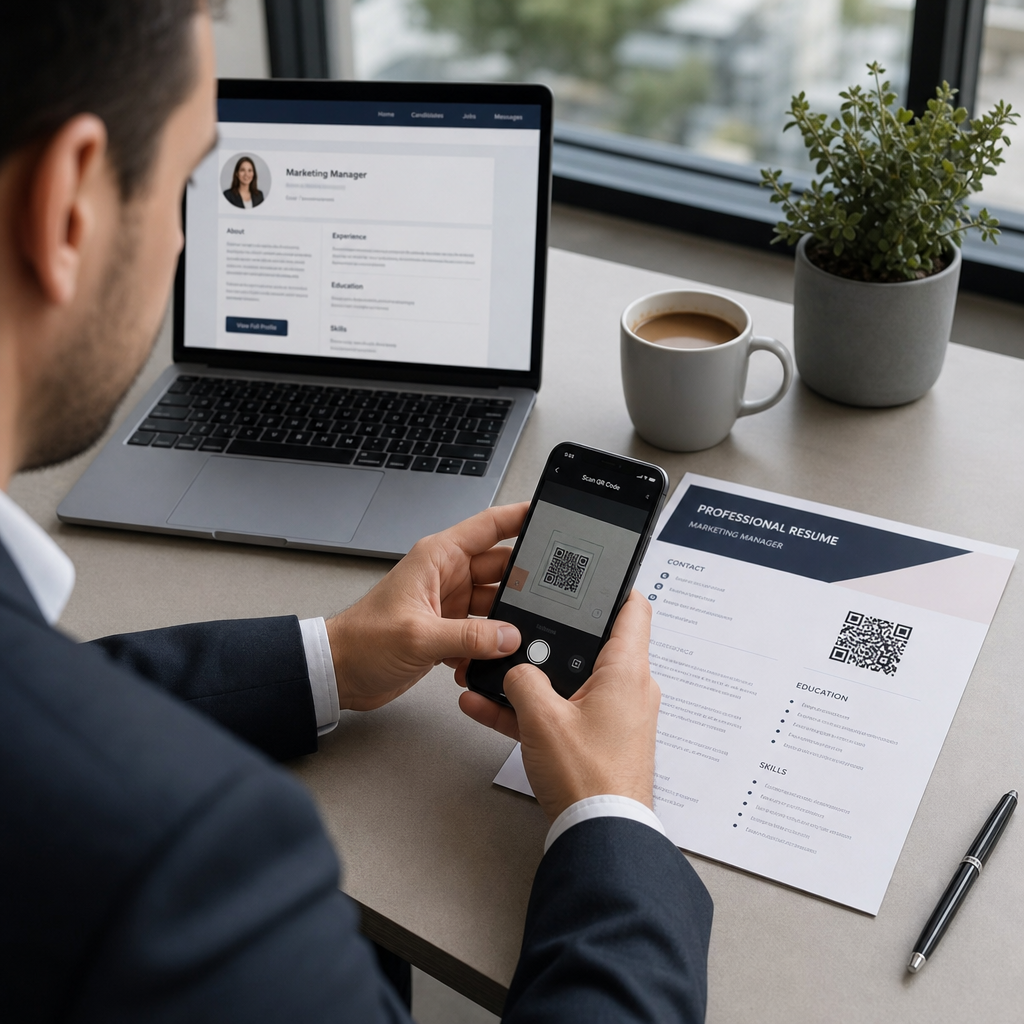
QR-код — это сканируемое изображение, которое кодирует URL-адрес или другие данные. Когда рекрутер наводит на него камеру своего телефона, он открывает ваше портфолио, профиль LinkedIn или цифровое резюме непосредственно в их браузере – ввод текста не требуется.
В резюме это решает реальную проблему: у рекрутеров, читающих печатную копию, нет простого способа нажать на ваши ссылки. QR-код превращает статическую страницу в интерактивную, не добавляя беспорядка. Типы мест назначения, на которые вы можете ссылаться, включают:
- профиль LinkedIn – позволяет рекрутерам просматривать вашу полную историю работы, рекомендации и активность
- Онлайн-портфолио – показывает проектные работы, тематические исследования или творческие образцы
- Резюме в формате PDF – предоставляет доступ к расширенной или отформатированной версии вашего резюме
- Цифровая контактная карта (vCard) – позволяет рекрутерам сохранять ваши контактные данные непосредственно в свой телефон
Когда добавление QR-кода имеет смысл
QR-код добавляет ценность в определенных ситуациях. Он работает лучше всего, когда ваше резюме будет распечатано и передано кому-либо лично – на собеседованиях, ярмарках вакансий или сетевых мероприятиях – и когда у вас есть портфолио, личный сайт или профиль LinkedIn, который стоит посетить. Он особенно эффективен в областях, где важен показ работ: дизайн, разработка, написание текстов, маркетинг или любая творческая дисциплина, где рекрутер получает выгоду от просмотра образцов, выходящих за рамки того, что помещается на странице.
Он добавляет меньше ценности, когда ваше резюме будет отправлено только через онлайн-портал подачи заявок. В таких случаях рекрутеры редко печатают резюме, поэтому QR-код остается несканированным. Думайте о нем как о функции для личного общения, а не как о замене обычных текстовых ссылок, которые работают везде.
Как системы ATS обрабатывают QR-коды
Прежде чем добавлять QR-код, вам нужно понять, как работают системы отслеживания кандидатов. Платформы ATS читают текст и в значительной степени игнорируют элементы изображений – QR-код рассматривается как нетекстовая графика и просто пропускается во время анализа. Это означает, что сам код не повредит вашему баллу ATS, но и не поможет ему. Что важно для ATS, так это текст в вашем резюме.
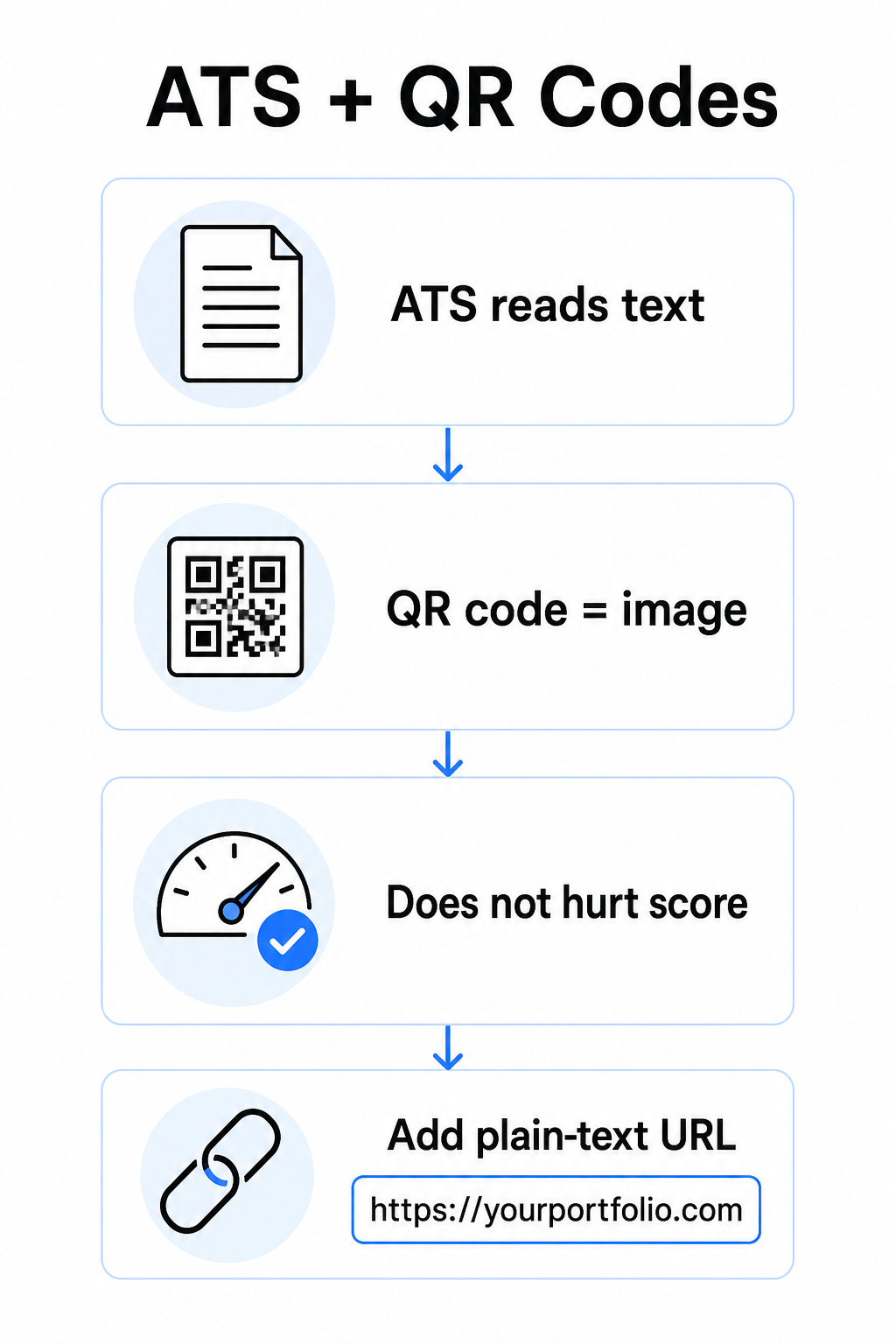
Всегда включайте обычный текстовый URL-адрес рядом с вашим QR-кодом. Напишите полную ссылку читаемым текстом (например, `linkedin.com/in/yourname`), чтобы пункт назначения оставался доступным как для программного обеспечения ATS, так и для любого рекрутера, просматривающего цифровую копию, который не может сканировать изображение.
Сохраняйте общий формат вашего резюме простым. Сложные макеты, текстовые поля, несколько столбцов и тяжелая графика могут сбивать с толку парсеры ATS – поэтому ваш QR-код должен аккуратно располагаться в чистом, стандартном макете, а не доминировать в дизайне.
Создайте QR-код для вашего резюме Готовы связать ваше портфолио или профиль LinkedIn со сканируемым кодом? Используйте Генератор QR-кодов чтобы создать индивидуальный, профессиональный QR-код за считанные минуты – опыт дизайна не требуется.
Подготовка вашего пункта назначения перед генерацией
QR-код силен настолько, насколько сильна ссылка, на которую он ведет. Прежде чем создавать его, убедитесь, что пункт назначения готов для глаз рекрутера.
Профиль LinkedIn
Начните с создания пользовательского URL-адреса LinkedIn – например, `linkedin.com/in/firstname-lastname` – чтобы ссылка выглядела аккуратно, а не как набор случайных символов. Добавьте профессиональную фотографию профиля, что повышает доверие и количество просмотров профиля. Напишите четкий, релевантный ключевым словам заголовок и резюме, используя знакомые названия должностей и измеримые достижения, полученные из ваших целевых ролей. Затем обновите свою историю работы, образование и любые медиа-образцы, которые демонстрируют вашу работу, прежде чем делиться ссылкой где-либо.
Вы можете узнать больше о как найти и использовать ваш QR-код LinkedIn и сгенерировать индивидуальный с помощью Генератор QR-кода LinkedIn.
Сайт-портфолио
Подберите 4–6 проектов, которые непосредственно релевантны ролям, на которые вы претендуете, и включите измеримые результаты для каждого – результаты, влияние и ваш конкретный вклад. Напишите описания простым английским языком и тщательно проверьте орфографию и грамматику. Протестируйте сайт как на мобильных, так и на настольных устройствах, чтобы подтвердить быструю загрузку и чистое форматирование, и используйте короткий, профессиональный URL-адрес с пользовательским "слагом". Избегайте ссылок, которые выглядят как набор цифр и дефисов, что может показаться спамом или ненадежным для рекрутеров.
Резюме в формате PDF
Если вы хотите сослаться на более длинную или более визуально отформатированную версию вашего резюме, QR-код PDF — это простой вариант. Используйте QR код на пдф файл чтобы загрузить ваш документ и сгенерировать сканируемую ссылку непосредственно на него.
Контактная карта (vCard)
QR-код vCard кодирует ваши контактные данные – имя, телефон, электронную почту и веб-сайт – непосредственно в код. Когда кто-то сканирует его, они могут сохранить вас в свои контакты мгновенно, не вводя ни одного символа. Это особенно хорошо работает в разделе контактов резюме или на визитной карточке, которую вы раздаете на собеседованиях. The QR код с контактами vCard делает создание такого кода простым, и вы можете прочитать больше о том, как создать QR-код для контактной информации чтобы максимально использовать этот формат.
Как создать ваш QR-код для резюме
Как только ваше место назначения готово, генерация QR-кода занимает всего несколько шагов.
Сначала выберите правильный генератор для вашего места назначения. Используйте the Генератор QR-кода LinkedIn для ссылки на профиль, the QR код на пдф файл для документа, the QR код с контактами vCard для контактных данных, или the Генератор QR-кодов для ссылок для любого другого URL-адреса. Затем вставьте ваш целевой URL-адрес или загрузите ваш файл.
На этом этапе рассмотрите, стоит ли использовать динамический QR-код. Динамические коды хранят короткий URL-адрес перенаправления внутри кода, а не кодируют полное место назначения напрямую. Это означает, что вы можете обновить, куда указывает код – даже после печати – без изменения самого кода. Если ваш URL-адрес портфолио изменится или вы обновите свой адрес LinkedIn, динамический код избавит вас от перепечатки резюме.
Далее, настройте дизайн. Отрегулируйте цвета, чтобы они соответствовали палитре вашего резюме, сохраняя темный передний план и светлый фон. Черный на белом остается самой надежной комбинацией для сканеров. Избегайте градиентов, теней или инвертированных дизайнов (светлый код на темном фоне), так как это может привести к сбоям сканирования на некоторых устройствах.
Когда вы будете готовы к загрузке, экспортируйте в формате SVG или EPS для получения максимально четкого результата. Эти векторные форматы масштабируются без потери качества, предотвращая размытость, которая вызывает сбои сканирования на печатных материалах. Наконец, протестируйте код на нескольких устройствах и в различных условиях освещения, прежде чем добавлять его в ваше резюме. Убедитесь, что место назначения загружается правильно и быстро как по Wi-Fi, так и по сотовой связи.
Привяжите любой URL-адрес к сканируемому коду Независимо от того, является ли ваше место назначения портфолио, личным сайтом или любой другой веб-страницей, the Генератор QR-кодов для ссылок позволяет вам создать настраиваемый, отслеживаемый код за считанные секунды.
Стандарты дизайна QR-кодов для резюме
QR-код в резюме должен выглядеть намеренно, а не быть вставленным как нечто второстепенное. Следующие технические рекомендации обеспечивают его надежное сканирование и аккуратное размещение на странице.
Размер
Минимальный рекомендуемый размер для QR-кода в контексте сканирования с близкого расстояния – например, резюме, которое держат на расстоянии вытянутой руки – составляет 0.8 x 0.8 дюйма (2 x 2 см). Уменьшение размера рискует привести к сбоям сканирования; что-либо около 0.4 x 0.4 дюйма (1 x 1 см) слишком мало для постоянного использования. The Какого размера должен быть QR код на визитке в равной степени применимы к резюме и стоит их просмотреть, прежде чем вы завершите свой макет.
Цветовой контраст
Сканеры работают, определяя контраст между темными и светлыми модулями. Стремитесь к коэффициенту контрастности не менее 5:1 для небольших QR-кодов, в соответствии с рекомендациями по доступности. Черный на белом достигает соотношения 21:1 и является самым безопасным выбором. Избегайте светло-серого на белом, желтого на белом или любой комбинации, где код сливается с фоном страницы. The full лучшим практикам контрастности цветов QR-кода руководство предоставляет подробные рекомендации по сочетаниям и примеры коэффициентов контрастности.
Тихоокеанская зона
Тихая зона – это пустая граница, окружающая QR-код. Согласно ISO/IEC 18004, она должна быть шириной не менее четырех модулей со всех сторон – то есть, в четыре раза шире одного маленького квадрата в сетке кода. Никогда не размещайте текст, линии или другие элементы дизайна внутри этого поля. Отсутствующая или переполненная тихая зона является одной из наиболее распространенных причин, по которым QR-код не сканируется, и ее легко случайно нарушить при размещении кода в плотном макете резюме.
Разрешение
Экспортируйте ваш QR-код с минимальным разрешением 300 DPI для печати. Еще лучше, используйте векторный формат (SVG или EPS), чтобы код чисто масштабировался независимо от размера печати, без пикселизации. The лучшим практикам читаемости QR-кодов охватывает разрешение, тихие зоны и контрастность в одном месте, если вам нужен исчерпывающий справочник.
Куда разместить QR-код в вашем резюме
Размещение сигнализирует о профессионализме. QR-код, случайно помещенный в середину раздела вашего опыта, выглядит как случайность. Две наиболее эффективные позиции: рядом с вашей контактной информацией в верхней части страницы – где рекрутеры в первую очередь ищут способы связаться с вами – или в правом верхнем углу, что делает код видимым, не конкурируя с основным текстом резюме.
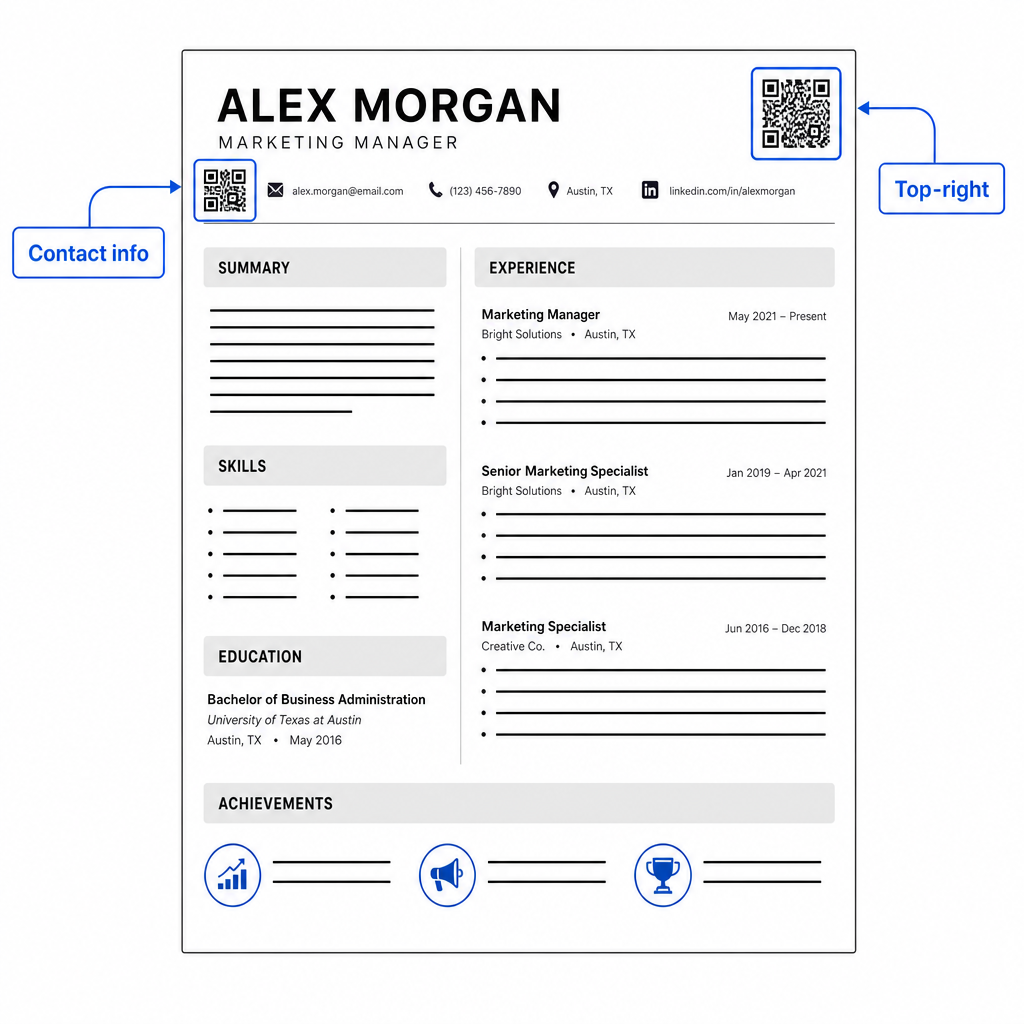
Держите код достаточно маленьким, чтобы он оставался ненавязчивым: примерно 0.8 до 1 дюйма в квадрате подходит для стандартного резюме. Добавьте под ним короткую текстовую метку, например Сканируйте, чтобы просмотреть портфолио или Сканируйте для LinkedIn, чтобы рекрутер с первого взгляда знал, куда ведет код. Разместите URL-адрес в виде обычного текста непосредственно рядом или под кодом.
В таблице ниже сравниваются распространенные подходы к размещению:
| РАЗМЕЩЕНИЕ | Плюсы | Минусы |
|---|---|---|
| Рядом с контактной информацией вверху | Естественное расположение, сразу видно | Должен оставаться маленьким, чтобы избежать перегруженности |
| Верхний правый угол | Аккуратный, ненавязчивый | Может быть пропущен, если рекрутер читает слева направо |
| Нижний колонтитул резюме | Сохраняет основной контент чистым | Может быть пропущен или обрезан при печати |
| Рядом с конкретной ролью | Контекстно связывает портфолио с этой работой | Имеет смысл только для одного связанного элемента |
Общие ошибки, которых следует избегать
- Использование QR-кода как единственного способа доступа –.
- Связывание с неподготовленным пунктом назначения – Профиль LinkedIn без фотографии, скудное резюме или устаревший опыт выглядят плохо. Ссылайтесь только тогда, когда пункт назначения полный и актуальный.
- Использование статического QR-кода, когда ваши ссылки могут измениться – Если URL вашего портфолио или адрес LinkedIn изменится, статический код станет нерабочим и бесполезным. Динамический код можно обновить без перепечатки.
- Пропуск теста – Всегда сканируйте свой окончательный код с распечатанной копии – а не только с экрана – перед отправкой или раздачей резюме.
- Плохой контраст или переполненная свободная зона – И то, и другое приведет к тому, что код не будет работать на некоторых устройствах. Следуйте приведенным выше рекомендациям по размеру и контрастности и оставляйте свободное пространство вокруг кода со всех сторон.
- Использование изображения низкого разрешения – Пикселизированный QR-код на распечатанном резюме выглядит непрофессионально и может не сканироваться. Экспортируйте в SVG или EPS, или как минимум в PNG с разрешением 300 DPI.
Устранение скептицизма рекрутеров
Не каждый рекрутер будет сканировать QR-код. Некоторые могут быть незнакомы с этой практикой, осторожны в отношении неизвестных ссылок или просто просматривают резюме на компьютере, где сканирование непрактично. Это не повод полностью избегать QR-кодов – но это повод рассматривать их как дополнение, а не замену для обычных текстовых ссылок.
Четко подписывайте свой код и оставляйте URL-адрес видимым в тексте. Рекрутер, который не сканирует, все равно увидит URL-адрес и сможет ввести или нажать на него. Рекрутер, просматривающий ваше резюме лично, имеет возможность немедленно отсканировать его. Цель состоит в том, чтобы предоставить каждому читателю максимально простой путь к вашей работе, независимо от того, как он читает ваше резюме.
Сделайте свое резюме более интерактивным Добавьте профессиональный QR-код в свое резюме, который ведет непосредственно к вашему портфолио, профилю LinkedIn или цифровому резюме. Начните с Генератор QR-кодов – бесплатно для создания, с возможностями отслеживания сканирований и обновления пункта назначения в любое время.
Добавление QR-кода в ваше резюме – это небольшое изменение, которое может произвести значительное впечатление – особенно когда вы передаете свое резюме кому-то лично. Ключ – это подготовка: убедитесь, что ваш пункт назначения отполирован, ваш код соответствует базовым стандартам дизайна, и вы всегда включаете читаемый текстовый URL-адрес рядом с ним. Используйте динамический код, чтобы вы могли обновлять пункт назначения без перепечатки, и тестируйте все на физической распечатке перед следующим собеседованием или ярмаркой вакансий.
Часто задаваемые вопросы
Нет – платформы ATS рассматривают QR-коды как изображения и пропускают их во время анализа текста, поэтому сам код не влияет отрицательно на ваш балл ATS. Однако, чтобы убедиться, что ваше портфолио или URL-адрес LinkedIn также машиночитаемы, всегда включайте текстовую версию ссылки рядом с QR-кодом.
Лучшее место назначения зависит от вашей области. Сайт-портфолио или PDF-портфолио хорошо подходит для творческих и технических ролей. Профиль LinkedIn подходит для большинства отраслей. QR-код vCard полезен, если ваша основная цель — упростить рекрутерам сохранение ваших контактных данных. На что бы вы ни ссылались, убедитесь, что оно полное, актуальное и оптимизированное перед печатью.
Статический QR-код кодирует ваш целевой URL непосредственно в шаблон кода — если URL меняется, код становится нерабочим, и вам нужно перепечатать. Динамический QR-код кодирует короткий URL перенаправления, который вы можете обновить в любое время без изменения напечатанного кода. Для резюме, которое вы можете раздавать в течение нескольких месяцев, динамический код является более безопасным и гибким выбором.