Δυσκολεύεστε να κάνετε τους υπεύθυνους προσλήψεων να προσέξουν το χαρτοφυλάκιό σας ή το προφίλ σας στο LinkedIn; Ένας κωδικός QR στο βιογραφικό σας γεφυρώνει το χάσμα μεταξύ μιας έντυπης σελίδας και της πλήρους ψηφιακής σας παρουσίας – αυτός ο οδηγός εξηγεί πώς να δημιουργήσετε έναν, πού να τον τοποθετήσετε και πώς να αποφύγετε τα λάθη που τον κάνουν να φαίνεται αντιεπαγγελματικός.
Τι κάνει στην πραγματικότητα ένας κωδικός QR βιογραφικού
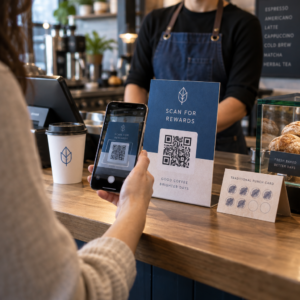
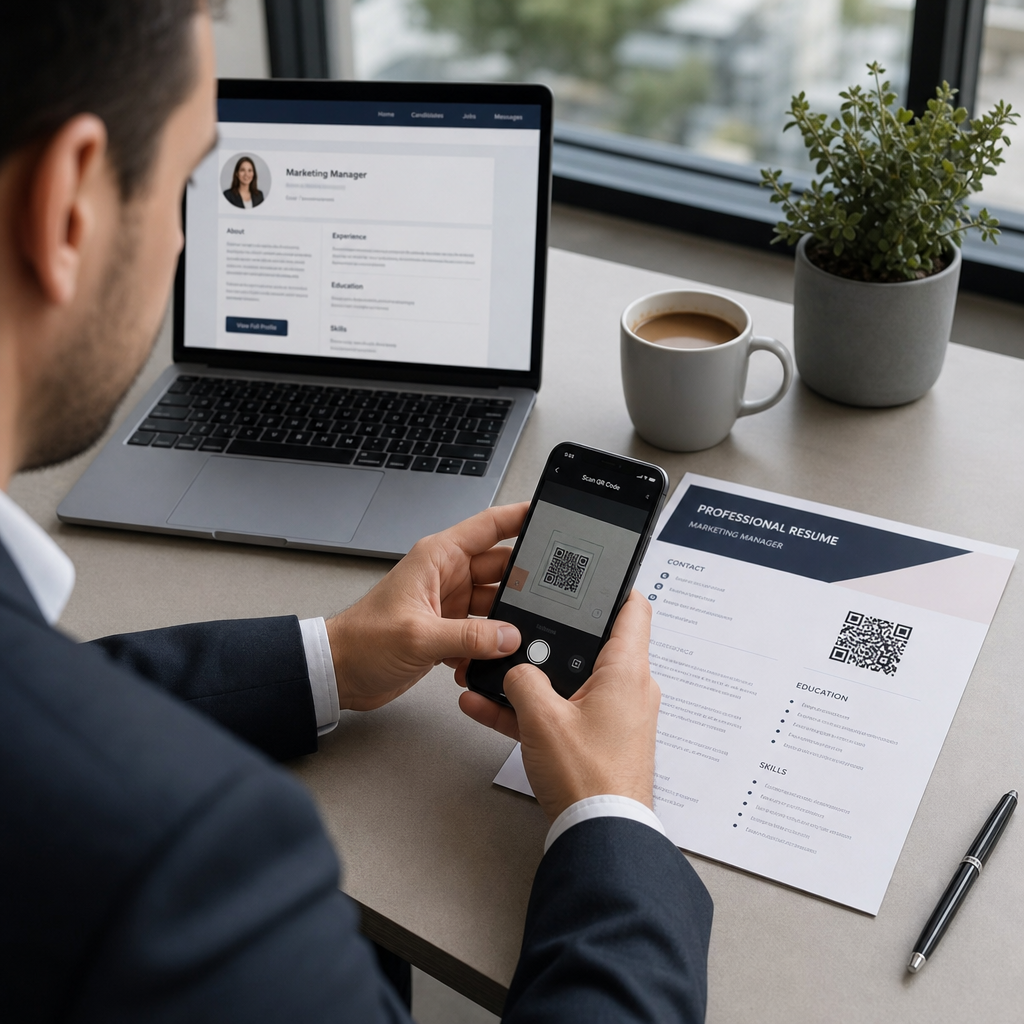
Ένας κωδικός QR είναι μια σαρώσιμη εικόνα που κωδικοποιεί μια διεύθυνση URL ή άλλα δεδομένα. Όταν ένας υπεύθυνος προσλήψεων στρέφει την κάμερα του τηλεφώνου του σε αυτόν, ανοίγει το χαρτοφυλάκιό σας, το προφίλ σας στο LinkedIn ή το ψηφιακό σας βιογραφικό απευθείας στο πρόγραμμα περιήγησής του – χωρίς να απαιτείται πληκτρολόγηση.
Σε ένα βιογραφικό, αυτό λύνει ένα πραγματικό πρόβλημα: οι υπεύθυνοι προσλήψεων που διαβάζουν ένα έντυπο αντίγραφο δεν έχουν εύκολο τρόπο να κάνουν κλικ στους συνδέσμους σας. Ένας κωδικός QR μετατρέπει μια στατική σελίδα σε διαδραστική χωρίς να προσθέτει ακαταστασία. Οι τύποι προορισμών στους οποίους μπορείτε να συνδέσετε περιλαμβάνουν:
- προφίλ σας στο LinkedIn – επιτρέπει στους υπεύθυνους προσλήψεων να εξετάσουν το πλήρες ιστορικό εργασίας σας, τις συστάσεις και τη δραστηριότητά σας
- Ηλεκτρονικό χαρτοφυλάκιο – δείχνει εργασίες έργων, μελέτες περιπτώσεων ή δημιουργικά δείγματα
- Βιογραφικό σε PDF – παρέχει πρόσβαση σε μια διευρυμένη ή μορφοποιημένη έκδοση του βιογραφικού σας
- Ψηφιακή κάρτα επαφών (vCard) – επιτρέπει στους υπεύθυνους προσλήψεων να αποθηκεύουν τα στοιχεία επικοινωνίας σας απευθείας στο τηλέφωνό τους
Πότε έχει νόημα η προσθήκη κωδικού QR
Ένας κωδικός QR προσθέτει αξία σε συγκεκριμένες καταστάσεις. Λειτουργεί καλύτερα όταν το βιογραφικό σας θα εκτυπωθεί και θα παραδοθεί σε κάποιον αυτοπροσώπως – σε συνεντεύξεις, εκθέσεις καριέρας ή εκδηλώσεις δικτύωσης – και όταν έχετε ένα χαρτοφυλάκιο, προσωπικό ιστότοπο ή προφίλ LinkedIn που αξίζει να επισκεφθείτε. Είναι ιδιαίτερα αποτελεσματικός σε τομείς όπου η επίδειξη εργασίας έχει σημασία: σχεδιασμός, ανάπτυξη, συγγραφή, μάρκετινγκ ή οποιαδήποτε δημιουργική ειδικότητα όπου ένας υπεύθυνος προσλήψεων επωφελείται από την προβολή δειγμάτων πέρα από αυτά που χωρούν σε μια σελίδα.
Προσθέτει λιγότερη αξία όταν το βιογραφικό σας θα υποβληθεί μόνο μέσω μιας διαδικτυακής πύλης αιτήσεων. Σε αυτές τις περιπτώσεις, οι υπεύθυνοι προσλήψεων σπάνια εκτυπώνουν βιογραφικά, οπότε ο κωδικός QR παραμένει μη σαρωμένος. Σκεφτείτε το ως ένα χαρακτηριστικό για την προσωπική εμπειρία, όχι ως υποκατάστατο των συνδέσμων απλού κειμένου που λειτουργούν παντού.
Πώς χειρίζονται οι ATS κωδικούς QR
Πριν προσθέσετε έναν κωδικό QR, πρέπει να κατανοήσετε πώς λειτουργούν τα συστήματα παρακολούθησης αιτούντων (ATS). Οι πλατφόρμες ATS διαβάζουν κείμενο και αγνοούν σε μεγάλο βαθμό τα στοιχεία εικόνας – ένας κωδικός QR αντιμετωπίζεται ως μη κειμενικό γραφικό και απλώς παραλείπεται κατά την ανάλυση. Αυτό σημαίνει ότι ο ίδιος ο κωδικός δεν θα βλάψει τη βαθμολογία σας στο ATS, αλλά ούτε θα τη βοηθήσει. Αυτό που έχει σημασία για το ATS είναι το κείμενο στο βιογραφικό σας.
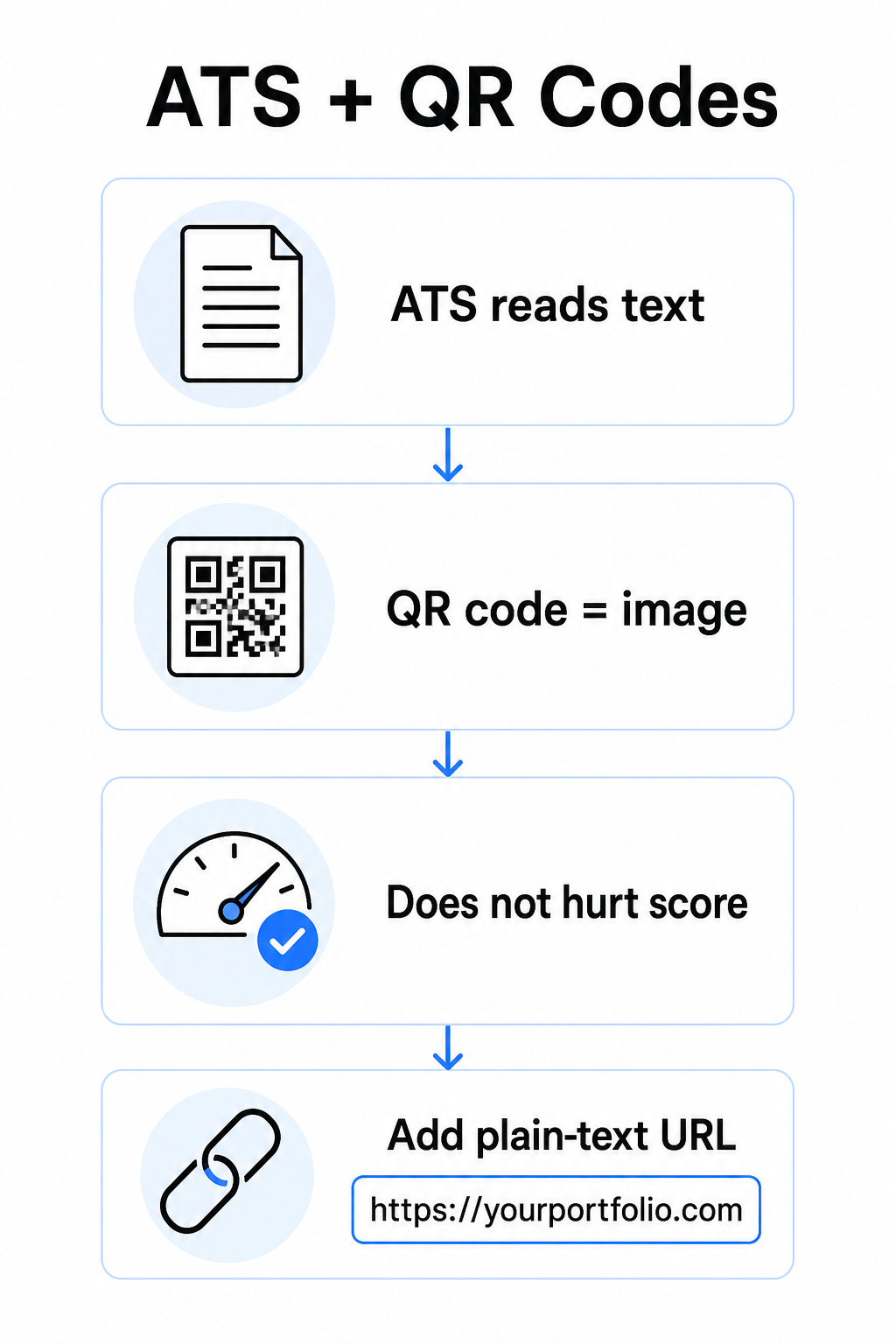
Να περιλαμβάνετε πάντα μια διεύθυνση URL απλού κειμένου μαζί με τον κωδικό QR σας. Γράψτε τον πλήρη σύνδεσμο σε αναγνώσιμο κείμενο (για παράδειγμα, `linkedin.com/in/yourname`) ώστε ο προορισμός να παραμένει προσβάσιμος τόσο στο λογισμικό ATS όσο και σε οποιονδήποτε υπεύθυνο προσλήψεων εξετάζει ένα ψηφιακό αντίγραφο που δεν μπορεί να σαρώσει μια εικόνα.
Διατηρήστε τη συνολική μορφή του βιογραφικού σας απλή. Οι σύνθετες διατάξεις, τα πλαίσια κειμένου, οι πολλαπλές στήλες και τα βαριά γραφικά μπορούν να μπερδέψουν τους αναλυτές ATS – επομένως ο κωδικός QR σας θα πρέπει να βρίσκεται τακτοποιημένα μέσα σε μια καθαρή, τυπική διάταξη αντί να κυριαρχεί στο σχέδιο.
Δημιουργήστε έναν κωδικό QR για το βιογραφικό σας Είστε έτοιμοι να συνδέσετε το χαρτοφυλάκιό σας ή το προφίλ σας στο LinkedIn με έναν σαρώσιμο κωδικό; Χρησιμοποιήστε το Γεννήτρια Κωδικών QR για να δημιουργήσετε έναν προσαρμοσμένο, επαγγελματικό κωδικό QR μέσα σε λίγα λεπτά – χωρίς να απαιτείται εμπειρία σχεδιασμού.
Προετοιμασία του προορισμού σας πριν τη δημιουργία
Ο κωδικός QR είναι τόσο ισχυρός όσο αυτό στο οποίο συνδέεται. Πριν δημιουργήσετε έναν, βεβαιωθείτε ότι ο προορισμός είναι έτοιμος για τα μάτια ενός υπεύθυνου προσλήψεων.
Προφίλ LinkedIn
Ξεκινήστε δημιουργώντας μια προσαρμοσμένη διεύθυνση URL LinkedIn – κάτι σαν `linkedin.com/in/firstname-lastname` – ώστε ο σύνδεσμος να φαίνεται καθαρός αντί για μια σειρά τυχαίων χαρακτήρων. Προσθέστε μια επαγγελματική φωτογραφία προφίλ, η οποία αυξάνει την αξιοπιστία και τις προβολές προφίλ. Γράψτε έναν σαφή, σχετικό με λέξεις-κλειδιά τίτλο και περίληψη χρησιμοποιώντας οικείους τίτλους εργασίας και μετρήσιμα επιτεύγματα που προέρχονται από τους στόχους σας. Στη συνέχεια, ενημερώστε το ιστορικό εργασίας σας, την εκπαίδευση και τυχόν δείγματα πολυμέσων που αναδεικνύουν την εργασία σας πριν μοιραστείτε τον σύνδεσμο οπουδήποτε.
Μπορείτε να μάθετε περισσότερα για πώς να βρείτε και να χρησιμοποιήσετε τον κωδικό QR του LinkedIn σας και δημιουργήστε έναν προσαρμοσμένο με το Δημιουργία QR code για LinkedIn.
Ιστότοπος χαρτοφυλακίου
Επιμεληθείτε 4–6 έργα που είναι άμεσα σχετικά με τους ρόλους για τους οποίους υποβάλλετε αίτηση και συμπεριλάβετε μετρήσιμα αποτελέσματα για κάθε ένα – αποτελέσματα, αντίκτυπο και τι συνεισφέρατε συγκεκριμένα. Γράψτε περιγραφές σε απλά αγγλικά και ελέγξτε σχολαστικά για ορθογραφία και γραμματική. Δοκιμάστε τον ιστότοπο τόσο σε κινητό όσο και σε επιτραπέζιο υπολογιστή για να επιβεβαιώσετε τη γρήγορη φόρτωση και την καθαρή μορφοποίηση, και χρησιμοποιήστε μια σύντομη, επαγγελματική διεύθυνση URL με προσαρμοσμένο slug. Αποφύγετε συνδέσμους που μοιάζουν με μια σειρά αριθμών και παύλων, οι οποίοι μπορεί να φαίνονται ως spam ή αναξιόπιστοι στους υπεύθυνους προσλήψεων.
Βιογραφικό σε PDF
Εάν θέλετε να συνδέσετε μια μεγαλύτερη ή πιο οπτικά μορφοποιημένη έκδοση του βιογραφικού σας, ένας κωδικός QR PDF είναι μια απλή επιλογή. Χρησιμοποιήστε το Δημιουργία QR code για PDF για να ανεβάσετε το έγγραφό σας και να δημιουργήσετε έναν σαρώσιμο σύνδεσμο απευθείας σε αυτό.
Κάρτα Επαφών (vCard)
Ένας κωδικός QR vCard κωδικοποιεί τα στοιχεία επικοινωνίας σας – όνομα, τηλέφωνο, email και ιστότοπο – απευθείας στον κωδικό. Όταν κάποιος τον σαρώνει, μπορεί να σας αποθηκεύσει στις επαφές του άμεσα χωρίς να πληκτρολογήσει ούτε έναν χαρακτήρα. Αυτό λειτουργεί ιδιαίτερα καλά στην ενότητα επικοινωνίας ενός βιογραφικού ή σε μια επαγγελματική κάρτα που μοιράζετε σε συνεντεύξεις. Το Δημιουργία QR code vCard κάνει τη δημιουργία ενός απλή, και μπορείτε να διαβάσετε περισσότερα σχετικά με πώς να δημιουργήσετε έναν κωδικό QR για στοιχεία επικοινωνίας για να αξιοποιήσετε στο έπακρο αυτή τη μορφή.
Πώς να Δημιουργήσετε τον Κωδικό QR του Βιογραφικού σας
Μόλις ο προορισμός σας είναι έτοιμος, η δημιουργία του κωδικού QR απαιτεί μόνο λίγα βήματα.
Πρώτα, επιλέξτε τον σωστό δημιουργό για τον προορισμό σας. Χρησιμοποιήστε το Δημιουργία QR code για LinkedIn για έναν σύνδεσμο προφίλ, το Δημιουργία QR code για PDF για ένα έγγραφο, το Δημιουργία QR code vCard για στοιχεία επικοινωνίας, ή το Γεννήτρια Κωδικών QR Συνδέσμων για οποιαδήποτε άλλη διεύθυνση URL. Στη συνέχεια, επικολλήστε τη διεύθυνση URL προορισμού σας ή ανεβάστε το αρχείο σας.
Σε αυτό το στάδιο, σκεφτείτε αν θα χρησιμοποιήσετε έναν δυναμικός κωδικός QR. Οι δυναμικοί κωδικοί αποθηκεύουν μια σύντομη διεύθυνση URL ανακατεύθυνσης μέσα στον κωδικό αντί να κωδικοποιούν απευθείας τον πλήρη προορισμό. Αυτό σημαίνει ότι μπορείτε να ενημερώσετε πού οδηγεί ο κωδικός – ακόμη και μετά την εκτύπωση – χωρίς να αλλάξετε τον ίδιο τον κωδικό. Εάν η διεύθυνση URL του χαρτοφυλακίου σας αλλάξει ή ενημερώσετε τη διεύθυνση LinkedIn σας, ένας δυναμικός κωδικός σας γλιτώνει από την επανεκτύπωση του βιογραφικού σας.
Στη συνέχεια, προσαρμόστε τη σχεδίαση. Προσαρμόστε τα χρώματα ώστε να ταιριάζουν με την παλέτα του βιογραφικού σας, διατηρώντας το προσκήνιο σκούρο και το παρασκήνιο ανοιχτό. Το μαύρο σε λευκό παραμένει ο πιο αξιόπιστος συνδυασμός για σαρωτές. Αποφύγετε τις διαβαθμίσεις, τις σκιές ή τις ανεστραμμένες σχεδιάσεις (ανοιχτόχρωμος κωδικός σε σκούρο φόντο), καθώς αυτές μπορεί να προκαλέσουν αποτυχίες σάρωσης σε ορισμένες συσκευές.
Όταν είστε έτοιμοι να κατεβάσετε, εξαγάγετε ως SVG ή EPS για το πιο ευκρινές αποτέλεσμα. Αυτές οι διανυσματικές μορφές κλιμακώνονται χωρίς απώλεια ποιότητας, αποτρέποντας τη θολούρα που προκαλεί αποτυχίες σάρωσης σε έντυπα υλικά. Τέλος, δοκιμάστε τον κωδικό σε πολλές συσκευές και σε διαφορετικές συνθήκες φωτισμού πριν τον προσθέσετε στο βιογραφικό σας. Επιβεβαιώστε ότι ο προορισμός φορτώνει σωστά και γρήγορα τόσο σε συνδέσεις Wi-Fi όσο και σε κινητές συνδέσεις.
Συνδέστε Οποιαδήποτε URL σε έναν Σαρώσιμο Κωδικό Είτε ο προορισμός σας είναι ένα χαρτοφυλάκιο, προσωπικός ιστότοπος ή οποιαδήποτε άλλη ιστοσελίδα, το Γεννήτρια Κωδικών QR Συνδέσμων σας επιτρέπει να δημιουργήσετε έναν προσαρμοσμένο, ανιχνεύσιμο κωδικό σε δευτερόλεπτα.
Πρότυπα Σχεδίασης Κωδικών QR για Βιογραφικά
Ένας κωδικός QR σε ένα βιογραφικό πρέπει να φαίνεται σκόπιμος, όχι απλώς πεταμένος ως εκ των υστέρων σκέψη. Οι ακόλουθες τεχνικές οδηγίες διασφαλίζουν ότι σαρώνεται αξιόπιστα και ταιριάζει καθαρά στη σελίδα.
Μέγεθος
Το ελάχιστο συνιστώμενο μέγεθος για έναν κωδικό QR σε ένα πλαίσιο σάρωσης από κοντινή απόσταση – όπως ένα βιογραφικό που κρατιέται σε απόσταση αναπνοής – είναι 0,8 x 0,8 ίντσες (2 x 2 εκ.). Το να πάτε σε μικρότερο μέγεθος ενέχει κινδύνους αποτυχίας σάρωσης· οτιδήποτε γύρω στα 0,4 x 0,4 ίντσες (1 x 1 εκ.) είναι πολύ μικρό για συνεπή χρήση. Οι Μεγέθη QR code σε επαγγελματικές κάρτες: οδηγός ισχύουν εξίσου για τα βιογραφικά και αξίζει να τις αναθεωρήσετε πριν οριστικοποιήσετε τη διάταξή σας.
Αντίθεση χρωμάτων
Οι σαρωτές λειτουργούν ανιχνεύοντας την αντίθεση μεταξύ σκούρων και ανοιχτόχρωμων μονάδων. Στοχεύστε σε αναλογία αντίθεσης τουλάχιστον 5:1 για μικρούς κωδικούς QR, σύμφωνα με τις οδηγίες προσβασιμότητας. Το μαύρο σε λευκό επιτυγχάνει αναλογία 21:1 και είναι η ασφαλέστερη επιλογή. Αποφύγετε το ανοιχτό γκρι σε λευκό, το κίτρινο σε λευκό, ή οποιοδήποτε ζεύγος όπου ο κωδικός ενσωματώνεται στο φόντο της σελίδας. Ο πλήρης βέλτιστες πρακτικές αντίθεσης χρωμάτων κωδικών QR οδηγός παρέχει λεπτομερείς συστάσεις ζευγαρώματος και παραδείγματα αναλογίας αντίθεσης.
Ήσυχη ζώνη
Η ήσυχη ζώνη είναι το κενό περίγραμμα που περιβάλλει τον κωδικό QR. Σύμφωνα με το ISO/IEC 18004, πρέπει να είναι τουλάχιστον τέσσερις μονάδες πλάτος σε όλες τις πλευρές – δηλαδή, τέσσερις φορές το πλάτος ενός μικρού τετραγώνου στο πλέγμα του κωδικού. Ποτέ μην τοποθετείτε κείμενο, γραμμές ή άλλα σχεδιαστικά στοιχεία μέσα σε αυτό το περιθώριο. Μια ελλιπής ή πολυπληθής ήσυχη ζώνη είναι ένας από τους πιο συνηθισμένους λόγους που ένας κωδικός QR αποτυγχάνει να σαρωθεί, και είναι εύκολο να παραβιαστεί κατά λάθος όταν προσαρμόζετε έναν κωδικό σε μια στενή διάταξη βιογραφικού.
Ανάλυση
Εξαγάγετε τον κωδικό QR σας σε ελάχιστο 300 DPI για εκτύπωση. Ακόμα καλύτερα, χρησιμοποιήστε μια διανυσματική μορφή (SVG ή EPS) ώστε ο κωδικός να κλιμακώνεται καθαρά ανεξάρτητα από το μέγεθος εκτύπωσης, χωρίς εικονοστοιχεία. Ο βέλτιστες πρακτικές για την αναγνωσιμότητα των κωδικών QR καλύπτει την ανάλυση, τις ήσυχες ζώνες και την αντίθεση σε ένα μέρος αν θέλετε μια ολοκληρωμένη αναφορά.
Πού να Τοποθετήσετε τον Κωδικό QR στο Βιογραφικό σας
Η τοποθέτηση σηματοδοτεί τον επαγγελματισμό. Ένας κωδικός QR που πέφτει τυχαία στη μέση της ενότητας εμπειρίας σας μοιάζει με ατύχημα. Οι δύο πιο αποτελεσματικές θέσεις είναι κοντά στα στοιχεία επικοινωνίας σας στην κορυφή της σελίδας – όπου οι υπεύθυνοι προσλήψεων κοιτάζουν πρώτα για τρόπους να επικοινωνήσουν μαζί σας – ή στην επάνω δεξιά γωνία, η οποία διατηρεί τον κωδικό ορατό χωρίς να ανταγωνίζεται το κύριο κείμενο του βιογραφικού.
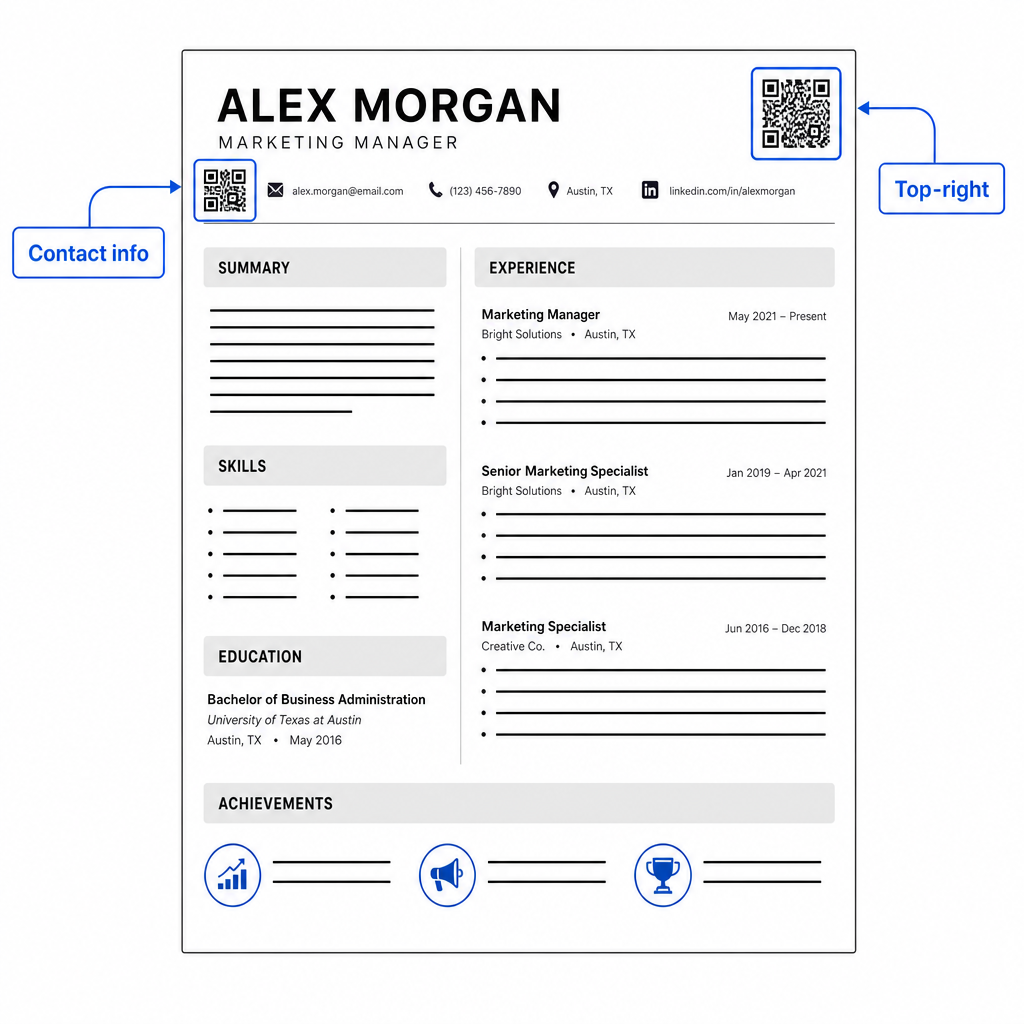
Κρατήστε τον κωδικό αρκετά μικρό ώστε να παραμένει διακριτικός: περίπου 0,8 έως 1 ίντσα τετράγωνο ταιριάζει σε ένα τυπικό βιογραφικό. Προσθέστε μια σύντομη ετικέτα κειμένου κάτω από αυτόν, όπως Σαρώστε για προβολή χαρτοφυλακίου ή Σαρώστε για LinkedIn, ώστε ένας υπεύθυνος προσλήψεων να γνωρίζει με μια ματιά πού οδηγεί ο κωδικός. Τοποθετήστε την απλή διεύθυνση URL απευθείας δίπλα ή κάτω από τον κωδικό.
Ο παρακάτω πίνακας συγκρίνει κοινές προσεγγίσεις τοποθέτησης:
| ΤΟΠΟΘΕΤΗΣΗ | Πλεονεκτήματα | Μειονεκτήματα |
|---|---|---|
| Κοντά στα στοιχεία επικοινωνίας στην κορυφή | Φυσική τοποθεσία, ορατή αμέσως | Πρέπει να παραμείνει μικρό για να αποφευχθεί ο συνωστισμός |
| Πάνω δεξιά γωνία | Καθαρό, μη παρεμβατικό | Μπορεί να χαθεί αν ο υπεύθυνος προσλήψεων διαβάζει από αριστερά προς τα δεξιά |
| Υποσέλιδο βιογραφικού | Διατηρεί το κύριο περιεχόμενο καθαρό | Μπορεί να παραβλεφθεί ή να κοπεί κατά την εκτύπωση |
| Δίπλα σε έναν συγκεκριμένο ρόλο | Συνδέει το χαρτοφυλάκιο με αυτή τη θέση εργασίας με βάση το πλαίσιο | Έχει νόημα μόνο για ένα μόνο συνδεδεμένο στοιχείο |
Κοινά λάθη προς αποφυγή
- Κάνοντας τον κωδικό QR τη μοναδική διαδρομή πρόσβασης – Να περιλαμβάνετε πάντα την απλή διεύθυνση URL. Ένας υπεύθυνος προσλήψεων που εξετάζει ένα PDF στην οθόνη δεν μπορεί να σαρώσει έναν κωδικό QR.
- Σύνδεση με έναν απροετοίμαστο προορισμό – Ένα προφίλ LinkedIn χωρίς φωτογραφία, μια αραιή περίληψη ή ξεπερασμένη εμπειρία αντικατοπτρίζει αρνητικά. Συνδέστε μόνο όταν ο προορισμός είναι πλήρης και ενημερωμένος.
- Χρήση στατικού κωδικού QR όταν οι σύνδεσμοί σας ενδέχεται να αλλάξουν – Εάν η διεύθυνση URL του χαρτοφυλακίου σας ή η διεύθυνση LinkedIn αλλάξει, ένας στατικός κωδικός γίνεται χαλασμένος και άχρηστος. Ένας δυναμικός κωδικός μπορεί να ενημερωθεί χωρίς να επανεκτυπωθεί τίποτα.
- Παράλειψη της δοκιμής – Να σαρώνετε πάντα τον τελικό σας κωδικό από ένα έντυπο αντίγραφο – όχι μόνο από την οθόνη σας – πριν υποβάλετε ή παραδώσετε το βιογραφικό σας.
- Κακή αντίθεση ή μια πολυσύχναστη ήσυχη ζώνη – Και τα δύο θα προκαλέσουν την αποτυχία του κωδικού σε ορισμένες συσκευές. Ακολουθήστε τις παραπάνω οδηγίες μεγέθους και αντίθεσης και αφήστε καθαρό χώρο γύρω από τον κωδικό από όλες τις πλευρές.
- Χρήση εικόνας χαμηλής ανάλυσης – Ένας pixelated κωδικός QR σε ένα έντυπο βιογραφικό φαίνεται αντιεπαγγελματικός και ενδέχεται να μην σαρωθεί. Εξάγετε σε SVG ή EPS, ή τουλάχιστον 300 DPI PNG.
Αντιμετωπίζοντας τον σκεπτικισμό των υπευθύνων προσλήψεων
Δεν θα σαρώσει κάθε υπεύθυνος προσλήψεων έναν κωδικό QR. Κάποιοι μπορεί να μην είναι εξοικειωμένοι με τη συνήθεια, να είναι επιφυλακτικοί σχετικά με άγνωστους συνδέσμους ή απλώς να εξετάζουν βιογραφικά σε επιτραπέζιο υπολογιστή όπου η σάρωση είναι ανέφικτη. Αυτός δεν είναι λόγος να αποφύγετε εντελώς τους κωδικούς QR – αλλά είναι λόγος να τους αντιμετωπίζετε ως συμπλήρωμα, όχι ως αντικατάσταση, για τους απλούς συνδέσμους κειμένου.
Επισημάνετε τον κωδικό σας καθαρά και διατηρήστε τη διεύθυνση URL ορατή σε κείμενο. Ένας υπεύθυνος προσλήψεων που δεν σαρώνει θα εξακολουθεί να βλέπει τη διεύθυνση URL και μπορεί να την πληκτρολογήσει ή να την κάνει κλικ. Ένας υπεύθυνος προσλήψεων που εξετάζει το βιογραφικό σας αυτοπροσώπως έχει την επιλογή να σαρώσει αμέσως. Ο στόχος είναι να δώσετε σε κάθε αναγνώστη την ευκολότερη δυνατή διαδρομή προς την εργασία σας, ανεξάρτητα από το πώς διαβάζουν το βιογραφικό σας.
Κάντε το βιογραφικό σας πιο διαδραστικό Προσθέστε έναν επαγγελματικό κωδικό QR στο βιογραφικό σας που συνδέεται απευθείας με το χαρτοφυλάκιό σας, το προφίλ σας στο LinkedIn ή το ψηφιακό σας βιογραφικό. Ξεκινήστε με το Γεννήτρια Κωδικών QR – δωρεάν για δημιουργία, με επιλογές παρακολούθησης σαρώσεων και ενημέρωσης του προορισμού σας ανά πάσα στιγμή.
Η προσθήκη ενός κωδικού QR στο βιογραφικό σας είναι μια μικρή αλλαγή που μπορεί να κάνει μια ουσιαστική εντύπωση – ιδιαίτερα όταν παραδίδετε το βιογραφικό σας σε κάποιον αυτοπροσώπως. Το κλειδί είναι η προετοιμασία: βεβαιωθείτε ότι ο προορισμός σας είναι άψογος, ο κωδικός σας πληροί τα βασικά πρότυπα σχεδιασμού και ότι περιλαμβάνετε πάντα μια ευανάγνωστη απλή διεύθυνση URL δίπλα του. Χρησιμοποιήστε έναν δυναμικό κωδικό ώστε να μπορείτε να ενημερώσετε τον προορισμό χωρίς επανεκτύπωση και δοκιμάστε τα πάντα σε μια φυσική εκτύπωση πριν.
Συχνές ερωτήσεις
Όχι – Οι πλατφόρμες ATS αντιμετωπίζουν τους κώδικες QR ως εικόνες και τους παραλείπουν κατά την ανάλυση κειμένου, οπότε ο ίδιος ο κώδικας δεν επηρεάζει αρνητικά τη βαθμολογία σας στο ATS. Ωστόσο, για να διασφαλίσετε ότι το URL του χαρτοφυλακίου σας ή του LinkedIn είναι επίσης αναγνώσιμο από μηχανή, να συμπεριλαμβάνετε πάντα την έκδοση του συνδέσμου σε απλό κείμενο δίπλα στον κώδικα QR.
Ο καλύτερος προορισμός εξαρτάται από τον τομέα σας. Ένας ιστότοπος χαρτοφυλακίου ή ένα χαρτοφυλάκιο PDF λειτουργεί καλά για δημιουργικούς και τεχνικούς ρόλους. Ένα προφίλ LinkedIn ταιριάζει στις περισσότερες βιομηχανίες. Ένας κωδικός QR vCard είναι χρήσιμος αν ο πρωταρχικός σας στόχος είναι να διευκολύνετε τους υπεύθυνους προσλήψεων να αποθηκεύσουν τα στοιχεία επικοινωνίας σας. Ό,τι κι αν συνδέσετε, βεβαιωθείτε ότι είναι πλήρες, ενημερωμένο και βελτιστοποιημένο πριν την εκτύπωση.
Ένας στατικός κώδικας QR κωδικοποιεί τη διεύθυνση URL προορισμού σας απευθείας στο μοτίβο του κώδικα – αν η διεύθυνση URL αλλάξει, ο κώδικας χαλάει και πρέπει να τον ξανατυπώσετε. Ένας δυναμικός κώδικας QR κωδικοποιεί μια σύντομη διεύθυνση URL ανακατεύθυνσης την οποία μπορείτε να ενημερώσετε οποιαδήποτε στιγμή χωρίς να αλλάξετε τον εκτυπωμένο κώδικα. Για ένα βιογραφικό σημείωμα που μπορεί να διανείμετε για αρκετούς μήνες, ένας δυναμικός κώδικας είναι η ασφαλέστερη και πιο ευέλικτη επιλογή.