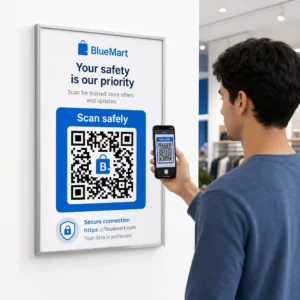
Kas soovite, et teie QR-kood näeks välja nagu osa teie brändist, mitte nagu tavaline mustvalge ruut? Lihtne QR-kood töötab, kuid teie logo ja värvidega bränditud kood loob äratundmist ja seda skannitakse rohkem. See juhend näitab teile, kuidas luua kohandatud QR-kood, mis näeb välja professionaalne, ohverdamata skannitavust.
Miks bränditud QR-koodid toimivad paremini
Standardne QR-kood ei ütle skannerile teie ettevõtte kohta midagi. Bränditud kood teeb rohkem tööd, enne kui keegi seda isegi skannib. Kui teie logo asub koodi sees ja teie brändivärvid raamivad disaini, tunnevad kliendid allika koheselt ära. See äratundmine loob usaldust – ja usaldus suurendab skannimisi.
Uuring, mis käsitleb 7 näidet bränditud QR-koodidest näitab, et logodega bränditud QR-koodid võivad suurendada skannimismäärasid 30–70% võrreldes tavaliste koodidega. Lisaks numbritele tugevdab bränditud kood teie visuaalset identiteeti iga kord, kui see ilmub pakendil, siltidel või trükimaterjalidel.
Ettevõtted, mis alles kujundavad oma visuaalset identiteeti, saavad uurida ideid unikaalse logo ettevõttele enne selle rakendamist QR-koodidel, pakenditel ja muudel bränditud materjalidel. Võti on teadmine, millised disainivalikud aitavad ja millised rikuvad skannitavust.
Kuidas QR-koodi veaparandus muudab logo integreerimise võimalikuks
Enne koodi kohandamist on kasulik mõista, miks logosid saab üldse lisada seda rikkumata. QR-koodid sisaldavad sisseehitatud veaparandust, mis põhineb Reed–Solomoni koodidel, mis lisab üleliigseid andmeid, et skannerid saaksid mustri rekonstrueerida isegi siis, kui osa sellest on varjatud.
Veaparanduse tasemeid on neli:
- Tase L – taastab kuni 7% kahjustatud koodisõnadest; väikseim koodisuurus; parim puhtaks siseruumides kasutamiseks
- Tase M – taastab kuni 15%; standardvalik enamiku turundusrakenduste jaoks
- Tase Q – taastab kuni 25%; sobib välitingimustes kasutamiseks või tekstuuriga pindadele
- Tase H – taastab kuni 30%; soovitatav alati, kui lisate logo
Kui te paigutate logo QR-koodi keskele, varjate te tahtlikult osa mustrist. H-taseme veaparandus kompenseerib seda, võimaldades skanneril puuduvad andmed rekonstrueerida. Ilma selleta võib isegi väike logo põhjustada skaneerimisvigu.
Selle praktilise toimimise kohta lisateabe saamiseks vaadake kuidas vigaparandus toimib muudetavates QR-koodides.
Loo bränditud QR-kood logoga Kas olete valmis looma QR-koodi, mis peegeldab teie brändi? Kasutage QR-koodi generaator logoga oma logo üleslaadimiseks, värvide valimiseks ja looge minutitega skaneeritav, brändile vastav kood.
Logo paigutus: Reeglid, mis kaitsevad skaneeritavust
Logo vale lisamine on üks levinumaid põhjuseid, miks bränditud QR-koodid ebaõnnestuvad. Järgige neid juhiseid, et teie kood oleks usaldusväärne:
- Hoidke logo keskel. QR-koodi keskosa sisaldab andmemooduleid, mis saavad veaparanduse katvusest kõige rohkem kasu. Logo tsentreerimine väldib kolme nurgas asuvat positsioonimärki, mis on skanneri orientatsiooni jaoks kriitilise tähtsusega ja mida ei tohi kunagi katta.
- Piirake logo katvust umbes 20–25% koodi alast. Rohkem kui 30% katmine ületab isegi H-taseme veaparanduse taastamisvõimalused. Lähemal 20%-le annab teile mugava ohutusvaru.
- Kasutage kõrge resolutsiooniga logofaili. Udune või pikseldatud logo koodi keskel lisab visuaalset müra, mis võib skaneerimist häirida, eriti vanematel seadmetel. Parima tulemuse saamiseks kasutage PNG-d või vektormingit nagu SVG.
- Eelistage lihtsaid, ruudukujulisi või ümmargusi logosid. Vertikaalsed ristkülikukujulised logod riskivad kattuda ajastusmustritega, mis kulgevad mööda koodi servi. Horisontaalsed või kompaktsed kujundid on ohutumad.
- Testige mitmel seadmel enne printimist. Kood, mis skaneerib uuel iPhone'il täiuslikult, võib vanemal Androidil madalama resolutsiooniga kaameraga ebaõnnestuda. Testige erinevatel platvormidel ja valgustingimustes.
Lisateavet logo ohutu integreerimise kohta leiate juhendist kuidas lisada logosid QR-koodidele.
Värv ja kontrast: hoides oma brändivärvid skaneeritavana
Saate kasutada oma brändivärve QR-koodis, kuid värvivalikud mõjutavad otseselt seda, kas kood skaneerib usaldusväärselt. Skannerid loevad tumedate moodulite ja heleda tausta vahelist erinevust – mitte konkreetseid toone. Kui see kontrast kaob, kaob ka skaneeritavus.
Kontrastireeglid, mida järgida
- Kasutage heledal taustal tumedaid esiplaanimooduleid. See on põhinõue. Klassikaline must valgel pakub kontrastsussuhet 21:1 ja on kõige universaalsemalt usaldusväärsem kombinatsioon.
- Säilitage minimaalne kontrastsussuhe 4,5:1 väiksemate koodide puhul. Eemalt vaadatavate suureformaadiliste koodide puhul on aktsepteeritav suhe 4:1. Saate seda kontrollida mis tahes veebipõhise ligipääsetavuse kontrasti kontrollijaga.
- Ärge kunagi värve pöörake. Hele-tumedal (valge mustal) skeem võib tunduda silmatorkav, kuid paljud QR-skannerid ebaõnnestuvad pööratud värviskeemide puhul.
- Vältige gradiente moodulimustri sees. Grandid loovad keskmisi toone, mis vähendavad lokaalset kontrasti ja ajavad skannerid segadusse. Kui soovite gradientefekti, rakendage seda ainult dekoratiivsetele elementidele väljaspool koodimustrit, näiteks raamile või taustale.
- Hoidke vaikne tsoon selge. Vaikne tsoon on QR-koodi ümbritsev tühi äär. ISO standard nõuab vähemalt nelja mooduli tühja ruumi igal küljel. Kui iga moodul on 2 mm lai, peab vaikne tsoon olema igal küljel vähemalt 8 mm. Teksti, dekoratiivsete elementide või isegi teie logo liiga lähedale sellele piirile paigutamine võib põhjustada skaneerimisvigu.
Täieliku ülevaate saamiseks, millised värvikombinatsioonid sobivad ja milliseid vältida, vaadake juhendit teemal QR-koodi värvikontrasti parimaid tavasid.
Suurus ja resolutsioon: Kuidas printimiseks õigesti seadistada
Kaunis bränditud QR-kood, mis on skannimiseks liiga väike, kaotab oma mõtte. Suurus mõjutab nii loetavust kui ka skannimiskaugust.
- Minimaalne suurus lähikasutuseks on 0,8 × 0,8 tolli (umbes 2 × 2 cm). Sellest väiksemana on enamikul skanneritel raskusi.
- Rakendage skannimiskauguse jaoks 10:1 reeglit. Iga 10 cm oodatava skannimiskauguse kohta peaks kood olema vähemalt 1 cm lai. Kood, mis on mõeldud skannimiseks 50 cm kauguselt, peaks olema vähemalt 5 cm lai.
- Eksportige printimiseks vektormaatides. SVG, EPS ja PDF formaadid skaleeruvad kvaliteeti kaotamata. Madala resolutsiooniga rasterdatud PNG näib printimisel udune ja udune kood ei pruugi skannida. Printimisrakenduste jaoks eksportige alati 300 DPI või kõrgema resolutsiooniga.
Kontekstipõhise suuruse määramise juhiste saamiseks vaadake QR-koodi loetavuse parimaid tavasid.
Samm-sammult: Bränditud QR-koodi loomine logoga
Siin on praktiline töövoog usaldusväärselt skanniva bränditud QR-koodi loomiseks.
- Valige generaator, mis toetab logo manustamist ja värvide kohandamist. Kõik tööriistad seda ei tee. Otsige sellist, mis võimaldab teil määrata veaparandustasemeid, üles laadida logo ja kohandada värve iseseisvalt. Pageloot'i QR-koodi generaator katab kõik need.
- Määrake veaparandustase H-le enne logo lisamist. Mõned generaatorid vaikimisi tasemele M, mis ei ole piisav, kui logo on olemas.
- Sisestage oma sihtkoha URL või sisu. Kui loote koodi kampaania või trükimaterjali jaoks, kaaluge kasutamist dünaamiline QR-kood et saaksite sihtkohta hiljem ilma uuesti printimata uuendada.
- Laadige üles oma logo. Kasutage PNG- või SVG-faili. Hoidke logo lihtsana – vältige peent teksti või keerulisi illustratsioone, mis väikestes suurustes selgust kaotavad.
- Rakendage oma brändi värve. Valige tume esiplaanivärv, mis sobib teie brändipaletiga, ja siduge see heleda või valge taustaga. Kontrollige kontrastsussuhet enne lõplikku kinnitamist.
- Lisage raam koos üleskutsega tegevusele. Lühike fraas nagu “Skanni meie menüü vaatamiseks” või “Skanni eksklusiivsete pakkumiste saamiseks” eemaldab ebaselguse ja suurendab skannimismäärasid. Saate sobitada QR-koodi raamid oma brändi värvide ja logoga.
- Eelvaade ja testimine. Skannige koodi vähemalt kahel erineval seadmel enne allalaadimist. Kontrollige seda erinevates valgustingimustes ja kaugustelt, kust eeldate kasutajate skannimist.
- Laadige alla õiges vormingus. Kasutage printimiseks SVG- või EPS-faili, digitaalseks kasutamiseks kõrge eraldusvõimega PNG-faili.

Valmis brändikujunduste jaoks, mida saate kiiresti kohandada, uurige QR-koodi mallid.
Dünaamiliste QR-koodide kasutamine brändikampaaniate jaoks
Kui teie bränditud QR-kood ilmub trükimaterjalidel, annab dünaamiline kood teile märkimisväärse eelise. Staatilise koodi puhul on sihtkoht püsivalt lukustatud. Dünaamilise koodi puhul osutab mustrisse kodeeritud URL lühikesele ümbersuunamisele, mida te kontrollite. Saate igal ajal muuta, kuhu see viib, ilma koodi uuesti trükkimata või ümber kujundamata.
See on eriti oluline bränditud koodide puhul, sest:
- Võite soovida vahetada hooajalisi pakkumisi või kampaania sihtlehti
- Saate parandada katkiseid linke füüsilist materjali puudutamata
- Saate skannimisanalüüsi – reaalajas andmed selle kohta, millal, kus ja kui tihti koodi skannitakse
Dünaamilised koodid sobivad hästi ka bränditud kujundustega, sest panustate rohkem professionaalse välimusega koodi loomisesse. Selle investeeringu kaitsmine uuendatava sisuga on praktiline. Lisateavet leiate kohandatud QR-koodide jaoks saadaoleva täieliku funktsioonikomplekti kohta.
Reaalsed rakendused tööstusharude kaupa
Mõistmine, kuidas teised ettevõtted kasutavad bränditud QR-koode, aitab teil leida õige lähenemise oma materjalidele.
- Jaekaubandus: Rõivabrändid paigutavad oma logoga QR-koode riputussiltidele, linkides stiilijuhenditele, suurustabelitele või veebipoodi. Logo keskel muudab koodi müügikohas äratuntavaks ja brändile vastavaks.
- Restoranid: QR-kood laual või menüükaanel võib linkida digitaalsele menüüle, broneerimissüsteemile või lojaalsusprogrammile. Koodi värvide sobitamine restorani värvipaletiga hoiab disaini ühtse.
- Üritused: Ürituste korraldajad kasutavad bränditud QR-koode märkidel, siltidel ja trükitud programmides, et suunata rakenduste allalaadimisi, sisseregistreerimisi või sessioonide ajakavasid. Kõrge veaparandus on siin eriti oluline, kuna koode võidakse skannida muutuvates valgustingimustes.
- Tootepakendid: Bränditud QR-kood pakendil võib linkida kokkupanekujuhistele, garantiiregistreerimisele või tooteülevaadetele. Dünaamilise koodi kasutamine siin tähendab, et saate sihtkohta uuendada toote arenedes.

Täpsemate näidete saamiseks vaadake 7 näidet bränditud QR-koodidest.
Korduma kippuvad küsimused
Mitte kui järgite õigeid juhiseid. Määrake veaparandus tasemele H enne logo lisamist, hoidke logo keskel ja piirake selle katvust umbes 20–25% kogu koodialast. Vältige kolme nurgapositsioonimarkeri katmist. Testige lõplikku koodi mitmel seadmel enne printimist.
Jah, eeldusel, et säilitate piisava kontrasti tumedate moodulite ja heleda tausta vahel. Püüdke saavutada kontrastsussuhe vähemalt 4,5:1. Vältige gradientide kasutamist moodulimustris, ärge kunagi pöörake värve ümber heledaks tumedal ja hoidke vaikne tsoon (koodi ümbritsev tühi äär) alati täiesti puhtana.
Minimaalne soovitatav suurus lähiskaneerimiseks on 0,8 × 0,8 tolli (ligikaudu 2 × 2 cm). Koodide puhul, mis on mõeldud skaneerimiseks suurematelt kaugustelt, kasutage 10:1 reeglit: iga 10 cm oodatava skaneerimiskauguse kohta peaks kood olema vähemalt 1 cm lai. Eksportige prindifailid alati vektorvormingus, nagu SVG või EPS, pikseliseerumise vältimiseks.