Kuidas lisada füüsilisele kunstiteosele rikkalikku digitaalset konteksti ilma galeriiseina risustamata või teose võlu rikkumata? See pinge – teabe ja süvenemise vahel – on täpselt see, mida QR-koodid kunstipaigaldistes lahendama on loodud. See juhend käsitleb reaalseid näiteid, disainipõhimõtteid ja praktilisi samme kuraatoritele ja kunstnikele, kes soovivad oma näitustesse skaneeritavaid digitaalseid kihte luua.
Juhtumiuuringud: Kuidas muuseumid ja kunstnikud QR-koode kasutavad
Mehendi QR-koodi kunstipaigaldus
See ajutine projekt ühendas henna kunsti traditsiooni QR-koodide praktilisusega. Külastajad said skaneerida hennapõhiseid kujundusi, et sooritada digitaalseid tehinguid või teha annetusi. Kuna henna loomulikult tuhmub, sai paigaldusest meditatsioon mööduvuse üle, demonstreerides samal ajal, kuidas QR-koodid saavad ühendada kultuuritraditsioone kaasaegsete digitaalsete interaktsioonidega.
Ruumiline QR-koodi integreerimine Pinault' kogus
Pinault' kogus Rennes'is, Prantsusmaal, paigaldasid kuraatorid QR-koodid muuseumi põrandatesse ja üleminekualadele, selle asemel et galeriiseinu tekstipaneelidega üle koormata. Kasutades MySmartJourney platvormi, pakkusid koodid mängustatud sisu – popkunsti õpetusi ja visuaalseid mõistatusi – hetkedel, mis muidu oleksid olnud tegevusetud, näiteks järjekorras ootamise ajal. Tulemuseks oli suurenenud kaasatus ilma galerii visuaalset voogu häirimata, mudel, mida tasub uurida igal asutusel, mis tasakaalustab teabe edastamist esteetilise terviklikkusega.
Erarta muuseumi laiendatud külastajakogemus
Erarta muuseum kasutas QR-koode, et laiendada külastust väljapoole galeriid ennast. Kunstiteoste lähedale paigutatud koodid võimaldasid külalistel uurida üksikasjalikku näituseinfot, õppida kunstnike kohta ja osta kvaliteetseid reproduktsioone. Selle asemel, et sundida iga külastajat läbi sama lineaarse kogemuse, andis see lähenemine inimestele vabaduse minna nii sügavale, kui nende uudishimu neid viis – isikupärasem interaktsioon kui ükski fikseeritud seinasilt pakkuda suudab.
Elkoy kunstnike kollektiivi Bauhausi-inspireeritud QR-koodid
Elkoy kunstnike kollektiiv kujutas QR-koode ümber Bauhausi põhimõtete kaudu. Geomeetrilisi kujundeid, julgeid värve ja minimalistlikku disaini kaasates muutsid nad standardsed mustvalged koodid kompositsioonilisteks elementideks. Iga kood viitas esseedele, mis selgitasid ajalooliste disainiliikumiste ja kaasaegse tehnoloogia vahelist seost. Nende töö on selge demonstratsioon, et QR-kood võib olla osa kunstiteosest, mitte selle annotatsioon.
Brooklyni muuseumi varajase kasutuselevõtu õppetunnid
Brooklyni muuseum oli QR-koodide varajane kasutuselevõtja, kuid nende esialgsed jõupingutused kohtasid tõelist hõõrdumist – külastajad vajasid skaneerimiseks kolmanda osapoole rakendusi, mida enamikul inimestel polnud. Kaasatus kasvas märkimisväärselt alles pärast seda, kui Apple ja Android integreerisid QR-lugejad otse nutitelefonide kaameratesse. Õppetund on praktiline: isegi hästi läbimõeldud idee võib ebaõnnestuda ilma õige infrastruktuurita. Ajastus ja tehniline ligipääsetavus on sama olulised kui loominguline visioon.
QR-koodide eelised kunstipaigaldistes
Sügavam külastajate kaasatus
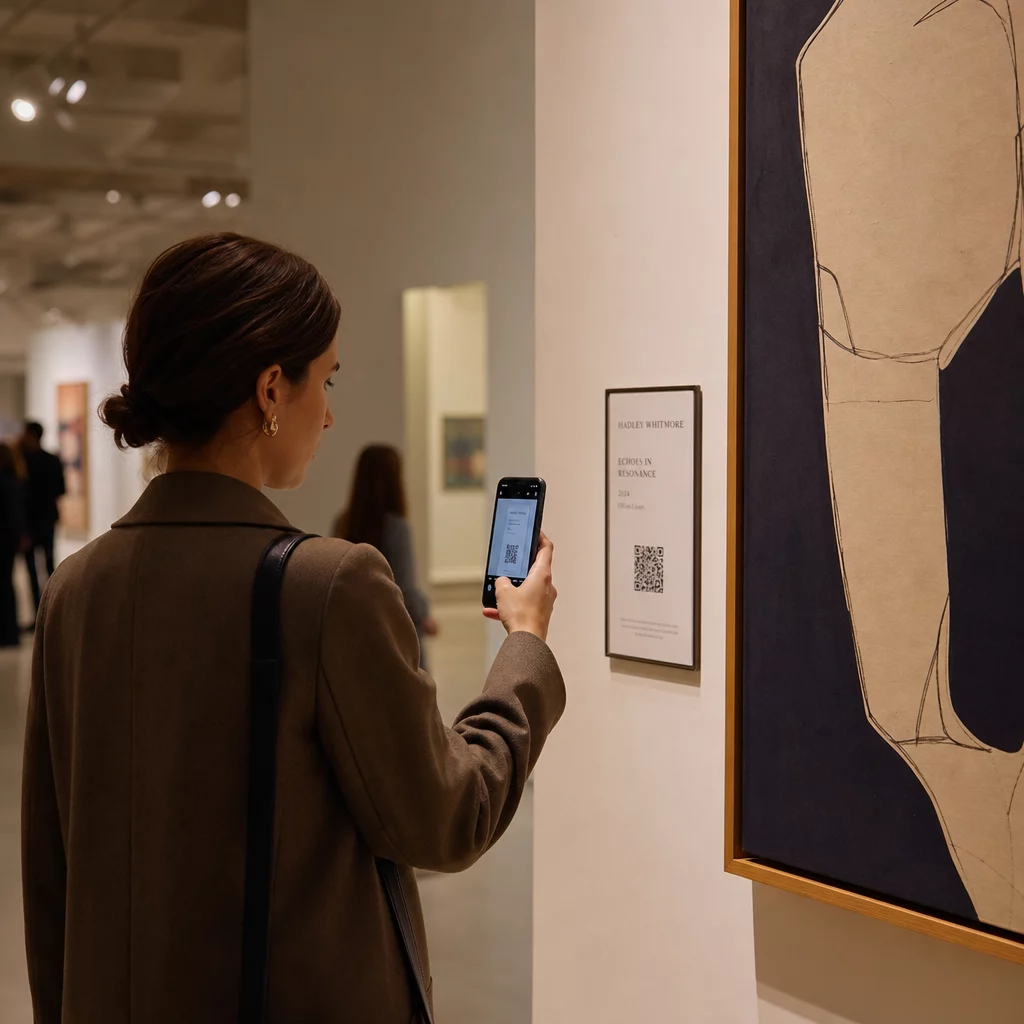
QR-koodid muudavad külastajad passiivsetest vaatlejatest aktiivseteks osalejateks. Selle asemel, et omastada seda, mis mahub seinasildile, saab külastaja skaneerida ja pääseda ligi kunstnike intervjuudele, telgitagustele videotele, audiogiididele või liitreaalsuse ülekatetele, mis elustavad staatilist teost. Muuseumid saavad koode kasutada ka digitaalsete aardejahtide või viktoriinide käivitamiseks, mis on eriti tõhusad peredele ja noorematele publikutele.
QR-koodid muuseumidele avavad ka sisulisi ligipääsetavuse parandusi. Mitmekeelsed audiogiidid, subtiitrid ja korduvtaasesitusega videod õpiraskustega külastajatele saavad kõik võimalikuks ühe skaneerimisega külastaja enda seadmest. Uuringud kinnitavad, et õpiraskustega külastajad hindavad eriti võimalust vaadata või kuulata sisu mitu korda oma tempos.
Üks praktiline hoiatus: mitte iga külastaja ei kanna nutitelefoni – kooligrupid on sageli mainitud näide. QR-koode tuleks käsitleda täiendava kihina, mitte ainsa teabeallikana. Pakkuge alati alternatiivset viisi sama sisule juurdepääsuks, olgu selleks lähedal asuv URL, trükitud jaotusmaterjal või personali abiga pakutav võimalus.
Lisage oma järgmisele näitusele digitaalne kiht See Dünaamilise QR koodi generaator võimaldab teil lingitud sisu igal ajal värskendada – uuesti printimist pole vaja – nii et teie koodid püsivad ajakohased kogu installatsiooni vältel.
Disaini paindlikkus ja kunstiline integreerimine
QR-koodid ei pea enam traditsioonilises mõttes QR-koodide moodi välja nägema. Värve, kujundeid, sisseehitatud logosid ja kohandatud mustreid saab kõiki rakendada, säilitades samal ajal skaneeritavuse, eeldusel, et kontrasti ja vaikseid tsoone austatakse (sellest lähemalt allpool). Elkoy Collective'i Bauhausi-inspireeritud koodid ja Pinault Collectioni põrandasse paigaldatud koodid näitavad mõlemad, et läbimõeldud paigutus ja visuaalne disain võivad muuta koodi installatsioonile omaseks, mitte sellele poogituks.
Kasulik juhtpõhimõte kuraatoripraktikast: “QR-kood peaks olema kujundatud diskreetseks ja elegantseks, täiendades eksponaati, mitte sellest tähelepanu kõrvale juhtides.” See standard kehtib olenemata sellest, kas kood ilmub väikesele sildile maali kõrval või on integreeritud otse skulpturaalse teose pinnale.
Analüütika ja reaalajas külastajate ülevaated
Üks praktilisemaid argumente QR-koodide kasutamise kohta näitustel on nende genereeritavad andmed. Iga skaneering on signaal: millised teosed pakuvad püsivat huvi, millal toimub tipptasemel kaasatus, millistes galeriitsoonides külastajad viibivad ja milliseid sisuvorminguid – video, heli, tekst – tarbitakse kõige rohkem.
| Andmepunkt | Pakutav ülevaade |
|---|---|
| SKANEERINGUID KOKKU | Mõõdab üldist huvi konkreetse teose või tsooni vastu |
| Unikaalsed skaneeringud | Jälgib individuaalset külastajate kaasatust |
| Skaneerimisaeg | Tuvastab tipptunnid ja külastajate liikumismustrid |
| Operatsioonisüsteem | Pakub tehnilisi teadmisi mobiili optimeerimiseks |
| Skannimise asukoht | Hindab QR-koodi paigutuse tõhusust |
Dünaamilised QR-koodid muudavad need andmed veelgi rakendatavamaks. Kuna siht-URL-i saab muuta füüsilist koodi uuesti printimata, saab kuraator reaalajas reageerida skaneerimisandmetele – vahetades välja video, mis ei kõneta, sellise vastu, mis kõnetab, või lisades külastajate tagasiside põhjal jooksu pealt ligipääsetavuse sisu. Täielikuma pildi saamiseks sellest, kuidas AR QR-koodid muudavad muuseumi lugude jutustamise, liitreaalsuse kihid saab samamoodi lisada või uuendada.
Mida linkida: Sisu, mis lisab väärtust
Koodi taga olev sisu on sama oluline kui kood ise. Muuseumid ja kunstnikud on leidnud, et järgmised sisutüübid on pidevalt kasulikud:
- Kunstniku avaldused ja intervjuud – kuuldes kunstnikku kirjeldamas oma protsessi oma sõnadega loob ühenduse, mida ükski seinatekst ei suuda korrata; a YouTube'i QR-kood käsitleb seda puhtalt
- Audiogiidid – jutustatud kirjeldused või helimaastikud lingitud an kaudu MP3 QR-kood töötavad eriti hästi teoste puhul, kus visuaalne kogemus peaks jääma häirimatuks
- Laiendatud kataloogi sisu – üksikasjalik päritolu, teaduslikud esseed või näitusekataloogid edastatud a-na PDF QR-kood
- Pildigaleriid – töötle fotosid, installatsioonivaateid või võrdlevaid töid, mis on kättesaadavad läbi pildigalerii QR-koodi
- Virtuaaltuurid – külastajatele, kes soovivad uurida seotud töid või sõsarasutusi, virtuaaltuurile viitav QR-kood laiendab kogemust füüsilisest ruumist kaugemale
- Külastajate tagasiside vormid – paigutatud väljapääsude juurde või ankurtööde lähedusse, et koguda kvalitatiivset tagasisidet
Hoidke lingitud sihtkoht lihtsana. Lühemad URL-id kodeeritakse vähem tihedate mustritena, mis skaneerivad kiiremini ja usaldusväärsemalt. Dünaamilised QR-koodid lahendavad selle süstemaatiliselt, kodeerides ainult lühikese ümbersuunamislingi, olenemata sihtkoha keerukusest.
Disain ja paigutus: koodide skaneeritavaks ja märkamatuks muutmine
Visuaalse ja füüsilise teostuse õigesti tegemine on koht, kus paljud installatsioonid komistavad. Alltoodud põhimõtted on tuletatud ligipääsetavuse juhistest ja QR-koodi loetavuse uuringutest.
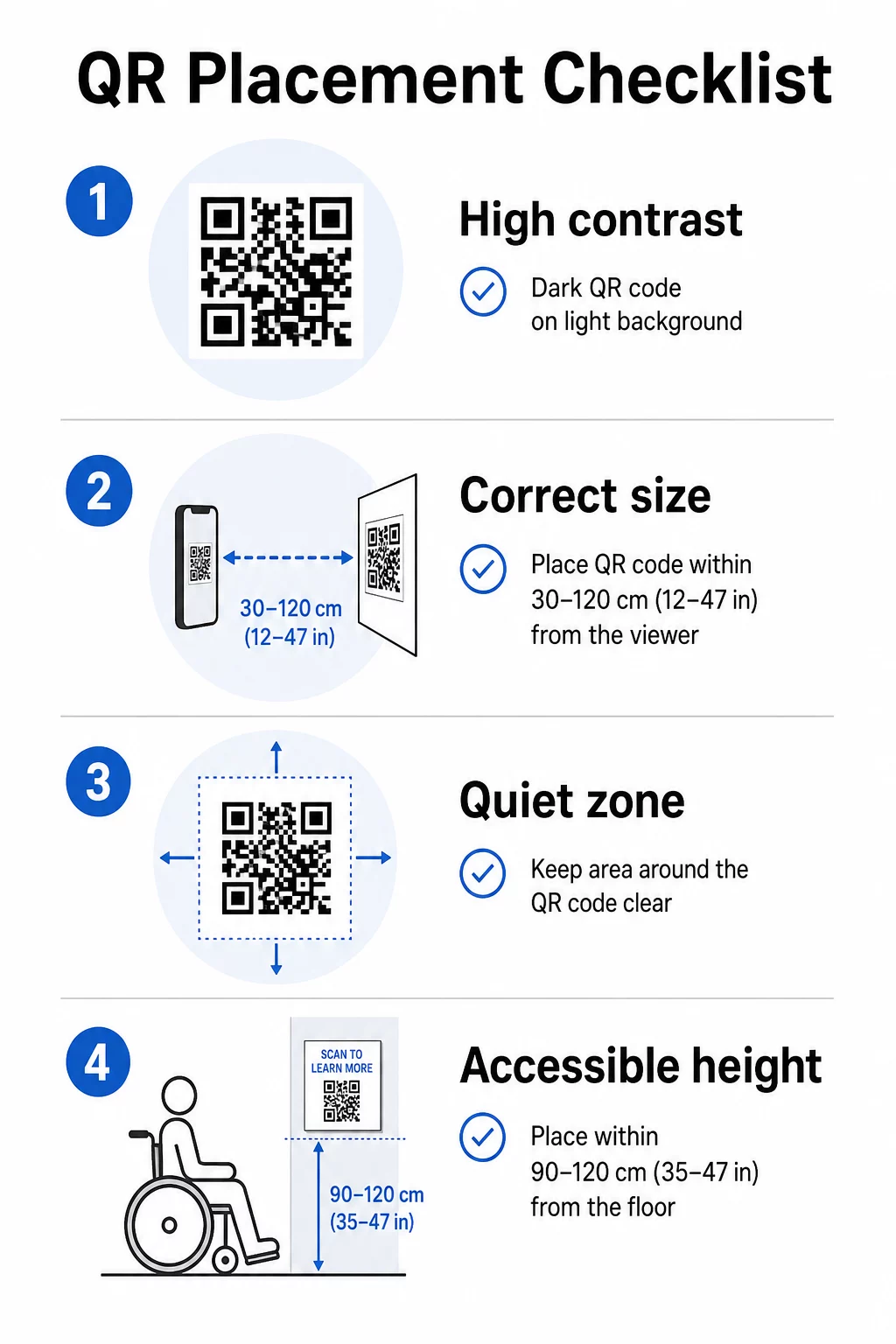
Kontrast ja värv
Koodi esiplaan peab olema tume ja taust hele – mitte vastupidi. Inverteeritud koodid (hele muster tumedal taustal) ebaõnnestuvad märkimisväärsel osal nutitelefonikaameratest. Kohandatud värviliste koodide puhul püüdke saavutada vähemalt 3:1 kontrastsussuhe koodimoodulite ja taustapinna vahel. Põhjalik ülevaade kontrastsuse reeglitest on saadaval QR-koodi värvikontrasti parimate tavade juhend.
Gradiendid ja varjud tekitavad keskmisi toone, mis ajavad skannerid segadusse. Kui soovite stiliseeritud koodi, mis sobib installatsiooni paletiga, kasutage ühevärvilisi toone ja testige põhjalikult.
Suurus ja skaneerimiskaugus
Usaldusväärne reegel: kood peaks olema umbes üks kümnendik eeldatavast skaneerimiskaugusest. Kood, mis on mõeldud skaneerimiseks käeulatusest (umbes 10 tolli), peab olema vähemalt 1 toll ruut. Installatsioonisiltide puhul, mida vaadatakse kaugemalt, skaleerige vastavalt. Absoluutne miinimum lähiskaneerimiseks on 2 × 2 cm (umbes 0,8 × 0,8 tolli). Rohkem üksikasju suuruse kohta on saadaval QR-koodi paigutusjuhend.
Vaiksed tsoonid
Iga QR-kood nõuab selget marginaali – mida nimetatakse vaikseks tsooniks – vähemalt neli moodulit igast küljest. Sellesse ruumi ei tohi tungida teksti, mustreid ega dekoratiivseid elemente. Kui paigutate koodi mustrilisele pinnale või kunstiteose servale, on see piirang kõige tõenäolisemalt skaneerimisvigade põhjustaja.
Füüsiline ligipääsetavus
Kõrgus ja asukoht määravad, kes koodi tegelikult kasutada saab. Paigutus peaks olema ligipääsetav ratastoolis külastajatele või piiratud kasvuga inimestele – mugavaks juurdepääsuks umbes 2,5 kuni 4 jalga põrandast. Vältige koodide paigutamist kumeratele pindadele, peegeldavale klaasile või materjalidele, mis tekitavad galerii valgustuse all pimestamist.
Sildi tekst
Koodi lähedal asuv silt peaks selgelt selgitama, mida külastaja pärast skannimist leiab ja kuidas seda skannida. Mitte iga külastaja ei ole protsessiga tuttav ja isegi kogenud skannerid saavad kasu teadmisest, kas nad on kohe nägemas kolmeminutilist videot või 12-leheküljelist kataloogi esseed. Lihtne keel, lühikesed laused ja piisav fondisuurus aitavad kõik kaasa kasutatavusele. Hoidke sildid lühikesed – külastajad sirvivad ja kõige olulisem teave peaks ilmuma esimesena.
Hoidke näituse sisu ajakohasena ilma uuesti trükkimata Kunstigaleriid saavad kasutada Dünaamilise QR koodi generaator kunstnike elulugude uuendamiseks, audiogiidide vahetamiseks või uue sisu lisamiseks isegi pärast näituse avamist – füüsilist märgistust puudutamata.
Testige enne paigaldamist
Printige kood lõplikus suuruses ja skannige seda vähemalt kahe seadmega – iPhone'i ja Android-telefoniga – valgustingimustes, mida paigaldus tegelikult kasutab. Galerii valgustus on sageli soe ja suunatud, mis võib kontrasti mõjutada erinevalt tavalisest kontorivalgusest. Mattviimistlused vähendavad pimestamist ja on üldiselt läikivatest pindadest paremad usaldusväärseks skannimiseks. Rohkem testimisjuhiseid leiate QR-koodi loetavuse parimate tavade juhend.
Dünaamiliste QR-koodide kasutamine arenevate näituste jaoks
Staatiline QR-kood kodeerib fikseeritud sihtkoha. Pärast printimist on ainus viis selle suunda muuta, see uuesti printida. Dünaamilised QR-koodid töötavad teisiti: kood ise osutab lühikesele ümbersuunamisele ja saate ümbersuunamise sihtkohta igal ajal juhtpaneelilt muuta.
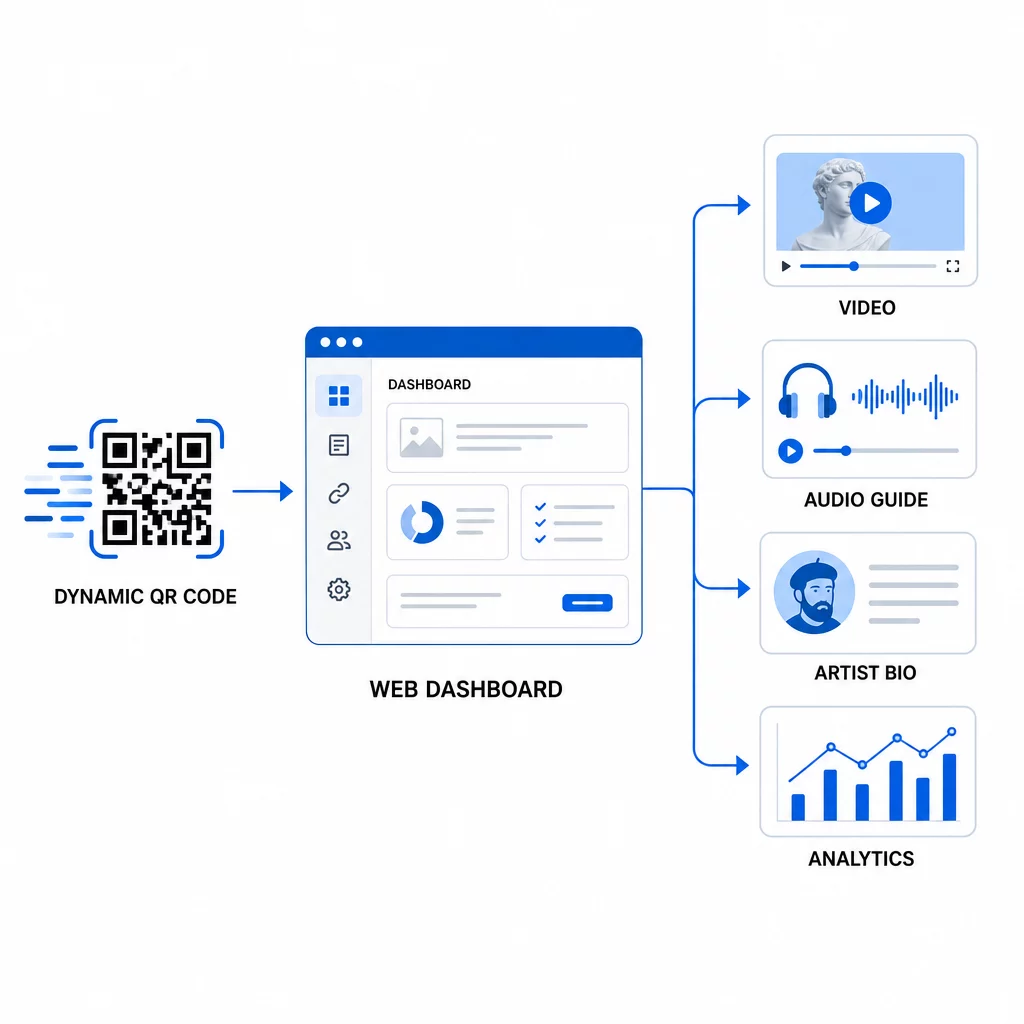
Kunstiinstallatsioonide puhul on see eristus oluline:
- Mitu kuud kestev näitus saab oma lingitud sisu muuta vastavalt näituse arengule – lisades uusi kunstnike kommentaare, vahetades tiiservideo täispika dokumentaalfilmi vastu või uuendades päritoluandmeid uurimistöö edenedes
- Ajutised installatsioonid saavad sama füüsilist koodi mitmel üritusel uuesti kasutada, lihtsalt sihtkohta uuendades
- Analüütika jääb seotuks sama koodiga, pakkudes pidevat toimivusandmete salvestust, mitte killustatud andmeid uuesti trükkimiste vahel
Smithsonian on kasutanud seda lähenemist suurte digitaalsete kogude juurdepääsu tõhusaks haldamiseks, vähendades nii kulusid kui ka keskkonnajäätmeid uuesti trükitud materjalidest. Kuraatoritele, kes haldavad mitme asukohaga või rändnäitusi, on võime luua virtuaalne kunstireis QR-koodidega ja seda tsentraalselt uuendada on oluline operatiivne eelis.
Korduma kippuvad küsimused
Kujundage kood kunstiteose paletist võetud värvidega, kuid hoidke tume esiplaan heledal taustal ja püüdke saavutada vähemalt 3:1 kontrastsussuhe. Hoidke vaikne tsoon igast küljest selge ja testige prinditud versiooni mitme seadmega enne paigaldamist. Kõrgemad veaparandustasemed (Q või H) võimaldavad rohkem visuaalset kohandamist – sealhulgas manustatud logosid – säilitades samal ajal skaneerimise usaldusväärsuse.
Kõige tõhusamad sisutüübid on kunstnikuintervjuud või videopöördumised, audiogiidid, laiendatud kataloogi esseed või päritoludokumendid, protsessipildid ja külastajate tagasiside vormid. Sobita formaat publiku ja teosega: video sobib protsessirohkete või etenduspõhiste teoste jaoks, samal ajal kui heli sobib hästi teoste juurde, kus visuaalne elamus peaks jääma katkematuks.
Dünaamilised QR-koodid sisseehitatud analüütikaga salvestavad koondandmeid – skaneeringute koguarv, unikaalsed skaneeringud, skaneerimisaeg, seadme tüüp ja geograafiline asukoht – ilma üksikutelt külastajatelt isiklikku teavet kogumata. Platvormid nagu Pagelooti dünaamiline QR-koodi generaator pakuvad neid andmeid armatuurlaua vaates, andes kuraatoritele teostatavaid teadmisi, austades samal ajal külastajate privaatsust.