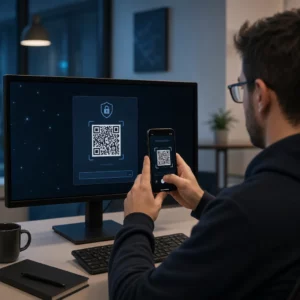
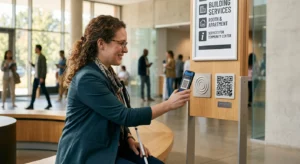
Die manuelle Verwaltung der Veranstaltungspräsenz ist langsam, fehleranfällig und von den wichtigen Systemen getrennt. Dieser Leitfaden zeigt Ihnen, wie Sie dynamische QR-Codes erstellen, die Check-in-Daten direkt in Ihr CRM einspeisen, manuelle Eingaben eliminieren und Ihnen eine Echtzeit-Anwesenheitsliste für jeden Kontakt liefern.
Warum dynamische QR-Codes für CRM-Check-ins funktionieren
Ein statischer QR-Code kodiert eine feste URL und kann nach dem Drucken weder verfolgt noch geändert werden. Ein dynamischer QR-Code, im Gegensatz dazu, verwendet einen kurzen Weiterleitungslink als Vermittler. Sie können dieses Ziel jederzeit ohne Neudruck aktualisieren, und jeder Scan wird mit Daten wie Zeitstempel, Gerätetyp und geografischem Standort protokolliert.
Für CRM-Check-ins ist dieser Unterschied von enormer Bedeutung. Wenn jeder Teilnehmer einen einzigartigen dynamischen Code erhält, der mit seinem Kontaktdatensatz verknüpft ist, bewirkt das Scannen an der Tür drei Dinge gleichzeitig: Es überprüft die Identität, markiert die Anwesenheit und überträgt Daten in Ihr CRM – alles ohne dass ein Mitarbeiter etwas eingeben muss.
Plattformen wie HubSpot verfolgen den Registrierungsstatus, den Anwesenheitsstatus, Stornierungen und No-Show-Indikatoren anhand individueller Kontaktdatensätze über ihre Marketing-Event-Tools. Systeme, die formularbasierte Check-ins verwenden, können einen bestehenden Kontaktdatensatz aktualisieren, indem sie die eindeutige ID des Kontakts an die Formular-URL anhängen, sodass die Übermittlung mit dem richtigen Profil zusammengeführt wird, anstatt ein Duplikat zu erstellen. Dieselbe Logik gilt, ob Sie eine dedizierte Event-Plattform oder ein allgemeines CRM mit Formularintegrationen verwenden.
Um den vollständigen Unterschied zwischen den Codetypen zu verstehen, bevor Sie Ihren Workflow erstellen, siehe den Vergleich von statischen vs. dynamischen QR-Codes.
Verfolgbare Check-in-Codes in Minuten erstellen Verwenden Sie die Dynamischer QR-Code Generator um bearbeitbare, analysefähige QR-Codes zu erstellen, die direkt mit Ihren Event-Formularen und CRM-Workflows verbunden sind.
Was Sie vor dem Start benötigen
Bevor Sie einen einzigen Code generieren, stellen Sie sicher, dass drei Dinge vorhanden sind:
- Ein CRM-Webformular, das URL-Parameter akzeptiert. Die meisten CRM- und Formular-Tools – einschließlich Google Forms, HubSpot-Formulare und ähnliche Plattformen – ermöglichen es Ihnen, Felder vorab auszufüllen, indem Werte über Abfragezeichenfolgen in der URL übergeben werden (z. B. `?email=value&first_name=value`). Bestätigen Sie, dass Ihr Formular dies unterstützt, bevor Sie den Workflow erstellen.
- Kontaktdatensätze mit Seriendruckfeldern. Ihr CRM muss in der Lage sein, Daten wie E-Mail, Vorname und Nachname aus bestehenden Kontaktdatensätzen abzurufen und diese Werte dynamisch in eine URL-Vorlage einzufügen.
- Ein dynamischer QR-Code-Generator mit Analysefunktionen. Sie benötigen eine Plattform, die eindeutige Codes pro Kontakt generiert, jeden Scan verfolgt und es Ihnen ermöglicht, Ziele ohne Neudruck zu aktualisieren. Die Tool für Anwesenheits-QR-Codes ist genau für diesen Anwendungsfall konzipiert.
Schritt-für-Schritt: Dynamische QR-Codes für CRM-Check-ins erstellen
Richten Sie Ihr Check-in-Formular ein
Erstellen Sie ein Webformular in Ihrem CRM oder Formular-Tool mit Feldern, die die Daten erfassen, die Sie beim Check-in benötigen: mindestens E-Mail-Adresse, Vorname und Nachname. Wenn Sie Google Forms verwenden, ermöglicht die Google Forms QR-Code erstellen es Ihnen, direkt zu Ihrem Formular zu verlinken und Scans zusammen mit den Einreichungen zu verfolgen.
Ihr Formular sollte auch so konfiguriert sein, dass es einen bestehenden Kontaktdatensatz aktualisiert, anstatt einen neuen zu erstellen. In Systemen, die dies zulassen, verknüpft das Anhängen eines Kontaktidentifikators an die URL – wie z.B. `?contact_id={{contact.id}}` – die Formularübermittlung automatisch mit dem richtigen CRM-Datensatz.
Erstellen Sie die dynamische URL mit Merge-Feldern
Eine dynamische Check-in-URL verwendet die Merge-Feld-Syntax Ihres CRM, um die Daten jedes Kontakts als Abfrageparameter einzufügen. Eine Vorlage sieht so aus:
“`
https://yourform.com/checkin?email=[Contact.Email]&firstname=[Contact.FirstName]&lastname=[Contact.LastName]
“`
Wenn Ihr CRM diese Vorlage für einen einzelnen Kontakt verarbeitet, werden die Platzhalter durch reale Werte ersetzt:
“`
https://yourform.com/[email protected]&firstname=Jane&lastname=Smith
“`
Die genaue Merge-Feld-Syntax hängt von Ihrem CRM ab. Keep/Infusionsoft verwendet Klammer-Tags; HubSpot verwendet sein eigenes Personalisierungs-Token-Format. Überprüfen Sie die Dokumentation Ihrer Plattform für die korrekte Syntax.
Kodieren Sie die URL korrekt
URLs funktionieren nicht, wenn sie nicht-kodierte Sonderzeichen enthalten. Leerzeichen, Et-Zeichen und Gleichheitszeichen innerhalb von Parameter- Werten müssen prozentkodiert werden, damit Browser und QR-Code-Leser sie korrekt interpretieren. Häufige Konvertierungen umfassen:
- Space → `%20`
- Ampersand (`&`) → `%26`
- Equal sign (`=`) → `%3D`
Die meisten CRM-Plattformen verfügen über eine URL-Kodierungsfunktion, die Sie auf die Ausgabe von Seriendruckfeldern anwenden können. Nutzen Sie diese. Ein einziges nicht-kodiertes Zeichen im Namen eines Kontakts – wie ein Et-Zeichen in einem Firmennamen – kann den gesamten Check-in-Prozess für diesen Teilnehmer unbemerkt unterbrechen.
Generieren Sie einen einzigartigen dynamischen QR-Code pro Kontakt
Sobald die kodierte URL-Vorlage bereit ist, generieren Sie einen dynamischen QR-Code pro Teilnehmer. Jeder Code verweist auf die vorausgefüllte Formular-URL dieser Person. Da es sich um dynamische Codes handelt, behalten Sie die Möglichkeit, das Ziel später zu aktualisieren – nützlich, wenn sich Ihre Formular-URL ändert, nachdem die Codes bereits verteilt wurden.
Für große Veranstaltungen unterstützen die meisten CRM-Plattformen und E-Mail-Automatisierungstools die Massengenerierung von Codes: führen Sie die URL-Vorlage zusammen, kodieren Sie sie und lösen Sie die QR-Code-Erstellung für jeden Kontakt in einer Sequenz aus. Der resultierende Code wird dann zusammen mit den Registrierungsdetails in die Bestätigungs-E-Mail des Teilnehmers aufgenommen.
Die QR-Code für Veranstaltungen erstellen unterstützt diesen Workflow und ermöglicht es Ihnen, das Erscheinungsbild des Codes anzupassen – indem Sie Ihr Event-Branding, Logo oder Farbschema hinzufügen – vor der Verteilung.
Verteilen und am Eingang einsetzen
Senden Sie jedem Teilnehmer seinen einzigartigen QR-Code in seiner Bestätigungs-E-Mail. Am Veranstaltungseingang scannt ein Mitarbeiter den Code mit einer beliebigen Standard-Smartphone-Kamera. Der Scan öffnet das vorausgefüllte Formular, der Teilnehmer bestätigt oder sendet ab, und der CRM-Datensatz wird mit dem Anwesenheitszeitstempel aktualisiert.
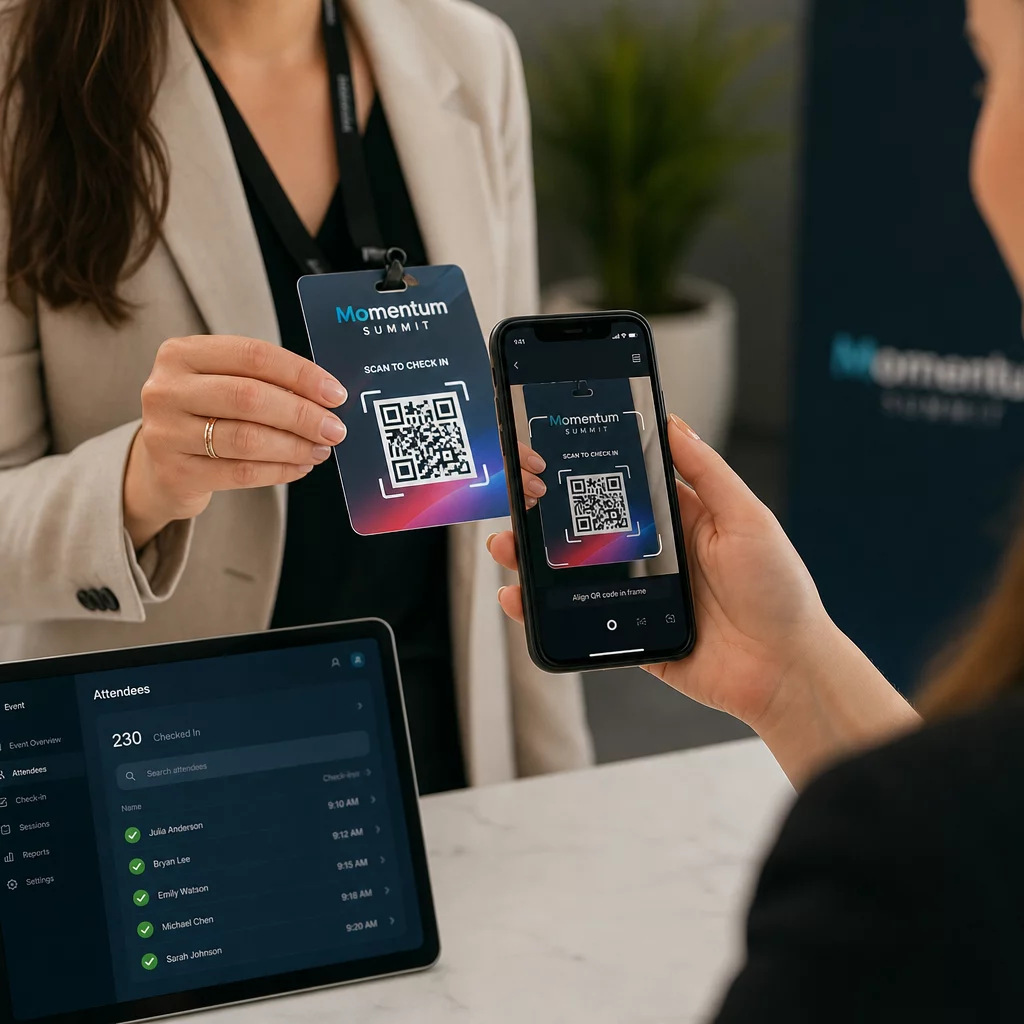
Für größere Veranstaltungen sollten Sie die Einrichtung spezieller Scan-Stationen in Betracht ziehen. Schulen Sie das Personal, das Scan-Gerät etwa 30 cm vom Code entfernt zu halten und den Kamerablitz in Umgebungen mit wenig Licht zu aktivieren. Wenn Sie Codes auf Ausweisen oder Armbändern drucken, verwenden Sie matte Materialien anstelle von glänzenden Oberflächen, um Blendung zu vermeiden, die den Scan stören könnte. Weitere Details zu Best Practices für den physischen Einsatz finden Sie unter ultimativen Leitfaden für QR-Codes beim Event-Check-in.
Wie Anwesenheitsdaten in Ihr CRM fließen
Der Check-in-Scan löst eine Kette von Ereignissen aus, die mit einem aktualisierten Kontaktdatensatz endet. Hier ist, was bei jedem Schritt passiert:
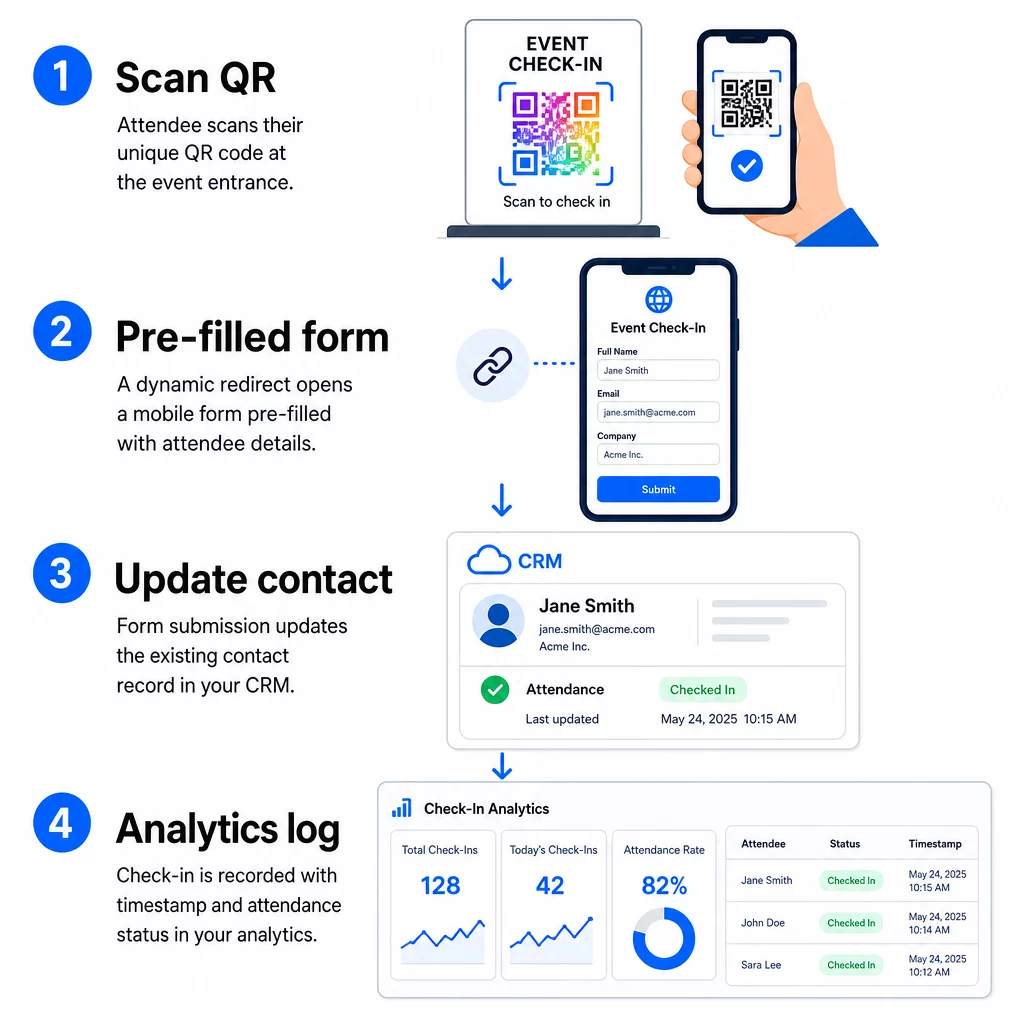
- Der einzigartige QR-Code des Teilnehmers wird am Eingang gescannt.
- Die dynamische Weiterleitung lädt das vorausgefüllte Check-in-Formular im Browser des Teilnehmers.
- Der Teilnehmer sendet das Formular ab (oder das Formular wird nach einer kurzen Bestätigung automatisch gesendet).
- Die Formularübermittlung, verknüpft mit der eindeutigen ID des Kontakts, aktualisiert den bestehenden CRM-Datensatz mit dem Check-in-Status, dem Zeitstempel und allen erfassten zusätzlichen Feldern.
- Wenn Ihr CRM Webhook-basierte Automatisierung unterstützt, kann die Übermittlung gleichzeitig nachgelagerte Aktionen auslösen: Zuweisung einer Nachverfolgungsaufgabe, Senden einer E-Mail nach der Veranstaltung oder Aktualisierung eines Kampagnenstatus.
Plattformen wie HubSpot speichern den Teilnahmestatus – Registriert, Anwesend, Nicht erschienen, Storniert – direkt auf der Marketing-Event-Karte des Kontakts, wodurch Ihr Team eine vollständige Anwesenheitshistorie für jeden Kontakt ohne manuelle Abstimmung erhält. Um zu erfahren, wie Scans breiter mit automatisierten CRM-Aktionen verbunden werden können, siehe den Leitfaden zu Automatisierung des QR-Code-Scan-Workflows.
Verfolgung der Check-in-Leistung mit Analysen
Da Sie dynamische Codes verwenden, generiert jeder Scan Analysedaten – nicht nur ein ausgefülltes Formular. Ihr QR-Code-Dashboard erfasst:
- Gesamtscans vs. eindeutige Scans – nützlich, um festzustellen, ob jemand seinen Code mehrmals gescannt hat
- Scan-Zeitstempel – ermöglicht es Ihnen, Ankunftsmuster zu rekonstruieren und Spitzenzeiten für den Check-in zu identifizieren
- Gerätetyp und Betriebssystem – hilft Ihnen, die mobile Erfahrung Ihres Check-in-Formulars zu optimieren
- Geografischer Standort – bestätigt, dass Scans am erwarteten Veranstaltungsort stattfinden
Diese Daten liegen neben Ihren CRM-Anwesenheitsaufzeichnungen und bieten Ihnen eine zweite Verifizierungsebene. Wenn die Formularübermittlung eines Kontakts fehlgeschlagen ist, aber sein QR-Scan protokolliert wurde, haben Sie einen Datensatz zur Untersuchung. Für einen tieferen Einblick, was gemessen und wie darauf reagiert werden kann, bietet der Leitfaden zu Analyse von QR-Codes für Unternehmen und Schlüsselkennzahlen deckt das Gesamtbild ab.
Sie können auch QR-Code-Scans und Analysen verfolgen auf Kampagnenebene, segmentiert nach Veranstaltung, Datumsbereich oder individuellem Code, um die Leistung über mehrere Check-in-Punkte hinweg zu vergleichen.
Anwesenheit in Echtzeit überwachen Sehen Sie genau, wer wann und von welchem Ort gescannt hat. Verwenden Sie das Anwesenheits-QR-Code-Tool um Check-in-Codes mit integrierten vollständigen Scan-Analysen bereitzustellen.
Häufige Probleme und wie man sie behebt
Defekte URLs nach der Ersetzung von Seriendruckfeldern. Testen Sie Ihre kodierte URL immer mit echten Kontaktdaten, bevor Sie Codes an Teilnehmer senden. Achten Sie besonders auf Kontakte, deren Namen oder E-Mail-Adressen Sonderzeichen enthalten.
Doppelte CRM-Datensätze, die beim Check-in erstellt wurden. Dies geschieht, wenn die Formular-URL den Kontaktbezeichner nicht enthält. Fügen Sie den Kontakt-ID-Parameter zu Ihrer URL-Vorlage hinzu und bestätigen Sie, dass Ihr CRM so konfiguriert ist, dass es auf diesem Feld abgleicht, anstatt einen neuen Datensatz zu erstellen.
QR-Codes, die nach der Verteilung nicht mehr funktionieren. Hier beweisen dynamische Codes ihren Wert. Wenn sich Ihre Formular-URL ändert – weil Sie das Formular-Tool gewechselt oder Ihre Domain aktualisiert haben – können Sie das Ziel in Ihrem QR-Code-Verwaltungs-Dashboard aktualisieren, ohne neue Codes an die Teilnehmer verteilen zu müssen.
Codes, die korrekt scannen, aber das Formular nicht vorab ausfüllen. Prüfen Sie, ob Ihr Formular-Tool spezifische Abfrageparameternamen erfordert. Einige Plattformen verwenden `email`, während andere `entry.12345` (Google Forms) oder einen benutzerdefinierten Feldschlüssel benötigen. Passen Sie Ihre URL-Vorlage an die erwarteten Parameternamen Ihres Formular-Tools an.
Scanfehler bei schlechten Lichtverhältnissen am Eingang. Stellen Sie sicher, dass Ihre gedruckten QR-Codes das Größen-Abstands-Verhältnis von 10:1 erfüllen: Ein Code, der aus 10 Zoll Entfernung gescannt wird, sollte mindestens 1 Zoll breit sein. Verwenden Sie hochkontrastigen Druck – dunkle Module auf weißem Hintergrund – und vermeiden Sie glänzendes Papier oder Laminat.
Wichtige Erkenntnisse
Dynamische QR-Codes für CRM-Check-ins funktionieren, weil jeder Code die Identität eines Kontakts in seiner Ziel-URL kodiert, diese Daten in ein Formular leitet, das mit einem bestehenden Datensatz verknüpft ist, und den Scan selbst als separates Analyseereignis protokolliert. Das Ergebnis ist eine Anwesenheitsliste, die genau, mit Zeitstempel versehen und mit Ihrem CRM verbunden ist, ohne manuelle Dateneingabe.
Die technischen Anforderungen sind unkompliziert: ein CRM mit Seriendruckfeldern und Webformularen, die URL-Parameter akzeptieren, ordnungsgemäß kodierte dynamische URLs und eine QR-Code-Plattform, die die Generierung von Codes pro Kontakt und die Scan-Verfolgung unterstützt. Wenn diese drei Elemente stimmen, läuft der Check-in-Workflow weitgehend von selbst.
Beginnen Sie mit dem Aufbau Ihres Check-in-Systems mit dem Dynamischer QR-Code Generator – keine Kreditkarte für die 14-tägige Testphase erforderlich.
Häufig gestellte Fragen
Ein statischer QR-Code kodiert eine feste URL direkt in sein Muster und kann nach dem Drucken nicht mehr geändert oder verfolgt werden. Ein dynamischer QR-Code verwendet einen kurzen Weiterleitungslink, den Sie jederzeit von Ihrem Dashboard aus aktualisieren können, und jeder Scan wird mit Daten wie Zeitstempel, Gerätetyp und Standort protokolliert. Für CRM-Check-ins sind dynamische Codes unerlässlich, da sie eine URL-Personalisierung pro Kontakt ermöglichen und die zur Überprüfung der Anwesenheit erforderlichen Analysen bereitstellen.
Fügen Sie die eindeutige CRM-Kennung Ihres Kontakts als Abfrageparameter in die Check-in-URL ein – zum Beispiel `?contact_id={{contact.id}}`. Wenn das Formular übermittelt wird, verwendet Ihr CRM diese Kennung, um die Übermittlung dem bestehenden Datensatz zuzuordnen, anstatt einen neuen zu erstellen. Die meisten CRM-Plattformen verfügen auch über eine Einstellung, um bei fehlender Kontakt-ID eine Zusammenführung anhand der E-Mail-Adresse als Fallback durchzuführen.
Ja. Da die Codes dynamisch sind, können Sie die Ziel-URL in Ihrem QR-Code-Management-Dashboard jederzeit ändern. Der gedruckte oder verteilte Code bleibt exakt derselbe – nur das Umleitungsziel ändert sich. Das bedeutet, dass, wenn sich Ihre Formular-URL ändert, nachdem Bestätigungs-E-Mails versandt wurden, Teilnehmer mit den ursprünglichen Codes immer noch das richtige Formular erreichen werden.