Funktioniert Ihr Schaufenster auch nach Ladenschluss für Sie? Die meisten Ladenfronten verstummen, sobald die Lichter ausgehen, und verpassen jeden potenziellen Kunden, der vorbeigeht. Das Anbringen eines QR-Codes an Ihrem Fenster verwandelt dieses Glas in einen ständig aktiven Marketing-Berührungspunkt, der Passanten sofort mit Ihren digitalen Inhalten verbindet.
Warum Schaufenster ein ungenutzter Marketingraum sind
Die meisten Einzelhandelsunternehmen behandeln ihre Fenster als Dekoration. In Wirklichkeit ist ein Fenster, das zu einer belebten Straße zeigt, eine der sichtbarsten Platzierungen, die Ihnen zur Verfügung stehen – und es kostet nichts extra, einen QR-Code hinzuzufügen.
Schaufensterbummler sind bereits interessiert. Sie haben langsamer gemacht, Ihr Display betrachtet und überlegen, ob sie sich weiter engagieren sollen. Ein QR-Code gibt ihnen einen sofortigen nächsten Schritt: scannen, um die Speisekarte zu sehen, den Katalog zu durchsuchen, einen Rabatt einzulösen oder Bewertungen zu lesen. Ohne ihn verfliegt dieser Moment des Interesses und der Kunde zieht weiter.
Marken wie Heinz und Nestlé haben dynamische QR-Codes auf physischen Verpackungen verwendet, um dauerhafte Beziehungen zu Kunden aufzubauen. Dieselbe Logik gilt für Ladenfronten. Das Fenster ist nicht nur eine Barriere zwischen innen und außen – es ist eine Oberfläche, die Ihre Offline-Präsenz mit Ihrem gesamten digitalen Ökosystem verbinden kann.
So zeigen Sie einen QR-Code in einem Schaufenster an
Es gibt verschiedene praktische Formate, um einen QR-Code auf einem Fenster anzubringen, abhängig von Ihrem Budget und wie oft Sie den Inhalt ändern müssen.
- Fensterfolien sind abnehmbare Vinylaufkleber, die direkt auf Glas haften. Sie sind einfach anzubringen, sehen professionell aus und können ausgetauscht werden, wenn sich Ihre Aktion ändert.
- Fensteraufkleber oder -folien ähneln Fensterfolien, können aber dauerhafter sein. Diese eignen sich gut für Codes, die zu langfristigen Zielen wie Ihrer Website oder Ihrer Google-Bewertungsseite führen.
- Kundenstopper direkt vor Ihrem Eingang platziert, ermöglichen es Ihnen, QR-Code-Plakate auszutauschen, ohne das Fenster überhaupt zu berühren. Dies ist nützlich, um Tagesangebote oder zeitlich begrenzte Angebote zu bewerben.
- Ein Monitor oder Bildschirm im Fenster kann einen QR-Code dynamisch anzeigen, was besonders effektiv ist, wenn Sie Aktionen rotieren oder eine gut sichtbare digitale Anzeige wünschen.
Für jedes dieser Formate verwenden Sie einen hochauflösenden QR-Code als PNG um sicherzustellen, dass der gedruckte oder angezeigte Code in der benötigten Größe scharf bleibt.
Erstellen Sie einen druckfertigen QR-Code für Ihr Fenster Erstellen Sie in Sekundenschnelle einen gebrandeten, hochauflösenden QR-Code mit dem Pageloot QR-Code-Generator. Laden Sie ihn im PNG-, SVG- oder PDF-Format herunter – bereit für Fensteraufkleber, Haftfolien oder Kundenstopper.
Wahl zwischen statischen und dynamischen QR-Codes
Dies ist eine der wichtigsten Entscheidungen, die Sie treffen werden, bevor Sie etwas auf Ihr Fenster drucken.
Statische QR-Codes sind fest. Einmal gedruckt, kann das Ziel nicht mehr geändert werden. Sie eignen sich für permanente Links wie Ihre Unternehmenshomepage oder eine Standortkarte – Inhalte, die niemals aktualisiert werden müssen.
Dynamische QR-Codes ermöglichen es Ihnen, das verknüpfte Ziel jederzeit zu ändern, auch nachdem der Code bereits gedruckt und angezeigt wurde. Wenn Ihr Fensteraufkleber einen saisonalen Verkauf bewirbt, der im März endet, können Sie das Ziel im April auf eine neue Aktion aktualisieren, ohne den physischen Code zu ersetzen. Dynamische Codes unterstützen auch Analysen, sodass Sie sehen können, wie viele Personen wann und von welchem Standort aus gescannt haben.
Für die meisten Fenster- und Beschilderungsplatzierungen sind dynamische QR-Codes die bessere Wahl. Die Flexibilität, Inhalte ohne Neudruck zu aktualisieren, spart Geld und ermöglicht es Ihnen, Ihr Fenster relevant zu halten. Erfahren Sie mehr über QR-Code-Optionen für Schilder und Banner um zu verstehen, welches Format zu Ihrem Anwendungsfall passt.
Halten Sie Ihren Fenster-Code immergrün Mit Die dynamischen QR-Codes von Pageloot, können Sie die Ziel-URL Ihres Fensters jederzeit aktualisieren – kein Neudruck erforderlich. Starten Sie eine kostenlose 14-tägige Testversion, um vollen Tracking- und Bearbeitungszugriff zu erhalten.
Platzierungs- und Größenrichtlinien
Ein QR-Code, der nicht gescannt werden kann, ist eine verpasste Gelegenheit. Befolgen Sie diese praktischen Richtlinien, um sicherzustellen, dass Ihr Fenster-Code tatsächlich funktioniert.
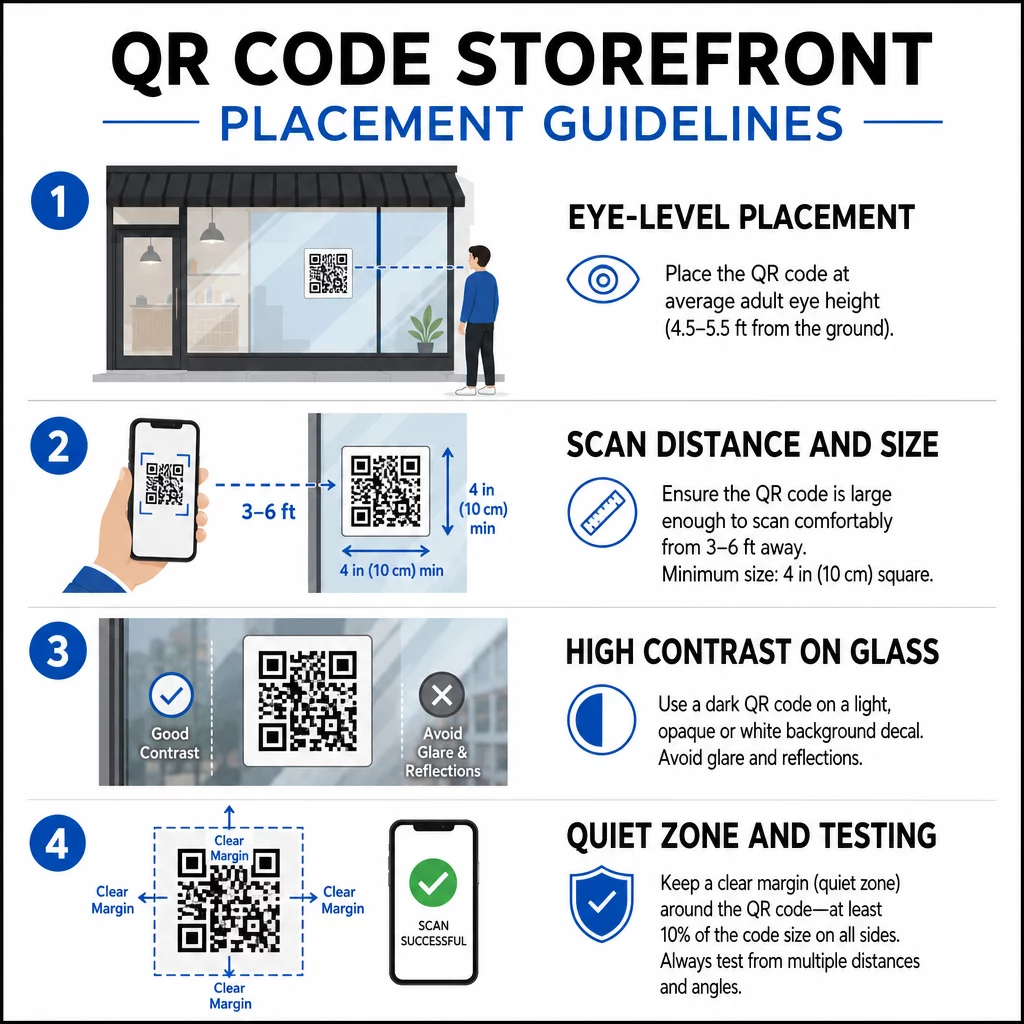
Platzierung auf Augenhöhe ist die Standardempfehlung. Zielen Sie auf etwa fünf Fuß über dem Boden ab, wo die meisten Erwachsenen beim Vorbeigehen natürlich hinschauen. Zu hoch, zu niedrig oder durch andere Beschilderung verdeckte Codes sind leicht zu ignorieren und schwerer zu scannen.
Größe für die erwartete Scan-Distanz ist wichtiger, als man erwartet. Eine Faustregel: Für alle 10 cm Scan-Distanz fügen Sie 1 cm zur Seitenlänge des Codes hinzu. Für einen Fenster-Code, der aus vier bis sieben Fuß Entfernung gescannt werden soll, ist ein Code von etwa 8 × 8 Zoll angemessen. Vermeiden Sie es, für Nahbereichsanwendungen kleiner als 2 × 2 cm zu gehen.
Hoher Kontrast zwischen dem Code und seinem Hintergrund ist unerlässlich. Verwenden Sie einen dunklen Code auf hellem Hintergrund. Vermeiden Sie invertierte Schemata (heller Code auf dunklem Hintergrund), da einige QR-Lesegeräte diese nicht zuverlässig dekodieren können. Wenn Sie einen Aufkleber auf Glas anbringen, testen Sie ihn nach der Installation – Glas kann Blendung erzeugen, die das Scannen beeinträchtigt.
Ruhezonen (der weiße Rand um den Code) sollte beibehalten werden. Lassen Sie auf allen Seiten mindestens 0,25 Zoll freien Raum, frei von Text, Bildern oder Designelementen. Ohne diesen Puffer können Scanner möglicherweise nicht erkennen, wo der Code beginnt und endet.
Vor der Veröffentlichung testen. Scannen Sie den Code in der endgültigen Druckgröße aus der tatsächlichen Entfernung, in der ein Kunde stehen würde, und verwenden Sie dabei mehrere Geräte. Dieser Schritt fängt Probleme ab, bevor sie Ihr Geschäft erreichen. Für weitere Details zu Best Practices für die Lesbarkeit von QR-Codes, einschließlich Kontrastverhältnissen und Ruhezonen, deckt der vollständige Leitfaden alle technischen Anforderungen ab.
Wohin Sie Ihren Fenster-QR-Code verlinken sollten
Das Ziel ist genauso wichtig wie der Code selbst. Einfach auf Ihre Homepage zu verlinken, ist die Option mit dem geringsten Wert. Personen, die einen Fenster-Code scannen, sind bereits an Ihrem Standort – sie wollen etwas Spezifischeres.
Ziehen Sie diese höherwertigen Ziele in Betracht:
- EIN PDF-Produktkatalog mit verfügbaren Artikeln, Größen und Preisen, damit Kunden auch bei geschlossenem Geschäft stöbern können. Ein PDF QR-Code macht dies einfach einzurichten und zu aktualisieren.
- EIN Rabatt oder Gutschein für ihren nächsten Besuch, um wiederkehrende Kunden zu fördern.
- EIN Bewertungslink zu Ihrem Google Business-Profil, um zufriedenen Kunden das Hinterlassen von Feedback zu erleichtern.
- Eine exklusive Aktion oder Gewinnspiel, um den Leuten einen Grund zu geben, sofort zu scannen, anstatt vorbeizugehen.
- Soziale Medien oder ein Anmeldeformular, um einen einmaligen Passanten in einen langfristigen Follower oder Abonnenten zu verwandeln.
EIN URL-QR-Code kann auf jedes dieser Ziele verweisen, und mit einem dynamischen Code können Sie Ihr Angebot wechseln, ohne die physische Anzeige zu ändern.
Fügen Sie immer einen Call-to-Action hinzu
Gehen Sie niemals davon aus, dass die Leute wissen, was sie mit einem QR-Code anfangen sollen oder warum sie sich die Mühe machen sollten. Eine kurze Anweisung neben dem Code beseitigt diese Reibung. Sätze wie “Öffnen Sie Ihre Kamera und scannen Sie für 10% Rabatt” oder “Scannen Sie, um das heutige Menü anzuzeigen” sagen dem Kunden genau, was er erwarten kann.
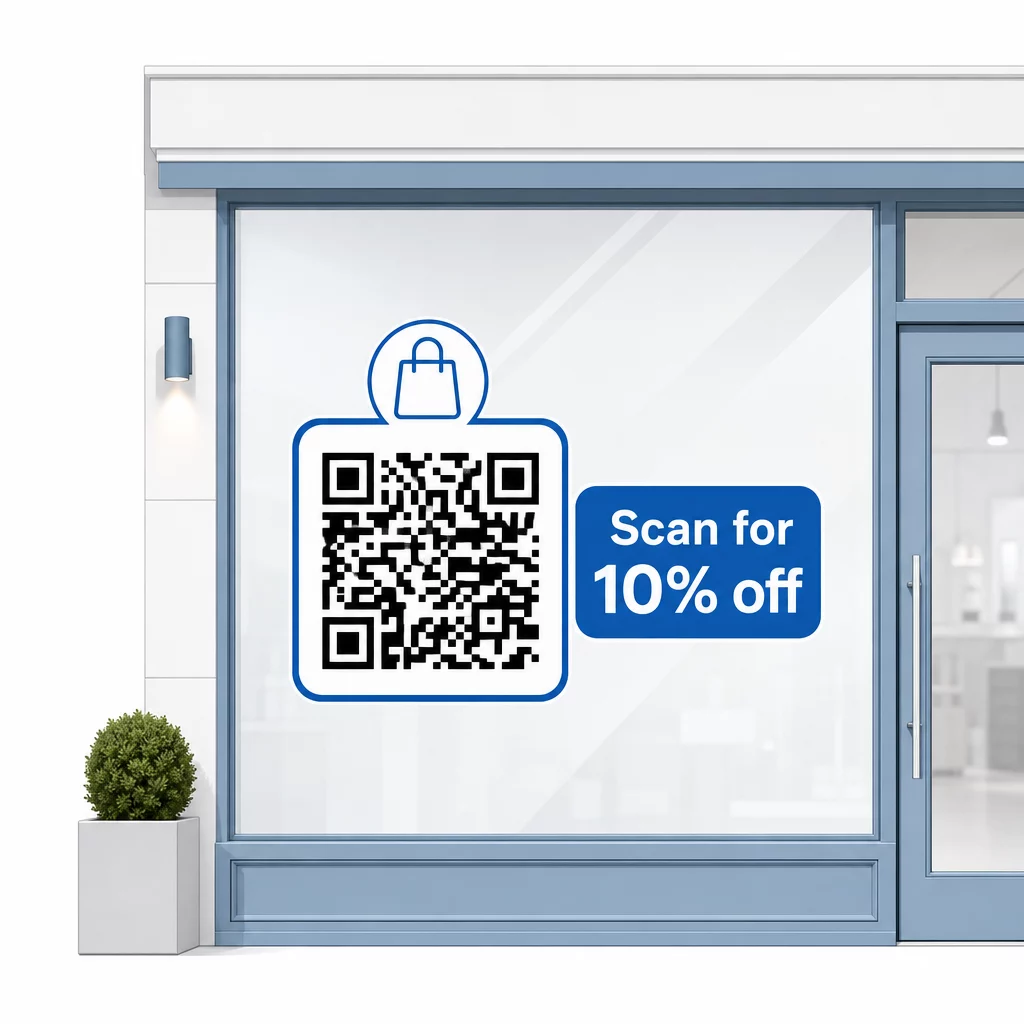
Halten Sie die Nachricht kurz – maximal zwei Zeilen. Je klarer und spezifischer Ihr CTA ist, desto höher wird Ihre Scanrate sein. Wenn Ihr Publikum Kunden umfassen könnte, die mit dem Scannen von QR-Codes nicht vertraut sind, fügen Sie eine kurze Notiz hinzu, wie “richten Sie Ihre Telefonkamera auf diesen Code.” Für Anleitungen zum Scannen von QR-Codes auf verschiedenen Geräten, einschließlich Laptops und Desktops, können Sie Kunden auf einfache Anweisungen verweisen.
Verfolgen und Verbessern im Laufe der Zeit
Ein Vorteil dynamischer QR-Codes gegenüber statischen ist die integrierte Analysefunktion. Sie können sehen, wie viele Personen Ihren Fenster-Code jeden Tag gescannt haben, zu welchen Zeiten und ob es Spitzenwerte bei bestimmten Aktionen gibt.
Diese Daten ermöglichen es Ihnen, fundierte Entscheidungen zu treffen. Wenn die Scans nach dem Ende einer Aktion zurückgehen, aktualisieren Sie das Ziel auf etwas Neues. Wenn eine Fensterplatzierung eine andere übertrifft, wissen Sie, worauf Sie sich konzentrieren müssen. Sie können auch QR-Code-Scanner-Apps vergleichen um zu verstehen, wie Kunden wahrscheinlich auf Ihre Codes zugreifen und die Kompatibilität sicherzustellen.
Verwenden Sie die Pageloot Funktionsübersicht um die gesamte Palette an Analyse-, Bearbeitungs- und Anpassungstools zu erkunden, die für die Verwaltung Ihrer Fenstercodes neben all Ihren anderen QR-Kampagnen verfügbar sind.
Ein gut platzierter, gut gestalteter QR-Code in Ihrem Schaufenster kann rund um die Uhr – nicht nur während der Geschäftszeiten – eine sinnvolle Interaktion erzeugen. Beginnen Sie mit einem klaren Ziel, wählen Sie einen dynamischen Code, damit Sie den Inhalt aktuell halten können, beachten Sie die Platzierungs- und Größenrichtlinien und geben Sie Kunden immer einen Grund zum Scannen.
Beginnen Sie mit der Verfolgung Ihrer Fensterscans Verwenden Sie die Pageloot QR-Code-Generator um einen verfolgbaren, bearbeitbaren QR-Code für Ihr Schaufenster zu erstellen. Kostenlose 14-tägige Testversion, keine Kreditkarte erforderlich.
Häufig gestellte Fragen
Ja, wenn Sie einen dynamischen QR-Code verwenden. Dynamische Codes ermöglichen es Ihnen, die Ziel-URL jederzeit nach dem Drucken zu aktualisieren, sodass der physische Code an Ihrem Fenster gleich bleibt, während sich der Inhalt, auf den er verweist, mit jeder Aktion ändert. Statische Codes sind fest und müssten jedes Mal neu gedruckt werden.
Für einen Fenster-Code, der voraussichtlich aus einer Entfernung von vier bis sieben Fuß gescannt wird, ist eine Größe von ungefähr 8 × 8 Zoll angemessen. Die allgemeine Richtlinie besagt, dass man für alle 10 cm Scan-Abstand 1 cm Code-Größe hinzufügen sollte. Testen Sie den Code immer in der tatsächlich gedruckten Größe aus der beabsichtigten Entfernung, bevor Sie die Anzeige finalisieren.
Vermeiden Sie es, einfach auf Ihre Startseite zu verlinken. Effektivere Ziele sind ein Produktkatalog-PDF, ein Rabatt oder Gutschein, ein Google-Bewertungslink, eine Social-Media-Seite oder ein Anmeldeformular. Ein klarer Call-to-Action neben dem Code, der Kunden mitteilt, was sie beim Scannen erhalten, erhöht die Wahrscheinlichkeit erheblich, dass sie ihn nutzen werden.