Wie teilen Sie einen 40-seitigen Datensatz oder eine vollständige Bibliografie mit jemandem, der 90 Sekunden lang vor Ihrem Poster steht? Papierhandzettel gehen aus, URLs sind zu lang zum Eintippen, und Apps erfordern Downloads, die niemand möchte. QR-Codes lösen alle drei Probleme mit einem einzigen Scan – dieser Leitfaden erklärt, wie Sie sie effektiv auf Forschungspostern und Konferenzpräsentationen einsetzen können.
Wohin Ihr QR-Code verlinken soll
Bevor Sie einen Code generieren, entscheiden Sie, was er für die Person, die ihn scannt, tatsächlich tun soll. Die nützlichsten Links auf wissenschaftlichen Konferenzen lassen sich in einige klare Kategorien einteilen.
Forschungsmaterialien und ergänzende Daten sind der häufigste Anwendungsfall. Ein Poster hat begrenzten Platz, daher kann ein QR-Code auf Ihr vollständiges Paper, eine Referenzliste, zusätzliche Abbildungen, Rohdatensätze oder hochauflösende Versionen von Diagrammen verweisen, die im Druck schwer zu lesen sind. Universitätsbibliotheksführer weisen darauf hin, dass QR-Codes besonders praktisch sind, wenn zu viele Referenzen direkt auf dem Poster aufgeführt werden müssten – der Code leitet die Betrachter einfach zu einer vollständigen Online-Liste.
Verwenden Sie eine PDF QR-Code um Ihr Paper oder Ihre ergänzende Datei direkt zu hosten, sodass die Teilnehmer sofortigen Zugriff erhalten, ohne eine Datenbank durchsuchen oder eine DOI eingeben zu müssen.
Kontaktinformationen sind ebenso wichtig. Konferenz-Networking geht schnell, und ein vCard QR-Code ermöglicht es jemandem, Ihr Namensschild oder Poster zu scannen und Ihren Namen, Ihre Institution, E-Mail und Website direkt in die Kontakte seines Telefons zu speichern – keine Visitenkarten erforderlich und keine Übertragungsfehler.
Feedback und Umfragen erweitern die Konversation über die Postersession hinaus. Das Einbetten eines Links zu einem kurzen Google Formular ermöglicht es den Teilnehmern, Fragen einzureichen oder Ihre Arbeit in Sekundenschnelle zu bewerten. Ein Google Formular QR-Code macht das Formular von jedem gedruckten Material aus zugänglich, ohne dass jemand eine URL eingeben muss.
Präsentationsfolien und Multimedia funktionieren gut, wenn sie in Präsentationen eingebettet sind. Das Platzieren eines QR-Codes am Anfang oder Ende eines Vortrags ermöglicht es dem Publikum, die Folien herunterzuladen, auf eine Aufzeichnung zuzugreifen oder verwandte Ressourcen zu besuchen, ohne die Sitzung zu unterbrechen.
Forschungsmaterialien sofort teilen Laden Sie Ihr Paper, Poster oder Ihre ergänzende Datei hoch und generieren Sie in wenigen Minuten einen scannbaren Code mit dem PDF QR-Code Generator.
Statische vs. Dynamische QR-Codes: Welche verwenden?
EIN statischer QR-Code kodiert die Ziel-URL direkt in das Muster. Einmal gedruckt, kann sie nicht mehr geändert werden – wenn die verlinkte Seite verschoben oder die Datei aktualisiert wird, wird der Code nutzlos.
EIN dynamischer QR-Code kodiert stattdessen eine kurze Weiterleitungs-URL. Sie können das Ziel jederzeit von einem Dashboard aus aktualisieren, ohne etwas neu drucken zu müssen. Dies ist besonders wertvoll für den Konferenzeinsatz, wo Zeitplanänderungen und Last-Minute-Dateiaktualisierungen Routine sind. Dynamische Codes generieren auch Analysen: Sie können die Gesamtzahl der Scans, eindeutige Scans, Gerätetypen, geografische Daten und Zeitstempel sehen, was Ihnen ein echtes Maß dafür gibt, wie viele Personen tatsächlich mit Ihren Materialien interagiert haben.
Für alles, was Sie im Voraus drucken möchten – Poster, Namensschilder, Tagungsbände – sind dynamische QR-Codes die sicherere Wahl. Die Dynamischer QR-Code Generator ermöglicht es Ihnen, jede URL in einen dynamischen Code umzuwandeln, das Ziel nach dem Drucken zu bearbeiten und die Interaktion von einem einzigen Dashboard aus zu verfolgen.
Ein von der DARPA finanziertes Forschungsteam an der University of California, Santa Cruz, nutzte dynamische QR-Codes, um die Qualitätskontrolle an fünf Universitäten während der Produktion bioelektronischer Geräte zu verfolgen. Durch die Überwachung der Scandaten stellten sie fest, dass ein Produktionsschritt nur eine 59%-Bonding-Erfolgsrate aufwies – ein Ergebnis, das ohne eingebettetes Tracking schwer zu ermitteln gewesen wäre. Wie der Forscher Cristian Hernandez bemerkte: “Das QR-Code-Tracking-System hat unserem Team ermöglicht festzustellen, dass Schritt 6 nur eine 59%-Bonding-Erfolgsrate hatte… diese Daten haben die Grundursache des Ausfallmodus des bioelektronischen Geräts genau bestimmt.”
QR-Codes für zuverlässiges Scannen gestalten
Ein QR-Code, der gut aussieht, aber nicht scannt, ist schlimmer als gar kein Code. Diese Designprinzipien stellen sicher, dass Ihrer unter den Bedingungen einer realen Konferenzumgebung funktioniert.
Größe und Scan-Abstand
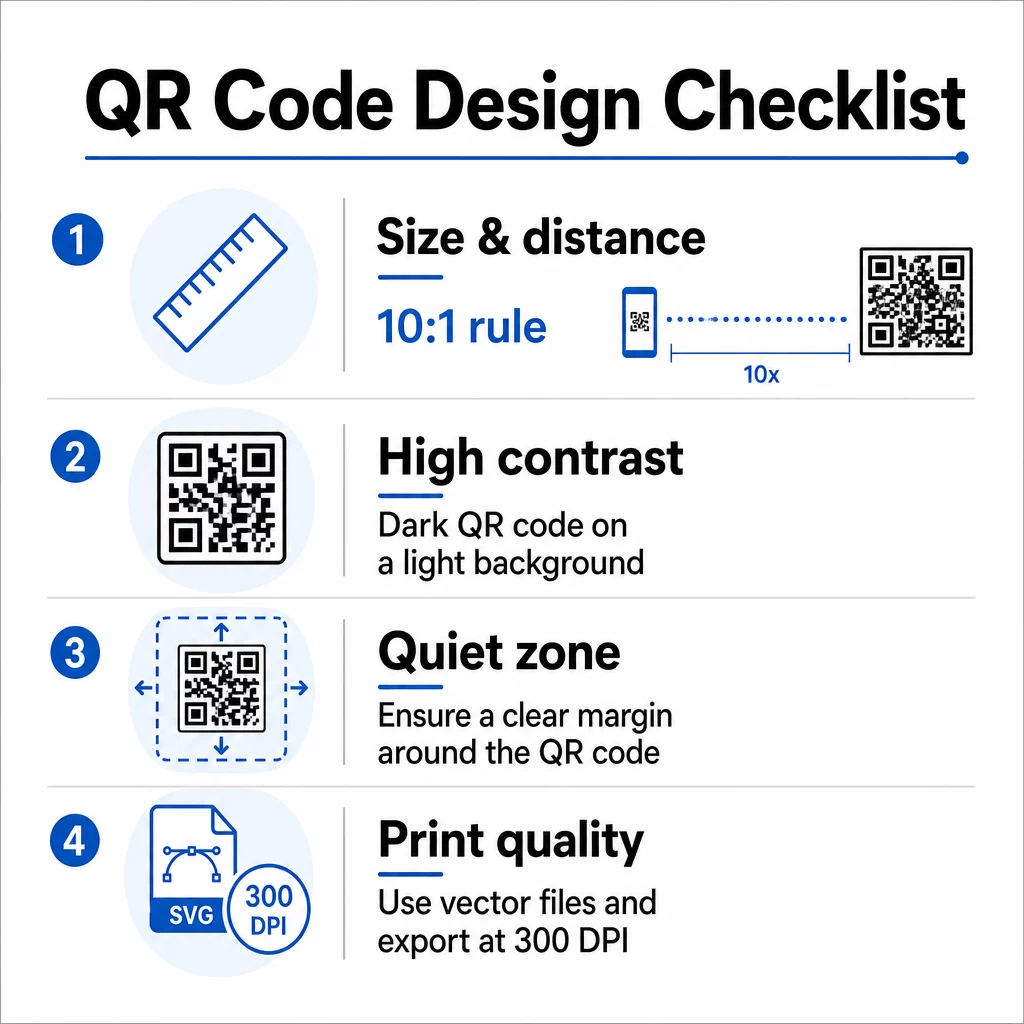
Befolgen Sie die 10:1-Regel: Die Breite des Codes sollte ungefähr ein Zehntel der erwarteten Scannentfernung betragen. Für ein Forschungsposter, das aus etwa 50 cm (20 Zoll) Entfernung betrachtet wird, sollte der Code mindestens 5 cm (2 Zoll) breit sein. Pageloots Größenrichtlinien für Druckmaterialien empfehlen ein Minimum von 3 × 3 cm für Poster, wobei 6 × 6 cm ein ideales Ziel sind. Einige Universitätsleitfäden schlagen ein Minimum von etwa 5 × 5 Zoll für Postercodes vor, die aus stehender Entfernung lesbar sein müssen.
Für Präsentationsfolien muss der Code groß genug sein, um von einem Sitzplatz aus gescannt werden zu können. Testen Sie ihn vor der Sitzung bei der tatsächlichen Projektionsentfernung.
Kontrast und Farbe
Scanner lesen QR-Codes, indem sie den Kontrast zwischen dunklen Modulen und einem hellen Hintergrund erkennen. Unzureichender Kontrast ist eine der Hauptursachen für Scanfehler. Verwenden Sie dunkle Codemuster auf einem hellen oder weißen Hintergrund und streben Sie ein Kontrastverhältnis von mindestens 4,5:1 an. Vermeiden Sie umgekehrte Schemata (heller Code auf dunklem Hintergrund), Farbverläufe oder gemusterte Hintergründe hinter dem Code.
Wenn Sie Marken- oder institutionelle Farben verwenden möchten, können Sie dies tun – vorausgesetzt, das Kontrastverhältnis bleibt hoch genug. Für weitere Details, welche Farbkombinationen funktionieren und welche nicht, siehe Pageloots Best Practices für den Farbkontrast von QR-Codes.
Ruhige Zone
Die Ruhezone ist der klare Rand, der den Code umgibt. ISO/IEC 18004 spezifiziert ein Minimum von vier Modulen Leerraum auf allen vier Seiten. Platzieren Sie keinen Text, Logos, Ränder oder Hintergrundtexturen innerhalb dieses Randes. Auf einem Poster bedeutet dies, sichtbaren Weißraum um den Code herum zu lassen – behandeln Sie ihn als Teil des Designs, nicht als verschwendeten Platz.
Dateiformat und Druckqualität
Exportieren Sie Ihren QR-Code als Vektordatei (SVG oder EPS) für den Großformatdruck. Rasterformate wie PNG können beim Hochskalieren pixelig werden, wodurch einzelne Module schwerer zu unterscheiden sind und die Scanbarkeit reduziert wird. Für Standard-Druckauflösungen sind mindestens 300 DPI der praktische Standard.
Druckfertige QR-Code-Dateien erhalten Laden Sie Ihren Code im SVG-, EPS- oder PDF-Format für den hochauflösenden Posterdruck mit dem QR-Code-Generator.
Platzierung auf Postern und Folien
Wo Sie den Code platzieren, beeinflusst, ob die Leute ihn tatsächlich scannen. Empfehlungen aus wissenschaftlichen Kommunikationsquellen raten dazu, den QR-Code am Ende des Lesepfades des Posters zu platzieren – bei den Schlussfolgerungen oder der Kernbotschaft –, sodass er erscheint, nachdem der Betrachter bereits mit dem Inhalt beschäftigt ist. Dies ist ein logischer Moment, um mehr anzubieten: “Möchten Sie den vollständigen Datensatz? Scannen Sie hier.”
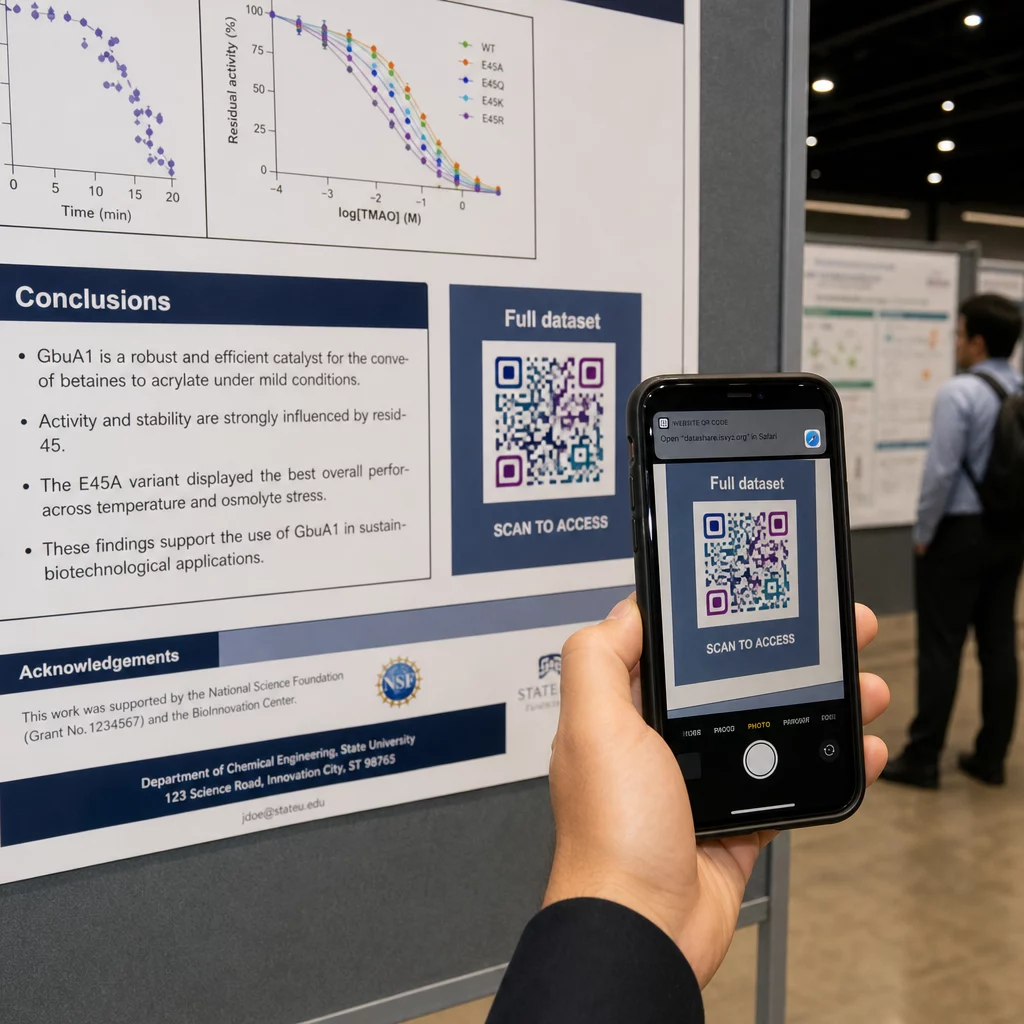
Auf einem vertikalen Poster ist der Bereich unten rechts ein natürlicher Ruhepunkt für das Auge nach dem Lesen. Bei einem horizontalen Layout funktioniert die rechte Seite ähnlich. Für QR-Codes auf Plakaten, ermöglicht die Platzierung auf Augenhöhe (etwa 1,05–1,65 Meter vom Boden) den Teilnehmern ein bequemes Scannen ohne Bücken.
Kombinieren Sie den Code immer mit einem kurzen Call-to-Action, der den Leuten sagt, was sie erhalten werden:
- “Scannen Sie für das vollständige Paper”
- “Zusätzliche Daten abrufen”
- “Meine Kontaktdaten speichern”
- “Das Foliendeck herunterladen”
Ohne einen CTA werden viele Teilnehmer den Code vollständig ignorieren – sie wissen nicht, ob sich das Scannen lohnt.
Bei Präsentationsfolien zeigen Sie den QR-Code für mindestens 15–20 Sekunden an und erwähnen ihn mündlich. Die Platzierung in der unteren rechten Ecke der Folie hält ihn sichtbar, ohne mit Ihrem Hauptinhalt zu konkurrieren. Dynamische Codes sind hier besonders nützlich: Wenn sich das Ziel zwischen Vorträgen oder Konferenzterminen ändert, aktualisieren Sie den Link, ohne die Folien-Datei anzufassen.
Für Anleitungen zur Platzierung in verschiedenen Kontexten, Pageloots Leitfaden zur Platzierung von QR-Codes behandelt die Platzierung auf Augenhöhe, Hintergrundauswahl und wie die Platzierung an die Benutzerabsicht angepasst wird.
Testen vor dem Druck
Testen Sie den Code, bevor Sie Ihr Poster in den Druck geben oder Ihre Folien fertigstellen. Insbesondere:
- Scannen Sie aus der tatsächlichen Entfernung, in der das Publikum stehen oder sitzen wird
- Testen Sie auf mindestens zwei verschiedenen Geräten (iOS und Android)
- Probieren Sie es unter verschiedenen Lichtverhältnissen aus, einschließlich der in Konferenzsälen üblichen Leuchtstoffröhren
- Überprüfen Sie, ob das verlinkte Ziel korrekt geladen wird, auch über eine Mobilfunkverbindung (nicht nur Wi-Fi)
- Überprüfen Sie, ob PDFs und andere Dateien auf Mobilgeräten ohne eine Desktop-App geöffnet werden können
Wenn Sie einen dynamischen Code verwenden, bestätigen Sie, dass die Weiterleitung nach Zielaktualisierungen korrekt aufgelöst wird. Eine vollständige Checkliste der Design- und Testkriterien finden Sie bei Pageloot's Best Practices für die Lesbarkeit von QR-Codes.
QR-Codes über das Poster hinaus nutzen
Wissenschaftliche Konferenzen bieten mehrere Berührungspunkte, an denen QR-Codes über die Plakatwand hinaus praktischen Wert bieten.
Konferenz-Badges mit vCard-QR-Codes ermöglichen es jedem Teilnehmer, Ihre Kontaktdaten während Gesprächen auf dem Flur zu speichern – kein Austausch von Telefonnummern erforderlich, keine Karte, die in einer Tasche verloren geht.
Sitzungsunterlagen per QR-Code verlinkt ersetzen Papierstapel. Ein einziger Code auf einem gedruckten Abstract kann Teilnehmer mit den vollständigen Tagungsberichten, verwandten Publikationen oder einem Feedback-Formular nach der Sitzung verbinden.
Registrierung und Check-in Abläufe profitieren von Anwesenheits-QR-Codes, die die Identität überprüfen und die Teilnahme verfolgen, wodurch Organisatoren Echtzeit-Teilnehmerzahlen pro Sitzung erhalten.
Networking-Materialien kann ein Link-QR-Code um sich mit einer Labor-Website, einem Google Scholar-Profil oder einer LinkedIn-Seite zu verbinden – was interessierten Kollegen mehrere Möglichkeiten bietet, nach dem Ende der Konferenz nachzufassen.
Die IASCON 2022 Konferenz zeigte, wie dies im großen Maßstab aussieht. Die Organisatoren platzierten QR-Codes am Registrierungsschalter, außerhalb der Besprechungsräume und in Präsentationsfolien, wodurch Papierpläne und Handouts vollständig ersetzt wurden. Teilnehmer konnten auf Sitzungsdetails, Sprecherprofile und Präsentationsdownloads zugreifen, indem sie die Codes an jedem Ort scannten. Ein mobiles Antwortsystem, das durch QR-Codes ausgelöst wurde, ermöglichte Live-Umfragen und Q&A ohne App-Downloads und erreichte Beteiligungsraten, die mit traditionellen Papierformularen vergleichbar waren. Analysen der Veranstaltung zeigten ein höheres Engagement während der Vormittagssitzungen und einen messbaren Rückgang nach dem Mittagessen – Daten, die zukünftige Planungsentscheidungen direkt beeinflussten.
QR-Codes funktionieren auf Konferenzen jeder Größe aus demselben Grund: Sie beseitigen Reibung zwischen einem neugierigen Teilnehmer und den Informationen, die er wünscht. Ein gut platzierter, richtig dimensionierter, kontrastreicher QR-Code mit einem klaren Call-to-Action leistet etwas, was ein gedrucktes Poster allein nicht kann – er hält das Gespräch nach dem Ende der Sitzung am Laufen. Beginnen Sie mit dynamischen Codes, damit Sie die Flexibilität behalten, Ziele zu aktualisieren, zu verfolgen, wer sich mit Ihren Materialien beschäftigt, und Änderungen ohne Neudruck vorzunehmen. Für all dies bietet das Pageloot QR-Code-Generator bietet die Tools, um Ihre Codes von einem einzigen Dashboard aus zu erstellen, anzupassen und zu verwalten.
Häufig gestellte Fragen
Nein. Moderne Smartphones sowohl unter iOS als auch unter Android können QR-Codes direkt über die integrierte Kamera-App scannen, ohne dass zusätzliche Software erforderlich ist. Teilnehmer öffnen einfach ihre Kamera, richten sie auf den Code und tippen auf die Benachrichtigung, um den verknüpften Inhalt in ihrem Browser zu öffnen.
Ein statischer QR-Code kodiert die Ziel-URL direkt im Muster – einmal gedruckt, kann er nicht geändert werden. Ein dynamischer QR-Code kodiert eine kurze Weiterleitungs-URL, sodass Sie das Ziel jederzeit von einem Dashboard aus aktualisieren können, ohne neu drucken zu müssen. Dynamische Codes bieten auch Analysen wie Scan-Zahlen, Gerätetypen und Zeitstempel, was statische Codes nicht tun. Für Konferenzposter und im Voraus gedruckte Materialien werden dynamische Codes dringend empfohlen.
Befolgen Sie die 10:1-Regel: Die Breite des Codes sollte ungefähr ein Zehntel der Scan-Entfernung betragen. Für ein Poster, das aus etwa 50 cm (20 Zoll) Entfernung betrachtet wird, bedeutet dies eine Mindestbreite von 5 cm (2 Zoll). Ein praktisches Ziel für die Posternutzung ist 6 × 6 cm, was den meisten Teilnehmern ausreichend Scan-Platz bietet. Testen Sie den gedruckten Code immer aus der tatsächlichen Betrachtungsentfernung vor der Konferenz.