Provozujete na akcích kampaně s QR kódy s rozšířenou realitou, ale máte potíže zjistit, co skutečně funguje? Bez správných metrik zůstávají data ze skenování nevyužita, zatímco příležitosti k zapojení proklouznou. Tento průvodce vás provede tím, které metriky jsou důležité, jak je číst a jak tato data proměnit v lepší výsledky událostí.
Čím se liší sledování QR kódů s rozšířenou realitou
Tradiční QR kódy vám řeknou, kolik lidí kód naskenovalo a zhruba, kde se nacházeli, když to udělali. QR kódy s rozšířenou realitou jdou dál. Protože se zážitek odehrává uvnitř samotného skenu – prostřednictvím 3D modelů, video překryvů, prostorových prvků – existuje více smysluplných okamžiků k měření.
Hlavní rozdíl spočívá v tom, že QR kódy s rozšířenou realitou vyžadují sledování obou počáteční zapojení (skenování) a pohlcující interakce (doba setrvání, interakce s 3D objekty, prostorový pohyb). Standardní počet skenů vám pouze řekne, že někdo začal zážitek. Doba setrvání, hloubka interakce a chování po skenování vám řeknou, zda to rezonovalo.
V průměru kampaně WebAR zaznamenávají doby setrvání mezi 60 až 120 sekundami – mnohem déle než krátké interakce typické pro standardní QR kódy. Toto prodloužené okno zapojení vytváří bohatší datovou stopu, ale pouze pokud víte, co zachytit.
Klíčové metriky ke sledování
Před nastavením jakékoli sledovací infrastruktury si ujasněte, jak vypadá úspěch pro vaši konkrétní událost. Aktivace pro povědomí o značce má jiné KPI než stánek pro generování potenciálních zákazníků. Jakmile jsou vaše cíle jasné, každá metrika má definovanou roli.
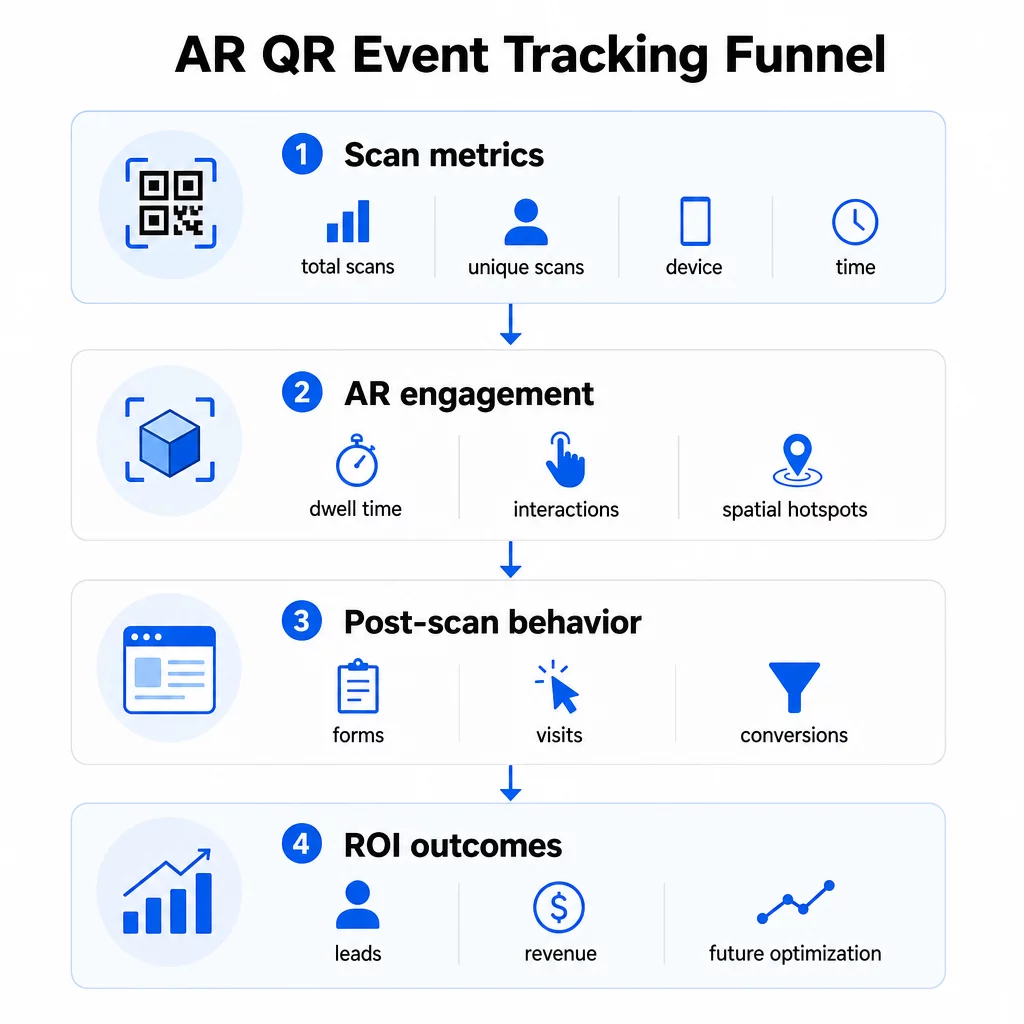
Metriky na úrovni skenování tvoří základ:
- CELKEM SKENŮ – celkový dosah a objem zapojení
- Unikátní skeny – přibližný počet jednotlivých účastníků, kteří interagovali
- Frekvence skenování (celkem ÷ unikátní) – zda se lidé vracejí k zážitku, což signalizuje skutečný zájem
- Čas a datum skenování – špičková okna zapojení vám pomohou identifikovat, které relace, stánky nebo časové sloty vyvolaly největší aktivitu
- Data o zařízení a OS – znalost toho, zda je vaše publikum převážně na iOS nebo Androidu, vám umožní optimalizovat vstupní stránku a AR zážitek pro dominantní typ zařízení
- Geografická data – data o skenování na úrovni města nebo regionu odhalují, kde je zapojení nejvyšší, což je užitečné pro akce s více místy konání nebo pro rozhodování o budoucím umístění akcí
Metriky specifické pro AR jděte hlouběji:
- Doba setrvání – jak dlouho uživatelé zůstávají uvnitř AR zážitku, nejen na vstupní stránce
- Prostorová analýza – které fyzické oblasti vašeho místa konání nebo stánku vygenerovaly nejvíce skenovací aktivity
- Události 3D interakce – zda uživatelé otočili model produktu, spustili video nebo dokončili interaktivní prvek
Chování po skenování uzavírá smyčku:
- Odeslání formulářů, registrace nebo stažení, které následovaly po skenování
- Míra okamžitého opuštění a čas strávený na stránce pro cílovou vstupní stránku
- Konverze spojené s konkrétními cíli kampaně (nákupy vstupenek, přihlášení k odběru newsletteru, žádosti o demo)
Zejména u B2B akcí jsou nejcennějšími metrikami nově získané kvalitní leady, nově zapojené účty a případné příjmy připsané akci. Data ze skenování naplňují horní část tohoto trychtýře, ale konverze po skenování určují návratnost investic.
Sledujte každé skenování v reálném čase Použijte Analytický panel Pageloot pro sledování celkového počtu skenování, unikátních skenování, typů zařízení a míst skenování v reálném čase během vaší akce – bez nutnosti technického nastavení.
Nastavení vaší sledovací infrastruktury
Získání přesných dat vyžaduje několik rozhodnutí před spuštěním vaší akce.
Používejte dynamické QR kódy
Statické QR kódy kódují pevnou destinaci a neposkytují žádné sledování. Dynamické QR kódy směrují skenování přes přesměrování, kde se zaznamenávají metadata skenování – čas, zařízení, poloha. The Dynamický QR kód od Pageloot vytváří kódy, které automaticky sledují míru skenování, údaje o poloze a další metriky, a umožňuje vám aktualizovat cílovou URL bez opětovného tisku materiálů. Pro vícedenní akce, kde se mohou měnit plány nebo výzvy k akci, je tato flexibilita zásadní.
Přidejte parametry UTM pro sledování po skenování
Připojení parametrů UTM k cílovým URL vašich QR kódů umožňuje nástrojům jako Google Analytics 4 rozlišit provoz generovaný QR kódy od jiných zdrojů a měřit, co se děje po skenování. Dobře strukturovaná URL vypadá takto:
`https://yoursite.com/event-page?utm``source=event`stánek&utmmedium=qrkód&utmcampaign=conference2025`
Používání popisných `utmsource` hodnot (např. `mainstagebooth`, `registrationdesk`) vám umožní porovnávat výkon napříč různými umístěními na stejné události. Udržujte konvence pojmenování konzistentní – malá písmena, podtržítka místo mezer – aby vaše zprávy GA4 zůstaly čisté a filtrovatelné. Průvodce na parametrů UTM pro QR kódy pokrývá toto nastavení podrobně.
Propojte svá data o účasti
Pokud používáte QR kódy pro odbavení na události, vaše data o účasti a data o zapojení lze číst společně. Systém QR kód pro účast zaznamenává příchody v reálném čase, což vám umožňuje křížově porovnávat, kdo se odbavil, s tím, kdo naskenoval vaši AR zkušenost a dokončil akci po skenování. To je obzvláště užitečné pro výpočet skutečných konverzních poměrů spíše než jen poměrů skenování na vstupní stránku.
Pro sběr strukturovaných odpovědí – zpětné vazby, registrací, průzkumů po události – spárujte své QR kódy s Google Formuláři pomocí Google formulář QR kód generátor. Data z odeslaných formulářů se integrují přímo s Google Sheets pro okamžitou analýzu.
Zjednodušte odbavení na události Ten Pageloot Generátor QR kódů pro události umožňuje vám vytvářet sledovatelné vstupenky, interaktivní rozvrhy a kontaktní body pro zapojení – vše spravovatelné z jednoho panelu.
Jak interpretovat data ze skenování
Sbírání metrik je užitečné pouze tehdy, pokud víte, co vám říkají. Zde je návod, jak číst nejběžnější vzorce.
Nízký celkový počet skenů automaticky neznamená, že nabídka selhala. Nejprve zkontrolujte umístění – je kód v úrovni očí, vytištěn dostatečně velký, s jasnou výzvou k akci v blízkosti? Špatný kontrast nebo neoznačený kód je nejčastější příčinou nízké míry skenování, nikoli obsah za ním. The průvodce zapojením QR kódů s heatmapami vysvětluje, jak diagnostikovat problémy s umístěním pomocí dat o hustotě skenování.
Vysoký celkový počet skenů, ale nízký počet unikátních skenů naznačuje, že malá skupina skenuje opakovaně. To může naznačovat skutečné nadšení, nebo to může znamenat, že váš QR kód je na místě, kde kolem něj procházejí stejní lidé vícekrát. Zde záleží na kontextu.
Vysoký počet unikátních skenů, ale vysoká míra opuštění na vstupní stránce poukazuje na nesoulad mezi očekáváním, které QR kód vytváří, a tím, co uživatelé najdou po skenování. Znovu zkontrolujte obsah vstupní stránky a ujistěte se, že odpovídá kontextu, ve kterém je kód zobrazen.
Dlouhá doba setrvání s nízkou konverzí je běžná u AR zážitků, kde je interakce příjemná, ale výzva k akci není dostatečně výrazná. Zkontrolujte, kde se CTA objevuje v rámci zážitku a zda se k ní uživatelé dostanou předtím, než odejdou.
Geografická data skenování z vašeho geolokační analýzu mohou odhalit, které oblasti vícepokojového místa nebo veletržní plochy generovaly největší aktivitu, což vám pomůže rozhodnout o umístění stánků a úrovni personálu pro budoucí akce.
Vzorce skenování založené na čase identifikujte okna špičkové angažovanosti. Pokud se většina skenování odehraje během 20 minut poté, co hlavní řečník zmíní vaši aktivaci, máte jasný signál o tom, co generuje provoz. Tyto informace využijte k odpovídajícímu načasování příspěvků na sociálních sítích nebo rotace personálu.
Týmy koordinující setkání v souvislosti s těmito obdobími nejvyššího zapojení mohou využít plánování událostí nástroje k organizaci časů událostí, dostupnosti a koordinaci účastníků.
Volba mezi Pageloot a GA4
Většina událostí těží z kombinovaného použití obou nástrojů, přičemž každý z nich zpracovává odlišnou vrstvu sledování.
| FUNKCE | Pageloot | Google Analytics 4 |
|---|---|---|
| Analýza skenování v reálném čase | Okamžitá data na úrovni skenování (geografická poloha, zařízení, čas) | Dostupné prostřednictvím reportu v reálném čase; vyžaduje nastavení UTM |
| Metriky specifické pro AR | Doba setrvání, prostorová analýza na podporovaných úrovních | Omezeno na webové metriky; vyžaduje vlastní události |
| Sledování unikátních skenování | Vestavěná deduplikace zařízení | Založeno na relacích/uživatelích; obtížné spojit výhradně s fyzickými skeny |
| Náročnost integrace | Nízká – plug-and-play s dynamickými přesměrováními | Vyšší – vyžaduje parametry UTM a sledovací skripty |
| Ceny | $10–$50+/měsíc | Zdarma (standardní verze) |
Použijte Pageloot když potřebujete okamžitý přehled během události: kdo skenuje, odkud, na jakém zařízení a jak dlouho se zapojuje. Nevyžaduje žádné změny ve vašem kódu webových stránek a je navržen kolem metrik specifických pro QR, včetně prostorové analýzy a doby setrvání.
Použijte GA4 když potřebujete porozumět následné cestě zákazníka – co uživatelé dělali poté, co přistáli na vaší stránce, zda konvertovali a jak událost přispěla k dlouhodobějším cílům kampaně. The nejlepších nástrojů pro sledování událostí pomocí QR kódů stránka podrobněji porovnává možnosti platforem.
Pro vícedenní konference nebo networkingové akce vám souběžné spuštění obou poskytne okamžitou zpětnou vazbu o zapojení prostřednictvím Pageloot a atribuci konverzí prostřednictvím GA4.
Důležité informace o ochraně soukromí
Kampaně s AR QR kódy shromažďují osobní údaje automaticky po skenování – to může zahrnovat IP adresy, identifikátory zařízení, časová razítka a přesné údaje o poloze. Podle státních zákonů USA o ochraně soukromí, jako jsou CCPA a VCPA, jste povinni zveřejnit, jaké údaje jsou shromažďovány, jak jsou používány a nabídnout mechanismy pro odhlášení.
Prakticky to znamená:
- Aktualizujte své oznámení o ochraně soukromí události tak, aby popisovalo, co se stane po naskenování QR kódu
- Zveřejněte jakékoli přesné sledování geolokace nebo behaviorální cílení vaší QR platformou
- Proveďte audit datových praktik vašeho poskytovatele QR kódů, včetně dob uchovávání a sdílení s třetími stranami
- Získejte výslovný souhlas před shromažďováním dat o poloze na základě GPS
Ten průvodce analýzou geolokace podrobněji pokrývá požadavky na dodržování ochrany soukromí, včetně rozdílu mezi sledováním na základě IP a GPS a kdy každý z nich vyžaduje souhlas uživatele.
Použití dat k optimalizaci budoucích událostí
Hodnota sledování se násobí, když jej používáte iterativně. Před vaší další událostí porovnejte výkon napříč umístěními, časovými sloty a typy AR obsahu, abyste identifikovali, co vedlo k nejvýznamnějšímu zapojení – nejen k největšímu počtu skenů.
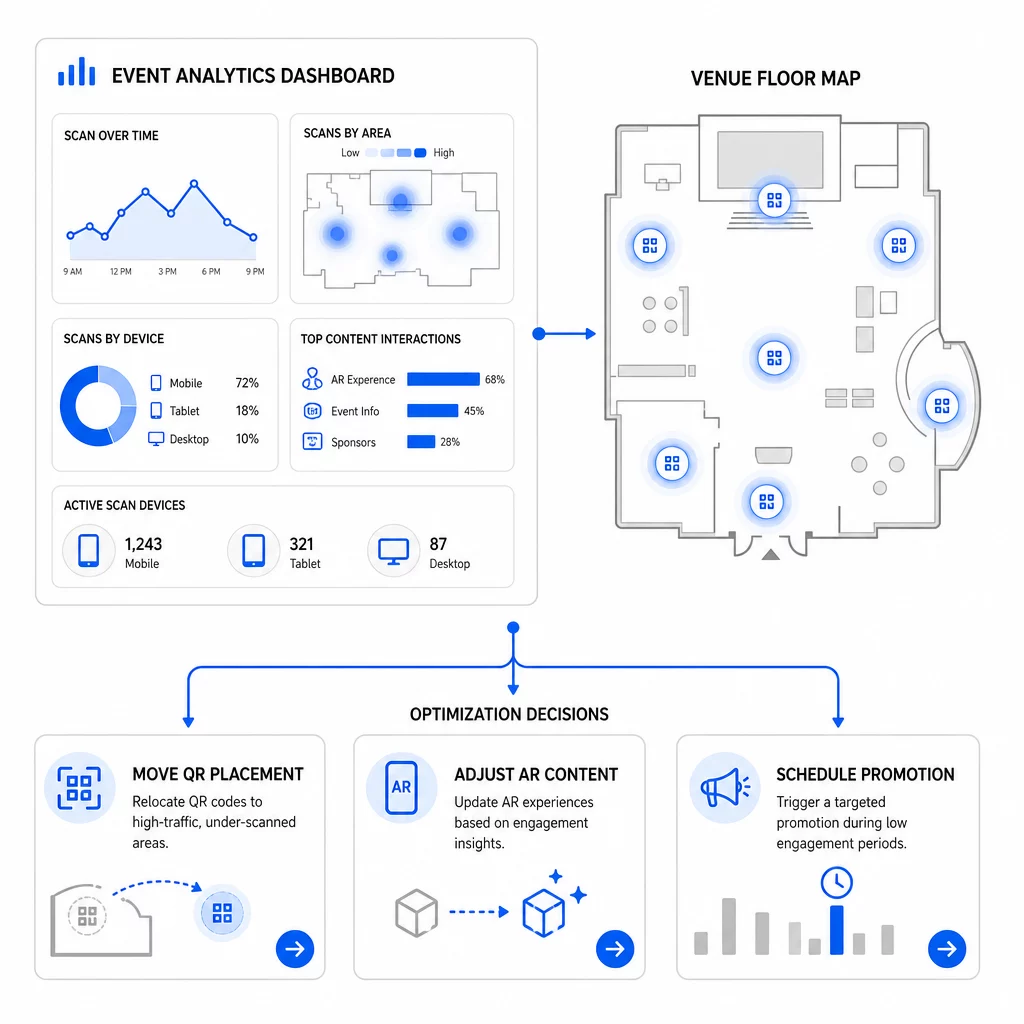
Konkrétní optimalizace k zvážení:
- Přemístěte QR kódy z oblastí s nízkým počtem skenů na místa v blízkosti východů z vysoce frekventovaných sekcí nebo registračních oblastí
- Upravte AR obsah na základě toho, které interaktivní prvky vykazovaly nejdelší dobu setrvání
- Upřesněte umístění CTA na vaší vstupní stránce na základě toho, kde uživatelé opouštějí stránku
- Naplánujte podpůrné propagace a aktivace personálu kolem časových oken s nejvyšším počtem skenů
- Zaměřte budoucí investice do událostí na geografické regiony, kde byly míry skenování k konverzi nejsilnější
Porovnání klíčových metrik před a po každé změně je jediný spolehlivý způsob, jak ověřit, zda optimalizace skutečně zlepšila výsledky. Průvodce analytickými panely QR kódů ukazuje, jak strukturovat tato porovnání uvnitř sledovacího panelu.
Širší pohled na to, jak AR QR kódy transformují události stojí za to si ho prohlédnout, pokud jste stále ve fázi plánování – zejména co se týče definování cílů před výběrem metrik, které chcete upřednostnit.
Sledování úspěšnosti událostí pomocí AR QR kódů není jen o počítání skenů. Jde o vytvoření jasného obrazu chování účastníků napříč celou cestou: kdo se zapojil, kde to udělal, jak hluboce interagoval a co udělal dál. Nastavte dynamické kódy se správným UTM tagováním před událostí, sledujte prostorové a časové metriky v reálném čase a použijte data o konverzích po události k vylepšení další kampaně.
Začněte sledovat své kampaně událostí Vytvářejte dynamické, sledovatelné AR QR kódy s Pageloot’s kompletní sadou funkcí QR a sledujte každé skenování z jednoho panelu. Bezplatná 14denní zkušební verze, není vyžadována kreditní karta.
Často kladené otázky
Nejdůležitější metriky jsou celkový počet skenů, unikátní skeny, frekvence skenování, čas a datum skenování, údaje o zařízení a OS, geolokace a doba setrvání v AR zážitku. Chování po skenování – míra okamžitého opuštění, čas strávený na stránce, odeslání formulářů a konverze – dotváří obrázek tím, že ukazuje, zda se skeny proměnily ve smysluplné výsledky.
Tyto dva nástroje slouží k různým účelům. Pageloot zachycuje metadata na úrovni skenování v reálném čase – typ zařízení, polohu, dobu setrvání – aniž by vyžadoval jakékoli změny kódu webových stránek. Google Analytics 4 sleduje, co se děje po skenování: chování na stránce, události konverze a širší cestu zákazníka. Pro události, kde záleží jak na okamžitém zapojení, tak na následných konverzích, vám použití obou dohromady poskytne nejúplnější pohled.
Statické QR kódy kódují pevnou URL a neposkytují žádná data o sledování. Dynamické QR kódy směrují skeny přes přesměrování, které automaticky zaznamenává metadata o čase, zařízení a poloze. Také vám umožňují aktualizovat cílovou URL nebo propojený obsah bez opětovného tisku materiálů – což je užitečné pro vícedenní události, kde se mění plány nebo výzvy k akci. Více o tom, jak to funguje, se dozvíte na stránce generátoru dynamických QR kódů.