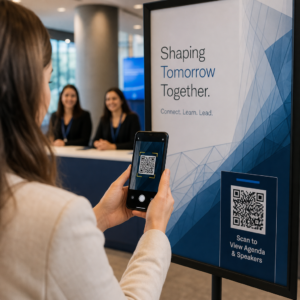
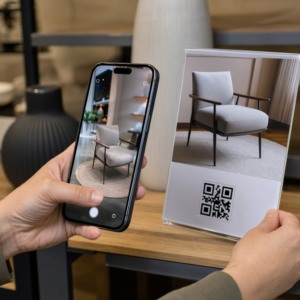
Kjører du AR-aktiverte QR-kodekampanjer på arrangementer, men sliter med å se hva som faktisk fungerer? Uten de riktige målingene på plass, blir skannedata ubrukt mens engasjementsmuligheter glipper. Denne guiden viser deg hvilke målinger som betyr noe, hvordan du leser dem, og hvordan du kan gjøre disse dataene om til bedre resultater for arrangementet.
Hva gjør sporing av AR QR-koder annerledes
Tradisjonelle QR-koder forteller deg hvor mange som skannet en kode og, generelt, hvor de var da de gjorde det. AR-aktiverte QR-koder går lenger. Fordi opplevelsen utfolder seg inne i selve skanningen – gjennom 3D-modeller, videooverlegg, romlige elementer – er det flere meningsfulle øyeblikk å måle.
Hovedforskjellen er at AR QR-koder krever sporing av både innledende engasjement (skanningen) og oppslukende interaksjon (oppholdstid, 3D-objektinteraksjoner, romlig bevegelse). En standard skannetelling forteller deg bare at noen startet opplevelsen. Oppholdstid, interaksjonsdybde og atferd etter skanning forteller deg om det ga gjenklang.
I gjennomsnitt ser WebAR-kampanjer oppholdstider mellom 60 og 120 sekunder – langt lengre enn de korte interaksjonene som er typiske for standard QR-koder. Det utvidede engasjementsvinduet skaper et rikere dataspor, men bare hvis du vet hva du skal fange opp.
De viktigste målingene å spore
Før du setter opp sporingsinfrastruktur, etabler hva suksess ser ut som for ditt spesifikke arrangement. En merkevarebevissthetsaktivering har andre KPI-er enn en stand for generering av leads. Når målene dine er klare, har hver måling en definert rolle.
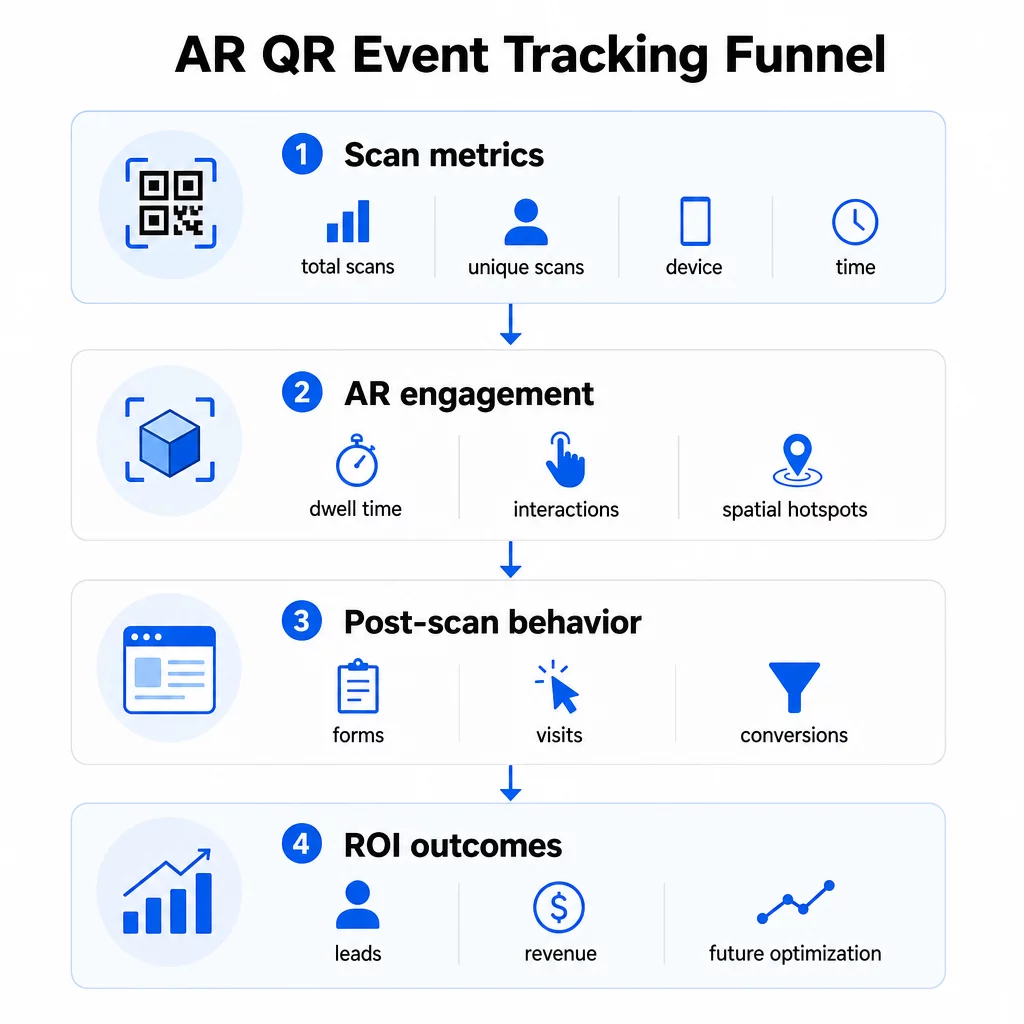
Skannenivåmålinger danner grunnlaget:
- TOTALT ANTALL SKANNINGER – total rekkevidde og engasjementsvolum
- Unike skanninger – omtrentlig antall individuelle deltakere som interagerte
- Skanningsfrekvens (totalt ÷ unike) – om folk kommer tilbake til opplevelsen, noe som signaliserer ekte interesse
- Tid og dato for skanning – topp engasjementsvinduer hjelper deg med å identifisere hvilke sesjoner, boder eller tidsluker som drev mest aktivitet
- Enhets- og OS-data – å vite om publikummet ditt hovedsakelig bruker iOS eller Android lar deg optimalisere landingssiden og AR-opplevelsen for den dominerende enhetstypen
- Geografiske data – skannedata på by- eller regionnivå avslører hvor engasjementet er høyest, nyttig for arrangementer på flere steder eller fremtidige beslutninger om arrangementsplassering
AR-spesifikke målinger gå dypere:
- Oppholdstid – hvor lenge brukere blir inne i AR-opplevelsen, ikke bare på landingssiden
- Romlig analyse – hvilke fysiske områder av lokalet eller standen din som genererte mest skanneaktivitet
- 3D-interaksjonshendelser – om brukere roterte en produktmodell, utløste en video eller fullførte et interaktivt element
Atferd etter skanning lukker sløyfen:
- Skjema-innsendinger, registreringer eller nedlastinger som fulgte etter skanningen
- Fluktfrekvens og tid på side for destinasjonssiden
- Konverteringer knyttet til spesifikke kampanjemål (billettkjøp, nyhetsbrevregistreringer, demoforespørsler)
For B2B-arrangementer spesielt, er de mest verdifulle målingene nye kvalitetsleads generert, nye kontoer engasjert, og eventuell inntekt tilskrevet arrangementet. Skannedata mater toppen av den trakten, men konverteringer etter skanning bestemmer avkastning.
Spor hvert skann i sanntid Bruke Pageloot Analytics-dashbord for å overvåke totale skanninger, unike skanninger, enhetstyper og skannesteder mens de skjer under arrangementet ditt – ingen teknisk oppsett kreves.
Sette opp din sporingsinfrastruktur
Å få nøyaktige data krever noen beslutninger før arrangementet ditt går live.
Bruk dynamiske QR-koder
Statiske QR-koder koder en fast destinasjon og gir ingen sporing. Dynamiske QR-koder ruter skanninger gjennom en omdirigering, som er der skannemetadata – tid, enhet, sted – blir logget. Den Dynamisk QR-kode generator fra Pageloot lager koder som sporer skannefrekvenser, stedsdata og andre målinger automatisk, og lar deg oppdatere destinasjons-URL-en uten å trykke opp materialer på nytt. For flerdagsarrangementer der tidsplaner eller oppfordringer til handling kan endres, er denne fleksibiliteten avgjørende.
Legg til UTM-parametere for sporing etter skanning
Ved å legge til UTM-parametere til destinasjons-URL-ene for QR-koden din, kan verktøy som Google Analytics 4 skille QR-drevet trafikk fra andre kilder og måle hva som skjer etter skanningen. En godt strukturert URL ser slik ut:
`https://yoursite.com/event-page?utm`source=eventstand&utmmedium=qrkode&utmkampanje=konferanse2025`
Bruk av beskrivende `utmsource`-verdier (f.eks. `hovedscenestand`, `registreringdisk`) lar deg sammenligne ytelse på tvers av ulike plasseringssteder på samme arrangement. Hold navnekonvensjonene konsekvente – små bokstaver, understreker i stedet for mellomrom – slik at GA4-rapportene dine forblir ryddige og filtrerbare. Guiden om UTM parameters for QR codes dekker dette oppsettet i detalj.
Koble til dine fremmøtedata
Hvis du bruker QR-koder for innsjekking på arrangementer, kan dine fremmøtedata og dine engasjementsdata leses sammen. fremmøte-QR-kode systemet logger ankomster i sanntid, noe som lar deg kryssreferere hvem som sjekket inn mot hvem som skannet din AR-opplevelse og fullførte en handling etter skanning. Dette er spesielt nyttig for å beregne sanne konverteringsrater i stedet for bare skann-til-landingsside-rater.
For å samle inn strukturerte svar – tilbakemeldinger, registreringer, undersøkelser etter arrangementet – par QR-kodene dine med Google Forms ved hjelp av Google Form QR-kode generator. Skjemainnsendingsdata integreres direkte med Google Sheets for umiddelbar analyse.
Strømlinjeform innsjekking på arrangementer De Pageloot Event QR-kodegenerator lar deg lage sporbare billetter, interaktive tidsplaner og engasjementspunkter – alt håndterbart fra ett enkelt dashbord.
Slik tolker du skannedataene dine
Å samle inn data er bare nyttig hvis du vet hva de forteller deg. Her er hvordan du leser de vanligste mønstrene.
Lavt totalt antall skanninger betyr ikke automatisk at tilbudet mislyktes. Sjekk plasseringen først – er koden i øyehøyde, trykt stort nok, med en tydelig oppfordring til handling i nærheten? Dårlig kontrast eller en umerket kode er den vanligste årsaken til lave skannefrekvenser, ikke innholdet bak den. Den guide til QR-kodeengasjement med varmekart forklarer hvordan du diagnostiserer plasseringsproblemer ved hjelp av skannetetthetsdata.
Høyt totalt antall skanninger, men lavt antall unike skanninger antyder at en liten gruppe skanner gjentatte ganger. Dette kan indikere ekte entusiasme, eller det kan bety at QR-koden din er plassert et sted der de samme personene passerer den flere ganger. Kontekst er viktig her.
Høyt antall unike skanninger, men høy fluktfrekvens på landingssiden peker på et misforhold mellom forventningen QR-koden skaper og hva brukerne finner etter skanning. Gå gjennom innholdet på landingssiden og sørg for at det samsvarer med konteksten der koden vises.
Sterk oppholdstid med lav konvertering er vanlig i AR-opplevelser der interaksjonen er hyggelig, men oppfordringen til handling ikke er fremtredende nok. Gå gjennom hvor CTA-en vises i opplevelsen og om brukerne når den før de avslutter.
Geografiske skannedata fra din geolokasjonsanalyse kan avsløre hvilke områder i et lokale med flere rom eller en messehall som genererte mest aktivitet, og hjelper deg med å bestemme standplassering og bemanning for fremtidige arrangementer.
Tidsbaserte skannemønstre identifisere toppengasjementsvinduer. Hvis de fleste skanninger skjer i løpet av de 20 minuttene etter at en hovedtaler nevner aktiveringen din, har du et tydelig signal om hva som driver trafikk. Bruk den informasjonen til å tidsbestemme innlegg på sosiale medier eller personalrotasjoner deretter.
Team som koordinerer økter rundt disse topp-engasjementsperiodene, kan bruke arrangementsplanlegging verktøy for å organisere arrangementstider, tilgjengelighet og koordinering av deltakere.
Velge mellom Pageloot og GA4
De fleste arrangementer drar nytte av å bruke begge verktøyene i kombinasjon, der hvert verktøy håndterer et distinkt sporingslag.
| FUNKSJON | Pageloot | Google Analytics 4 |
|---|---|---|
| Sanntids skanneanalyse | Umiddelbare skannenivådata (geo, enhet, tid) | Tilgjengelig via sanntidsrapport; krever UTM-oppsett |
| AR-spesifikke målinger | Oppholdstid, romlig analyse på støttede nivåer | Begrenset til webmålinger; krever egendefinerte hendelser |
| Unik skanningssporing | Innebygd enhetsdeduplisering | Sesjons-/brukerbasert; vanskelig å knytte utelukkende til fysiske skanninger |
| Integrasjonsarbeid | Lav – plug-and-play med dynamiske omdirigeringer | Høyere – krever UTM-parametere og sporingsskript |
| Priser | $10–$50+/måned | Gratis (standardversjon) |
Bruk Pageloot når du trenger umiddelbar innsikt under arrangementet: hvem som skanner, hvorfra, på hvilken enhet, og hvor lenge de engasjerer seg. Det krever ingen endringer i nettstedskoden din og er designet rundt QR-spesifikke målinger, inkludert romlig analyse og oppholdstid.
Bruk GA4 når du trenger å forstå den nedstrøms kundereisen – hva brukere gjorde etter at de landet på siden din, om de konverterte, og hvordan arrangementet bidro til langsiktige kampanjemål. Den beste verktøyene for QR-kode arrangementssporing siden sammenligner plattformalternativer mer detaljert.
For flerdagskonferanser eller nettverksarrangementer gir det å kjøre begge parallelt deg umiddelbar engasjementsfeedback gjennom Pageloot og konverteringsattribusjon gjennom GA4.
Personvernhensyn
AR QR-kodekampanjer samler inn personopplysninger automatisk ved skanning – dette kan inkludere IP-adresser, enhetsidentifikatorer, tidsstempler og nøyaktige posisjonsdata. Under amerikanske delstatslover for personvern som CCPA og VCPA, er du pålagt å opplyse hvilke data som samles inn, hvordan de brukes, og tilby mekanismer for å melde seg av.
Praktisk talt betyr dette:
- Oppdater personvernerklæringen for arrangementet ditt for å beskrive hva som skjer når en QR-kode skannes
- Opplys om eventuell nøyaktig geolokasjonssporing eller atferdsretting fra din QR-plattform
- Revider din QR-kodeleverandørs datapraksis, inkludert lagringsperioder og tredjepartsdeling
- Innhent eksplisitt samtykke før du samler inn GPS-baserte posisjonsdata
De veiledning for geolokasjonsanalyse dekker krav til personvernoverholdelse mer detaljert, inkludert skillet mellom IP-basert og GPS-basert sporing og når hver krever brukerens samtykke.
Bruke data til å optimalisere fremtidige arrangementer
Verdien av sporing forsterkes når du bruker den iterativt. Før ditt neste arrangement, sammenlign ytelse på tvers av plasseringer, tidsluker og AR-innholdstyper for å identifisere hva som drev det mest meningsfulle engasjementet – ikke bare flest skanninger.
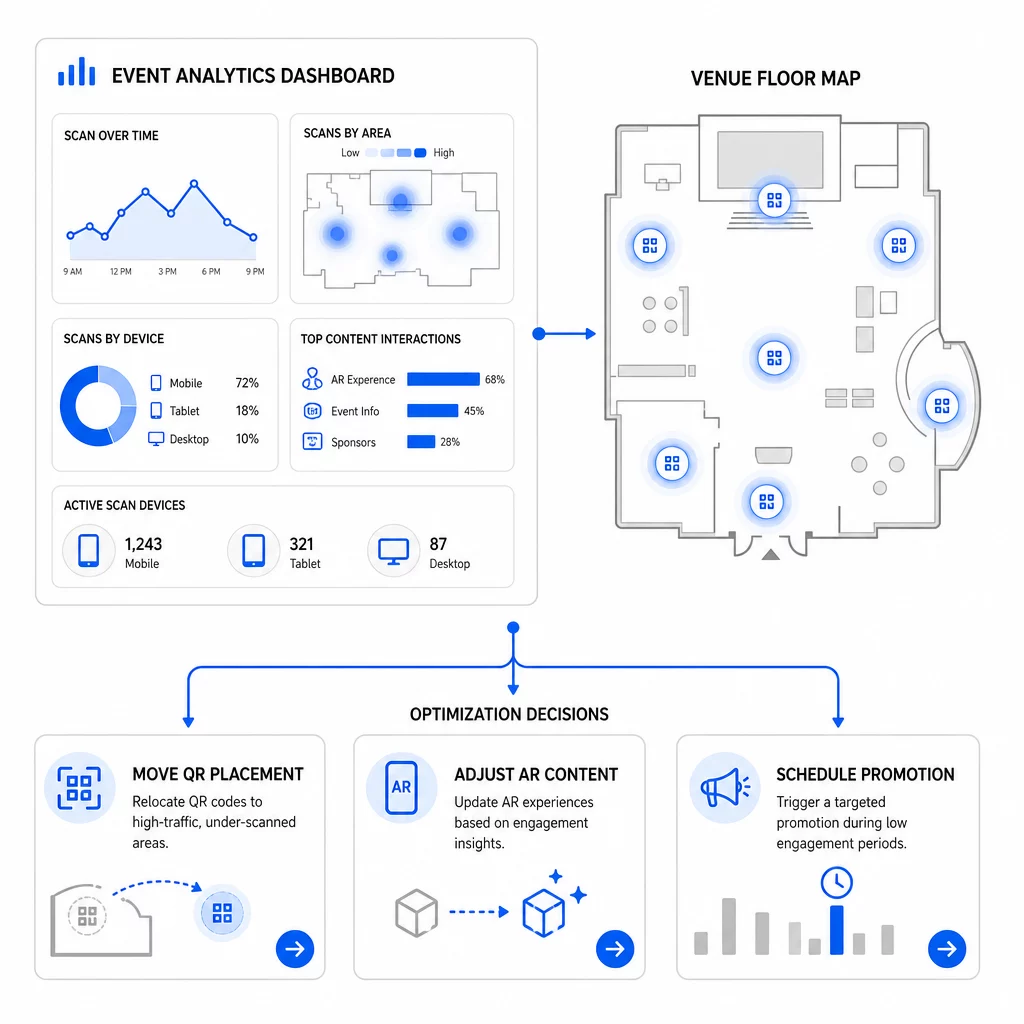
Spesifikke optimaliseringer å vurdere:
- Flytt QR-koder fra områder med få skanninger til posisjoner nær utganger fra økter med mye trafikk eller registreringsområder
- Juster AR-innhold basert på hvilke interaktive elementer som viste lengst oppholdstid
- Forbedre plasseringen av CTA på landingssiden din basert på hvor brukere faller fra
- Planlegg støttende kampanjer og personalaktiveringer rundt perioder med flest skanninger
- Fokuser fremtidige arrangementinvesteringer på geografiske regioner der skanning-til-konvertering-ratene var sterkest
Å sammenligne nøkkelmålinger før og etter hver endring er den eneste pålitelige måten å validere om en optimalisering faktisk forbedret resultatene. Den veiledningen for QR-kodeanalyse-dashbord går gjennom hvordan du strukturerer disse sammenligningene i et sporingsdashbord.
Det bredere bildet om hvordan AR QR-koder transformerer arrangementer er verdt å gjennomgå hvis du fortsatt er i planleggingsfasen – spesielt når det gjelder å definere mål før du velger hvilke målinger du skal prioritere.
Å spore arrangementssuksess med AR QR-koder handler ikke bare om å telle skanninger. Det handler om å bygge et klart bilde av deltakeratferd gjennom hele reisen: hvem som engasjerte seg, hvor de gjorde det, hvor dypt de interagerte, og hva de gjorde deretter. Sett opp dynamiske koder med riktig UTM-tagging før arrangementet, overvåk romlige og oppholdstidsmålinger i sanntid, og bruk konverteringsdata etter arrangementet til å forbedre neste kampanje.
Begynn å spore dine arrangementskampanjer Lag dynamiske, sporingsbare AR QR-koder med Pageloots full pakke med QR-funksjoner og overvåk hver skanning fra ett enkelt dashbord. Gratis 14-dagers prøveperiode, ingen kredittkort kreves.
Ofte stilte spørsmål
De viktigste målingene er totale skanninger, unike skanninger, skannefrekvens, tid og dato for skanning, enhets- og OS-data, geolokasjon, og oppholdstid innenfor AR-opplevelsen. Atferd etter skanning – fluktfrekvens, tid på side, skjemainnsendinger og konverteringer – kompletterer bildet ved å vise om skanningene resulterte i meningsfulle utfall.
De to verktøyene tjener forskjellige formål. Pageloot fanger opp metadata på skanningsnivå i sanntid – enhetstype, plassering, oppholdstid – uten å kreve endringer i nettstedskoden. Google Analytics 4 sporer hva som skjer etter skanningen: sideatferd, konverteringshendelser og den bredere kundereisen. For hendelser der både umiddelbar engasjement og nedstrøms konverteringer er viktig, gir bruk av begge sammen deg det mest komplette bildet.
Statiske QR-koder koder en fast URL og gir ingen sporingsdata. Dynamiske QR-koder ruter skanninger gjennom en omdirigering som logger tid, enhet og stedmetadata automatisk. De lar deg også oppdatere destinasjons-URL-en eller lenket innhold uten å trykke materialer på nytt – nyttig for flerdagersarrangementer der tidsplaner eller oppfordringer til handling endres. Du kan lære mer om hvordan dette fungerer på siden for dynamisk QR-kodegenerator.