¿Está ejecutando campañas de códigos QR con realidad aumentada (RA) en eventos, pero le cuesta saber qué funciona realmente? Sin las métricas adecuadas, los datos de escaneo quedan sin usar mientras las oportunidades de interacción se escapan. Esta guía le explica qué métricas importan, cómo interpretarlas y cómo convertir esos datos en mejores resultados para sus eventos.
Qué hace diferente el seguimiento de códigos QR con RA
Los códigos QR tradicionales le dicen cuántas personas escanearon un código y, en términos generales, dónde estaban cuando lo hicieron. Los códigos QR con RA van más allá. Debido a que la experiencia se desarrolla dentro del propio escaneo –a través de modelos 3D, superposiciones de video, elementos espaciales– hay más momentos significativos para medir.
La diferencia fundamental es que los códigos QR con RA requieren el seguimiento tanto de la interacción inicial (el escaneo) como de la interacción inmersiva (tiempo de permanencia, interacciones con objetos 3D, movimiento espacial). Un recuento de escaneos estándar solo le dice que alguien inició la experiencia. El tiempo de permanencia, la profundidad de la interacción y el comportamiento posterior al escaneo le indican si resonó.
En promedio, las campañas de WebAR registran tiempos de permanencia entre 60 y 120 segundos, mucho más largos que las interacciones breves típicas de los códigos QR estándar. Esa ventana de interacción extendida crea un rastro de datos más rico, pero solo si sabe qué capturar.
Las métricas clave a seguir
Antes de configurar cualquier infraestructura de seguimiento, establezca cómo se ve el éxito para su evento específico. Una activación de reconocimiento de marca tiene KPI diferentes a los de un stand de generación de leads. Una vez que sus objetivos estén claros, cada métrica tendrá un rol definido.
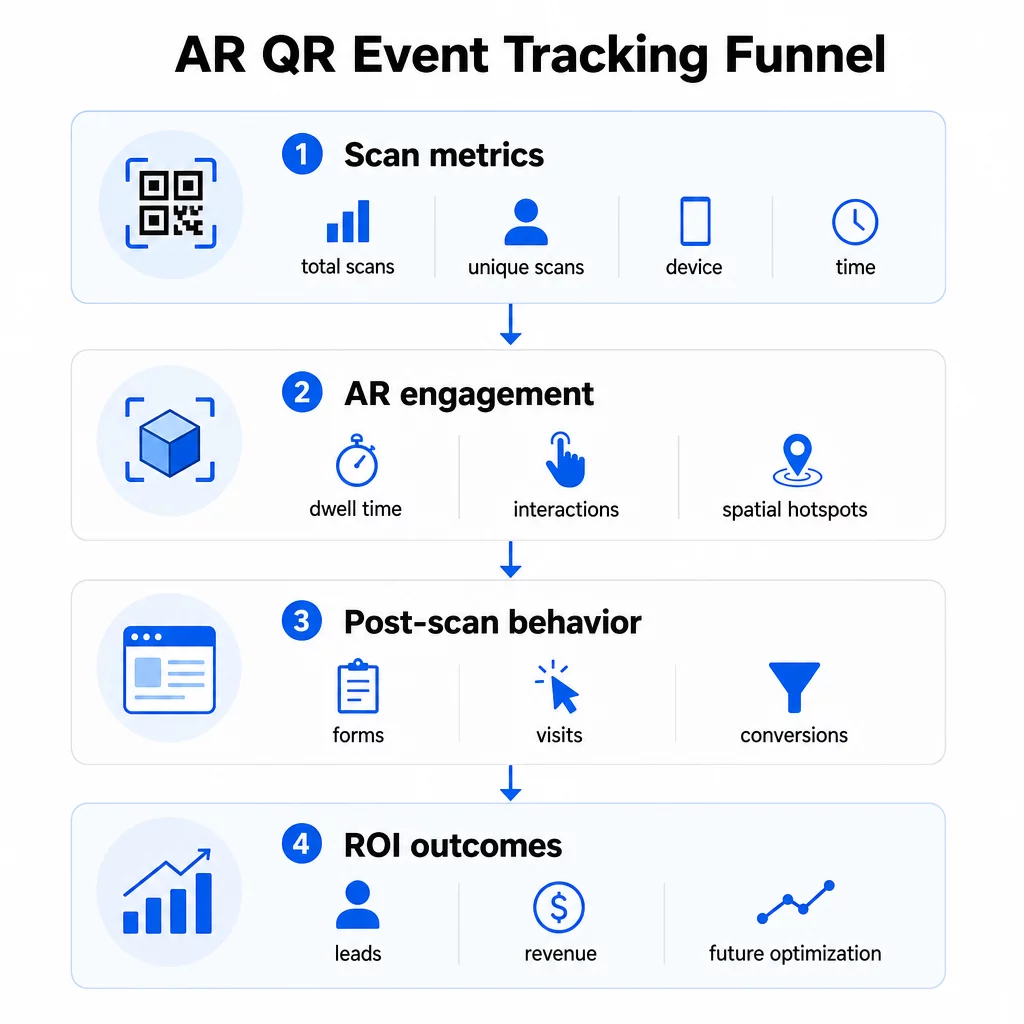
Métricas a nivel de escaneo forman la base:
- ESCANEOS TOTALES – alcance general y volumen de interacción
- Escaneos únicos – número aproximado de asistentes individuales que interactuaron
- Frecuencia de escaneo (total ÷ únicos) – si las personas regresan a la experiencia, lo que indica un interés genuino
- Hora y fecha del escaneo – las ventanas de máxima participación te ayudan a identificar qué sesiones, stands o franjas horarias generaron la mayor actividad
- Datos del dispositivo y del sistema operativo – saber si tu audiencia utiliza predominantemente iOS o Android te permite optimizar la página de destino y la experiencia de RA para el tipo de dispositivo dominante
- Datos de geolocalización – los datos de escaneo a nivel de ciudad o región revelan dónde es mayor la participación, útil para eventos con múltiples sedes o decisiones futuras sobre la ubicación de eventos
Métricas específicas de RA profundizar:
- Tiempo de permanencia – cuánto tiempo permanecen los usuarios dentro de la experiencia de RA, no solo en la página de destino
- Análisis espacial – qué áreas físicas de tu sede o stand generaron la mayor actividad de escaneo
- Eventos de interacción 3D – si los usuarios rotaron un modelo de producto, activaron un video o completaron un elemento interactivo
Comportamiento post-escaneo cierra el ciclo:
- Envíos de formularios, registros o descargas que siguieron al escaneo
- Tasa de rebote y tiempo en la página para el destino de la página de destino
- Conversiones vinculadas a objetivos específicos de la campaña (compra de entradas, suscripciones a boletines, solicitudes de demostración)
Para eventos B2B en particular, las métricas más valiosas son los nuevos leads de calidad generados, las nuevas cuentas comprometidas y los ingresos eventuales atribuidos al evento. Los datos de escaneo alimentan la parte superior de ese embudo, pero las conversiones post-escaneo determinan el ROI.
Rastrea Cada Escaneo en Tiempo Real Use el Panel de análisis de Pageloot para monitorear el total de escaneos, escaneos únicos, tipos de dispositivos y ubicaciones de escaneo a medida que ocurren durante su evento, sin necesidad de configuración técnica.
Configuración de su infraestructura de seguimiento
Obtener datos precisos requiere algunas decisiones antes de que su evento se ponga en marcha.
Utilice códigos QR dinámicos
Los códigos QR estáticos codifican un destino fijo y no proporcionan seguimiento. Los códigos QR dinámicos dirigen los escaneos a través de una redirección, que es donde se registran los metadatos del escaneo (hora, dispositivo, ubicación). El Generador de códigos QR dinámicos de Pageloot crea códigos que rastrean automáticamente las tasas de escaneo, los datos de ubicación y otras métricas, y le permite actualizar la URL de destino sin reimprimir materiales. Para eventos de varios días donde los horarios o las llamadas a la acción pueden cambiar, esta flexibilidad es esencial.
Agregar parámetros UTM para el seguimiento post-escaneo
Adjuntar parámetros UTM a las URL de destino de su código QR permite que herramientas como Google Analytics 4 distingan el tráfico impulsado por QR de otras fuentes y midan lo que sucede después del escaneo. Una URL bien estructurada se ve así:
`https://yoursite.com/event-page?utm``source=event`stand&utmmedio=qrcódigo&utmcampaign=conference2025`
Uso de valores descriptivos de `utmsource` (por ejemplo, `mainstagebooth`, `registrationdesk`) le permite comparar el rendimiento en diferentes ubicaciones dentro del mismo evento. Mantenga las convenciones de nomenclatura consistentes – minúsculas, guiones bajos en lugar de espacios – para que sus informes de GA4 se mantengan limpios y filtrables. La guía sobre parámetros UTM para códigos QR cubre esta configuración en detalle.
Conecte sus datos de asistencia
Si utiliza códigos QR para el registro de eventos, sus datos de asistencia y sus datos de interacción se pueden leer juntos. El código QR de asistencia sistema registra las llegadas en tiempo real, lo que le permite cotejar quién se registró con quién escaneó su experiencia de RA y completó una acción posterior al escaneo. Esto es particularmente útil para calcular las tasas de conversión reales en lugar de solo las tasas de escaneo a página de destino.
Para recopilar respuestas estructuradas – comentarios, registros, encuestas post-evento – empareje sus códigos QR con Google Forms utilizando el Generador de código QR para Google Forms. Los datos de envío del formulario se integran directamente con Google Sheets para un análisis inmediato.
Optimice el registro de eventos El Generador de códigos QR para eventos de Pageloot le permite crear entradas rastreables, horarios interactivos y puntos de contacto de interacción, todo gestionable desde un único panel de control.
Cómo interpretar sus datos de escaneo
Recopilar métricas solo es útil si sabe lo que le están diciendo. Aquí le explicamos cómo leer los patrones más comunes.
Bajo número total de escaneos no significa automáticamente que la oferta haya fallado. Verifique primero la ubicación – ¿está el código a la altura de los ojos, impreso lo suficientemente grande, con una llamada a la acción clara cerca? El contraste deficiente o un código sin marcar es la causa más común de bajas tasas de escaneo, no el contenido detrás de él. La guía para la interacción con códigos QR mediante mapas de calor explica cómo diagnosticar problemas de ubicación utilizando datos de densidad de escaneo.
Alto número total de escaneos pero bajo número de escaneos únicos sugiere que un pequeño grupo está escaneando repetidamente. Esto puede indicar un entusiasmo genuino, o puede significar que su código QR está en un lugar donde las mismas personas pasan por él varias veces. El contexto es importante aquí.
Alto número de escaneos únicos pero alta tasa de rebote en la página de destino apunta a una falta de coincidencia entre la expectativa que genera el código QR y lo que los usuarios encuentran después de escanear. Revise el contenido de la página de destino y asegúrese de que coincida con el contexto donde se muestra el código.
Tiempo de permanencia prolongado con baja conversión es común en experiencias de RA donde la interacción es agradable pero la llamada a la acción no es lo suficientemente prominente. Revise dónde aparece la CTA dentro de la experiencia y si los usuarios la alcanzan antes de salir.
Datos de escaneo geográficos de su análisis de geolocalización pueden revelar qué áreas de un recinto de varias salas o de un piso de feria comercial generaron la mayor actividad, ayudándole a decidir la ubicación del stand y los niveles de personal para futuros eventos.
Patrones de escaneo basados en el tiempo identificar ventanas de máxima participación. Si la mayoría de los escaneos ocurren durante los 20 minutos posteriores a que un orador principal mencione su activación, tiene una señal clara sobre lo que está impulsando el tráfico. Utilice esa información para programar publicaciones en redes sociales o rotaciones de personal en consecuencia.
Los equipos que coordinan sesiones alrededor de estos períodos de máxima participación pueden usar programación de eventos herramientas para organizar los horarios de los eventos, la disponibilidad y la coordinación de los asistentes.
Eligiendo entre Pageloot y GA4
La mayoría de los eventos se benefician de usar ambas herramientas en combinación, cada una manejando una capa distinta de seguimiento.
| FUNCIÓN | Pageloot | Google Analytics 4 |
|---|---|---|
| Análisis de escaneo en tiempo real | Datos instantáneos a nivel de escaneo (ubicación geográfica, dispositivo, tiempo) | Disponible a través del informe en tiempo real; requiere configuración de UTM |
| Métricas específicas de RA | Tiempo de permanencia, análisis espacial en niveles compatibles | Limitado a métricas web; requiere eventos personalizados |
| Seguimiento de escaneos únicos | Deduplicación de dispositivos incorporada | Basado en sesión/usuario; difícil de vincular únicamente a escaneos físicos |
| Esfuerzo de integración | Bajo – plug-and-play con redirecciones dinámicas | Mayor – necesita parámetros UTM y scripts de seguimiento |
| Precios | $10–$50+/mes | Gratis (versión estándar) |
Usa Pageloot cuando necesites información inmediata durante el evento: quién está escaneando, desde dónde, en qué dispositivo y cuánto tiempo están interactuando. No requiere cambios en el código de tu sitio web y está diseñado en torno a métricas específicas de QR, incluyendo análisis espacial y tiempo de permanencia.
Usa GA4 cuando necesites comprender el recorrido del cliente posterior – qué hicieron los usuarios después de aterrizar en tu página, si convirtieron y cómo el evento contribuyó a los objetivos de campaña a largo plazo. La mejores herramientas para el seguimiento de eventos con código QR página compara las opciones de plataforma con más detalle.
Para conferencias de varios días o eventos de networking, ejecutar ambos en paralelo te proporciona retroalimentación inmediata sobre la interacción a través de Pageloot y atribución de conversiones a través de GA4.
Consideraciones de Privacidad
Las campañas de códigos QR de RA recopilan datos personales automáticamente al escanear – esto puede incluir direcciones IP, identificadores de dispositivo, marcas de tiempo y datos de ubicación precisos. Según las leyes de privacidad estatales de EE. UU. como CCPA y VCPA, se te exige divulgar qué datos se recopilan, cómo se utilizan y ofrecer mecanismos de exclusión voluntaria.
En la práctica, esto significa:
- Actualiza tu aviso de privacidad del evento para describir qué sucede cuando se escanea un código QR
- Divulga cualquier seguimiento de geolocalización precisa o segmentación conductual por parte de tu plataforma QR
- Audita las prácticas de datos de tu proveedor de códigos QR, incluyendo los períodos de retención y el intercambio con terceros
- Obtén consentimiento explícito antes de recopilar datos de ubicación basados en GPS
El guía de análisis de geolocalización cubre los requisitos de cumplimiento de privacidad con más detalle, incluyendo la distinción entre el seguimiento basado en IP y el basado en GPS y cuándo cada uno requiere el consentimiento del usuario.
Uso de datos para optimizar eventos futuros
El valor del seguimiento se multiplica cuando se utiliza de forma iterativa. Antes de su próximo evento, compare el rendimiento entre ubicaciones, franjas horarias y tipos de contenido de RA para identificar qué impulsó el compromiso más significativo, no solo la mayor cantidad de escaneos.
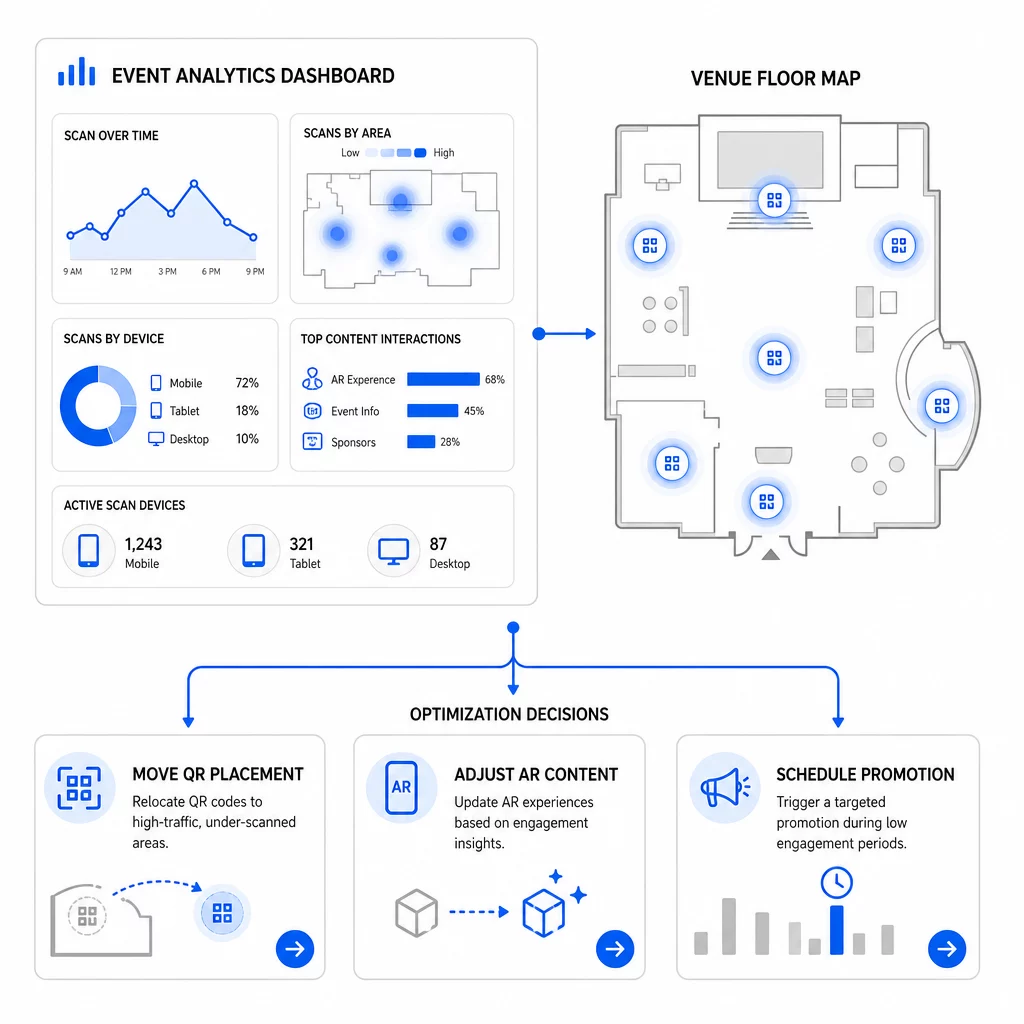
Optimizaciones específicas a considerar:
- Reubique los códigos QR de áreas de bajo escaneo a posiciones cercanas a las salidas de sesiones de alto tráfico o áreas de registro
- Ajuste el contenido de RA basándose en qué elementos interactivos mostraron el mayor tiempo de permanencia
- Refine la ubicación de la CTA de su página de destino basándose en dónde abandonan los usuarios
- Programe promociones de apoyo y activaciones de personal en torno a las ventanas de escaneo pico
- Enfoque la inversión en eventos futuros en regiones geográficas donde las tasas de escaneo a conversión fueron más sólidas
Comparar las métricas clave antes y después de cada cambio es la única forma fiable de validar si una optimización realmente mejoró los resultados. La guía de paneles de análisis de códigos QR explica cómo estructurar estas comparaciones dentro de un panel de seguimiento.
La imagen más amplia sobre cómo los códigos QR de RA transforman los eventos vale la pena revisarla si aún se encuentra en la etapa de planificación, particularmente en torno a la definición de objetivos antes de elegir qué métricas priorizar.
El seguimiento del éxito de un evento con códigos QR de RA no se trata solo de contar escaneos. Se trata de construir una imagen clara del comportamiento de los asistentes a lo largo de todo el recorrido: quién interactuó, dónde lo hizo, con qué profundidad interactuó y qué hizo después. Configure códigos dinámicos con el etiquetado UTM adecuado antes del evento, monitoree las métricas espaciales y de permanencia en tiempo real, y utilice los datos de conversión posteriores al evento para afinar la próxima campaña.
Comience a rastrear sus campañas de eventos Crea códigos QR de RA dinámicos y rastreables con Pageloot’s completa suite de funciones QR y monitorea cada escaneo desde un único panel de control. Prueba gratuita de 14 días, no se requiere tarjeta de crédito.
Preguntas frecuentes
Las métricas más importantes son los escaneos totales, los escaneos únicos, la frecuencia de escaneo, la hora y fecha del escaneo, los datos del dispositivo y del sistema operativo, la geolocalización y el tiempo de permanencia dentro de la experiencia de RA. El comportamiento posterior al escaneo –tasa de rebote, tiempo en la página, envíos de formularios y conversiones– completa el panorama al mostrar si los escaneos se tradujeron en resultados significativos.
Las dos herramientas tienen propósitos diferentes. Pageloot captura metadatos a nivel de escaneo en tiempo real – tipo de dispositivo, ubicación, tiempo de permanencia – sin requerir ningún cambio en el código del sitio web. Google Analytics 4 rastrea lo que sucede después del escaneo: comportamiento de la página, eventos de conversión y el recorrido más amplio del cliente. Para eventos donde tanto el compromiso inmediato como las conversiones posteriores importan, usar ambos juntos le brinda la vista más completa.
Los códigos QR estáticos codifican una URL fija y no proporcionan datos de seguimiento. Los códigos QR dinámicos dirigen los escaneos a través de una redirección que registra automáticamente metadatos de tiempo, dispositivo y ubicación. También permiten actualizar la URL de destino o el contenido vinculado sin reimprimir materiales, lo que es útil para eventos de varios días donde los horarios o las llamadas a la acción cambian. Puede obtener más información sobre cómo funciona esto en la página del generador de códigos QR dinámicos.