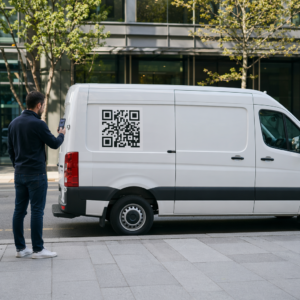
Järjestätkö AR-yhteensopivia QR-koodikampanjoita tapahtumissa, mutta sinulla on vaikeuksia selvittää, mikä todella toimii? Ilman oikeita mittareita skannaustiedot jäävät käyttämättä, kun taas sitoutumismahdollisuudet lipuvat ohi. Tämä opas käy läpi, mitkä mittarit ovat tärkeitä, miten niitä luetaan ja miten nämä tiedot muutetaan paremmiksi tapahtumatuloksiksi.
Mikä tekee AR QR-koodin seurannasta erilaista
Perinteiset QR-koodit kertovat, kuinka monta ihmistä skannasi koodin ja yleisesti ottaen, missä he olivat tehdessään sen. AR-yhteensopivat QR-koodit menevät pidemmälle. Koska kokemus avautuu itse skannauksen sisällä – 3D-mallien, videopäällysteiden, spatiaalisten elementtien kautta – on enemmän merkityksellisiä hetkiä mitattavaksi.
Keskeinen ero on, että AR QR-koodit edellyttävät molempien seurantaa alkuperäinen sitoutuminen (skannaus) ja immersiivinen vuorovaikutus (viipymisaika, 3D-objektien vuorovaikutukset, spatiaalinen liike). Tavallinen skannausten määrä kertoo vain, että joku aloitti kokemuksen. Viipymisaika, vuorovaikutuksen syvyys ja skannauksen jälkeinen käyttäytyminen kertovat, resonoiko se.
Keskimäärin WebAR-kampanjoissa viipymisajat ovat 60–120 sekuntia – paljon pidempiä kuin tavallisille QR-koodeille tyypilliset lyhyet vuorovaikutukset. Tämä laajennettu sitoutumisikkuna luo rikkaamman tietopolun, mutta vain jos tiedät, mitä tallentaa.
Keskeiset seurattavat mittarit
Ennen minkään seurantainfrastruktuurin perustamista määritä, miltä menestys näyttää juuri sinun tapahtumassasi. Bränditietoisuuden aktivoinnilla on erilaiset KPI:t kuin liidien generointipisteellä. Kun tavoitteesi ovat selvät, jokaisella mittarilla on määritelty rooli.
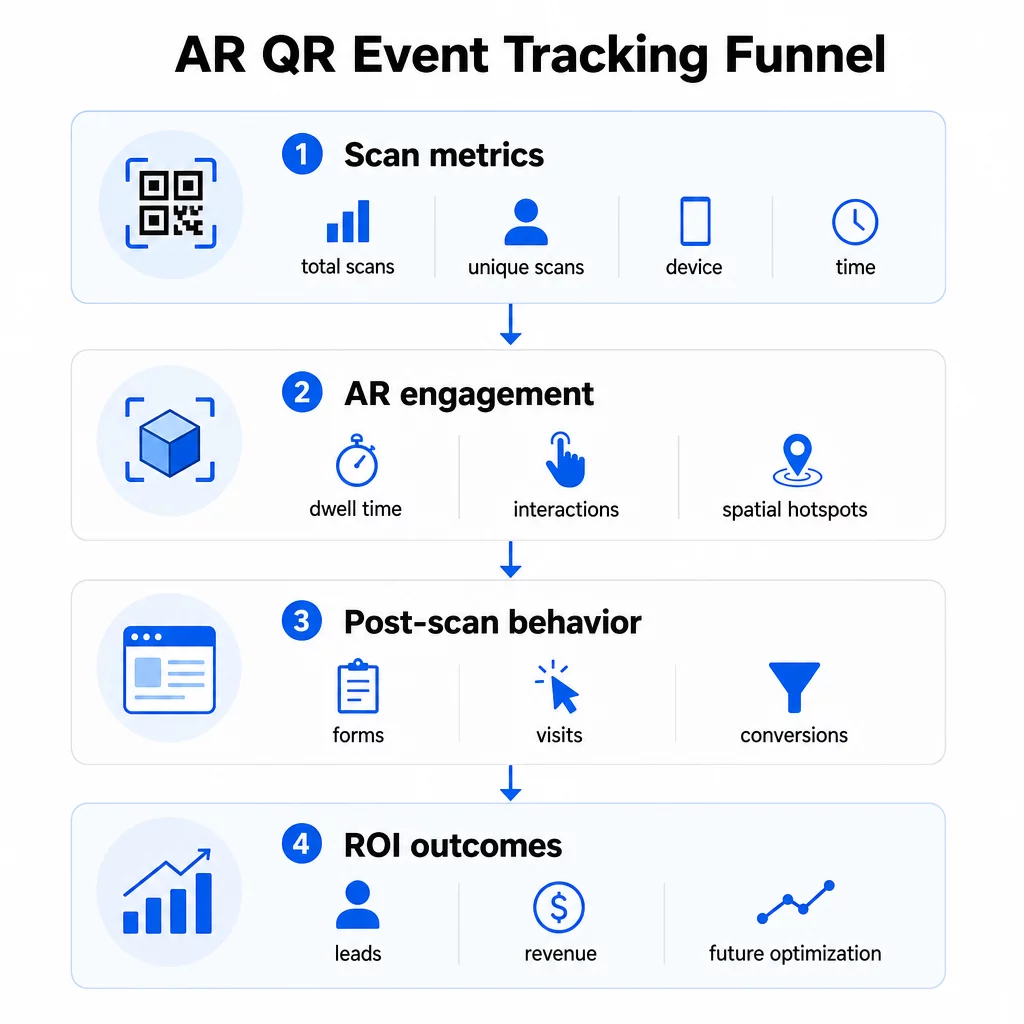
Skannaustason mittarit muodostavat perustan:
- SKANNAUKSET YHTEENSÄ – kokonaiskattavuus ja sitoutumisen määrä
- Uniikit skannaukset – arvioitu vuorovaikuttaneiden yksittäisten osallistujien määrä
- Skannaustiheys (yhteensä ÷ yksilölliset) – palaavatko ihmiset kokemukseen, mikä kertoo aidosta kiinnostuksesta
- Skannauksen aika ja päivämäärä – vilkkaimmat sitoutumisajat auttavat sinua tunnistamaan, mitkä sessiot, osastot tai aikavälit tuottivat eniten toimintaa
- Laitteen ja käyttöjärjestelmän tiedot – tieto siitä, onko yleisösi pääasiassa iOS- vai Android-käyttäjiä, antaa sinun optimoida aloitussivun ja AR-kokemuksen hallitsevalle laitetyypille
- Maantieteelliset sijaintitiedot – kaupunki- tai aluetason skannaustiedot paljastavat, missä sitoutuminen on korkeinta, mikä on hyödyllistä usean tapahtumapaikan tapahtumissa tai tulevien tapahtumien sijoituspäätöksissä
AR-kohtaiset mittarit syvennä:
- Viipymisaika – kuinka kauan käyttäjät pysyvät AR-kokemuksen sisällä, eivät vain aloitussivulla
- Tilallinen analytiikka – mitkä fyysiset alueet tapahtumapaikallasi tai osastollasi tuottivat eniten skannaustoimintaa
- 3D-vuorovaikutustapahtumat – pyörittivätkö käyttäjät tuotemallia, käynnistivätkö videon vai suorittivatko interaktiivisen elementin
Skannauksen jälkeinen käyttäytyminen sulkee ympyrän:
- Lomakelähetykset, rekisteröinnit tai lataukset, jotka seurasivat skannausta
- Välitön poistumisprosentti ja sivulla vietetty aika kohdesivulla
- Konversiot, jotka liittyvät tiettyihin kampanjatavoitteisiin (lippuostot, uutiskirjeen tilaukset, demo-pyynnöt)
Erityisesti B2B-tapahtumissa arvokkaimmat mittarit ovat luodut uudet laadukkaat liidit, sitoutuneet uudet asiakastilit ja tapahtumaan liittyvä lopullinen tuotto. Skannaustiedot syöttävät suppilon yläpäätä, mutta skannauksen jälkeiset konversiot määrittävät sijoitetun pääoman tuoton (ROI).
Seuraa jokaista skannausta reaaliajassa Käytä Pageloot Analytics -hallintapaneeli valvoa kokonaisskannauksia, yksilöllisiä skannauksia, laitetyyppejä ja skannauspaikkoja niiden tapahtuessa tapahtumasi aikana – teknistä asennusta ei tarvita.
Seurantainfrastruktuurin määrittäminen
Tarkan tiedon saaminen edellyttää muutamia päätöksiä ennen tapahtumasi alkamista.
Käytä dynaamisia QR-koodeja
Staattiset QR-koodit koodaavat kiinteän kohteen eivätkä tarjoa seurantaa. Dynaamiset QR-koodit reitittävät skannaukset uudelleenohjauksen kautta, jonne skannauksen metatiedot – aika, laite, sijainti – kirjataan. Se Dynaaminen QR-koodi generaattori Pagelootilta luo koodeja, jotka seuraavat skannausmääriä, sijaintitietoja ja muita mittareita automaattisesti, ja antaa sinun päivittää kohde-URL-osoitteen ilman materiaalien uudelleenpainatusta. Monipäiväisissä tapahtumissa, joissa aikataulut tai toimintakehotukset voivat muuttua, tämä joustavuus on välttämätöntä.
Lisää UTM-parametrit skannauksen jälkeiseen seurantaan
UTM-parametrien liittäminen QR-koodin kohde-URL-osoitteisiin antaa Google Analytics 4:n kaltaisille työkaluille mahdollisuuden erottaa QR-koodista tulevan liikenteen muista lähteistä ja mitata, mitä skannauksen jälkeen tapahtuu. Hyvin jäsennelty URL-osoite näyttää tältä:
`https://yoursite.com/event-page?utm`source=eventkoppi&utmmedium=qrkoodi&utmkampanja=konferenssi2025`
Käyttämällä kuvaavia `utmsource`-arvoja (esim. `pää-`lava-koppi`, `rekisteröinti-`piste`) voit vertailla suorituskykyä eri sijoituspaikoissa samassa tapahtumassa. Pidä nimeämiskäytännöt johdonmukaisina – pienet kirjaimet, alaviivat välilyöntien sijaan – jotta GA4-raporttisi pysyvät selkeinä ja suodatettavina. Opas aiheesta UTM-parametrit QR-koodeille kattaa tämän asetuksen yksityiskohtaisesti.
Yhdistä osallistumistietosi
Jos käytät QR-koodeja tapahtuman sisäänkirjautumiseen, osallistumistietosi ja sitoutumistietosi voidaan lukea yhdessä. osallistumisen QR-koodi järjestelmä kirjaa saapumiset reaaliaikaisesti, mikä antaa sinun vertailla, ketkä kirjautuivat sisään ja ketkä skannasivat AR-kokemuksesi ja suorittivat skannauksen jälkeisen toiminnon. Tämä on erityisen hyödyllistä todellisten konversioprosenttien laskemisessa pelkkien skannaus-laskeutumissivu-prosenttien sijaan.
Jäsenneltyjen vastausten keräämiseksi – palautteen, rekisteröintien, tapahtuman jälkeisten kyselyjen – yhdistä QR-koodisi Google Forms -lomakkeisiin käyttämällä Google Forms QR-koodi generaattori. Lomakkeen lähetystiedot integroituvat suoraan Google Sheets -palveluun välitöntä analysointia varten.
Virtaviivaista tapahtuman sisäänkirjautumiset Se Pageloot Event QR Code Generator antaa sinun luoda seurattavia lippuja, interaktiivisia aikatauluja ja sitoutumispisteitä – kaikki hallittavissa yhdestä hallintapaneelista.
Miten tulkita skannaustietojasi
Mittareiden kerääminen on hyödyllistä vain, jos tiedät, mitä ne kertovat sinulle. Tässä kerrotaan, miten yleisimmät kuviot luetaan.
Vähän skannauksia yhteensä ei automaattisesti tarkoita, että tarjous epäonnistui. Tarkista ensin sijoittelu – onko koodi silmien tasolla, riittävän suurena painettuna, ja onko lähellä selkeä toimintakehote? Huono kontrasti tai merkitsemätön koodi on yleisin syy alhaisiin skannausmääriin, ei sen takana oleva sisältö. Opas QR-koodin sitoutumiseen lämpökarttojen avulla selittää, miten sijoitteluongelmia diagnosoidaan skannaustiheystietojen avulla.
Paljon skannauksia yhteensä mutta vähän yksilöllisiä skannauksia viittaa siihen, että pieni ryhmä skannaa toistuvasti. Tämä voi viitata aitoon innostukseen, tai se voi tarkoittaa, että QR-koodisi on paikassa, jossa samat ihmiset ohittavat sen useita kertoja. Kontekstilla on tässä merkitystä.
Paljon yksilöllisiä skannauksia mutta korkea poistumisprosentti kohdesivulla viittaa ristiriitaan QR-koodin luoman odotuksen ja sen välillä, mitä käyttäjät löytävät skannauksen jälkeen. Tarkista kohdesivun sisältö ja varmista, että se vastaa kontekstia, jossa koodi näytetään.
Vahva viipymisaika mutta alhainen konversio on yleistä AR-kokemuksissa, joissa vuorovaikutus on miellyttävää, mutta toimintakehote ei ole riittävän näkyvä. Tarkista, missä CTA näkyy kokemuksen sisällä ja saavuttavatko käyttäjät sen ennen poistumistaan.
Maantieteelliset skannaustiedot sinun sijaintianalytiikan voivat paljastaa, mitkä monihuoneisen tapahtumapaikan tai messualueen alueet tuottivat eniten toimintaa, auttaen sinua päättämään osaston sijoittelusta ja henkilöstömäärästä tulevissa tapahtumissa.
Aikaan perustuvat skannauskuviot tunnista huippusitoutumisen ajankohdat. Jos suurin osa skannauksista tapahtuu 20 minuutin kuluessa sen jälkeen, kun pääpuhuja mainitsee aktivointisi, sinulla on selkeä signaali siitä, mikä ohjaa liikennettä. Käytä tätä tietoa ajoittaaksesi sosiaalisen median julkaisut tai henkilöstön kierrot sen mukaisesti.
Tiimit, jotka koordinoivat istuntoja näiden huippusitoutumisaikojen ympärillä, voivat käyttää tapahtumien aikataulutusta työkaluja tapahtuma-aikojen, saatavuuden ja osallistujien koordinointiin.
Pagelootin ja GA4:n välillä valitseminen
Useimmat tapahtumat hyötyvät molempien työkalujen yhdistelmäkäytöstä, jolloin kumpikin hoitaa oman erillisen seurantakerroksensa.
| OMINAISUUS | Pageloot | Google Analytics 4 |
|---|---|---|
| Reaaliaikainen skannausanalytiikka | Välitön skannaustason data (maantieteellinen sijainti, laite, aika) | Saatavilla reaaliaikaisen raportin kautta; vaatii UTM-asetukset |
| AR-kohtaiset mittarit | Viipymäaika, spatiaalinen analytiikka tuetuilla tasoilla | Rajoitettu verkkometiikkaan; vaatii mukautettuja tapahtumia |
| Ainutlaatuinen skannausten seuranta | Sisäänrakennettu laitteiden duplikaattien poisto | Istunto-/käyttäjäpohjainen; vaikea yhdistää yksinomaan fyysisiin skannauksiin |
| Integrointityö | Matala – plug-and-play dynaamisilla uudelleenohjauksilla | Korkeampi – vaatii UTM-parametreja ja seurantaskriptejä |
| Hinnoittelu | $10–$50+/kuukausi | Ilmainen (vakioversio) |
Käytä Pagelootia kun tarvitset välitöntä tietoa tapahtuman aikana: kuka skannaa, mistä, millä laitteella ja kuinka kauan he ovat vuorovaikutuksessa. Se ei vaadi muutoksia verkkosivustosi koodiin ja on suunniteltu QR-kohtaisia mittareita varten, mukaan lukien spatiaalinen analytiikka ja viipymisaika.
Käytä GA4:ää kun haluat ymmärtää asiakkaan jatkopolkua – mitä käyttäjät tekivät laskeuduttuaan sivullesi, konvertoituivatko he ja miten tapahtuma edisti pidemmän aikavälin kampanjatavoitteita. parhaita työkaluja QR-koodi-tapahtumaseurantaan sivu vertailee alustavaihtoehtoja tarkemmin.
Monipäiväisissä konferensseissa tai verkostoitumistapahtumissa molempien rinnakkainen käyttö antaa välitöntä sitoutumispalaute Pagelootin kautta ja konversioiden attribuution GA4:n kautta.
Tietosuojaan liittyviä huomioita
AR-QR-koodikampanjat keräävät henkilötietoja automaattisesti skannauksen yhteydessä – tämä voi sisältää IP-osoitteita, laitetunnisteita, aikaleimoja ja tarkkoja sijaintitietoja. Yhdysvaltain osavaltioiden tietosuojalakien, kuten CCPA:n ja VCPA:n, mukaan sinun on ilmoitettava, mitä tietoja kerätään, miten niitä käytetään, ja tarjottava kieltäytymismekanismeja.
Käytännössä tämä tarkoittaa:
- Päivitä tapahtuman tietosuojailmoitus kuvaamaan, mitä tapahtuu, kun QR-koodi skannataan
- Ilmoita kaikesta tarkan maantieteellisen sijainnin seurannasta tai käyttäytymiseen perustuvasta kohdentamisesta QR-alustasi toimesta
- Tarkasta QR-koodipalveluntarjoajasi tietokäytännöt, mukaan lukien säilytysajat ja kolmansien osapuolten kanssa jakaminen
- Hanki nimenomainen suostumus ennen GPS-pohjaisen sijaintitiedon keräämistä
Se maantieteellisen sijainnin analytiikkaopas käsittelee tietosuojan vaatimuksia yksityiskohtaisemmin, mukaan lukien IP-pohjaisen ja GPS-pohjaisen seurannan eron ja milloin kumpikin vaatii käyttäjän suostumuksen.
Datan hyödyntäminen tulevien tapahtumien optimointiin
Seurannan arvo kasvaa, kun sitä käytetään iteratiivisesti. Ennen seuraavaa tapahtumaasi vertaa suorituskykyä sijoittelujen, aikavälien ja AR-sisältötyyppien välillä tunnistaaksesi, mikä johti merkityksellisimpään sitoutumiseen – ei vain eniten skannauksiin.
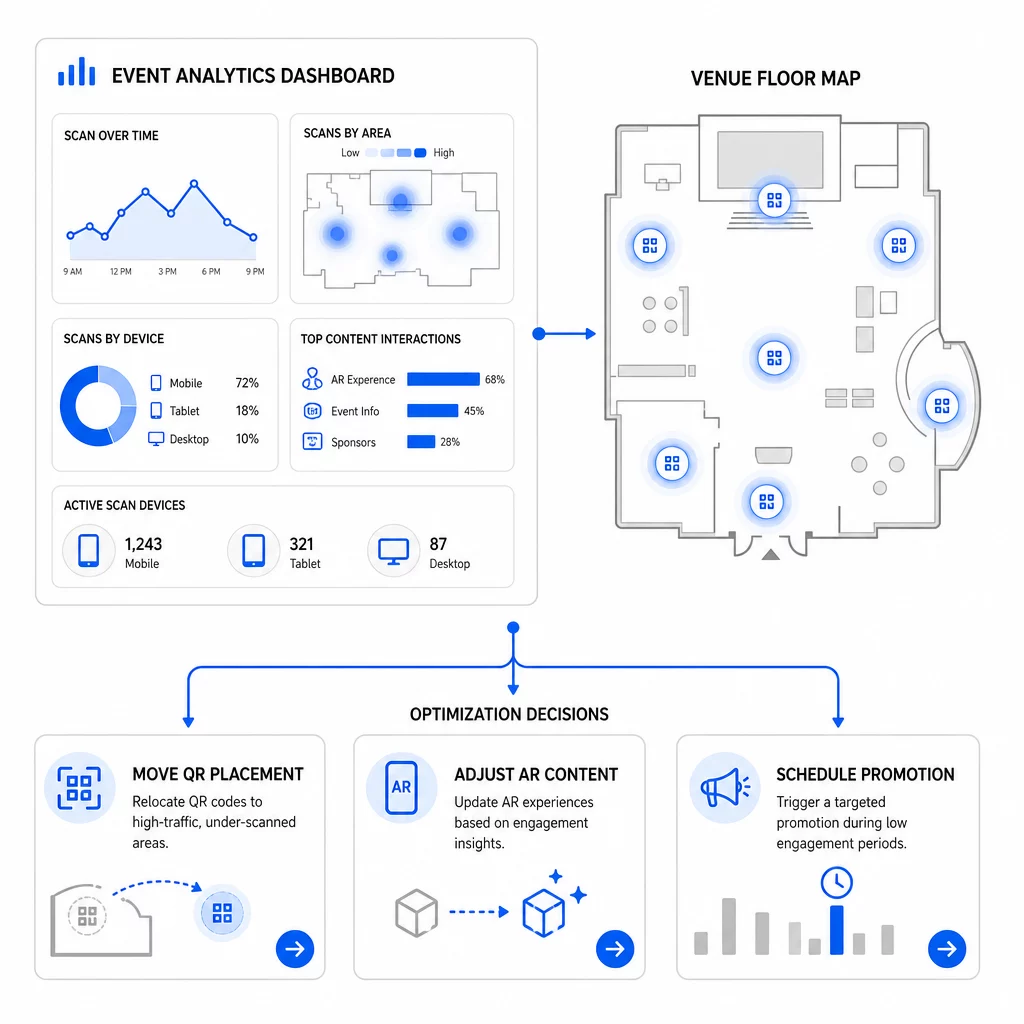
Harkittavia erityisiä optimointeja:
- Siirrä QR-koodit vähän skannatuilta alueilta vilkkaiden istuntojen poistumisteiden tai rekisteröintialueiden lähelle
- Säädä AR-sisältöä sen perusteella, mitkä interaktiiviset elementit osoittivat pisimmän viipymisajan
- Tarkenna laskeutumissivun CTA-sijoittelua sen perusteella, missä käyttäjät poistuvat
- Ajoita tukevat kampanjat ja henkilöstön aktivoinnit skannaushuippujen ympärille
- Kohdista tulevat tapahtumainvestoinnit maantieteellisille alueille, joilla skannaus-konversio-suhteet olivat vahvimmat
Avainmittareiden vertailu ennen ja jälkeen jokaisen muutoksen on ainoa luotettava tapa varmistaa, paransiko optimointi todella tuloksia. QR-koodianalytiikan hallintapaneelioppaan käy läpi, miten nämä vertailut rakennetaan seurantapaneelin sisällä.
Laajempi kuva siitä, miten AR-QR-koodit muuttavat tapahtumia on syytä tarkistaa, jos olet vielä suunnitteluvaiheessa – erityisesti tavoitteiden määrittelyn osalta ennen kuin valitset priorisoitavat mittarit.
Tapahtuman menestyksen seuranta AR-QR-koodeilla ei ole vain skannausten laskemista. Kyse on selkeän kuvan rakentamisesta osallistujien käyttäytymisestä koko matkan ajan: kuka sitoutui, missä he sen tekivät, kuinka syvällisesti he olivat vuorovaikutuksessa ja mitä he tekivät seuraavaksi. Määritä dynaamiset koodit asianmukaisella UTM-taggauksella ennen tapahtumaa, seuraa spatiaalisia ja viipymismittareita reaaliaikaisesti ja käytä tapahtuman jälkeisiä konversiotietoja seuraavan kampanjan terävöittämiseen.
Aloita tapahtumakampanjoidesi seuranta Luo dynaamisia, seurattavia AR-QR-koodeja Pagelootin täydellä QR-ominaisuuksien valikoimalla ja seuraa jokaista skannausta yhdestä hallintapaneelista. Ilmainen 14 päivän kokeilu, luottokorttia ei tarvita.
Usein kysytyt kysymykset
Tärkeimmät mittarit ovat skannausten kokonaismäärä, yksilölliset skannaukset, skannaustiheys, skannauksen aika ja päivämäärä, laite- ja käyttöjärjestelmätiedot, maantieteellinen sijainti sekä viipymäaika AR-kokemuksen sisällä. Skannauksen jälkeinen käyttäytyminen – poistumisprosentti, sivulla vietetty aika, lomakelähetykset ja konversiot – täydentää kuvan näyttämällä, johtivatko skannaukset merkityksellisiin tuloksiin.
Nämä kaksi työkalua palvelevat eri tarkoituksia. Pageloot kerää reaaliaikaisesti skannaustason metatietoja – laitteen tyyppi, sijainti, viipymäaika – vaatimatta verkkosivuston koodiin muutoksia. Google Analytics 4 seuraa, mitä skannauksen jälkeen tapahtuu: sivustokäyttäytymistä, konversiotapahtumia ja laajempaa asiakaspolkua. Tapahtumissa, joissa sekä välitön sitoutuminen että myöhemmät konversiot ovat tärkeitä, molempien käyttäminen yhdessä antaa sinulle kattavimman näkymän.
Staattiset QR-koodit koodaavat kiinteän URL-osoitteen eivätkä tarjoa seurantatietoja. Dynaamiset QR-koodit ohjaavat skannaukset uudelleenohjauksen kautta, joka kirjaa automaattisesti ajan, laitteen ja sijainnin metatiedot. Ne mahdollistavat myös kohde-URL-osoitteen tai linkitetyn sisällön päivittämisen ilman materiaalien uudelleenpainamista – hyödyllistä monipäiväisissä tapahtumissa, joissa aikataulut tai toimintakehotukset muuttuvat. Voit oppia lisää tämän toiminnasta dynaamisen QR-koodigeneraattorin sivulla.