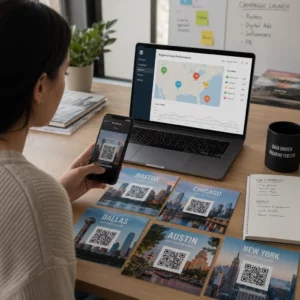
Stai gestendo campagne con codici QR abilitati alla realtà aumentata (AR) agli eventi ma fai fatica a capire cosa funziona davvero? Senza le giuste metriche, i dati di scansione rimangono inutilizzati mentre le opportunità di coinvolgimento sfuggono. Questa guida ti illustra quali metriche contano, come leggerle e come trasformare quei dati in migliori risultati per gli eventi.
Cosa rende diverso il tracciamento dei codici QR AR
I codici QR tradizionali ti dicono quante persone hanno scansionato un codice e, in generale, dove si trovavano quando lo hanno fatto. I codici QR abilitati alla realtà aumentata (AR) vanno oltre. Poiché l'esperienza si svolge all'interno della scansione stessa – attraverso modelli 3D, sovrapposizioni video, elementi spaziali – ci sono più momenti significativi da misurare.
La differenza fondamentale è che i codici QR AR richiedono il tracciamento di entrambi il coinvolgimento iniziale (la scansione) e l'interazione immersiva (tempo di permanenza, interazioni con oggetti 3D, movimento spaziale). Un conteggio standard delle scansioni ti dice solo che qualcuno ha iniziato l'esperienza. Il tempo di permanenza, la profondità dell'interazione e il comportamento post-scansione ti dicono se ha avuto risonanza.
In media, le campagne WebAR registrano tempi di permanenza tra i 60 e i 120 secondi – molto più lunghi delle brevi interazioni tipiche dei codici QR standard. Questa finestra di coinvolgimento estesa crea una traccia di dati più ricca, ma solo se sai cosa catturare.
Le metriche fondamentali da tracciare
Prima di impostare qualsiasi infrastruttura di tracciamento, stabilisci cosa significa il successo per il tuo evento specifico. Un'attivazione per la brand awareness ha KPI diversi rispetto a uno stand per la generazione di lead. Una volta che i tuoi obiettivi sono chiari, ogni metrica ha un ruolo definito.
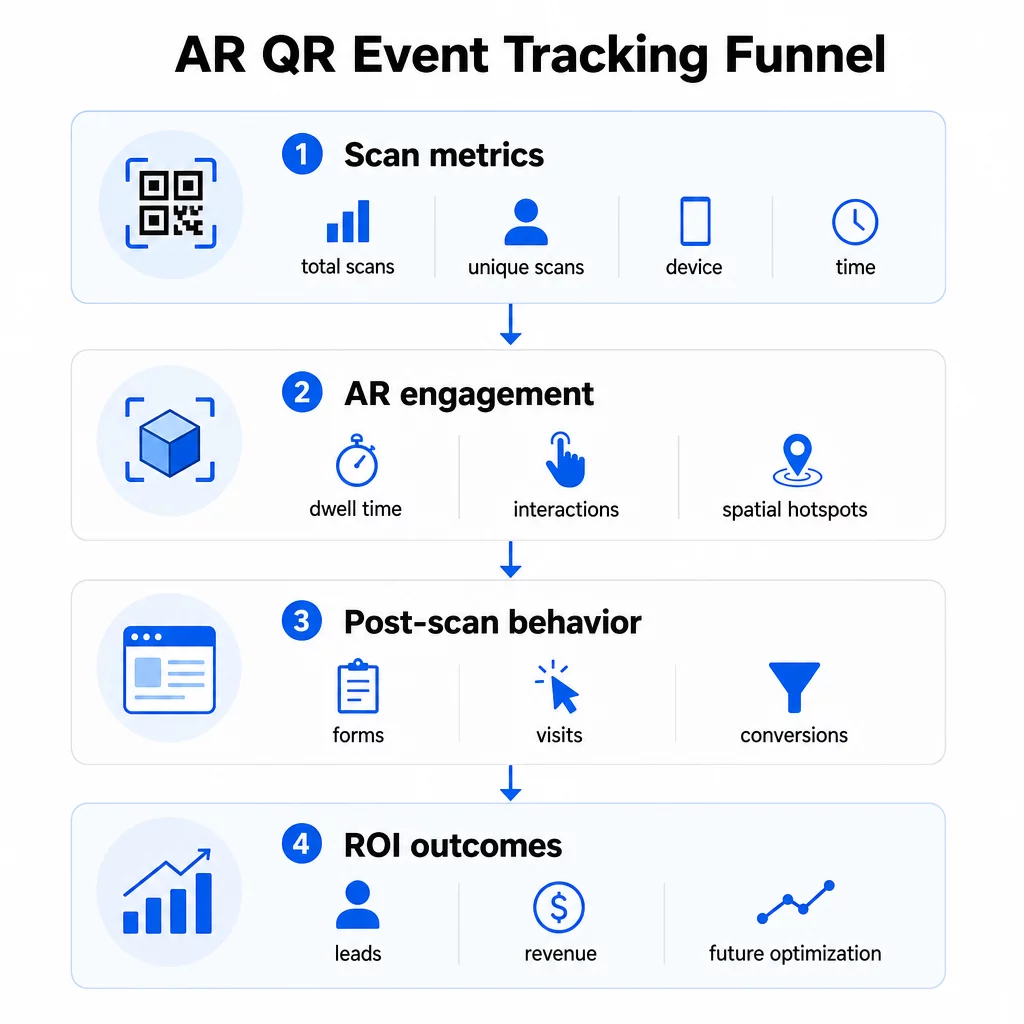
Metriche a livello di scansione costituiscono le fondamenta:
- SCANSIONI TOTALI – portata complessiva e volume di coinvolgimento
- Scansioni uniche – numero approssimativo di partecipanti individuali che hanno interagito
- Frequenza di scansione (totale ÷ unici) – se le persone stanno tornando all'esperienza, il che segnala un interesse genuino
- Ora e data della scansione – le finestre di picco di coinvolgimento ti aiutano a identificare quali sessioni, stand o fasce orarie hanno generato la maggiore attività
- Dati del dispositivo e del sistema operativo – sapere se il tuo pubblico è prevalentemente su iOS o Android ti permette di ottimizzare la landing page e l'esperienza AR per il tipo di dispositivo dominante
- Dati di geolocalizzazione – i dati di scansione a livello di città o regione rivelano dove l'engagement è più alto, utile per eventi multi-sede o decisioni future sulla collocazione degli eventi
Metriche specifiche per la RA approfondisci:
- Tempo di permanenza – quanto tempo gli utenti rimangono all'interno dell'esperienza AR, non solo sulla landing page
- Analisi spaziale – quali aree fisiche della tua sede o stand hanno generato la maggiore attività di scansione
- Eventi di interazione 3D – se gli utenti hanno ruotato un modello di prodotto, attivato un video o completato un elemento interattivo
Comportamento post-scansione chiude il cerchio:
- Invii di moduli, registrazioni o download successivi alla scansione
- Frequenza di rimbalzo e tempo sulla pagina per la destinazione della landing page
- Conversioni legate a specifici obiettivi della campagna (acquisti di biglietti, iscrizioni alla newsletter, richieste di demo)
In particolare per gli eventi B2B, le metriche più preziose sono i nuovi lead di qualità generati, i nuovi account coinvolti e le entrate finali attribuite all'evento. I dati di scansione alimentano la parte superiore di quel funnel, ma le conversioni post-scansione determinano il ROI.
Traccia Ogni Scansione in Tempo Reale Utilizzare il Dashboard di Pageloot Analytics per monitorare scansioni totali, scansioni uniche, tipi di dispositivo e posizioni di scansione mentre avvengono durante il tuo evento – nessuna configurazione tecnica richiesta.
Configurazione della tua infrastruttura di tracciamento
Ottenere dati accurati richiede alcune decisioni prima che il tuo evento vada online.
Utilizzare codici QR dinamici
I codici QR statici codificano una destinazione fissa e non forniscono tracciamento. I codici QR dinamici instradano le scansioni attraverso un reindirizzamento, che è il luogo in cui vengono registrati i metadati della scansione – ora, dispositivo, posizione. Il Generatore di QR code dinamici di Pageloot crea codici che tracciano automaticamente i tassi di scansione, i dati di posizione e altre metriche, e ti permette di aggiornare l'URL di destinazione senza ristampare i materiali. Per eventi di più giorni in cui gli orari o le chiamate all'azione possono cambiare, questa flessibilità è essenziale.
Aggiungi parametri UTM per il tracciamento post-scansione
Allegare parametri UTM agli URL di destinazione del tuo codice QR consente a strumenti come Google Analytics 4 di distinguere il traffico generato da QR da altre fonti e di misurare ciò che accade dopo la scansione. Un URL ben strutturato assomiglia a:
`https://yoursite.com/event-page?utm``source=event``booth&utm`medium=qrcode&utmcampaign=conference2025`
L'uso di valori descrittivi `utmsource` (ad es., `mainstagebooth`, `registrationdesk`) ti consente di confrontare le prestazioni tra diverse posizioni di posizionamento allo stesso evento. Mantieni le convenzioni di denominazione coerenti – minuscole, trattini bassi invece di spazi – in modo che i tuoi report GA4 rimangano puliti e filtrabili. La guida su parametri UTM per i codici QR copre questa configurazione in dettaglio.
Collega i tuoi dati di partecipazione
Se utilizzi codici QR per i check-in degli eventi, i tuoi dati di partecipazione e i tuoi dati di coinvolgimento possono essere letti insieme. Il codice QR di partecipazione sistema registra gli arrivi in tempo reale, il che ti consente di confrontare chi ha effettuato il check-in con chi ha scansionato la tua esperienza AR e ha completato un'azione post-scansione. Questo è particolarmente utile per calcolare i tassi di conversione reali piuttosto che solo i tassi di scansione-a-landing-page.
Per la raccolta di risposte strutturate – feedback, registrazioni, sondaggi post-evento – abbina i tuoi codici QR a Google Forms utilizzando il Generatore di QR code per Google Form. I dati di invio del modulo si integrano direttamente con Fogli Google per un'analisi immediata.
Semplifica i check-in degli eventi Il sito Generatore di codici QR per eventi Pageloot ti consente di creare biglietti tracciabili, orari interattivi e punti di contatto per il coinvolgimento – tutti gestibili da un'unica dashboard.
Come Interpretare i Tuoi Dati di Scansione
Raccogliere metriche è utile solo se sai cosa ti stanno dicendo. Ecco come leggere i modelli più comuni.
Scansioni totali basse non significano automaticamente che l'offerta è fallita. Controlla prima il posizionamento – il codice è all'altezza degli occhi, stampato abbastanza grande, con una chiara chiamata all'azione nelle vicinanze? Un contrasto scarso o un codice non segnalato è la causa più comune di bassi tassi di scansione, non il contenuto dietro di esso. La guida all'engagement dei codici QR con le heatmap spiega come diagnosticare i problemi di posizionamento utilizzando i dati di densità di scansione.
Scansioni totali alte ma scansioni uniche basse suggerisce che un piccolo gruppo sta scansionando ripetutamente. Questo può indicare un genuino entusiasmo, oppure può significare che il tuo codice QR si trova in un luogo dove le stesse persone lo passano più volte. Il contesto è importante qui.
Scansioni uniche alte ma alto tasso di rimbalzo sulla landing page indica una discrepanza tra l'aspettativa che il codice QR crea e ciò che gli utenti trovano dopo la scansione. Rivedi il contenuto della landing page e assicurati che corrisponda al contesto in cui il codice è visualizzato.
Tempo di permanenza elevato con bassa conversione è comune nelle esperienze AR dove l'interazione è piacevole ma la chiamata all'azione non è abbastanza prominente. Rivedi dove appare la CTA all'interno dell'esperienza e se gli utenti la raggiungono prima di uscire.
Dati di scansione geografici dal tuo analisi di geolocalizzazione possono rivelare quali aree di una sede multi-sala o di un'area espositiva hanno generato la maggiore attività, aiutandoti a decidere il posizionamento dello stand e i livelli di personale per eventi futuri.
Modelli di scansione basati sul tempo identificare le finestre di picco di coinvolgimento. Se la maggior parte delle scansioni avviene nei 20 minuti successivi alla menzione della tua attivazione da parte di un relatore principale, hai un segnale chiaro su cosa sta generando traffico. Usa queste informazioni per programmare di conseguenza i post sui social media o le rotazioni del personale.
I team che coordinano sessioni durante questi periodi di massimo coinvolgimento possono utilizzare la pianificazione degli eventi strumenti per organizzare gli orari degli eventi, la disponibilità e il coordinamento dei partecipanti.
Scegliere tra Pageloot e GA4
La maggior parte degli eventi beneficia dell'uso combinato di entrambi gli strumenti, con ciascuno che gestisce un distinto livello di tracciamento.
| FUNZIONE | Pageloot | Google Analytics 4 |
|---|---|---|
| Analisi delle scansioni in tempo reale | Dati istantanei a livello di scansione (geolocalizzazione, dispositivo, ora) | Disponibile tramite report in tempo reale; richiede configurazione UTM |
| Metriche specifiche per la RA | Tempo di permanenza, analisi spaziale sui livelli supportati | Limitato alle metriche web; richiede eventi personalizzati |
| Tracciamento scansioni uniche | Deduplicazione del dispositivo integrata | Basato su sessione/utente; difficile da collegare esclusivamente a scansioni fisiche |
| Sforzo di integrazione | Basso – plug-and-play con reindirizzamenti dinamici | Più alto – necessita di parametri UTM e script di tracciamento |
| Prezzi | $10–$50+/mese | Gratuito (versione standard) |
Usa Pageloot quando hai bisogno di informazioni immediate durante l'evento: chi sta scansionando, da dove, su quale dispositivo e per quanto tempo si sta impegnando. Non richiede modifiche al codice del tuo sito web ed è progettato attorno a metriche specifiche per i QR, inclusi l'analisi spaziale e il tempo di permanenza.
Usa GA4 quando hai bisogno di comprendere il percorso del cliente a valle – cosa hanno fatto gli utenti dopo essere atterrati sulla tua pagina, se hanno convertito e come l'evento ha contribuito agli obiettivi di campagna a lungo termine. Il migliori strumenti per il monitoraggio degli eventi con codice QR pagina confronta le opzioni della piattaforma in modo più dettagliato.
Per conferenze di più giorni o eventi di networking, l'esecuzione di entrambi in parallelo ti offre un feedback immediato sull'engagement tramite Pageloot e l'attribuzione delle conversioni tramite GA4.
Considerazioni sulla Privacy
Le campagne con codici QR AR raccolgono automaticamente dati personali al momento della scansione – questo può includere indirizzi IP, identificatori di dispositivo, timestamp e dati di localizzazione precisi. Secondo le leggi sulla privacy statali degli Stati Uniti, come CCPA e VCPA, sei tenuto a divulgare quali dati vengono raccolti, come vengono utilizzati e a offrire meccanismi di opt-out.
In pratica, questo significa:
- Aggiorna la tua informativa sulla privacy dell'evento per descrivere cosa succede quando viene scansionato un codice QR
- Divulga qualsiasi tracciamento di geolocalizzazione precisa o targeting comportamentale da parte della tua piattaforma QR
- Verifica le pratiche sui dati del tuo fornitore di codici QR, inclusi i periodi di conservazione e la condivisione con terze parti
- Ottieni il consenso esplicito prima di raccogliere dati di localizzazione basati su GPS
Il sito guida all'analisi della geolocalizzazione copre i requisiti di conformità alla privacy in modo più dettagliato, inclusa la distinzione tra tracciamento basato su IP e basato su GPS e quando ciascuno richiede il consenso dell'utente.
Utilizzare i Dati per Ottimizzare Eventi Futuri
Il valore del tracciamento si moltiplica quando lo si usa in modo iterativo. Prima del tuo prossimo evento, confronta le prestazioni tra posizionamenti, fasce orarie e tipi di contenuto AR per identificare cosa ha generato l'engagement più significativo – non solo il maggior numero di scansioni.
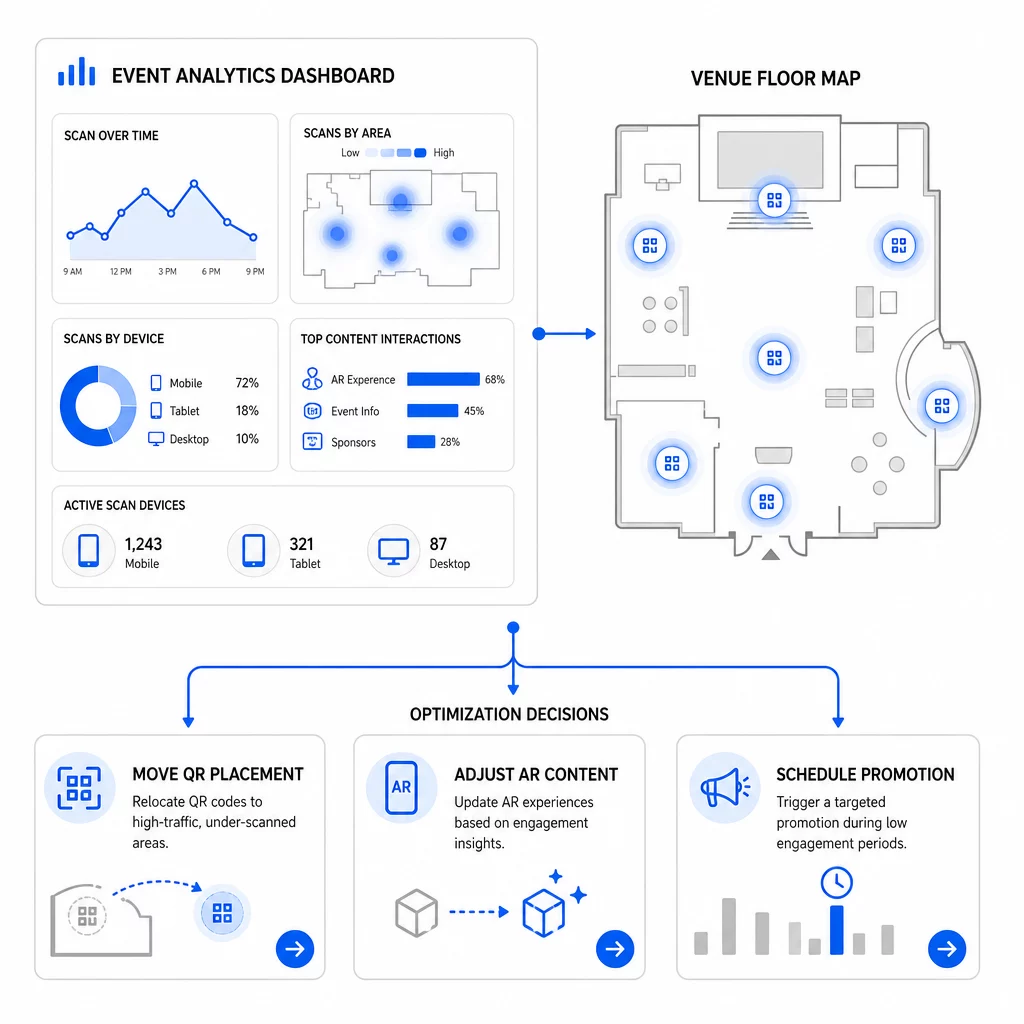
Ottimizzazioni specifiche da considerare:
- Sposta i codici QR da aree a bassa scansione a posizioni vicino alle uscite di sessione ad alto traffico o alle aree di registrazione
- Regola il contenuto AR in base agli elementi interattivi che hanno mostrato il tempo di permanenza più elevato
- Affina il posizionamento della CTA della tua landing page in base a dove gli utenti abbandonano
- Pianifica promozioni di supporto e attivazioni del personale intorno ai periodi di picco delle scansioni
- Concentra gli investimenti futuri per gli eventi sulle regioni geografiche dove i tassi di scansione-conversione sono stati più forti
Confrontare le metriche chiave prima e dopo ogni modifica è l'unico modo affidabile per verificare se un'ottimizzazione ha effettivamente migliorato i risultati. La guida ai dashboard di analisi dei codici QR illustra come strutturare questi confronti all'interno di un dashboard di tracciamento.
Il quadro più ampio su come i codici QR AR trasformano gli eventi merita di essere esaminato se sei ancora nella fase di pianificazione – in particolare per quanto riguarda la definizione degli obiettivi prima di scegliere quali metriche privilegiare.
Tracciare il successo di un evento con i codici QR AR non significa solo contare le scansioni. Si tratta di costruire un quadro chiaro del comportamento dei partecipanti lungo l'intero percorso: chi ha interagito, dove lo ha fatto, quanto profondamente ha interagito e cosa ha fatto dopo. Configura codici dinamici con un'adeguata etichettatura UTM prima dell'evento, monitora le metriche spaziali e di permanenza in tempo reale e utilizza i dati di conversione post-evento per affinare la campagna successiva.
Inizia a tracciare le tue campagne evento Crea codici QR AR dinamici e tracciabili con Pageloot's suite completa di funzionalità QR e monitorare ogni scansione da un'unica dashboard. Prova gratuita di 14 giorni, nessuna carta di credito richiesta.
Domande frequenti
Le metriche più importanti sono scansioni totali, scansioni uniche, frequenza di scansione, ora e data della scansione, dati del dispositivo e del sistema operativo, geolocalizzazione e tempo di permanenza all'interno dell'esperienza AR. Il comportamento post-scansione – frequenza di rimbalzo, tempo sulla pagina, invii di moduli e conversioni – completa il quadro mostrando se le scansioni si sono tradotte in risultati significativi.
I due strumenti servono a scopi diversi. Pageloot cattura metadati a livello di scansione in tempo reale – tipo di dispositivo, posizione, tempo di permanenza – senza richiedere modifiche al codice del sito web. Google Analytics 4 traccia ciò che accade dopo la scansione: comportamento della pagina, eventi di conversione e il percorso più ampio del cliente. Per gli eventi in cui contano sia l'engagement immediato che le conversioni successive, usarli entrambi insieme offre la visione più completa.
I codici QR statici codificano un URL fisso e non forniscono dati di tracciamento. I codici QR dinamici instradano le scansioni attraverso un reindirizzamento che registra automaticamente l'ora, il dispositivo e i metadati di posizione. Inoltre, ti consentono di aggiornare l'URL di destinazione o il contenuto collegato senza ristampare i materiali – utile per eventi di più giorni in cui gli orari o le chiamate all'azione cambiano. Puoi saperne di più su come funziona sulla pagina del generatore di codici QR dinamici.