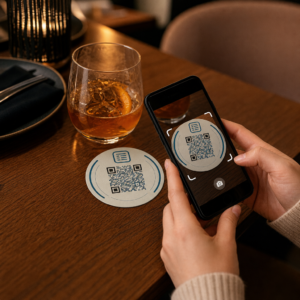
Prebiehajú vaše kampane s QR kódmi s podporou AR na podujatiach, ale neviete určiť, čo skutočne funguje? Bez správnych metrík zostávajú údaje zo skenov nepoužité, zatiaľ čo príležitosti na zapojenie unikajú. Táto príručka vás prevedie tým, ktoré metriky sú dôležité, ako ich čítať a ako premeniť tieto údaje na lepšie výsledky podujatí.
Čím sa líši sledovanie QR kódov s AR
Tradičné QR kódy vám povedia, koľko ľudí naskenovalo kód a zhruba, kde sa nachádzali, keď to urobili. QR kódy s podporou AR idú ďalej. Pretože zážitok sa odohráva priamo v rámci skenu – prostredníctvom 3D modelov, video prekrytí, priestorových prvkov – existuje viac zmysluplných momentov na meranie.
Hlavný rozdiel spočíva v tom, že QR kódy s AR vyžadujú sledovanie oboch počiatočného zapojenia (sken) a pohlcujúcej interakcie (čas strávený na stránke, interakcie s 3D objektmi, priestorový pohyb). Štandardný počet skenov vám len povie, že niekto začal zážitok. Čas strávený na stránke, hĺbka interakcie a správanie po skenovaní vám povedia, či to rezonovalo.
V priemere kampane WebAR zaznamenávajú časy strávené na stránke medzi 60 až 120 sekundami – oveľa dlhšie ako krátke interakcie typické pre štandardné QR kódy. Toto predĺžené okno zapojenia vytvára bohatšiu dátovú stopu, ale len ak viete, čo zachytiť.
Kľúčové metriky na sledovanie
Pred nastavením akejkoľvek sledovacej infraštruktúry si stanovte, ako vyzerá úspech pre vaše konkrétne podujatie. Aktivácia na zvýšenie povedomia o značke má iné KPI ako stánok na generovanie potenciálnych zákazníkov. Akonáhle sú vaše ciele jasné, každá metrika má definovanú úlohu.
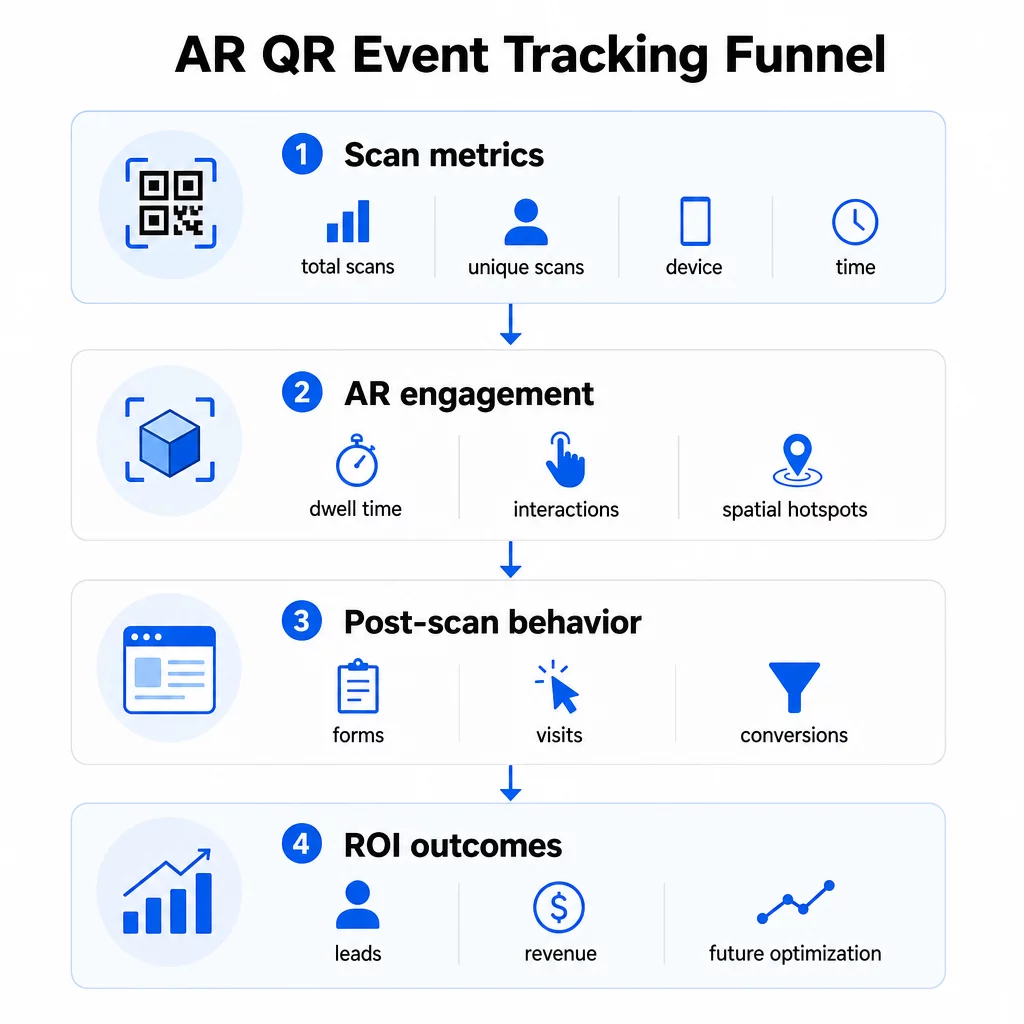
Metriky na úrovni skenov tvoria základ:
- SKENY SPOLU – celkový dosah a objem zapojenia
- Unikátne skeny – približný počet jednotlivých účastníkov, ktorí interagovali
- Frekvencia skenovania (celkový počet ÷ unikátny počet) – či sa ľudia vracajú k zážitku, čo signalizuje skutočný záujem
- Čas a dátum skenovania – okná špičkovej angažovanosti vám pomôžu identifikovať, ktoré relácie, stánky alebo časové úseky vygenerovali najväčšiu aktivitu
- Údaje o zariadení a OS – vedomosť, či je vaše publikum prevažne na iOS alebo Androide, vám umožní optimalizovať vstupnú stránku a AR zážitok pre dominantný typ zariadenia
- Geolokačné údaje – údaje o skenovaní na úrovni mesta alebo regiónu odhaľujú, kde je angažovanosť najvyššia, čo je užitočné pre podujatia s viacerými miestami konania alebo pre rozhodnutia o umiestnení budúcich podujatí
Metriky špecifické pre AR podrobnejšie:
- Čas zotrvania – ako dlho používatelia zostávajú v rámci AR zážitku, nielen na vstupnej stránke
- Priestorová analýza – ktoré fyzické oblasti vášho miesta konania alebo stánku vygenerovali najväčšiu aktivitu skenovania
- Udalosti 3D interakcie – či používatelia otočili model produktu, spustili video alebo dokončili interaktívny prvok
Správanie po skenovaní uzatvára cyklus:
- Odoslania formulárov, registrácie alebo stiahnutia, ktoré nasledovali po skenovaní
- Miera odchodov a čas strávený na stránke pre cieľovú vstupnú stránku
- Konverzie viazané na konkrétne ciele kampane (nákupy lístkov, prihlásenia na odber noviniek, žiadosti o demo)
Najmä pre B2B podujatia sú najcennejšími metrikami nové kvalitné generované leady, nové zapojené účty a prípadné príjmy pripísané podujatiu. Dáta zo skenovania napĺňajú hornú časť tohto lievika, ale konverzie po skenovaní určujú návratnosť investícií.
Sledujte každé skenovanie v reálnom čase Použi Analytický panel Pageloot na monitorovanie celkového počtu skenov, unikátnych skenov, typov zariadení a miest skenovania v reálnom čase počas vášho podujatia – bez potreby technického nastavenia.
Nastavenie vašej sledovacej infraštruktúry
Získanie presných údajov si vyžaduje niekoľko rozhodnutí predtým, ako sa vaša udalosť spustí.
Používajte dynamické QR kódy
Statické QR kódy kódujú pevnú destináciu a neposkytujú žiadne sledovanie. Dynamické QR kódy smerujú skeny cez presmerovanie, kde sa zaznamenávajú metaúdaje skenovania – čas, zariadenie, poloha. Dynamický QR kód generátor od Pageloot vytvára kódy, ktoré automaticky sledujú miery skenovania, údaje o polohe a ďalšie metriky, a umožňuje vám aktualizovať cieľovú URL bez predtlače materiálov. Pre viacdňové podujatia, kde sa môžu meniť plány alebo výzvy na akciu, je táto flexibilita nevyhnutná.
Pridajte parametre UTM pre sledovanie po skenovaní
Pripojenie parametrov UTM k cieľovým URL vašich QR kódov umožňuje nástrojom ako Google Analytics 4 rozlíšiť prevádzku generovanú QR kódmi od iných zdrojov a merať, čo sa stane po skenovaní. Dobre štruktúrovaná URL vyzerá takto:
`https://yoursite.com/event-page?utm`source=eventstánok&utmmedium=qrkód&utmkampaň=konferencia2025`
Používanie popisných `utmsource` hodnôt (napr. `mainpódiumstánok`, `registráciapult`) vám umožní porovnať výkonnosť naprieč rôznymi umiestneniami na tej istej udalosti. Dodržujte konzistentné konvencie pomenovania – malé písmená, podčiarkovníky namiesto medzier – aby vaše prehľady GA4 zostali čisté a filtrovateľné. Sprievodca na parametrov UTM pre QR kódy pokrýva toto nastavenie podrobne.
Prepojte svoje údaje o účasti
Ak používate QR kódy na registráciu na podujatia, vaše údaje o účasti a údaje o zapojení je možné čítať spoločne. Systém QR kódu pre účasť zaznamenáva príchody v reálnom čase, čo vám umožňuje porovnať, kto sa prihlásil, s tým, kto naskenoval vašu AR skúsenosť a dokončil akciu po skenovaní. To je obzvlášť užitočné pre výpočet skutočných konverzných pomerov, a nie len pomerov skenovania k vstupnej stránke.
Pre zber štruktúrovaných odpovedí – spätnej väzby, registrácií, prieskumov po podujatí – spárujte svoje QR kódy s Google Formulármi pomocou Formulár Google ako QR kód: generátor. Údaje z odoslaných formulárov sa integrujú priamo s Google Sheets pre okamžitú analýzu.
Zefektívnite registráciu na podujatia Ten Generátor QR kódov pre udalosti Pageloot umožňuje vám vytvárať sledovateľné lístky, interaktívne rozvrhy a kontaktné body pre zapojenie – všetko spravovateľné z jedného ovládacieho panela.
Ako interpretovať údaje zo skenovania
Zber metrík je užitočný len vtedy, ak viete, čo vám hovoria. Tu je návod, ako čítať najčastejšie vzorce.
Nízky celkový počet skenov automaticky neznamená, že ponuka zlyhala. Najprv skontrolujte umiestnenie – je kód vo výške očí, vytlačený dostatočne veľký, s jasnou výzvou na akciu v blízkosti? Slabý kontrast alebo neoznačený kód je najčastejšou príčinou nízkej miery skenovania, nie obsah za ním. Sprievodca zapojením QR kódov pomocou tepelných máp vysvetľuje, ako diagnostikovať problémy s umiestnením pomocou údajov o hustote skenovania.
Vysoký celkový počet skenov, ale nízky počet unikátnych skenov naznačuje, že malá skupina skenuje opakovane. To môže naznačovať skutočné nadšenie, alebo to môže znamenať, že váš QR kód je na mieste, kde okolo neho prechádzajú tí istí ľudia viackrát. Kontext je tu dôležitý.
Vysoký počet unikátnych skenov, ale vysoká miera odchodov na vstupnej stránke poukazuje na nesúlad medzi očakávaním, ktoré QR kód vytvára, a tým, čo používatelia nájdu po skenovaní. Prehodnoťte obsah vstupnej stránky a uistite sa, že zodpovedá kontextu, v ktorom je kód zobrazený.
Silný čas zotrvania s nízkou konverziou je bežné v AR zážitkoch, kde je interakcia príjemná, ale výzva na akciu nie je dostatočne výrazná. Skontrolujte, kde sa CTA objavuje v rámci zážitku a či sa k nemu používatelia dostanú predtým, ako odídu.
Geografické údaje zo skenovania z vášho geolokačnú analýzu môžu odhaliť, ktoré oblasti viacmiestneho priestoru alebo výstavnej plochy generovali najväčšiu aktivitu, čo vám pomôže rozhodnúť o umiestnení stánkov a úrovni personálu pre budúce podujatia.
Vzorce skenovania založené na čase identifikujte okná špičkovej angažovanosti. Ak sa väčšina skenov uskutoční počas 20 minút po tom, čo hlavný rečník spomenie vašu aktiváciu, máte jasný signál o tom, čo generuje návštevnosť. Použite tieto informácie na prispôsobenie načasovania príspevkov na sociálnych sieťach alebo rotácie personálu.
Tímy koordinujúce stretnutia v týchto obdobiach najvyššej angažovanosti môžu použiť plánovanie podujatí nástroje na organizovanie časov podujatí, dostupnosti a koordinácie účastníkov.
Výber medzi Pageloot a GA4
Väčšina podujatí profituje z používania oboch nástrojov v kombinácii, pričom každý z nich spracováva odlišnú vrstvu sledovania.
| FUNKCIA | Pageloot | Google Analytics 4 |
|---|---|---|
| Analýza skenov v reálnom čase | Okamžité údaje na úrovni skenovania (geo, zariadenie, čas) | Dostupné prostredníctvom prehľadu v reálnom čase; vyžaduje nastavenie UTM |
| Metriky špecifické pre AR | Čas zotrvania, priestorová analýza na podporovaných úrovniach | Obmedzené na webové metriky; vyžaduje vlastné udalosti |
| Sledovanie jedinečných skenov | Vstavaná deduplikácia zariadení | Založené na reláciách/používateľoch; ťažko sa viaže výlučne na fyzické skeny |
| Náročnosť integrácie | Nízka – plug-and-play s dynamickými presmerovaniami | Vyššia – potrebuje parametre UTM a sledovacie skripty |
| Ceny | $10–$50+/mesiac | Zadarmo (štandardná verzia) |
Použite Pageloot keď potrebujete okamžitý prehľad počas udalosti: kto skenuje, odkiaľ, na akom zariadení a ako dlho sa zapája. Nevyžaduje žiadne zmeny vo vašom kóde webovej stránky a je navrhnutý okolo metrík špecifických pre QR, vrátane priestorovej analýzy a času zotrvania.
Použite GA4 keď potrebujete pochopiť následnú cestu zákazníka – čo používatelia robili po pristátí na vašej stránke, či konvertovali a ako udalosť prispela k dlhodobejším cieľom kampane. The špičkových nástrojov na sledovanie udalostí pomocou QR kódov stránka porovnáva možnosti platforiem podrobnejšie.
Pre viacdňové konferencie alebo networkingové podujatia vám súbežné spustenie oboch poskytuje okamžitú spätnú väzbu o zapojení prostredníctvom Pageloot a atribúciu konverzií prostredníctvom GA4.
Úvahy o ochrane súkromia
Kampane s AR QR kódmi automaticky zbierajú osobné údaje pri skenovaní – to môže zahŕňať IP adresy, identifikátory zariadení, časové pečiatky a presné údaje o polohe. Podľa štátnych zákonov USA o ochrane súkromia, ako sú CCPA a VCPA, ste povinní zverejniť, aké údaje sa zbierajú, ako sa používajú a ponúknuť mechanizmy na odhlásenie.
Prakticky to znamená:
- Aktualizujte svoje oznámenie o ochrane súkromia udalosti, aby ste opísali, čo sa stane pri skenovaní QR kódu
- Zverejnite akékoľvek presné sledovanie geolokácie alebo behaviorálne cielenie vašou QR platformou
- Auditujte postupy spracovania údajov vášho poskytovateľa QR kódov, vrátane doby uchovávania a zdieľania s tretími stranami
- Získajte výslovný súhlas pred zhromažďovaním údajov o polohe založených na GPS
Ten sprievodca analýzou geolokácie podrobnejšie pokrýva požiadavky na súlad s ochranou súkromia, vrátane rozdielu medzi sledovaním založeným na IP a GPS a kedy každý z nich vyžaduje súhlas používateľa.
Používanie dát na optimalizáciu budúcich podujatí
Hodnota sledovania sa znásobuje, keď ho používate iteratívne. Pred vaším ďalším podujatím porovnajte výkonnosť naprieč umiestneniami, časovými slotmi a typmi AR obsahu, aby ste identifikovali, čo viedlo k najzmysluplnejšej angažovanosti – nielen k najväčšiemu počtu skenov.
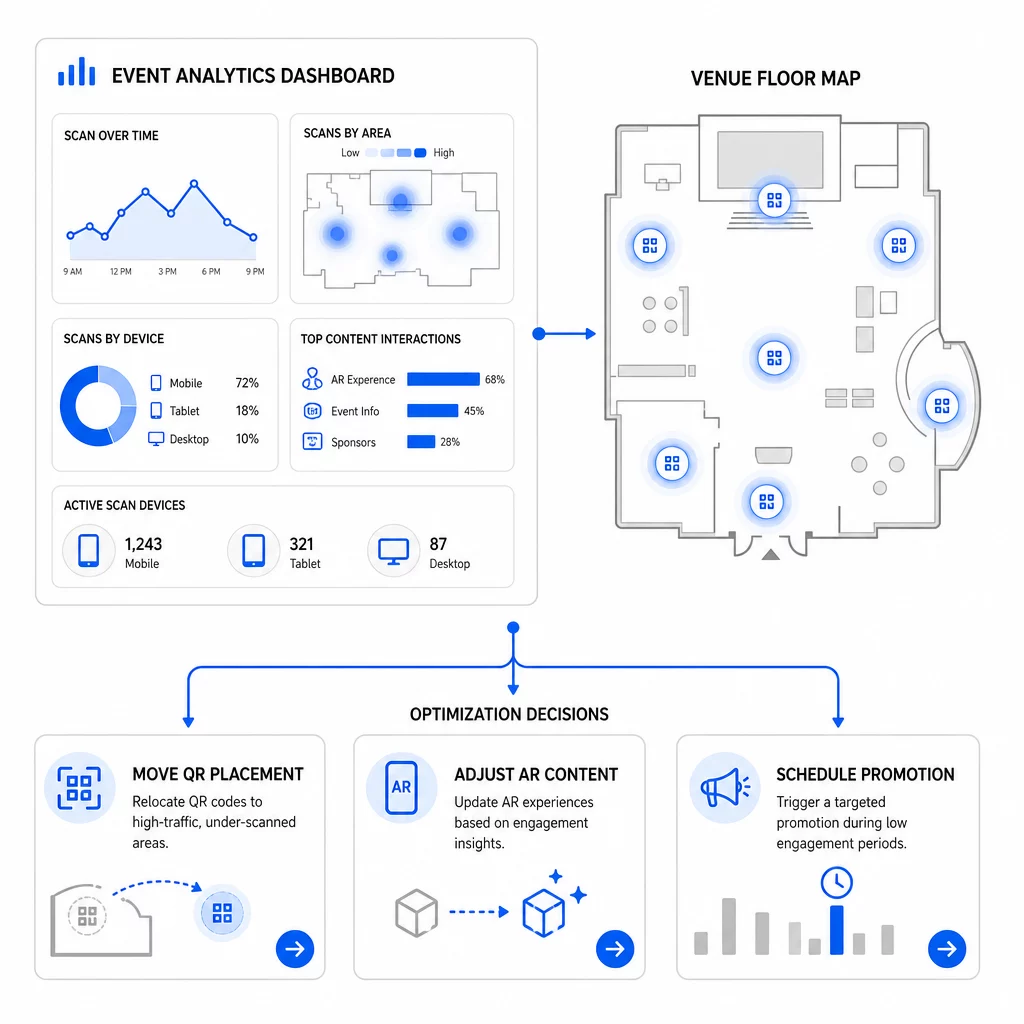
Konkrétne optimalizácie, ktoré treba zvážiť:
- Premiestnite QR kódy z oblastí s nízkym počtom skenov na miesta v blízkosti východov zo sekcií s vysokou návštevnosťou alebo registračných oblastí
- Upravte AR obsah na základe toho, ktoré interaktívne prvky vykazovali najdlhší čas zotrvania
- Upravte umiestnenie CTA na vašej vstupnej stránke na základe toho, kde používatelia odchádzajú
- Naplánujte podporné propagácie a aktivácie personálu okolo špičkových časov skenovania
- Zamerajte budúce investície do podujatí na geografické regióny, kde boli miery skenovania na konverziu najsilnejšie
Porovnávanie kľúčových metrík pred a po každej zmene je jediný spoľahlivý spôsob, ako overiť, či optimalizácia skutočne zlepšila výsledky. Sprievodca analytickými panelmi QR kódov podrobne vysvetľuje, ako štruktúrovať tieto porovnania v rámci sledovacieho panelu.
Širší pohľad na to, ako AR QR kódy transformujú podujatia, stojí za to si preštudovať, ak ste stále vo fáze plánovania – najmä pokiaľ ide o definovanie cieľov pred výberom metrík, ktoré chcete uprednostniť.
Sledovanie úspešnosti podujatia pomocou AR QR kódov nie je len o počítaní skenov. Ide o vytvorenie jasného obrazu správania účastníkov počas celej cesty: kto sa zapojil, kde to urobil, ako hlboko interagoval a čo urobil ďalej. Nastavte dynamické kódy so správnym UTM tagovaním pred podujatím, monitorujte priestorové metriky a metriky zotrvania v reálnom čase a použite údaje o konverziách po podujatí na zdokonalenie ďalšej kampane.
Začnite sledovať svoje kampane podujatí Vytvorte dynamické, sledovateľné AR QR kódy s Pageloot kompletná sada QR funkcií a sledujte každé skenovanie z jedného ovládacieho panela. Bezplatná 14-dňová skúšobná verzia, nevyžaduje sa kreditná karta.
Často kladené otázky
Najdôležitejšie metriky sú celkový počet skenov, jedinečné skeny, frekvencia skenovania, čas a dátum skenovania, údaje o zariadení a OS, geolokácia a čas strávený v AR zážitku. Správanie po skenovaní – miera odchodov, čas strávený na stránke, odoslania formulárov a konverzie – dopĺňa obraz tým, že ukazuje, či sa skeny premenili na zmysluplné výsledky.
Tieto dva nástroje slúžia na rôzne účely. Pageloot zachytáva metadáta na úrovni skenovania v reálnom čase – typ zariadenia, polohu, čas zotrvania – bez potreby akýchkoľvek zmien kódu webovej stránky. Google Analytics 4 sleduje, čo sa stane po skenovaní: správanie na stránke, konverzné udalosti a širšiu cestu zákazníka. Pre udalosti, kde záleží na okamžitej interakcii aj na následných konverziách, vám použitie oboch nástrojov spoločne poskytne najkomplexnejší pohľad.
Statické QR kódy kódujú pevnú URL adresu a neposkytujú žiadne údaje o sledovaní. Dynamické QR kódy smerujú skeny cez presmerovanie, ktoré automaticky zaznamenáva čas, zariadenie a metadáta polohy. Umožňujú tiež aktualizovať cieľovú URL adresu alebo prepojený obsah bez opätovnej tlače materiálov – užitočné pre viacdňové podujatia, kde sa menia plány alebo výzvy na akciu. Viac o tom, ako to funguje, sa dozviete na stránke generátora dynamických QR kódov.